






Cartoonize
Cartoonize: an intelligent tool specialized in AI-generated images
Tags:Common AI image toolsWhat is Cartoonize?
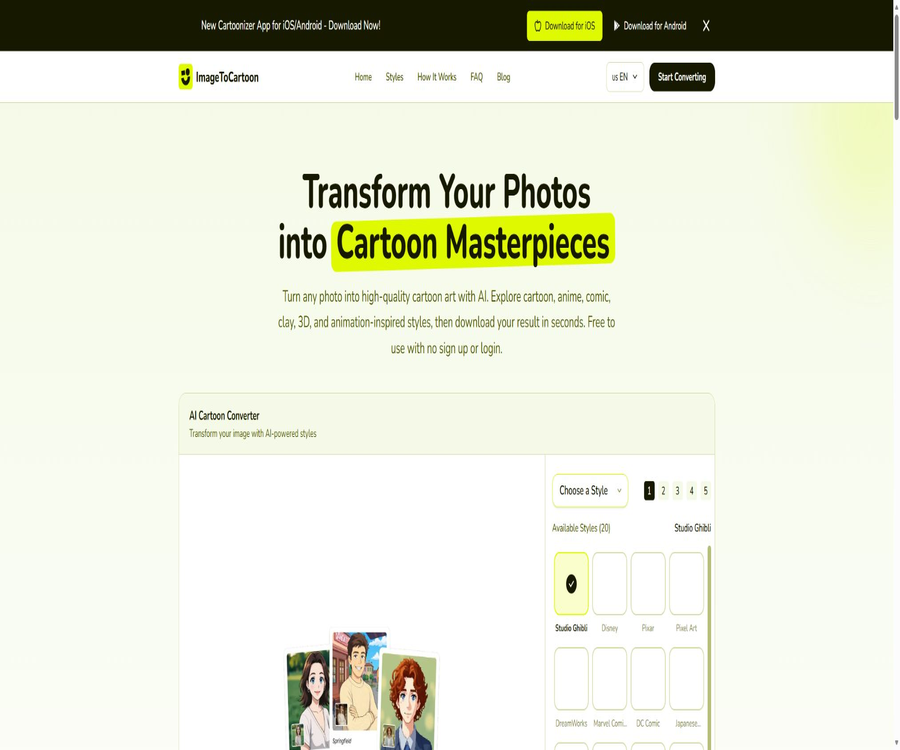
Cartoonize is an AI-based tool for turning photos into cartoon versions, part of the ImageToCartoon system. It can convert selfies, portraits, pets, group photos, and landscapes into styles such as anime, comics, pixel art, claymation, or 3D animation. It offers a web-based converter that requires no login, as well as iOS and Android apps.
The current brand name varies slightly depending on the platform: the website uses ImageToCartoon, while the iOS app is called Cartoonizer and the Android app is named Cartoonize. The entry labeled Cartoonize in the database refers to the same official website and its official mobile applications; it should not be confused with other cartooning tools that share the same name.
A one-sentence summary
Cartoonize allows users with no experience in drawing or photo editing to upload a photo, select a preset style, and download the cartoon version. The web version is currently available free of charge and without the need for registration, while the mobile app offers more than 80 different styles as well as advanced features such as image zooming.
Main functions
Convert photos to cartoons
The web interface accepts JPG, PNG, and WebP images; users can select them by clicking, drag and drop them, paste them from the clipboard, or provide the image URL. After the user selects a style, the cloud-based AI generates the result, preserving the original image’s aspect ratio.
Over 80 art styles
The official website and the new version of the app offer over 80 preset styles, including classic cartoons, Japanese anime, comics, pixel art, flat illustrations, children’s picture books, watercolor paintings, oil paintings, clay art, and vintage effects. The home page displays some of the most commonly used styles; the complete list may differ on mobile devices and web versions.
Portraits, group photos, and full-body shots
The official website currently supports portraits, group photos, and full-body images, and it can also handle multiple faces. In cases of complex compositions, very small figures, occlusions, or uneven lighting on the faces, the clarity of facial features and details may decrease.
Switch between pets and scenery
In addition to faces, users can also upload pictures of pets, landscapes, and everyday scenes. Different preset styles handle animal fur, architectural lines, and complex backgrounds in varying degrees, so it is usually necessary to try several different styles.
AI enhancement on mobile devices
The new version of the mobile app allows for up to 4x image zooming, which helps improve the resolution, texture, and edges of the generated images. The update notes for the iOS version describe this feature as an offline zoomer, but the actual creation of cartoons still involves uploading the images to servers for processing.
Local history and quick saving
The mobile version stores the processing history locally on the device; once it is created, it can be viewed and saved in the album. Before uninstalling the app, deleting data, or changing devices, it is necessary to back up the works that you wish to keep.
Supported inputs and outputs
| Project | Support status | Requirements or methods | Precautions |
|---|---|---|---|
| JPG images | Support | Upload, drag and drop, or paste web pages | Suitable for regular cameras and social media photos |
| PNG images | Support | Import from web page or app | Whether the transparent areas are retained depends on the generated result. |
| WebP images | Web support | Up to 10 MB | When exporting from certain photo albums or editing software, it is necessary to check compatibility. |
| Image URL | Web support | Read publicly accessible images from web pages | Affected by cross-domain issues, failures, and channel permissions. |
| Portraits and selfies | Support | A clear single-person photo is the easiest to preserve the features. | Excessive shading, backlighting, and low clarity can affect the results. |
| Group photos and full-body photos | Support | It can recognize multiple faces and complete compositions. | The more characters there are, the more likely errors will appear in the faces and hands. |
| Pets and scenery | Support | Select the preset that suits the subject. | The adaptation differences vary greatly depending on the style. |
| Download results | Support | Save high-quality images after generation. | The official website does not guarantee a fixed output format or resolution. |
Common style types
| Style categories | Representative effect | Suitable materials | Use reminders |
|---|---|---|---|
| Anime and comics | Japanese anime, comic line art, exaggerated characters | Selfies, couple, and character avatars | It may change the features, hairstyle, and clothing details. |
| 3D animation | Smooth materials, gentle lighting, and three-dimensional characters | Frontal portraits, pet, and family photos | Complex backgrounds can be re-composed. |
| American cartoons | Bold outlines, vivid color blocks, and exaggerated proportions | Social profile pictures and fun posters | Not suitable for tasks that require an identity identical to that of a real person. |
| Pixels and retro style | Low-resolution grid points and a game-like aesthetic | Game avatars, stickers, and retro content | Small print and microexpressions are easy to miss. |
| Children’s picture books and flat illustrations | Soft colors, simplified shapes | Illustrations for stories, as well as materials for parents and children and for educational purposes | Character consistency needs to be checked image by image. |
| Watercolor, oil painting, and clay | Distinct medium textures and artistically crafted shapes | Gifts, posters, and decorative paintings | Before printing, enlarge the image and check the edges and colors. |
Tutorial for web version
- Prepare a photo of yourself that shows you have the necessary rights or authorization, and make sure the file size is no more than 10 MB.
- In the web page converter, you can click to upload, drag in an image, paste from the clipboard, or use a valid image URL.
- Browse the style library; first, choose between portrait, anime, comic, pixel, or clay based on the subject.
- Maintain the original aspect ratio or select one of the ratio options provided on the page, then submit it to the AI for processing.
- Check for any obvious errors in the face, skin tone, fingers, clothing, background, and text.
- If you are not satisfied, change the style or use a clearer original image; do not repeatedly enlarge an image that has already become severely distorted.
- Download the final image and save it on your own device; do not rely on temporary link addresses for long-term storage.
Mobile Usage Guide
- Install Cartoonizer from the official app store, and make sure that the information provided by the developer matches the details on their official website.
- Grant the necessary permissions to the album or camera, in order to prevent the access to all photos that are not related to the tasks at hand.
- Import selfies, pet photos, or other images, and choose from over 80 cartoon, anime, and artistic styles.
- Wait for the results to be generated in the cloud and view them; if you need a higher resolution output, try using the 4x zoom feature within the app.
- Save the satisfactory results to the album, and check how local history and server temporary files are handled.
- Verify your preferred styles before purchasing a subscription, and use the re-purchase feature within the same store account after purchase.
Tips for achieving better results
- Give priority to using original images with even lighting, a clear subject, and no severe compression or motion blur.
- When creating a portrait, try to keep the face and hairstyle intact, and avoid obstruction by sunglasses, masks, hands, or strong shadows.
- For group photos, first ensure that each person has enough pixels; if necessary, create separate images and then arrange them together.
- Choose a style that is similar to the composition of the original image; for example, use preset profiles for frontal headshots and preset character profiles for full-body photos.
- Check whether the skin tone, age, body proportions, hands, accessories, and brand logos have been incorrectly altered.
- When preparing images for printing or use as product visuals, first zoom in at high resolution, and then view them at their actual size rather than just relying on thumbnails.
- Retain the original license and generation records before commercial release, to avoid using unauthorized faces, characters, or trademarks.
Which users are it suitable for
- Regular social media users: Quickly create avatars, emojis, wallpapers, and share photos.
- Couples and family users: Turn group photos into memory cards, invitation letters, or personalized gifts.
- Pet owners: Convert photos of cats and dogs into cartoon avatars, stickers, or decorative art.
- Content creators: Produce styled visual materials for social media posts, covers, and short videos.
- Small businesses: Create event posters, packaging, or marketing materials after obtaining permissions for the images and content used.
- Teachers and parent-child users: Convert photos into picture book-style characters or creative materials for use in the classroom.
- Design beginners: Use preset options to quickly explore visual directions, and then rely on professional tools for further refinement.
Typical use cases
- Transform ID photos or selfies into avatars for games, forums, and social media platforms.
- Turn couple, graduation, or family photos into anime-style commemorative images.
- Convert pet photos into draft designs for mugs, T-shirts, stickers, or greeting cards.
- Create unified cartoon-style visuals for festivals, birthdays, and weddings.
- Try comic, pixel, clay, or picture book styles to determine the artistic direction for your creative project.
- Turn landscape or travel photos into posters and wallpapers, but keep the original images as high-quality backups.
Product advantages
- There is no need for registration, login, or payment on the web version; after uploading, you can choose a style and have it generated.
- It supports JPG, PNG, and WebP formats; images can also be uploaded by drag-and-drop, pasted, or using their URLs.
- There are a large number of styles, covering anime, comics, 3D, pixel art, clay art, and traditional art.
- It is not only suitable for self-portraits of individuals, but it also fully supports group photos, full-body shots, pets, and landscapes.
- It offers access via Web, iOS, and Android, and the mobile app also provides zooming and local history features.
- The latest privacy policy sets a clear deadline of two hours for automatically deleting images and results.
Usage restrictions and precautions
- AI will redraw the image instead of applying filters pixel by pixel, which may result in distortions in the features, skin tone, fingers, text, and background.
- With over 80 styles available, it is not guaranteed that each entry will be exactly the same; the models and functions on the web and mobile versions may change.
- The official website does not guarantee a fixed output size, a transparent background, batch processing, or watermark-free results; it is necessary to conduct actual tests before using it.
- Just because the website is free does not mean that all advanced features on mobile devices are also free; the app includes ads, subscriptions, and in-app purchases.
- The generated images may evoke the style of well-known animations, comics, or characters; commercial use still requires an assessment of trademark, copyright, and confusion risks.
- Uploading someone else’s photos without permission can violate rights related to portrait ownership, privacy, and the right to public visibility; extra care should be taken when dealing with images of children and individuals who are sensitive to such matters.
- The website makes use of third-party services for hosting, analysis, advertising, security, image processing, and storage; as a result, images are transferred away from the local device.
- There are differences between the data security declarations on Google Play and the way privacy policies are presented on websites; users who place a high value on privacy should prefer to use materials that are not sensitive.
Price and version
As of August 21, 2026, the public web converter can be used for free – no account, subscription, points, or payment are required. The mobile app is available for free download, but it contains ads and premium in-app purchases; the prices vary for iOS and Android.
| Version | Monthly price | Annual price | Lifetime price | Main explanation |
|---|---|---|---|---|
| Web page version | $ | $ | Not applicable | No registration or payment is required; the current terms state that public converters are available free of charge. |
| iOS apps | 6.99 dollars | 19.99 dollars | $ | Unlock unlimited access and advanced AI features; price is based on that of the App Store in the United States. |
| Android apps | 6.99 dollars | 24.99 dollars | 49.99 dollars | Unlock unlimited access and advanced AI features; the app contains ads, and the price is as stated on Google Play. |
The prices in the app stores vary depending on the country, taxes, exchange rates, and any promotions in effect; the actual amount charged is determined by the purchase page on the store where the user is shopping. A lifetime plan generally refers to the current features of the app or account, and it does not mean that the service will be available indefinitely, that all future features will be included, or that the app can be used across different platforms.
How to make a choice before purchasing
| Demand | Suggested entry point | Reason | Confirmation is needed. |
|---|---|---|---|
| Occasionally switch one or two images. | Web page version | Free, no login required, and no installation needed | Output quality and availability during peak times |
| I often create content on the iPhone or iPad. | iOS apps | Album import, over 80 styles, and 4x zoom | Subscription benefits, ads, and device compatibility |
| I often create content for Android. | Android apps | Mobile workflows and advanced styles | Local prices, star ratings or quota systems, and data security |
| Single-use for long-term use | First, evaluate the lifetime plan. | Avoid continuous monthly payments | Cross-device, cross-platform, refunds, and future service offerings |
| Commercial mass production | It is not recommended to rely solely on consumer-facing solutions. | There is no public information regarding batches, teams, and SLAs. | Authorization, stability, output specifications, and manual quality inspection |
Supported platforms
| Platform | Support status | System requirements or methods | Key capabilities |
|---|---|---|---|
| Web | Support | Modern desktop or mobile browsers | Free conversion, style selection, and download |
| iPhone | Support | iOS 16.6 or later | Convert photos to cartoons, change styles, save images, and use advanced features |
| iPad | Support | iPadOS 16.6 or later | Large-screen selection and preview |
| Mac | Supports iOS-based applications | macOS 13.5 or later | Supports Apple chips and compatible devices |
| Apple Vision | Compatibility | visionOS 1.0 or later versions | Run applications in a compatible manner |
| Android | Support | The specific minimum version is subject to Google Play. | Convert photos to cartoons, with over 80 styles and image enlargement options. |
| Windows and Linux | Supported via Web | No separate client is required. | Upload, generate, and download via browser |
Differences between web and mobile versions
| Ability | Web version | Mobile apps |
|---|---|---|
| Registration and Login | It’s not necessary. | It can be used after downloading; purchase requires a store account. |
| Costs | Currently free | Free installation, with ads and paid premium features |
| Style library | More than 80 directions are displayed. | The new version of the app offers over 80 different styles. |
| Enter | JPG, PNG, WebP, clipboard, or image URL | Import from album or camera |
| Image zooming | The main function is not clearly listed on the home page. | Up to 4x magnification |
| History record | The result is a temporary access. | The processing history is stored locally on the device. |
| Cloud files | The original image and the result are automatically deleted within two hours. | The store instructions also state that the server results should be deleted within two hours. |
Commercial use and copyright
The latest version of the official website allows the use of the generated results for personal or commercial projects, provided that the user owns the original images or has obtained the necessary permissions, and complies with laws and the rights of third parties. This permission does not automatically waive the rights related to the portraits of people, brands, works of art, clothing patterns, or background elements in the photos.
The resulting output is generated by automated systems, and users must review it themselves before publishing, printing, selling, or distributing it. If the final product clearly imitates the visual elements of protected characters or brands, additional legal and design checks are necessary for such commercial projects.
Commercial checklist
- Save records of the original image source, photographer’s permission, model’s authorization, and client instructions.
- Confirm that the children, employees, customers, and passersby in the image have given their consent for the intended use.
- Check whether the generated image includes any new, distorted, or duplicated trademarks, text, or protected characters.
- Before printing, check the resolution, colors, cropping, and artifacts caused by scaling.
- Advertising and product pages must not imply any official partnership with animation studios, comic artists, or brands.
- When it comes to high-value commercial, celebrity, or brand-related activities, have professionals conduct a rights review.
Privacy and data security
The privacy policy, updated in June 2026, states that uploaded images and the resulting outputs are used solely for carrying out conversions, providing temporary deliveries, troubleshooting issues, as well as ensuring security and preventing abuse; they are automatically deleted from the system within two hours. The website does not require users of the public conversion tool to provide an account, phone number, or payment information.
The platform still processes IP addresses, browsers, devices, approximate locations, access times, referral pages, and error logs; it may also make use of cookies, as well as analysis and advertising services. Third-party service providers can be involved in hosting, image processing, storage, security, and advertising, so deleting data after two hours does not mean that the images have never been on the device.
Differences in privacy practices for mobile apps
The App Store indicates that apps may use device identifiers and usage data for cross-app tracking, as well as process photos, ads, and device data that are not linked to any identity. Google Play shows that device identifiers might be shared with third parties, while developers claim that no data is collected, that the data is not encrypted, and that it cannot be deleted.
The labels for the two stores are filled in by the respective developers, and the details provided are not always consistent. Users should decide, based on their own level of risk, whether to upload actual facial images; images related to medical information, identification documents, minors, or private situations are not suitable as material for testing.
Suggestions for using privacy settings
- Crop out IDs, house numbers, license plates, screen content, and any unnecessary people in the scene.
- Do not upload identification documents, medical records, private photos, or original images that contain location information.
- Turn off unnecessary album, camera, and tracking permissions, and grant them only to the selected photos.
- Save the desired results as soon as they are generated, and delete the failed versions as well as any temporary shares from the album.
- For commercial customers, photos must first undergo procedures regarding privacy notification, permission for use, and data processing agreements.
- Do not assume that automatic deletion after two hours means that third-party analysis data and technical logs are also removed at the same time.
APIs, SDKs, and open-source status
As of the time of verification, the ImageToCartoon website does not offer any public API references, a developer console, a mechanism for requesting API keys, Webhooks, or official SDKs. The functions for uploading files via the web and through mobile apps cannot be used as interfaces that allow developers to make batch calls.
No official GitHub organization linked from the official website, model weights, client source code, or open-source license were found. The product should be considered a closed-source online service; there is no confirmed official connection between the similarly named cartoon project on GitHub and ImageToCartoon.
Basic information
| Project | Information |
|---|---|
| Tool name | Cartoonize |
| Official website brand | ImageToCartoon |
| iOS app name | Cartoonizer: AI Cartoon Maker |
| Android app name | Cartoonize: Photo to Cartoon |
| Tool type | AI photo cartoonization, anime avatar creation, and artistic style conversion |
| Main inputs | JPG, PNG, WebP, portraits, group photos, full-body shots, pets, and landscapes |
| Number of styles | Over 80 types |
| Price pattern | The website is free; the mobile app requires a subscription or a one-time purchase. |
| Is registration required? | It’s not required on the web version. |
| Main platforms | Web, iOS, iPadOS, macOS, visionOS, and Android |
| Public API | No findings were detected. |
| Official SDK | No findings were detected. |
| Official GitHub | No findings were detected. |
| Is it open source? | No |
| File retention | The official website states that both the original image and the generated version are automatically deleted within two hours. |
Recommendation score
The recommendation score is 4.2 out of 5. The advantages of Cartoonize are that it requires no login to use on the web, has a simple workflow, offers a wide range of style options, and can handle portraits, groups of people, pets, and landscapes – making it suitable for ordinary users who want to create cartoon-style visuals quickly.
The shortcomings lie in the fact that the functions and pricing models of web versions and mobile apps are separate; there are no public APIs, no possibility for batch processing, and no clear specifications for the output. AI’s ability to preserve identity features and details is also unstable, and images that are sensitive from a privacy perspective as well as official commercial materials require more careful handling through specialized tools and human review.
Frequently Asked Questions
Is Cartoonize free?
The web-based converter is currently available for free, without the need for an account, points, or any payment. iOS and Android apps can be downloaded for free, but they contain ads and offer paid premium features.
Is it necessary to register an account?
Using a web converter requires no registration, login, phone number, or payment information. In-app purchases require a corresponding Apple or Google Store account.
Which image formats and sizes are supported?
The website explicitly supports JPG, PNG, and WebP formats; the maximum size of a single file is 10 MB. The application allows files to be imported from the album or camera, with the specific formats determined by the system’s compatibility.
Can it handle group photos and full-body photos?
Yes, the official website explicitly states that it supports multiple face photos as well as full-body photos. When there are too many people in the image, the faces are too small, or there is excessive shading, it is recommended to crop the image or create separate photos for each person.
Will the photos be kept for a long time?
The official website states that the original images and the resulting outputs are automatically deleted within two hours. Technical logs, analysis data, and advertising data are handled in a different manner; therefore, highly sensitive images should still not be uploaded.
Can the generated images be used for commercial purposes?
It can be used for commercial purposes when the conditions are met, but the user must possess the original image or the relevant licenses, and must respect laws related to personality rights, privacy, copyright, trademarks, and other third-party rights.
Are the prices the same for iOS and Android?
It’s not exactly the same. In the current information for the U.S. market, the monthly fee is 6.99 dollars, but the annual and lifetime fees for iOS are lower than those indicated for Android; the actual fees depend on the store in the respective region.
Can lifetime purchases be used across iPhone and Android devices?
There are no official commitments regarding cross-platform compatibility. In-app purchases are usually linked to the original store account, and it is necessary to check the rules related to account restoration, device change, family sharing, and cross-platform use before making a purchase.
Are there APIs or batch processing options?
No public APIs, SDKs, or batch processing solutions for teams were found. For large-scale commercial use, it is advisable to choose services that offer official interfaces, SLAs, and licensing terms.
Is Cartoonize open source?
No. The official website does not make the product’s source code, model weights, or open-source licenses available, and third-party repositories with the same name cannot be considered as the official code.
Summary
Cartoonize is a user-friendly tool for converting photos into cartoon images. The web version is suitable for quick trials, while the mobile version is better suited for those who need to use it frequently or who require advanced styles or enlarged images. The official website provides clear information regarding the free usage terms, the acceptable file formats, and the rule of deleting images after two hours.
When actually using it, the resulting output should be regarded as a draft for creative purposes rather than an exact copy; special attention should be paid to elements such as identity, skin tone, hands, text, and brand symbols. In situations involving commercial or privacy-sensitive matters, it is necessary to obtain approval before uploading, and a manual review must be carried out prior to publication.
Tools similar to Cartoonize




 Guigong Network Security Registration No. 45132202000164