






Anime AI
Anime AI: an intelligent tool specialized in AI-generated images
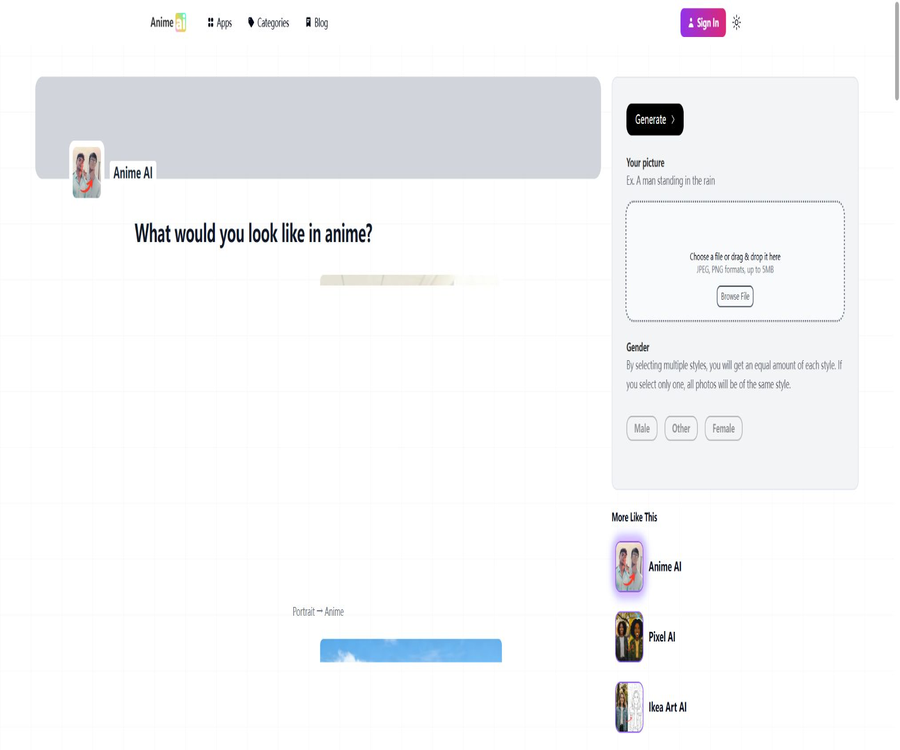
Tags:Common AI image toolsAnime AI is an online tool that converts photos into anime-style images; users can upload selfies or portraits to have two-dimensional avatars and stylized images created. The official website states that it is free to use and does not require registration, and it is designed mainly for personal avatars, social media pictures, and creative purposes.
What is Anime AI?
This tool is operated by a French team; it relies on Stable Diffusion as its underlying technology, with custom models and parameters added on top. It is not a simple filter – instead, it generates new images based on the original ones, which gives it a stronger stylistic character – though the similarity of the characters in the resulting images may change.
Main functions
- Convert selfies and portraits into anime style.
- Generate 2D avatar and social profile images.
- It supports various styles such as anime, pixel art, and cartoons.
- Understand facial structure based on gender-assisted models.
- Attributes such as glasses, skin tone, and beard can be selected.
- Supports a single style or a combination of multiple styles.
- It provides tools for creating anime characters and scenes from text.
- The main functions can be used without registration.
Based on Stable Diffusion
Anime AI uses custom models and parameters based on Stable Diffusion to achieve style reprocessing. The model reconstructs the characters rather than drawing them pixel by pixel from the original image, which is why different random outcomes can vary significantly.
Photo rotation animation
After the user uploads a photo and selects gender and style, a result is generated; usually, a few minutes of waiting are required. Photos that are clear, have even lighting, show a single person with a larger proportion of the face in the image, tend to yield more stable results.
Animated text rotation
The website also offers ideas for creating original characters and scenes using tag-based prompts; anime models are generally easier to understand when described through brief attribute tags. These prompts can include four elements: character, style, quality, and environment.
Style selection
Different styles result in varying degrees of preservation of the character’s similarities; more natural anime and pixel-style representations tend to stay closer to the original appearance, while exaggerated cartoon styles or those specific to certain works lead to greater changes. When multiple styles are selected, the number of generated images is distributed evenly among them.
Attribute options
Attributes such as glasses, facial hair, and skin tone can help the model compensate for the lack of representativeness in the training data. These attributes are not mandatory, but it is usually helpful to check them when the original image has distinct features.
Requirements for the input file
| Project | Requirements | Suggestions |
|---|---|---|
| Format | JPG or PNG | Avoid uncommon formats. |
| File size | No more than 5MB | Compress moderately before uploading. |
| Number of characters | It is recommended for one person. | Group photos tend to have blurred faces. |
| Composition | Clear portrait | Let the face occupy more than half of the frame. |
| Light | There are no strict restrictions. | A uniform and bright light facilitates recognition. |
Output specifications
The FAQ on the official website states that the output resolution is 512×512 pixels, which is suitable for use as avatars and on regular web pages. The site mentioned an upgrade to HD format, but it’s not possible to consider high-definition output to be widely available when no actual option for it exists.
Which users are it suitable for
- Users who want to convert their selfies into 2D avatars.
- Anime enthusiasts who need images for social media profiles.
- Those who have no experience in painting but want to experience AI-generated art.
- Creators who wish to compare the redrawn effects of various styles.
- Users who create personal gifts and non-commercial images.
- Beginners learning the structure of prompts for Stable Diffusion.
Typical use cases
- Create anime avatars for social media accounts.
- Transform personal photos into styled portraits.
- Create personalized avatars for couples or family members.
- Test pixel, anime, and cartoon visual styles.
- Find early inspiration for original characters.
- Create personal chat stickers or non-commercial commemorative images.
It’s not very suitable for which situations
- Documents or brand projects that require an accurate representation of a real person’s face.
- Users who need stable redrawing of group photos.
- Designers who need print-grade ultra-high resolution are required.
- To obtain projects with editable layered source files.
- Those who hope to create portraits of others without authorization.
- Companies that plan to use the style of specific anime works for commercial purposes.
- For users under 18 years of age, the current terms require that the user be an adult.
Tutorial on rotating photos into animations
- Prepare a clear, evenly lit single-person portrait.
- Crop the photo so that the face occupies more than half of the frame.
- Ensure the file is in JPG or PNG format and does not exceed 5MB.
- Upload a photo and select the appropriate gender option.
- Check real attributes such as glasses, beard, or skin tone.
- Select one or more target styles.
- After generation, compare the similarity and image details.
Tutorial on improving similarity
- Give priority to photos from the front or at a slight side angle.
- Avoid sunglasses, strong shadows, and facial coverings.
- Keep only one character.
- Ensure that the eyes, nose, and mouth are clearly visible.
- Select the important attributes in the original image accurately.
- First, choose between the more natural Anime or Pixel style.
- Multiple versions are generated and then manually selected.
Tutorial on generating animations from text
- First, describe the number of characters and their basic appearance.
- Add hair color, eyes, clothing, expressions, and posture.
- Add visual elements such as cel shading and a cinematic feel.
- Describe the background, lighting, and atmosphere.
- Add negative terms such as blur, distortion, and watermarks that should be avoided.
- Start with brief hints for testing, then gradually add more details.
- Retain the valid tags for subsequent iterations.
Delete the tutorial on creating images
- Record the generated images that need to be deleted along with their approximate creation time.
- Confirm that you can prove to be the person who uploaded the image.
- Submit a deletion request via the official support email address.
- It indicates that the wish is to delete the generated image and related data.
- Do not resend unnecessary sensitive photos in emails.
- Save ticket and response records.
- After receiving the completion notification, it was confirmed once again that the page is inaccessible.
Current price
The official website lists the main generators as “Free” and “No Signup,” and it is stated in the FAQ that they can be used for free; there are no publicly available subscription plans or fixed prices for image packs. Old user reviews mention a price of $2 for such packages, but this is not an official price that can be verified at present.
Price and payment status
| Project | Current public information | Explanation |
|---|---|---|
| Photo rotation animation | Free | The official website indicates that it can be used for free at the moment. |
| Account registration | No need | The main generator can be uploaded directly. |
| Subscription plan | Not announced | There are no publicly available monthly or annual fee plans. |
| Historical image pack | It cannot be used as the current price. | The previous evaluation mentioned $2, but that does not reflect the current price. |
| Refund | The terms state that purchases are non-refundable. | If there are any payment items on the checkout page, they need to be confirmed first. |
Privacy and photo storage
The official website states that the original photos are stored in France and are deleted from the servers once they have been generated. The images created in this way are retained indefinitely; if users wish to have them removed, they must contact the support team directly.
Difference between the original image and the generated image
| Data type | Public saving rules | User suggestions |
|---|---|---|
| Upload the original photo | Delete after generation is complete. | Still avoid uploading highly sensitive photos. |
| Generate anime images | Storage for an indefinite period | Apply for deletion proactively when it is no longer needed. |
| Feedback and support information | Handle it in accordance with the terms. | Do not include unnecessary personal data. |
How to understand GDPR
The server is located in France and is subject to European data protection regulations, but this does not mean that there is no risk associated with any uploads. Users should still pay attention to the long-term storage of the generated images, third-party infrastructure, and the process for requesting their deletion.
Age requirement
The current terms of service state that the website is intended for users who are at least 18 years old; minors are not allowed to use it or register. The information provided in the catalog should comply with these terms, rather than being inferred from the appearance of the tool as suitable for all ages.
Portrait and upload authorization
Only your own photos should be uploaded, or photos for which you have obtained explicit consent from the person in them. Creating stylized portraits using someone else’s photos can still raise issues related to privacy, portrait rights, and reputation.
Anime style and copyright
The page offers a variety of creative works or visual style options, but the terms stipulate that the use of content on the site is permitted only for personal, non-commercial purposes. For commercial projects, original visual elements must be used, and separate approval for licensing and respect for third-party rights is required.
Deviation and representativeness
The official website acknowledges that the training data used for animating characters is insufficient in terms of representation of minority groups and certain characteristics, which may lead to inaccurate representations of skin color, gender, and facial features. While the available attribute options can help improve the results, they cannot completely eliminate the biases present in the model.
Limits on multiple-person photos
The current official recommendation is to upload only one person at a time, as photos of multiple people or couples can lead to face confusion. If multiple images are needed, they can be created separately and then combined manually using image editing tools.
Failure and refunds
Generation may fail due to file format, size, clarity, or server load. The terms state that purchases are generally non-refundable; if the result is not satisfactory, you can contact the team to request a free, customized re-generation.
APIs and developer capabilities
No public API, SDK, or pricing information for AnimeAI.app has been found. The website offers generators and a catalog of related applications, but it is not suitable for use as an automated batch interface.
GitHub and the open-source status
Anime AI has a GitHub organization linked to its official domain name and team email addresses, but no public repository for the core generation engine has been found. Although the underlying Stable Diffusion software can be used under an open-source license, this does not mean that the custom models, parameters, and service code of this website are also available under an open-source license.
Product advantages
- It is currently free and requires no registration.
- The upload process is simple; results are available within a few minutes.
- Complete style redrawing based on Stable Diffusion.
- It supports various styles such as anime, pixel art, and cartoons.
- Provide attribute options to enhance character features.
- Publicly explain similarity drift and training bias.
- The original photos will be deleted after they are generated.
- Provides a support center and options to remove contact information.
Usage restrictions
- The generated result may not have a high degree of similarity to the individual.
- It is currently more suitable for single-person portraits.
- The file must be in JPG or PNG format and cannot exceed 5MB in size.
- The output is primarily 512×512 pixels.
- The generated images will be saved indefinitely.
- The current terms require users to be at least 18 years old.
- Additional approval is required for commercial use licenses.
- There are no public APIs or core source codes available.
Basic information
| Project | Content |
|---|---|
| Tool name | Anime AI |
| Tool type | Photo animation and AI avatar generator |
| Underlying model | Stable Diffusion and custom models |
| Input format | JPG and PNG, up to 5MB |
| Recommended input | Clear single-person portrait |
| Output size | Currently about 512×512 pixels |
| Price pattern | It is currently free and requires no registration. |
| Data region | France |
| Age requirement | At least 18 years old |
| Whether API is provided | No findings were detected. |
| Is it open source? | The website is not open-source; there is an open-source ecosystem for its underlying models. |
Recommendation score
The comprehensive recommendation score is 4.0 out of 5. Anime AI is suitable for quickly creating personal anime avatars, but it is important to be aware that the generated images will be stored permanently before uploading them; commercial users should also avoid imitating specific works and ensure that they have the necessary permissions.
Frequently Asked Questions
Is Anime AI free?
The official website indicates that it can be used for free, and the main generators do not require registration.
Which image formats are supported?
JPG and PNG are supported, with a maximum file size of 5MB.
Can I upload group photos?
It is not recommended; the official recommendation at present is clear single-person portraits.
How long does it take to generate?
It usually takes a few minutes; it may take longer if the server is busy.
How large is the output?
The current FAQ states that the generated image is approximately 512×512 pixels.
Will the original photos be saved?
The official website states that the original image is deleted once it has been generated, but the resulting image is stored indefinitely.
How to delete the generated image?
It is necessary to contact the official support team and provide identifiable generation records.
Can it be used for commercial purposes?
The current provisions grant individuals non-commercial use rights; commercial projects require separate permission.
Is Anime AI open source?
The website and the custom models do not have their source code made public, and the open-source nature of Stable Diffusion at the underlying level does not reflect the status of the entire platform.
Tools similar to Anime AI




 Guigong Network Security Registration No. 45132202000164