






AIArt
AIArt, an intelligent tool focused on AI-generated images
Tags:Common AI image toolsWhat is AIArt?
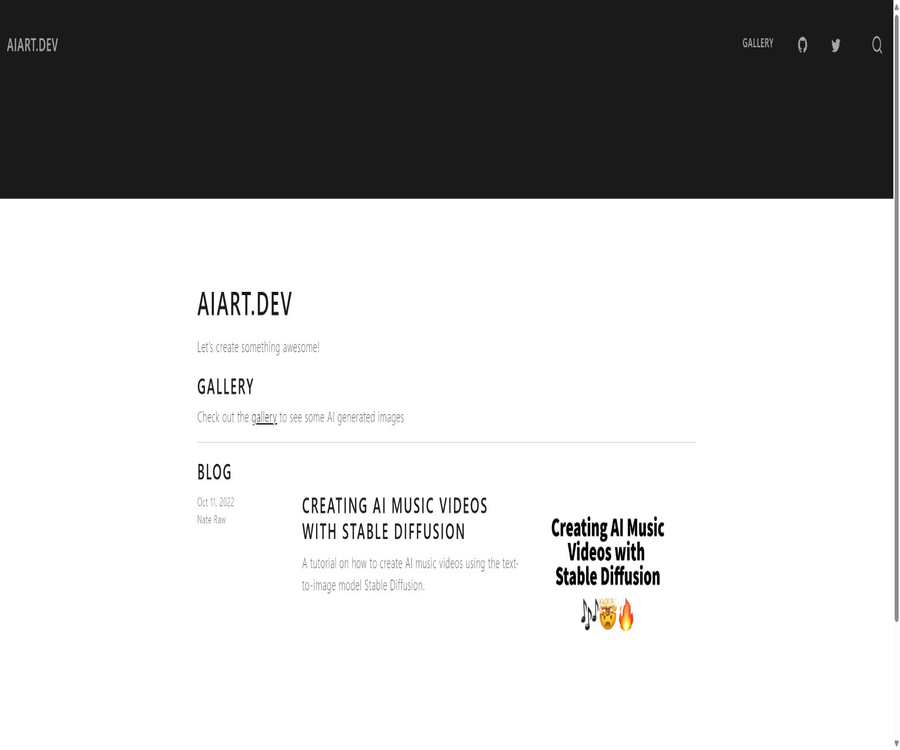
AIArt refers to aiart.dev, a website created by developer Nate Raw that serves as a platform for showcasing AI-generated art and providing technical tutorials. It is used primarily for sharing generative image works and details of experiments with Stable Diffusion; it is not a commercial generator that produces images online simply by entering prompts.
As of August 2026, the homepage of the site is very simple: it offers only a gallery of AI-generated images and a detailed tutorial on how to create music videos using Stable Diffusion. Visitors do not need to register, and there is no system for members, points, or charging based on the number of images viewed.
Current website content
- AI-generated image gallery.
- Stable Diffusion music video tutorial.
- Experiment code that can be opened in a cloud notebook.
- Explanation of the principle of latent space interpolation.
- Example of prompt embedding interpolation.
- A method of using audio energy to drive changes in the visuals.
- Links to open-source projects and technical documentation.
It is not an online AI art platform.
The AIArt page lacks a model selector, a prompt input field, an account for storing works, a points wallet, or an online generation queue. It should be classified in the catalog as AI art resources and technical tutorials, rather than as an online creation platform like Midjourney or OpenArt.
| Ability | Is AIArt available currently? | Explanation |
|---|---|---|
| Browse AI works | Provide | View the generated images through the gallery. |
| Read technical tutorials | Provide | The focus is on Stable Diffusion music videos. |
| Generate images by entering prompts online | Not provided | The website does not generate a console. |
| Save personal works | Not provided | There are no public accounts or portfolio. |
| Business model API | Not provided | There are no public interfaces or pricing for calls. |
| Paid subscription | Not provided | The website content is available for direct access. |
AI Art Gallery
The gallery is used to display images generated by AI, allowing visitors to see the style and composition of the early Stable Diffusion creations. It functions more like a page to showcase experimental results, and it does not offer features such as community followings, comments, likes, or post management.
- View examples of generated images.
- Observe the visual results of different themes.
- Get prompts and inspiration for composition.
- Understand the visual characteristics of early diffusion models.
- Provides reference results for technical tutorials.
Music video tutorials
The core article on the website was published in October 2022; it explains how to use Stable Diffusion to create sequential images that change in rhythm with music. The goal of this tutorial is to clarify the underlying principles and to organize the entire process into a runnable notebook.
- Load the Stable Diffusion model.
- Fix the random seed to reproduce the image.
- Interpolate between the two noise vectors.
- Transition between the text embeddings of different prompts.
- Generate images frame by frame.
- Combine consecutive frames to create an animated image or video.
- Adjust the interpolation progress based on audio energy.
Subspace interpolation
The tutorial begins by explaining the relationship between random noise and the resulting output: with the same model, prompt, and noise level, it is usually possible to generate the same image; changing the noise level, however, yields different results. By smoothly transitioning between two noise vectors, intermediate frames with visually continuous changes can be created.
- Set different random seeds for the start and end points.
- Intermediate noise is generated using spherical linear interpolation.
- The diffusion model is called at each time step.
- Save all intermediate images.
- Check whether the adjacent frames are consecutive.
- Adjust the step count to control the smoothness of the transition.
Prompt embedding interpolation
In addition to transitioning between random noises, the tutorial also attempts to perform interpolation between the text embeddings of two different prompt phrases. This allows the theme of the image to change gradually from one concept to another, rather than shifting suddenly.
- Prepare the starting prompt and the ending prompt.
- Calculate the embeddings for the two text segments separately.
- Mix text embeddings based on temporal weights.
- Interpolate noise and text conditions simultaneously.
- Check for semantic changes frame by frame.
- Reduce mutations or topic drift.
Audio rhythm-driven
By analyzing the energy of audio segments, the tutorial causes the video elements to move faster in the louder parts and slower in the quieter parts. It offers ideas for technical experiments; it is not a full-fledged video editor with a timeline, audio tracks, and an export panel.
- Load the audio files that are allowed to be used.
- Calculate the audio energy as it changes over time.
- Convert energy into interpolation weights.
- Add visual changes at strong beats.
- Slower transitions occur in the low-energy segments.
- The generated frame is re-synthesized with the audio.
Main technologies used
| Technology or components | The role in tutorials | Current usage reminder |
|---|---|---|
| Stable Diffusion 1.4 | Text-to-image generation | It belongs to an early version of the model. |
| Hugging Face Diffusers | Load the model and perform inference. | The tutorial always uses an earlier version. |
| PyTorch | Tensors, random seeds, and interpolation calculations | Compatible hardware and version required |
| Cloud notebook | Run experiments in the browser | Account, runtime, and model permissions are still required. |
| FFmpeg | Combine consecutive images to create an animated sequence or video. | A basic understanding of the command line is required. |
| Audio analysis library | Extract audio energy | Different versions may modify the interfaces. |
Hardware requirements for the tutorial
The original tutorial was written with a focus on GPU environments and half-precision models, using 512-pixel images as an example. Generating a video frame by frame involves running the diffusion model repeatedly; therefore, the amount of video memory, the number of frames generated, and the inference speed all have a direct impact on the time required to complete the task.
- Give priority to using a dedicated GPU that supports deep learning.
- Ensure that the video memory has sufficient capacity to hold the model and the target resolution.
- First, use a small number of frames to verify the entire process.
- Reducing the resolution can decrease resource usage.
- Long videos require more time for generation and more storage space.
- Cloud GPUs may incur additional costs.
The tutorial version is outdated.
The article uses Diffusers 0.4.0 and Stable Diffusion 1.4, both reflecting the technical environment of 2022. The library interfaces, model licensing, returned objects, and security components may have changed, and running old code line by line can easily lead to dependency errors.
- First, reproduce the original dependencies in an isolated environment.
- Do not expect the code to remain unchanged after upgrading all libraries directly.
- Update the model loading method according to the current document.
- Recheck the reasoning return values and the scheduler interface.
- Verify the access rights and licenses for the target model.
- Save a reproducible list of dependencies.
Which users are it suitable for
- Developers who learn how diffusion models work.
- Graduate students are creators of video interpolation.
- For students who wish to understand random seeds and latent variables.
- Technical artists preparing to read Python notebooks.
- Researchers looking for early experimental materials on Stable Diffusion.
- Ordinary visitors who wish to observe examples of AI-generated art.
Typical learning scenarios
- Understand how the same seed helps to reproduce images.
- Create a smooth transition between the two generated images.
- The concept of test prompts is evolving gradually.
- Study the mapping between musical energy and visual motion.
- Learn to encode image sequences into video.
- Transform the tutorial prototype into your own experimental project.
It’s not very suitable for which situations
- For users who do not need to generate images online using code.
- Editors who need ready-made video timelines and templates.
- For beginners who are looking for comprehensive tutorials on the current mainstream models.
- Users without a GPU or cloud computing environment.
- Teams that need business customer support, API services, or bulk production services.
- Creators who wish to join an active community of creative works.
Access and pricing methods
The AIArt website can be accessed directly, without the need for registration, membership, or any points. The site itself does not charge fees, but carrying out rendering tasks may require GPU power, paid cloud computing resources, space for storing models, and a environment for video processing.
| Project | Website fees | Possible external costs |
|---|---|---|
| Browse the homepage and gallery | Free access | Network traffic |
| Read technical tutorials | Free access | No mandatory fees |
| Open the lab notebook | The site is free of charge. | Cloud GPUs may incur fees. |
| Download the model | The site is free of charge. | Storage and bandwidth costs |
| Generate frames in batches | The site does not offer generation on behalf of users. | Cost of local or cloud computing resources |
| Video encoding | The site is free of charge. | Device computing and storage |
Why is there no package list?
AIArt is not a SaaS-based generation platform, and it does not have different version tiers such as a free version, a professional version, or an enterprise version. The price categories listed should be referred to as free content websites, with it being noted that there may be separate costs associated with running third-party models and using cloud computing resources.
Browse website tutorials
- Go to the home page to check the currently available content.
- First, browse the gallery to understand the output format.
- Open the article on Stable Diffusion music videos.
- Read about background, latent space, and interpolation concepts.
- View example results for each stage.
- Record the old version dependencies used by the article.
- Enter the runnable notebook only when practice is needed.
Preparations before the replication experiment
- Prepare a local or cloud environment equipped with a GPU.
- Verify the compatibility of Python, PyTorch, and graphics card drivers.
- Read the license and access requirements for the target model.
- Create a separate virtual environment for the old tutorials.
- First, install the core dependencies using the original version.
- Prepare short audio files that are available for use.
- Reserve storage space for models, frame diagrams, and complete images.
Steps to generate an interpolated video
- Select the start and end prompt words.
- Set a reproducible random seed for the two endpoints.
- Generate the endpoint diagram first and check content security.
- Set a lower number of interpolation steps for testing.
- Generate and save images with a unified name, one frame at a time.
- Check for flickering, mutations, and theme drift.
- Synthesize image sequences using video tools.
- Increase the frame rate and resolution after confirming the effect.
Let the visuals follow the music.
- Use authorized audio files.
- Split the audio time according to the video frame rate.
- Calculate the energy or rhythm characteristics of each segment.
- Normalize the features into smooth interpolation weights.
- Generate a small number of preview frames to verify the motion pattern.
- Adjust the intensity changes to prevent jumps in the image.
- Synthesize the video and audio tracks and check for synchronization.
Methods for upgrading old tutorials
- First, record the models and dependency versions of the old tutorial in their entirety.
- Check the current migration instructions for Diffusers.
- Select a new model whose license is suitable for the intended purpose.
- Replace the code for model loading, inference, and returning values one by one.
- Write small tests for the random seed, size, and output frame.
- Verify that the security checks and exception handling are still effective.
- Fix the new version of the environment and save the instructions for reproducible experiments.
Content copyright and music licensing
- Do not assume that model outputs are inherently free of copyright risks.
- Check the model training and usage licenses.
- Verify that the prompt does not misuse any brands or personalities in an inappropriate manner.
- Use only music that you have created yourself or for which you have permission to use.
- Save the authorization records for the materials before public release.
- Commercial projects should undergo reviews regarding portraits, trademarks, and copyrights.
- Different regions may have different rules for generating content.
Security and content risks
- Models may generate inappropriate or biased content.
- Old dependencies may have known security vulnerabilities.
- Third-party laptops may have access to cloud storage or account resources.
- Model files should be obtained from reliable sources.
- Check all installations and file operations in the notebook before running it.
- Content about public figures may be misleading or involve deepfakes.
- It is recommended to indicate the extent of AI involvement when publishing a work.
Product advantages
- Show examples of AI-generated art directly.
- A lengthy tutorial explains the principles of latent space interpolation.
- A dual transition covering prompt words and random noise.
- It demonstrates the concept of using audio energy to drive the visuals.
- Executable notebooks are provided to facilitate learning.
- Accessing the website is free and no registration is required.
- The source files of the site are available publicly, and its content structure can be inspected.
Product restrictions
- It is not an online AI image generator.
- The number of currently available items is very small.
- The core tutorials are based on the technology stack from 2022.
- Older versions may not be able to run directly.
- There are no account, work management, or community features.
- There are no API, team features, or commercial support.
- Video experiments require a foundation in coding and GPU resources.
- The website does not provide a clear update schedule.
GitHub and the open-source status
The public repository associated with aiart.dev is aiart-blog, which is maintained by nateraw; it contains the configuration files for the Quarto site, the original text files of the articles, as well as gallery and style files. The repository is accessible to the public, and as of the time of verification it had around 21 commits, but no explicit software license is indicated on the pages.
An open repository does not mean that one can freely copy, modify, and use all the code and content for commercial purposes. In the absence of a clear license, any use beyond the scope of browsing and learning requires permission from the author; the related Stable Diffusion Videos represent another project, and its license must be checked separately.
Site maintenance status
The home page currently displays only one article dated October 11, 2022, and the GitHub repository is relatively small. It is better suited for storing historical technical information rather than being described as a platform that provides continuously updated news on AI art.
Basic information
| Project | Content |
|---|---|
| Tool name | AIArt |
| Site name | aiart.dev |
| Author | Nate Raw |
| Tool type | AI Art Gallery and Technical Tutorials |
| Core theme | Stable Diffusion for music videos and interpolation |
| Access method | Web page |
| Registration requirements | No registration required |
| Price | The website content is free. |
| Online image generation | Not available |
| Open-source status | The site’s repository is public, but no explicit license is visible. |
Recommendation score
Recommendation score: 3.7 / 5. AIArt is suitable for developers who wish to understand the latent space of Stable Diffusion, prompt interpolation, and the principles behind music-driven visuals; it can also be used as reference material for early AI art experiments.
If the goal is to generate images directly online, use the latest models, or access systematically updated courses, it is necessary to choose a creation platform that is still under maintenance, along with the current official documentation.
Frequently Asked Questions
Can AIArt generate images directly?
No, the current website is primarily a gallery and tutorial site; it does not have a tool for generating prompts online.
Is AIArt free?
The website content can be viewed for free, but running the models may incur costs related to local hardware or cloud GPUs.
Is it necessary to register an account?
Browsing the site does not require registration, but opening cloud notebooks or downloading restricted models may need a third-party account.
What does the tutorial mainly cover?
It mainly explains how to interpolate noise and text embeddings, so that the visuals generated by Stable Diffusion can change in accordance with the energy of the music.
Can the tutorial still be run directly now?
Not necessarily; it relies fixedly on the models and dependencies from 2022, so it should first be reproduced in an isolated environment or migrated according to the current documentation.
Is an API provided?
There are no public commercial interfaces; the model calls mentioned in the article take place within the reader’s own experimental environment.
Is AIArt an open-source project?
The source files for the site are available on GitHub, but the repository page does not indicate a specific license; therefore, it cannot be assumed that they can be used freely for commercial purposes.
Is it suitable for users with no prior experience?
It is possible to understand the concepts, but carrying out experiments requires Python, a deep learning environment, and basic knowledge of video processing.
Can tutorial guides be used to create commercial music videos?
Technically, it can serve as a reference, but it is necessary to verify separately the licenses for the code, models, music, portraits, and the output content.
Tools similar to AIArt




 Guigong Network Security Registration No. 45132202000164