






AI2image
AI2image: a smart tool specialized in AI-related image processing.
Tags:Common AI image toolsWhat is AI2image?
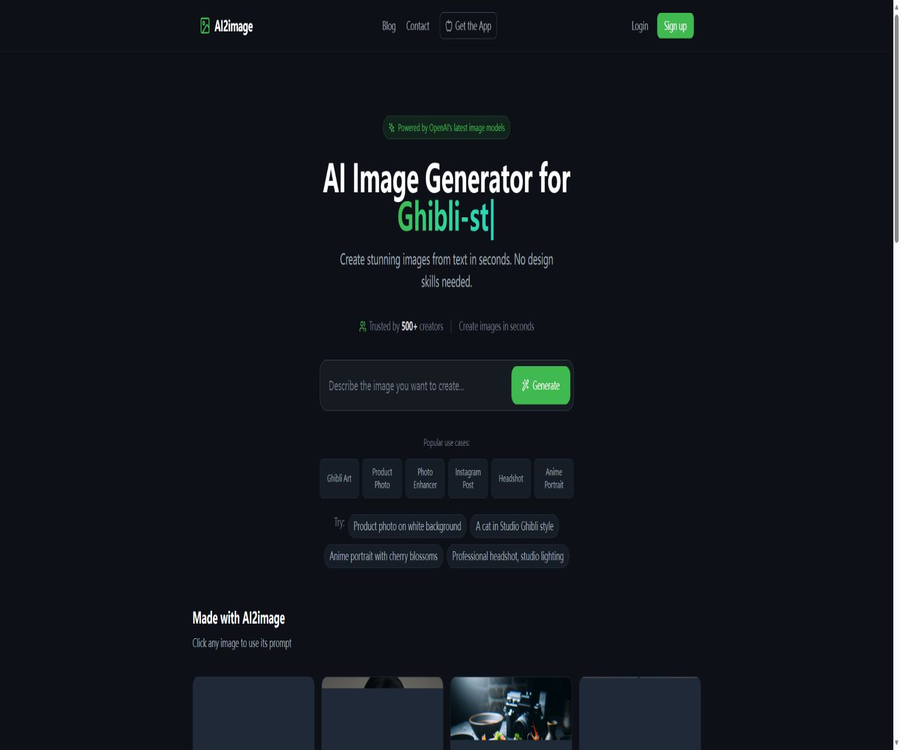
AI2image is a browser-based tool for generating images from text descriptions. According to its official website, it uses the DALL·E 3 model to create illustrations, animations, logos, avatars, and marketing images based on textual inputs. The service offers a limited amount of free trials, along with the option to purchase a set number of generations; no long-term subscription is required.
A one-sentence summary
AI2image allows users to enter natural language prompts to generate images quickly, and it reduces the barrier to getting started with AI-driven image creation through examples and a library of prompts.
Current product changes
On the Internet, it is still possible to find information regarding the early monthly subscriptions for AI2image as well as details on other models from that period; however, the official website now shows the prices for DALL·E 3 and one-time credit packages. The list of available tools should be based on the current version of the website.
Core functions
- Generate AI images based on the textual description.
- Use DALL·E 3 to understand complex prompts.
- It covers realistic, illustrative, anime, and artistic styles.
- Generate visual candidates containing simple text.
- Provides viewable images and example prompts.
- Generation and downloading are done on the web page.
- Purchase based on the number of times it is generated, rather than requiring a monthly subscription.
Text to image
- Enter the subject, scenario, and action.
- Describe light, color, and composition.
- Specify the photography, illustration, or anime style.
- Add information on the frame size and purpose.
- It is necessary to exclude unwanted elements.
- After generation, modify the prompt based on the results.
DALL·E 3 model
The official website currently presents DALL·E 3 as the primary generation model, highlighting its ability to understand complex, multi-part prompts as well as text within images. Despite its strong capabilities, it may still make mistakes with small texts, hands, brand logos, and complex spatial relationships.
- Understand relatively complete natural language descriptions.
- Handle relationships between multiple entities and scenarios.
- It supports a wide range of visual styles.
- Suitable for quickly generating concept candidates.
- It is not guaranteed that the composition will meet all requirements every time.
- The models and quality may be updated by the supplier.
Prompt example database
Users can view public examples and prompts without logging in, in order to find inspiration among existing compositions, styles, and expressions. These examples can serve as a starting point, but it is not appropriate to copy verbatim content that features a specific brand or creator’s style.
- View the images and their corresponding prompt words.
- Look for composition references by purpose.
- Learn methods for describing lenses and lighting.
- Modify the main subject, scene, and color scheme.
- Create your own reusable prompt templates.
- Avoid copying others’ unique characters and trademarks.
Supported visual types
- Anime and cartoon illustrations.
- Ghibli-style artistic illustrations with a thematic atmosphere.
- Photos in a realistic photography style.
- Images for social media and blogs.
- Logo and brand concept sketches.
- Professional avatar and character concepts.
- Posters, covers, and advertising visuals.
- Backgrounds, wallpapers, and decorative elements.
Anime and artistic images
- Describe the character’s age, clothing, and expression.
- Specify the environment, time, and weather.
- Control colors, lines, and materials.
- Explain the shot size and perspective.
- Avoid directly imitating the unique style of living artists.
- Character details may vary when generated sequentially.
Logo and text visualization
Compared to many older models, DALL·E 3 is better at displaying text within images, but it cannot replace professional vector-based logo design. The results generated often require reformatting of the text, vectorization, and trademark verification.
- Quickly explore the directions of brand symbols.
- Generate a draft of the font and graphic combination.
- Try different colors and industry imagery.
- Submit the candidate design to the designer for further refinement.
- Check the spelling and readability word by word.
- Conduct a trademark search before commercial use.
Profile pictures and character images
- Create avatar images for fictional characters and roles.
- Try business, casual, or creative styles.
- Control the background, clothing, and lighting.
- One should not pretend to be a real person or hold a professional title.
- For real-person portraits, consideration must be given to portrait rights and consent.
- Synthetic avatars should not be used in scenarios involving high-risk identities.
Marketing and social media visuals
- Generate blog header images and visuals for social media posts.
- Explore various concepts for advertising campaigns.
- Create a draft of the product atmosphere image.
- Prepare the composition direction according to different platforms.
- Add accurate copy and brand elements to the later-stage tools.
- Verify the product’s appearance and marketing claims before release.
Which users are it suitable for
- Creators who occasionally need images for blogs and social media.
- Individuals who wish to experience DALL·E 3 at a low cost.
- Marketers who need to create concept diagrams quickly.
- Designers looking for inspiration for illustrations.
- Students and teachers who prepare visuals for courses and presentations.
- Light users who do not want to subscribe to image-related tools on a long-term basis.
- Beginners learning prompt phrases for text-to-image generation.
Typical use cases
- Generate a theme thumbnail for the article.
- Create backgrounds for social media posts.
- Explore poster and cover composition.
- Create fictional characters and story illustrations.
- Prepare the direction for the logo for the brand meeting.
- Create visual concepts for the presentation.
- Create wallpaper and personal art works.
- Test the effectiveness of different prompt expressions.
It’s not very suitable for which situations
- Companies that need comprehensive graphic design and team collaboration.
- Designers who require pixel-level editing and layer control.
- Developers who need to generate tens of thousands of images using batch APIs.
- Projects that require maintaining complete consistency between the role and the product over the long term.
- Teams that require local deployment or the use of custom open-source models.
- An organization that deals with confidential product designs and sensitive personal images.
- It is necessary to identify high-risk activities that require commercial copyright protection.
Free trial
The current homepage indicates that users can create 1 image for free, without the need for a credit card. Older pages on the official blog mentioned that 3 free creations were available after registration; this number may have been changed, so it is advisable to refer to the information displayed in one’s actual account.
Price and credits
As of August 2026, the official website indicates that the cost for the next 10 image generations is $5.99, with no monthly subscription required. The actual number of possible images generated per request, any fees incurred in case of failures, and the validity period of credits are specified on the payment page.
| Project | Public price | Explanation |
|---|---|---|
| First experience | 1 free image | No credit card required |
| Disposable pack | $ | 10 image generations |
| Converted per session | About 0.60 dollars | Excluding failures, taxes, and exchange rates |
| Monthly subscription | It is not required at the moment. | The information on monthly fees for the old version is not applicable to the current page. |
Comparison between one-time purchase and subscription
| Dimension | AI2image one-time credits | Common subscription tools |
|---|---|---|
| Payment methods | Buy by package | Renewal on a monthly or annual basis |
| Suitable frequency | Low frequency and temporary use | Continuous high-frequency production |
| Budget characteristics | No fixed monthly fee | Costs are more predictable |
| Limit | One pack is generated every 10 times. | A higher limit is refreshed on a monthly basis. |
| Team features | Not prominent | High-end solutions are usually more comprehensive. |
How to assess actual costs
- Estimate how many retries are needed to obtain a usable result.
- Include prompt testing in the count of generations as well.
- Verify whether failed tasks have their credits refunded.
- Find out how many candidate outputs are generated at once.
- Add time for later formatting and photo editing.
- For business projects, the costs associated with review and authorization must also be taken into account.
- For frequent use, a subscription or direct API is preferable.
Basic Generation Tutorial
- Determine the purpose of the image and the desired outcome.
- Write down the subject, action, and environment.
- Add style, lighting, lenses, and color schemes.
- It explains the elements that must be present and those that are prohibited in the composition.
- Submit to generate and check the overall direction.
- Only one or two key variables are modified at a time.
- Download the satisfactory results and refine them in subsequent tools.
Marketing Image Tutorial
- Record the activity objectives, target audience, and distribution channels.
- Separate the product facts from the visual creativity.
- Generate a main visual without complex text.
- Check the shape, color, and usage of the product.
- Include the correct brand and copy in the design software.
- Cut to the platform size and check the safety area.
- It will be released after the legal and advertising policy reviews are completed.
Tutorial on the concept of logos
- Define the brand name, industry, and core impression.
- List the graphic elements you wish to use and those you want to avoid.
- Generate multiple concepts of black and white or limited colors.
- Filter out the directions that can still be recognized at small sizes.
- Redrawn by a designer into a standard vector graphic.
- Check the text, similar trademarks, and cultural meanings.
- Establish the final guidelines for brand usage.
Prompt structure
| Prompt section | The content to be described | Example direction |
|---|---|---|
| Main body | People, goods, buildings, or objects | An orange robotic cat |
| Action | What is the main entity doing? | Repairing a watch at the table |
| Environment | Location, time, and weather | A vintage studio on a rainy night |
| Style | Photography, illustration, or materials | Film-like 3D illustrations |
| Composition | Shot size, angle, and negative space | Medium shot, with empty space on the right side. |
| Light | Direction, color temperature, and atmosphere | Warm side lighting and blue ambient light |
| Restrictions | Content that should not appear | No text, no watermark |
Methods to improve generation quality
- Replace abstract adjectives with concrete nouns.
- Clarify the number of entities and their spatial relationships.
- Indicate the lens, focal length, and depth of field.
- Reduce conflicting style requirements.
- Leave a clean area for the poster text.
- When things go wrong, simplify the prompt first and then add details gradually.
- Retain valid prompts and generation records.
Common generation issues
- The characters’ fingers, teeth, and accessories may be abnormal.
- The text in the image may have spelling errors.
- The number and position of multiple entities may vary.
- It is difficult to maintain consistency for the same character across different images.
- The product’s logo and packaging may be altered.
- In complex backgrounds, repetition and blending tend to occur.
- Repeated attempts will quickly deplete credits.
Commercial use and copyright
The search results on the official website do not clearly show the current terms regarding commercial licensing, exclusivity, or compensation in case of infringement. Before using it for advertising, products, logos, or customer projects, it is necessary to read the purchase page and the terms of use, and to keep the current version of those documents.
- The images generated are usually not exclusive.
- Similar outputs may be generated by other users.
- The models used for training and the rights associated with the outputs vary by region.
- Do not use unauthorized trademarks and characters.
- For real-person portraits, consent and personality rights must be taken into account.
- High-value commercial materials should undergo similar image checks.
Privacy and data considerations
- Prompt words may contain creative and business-related information.
- Do not enter information on unreleased product designs.
- Do not submit sensitive information that can identify customers or employees.
- Confirm the method for retaining generated records and account data.
- Check the scope of data processing provided by third-party model suppliers.
- Trade secrets should be handled using tools that have been approved by the company.
Rules for refunds and credits
During this verification, no clear and publicly available pages were found detailing AI2image’s current refund policy, the validity period of credits, the handling of failed transactions, and the management of unused credits. It is necessary to check these rules on the settlement page before making a payment, and to first test the quality of the generated content for free.
Product advantages
- The interface and workflow are designed for beginners in text-to-image generation.
- Currently, images are generated using DALL·E 3.
- Provides a database of public prompt examples.
- It can be tried for free for the first time, and no credit card is required.
- A one-time purchase is suitable for users with low usage frequency.
- There is no need to worry about automatic renewal on a long term basis.
- It can cover a variety of common visual types.
Product restrictions
- There is only 1 free trial available at the moment.
- Generating it 10 times costs $5.99, and the cost of trying again is high.
- Lack of professional layers and advanced editing capabilities.
- Characters, products, and text may be inaccurate.
- The current terms regarding commercial licensing and refunds are not clear enough.
- There are no features for team collaboration and brand governance available publicly.
- No public APIs, SDKs, or batch interfaces were found.
- No verifiable official source code repository was found.
- The platform is not an open-source project.
APIs and developer capabilities
During this verification, no public API keys, developer documentation, SDKs, Webhooks, or tools for batch image generation related to AI2image were found. It is currently better suited to serve as a personal tool for use in web browsers, rather than an infrastructure for image generation within applications.
GitHub and the open-source status
The AI2image prompt repository and list of tools listed in the search results cannot be verified on the official website as being the source code of the product; AI2image should be considered a closed-source online service.
Basic information
| Project | Content |
|---|---|
| Tool name | AI2image |
| Tool type | AI image generation and prompt library |
| Current model | DALL·E 3 |
| Free trial | 1 generation |
| Paid price | $ |
| Subscribe | It is not required at the moment. |
| Public API | No findings were detected. |
| Open-source status | Not open source |
Recommendation score
Recommendation score: 4.0 / 5. AI2image is suitable for individual creators and marketers who occasionally need DALL·E 3 images and prefer to make a one-time payment.
When high-frequency production, complex editing, team collaboration, or high-level commercial licensing requirements are involved, it is advisable to consider design platforms with more comprehensive features or direct model APIs.
Frequently Asked Questions
Is AI2image free?
The current homepage offers 1 free image generation session, without the need for a credit card.
How much will be generated in the future?
According to the official website, 5.99 dollars is required to obtain 10 image generation sessions.
Is a subscription required?
Currently, purchases are made using one-time credits; a monthly subscription is not required.
What model to use?
The current official website and official blog indicate that DALL·E 3 is to be used.
Can a logo be created?
Concepts can be generated, but manual redrawing, text verification, and trademark searches are required.
Can it be used for commercial purposes?
The current public page does not clearly display the full commercial licensing terms; it is necessary to check those terms before making a payment and proceeding with the release.
Do credits expire?
The public page does not specify this; the settlement page and account rules should be taken as the reference.
Are APIs provided?
No public APIs or SDKs were found.
Is AI2image open source?
It is not open source, and no verifiable official source code repository for the product has been found.
Tools similar to AI2image




 Guigong Network Security Registration No. 45132202000164