






AI Logo Art
AI Logo Art – a smart tool specialized in AI-generated images
Tags:Common AI image toolsWhat is AI Logo Art?
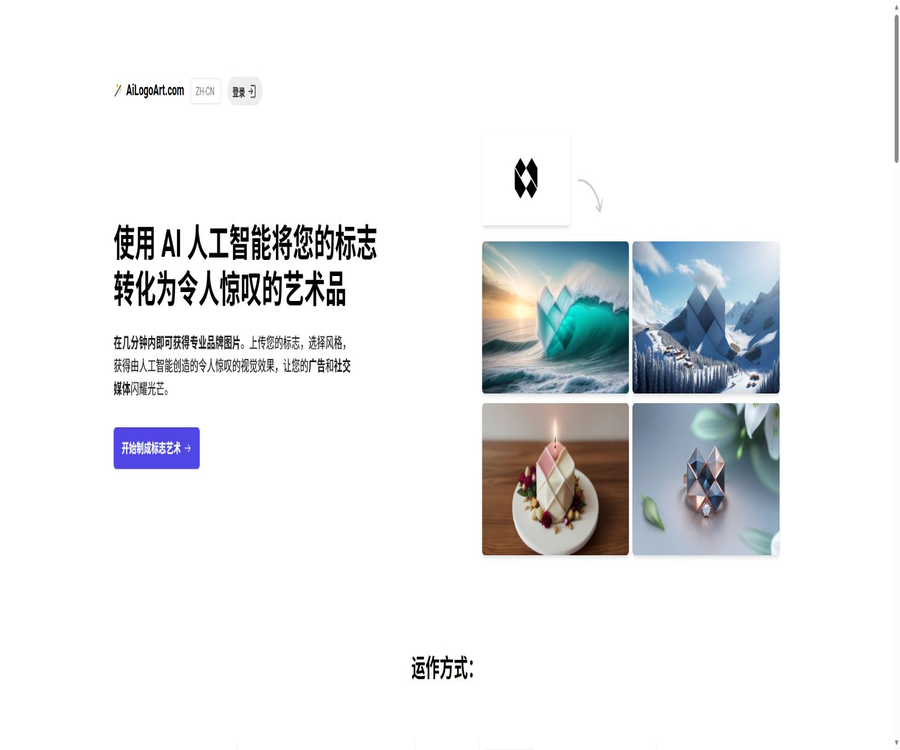
AI Logo Art is an online tool that transforms existing logos into creative brand images. Users upload their logos in JPG or PNG format, choose from pre-set designs or provide a custom description; the system maintains the overall layout and position of the logo and creates images suitable for use in advertisements, on social media, and for brand presentation.
It is not a tool for designing logos starting from a brand name, nor does it offer font, vector path, or icon editors. Users who do not have a ready-made logo must first create one using other design tools and then upload a simplified version of it.
A one-sentence summary
AI Logo Art enables existing logos to be integrated into various objects, materials, and environments, allowing for the rapid creation of high-resolution visual assets suitable for brand promotion, advertising campaigns, social media content, and conference backgrounds.
Core functions
- Logo image generation: Uses an existing logo as a reference for composition and shape.
- Pre-set ideas: Provide pre-tested scene and style descriptions.
- Custom description: Allows users to create their own creative visuals.
- Batch variations: At least 4 images are generated for each idea simultaneously.
- Multiple logo handling: The same account can generate images for multiple brands.
- High-resolution download: Save the result you are satisfied with after selecting it.
- Aspect ratio reference: The output follows the aspect ratio of the input logo canvas.
- Position reference: The location of the logo on the canvas affects the outcome.
- Brand promotion materials: for use in advertisements, websites, and social media.
- Zoom background: There is also a separate option for creating background images for team meetings.
- Multilingual interface: Offers various page languages including English and Chinese.
- Login via email: Access your purchased account using Magic Link.
What can it generate?
- Create the logo as neon lights, metal plaques, or three-dimensional installations.
- Have the logo appear on walls, packaging, clothing, or equipment.
- Create themed images for festivals, celebrations, and team activities.
- Create social media covers and background images for brand posts.
- Create ad concept sketches and marketing proposal materials.
- Generate background elements with brand features for online meetings.
- Explore visual expressions in different materials, lighting, and spaces.
- Provide various creative approaches for client proposals.
What can’t it do?
- It is not possible to automatically create a complete logo simply by entering the brand name.
- It is not possible to guarantee the exact replication of all text and fine lines.
- Editable vector paths cannot be output.
- It cannot replace the design of brand guidelines, font styles, and color systems.
- It is not possible to precisely control the position of each pixel and object.
- It cannot be guaranteed that the resulting output will meet all printing requirements.
- It is not possible to prove that the image has no similarity to other works at all.
- It cannot be used as a legal search tool to determine the availability of a trademark for registration.
Requirements for logo upload
| Project | Official recommendations | Reason |
|---|---|---|
| File format | JPG or PNG | Other formats need to be converted first. |
| Background | Pure white or pure black | Help the model identify the outlines of objects. |
| Color | Monochrome or as few colors as possible | Complex color schemes are easier to modify. |
| Text | It’s best not to include any text. | It is difficult for generation models to stably retain characters. |
| Graphics | Simplify icons or outlines | The clearer the structure, the easier it is to maintain recognizability. |
| margin | Leave appropriate empty space around the main element. | It will affect the size and position in the output. |
| Canvas ratio | Prepare according to the target finished product ratio. | The output will take the input aspect ratio into account. |
Tutorial on creating logos
- Make sure you have the logo or have authorization from the brand owner.
- Export a simplified version without excess background from the brand files.
- Give priority to using icons that are monochromatic and have clear outlines.
- Remove slogans, small-text elements, and complex decorations.
- Set the canvas to landscape, square, or portrait format based on the intended use.
- Adjust the logo’s position and the spacing around it.
- Export as JPG or PNG while retaining the original vector file.
- Prepare multiple simplified versions for comparing generation stability.
Tutorial on Creating Logo Art
- Log in to your account and check your remaining quota for ideas and images.
- Upload the prepared JPG or PNG logo.
- Check the position and scale of the logo on the canvas.
- Select a preset idea, or enter a custom scene description.
- Submission is processed, and each idea will receive at least 4 images.
- Wait for about 1 minute and view all variants.
- Check the shape of the logo, the text, the colors, and the brand’s recognizability.
- Download suitable images to regenerate the results of the issues or to make subsequent edits to the photos.
How to write a custom idea
- First, describe the scene, such as a booth, a nighttime city view, or an office space.
- Describe the material again, such as metal, glass, paper, or fabric.
- It describes types of light, such as soft light, neon light, sunset light, or studio lighting.
- Specify the atmosphere, such as professional, youthful, luxurious, or festive.
- Additional compositional elements, such as centering, close-ups, wide angles, or negative space.
- Specify the purpose, such as social media posts, advertisements, or meeting backgrounds.
- Avoid adding too many conflicting requirements at once.
- Do not demand the replication of the unique style of living artists.
How the input canvas affects the output
According to the official website, the position of the logo within the image, its size, the amount of space around it, and its aspect ratio all affect the final image. The generation model does not apply the image data with precision like traditional mockups; instead, it redraws these elements based on the visual parameters provided.
- A centered logo is usually more suitable for square social media images.
- The logo placed on the side leaves space for text and buttons.
- Horizontal canvases are suitable for website banners and conference backgrounds.
- Vertical canvases are suitable for short video covers and story images.
- Too little negative space can lead to the subject being cropped or appearing crowded.
- If the logo is too small, details may be lost during generation.
- The same logo can be used to test compositions on various canvases.
Which users are it suitable for
- Brand management: Quickly create visual content for daily social media use.
- Marketing staff: Explore creative approaches for advertising and campaigns.
- Graphic designer: Creates concept sketches for client proposals.
- Startup team: Creating brand materials with a limited budget.
- E-commerce sellers: Create packaging and product atmosphere images.
- Social Media Manager: Prepare batch of posts for holidays and events.
- Event Team: Creates backgrounds for meetings, celebrations, and teams.
- Agency: Creates different scenarios for multiple clients’ logos.
Typical use cases
- Social media posts, covers, and event previews.
- Banners on the website’s home page and images illustrating the brand story.
- New product launches, holiday marketing, and promotional posters.
- Concept diagrams of materials and space in the brand proposal.
- Background for online meetings and team activities.
- The concept of logos as they appear on signs, walls, and packaging.
- Multi-directional creative testing before advertising deployment.
- Inspiration and application examples in the brand guide.
- Emotion boards and visual drafts for customer communication.
Scenarios where direct delivery is not appropriate
- Official brand standard images with pixel-level accuracy are required.
- Materials requiring the text, trademarks, and colors to remain exactly unchanged.
- Print-ready files with bleed, spot colors, and editable vector graphics are required.
- Real product photography and an accurate representation in a legal sense are required.
- The resulting output is intended to be used directly for trademark registration.
- It involves unauthorized customer logos, characters, or third-party intellectual property rights.
- Projects that include confidential new products and unreleased brand assets.
- Organizations that cannot agree to have their uploaded content used for model training.
Price of image packages
AI Logo Art uses a one-time image package instead of a monthly subscription. One idea generates 4 images, and the number of images for each of the three packages is four times the number of ideas.
| Package | One-time price | Number of Ideas | Total number of images | Cost per sheet approximately |
|---|---|---|---|---|
| Starter | 9.99 dollars | 5 | 20 pieces | About 0.50 dollars |
| Creator | 29 dollars | 25 | 100 pieces | About 0.29 dollars |
| Studio | 99 dollars | 125 | 500 pieces | About 0.20 dollars |
Which of the three packages should I choose?
- For testing just one logo and a few scenarios, 20 package options are available.
- If you need to create comprehensive promotional materials for a brand, you can choose the package of 100 images.
- Designers, agencies, and multi-logo projects can consider the 500-sheet package.
- First, use the smallest package to verify whether the logo can be easily retained by the model.
- Estimate the actual cost per sheet based on the available yield rate.
- The package with a higher data volume is cheaper, but the value of the unused quota depends on the project’s requirements.
- The final payment amount may be affected by the currency, taxes, and payment method.
Idea and image quota
- For each idea submitted, at least 4 images will be generated.
- 20 packages correspond to 5 ideas.
- 100 packages correspond to 25 ideas.
- 500 package sets correspond to 125 ideas.
- The 4 images of the same concept represent different random variants.
- Once image generation begins, the corresponding amount will be consumed.
- Check the remaining quota before attempting a new idea.
Purchase, login, and refunds
- The package is purchased in one go through an external payment page.
- After purchase, log in using the email Magic Link.
- It is not a monthly membership with automatic renewal.
- Before generation begins, the logo, canvas, and description should be confirmed.
- The official FAQ states that no refunds are provided once AI generation begins.
- The reason is that each generation incurs computational costs.
- Read the final terms on the checkout page before making a purchase.
- In case of payment issues, contact the platform after keeping the order and the relevant records.
Commercial licensing and ownership
The FAQ on the official website states that users receive full commercial rights and ownership of the generated images, which can be used on websites, social media platforms, and other channels. This provision is beneficial for commercial projects, but users still need to ensure that the logos and prompts they use do not violate the rights of third parties.
- Only upload your own or authorized logos.
- Retain purchase records, the original logo, and the date of creation.
- Do not include unauthorized trademarks or characters in the prompt.
- Before publishing, check the image for any distorted text or similar symbols.
- Commercial ads should have the product and brand statements reviewed manually.
- Different regions may have varying approaches to determining the copyright status of purely AI-generated content.
- For major brand projects, legal teams should review trademark and licensing risks.
Consistency between logo text and brand identity
The official website recommends uploading logos that contain no text, as the generation model is not reliable when it comes to preserving letters, words, and complex details. Even if the overall shape remains similar, the brand name, proportions, and colors can still change.
- Text-based logos should preferably be separated into two versions: icon and text.
- First, create the background and the main artistic elements, and then add the standard logo in a later stage.
- Manually adjust the color of the finished product using the brand’s color values.
- Compare whether the marker outline is stretched or missing.
- Check whether the random patterns resemble other brands or protected trademarks.
- The official materials are overwritten using the original brand asset files.
Privacy and training data
The FAQ on the official website, when discussing image ownership, states that the platform uses these images to train its AI models. The page does not provide clear, separate, and detailed information regarding data retention, deletion, withdrawal from training processes, or details related to sub-processors.
- Uploading logos and generating images may be used for model training.
- Users who do not intend to use the service for training purposes should not upload confidential assets.
- Special care must be taken with unreleased brands, customer logos, and internal projects.
- The page does not indicate how long the files are retained on the server.
- The page does not provide a public way to exit training or to delete items in bulk.
- Before using it, enterprises should request the data processing terms from the platform.
- For sensitive projects, it is preferable to choose services that offer support for neither training nor deletion.
Multiple Logos and Customer Projects
- The same account can be used to generate images for multiple logos.
- Each client should use a separate folder and naming conventions to manage the results.
- Before starting, confirm that the customer permits the use of third-party AI services.
- Do not place the logos of different customers in the same input image.
- Record the version of the logo used for each image along with a description of the creative concept.
- At the time of delivery, it should be clear which parts are AI drafts and which have been edited manually.
- Customer confidentiality clauses may prohibit uploading to training platforms.
Zoom background feature
- A background for team meetings can be created around the company’s logo.
- Supports preset themes or custom background designs.
- You can also upload images that are pure white or pure black; the output will be generated solely based on the description provided.
- Using a logo in the input usually yields results with a stronger brand identity.
- Horizontal canvases are more suitable for the aspect ratio of video conferences.
- A clean space should be left in the area where the character is located.
- Before going live, test camera cropping, text orientation, and background blurring.
Methods to increase the yield rate
- Use a logo that is monochromatic, has thick lines, and clear contours.
- Remove small text and details that are prone to distortion.
- Set the canvas ratio in advance based on the final distribution channel.
- Describe only one main scene and one material at a time.
- First, use the preset creative understanding model to comprehend the types of images it is good at handling.
- Generate multiple variants in the same direction and then filter them.
- Use professional image software to adjust text, colors, and edges.
- A standard vector logo is used prior to the official release.
- Check the performance on mobile devices, desktops, and advertising slots respectively.
Product advantages
- Focus on transforming the existing logo into brand scene illustrations.
- The process consists of only four steps: uploading, selecting a design, generating it, and downloading it.
- Pre-set ideas lower the barrier to creating prompt texts.
- Each Idea generates at least 4 variants at a time.
- Custom descriptions and multiple logos are supported.
- One-time image packs suitable for different project scales are provided.
- The cost per image for the larger package is lower.
- The official website explicitly grants commercial rights for image generation.
- It offers interfaces in multiple languages, including Chinese.
- There are also brand-themed background scenes for team meetings.
Usage restrictions and precautions
- It cannot design a logo from scratch; it can only work with existing images as input.
- Only JPG and PNG files are accepted.
- Complex colors, fine lines, and text can be easily altered by the model.
- SVG or editable vector logos cannot be output.
- The results generated each time are random.
- No refunds will be provided by the authorities once generation begins.
- The package is priced according to the amount shown in the image; there is no option for a free trial version.
- The official website states that images may be used to train AI models.
- The rules regarding data retention, deletion, and termination of training are not transparent enough.
- A commercial license does not exempt one from liability for infringement related to the use of logos and third-party elements.
GitHub and open source
The AI Logo Art website does not provide a link to an official GitHub repository that can be verified; moreover, it does not make available the image-generation models, training data, prompt systems, backend infrastructure of the site, nor any open-source licenses. The repositories found with similar names that are used for logo creation belong to other projects.
Therefore, AI Logo Art should be classified as a commercial, closed-source service; it has no official connection to the open-source AI Logo projects that can be deployed on one’s own.
Basic information
| field | Content |
|---|---|
| Product name | AI Logo Art |
| Tool type | AI brand visual generator with existing logos |
| Input format | JPG and PNG |
| Each Idea | At least 4 images |
| Primary uses | Backgrounds for advertisements, social media, websites, and conferences |
| Price pattern | One-time image package |
| Minimum package | $ |
| Commercial licensing | The official website states that it provides complete commercial licensing and ownership rights. |
| Whether to create a new logo | No |
| Whether API is provided | Not disclosed |
| Is it open source? | No |
Recommendation score
4.1 / 5. AI Logo Art has a clear purpose and is easy to use; it’s suitable for quickly creating brand visuals and marketing concept images. However, the text used needs to be manually adjusted to ensure consistency with the brand, and the images can be used for model training, which makes it unsuitable for projects that require confidential logos or strict data control.
Frequently Asked Questions
Can AI Logo Art create a logo from scratch?
No, it requires the user to upload an existing logo first, before a brand-themed image can be generated.
Which file formats are supported?
The official website only accepts JPG and PNG files.
How many images are generated from one idea?
Each idea generates at least 4 images simultaneously, and this process usually takes about 1 minute.
Is AI Logo Art free?
The official website does not disclose any free quota; the lowest package available costs 9.99 dollars and includes 20 images.
Can multiple logos be processed?
Yes, the same account can be used to generate images for multiple logos; the quota is determined by the total number of images created.
Can the generated images be used for commercial purposes?
The official website states that it grants users full commercial rights and ownership, but the materials used must be legal.
Can a refund be obtained after it’s generated?
No, the official FAQ states that no refund is provided once the AI starts generating images.
Will the uploaded logo be used for training?
The website states that images are used to train its AI models, so confidential assets are not recommended for uploading.
Is AI Logo Art open source?
It is not open source; the official website does not provide accessible, verifiable core code, models, data, or an open-source license.
Tools similar to AI Logo Art




 Guigong Network Security Registration No. 45132202000164