






Accomplice
Accomplice, a smart tool focused on AI-powered images
Tags:Common AI image toolsWhat is an accomplice?
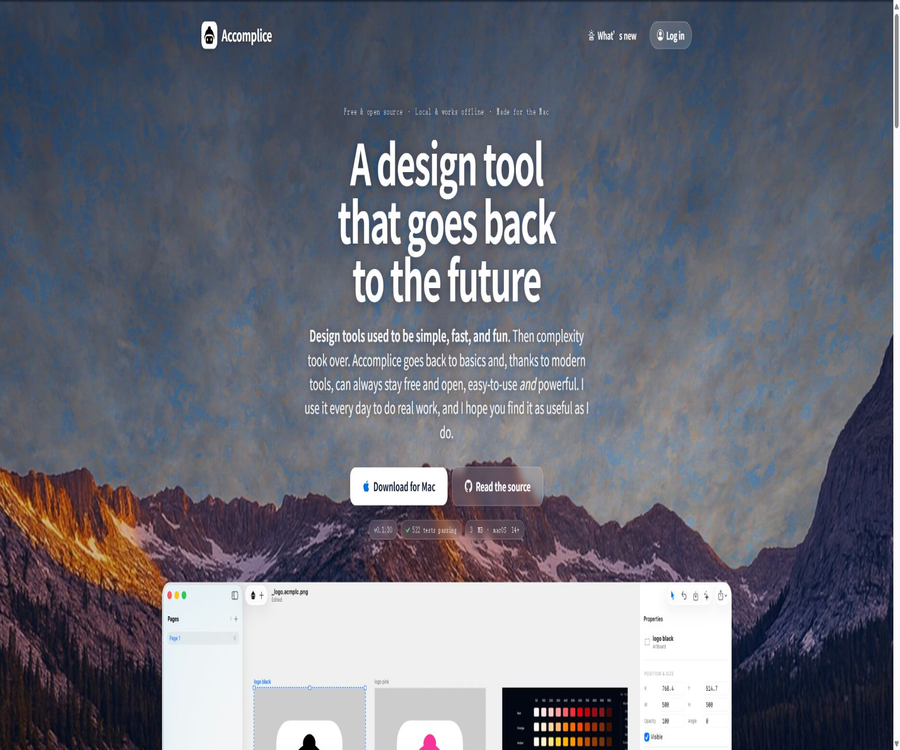
Accomplice is a local design tool for individual creators on Mac; it can be considered a modern successor to Macromedia Fireworks and the early versions of Sketch. It combines vector drawing, bitmap processing, text handling, drawing boards, and AI-assisted features within a lightweight, native application.
As of this verification, the current public version is 0.1.30; it requires macOS 14 or a later version as well as an Apple chip. The official source provides downloads of the application that have been signed and notarized, and the installation package is about 3 MB in size. The project’s source code is made available under the MIT license.
Differences between the current product and the older version
There is still a large amount of old information on the Internet that describes Accomplice as a cloud-based AI platform for creating royalty-free logos, photos, and graphics, and it lists Free, Personal, Pro, and Team subscription plans. The official website with the same name currently showcases a Mac design application that was first released in July 2026; the functions, structure, and pricing of these two versions are different from each other.
| Comparison items | Accomplice in the old records | Current Accomplice |
|---|---|---|
| Product format | AI image and design platforms in browsers | Native Mac local design application |
| Key capabilities | Tips for generation, training styles, team asset library, and Figma plugins | Vectors, bitmaps, drawing boards, import/export, and AI-assisted editing |
| Collaboration methods | Cloud team sharing | Single-user, local file workflow |
| Price | There were once free options as well as plans with monthly fees of 9, 20, and 40 dollars. | The application ontology is available for free; some AI functions require credits or a custom model account. |
| Open-source status | The open-source status of the old cloud platform has not been confirmed. | The current application’s source code is licensed under the MIT license. |
| Content assessment | It can only be used as reference historical information. | It should represent the current product information for the tool catalog. |
Main functions
- Process vector paths and bitmap layers on the same canvas.
- Create graphics using pens, rectangles, ellipses, stars, and polygons.
- Shapes that can still be edited through combinations of Boolean operations such as union and subtraction.
- Edit the text, adjust the letter spacing and line height, and arrange the text along a circular path.
- Crop the photo and adjust its brightness, contrast, and saturation.
- Use selection, brushes, or shapes for non-destructive erasure.
- Organize interfaces, icons, illustrations, and version options across multiple canvases.
- Import Sketch, Figma, SVG, and regular image assets.
- Export as SVG, PNG, and JPG, and select a size from 1x to 3x.
- Use the built-in chat to name layers, reorder them, change their colors, and modify text in bulk.
Vector design capabilities
Accomplice ensures that the paths remain editable, making it suitable for creating icons, logos, badges, and simple illustrations. Boolean shapes, automatic shape creation, and multi-point editing reduce the need to flatten objects prematurely.
- The Pen tool allows for the creation and modification of nodes and curves.
- The components resulting from combination and subtraction can be edited further.
- Stars and polygons retain generation parameters such as the number of points.
- Different nodes can use different corner radius values.
- It supports aligning multiple vector points and adjusting path hierarchy.
- The shape can be tilted, perspective-shifted, and flipped.
- Filling, borders, dashed lines, dotted lines, and shadows can be adjusted through the property panel.
- SVG can be pasted directly or opened as a file.
Bitmap editing capabilities
Bitmaps and vectors do not need to be used in separate applications; users can directly crop, erase, and adjust photos within the same interface, and then add shapes and text. Some of the basic processing tasks are carried out locally.
- Crop the image while keeping other objects on the canvas editable.
- Adjust brightness, contrast, and saturation.
- Double-click on the bitmap to select or copy a portion of the pixels.
- Use Magic Select to select by color.
- Use rectangles, ellipses, or brushes to securely erase pixel areas.
- The basic Remove function repairs the area locally based on the surrounding content.
- Extend can expand the edges of an image and create new areas within it.
- AI Remove can be used to recall the model for redrawing when basic repairs are unsatisfactory.
AI chat and batch operations
The built-in chat is not a separate, general Q&A window; rather, it is designed to perform specific actions related to the current design document. The commands returned by the model are executed through document interfaces that can be controlled by the application, and each change can be undone as a regular step.
- Rename layers in bulk and tidy up the chaotic layer list.
- Reorder the layers based on their position on the canvas.
- Replace multiple instances of a specified color with the brand color.
- Modify the titles or text content in multiple canvases.
- Use official points through the Accomplice account.
- Connect to your personal OpenRouter account and bear the costs associated with the models yourself.
- The model carries out actions only when the user issues a command.
- Any automatic modifications should be manually reviewed in both the canvas and the exported result.
AI image tools
The current version concentrates the costly operations that require models in a few specific tools, rather than relying on the cloud for the entire editor. Vectorize, AI Draw, AI Remove, and AI Extend serve different purposes.
| Tools | Main function | Suitable materials | Precautions |
|---|---|---|---|
| Vectorize | Track bitmaps as editable SVG shapes | Logos, icons, photo outlines | It may take one to two minutes and require points. |
| AI Draw | Redraw the image as a small number of editable shapes. | Illustrations, cartoons, and simplified graphics | Photos may not be suitable; it is better to compare them with Vectorize. |
| AI Remove | Understand selecting objects and redrawing the background. | Object removal in complex backgrounds | The current application indicates that about 40 points are required per use. |
| AI Extend | Generate continuous content beyond the edges of the image. | Add background and adjust composition. | To generate details, it is necessary to check for continuity. |
| Basic Remove | Repair locally based on surrounding pixels. | Simple textures and small areas | Free, but with limited performance in complex scenarios |
Living PNG file format
The Accomplice document uses Living PNG files with a .acmplc.png extension. It can be viewed as a regular PNG, while also containing editable source data within itself, so that the artwork is not entirely dependent on the application itself.
- Finder and regular image viewers can display previews directly.
- The file contains SVG for each page, readable JSON, and the images to be displayed.
- Even if the application is no longer maintained, it is still possible to unpack and retrieve assets in common formats.
- Real files can be copied, backed up, emailed, or included in version control.
- The canvas and export share the same drawing logic, which reduces discrepancies between the preview and the exported version.
- When dealing with sensitive designs, it is still necessary to set access permissions and create backups for the original files.
Importing Sketch and Figma files
The official version places emphasis on reading old Sketch files; the new version also includes the ability to import Figma files. Importing such files can help individual designers transfer common canvases, shapes, and colors, but it does not allow for the complete restoration of all objects present in the collaborative platform.
- It is possible to open old Sketch files and restore common pages and canvases.
- It can be dragged into a Figma file to transfer frames, shapes, and colors.
- It can read SVG clipping, masks, patterns, and gradients.
- Complex components, variables, prototypes, and plugin data may not have a one-to-one correspondence.
- After importing, check each page for fonts, images, masks, boolean shapes, and spacing.
- For critical projects, the original documents should be retained; do not save only the converted copies.
Export and delivery
- A single layer or canvas can be exported directly.
- Multiple objects can be selected in bulk to target a folder.
- Supports SVG, PNG, and JPG formats.
- Supports output in 1x, 2x, and 3x sizes.
- The text in SVG is converted into outlines, so that the recipient does not lack the necessary fonts.
- Before exporting, check the transparent background, cropping area, colors, and actual pixel size.
- When developing annotated or designed tokens, it is necessary to combine them with other methods of delivery.
Which users are it suitable for
- Individual designers who wish to create icons, logos, and simple illustrations quickly on a Mac.
- I miss the creators of Fireworks, with its ability to work with both bitmap and vector graphics on the same canvas.
- Freelancers who do not require real-time collaboration, comment approval, or complex design systems.
- Mac users who need to open or migrate some old Sketch files.
- Users who value local files, offline editing, and portable formats.
- Developers who wish to review, modify, or further develop the source code of design tools.
- Creators who need to use AI to organize layers in bulk and make specific design modifications.
Which scenarios are not suitable?
- Workflows for Windows, Linux, Intel Mac, iPhone, and iPad.
- Teams in which multiple people edit the same file simultaneously and can see the cursor.
- Enterprise projects that require comment threads, approval processes, permissions, and version branches.
- Product teams that rely on large component libraries, design variables, and cross-file design systems.
- Projects that require a complete interactive prototype, development testing, and automated code delivery.
- Critically important production processes that are highly mature and require long-term compatibility guarantees.
- Users who are purely AI-based image generators and wish to create multiple finished images based on given prompts.
Accomplice installation guide
- Confirm that the device is a Mac with an Apple chip and that macOS 14 or a later version is installed.
- Download the compressed package containing the signature and notarization from the official page.
- After decompressing, drag the Accomplice app into the Applications folder.
- When opening it for the first time, check the system security warnings and the source of the application.
- Create a blank document to test shapes, text, saving, and exporting.
- Create a separate backup directory for important projects and retain the original materials.
- Log in to the Accomplice account or connect your personal model account whenever AI functions are needed.
Tutorials for designing projects
- First, determine the final purpose, canvas size, color mode, and export resolution.
- Create a canvas and import sketches, photos, Sketch, or Figma reference files.
- Use vector shapes and Boolean operations to build the main structure.
- Crop bitmaps, perform local selection, and erase non-destructively.
- Add text and standardize the font, line height, color, and layer names.
- Let the chat assistant handle batch name changes, sorting, or color adjustments, and then check each item individually.
- Test the SVG and PNG exports separately to verify the edges, transparency, and text outlines.
- Save the original Living PNG file and keep a backup in another location.
Tutorial on checking imported files
- Copy the original Sketch or Figma file; do not overwrite the unique source file directly.
- First, import a representative page to verify the basic compatibility.
- Check the canvas size, layer order, font, filling, and borders one by one.
- Pay special attention to checking masks, Boolean paths, gradients, image cropping, and text wrapping.
- Convert unsupported complex components into manageable regular layers.
- Export the comparison image to examine it side by side with the visual result in the original application.
- After approval, migrate the other pages, and keep the list of migration issues.
Price and version
Accomplice offers free access to its ontology, as well as conventional vector and bitmap editing tools, without any subscription based on the number of users. Features that require cloud-based models can be utilized through Accomplice points, and chatting is also possible by connecting to a user’s own OpenRouter account; the full price of the point packages can be viewed on the purchase page.
| Cost items | Current price or method | Explanation |
|---|---|---|
| Mac apps | Free | A notarized version with a downloadable signature is available, without any monthly subscription fee. |
| Source code | Free and open source | The MIT license permits use, modification, and distribution. |
| Standard design features | Free | Vectors, bitmaps, drawing boards, files, and export – all at no cost |
| Basic Remove | Free local processing | Suitable for simple background repair |
| AI Remove | About 40 points per session | The current suggested price will be applied; billing on the server side may change as a result. |
| Vectorize and AI Draw | Deduction based on points. | The actual consumption and balance are subject to the prompts within the application. |
| OpenRouter mode | Charged based on the usage of the individual account | The cost depends on the model chosen by the user. |
| Accomplice integration package | Check after logging in. | The official website’s public pages do not list all the fixed settings. |
Open source and GitHub
The complete Mac application code for Accomplice is available on developer Adam Howell’s GitHub repository, under the MIT license. The repository includes the Swift application, the core drawing code, tests, documentation, site content, and build scripts.
| Project | Status | Explanation |
|---|---|---|
| Accomplice app | Open source | Complete source code for Mac-based local design tools |
| License | MIT | Use, modify, and distribute under license conditions are permitted. |
| Primary language | Swift | Leverage Mac’s native graphics and interface capabilities. |
| Construction method | It can be built on your own. | The warehouse offers a simple cloning and building process. |
| Official release version | Sign and notarize | Suitable for ordinary users who do not want to compile manually |
| Cloud AI services | It is not equivalent to the application source code. | Integral accounts, model provision, and server-side operations need to be understood separately. |
Privacy and data processing
- Regular editing, local file management, and basic tools can be carried out on the device.
- Officials state that the app does not have telemetry capabilities, nor is it used to train models with creative works.
- When using Accomplice’s cloud-based AI, the relevant images or instructions need to be sent to the service for processing.
- When using OpenRouter, requests are processed by the selected model and its provider.
- Account tokens and personal model keys should be stored in the system keychain and checked regularly.
- Customer materials, unreleased products, and personal information should first be assessed to determine whether it is permissible to send them to the model.
- Offline editing does not mean that all AI functions can operate offline.
Product advantages
- The application has a small size, and its startup process as well as handling of local files are straightforward.
- Bitmaps and vectors are placed on the same canvas, reducing the need to switch back and forth between them.
- Living PNG provides both regular preview and editable source data.
- Files can be backed up, copied, and their versions can be managed, without relying on dedicated cloud services.
- Basic functions are available for free, so individual users do not face any pressure to subscribe to additional plans.
- The source code is open, allowing for review, building, modification, or forking.
- AI operations have clear trigger points and can be reversed as ordinary steps.
- A practical migration option is provided for old Sketch files.
Usage restrictions and precautions
- Only Macs with Apple chips and macOS versions 14 or higher are supported.
- The product is still in the early 0.1 version; updates are frequent and compatibility issues may arise.
- It does not offer real-time multi-user collaboration, commenting, approval, or team permissions.
- There is no complete design system, shared component library, prototypes, or development annotations.
- Importing from Sketch and Figma does not guarantee a 100% accurate reproduction of complex documents.
- Some AI tools require an internet connection, login, points, or a personal model account.
- The vectors and correction elements generated by the model may not meet brand or copyright requirements.
- The official point packages are not fully listed with prices on public pages, resulting in limited transparency regarding budgets.
- The data from the older version of Accomplice in the cloud can easily be confused with that of the current product.
Basic information
| field | Content |
|---|---|
| Tool name | Accomplice |
| Current location | Mac local vector and bitmap design tools |
| Developer | Adam Howell |
| Current version | 0.1.30 |
| First public release version | July 30, 2026 |
| Support system | macOS 14 and later |
| Processor | Apple chips |
| Applied volume | About 3 MB |
| Main format | Import from Living PNG, SVG, PNG, JPG, Sketch, and Figma |
| Price pattern | The application is free; some AI tools are charged based on points or a personal model account. |
| Is it open source? | Yes, MIT license. |
Recommendation score
4.1 / 5. Accomplice successfully combines Fireworks-style bitmaps with vector workflows, real local files, and controlled AI; it is suitable for individual Mac-based creators to try out. However, it is still in its early stages, and its capabilities in terms of platform coverage, multi-user collaboration, design systems, and enterprise-level delivery are quite limited.
Frequently Asked Questions
Is Accomplice an AI image generator?
The current product is primarily a local design editor for Mac; AI is used for batch processing of documents, vectorization, redrawing, removal, and expansion – it is not a cloud-based platform whose main function is to generate finished images via suggestions.
Why are there still old Accomplice packages available online?
The Free, Personal, Pro, and Team plans are derived from the data of the older cloud-based AI design platform, and they are not suitable for the open-source Mac applications released in 2026.
Is Accomplice free?
Application ontologies and standard design functions are available for free; some cloud-based AI processing requires the use of credits, or users can connect their own OpenRouter accounts to pay for the models.
Is it compatible with Windows?
It is not supported; currently, Apple Silicon Macs with macOS 14 or a later version are required.
Can it be used offline?
Regular design and local file operations can be carried out offline, while accessing cloud-based models, logging in to accounts, and using score functions require an internet connection.
Can Sketch files be opened?
Common Sketch documents can be imported, and the platform now also supports the import of Figma files; however, complex components and features specific to certain platforms still require manual verification.
What is Living PNG?
It is the Accomplice document format, which can be used as a regular PNG preview and also contains SVG, JSON, and image source data.
How much is AI Remove?
The current application code and interface prompts cost approximately 40 points per use; the prices of other tools and point packages are subject to the real-time information displayed on the page after logging in.
Will the model be trained using my design?
The official statement says that user-generated content will not be used to train models, but when using cloud-based AI, the information needed to complete tasks is still sent; sensitive materials should first have the service terms reviewed.
Is Accomplice open source?
Current Mac applications have their source code made available under the MIT license, allowing users to build and modify them as they wish; however, the associated cloud accounts and model services should not be considered fully open source.
Tools similar to Accomplice




 Guigong Network Security Registration No. 45132202000164