






wafrow
@wafrow, an intelligent tool focused on AI-generated images
Tags:Common AI image toolsWhat is Wafrow?
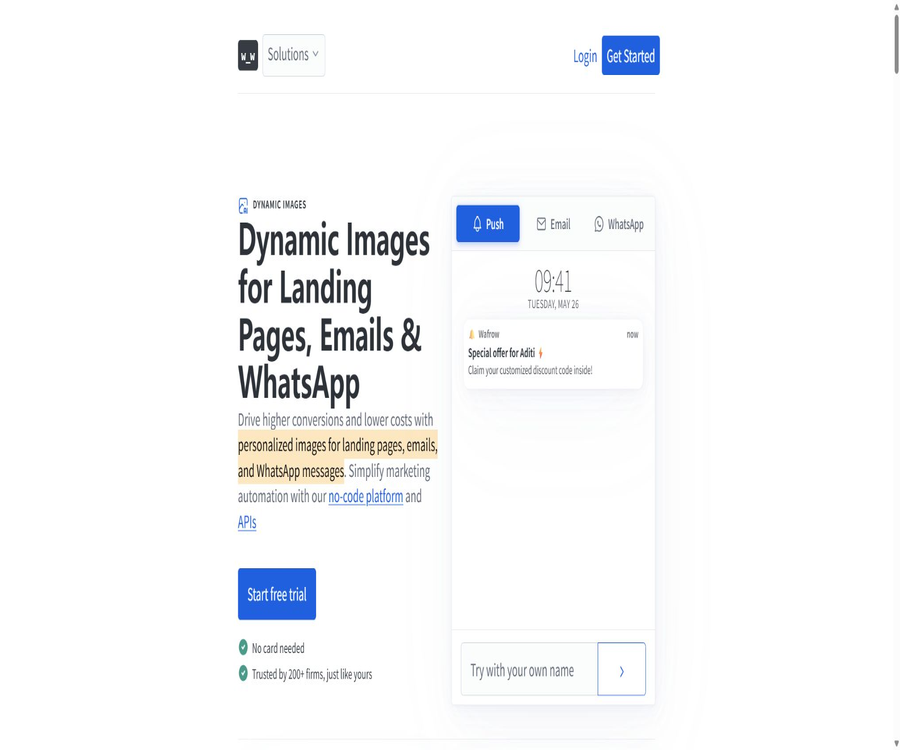
Wafrow is a platform for creating dynamic images and personalized marketing content, suitable for use in emails, landing pages, WhatsApp messages, and mobile push notifications. Teams can first create image templates, and then insert names, discounts, products, locations, QR codes, or real-time data into the layers of those templates.
The platform offers a no-code editor, image generation interfaces, Webhooks, Zapier integration, and MCP servers; it is suitable for marketers to configure manually as well as for developers to incorporate dynamic creative elements into automated workflows.
Change in product positioning
Early Wafrow documentation described it as a tool for creating copy for AI landing pages and for conducting A/B testing. The current website focuses heavily on dynamic images, personalized banners, and marketing automation; therefore, the description provided should reflect the latest features of the product.
| Phase | Main positioning | Is it a priority at the moment? |
|---|---|---|
| Early materials | AI-generated copy, brand tone, and landing page testing | The official website is no longer used as the main homepage. |
| Current products | Personalized animated images, email banners, landing pages, and messages | Yes |
| Developer capabilities | Image API, Webhook, and MCP server | Yes |
| Automation | Connection to Zapier and various marketing platforms | Yes |
Core functions
- Dynamic image template: Makes text, images, colors, and transparency adjustable layers.
- Real-time personalization: Generate different images based on the recipients, page visitors, or activity data.
- Email banner: Displays information such as name, discounts, products, and a countdown timer within the email.
- Landing page images: Lightweight scripts are used to match the page’s design elements with advertisements or customer data.
- WhatsApp and push notifications: Create personalized content for message cover images and rich-media push notifications.
- Image generation interface: Create images using request parameters or structured data.
- Automated integration: Generation is triggered via Zapier, Webhooks, and native connections.
- MCP server: Enables AI agents that are compatible with it to discover and utilize the Wafrow tool.
- Material management: Centralized storage for templates, brand assets, and generated results.
- Multilingual and font support: It supports various writing systems and thousands of fonts.
How do animated images work?
Dynamic images are not created by generating a separate image for each user manually; rather, they are produced using templates and parameters. The same image address can display different content based on the data provided, or fixed versions of such images can be generated in bulk in advance.
- Design the fixed background, brand elements, and layout.
- Set the name, discounts, images, or colors as editable layers.
- Customer data is provided by CRM systems, email platforms, spreadsheets, or business systems.
- When a image is requested, the server renders the final version.
- The generated results are delivered to email recipients or page visitors via a global CDN.
- It is necessary to prevent sensitive information from ending up in publicly accessible image addresses that can be guessed.
Personalization of template layers
- Text layers: name, company, discount, date, inventory, and action text.
- Image layers: products, profile pictures, locations, recommended content, and brand icons.
- Style layer: background color, transparency, and other customizable visual properties.
- QR code: Generates different discount or recommendation links for each customer.
- Default value: Safe, generic content is used when the customer field is missing.
- Multilingual: Select appropriate fonts for characters such as Arabic, Hindi, Chinese, and Japanese.
Email personalization
Wafrow allows dynamic image addresses to be included in email templates, so that each recipient sees a banner corresponding to their own data. The email platform is responsible for replacing the variables, while Wafrow handles the rendering and delivery of the images.
- Display the recipient’s name or company name on the banner.
- Display different products and discounts based on the shopping cart and customer tags.
- Add a real-time countdown, inventory level, or social proof.
- Generate friend avatars or personal invitation codes for recommendation posts.
- Switch creative content based on region and language.
- Use a test contact before sending to verify the syntax of variables and any missing fields.
Personalized landing page
The platform offers lightweight scripts that can be installed via the tag manager or website code. The images on the landing page can then be updated in accordance with changes in advertising content, customer information, or campaign details.
- Ensure that the ad copy and the visuals on the landing page are consistent.
- Display different banners by source, activity, region, or audience.
- Present exclusive discounts or recommendations to known customers.
- It reduces the workload of creating separate pages for each activity.
- The script is of small size and is provided via CDN.
- Before going live, it is necessary to check page speed, caching, privacy, and script-free fallback options.
WhatsApp and mobile push notifications
- Prepare a header image of the appropriate size for the WhatsApp Business template.
- Add name, order, discount, or promotion information to the image.
- Create rich-media images for push notifications and preview the appearance on iOS and Android.
- Dynamic addresses are generated using variables from CRM or messaging platforms.
- Different channels have their own restrictions on image size, aspect ratio, and caching.
- Marketing messages must also comply with user consent and template approval requirements.
E-commerce discount banners
- Show different discount codes and QR codes to each customer.
- Generate personalized recall images based on the products that were abandoned.
- Adjust the banner content based on inventory and event timing.
- Set different rewards for different membership levels or customer tags.
- Generation is triggered in combination with Shopify and email platforms.
- The eligibility for discounts must be verified on the server; the image itself cannot serve as a basis for authorization.
Recommended and social proof images
- The inviter’s profile picture and name are displayed in the invitation.
- Generate a recommendation code or QR code for each user.
- Display real-time inventory, number of applicants, or event progress.
- Include customer reviews, purchase quantity, or regional popularity in the template.
- Improve content relevance, but do not fabricate ratings, sales figures, or scarcity information.
- Rules for refreshing, caching, and handling exceptions should be established for real-time data.
Code-free automation
Non-developers can connect data sources to marketing channels using a visual editor and Zapier. A common scenario is that the creation of a banner is triggered by new rows in a table, new leads, or abandoned purchases.
- Google Sheets generates an image after adding a new record.
- Facebook Lead Ads creates welcome materials after new leads are generated.
- Shopify generates a recall banner after a abandoned purchase occurs.
- Enter the image URL in CRM or in the subsequent email steps.
- Use test data to verify that each field matches the default value.
- Batch activities should include error notification and handling for repeated events.
Native integration
The official website currently displays 14 types of integrations, covering e-commerce, CRM, email, push notifications, content management, and automation platforms. The specific fields, authentication methods, and available operations are subject to the current documentation.
- E-commerce and marketing: Shopify, Klaviyo, Omnisend, and ActiveCampaign.
- Email and CRM: Mailchimp, HubSpot, Salesforce, and ConvertKit.
- Messaging and engagement: Braze, Customer.io, and Firebase.
- Data and integration: Clay, Apollo, and Zapier.
- Content management: Systems such as Contentful.
- The pay-as-you-go plan also offers custom Webhooks.
Image generation API
Developers can select templates through the interface, and provide text, image, and style data for the variable layers. The platform supports both pre-generation of content and real-time rendering when users access it.
- Pre-generate all images for the batch list.
- Rendered based on parameters when the user opens a page or email.
- Modify multiple layers through structured requests.
- Integrate the generated results with CRM, messaging, and internal systems.
- Use Token authentication to restrict the environments and permissions for keys.
- Set retry and idempotency for failures, timeouts, rate limiting, and duplicate requests.
MCP server
Wafrow provides MCP servers that enable compatible clients or AI agents to discover and invoke image generation tools. This functionality is not available in the free version, but it is included in both the lifetime license and the pay-as-you-go plan.
- Let the agent create marketing images based on the task.
- Read templates and generate content from conversational workflows.
- Connect to development tools or automation platforms that support MCP.
- Verify the text, images, and target activities transmitted by the agent.
- Limits on the number of calls that can be made and on the templates that can be used help to prevent accidental creation of content or misuse of costs.
- Keys and customer data should not be exposed directly to untrusted clients.
Free marketing tools
- Personalized email banners: Enter the name variable and convert it to the syntax required by different email platforms.
- OG Image Generator: Creates images for sharing on social media based on page information.
- Email countdown: Create real-time countdown images that can be embedded in emails.
- Push notification preview: Simulates the rich-media push experience on iOS and Android.
- WhatsApp image preview: Check the size of the template header image and its display in chats.
- HTML email templates: Create, preview, and copy the basic email code.
Which users are it suitable for
- E-commerce and lifecycle marketing teams that need to improve the relevance of their emails.
- Marketing automation specialists who create personalized banners for a large number of clients.
- Shopify merchants in need of dynamic discounts, abandoned cart recovery, and recommendation campaigns.
- The growth team reaches out to users via WhatsApp or mobile push notifications.
- Developers who wish to generate ideas in bulk using APIs.
- Marketing agencies that manage templates and campaigns for multiple clients.
- A team that aims to enable AI agents to use image tools automatically.
Typical use cases
- The welcome email displays the recipient’s name and exclusive offers.
- Generate banners with images, prices, and discount codes for products that have been abandoned.
- Show the information of the inviter and friends in the recommendation email.
- The main visual of the landing page is changed in real time based on the advertising campaign.
- Render inventory, number of registrations, or countdown on a picture.
- Create personalized cover images for WhatsApp templates and mobile push notifications.
- Use interfaces to generate materials in bulk for thousands of CRM records.
- Let AI agents create template variants based on marketing tasks.
Tutorial on creating animated images
- Identify the channels, objectives, audience, and data fields that require personalization.
- Create a image template to define the brand background, logo, and security area.
- Make layers such as names, products, discounts, and QR codes editable.
- Set the type, length limits, and default values for each field.
- Use test contacts to generate various samples of different lengths, in different languages, and including abnormal cases.
- Add the URL of the animated image to emails, pages, WhatsApp, or notification templates.
- After publication, monitor for errors, bandwidth usage, clicks, and actual conversions.
Interface Integration Tutorial
- Create a template and record its identifier as well as the layers that can be modified.
- Store the access token on the server; do not include it in the public frontend code.
- Construct structured requests based on customer data, and perform length and format validation.
- Call the generation interface to save the returned image address or result.
- Implement secure retries for timeout, throttling, failures, and duplicate events.
- Use caching to avoid generating the same image repeatedly for the same customer and campaign.
- It records the template version, inputs, time, and activities to facilitate auditing and deletion.
Prices and packages
As of this verification, Wafrow offers three public licensing options: Free, Lifetime License, and Pay-As-You-Go. The free version costs $0 forever, the lifetime license costs $99 once, while the pay-as-you-go option charges $0.01 per image generated.
| Plan | Price | Monthly images | Bandwidth | Integration | MCP |
|---|---|---|---|---|---|
| Free | $ | 1000 pieces | 1GB/month | 14 types of integrations | Not included |
| Lifetime License | $ | 10,000 pieces | 25GB/month | 14 types of integrations | Includes |
| Pay-As-You-Go | 0.01 dollar per piece | No restrictions | No restrictions | 14 integrated options plus custom Webhooks | Includes |
Common functions of all solutions
- It can be used for emails, WhatsApp, mobile push notifications, and landing pages.
- It supports generating images using address parameters.
- It offers support for over 6,000 fonts as well as characters in multiple languages.
- There is no limit on the number of images and PDF downloads.
- It provides image APIs, Webhooks, and digital asset management.
- It includes support via Slack and email; the specific level of support is determined by the current plan.
Trial, cancellation, and support
- The official website states that it is possible to start using the service for free, without the need for a credit card.
- The pricing section also shows information regarding a 14-day free trial; the specific options available need to be confirmed on the settlement page.
- Officials state that cancellation can be done independently, with no long-term locking in place.
- Free assistance is available for the first integration of an activity.
- Non-profit organizations can contact the authorities to request a discount.
- Prices, quotas, and one-time license terms may change; therefore, keep a record of the purchase page.
How to choose a solution
| Demand | Suggested solution | Reason |
|---|---|---|
| Small-scale activities or effect verification | Free | 1,000 images per month and 1GB of bandwidth are sufficient for testing. |
| Continuous use, with no more than 10,000 sheets per month | Lifetime License | One-time fees, along with increased bandwidth and MCP capabilities |
| The amount generated is very large or subject to significant fluctuations. | Pay-As-You-Go | Charging is based on the number of images; the page indicates that there are no limits on the number of images or bandwidth. |
| A custom webhook is required. | Pay-As-You-Go | This solution explicitly lists custom Webhooks. |
| AI agent invocation | Lifetime or pay-as-you-go | Free does not include an MCP server. |
Product advantages
- Focusing on dynamic images makes it more suitable for marketing scenarios driven by data compared to general image generation tools.
- Code-free editors, Zapier, APIs, and MCP cater to different levels of technical expertise.
- Templates can be reused in emails, landing pages, WhatsApp, and push notifications.
- It supports programmed modification of each layer, offering a high level of customization.
- 14 marketing integrations reduce manual data handling.
- Three different cost models are available: permanently free, one-time license, and pay-as-you-go.
- Global CDN and real-time rendering are suitable for large-scale marketing delivery.
Usage restrictions and precautions
- The current focus is on animated images; it should no longer be designed as an AI copywriting platform based on old methods.
- Email clients may cache images, which can result in differences in the display of real-time content and tracking information.
- If the address of a dynamic image contains predictable data, it may reveal names, discounts, or customer information.
- Too long personalized fields, missing fields, or the use of complex text can disrupt the layout.
- Even in cases where there are no restrictions on images or bandwidth, it is still necessary to check the terms regarding fair use, speed limits, and abnormal traffic.
- The discounts or eligibility shown in the image cannot replace the verification carried out by the back-end systems.
- Marketing automation must comply with rules regarding consent, cancellation of subscriptions, privacy, and messaging platforms.
- The conversion data from case studies on the official website comes from specific customers, and it cannot be guaranteed that similar results will be achieved in other situations.
Privacy and security checks
- Only the customer fields necessary for generating the image are required.
- Avoid including email addresses, phone numbers, and internal identifiers in image URLs.
- Use unpredictable identifiers or server-side proxies to protect sensitive activities.
- Set minimum permissions for interfaces and MCP tokens, and rotate them regularly.
- Establish processes for data deletion, the end of activities, and template archiving.
- Check the data processing responsibilities among CRM, Zapier, Wafrow, and the messaging platform.
- Conduct GDPR and other privacy compliance assessments based on the target region.
Compared to static marketing images
| Comparison items | Wafrow dynamic images | Regular static images |
|---|---|---|
| Content | By customer, event, or real-time data changes | All recipients see the same content. |
| Production | Templates can generate data in batches or in real time. | The designers export them one by one. |
| Channels | Emails, pages, WhatsApp, and push notifications | It can be used widely, but personalization is not automatic. |
| Update | Uniform adjustments can be made through data and templates. | Usually, it is necessary to re-export and replace it. |
| Risk | Data, caching, rendering, and privacy are complex. | Personalization is weak, but the technical risks are low. |
| Suitable for tasks | Large-scale personalized marketing | Brand main visual and fixed generic content |
GitHub and the open-source status
During this verification, no GitHub organization that can be confirmed as belonging to Wafrow’s official team, nor any complete source code for the platform, was found. The repositories with names such as VAFROW, AIWAF, and other similar names that appeared in the search results have no clear connection to this animated image product.
| Project | Status | Explanation |
|---|---|---|
| Wafrow platform | Commercial SaaS | Templates, rendering, CDN, accounts, and billing are all managed by the official team. |
| Official GitHub | Not confirmed | Warehouses with similar names should not be regarded as official projects. |
| Image generation API | Expose developer capabilities | Providing an interface does not mean that the server-side code is open source. |
| MCP server | Managed Integration | The lifetime version and the pay-as-you-go plan are available; the core implementation details are not disclosed. |
| Self-hosted version | No findings were detected. | If local deployment is required, please confirm directly with the authorities. |
Basic information
| field | Content |
|---|---|
| Tool name | Wafrow |
| Tool type | Dynamic images and marketing personalization platforms |
| Primary channels | Emails, landing pages, WhatsApp, and mobile push notifications |
| Automation | Zapier, 14 integration options, custom Webhooks and APIs |
| AI agent | Provide MCP servers |
| Price pattern | Free, one-time lifetime license, and payment per image |
| Minimum payment | Lifetime license: $99 once, or $0.01 per copy |
| Is it open source? | No |
Recommendation score
4.3 / 5. Wafrow combines dynamic image templates, marketing integration, APIs, and MCP to create a clear, personalized creative workflow, and its pricing model is quite flexible; however, real-time images present issues related to caching, field layout, privacy, and campaign validation, requiring the team to conduct thorough testing using actual channels.
Frequently Asked Questions
What does Wafrow mainly do?
It uses customer and campaign data to generate personalized images in real time, which can be used in emails, landing pages, WhatsApp, and mobile push notifications.
Is Wafrow still an AI copywriting tool?
The core focus of the current official website has shifted to dynamic images and personalized marketing; AI-generated text and A/B testing from older versions should not be used as primary features.
Is Wafrow free?
There is a permanent free plan that allows for the creation of 1,000 images per month and the use of 1GB of bandwidth, but it does not include an MCP server.
How much is a lifetime license?
The official price listed is $99 one-time fee, which includes 10,000 images per month, 25GB of bandwidth, 14 integrated services, and an MCP server.
How much is it for pay-as-you-go?
The official figure shows that 0.01 dollar is charged for each image generated, and it offers unlimited numbers of images, bandwidth, as well as the possibility to set up custom Webhooks.
Is programming required?
It’s not necessary; a visual editor and Zapier can be used. Advanced users can also integrate it through image APIs, Webhooks, or MCP.
Is it compatible with Shopify and email platforms?
Supported – the official website lists various integrations such as Shopify, Klaviyo, Mailchimp, HubSpot, and Braze.
Can email images be updated in real time?
Rendering can be based on the data available at the time of request, but the cache in the email client may prevent the user from seeing the latest content every time it is opened.
Do you provide MCP servers?
Available; the lifetime license and pay-as-you-go options are included, while the free option is not.
Is Wafrow open source?
It is not an open-source platform; nor has a complete set of source codes available on official GitHub or that can be self-hosted been confirmed this time.
Tools similar to Wafrow




 Guigong Network Security Registration No. 45132202000164