






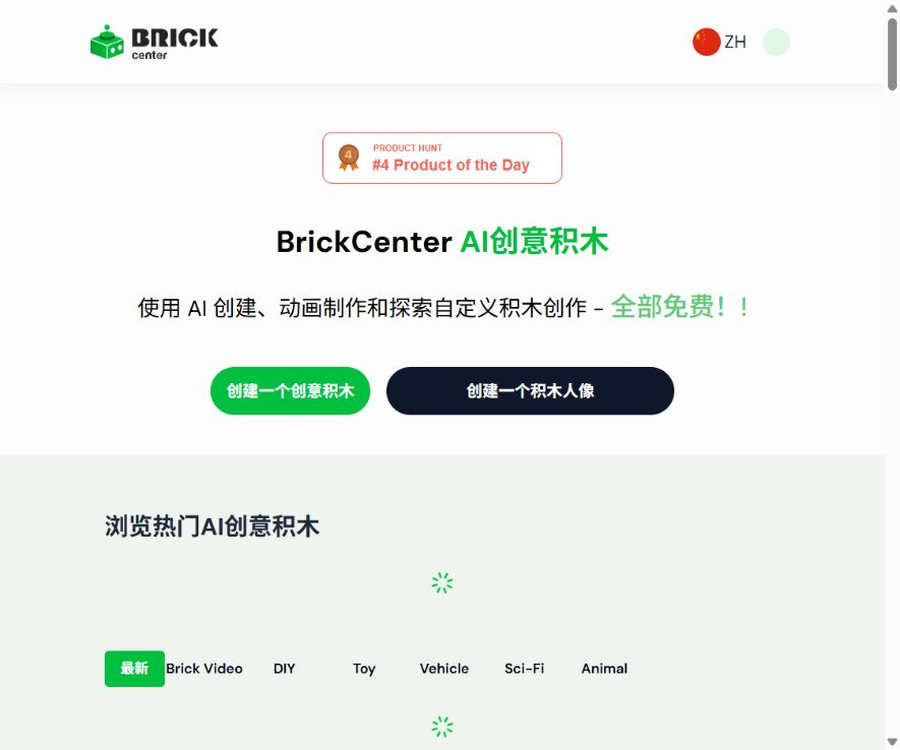
BrickCenterNet
BrickCenterNet, a smart tool focused on AI-powered image processing.
Tags:Common AI image toolsWhat is BrickCenter?
BrickCenter is an AI-based visual generation platform designed for brick enthusiasts and content creators. Users can describe the theme of a brick set in words, or they can upload photos of people to create images in the style of brick figurines.
The image generated can be used to create a 5-second short animation, which can then be saved or shared on communities. It is better suited for conceptual visuals and social content, and should not be considered an equivalent to validated tools for designing physical block structures.
Core functions
- Generate a conceptual diagram of the building block set based on the textual description.
- Convert photos of positive characters into block figure versions.
- Generate a 5-second short animation from the building block images.
- Download and share the generated images or videos
- Save the work and continue to view it in your profile.
- Browse vehicles, buildings, animals, and science fiction works in the community directory.
- The paid package offers high-definition downloads as well as the right to use the content for commercial purposes.
Images of the text generation building block set
After the user enters descriptions such as color, shape, theme, scene, and composition, the system generates an image that appears to be built from blocks. The more specific the instructions, the easier it is usually to control the direction of the image.
- Describe the subject, such as vehicles, buildings, animals, or artworks
- Specify the main color and texture appearance.
- It explains the angle of view, background, and lighting.
- Add considerations for size, component density, and style requirements.
- Generate again after modifying the description based on the results of the first round.
Convert photos into building block dolls
The doll generator allows the upload of photos no larger than 3.5MB; officials recommend using clear, front-facing portraits. The system creates images in a doll-like style based on features such as the face, hairstyle, and clothing.
- Priority should be given to front-facing photos with a fully visible face.
- Avoid images that are too dark, blurry, or have strong filters.
- After uploading, wait for the AI to generate the brick figurine.
- View and download the results on the canvas.
- When dynamic display is required, generate a 5-second animation again.
Block animation
After the image is generated, action or camera instructions can be entered to transform a static set of building blocks or dolls into a video lasting about 5 seconds. Each animation consumes an amount equivalent to 3 images in terms of generation quota.
- Describe character actions, object movements, or camera movements.
- Use short and precise movements to prevent the scene from getting out of control.
- After generation, check for part drift, deformation, and flickering.
- Download MP4 videos for sharing or editing
The differences between images, animations, and true 3D models
| Output type | Public capabilities of BrickCenter | Is it possible to build it physically directly? |
|---|---|---|
| Block-style images | Clear support | No, it is merely a visual concept. |
| Pictures of building block dolls | Clear support | It cannot be used directly as a part description. |
| 5-second animation | Clear support | No. |
| High-resolution images | Paid plan support available | No. |
| 3D model files | The FAQ states that it can be downloaded, but the format and examples are not clear. | It needs to be verified separately. |
| Parts list and assembly steps | No findings were detected. | Not supported |
The official website does not specify any standard 3D file formats that can be used for verification, nor does it provide information regarding grid quality, rules for connecting parts, or slicing tests. Before making a purchase, it is necessary to determine whether what will be downloaded is a rotatable model, a grid file, or merely an image with a three-dimensional appearance.
Table of Contents and Inspiration
- Browse the latest community creations
- View by categories such as DIY, toys, vehicles, science fiction, and animals.
- Refer to the themes and compositional methods of other works.
- Enter the newly created process from the directory.
- Avoid directly copying protected character or brand designs.
How to create images of building block sets
- After logging in, you will be taken to the page for creating text generation blocks.
- Use one sentence to define the subject, theme, and main color.
- Add additional shooting angles, backgrounds, lighting, and part density.
- Submit for generation and check the integrity of the main body as well as the block style.
- Adjust the prompt to remove unnecessary text, characters, or background elements.
- After selecting the desired result, download it at the required resolution.
- Before commercial use, verify the benefits of the current package as well as any third-party intellectual property rights.
How to create animations for building block dolls
- Prepare a clear front-facing portrait that is no larger than 3.5MB.
- Confirm that you have the right to upload and process the portraits in the photos.
- Upload the photo and wait for the system to generate an image of the building block figure.
- Check whether the face, hairstyle, clothing, and background meet the expectations.
- Enter simple and clear action and shot instructions.
- It is confirmed that the animation will start to be generated after 3 image slots are used.
- Check for flickering and distortion; once satisfied, download the MP4 file.
Prompt writing format
- Subject: First, specify the vehicle, building, or character that is to be created.
- Structure: Describes the number of layers, shape, symmetry, and part density
- Color: Specify the main color, secondary color, and transparent effect.
- Scene: Choose from workbench, display case, city, or solid-color background
- Perspective: Present in eye-level, top-down, isometric, or close-up views
- Lighting: Indicates soft lighting, studio lighting, or film-style lighting.
Which users are it suitable for
- Enthusiasts who wish to create concept diagrams based on building blocks quickly
- Social media users in need of fun avatars and character designs
- Content creators who produce short videos, posters, and presentation materials
- Teachers who create creative visuals for classroom activities
- Designers who explore possible design directions before proceeding with formal modeling
- Teams that need to generate marketing materials in a brick-style format on a bulk basis
Typical use cases
- Turn cars, buildings, or science fiction concepts into block-style concept art.
- Convert personal photos into brick doll heads
- Generate a 5-second animation for social media posts
- Create theme reference images for children’s creative activities
- Prepare quick visual drafts for proposals and mood boards
- Browse community creations to find new block themes.
Product advantages
- It also supports text-based character creation kits as well as photo-based doll creation.
- The interface process is simple; no experience in 3D modeling is required.
- Static images can still be converted into short animations.
- A limited amount of free access is provided to allow for initial testing of the functionality.
- The Premium version has a lower price and includes high-definition quality as well as commercial usage rights.
- The community directory offers creative references on various topics.
Usage restrictions
- The generated results are primarily visual concepts; there is no guarantee that they can be physically constructed.
- There is no capability for automatically generating part lists and assembly instructions in public.
- The so-called 3D model downloads lack format information, examples, and instructions for print verification.
- AI may generate parts that are unable to be connected, are floating, or have abnormal shapes.
- A 5-second animation will incur a charge equivalent to 3 images.
- No refunds are available once a membership is activated.
- The public page does not clearly state the name of the model or the source of the training data.
Verification prior to entity setup
- Do not purchase a large number of parts based solely on a single conceptual diagram.
- First, rebuild the structure in a specialized building-block design software.
- Check each connection point, center of gravity, load-bearing capacity, and potential interference.
- Generate an actual parts list and step-by-step instructions.
- Construct a small-scale prototype first, then create the official version.
- When used by children, it is necessary to check the safety of small parts and the structure.
Commercial use and intellectual property rights
The Premium and Pro pages list the rights for commercial use, but the commercial license only defines the scope of usage permitted by the platform; it does not automatically eliminate the rights of third parties regarding any photos, well-known characters, brand logos, or similar designs that are used.
- Priority is given to creating original themes and original characters.
- Do not directly copy protected characters and existing sets.
- Obtain permission for the use of someone’s portrait before uploading their photos.
- Retain the purchase records and the relevant business license information from that time.
- Conduct checks on trademarks, copyrights, and design before official sales.
Photo privacy
The doll upload page states that the photos are used solely for the purpose of creating the doll at that moment, and the original photos are not saved for any other purposes. Users should still avoid uploading identification documents, addresses, sensitive information related to children, or photos of third parties without their consent.
- Remove background information that is not related to the generation of characters.
- Avoid uploading identification documents and pictures with addresses.
- Photos of minors must be authorized by a guardian.
- After generation is complete, check the save and delete options in the account.
Free package
On the pricing page, “Free” is indicated as $0; it is possible to create up to 4 images and use the basic building block set for design purposes. The FAQ on the home page still states that a maximum of 3 free designs are available – there is thus a difference in the number of allowed designs between these two pages.
| Page | Description of the free quota | Suggestions |
|---|---|---|
| Price page | A total of 4 images. | Given priority as a reference for the current package |
| Home FAQ | Up to 3 designs | It might be old copywriting. |
| Actual account | Refer to the quota panel. | After registration, confirm first before generating. |
Premium package
- Limited-time price for the first month: $2.45
- $
- 30 images are generated each month.
- Supports high-resolution downloads
- Includes rights for commercial use
- 5-second animations are supported, with 3 images deducted per animation.
Pro package
- The price is $9.9 per month.
- Includes all features of Premium.
- 150 images are generated each month.
- Experience new features first.
- 5-second animations are supported, with 3 images deducted per animation.
Price comparison
| Package | Monthly fee | Image quota | HD download | Commercial use | Animation |
|---|---|---|---|---|---|
| Free | $ | A total of 4 pieces | Foundation | Not included | It is subject to the account details. |
| Premium | $ | 30 per month | Support | Support | 5 seconds, 3 credit units deducted |
| Pro | $ | 150 per month | Support | Support | 5 seconds, 3 credit units deducted |
Refunds and subscription notes
The official price page clearly states that memberships are virtual products, and no refunds are available once they are activated. The regular price will be applied again after the initial month’s discount expires; it is necessary to check the renewal date and the option to cancel before subscribing.
- First, use the free quota to verify the quality of the images and dolls.
- Check the renewal price after the first-month discount before making a purchase.
- Do not consider the unused credit as a refundable balance.
- Download and save the works that you need to use for a long time.
GitHub, APIs, and open-source status
As of this verification, no official GitHub repository, model weights, development interfaces, or locally deployed versions that can be confirmed through the BrickCenter website were found. The projects BrickNet, Brick AI, and other similar building-block-based projects identified in searches have no official connection to this platform.
| Project | Status | Explanation |
|---|---|---|
| Web application | Closed-source SaaS | Use via an online account |
| Generation model | Not disclosed | There is no model name or weights. |
| Official GitHub | No findings were detected. | Projects with the same name cannot be considered official. |
| Public API | No findings were detected. | No keys or development documentation available. |
| Local deployment | Not provided | Reliance on official online services |
Basic information
| field | Content |
|---|---|
| Tool name | BrickCenter |
| Tool type | Generator for AI building block images, dolls, and short animations |
| Enter | Text description or character photos |
| Main output | Images and 5-second MP4 animations |
| Free quota | The price page shows a total of 4 images. |
| Premium | $ |
| Pro | $ |
| Commercial use | Premium and Pro include |
| Whether API is provided | No findings were detected. |
| Is it open source? | No |
Recommendation score
3.9 / 5. BrickCenter is suitable for quickly creating block-style concept art, character portraits, and short animations; it is inexpensive and easy to use. However, it lacks functional structures, part lists, and detailed instructions for generating verifiable 3D files, so it isn’t suitable as a replacement for professional block design tools.
Frequently Asked Questions
Is BrickCenter free?
There are free packages available. The price page states that 4 images are included in total, while the FAQ on the homepage mentions 3 designs; the actual number of usable items is indicated on the account page.
How much is Premium?
The initial price for the first month is $2.45; after that, the cost is $4.9 per month. This package includes 30 images, high-resolution downloads, and the right to use them for commercial purposes.
How much is Pro?
The Pro version costs $9.9 per month and includes 150 images as well as early access to new features.
How long is the animation?
The currently stated value is 5 seconds, and each animation consumes an amount equivalent to 3 images.
Can photos be turned into dolls?
Yes, it is recommended to upload a clear front-facing portrait whose file size does not exceed 3.5 MB. Before generation, it is necessary to confirm the rights to use the photo or portrait.
Can it generate real, buildable sets?
No direct guarantee can be provided. The platform mainly generates conceptual images; it does not provide an official list of components, information on connection verification, or instructions for assembly.
Can I download 3D models?
The FAQ claims support, but it does not provide clear information regarding the format, examples, or print tests. Users who need 3D files should confirm this with the authorities before making a payment.
Can it be used for commercial purposes?
Premium and Pro outline the commercial benefits, but users still need to address the third-party rights related to photos, characters, trademarks, and similar designs.
Can I get a refund?
No refunds are available after the membership is activated; it is recommended to use the free quota first to test the quality of the generated content.
Is BrickCenter open source?
It is not open source, and no GitHub repository confirmed by the official website, public API, or self-hosted version has been found.
Tools similar to BrickCenterNet




 Guigong Network Security Registration No. 45132202000164