






3D AI Studio
3D AI Studio, a smart tool focused on AI-generated images
Tags:Common AI image toolsWhat is 3D AI Studio?
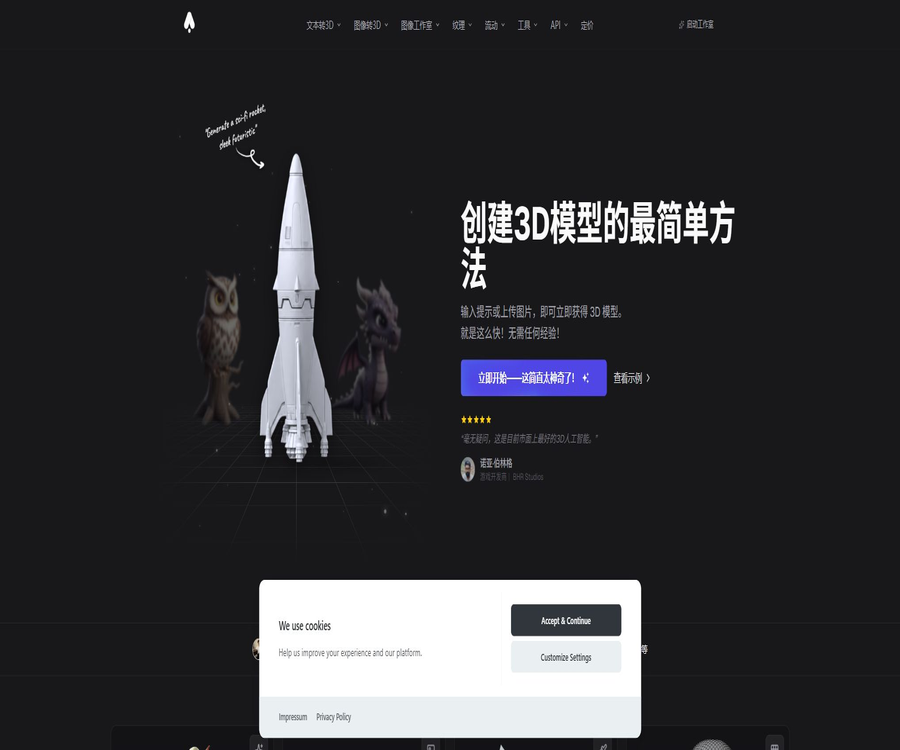
3D AI Studio is an AI-based 3D content creation platform that runs in a browser; it can convert textual descriptions, single images, or images from multiple angles into 3D models. The platform also includes additional tools such as texturing, topology reforming, binding, animation, mesh repair, rendering, and format conversion.
It offers its own Prism series of engines, as well as integrating various models such as Meshy, Tripo, Rodin, Hunyuan3D, Trellis, and Seed3D. Users can switch between engines depending on the task at hand, without the need to register for multiple services separately.
Core functions
- Generate a textured 3D model based on the textual instructions.
- Convert a single image into a complete 3D asset.
- Use multiple angles to improve consistency in shape and details.
- Generate or modify PBR textures for existing meshes.
- Automatically reconstructs the topology and outputs triangular or quadrilateral faces.
- Reduce the number of polygons and generate different levels of detail.
- Fix the grid, create hollow models, and set precise dimensions.
- Automatically bind bones to the character and apply animations.
- Create images, edit images, and produce video materials.
- Arrange image, text, 3D, and video nodes into Flow workflows.
- Create models in the AI assistant using the MCP connector.
- Integrate the complete 3D process into the application by developing APIs.
Text to 3D
Text-to-3D is suitable for quickly exploring concepts without any reference images. After the user describes the subject, style, material, and purpose, they select a model; the system then generates the geometry and textures that can be further modified.
- Describe a single entity first, to avoid having too many objects in the scene.
- Specify the style, such as hard surface, low polygon, or realistic.
- Additional materials, colors, and key structures.
- Indicates the intended use for gaming, printing, or AR.
- After generating multiple candidate solutions, the best geometry is selected.
- Continue to organize the assets using heavy topology and mapping tools.
Convert image to 3D
Converting images to 3D is more suitable for users who already have character designs, product photos, illustrations, or sketches. The official recommendation is to use images with a clear subject, even lighting, a simple background, and a resolution of at least 1024 pixels.
- PNG, JPG, JPEG, and WebP images are supported.
- Single-subject and three-quarters view angles are usually easier to reconstruct.
- Transparent, reflective, thin lines, and obscured structures are more prone to errors.
- A single image cannot provide information about the back side; AI will fill in that information based on its training data.
- Multiple image inputs can provide more geometric data for the front, back, left, and right.
- After it is created, the back, bottom, and joints should be checked.
Multi-model aggregation
Different 3D engines have their own advantages in terms of characters, hard surfaces, speed, textures, and topology. 3D AI Studio allows users to compare multiple engines under the same account, and to see the associated cost points before each generation.
| Model or series | Public positioning | Selection suggestions |
|---|---|---|
| Prism Turbo | Quick generation | Used for drafts and rapid iteration |
| Prism 3 series | Overall quality and details | Used for candidates of higher quality finished products |
| Tripo P1 | Assets suitable for use in games | Pay attention to the speed and the subsequent game progression. |
| Hunyuan3D | High-quality image-to-3D generation | Suitable for comparing geometric and texture features. |
| Trellis | Open-source model approach | Suitable for specific graph-to-3D tasks |
| Meshy, Rodin, etc. | Third-party professional engines | Conduct actual tests based on characters, objects, and styles. |
AI textures and PBR materials
AI Texturing can generate textures for existing models based on text or reference images, and it supports the PBR workflow. Before using it in practice, it is necessary to check the UV seams, material proportions, metallicity, roughness, and normal details.
- To rapidly generate a surface appearance for texture-free models.
- Use text to modify color, wear, and style.
- Transfer material characteristics based on the reference image.
- Generate textures for base color, metallicity, roughness, etc.
- Check the effects under different lighting conditions in the target engine.
- Manual color correction is applied to branded products and genuine materials.
Re-topology and model optimization
Generative 3D models often contain irregular surfaces, too high a number of polygons, or a topology that is not suitable for deformation. Quad Remesh and optimization tools can generate quadrilateral faces, reduce the number of polygons, create LOD levels, and compress web assets.
- Choose to output triangular or quadrilateral faces.
- Adjust the grid density according to the target platform.
- Prepare a cleaner topology for game characters and animations.
- Reduce file size for web and mobile versions.
- Generate LOD versions for different distances.
- Check whether the contour and UVs change after re-topologizing.
Binding and animation
The platform offers a role-binding tool that can handle bipedal, quadrupedal, and other types of creatures, allowing the use of pre-defined animations such as walking, running, and dancing. Automatic binding is suitable for prototypes; however, for more complex characters, it is still necessary to check the weights and joints in specialized software.
- Identify the character structure and add bones.
- Select a binding template for common role types.
- Apply various preset actions.
- Export to Unity, Unreal Engine, or Blender.
- Check the shoulders, hips, fingers, and the fit of the clothing.
- In official animation projects, manual adjustment of skinning weights is still carried out.
3D printing tools
Generation models can be exported in STL, OBJ, or 3MF formats for 3D printing, and can be processed using tools such as repair, hollowing, scaling, and vertex color adjustment. AI models are not necessarily closed in structure or have printable wall thicknesses.
- Check whether the model is closed and eliminate non-manifold geometry.
- Set the actual size in millimeters or other units.
- Hollow out large models to reduce material usage.
- Increase the thickness of weak structures and the strength of their connections.
- Convert texture or vertex colors for multi-color printing.
- Check the hanging, support, and printing direction before slicing.
Photos, videos, and Image Studio
Image Studio allows you to create or remove 2D reference images first, and then feed those images into the tool for converting them into 3D format. The official documentation recommends following this process of creating clear reference images first and then performing the 3D conversion, as it helps to improve the stability of the results.
- Create concept art for characters or products from text.
- Remove complex backgrounds and highlight a single subject.
- Use natural language to adjust shape, color, and angle.
- Prepare a consistent reference diagram for multi-view modeling.
- Generate display images or video materials.
- Combine 2D, 3D, and video steps within the same workflow.
Flow node workflow
Flow is an infinite canvas-based node system that allows prompt input, image generation, image editing, 3D creation, batch processing, and logical steps to be combined into repeatable workflows. There is no cost associated with creating and connecting nodes; points are only deducted when AI models are used.
- Use variable nodes to expose common inputs.
- Use Seed to allow multiple generation steps to share a random seed.
- Combine prompt words and switch paths based on conditions.
- Send multiple images to the same process in bulk.
- Check the estimated score for the entire process before running it.
- Consider local rendering and pure logic nodes as free steps.
- View and download historical results from the Outputs section.
MCP connector
The MCP connector enables AI assistants that support this protocol to access 3D AI Studio, use natural language generation models during conversations, and save the results in the user’s backend. The official website states that no local software needs to be installed by users, nor do they need to manually configure development keys.
- Describe the required 3D assets in the AI assistant.
- The model generation task is initiated by the connector.
- View the results of the interactive model within the dialogue.
- Return to the 3D AI Studio backend to continue editing and downloading.
- Before use, check the permission prompt from the AI assistant regarding remote connections.
Develop API
The public API covers text to 3D conversion, image to 3D conversion, image generation and editing, AI textures, topology remapping, restoration, format conversion, rendering, and compression. Tasks are typically executed asynchronously: the application first submits a request, then polls for the task status to obtain the results.
- Verify requests using a Bearer token.
- Generate textured models using a single image or multiple views.
- Modify 3D textures using text or reference images.
- Perform grid repair, hollowing, and precise scaling.
- Convert between GLB, OBJ, FBX, STL, and PLY.
- Generate turntable images, videos, and renders up to 4K.
- Compress textures, simplify meshes, and generate web GLB files.
- Queues are established for batch processing, rate limiting, and retrying failed attempts.
How to create the first 3D model
- Register for a free account and obtain trial points that require no credit card.
- Choose text-to-3D or image-to-3D depending on whether there is a reference image available.
- Prepare a clear description, or upload a high-resolution image with a simple background.
- Compare model speed, quality, input requirements, and integration cost.
- Confirm the points to be deducted for this task before generation.
- Generate multiple candidates and rotate them for inspection in a web viewer.
- Organize the model using mapping, remeshing, repair, and sizing tools.
- Select the export format as game, web page, print, or AR.
- Check the materials, proportions, skeletons, and performance in the target software.
- Save the original image, prompts, model version, and authorization records.
Production acceptance process
- Check the geometry of the front, back, bottom, and shaded areas.
- Search for holes, surfaces, self-intersections, and non-manifold structures.
- Check the UVs, texture seams, and PBR channels.
- Verify that the number of faces, file size, and LOD meet the requirements of the target device.
- Verify the coordinate axes, units, dimensions, and pivot points.
- Role model testing checks the bones, weights, and all movements.
- Print the model to check wall thickness, supports, and slicing results.
- Render again using the target engine and real lighting.
- Verify the input image, third-party elements, and commercial licenses.
- After manual repair, it proceeds to official release or production.
Free version and point rules
New users can receive free credits without the need for a credit card, and they can also test the main generation tools. According to the latest rules, the free outputs generated through non-compliant payment methods or separate commercial licenses are intended solely for personal, non-commercial use.
- Different models and tools deduct different points.
- The accurate cost will be displayed on the preview interface before generation.
- Subscription points are refreshed at the start of each billing period and are not carried over.
- One-time point packages are valid indefinitely; the pricing page indicates that they never expire.
- The document states that points will be automatically refunded in case of generation failure.
- Free tools include limited viewing capabilities as well as text and grid processing functions.
- Commercial projects should generate their final output when payment is valid.
Monthly plan
The current price page shows three monthly subscription tiers: Basic, Studio, and Pro. The Studio option is listed at a promotional price of $29, with the regular price of $39 also shown; it is the settlement page that determines whether the promotion is still in effect.
| Package | Current monthly payment | Monthly points | Public positioning | Team benefits |
|---|---|---|---|---|
| Basic | $ | 1,000 | Beginner generation | Single |
| Studio | $ | 3,500 | Comprehensive creative tools | Single |
| Pro | $ | 18,000 | High usage and teams | Contains 3 seats |
Annual subscription plan
| Package | Annual total amount | Converted to monthly price | Page savings ratio | Monthly points |
|---|---|---|---|---|
| Basic | 144 dollars per year | $ | 37% | 1,000 |
| Studio | $ | $ | 41% | 3,500 |
| Pro | $ | $ | 7% | 18,000 |
One-time point package
| Points package | Price | Cost per 100 points | Validity period |
|---|---|---|---|
| 2,000 points | 34 dollars | 1.70 dollars | The page indicator never expires. |
| 5,000 points | 69 dollars | 1.38 dollars | The page indicator never expires. |
| 35,000 points | 399 dollars | About 1.14 dollars | The page indicator never expires. |
Comparison of package features
| Ability | Basic | Studio | Pro |
|---|---|---|---|
| Convert text and images to 3D | Includes | Includes | Includes |
| Image generation and editing | Includes | Includes | Includes |
| Export in major formats | Includes | Includes | Includes |
| MCP connector | Includes | Includes | Includes |
| All creation and production tools | Partially | Unlock | Unlock |
| Convert multiple images to 3D | Not marked | Includes | Includes |
| Generation speed | Standard | Faster | Highest priority |
| Team workspace | None | None | Includes |
| Team Seats | 1 person | 1 person | 3 people |
| Priority support | Not marked | Not marked | Includes |
Common integral consumption
The integration cost varies depending on the model, quality, and settings; the following are the typical ranges provided in the official documentation. The figures displayed on the interface before actual operation are the most accurate.
| Task | Common integrals | Explanation |
|---|---|---|
| Convert images to 3D or text to 3D | About 20 to 60 points | It depends on the model and quality. |
| Prism Turbo | About 25 points | It is usually less than 90 seconds. |
| Prism 3.1 | About 35 points | About 3 to 5 minutes |
| Tripo P1 | About 60 points | Game assets focused |
| Hunyuan 3.1 Pro | About 40 points | High-quality options |
| Image generation | Approximately 2 to 8 points | It depends on the model. |
| Role binding | Approximately 15 to 20 points | Variation by role type |
| Predefined animations | About 15 points per item | Application after binding |
| Format conversion | About 1 point | Document example |
API billing
The API offers prepaid credits as well as pay-per-request pricing, and no fixed monthly subscription is required. According to the official documentation, top-ups can start with small amounts, and tiered discounts are available for larger purchases, along with customized speed limits and enterprise-level solutions.
- Different endpoints and models consume different amounts of credits.
- The app allows users to check their balance and transaction history.
- Request failures and refund rules should be handled in accordance with the endpoint documentation.
- Batch generation will result in costs accumulating based on the actual number of executions.
- Budgets, speed limits, and alerts should be set in the production environment.
- For large teams, you can inquire about bulk pricing and customized quotas.
Which users are it suitable for
- Developers who need to create game props and character prototypes quickly.
- Convert 2D character designs into 3D concept art.
- Creators who produce AR, VR, and web 3D content.
- 3D printing enthusiasts who need a small number of customized models.
- A film and television team that creates 3D concepts for proposals and storyboards.
- 3D professionals who wish to compare results using various models.
- It is necessary to involve the development team responsible for 3D generation in this product.
- Studios that wish to process images, 3D models, and videos in bulk using nodes.
Typical use cases
- Generate game characters, items, and environmental objects from concept diagrams.
- Convert product photos into web or AR display models.
- Create prototypes for board games, figurines, and souvenirs.
- Create 3D rough models quickly for films, animations, and proposals.
- Generate new material and style versions for existing grids.
- Redo topology and generate LOD suitable for real-time engines.
- Batch convert formats, compress models, and render turntable videos.
- Provide a service for converting images into 3D formats for users through APIs.
Product advantages
- One account can use various mainstream 3D generation models.
- It supports input of text, single images, and multiple images.
- It covers the process from creation to texturing, topology, binding, and export.
- No local GPU or complex installation environment is required.
- It supports common formats for games, web pages, AR, and printing.
- Flow enables the creation of reusable and batch workflows.
- The MCP connector lowers the barriers to conversational generation.
- The public API covers the entire 3D processing pipeline.
- Free points can be tried out without a credit card.
- One-time point packages do not expire on a monthly basis.
- Pro offers team projects, seats, and priority handling.
- The official documentation is continuously updated with information on the models, points, and usage methods.
Usage restrictions and precautions
- A single image cannot accurately reproduce the invisible back side and internal structures.
- Errors still occur easily with characters’ fingers, transparent objects, thin lines, and reflective surfaces.
- Generation models do not necessarily have a topology suitable for animation.
- Automatic binding and animation may experience issues with weights and overlap.
- Before printing, it is necessary to check the sealing, wall thickness, and actual dimensions.
- The licenses, capabilities, and availability of different engines may vary.
- Monthly points are not carried over, and users who use the service infrequently may waste their quota.
- The monthly subscription page for Studio shows the promotional price; the final price will be confirmed on the payment page.
- Free output is available only for personal, non-commercial use.
- Paid commercial licenses also do not guarantee exclusivity or freedom from infringement.
- The terms prohibit using the output for training or improving competitive AI services.
- Professional production still requires manual inspection using Blender, Maya, or engines.
Commercial use and copyright
The latest terms distinguish between free generation and paid generation: content generated for free comes with only a personal, non-commercial license; whereas content generated under a valid paid subscription entitles the user to a perpetual, transferable, and sublicensable commercial use license.
- Commercial end assets should be generated when payment is valid.
- Retain the bills, creation dates, and project records as evidence of authorization.
- Ensure that the images, characters, and trademarks uploaded are covered by legitimate licenses.
- The output may contain third-party or open-source components along with their associated restrictions.
- The platform does not guarantee that the content created by different users will be unique.
- Whether output generated purely by AI is subject to copyright depends on local laws.
- After canceling the subscription, the licenses obtained during the compliant payment period remain valid.
Privacy and training data
The official FAQ states that the models and images are not shared or used for training, but the latest terms of service grant the platform the permission to use the inputs and outputs for providing, maintaining, improving, and researching services; meanwhile, the intellectual property provisions mention the right to use them for training purposes. There is a discrepancy between these two statements.
- For sensitive projects, it is necessary to confirm the final data terms with the authorities before uploading.
- Do not enter unauthorized facial images, biometric data, or personal information.
- Private assets are not made available to other users by default.
- Proactively publishing to the Community Library grants additional permissions to the platform and other users.
- Account settings allow for the deletion of data, but users should still maintain local backups.
- The retention period for the privacy policy generated by the API may differ from that of the web asset repository.
- Enterprise projects should require a data processing agreement and a list of sub-processors.
GitHub and the open-source status
There is an organization named 3d-ai-studio on GitHub, but as of the time of verification, it does not have any public repositories. The platform hosts open or openly licensed models such as Trellis and Hunyuan3D, as well as third-party engines like Meshy, Tripo, and Rodin; however, the platform itself is not open source.
| Project | Open state | Explanation |
|---|---|---|
| 3D AI Studio web platform | Not open source | Available through cloud accounts and points. |
| Official GitHub organization | It exists. | There are no public warehouses available at the moment. |
| Prism engine | Not disclosed | The platform’s own series of models |
| Some underlying models | Open or open weight | The license varies depending on the model. |
| Public API | Yes | Commercial pay-as-you-go interfaces are not the same as open-source solutions. |
| Local deployment | No unified solution has been provided. | You can find the appropriate open-source underlying models on your own. |
Basic information
| field | Content |
|---|---|
| Tool name | 3D AI Studio |
| Tool type | AI 3D generation and production tool platform |
| Input method | Text, single images, and multi-angle images |
| Main models | Prism, Meshy, Tripo, Rodin, Hunyuan3D, etc. |
| Export format | GLB, FBX, OBJ, STL, 3MF, USDZ, BLEND, etc. |
| Free trial | There are free points available, no credit card required. |
| Basic monthly plan | $ |
| Studio monthly plan | Currently $29 per month |
| Pro monthly plan | $ |
| Whether API is provided | Yes |
| Is MCP provided? | Yes |
| Is it open source? | The platform is not open-source; there are no public repositories on the official GitHub. |
Recommendation score
4.7 / 5. The main advantages of 3D AI Studio are its capability for aggregating multiple models and its comprehensive set of post-processing tools, which enable rapid creation of assets, from the conceptual stage all the way to a format ready for export; however, for real-world projects, attention must still be paid to topology, licensing, data terms, and manual quality control.
Frequently Asked Questions
Is 3D AI Studio free?
New users can receive points for free without the need for a credit card, but subscription points and advanced features require payment. The free generation of outputs is permitted under the current terms only for personal, non-commercial use.
How much is the monthly fee for 3D AI Studio?
Currently, the Basic version costs $19, the Studio version is available at a promotional price of $29, and the Pro version costs $149. The annual subscription prices are $12, $23, and $139 per month, respectively.
How many points are required to generate one item?
Converting text or images into 3D usually costs between 20 and 60 points, depending on the model and settings. The exact cost is displayed on the interface before generation.
Which 3D formats are supported?
Common formats such as GLB, FBX, OBJ, STL, 3MF, USDZ, BLEND, Collada, and PLY can be exported.
Can the generated model be used for commercial purposes?
Outputs generated in compliance during the valid paid plan period can be used for commercial purposes; free outputs are granted only for personal, non-commercial use, and the platform does not guarantee exclusivity of the content nor the absence of third-party rights.
Can it be used directly for 3D printing?
It is possible to export the file in a printable format, but it is first necessary to check the integrity of the mesh, wall thickness, dimensions, supports, and the results of the slicing process; one cannot assume that the originally created model is already suitable for printing.
Is automatic binding and animation supported?
It supports binding of characters with two or four legs, as well as a variety of preset actions; however, for actual animations, it is still necessary to check the skinning weights, joint deformations, and overlapping movements.
Does 3D AI Studio provide APIs?
A comprehensive and publicly available API is provided, covering 3D generation, texturing, topology reforming, repair, conversion, rendering, optimization, and image processing; billing is carried out via prepaid credits.
Will the model be trained using user data?
The FAQ states that this is not possible, but the latest terms of service provide a broader license for use in improvement, research, and training. Sensitive corporate projects require written clarification before being uploaded.
Is 3D AI Studio open source?
The platform is not open source. The official GitHub repository does not exist at the moment; although some of the third-party underlying models used in the platform may be available under open licenses.
Tools similar to 3D AI Studio




 Guigong Network Security Registration No. 45132202000164