






Third-party GPTs store
A third-party GPT storage platform, an intelligent tool focused on AI-generated images
Tags:Common AI image toolsWhat is WorkAny?
WorkAny is a desktop AI agent that enables computer tasks to be carried out using natural language; it is maintained by ThinkAny, LLC. It can organize files in the local workspace, write code, create websites, generate documents, spreadsheets, and presentations, and it allows for real-time preview of the results produced.
The original name of the database, “Third-party GPTs store”, is no longer appropriate for the current product. WorkAny is now divided into a free desktop application and a paid cloud-based WorkAny Bot; the former focuses on local productivity, while the latter offers continuous online hosting for OpenClaw agents.
A one-sentence summary
A cross-platform desktop agent that supports multiple models, MCP, and custom skills; it can convert natural language tasks into actual files, code, websites, and office documents.
Product composition
| Products | Operation location | Primary uses | Payment method |
|---|---|---|---|
| WorkAny Desktop | User’s computer | Tasks related to files, code, websites, and office documents | Free download; model fees apply separately |
| WorkAny Bot Hosting | WorkAny cloud server | 24/7 online OpenClaw robot | Annual subscription |
| Personal Assistant | WorkAny cloud server | More model quotas and professional support are built in. | Annual subscription |
| Source code version | Compile and deploy manually | Research, contributions, and compliance for personal use | WorkAny Community License |
Core functions of the desktop version
- Describe complex, multi-step tasks using natural language.
- Read, create, move, and organize local files.
- Generate a React website and preview it in real time.
- Write, modify, and run code.
- Create Word-based documents, reports, and technical materials.
- Generate an Excel table with formulas and formatting.
- Create a presentation and organize its structure.
- Execute file, search, and coding tasks using over 30 built-in tools.
- Connect to the MCP server to extend external tools.
- Load the custom Agent Skills reuse workflow.
- Integration with OpenRouter, Anthropic, OpenAI, and compatible interfaces.
Organize files
WorkAny can analyze folders based on file type, name, content, and context, and create a more organized directory structure in accordance with the user’s preferences. Since moving, renaming, or overwriting files can alter local data, it is advisable to use a copy or a test directory during the first run.
- Sort files by project, date, type, or topic.
- Identify duplicate names and chaotic download directories.
- Rename in batches while maintaining a consistent format.
- Generate lists and documentation for the files.
- Organize the scattered materials into the project directory.
- Display the plan before execution and restrict the workspaces to which access is allowed.
Create websites and code
After the user describes the page’s objectives, components, and visual style, WorkAny can generate React and Tailwind CSS projects, allowing for real-time previews within the application. It can also utilize code editors, terminals, and file management tools to work on existing projects.
- Create a website prototype from a single requirement.
- Generate components, pages, and basic interactions.
- Modify the existing code and explain the changes.
- Run the build command and check for errors.
- Preview web pages and HTML outputs in real time.
- Connect to a custom model service provider to complete the coding tasks.
- Access version repositories, databases, or other services via MCP.
Create documents, tables, and slides.
| product | Tasks that can be completed | Key points of manual inspection |
|---|---|---|
| Document | Reports, plans, technical documents, and instructions | Facts, citations, formatting, and sensitive information |
| Table | Data organization, formulas, analysis, and financial models | Formula range, units, and outliers |
| Slides | Outline, page content, and visual structure | Brand guidelines, chart data, and layout |
| Code | Scripts, components, and complete projects | Security, dependencies, testing, and licensing |
| Website | React applications and preview pages | Responsiveness, accessibility, and deployment configuration |
Real-time product preview
Artifact Preview displays web pages, code, and document outputs during task execution, allowing users to make modifications while viewing them. This preview feature facilitates rapid iteration, but it does not replace the need to open the final file, perform formula calculations, check browser compatibility, or conduct print tests.
- View HTML and React pages in real time.
- Verify that the document structure meets the expected requirements.
- Modify the content and format before exporting.
- Compare the results of different task rounds.
- Rework is carried out immediately once obvious layout issues are detected.
- The final product still needs to be opened in the target software for verification.
Model service provider support
The desktop version supports OpenRouter, Anthropic, OpenAI, as well as compatible interfaces; the release history also indicates the addition of features such as SiliconFlow and Kimi CLI. The list of supported services may vary depending on the version, so it is necessary to refer to the current settings page.
| Type of service provider | Configuration method | Precautions |
|---|---|---|
| Anthropic | API keys, model, and service addresses | Suitable for the Claude model; the cost is charged by the service provider. |
| OpenAI | API keys, models, and compatibility parameters | The key should be stored securely on the local device. |
| OpenRouter | Unified interface and model names | Prices, routing, and data policies follow their respective rules. |
| SiliconFlow | Built-in or compatible interface configuration | Domestic and international endpoints may differ. |
| Custom compatible interface | Base URL, model name, and API Key | It is necessary to first test protocol compatibility. |
| Kimi CLI | CLI Agent version-based offering | It is required to install and authorize the appropriate tools. |
Is an API Key required?
The desktop application itself can be downloaded for free, but carrying out actual inference usually requires using an API key from a model service provider, subscribing to such a service, or making use of a locally compatible solution. The costs associated with WorkAny consist of both the cost of the models and other fees; therefore, it should not be assumed that the fact that it is a free, open-source desktop application means that all AI-related operations are free of charge forever.
- When a custom key is used, the corresponding model platform charges based on usage.
- The unit costs for inputs, outputs, and tool calls vary across different models.
- Long tasks and large files may consume a significant amount of context.
- Enabling web search or external MCP may also incur third-party fees.
- The model Credits included in the cloud Bot package are used in accordance with the official guidelines.
- Set the service provider’s budget and usage limits before going live.
MCP integration
MCP stands for Model Context Protocol; it is used to connect agents to files, databases, browsers, business systems, and other tools. WorkAny supports transmission methods such asstdio, SSE, and Web – the specific compatibility details are subject to those of the current version.
- Connect to an approved MCP server.
- Configure only the minimum necessary permissions for different projects.
- Avoid sending confidential data to unknown servers.
- Check the tool parameters, return content, and external writing range.
- Fix the server version in the production environment and retain audit records.
- Delete keys and connection configurations that are no longer in use.
Agent Skills
Skills are used to package rules, templates, and operational procedures specific to a particular field into reusable capabilities. Users can create custom skills for generating reports, initializing projects, organizing files, or producing content, and they can also share these skills with their team.
- Organize the repeated prompts into a standard workflow.
- Define inputs, steps, and acceptance criteria for different tasks.
- Reuse enterprise templates and file naming conventions.
- Review skill changes through version control.
- Read the script and permissions of third-party skills before installing them.
- Do not run skills of unknown origin that modify a large number of files.
Sandbox execution
WorkAny provides an isolated execution environment for running code and tools, thereby reducing the risk of tasks having an impact on the main system. Earlier versions as well as the official website mentioned that the sandbox was driven by Codex CLI, but current GitHub documentation indicates that the Agent Runtime has been replaced by an in-process SDK; the specific implementation may change over time as new versions are released.
- An isolated environment cannot replace backups and the principle of minimum privileges.
- Confirm the workspace mounting range and writable directories.
- Manual confirmation is required before executing high-risk commands.
- Do not include the system key directly in the generated code.
- Check network access and external download sources.
- Clean up temporary files and sensitive outputs after the task is completed.
How to install WorkAny Desktop
- Go to the official download page or the official GitHub Releases.
- Select the installation package based on the operating system and CPU architecture.
- For Windows, select the x64 installer or MSI.
- Mac computers are distinguished between Apple Silicon and Intel versions.
- Linux selects either deb or rpm packages depending on the distribution.
- After downloading, verify the version, publisher, and source of the file.
- Complete the installation and create or open a controlled workspace.
- Configure the model provider and keys in the settings.
- Test the model connection using simple read-only tasks.
- Grant permission for file modification and code execution only after confirming that the output is correct.
Supported systems
| System | Installation package | Current requirements or instructions |
|---|---|---|
| Windows | x64 EXE or MSI | Windows 10 and later versions |
| macOS Apple Silicon | Chip versions such as M1 to M4 | Select the installation package for the Arm architecture. |
| macOS Intel | Intel version | Do not use it in combination with Apple Silicon packages. |
| Ubuntu or Debian | deb | Applicable to the corresponding release version and its derivative versions |
| Fedora or RHEL | rpm | Suitable for the corresponding RPM-based distributions |
How to complete the first desktop task
- Create a new working directory that contains only test files.
- Select a model service provider and test the connection.
- Clearly describe the objectives, input files, and prohibited actions.
- The agent is required to first output the execution plan.
- Check the commands in the plan, the file scope, and the external connections.
- Approve the low-risk steps and monitor the real-time output.
- Check the page or document via the product preview.
- Open the final file to verify the format and data.
- Retain available prompts or organize them into custom Skills.
What is WorkAny Bot?
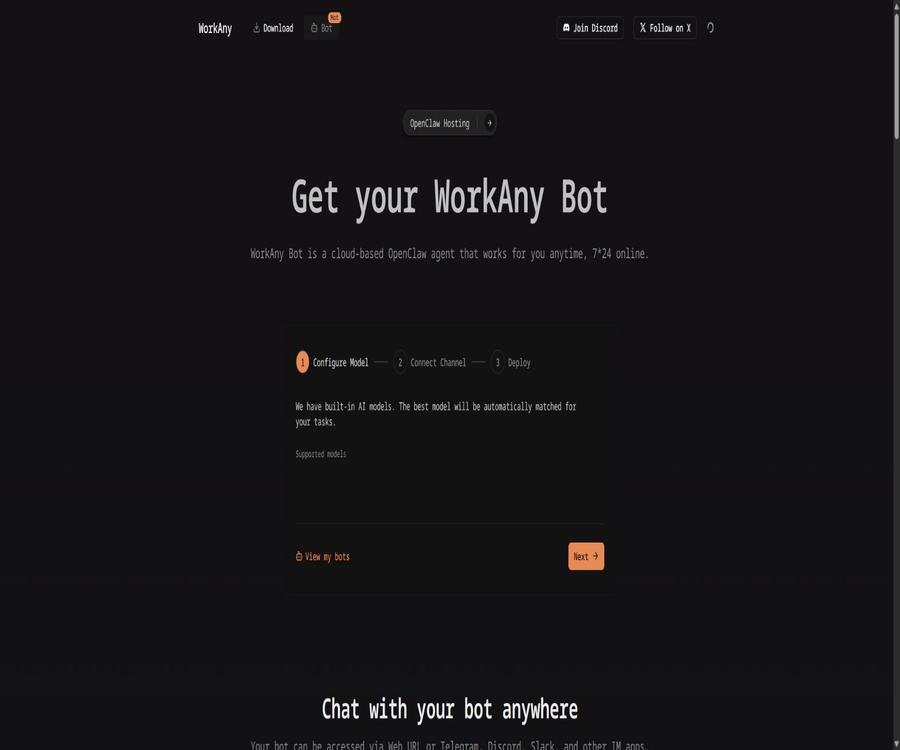
WorkAny Bot is an OpenClaw agent hosted in the cloud, capable of continuously receiving messages, invoking models, and completing tasks. It features independent storage, long-term memory, multiple access channels, and plugin support, making it suitable for users who do not wish to manage their own servers.
- It operates 24/7 in the cloud.
- You can use the built-in model Credits from the package.
- It also supports integrating one’s own AI models.
- Interact with the robot via web pages or messaging channels.
- Provide independent storage for each robot.
- Long-term storage of context and personalized memories.
- Expand search, file, and code capabilities through plugins.
Price of WorkAny Bot
The following are the annual subscription prices shown on the official website as of August 2026, expressed in US dollars. The page displays the average monthly price with a note that billing is done on an annual basis; the actual amount deducted in a single payment along with any taxes shall be as indicated on the settlement page.
| Plan | Current average monthly price for annual payment | Original page price | Built-in model Credits |
|---|---|---|---|
| Hosting | $ | $ | 60 dollars in Credits |
| Personal Assistant | $ | $ | 180 dollars in Credits |
Comparison of cloud package features
| Functions | Hosting | Personal Assistant |
|---|---|---|
| OpenClaw features | Includes | Includes |
| Built-in model | Support | Support |
| Built-in model quota | 60 dollars in Credits | 180 dollars in Credits |
| Independent storage | Support | Support |
| long-term memory | Support | Support |
| Operates 24/7 | Support | Support |
| Access via multiple channels | Support | Support |
| Quick start with no configuration needed | Basic deployment process | Clearly included |
| Professional support | Basic support | Clearly included |
The page does not clearly state whether the 60-dollar and 180-dollar credits are one-time amounts, annual totals, or provided on some other basis; it is necessary to confirm this with the officials on the order page before making a purchase. The API fees associated with using built-in models are usually charged by external model service providers.
How to create a WorkAny Bot
- On the WorkAny Bot page, select Hosting or Personal Assistant.
- Payment is made after confirming the annual total amount, model quota, and renewal rules.
- Go to the robot management page and click Start.
- Enter the robot’s name.
- Choose providers such as Anthropic, OpenAI, OpenRouter, or SiliconFlow.
- Enter the service address, model name, and API key, then test the connection.
- Select the appropriate interface protocol based on the model type.
- It is possible to configure a Telegram channel token as an option.
- After confirming the configuration, start the robot and wait for its status to change to Ready.
- Start a conversation through Telegram or the authorized web portal.
Message channel support
The marketing page lists various communication channels such as Telegram, Discord, Slack, WhatsApp, Feishu, iMessage, and Line, but the current quick-start guide only indicates Telegram as the channel that is supported by default. As for whether the other channels are available, it is necessary to check the robot’s backend and the relevant documentation.
| Channels | Current evidence | Configuration considerations |
|---|---|---|
| Web | Supported, device authorization is required. | New devices and incognito browsers require re-approval. |
| Telegram | The official quick start guide provides explicit support. | Create a bot using BotFather and copy the Token. |
| Discord | Display on marketing pages | Confirm whether the backend is available before making a purchase. |
| Slack | Display on marketing pages | Workspace application authorization may be required. |
| Display on marketing pages | It is necessary to verify the account requirements and regional constraints. | |
| Lark | Display on marketing pages | It is necessary to verify the application credentials and permissions. |
| iMessage and Line | Display on marketing pages | It is necessary to verify the official documents and their availability status. |
Web page access and device authorization
The WorkAny Bot web interface shows \"Not connected\" by default; a new browser requires approval for the device in the Security section of the robot management page. Re-pairing may be necessary each time a new device, browser, or incognito mode is used.
- Do not share the robot access link publicly.
- Only devices that have been identified as eligible for authorization are approved.
- Regularly remove lost or unused devices.
- The robot backend and the web interface utilize different security layers.
- Back up the available settings before modifying the OpenClaw configuration.
- Treat channel tokens and model keys as highly sensitive credentials.
How to choose between the desktop version and the cloud-based bot?
| Comparison dimensions | WorkAny Desktop | WorkAny Bot |
|---|---|---|
| Operation location | Local computer | WorkAny Cloud |
| Main tasks | Local files, code, and office outputs | Ongoing online conversations and automated tasks |
| Online time | When the computer and applications are running | 24/7 |
| Price | The app can be downloaded for free; models are available at an additional cost. | Annual hosting package plus possible model fees |
| Data | Dialogs, files, and tasks are mainly retained on the local device. | Robot memory and file storage are located in the cloud. |
| Channels | Desktop application | Web, Telegram, and other communication channels |
| Maintenance | The user is responsible for installation and the environment. | The platform is responsible for server hosting. |
| Suitable for users | Personal creation, development, and local work | Remote access, resident assistants, and message bots |
What use cases are suitable?
- Organize the download directory and project materials.
- Generate Word-style reports, Excel tables, and PPTs.
- Quickly build React websites and prototypes for internal tools.
- Allow AI to modify code in controlled directories.
- Connect business systems and development tools via MCP.
- Build reusable Agent Skills for the team.
- Use custom model service providers to control costs and capabilities.
- Deploy a continuously online Telegram personal assistant.
- Customize desktop agents for individual research or small teams.
Tasks that are not suitable for completion directly
- Moving or overwriting unique files in bulk without a backup.
- Execute administrator-level commands automatically without any review.
- Sending highly sensitive data to unreviewed models or MCP services.
- It requires the execution of financial, legal, or production/operational decisions without any human oversight at all.
- Financial models and formal contracts that can be generated directly and ready for use.
- Projects that require the standard Apache License and have no additional restrictions.
- Developing and distributing derivative products of WorkAny without commercial permission.
- Operate the source code directly as a multi-tenant service.
Product advantages
- Concentrate conversations, tool execution, and result preview in the desktop application.
- Covers files, websites, code, and common office documents.
- It supports installation packages for Windows, macOS, and major Linux distributions.
- It comes equipped with over 30 tools for handling practical tasks.
- Supports MCP and custom Skills extensions.
- It supports multiple model service providers and compatible interfaces.
- Desktop data is primarily processed on the local machine.
- The source code is made public and open to community contributions.
- Cloud bots offer 24/7 operation and long-term memory.
- Remote access is possible via Telegram and the authorized website.
Usage restrictions and precautions
- The old name of the database no longer matches the current product.
- The fact that desktop applications are free does not mean that model calls are free as well.
- Agents can modify files and execute code, which means the risk of accidental actions is higher than that of ordinary chat tools.
- A sandbox cannot replace backups, permission isolation, and manual approval.
- External models, MCP, and channels each have their own separate privacy policies.
- There is a version difference between the marketing page and the current description of GitHub’s architecture.
- The official download page may show a version that is outdated compared to the latest release on GitHub.
- The annual payment page for cloud bots shows the average monthly price.
- The explanation regarding the cycle for issuing Credits built into the Bot is not clear enough.
- The various messaging channels displayed on the marketing page do not necessarily mean that all of them are already available for use.
- Community licenses include restrictions on multi-tenancy, branding, and derivative distributions.
- The project is still in the 0.1.x stage, so its features and compatibility may change rapidly.
Privacy and data processing
The privacy policy states that desktop applications process conversations, files, and tasks locally; unless the user chooses to synchronize or back them up, this data is not sent to the WorkAny servers. However, the model API, MCP servers, and cloud-based bots may still receive the data needed to handle tasks.
- The platform may collect the account name, email address, and information provided by the user.
- It may collect information on the frequency of use of functions as well as device system details.
- Websites may use cookies to save preferences.
- Paid services require handling bills and payment information.
- Local processing does not mean that external model calls are also entirely local.
- Before choosing a model service provider, check its rules regarding data retention.
- The independent storage and long-term memory of cloud bots are located in the hosting environment.
- Do not include unnecessary personal sensitive information in agent tasks.
Pricing, Cancellation, and Refunds
The terms of service state that prices may be adjusted after notifying the user, and the user is required to pay the full cost of the selected plan. Unless required by law, purchases are final and no refunds are provided; although the Bot page indicates that cancellation is possible at any time, it is mainly used to stop subsequent renewals.
- Before making a purchase, check the total annual cost rather than just looking at the monthly price.
- Check the automatic renewal, taxes, and model Credits cycles.
- After cancellation, confirm when the robot will stop and how the data will be exported.
- The costs of model service providers are not necessarily included in the hosting subscription.
- A separate budget limit should be set for the API key that is used directly.
- Save order details, benefits, and cancellation confirmation records.
GitHub and version status
The official GitHub repository of WorkAny makes the source code of its desktop application available; this application is built using technologies such as React 19, TypeScript, Vite, Tailwind CSS, Hono, Tauri 2, Rust, and SQLite. As of August 2026, the latest release on GitHub was v0.1.19, yet the download page on the official website still shows v0.1.16.
| Project | Current information |
|---|---|
| GitHub Stars | Around 1.5k during verification. |
| Forks | Approximately 243 during verification. |
| Latest Release | v0.1.19 |
| Download and display on the official website | v0.1.16 |
| Frontend | React 19, TypeScript, Vite, and Tailwind CSS 4 |
| Backend | Hono and open-agent-sdk |
| Desktop framework | Tauri 2 and Rust |
| Local database | SQLite |
Open-source license
WorkAny claims to be free and open-source, but it actually uses the WorkAny Community License instead of the original Apache License 2.0. This license builds upon Apache 2.0 by adding restrictions related to commercial use and branding; therefore, a more accurate description would be “open source code / community license”.
- It can be used as a commercial backend or an enterprise development platform without modifying the source code.
- Developing and distributing derivative works of WorkAny requires a commercial license.
- Multi-tenant shared services cannot be operated using the source code without written authorization.
- When using the frontend, the WorkAny flag and copyright information must not be removed or modified.
- It is not allowed to use the WorkAny name and trademark to promote unauthorized derivative products.
- The contributed code may be used by ThinkAny in its commercial products and cloud services.
- The license allows the project owners to adjust the level of strictness in future versions of the agreement.
Compile by yourself
Developers can build desktop applications from the official repository. The minimum environment specified in the current README is Node.js version 20 or higher, pnpm version 9 or higher, and Rust version 1.70 or higher.
- Read the repository README, contribution guidelines, and Community License.
- Install the required Node.js, pnpm, and Rust toolchain.
- Clone the official repository and switch to the target Release tag.
- Install the front-end and back-end dependencies.
- Start the API development service.
- Launch the desktop application or the optional Web development interface.
- Configure the test model keys and workspaces with minimal permissions.
- Run checks for compilation, formatting, and basic functionality.
- Review the trademarks, front-end copyrights, and commercial licensing restrictions once more before distribution.
Basic information
| field | Content |
|---|---|
| Tool name | WorkAny |
| Old directory name | Third-party GPTs store – no longer available. |
| Maintainer | ThinkAny, LLC |
| Tool type | Desktop AI agents, office automation, and cloud bots |
| Main platforms | Windows, macOS, and Linux |
| Desktop price | Free download available; model services are charged separately. |
| Cloud Hosting | The annual rate is equivalent to 24.9 dollars per month. |
| Personal Assistant | The annual rate is equivalent to 32.9 dollars per month. |
| Is Chinese supported? | The official website offers a Chinese version, while the app depends on its version. |
| Is MCP supported? | Yes |
| Is Skills supported? | Yes |
| Is custom modeling supported? | Yes |
| Is the source code public? | Yes |
| License | WorkAny Community License |
Recommendation score
4.5 / 5. WorkAny integrates local file operations, code generation, office documents, MCP, and Skills in a fairly comprehensive way; its cross-platform capability and open-source nature are also attractive. However, it is still in the stage of rapid development, and factors such as model costs, file permissions, and community licensing restrictions need to be assessed in advance.
Frequently Asked Questions
Is WorkAny still a third-party GPT store?
No. WorkAny has now been transformed into desktop AI agents and the cloud-based OpenClaw Bot; the old name no longer reflects its current functions.
Is WorkAny free?
Desktop applications can be downloaded for free, but model APIs, external MCPs, and third-party services may incur costs. The cloud-based WorkAny Bot requires an annual hosting plan to be purchased.
Does WorkAny require an API Key?
Typically, it is necessary to configure the model provider’s key or use compatible model services; cloud-based bots can also make use of the model Credits included in their packages.
Which systems does WorkAny support?
It supports Windows 10 and later, Apple Silicon and Intel versions of macOS, as well as major Linux distributions that provide deb or rpm packages.
How much does the WorkAny Bot cost?
When the annual billing page is checked in August 2026, Hosting will cost 24.9 dollars per month, while Personal Assistant will cost 32.9 dollars per month. The actual annual amount deducted, along with any taxes, will be indicated on the settlement page.
Does WorkAny support Telegram?
Supported. The current quick-start documentation provides clear instructions for configuring Telegram; the channels listed on other marketing pages need to be verified based on what is actually available in the backend.
Will the desktop data be uploaded?
The privacy policy states that conversations, documents, and tasks are processed locally by default, but when external models, MCP, synchronization, or backup functions are used, the relevant data may still be sent to the corresponding services.
Is WorkAny open-source software?
The source code is available publicly, but it is licensed under the WorkAny Community License, which comes with additional commercial restrictions. It is not an Apache 2.0 project without any conditions; derivative distributions and multi-tenant services require special approval.
Tools similar to those used by third-party GPT stores




 Guigong Network Security Registration No. 45132202000164