






Aphael
Aphael, an intelligent tool focused on AI-powered imaging.
Tags:Common AI image toolsWhat is Raphael AI?
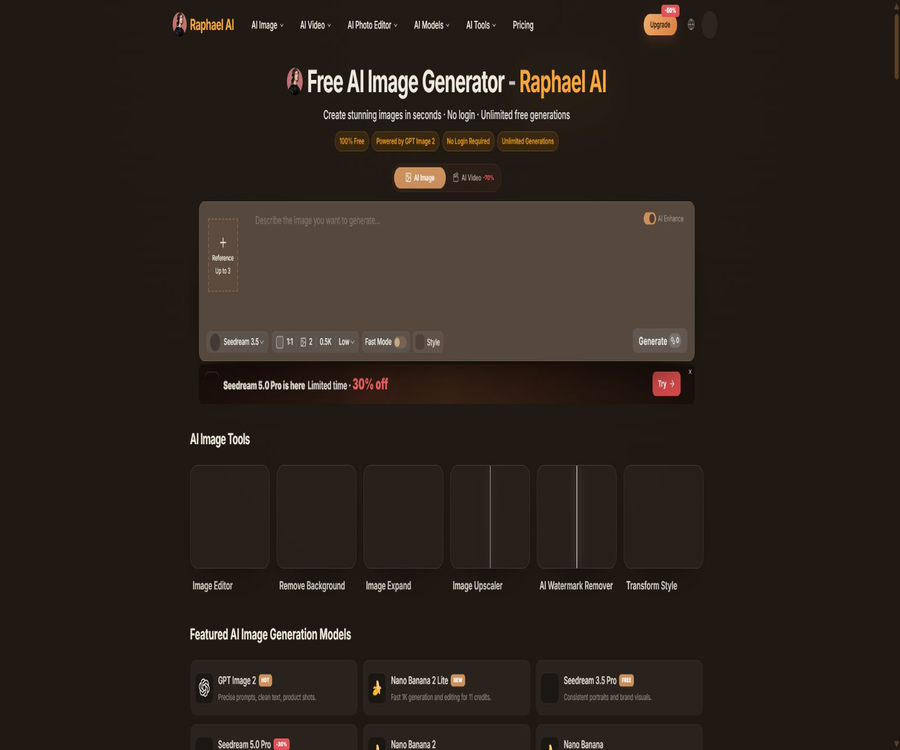
Raphael AI is an online platform for creating images and videos, based on multi-model routing. It utilizes models such as GPT Image, Seedream, Nano Banana, Veo, Kling, and Seedance, depending on the user’s choices or the type of task at hand.
The basic image mode offers free generation; the paid version provides faster processing times, more models, high-resolution outputs, watermark-free results, and commercial usage rights. The tool also includes functions for image editing, background removal, image enlargement, zooming, and watermark removal.
Product positioning and its relationship with third-party models
Raphael is an independent interface for aggregating products and models; it is not an official product of the underlying model manufacturers listed. The terms of service state clearly that, unless otherwise indicated, Raphael does not imply any approval or affiliation with the providers of the underlying models.
When selecting a model, one should pay attention to the benefits offered by the Raphael package, the capabilities of the underlying model, and the limitations on its output usage. Just because two models have the same name does not mean that their parameters, versions, and quality of output will remain unchanged over time.
Main functions
- Enter text prompts to generate realistic, illustrated, anime, and digital art images.
- Available image models are matched to different scenarios through intelligent routing.
- Upload reference images for redrawing, style conversion, and multi-reference editing.
- Use GPT Image 2 to create product images and visual designs with text.
- Use the Seedream series to generate 1K, 2K, or some 4K images.
- Use the Nano Banana series for multi-image reference and detailed editing.
- Use an AI editor to modify objects, backgrounds, composition, and visual style.
- Remove the background from an image with one click and export the transparent subject.
- Expand the image beyond the canvas to complete a horizontal or vertical composition.
- Enlarge the image and improve its resolution and details.
- Remove simple watermarks or overlay elements from the image.
- Videos are generated using models such as Seedance, Veo, and Kling.
- A single prompt can generate up to 4 images to facilitate quick comparison.
Free basic image generation
According to the official website, logged-in users can use the basic mode indefinitely once Fast Mode is turned off; Seedream 3.5 operates on a zero-point system. Unlogged-in visitors can also start generating content, but their historical records and access to certain account features are limited.
- The basic mode has to wait in the regular queue, and its speed may vary during peak times.
- The reference speed for the basic model provided on the official website is approximately 1 image per 8 seconds.
- Free images come with watermarks and are not suitable for direct use in commercial applications.
- Free users are only granted a license for personal and non-commercial use.
- After logging in, you can earn daily points that can be used to obtain models with faster processing speeds or higher resolution.
- Free access, with no limit on the number of times, is still subject to content guidelines, abnormal usage rules, and service availability constraints.
AI Image Generation Tutorial
- Open the generation page and decide whether to use the free basic mode or the point system.
- Specify the subject, environment, actions, camera angle, lighting, and visual style.
- Select the model, aspect ratio, resolution, and quality based on the task.
- Legal reference images must be uploaded when keeping a product or character.
- To turn off Fast Mode, first test the prompt using the basic model.
- Generate multiple candidate images and compare their structure, text, and details.
- Continue to edit, expand, or zoom in on the available results.
- Check the watermark, copyright, portraits, and factual accuracy before publishing.
Prompt writing format
- Subject: The core characteristics of a person, product, building, or scene.
- Action: Describes behaviors that can be clearly shown in the image.
- Environment: location, time, weather, and background context.
- Lenses: close-up, wide shot, aerial view, low angle, or depth of field.
- Lighting: soft light, backlighting, studio lighting, neon, or cinematic lighting.
- Composition: negative space, proportion of the main element, and visual guidance.
- Style: Realistic, anime, oil painting, poster, or 3D rendering.
- Restrictions: Errors, distortions, blurriness, and unnecessary elements are excluded.
Comparison of image models
| Model | Current positioning of the official website | Suitable for tasks |
|---|---|---|
| GPT Image 2 | Accurate understanding of prompts, clean text, and product photography | Posters, text-based visuals, and product images |
| Seedream 3.5 Pro | Stable portrait and brand visuals | Characters, brand assets, and free basic generation |
| Seedream 5.0 Pro | 1K and 2K generation, multi-reference editing | Professional images, products, and advanced editing |
| Seedream 5.0 Lite | Cinematic realism and dramatic lighting | Concept maps, scene diagrams, and atmosphere visuals |
| Seedream 4.5 | 2K or 4K generation and reference image editing | High resolution and visual iteration |
| Nano Banana 2 Lite | Fast 1K creation and editing | Quick sketches and low-cost image edits |
| Nano Banana 2 | Multiple reference images and quick style control | Unity in characters, products, and style |
| Nano Banana Pro | 4K rendering and advanced image editing | High-quality drafts and complex revisions |
Reference images and multi-image editing
Some models allow the upload of one or more reference images to help maintain the appearance of the people, products, color schemes, and composition. These reference images serve as guidelines only; they do not guarantee that the output will be exactly identical to the original images.
- Use images that are clear, fully licensed, and free of sensitive information.
- Specify separately the content that should be retained in each reference image.
- Do not demand too many conflicting styles at the same time.
- For branded products, it is necessary to check the logo, the text on the packaging, and the colors.
- After editing the character, check the physical features, age, and expression.
- Save a stable version during multiple generations to avoid irreversible drift.
AI image editor
An AI editor can modify existing images according to textual instructions, such as replacing the background, removing objects, changing clothing, or adjusting the style. Generative editing re-creates the individual pixels, so the details may not be exactly identical to those in the original image.
Image editing steps
- Upload a copy of the original image and keep the unmodified version.
- Describe in one sentence the areas that need to be changed and the desired outcome.
- Clearly specify the characters, products, and composition that must remain unchanged.
- Select the model and output resolution suitable for the editing task.
- Make a single modification first, and proceed to the next step once the effect is confirmed.
- Zoom in to examine edges, text, hands, and reflections.
- After exporting, it is important to overlay it with the original image and compare the key areas.
Background removal and replacement
The background removal tool automatically identifies the main subject and creates a transparent background, making it suitable for e-commerce products, portraits, and design elements. However, complex hair patterns, transparent objects, shadows, and elements in the foreground may still require manual editing.
- Use high-resolution original images with clear edges of the subject.
- Transparent glass, wedding dresses, and hair require close inspection.
- Product images should retain the necessary ground shadows and highlights.
- After replacing the background, unify the light direction, perspective, and color temperature.
- Check the white borders on the actual background before launching the business page.
Image enlargement and zooming
Image enlargement adds content to the existing image; it is possible to change a square image into a horizontal format, a vertical cover image, or one tailored for different social media platforms. Enlarging an image increases its size and detail level, but it cannot restore information that was not present in the original image.
| Tools | Suitable uses | Frequently Asked Questions |
|---|---|---|
| Image Expand | Adjust proportions, add spacing, and complete the background. | New areas may repeat objects or change perspective. |
| Image Upscaler | Increase size and visual clarity | It is possible to create fictional details regarding skin, texture, and text. |
| Background Remover | Product images with transparent backgrounds and character assets | Hair, shadows, and semi-transparent areas may be missing. |
| Watermark Remover | Clean up the images for which you have permission to edit. | Complex occlusions will leave repair marks. |
| Transform Style | Convert the original image into different artistic styles. | The identity of the characters and the shape of the products may change over time. |
Legitimate use of watermark removal
Watermark removal can only be used on images for which the user has editing rights, such as files they have exported themselves, materials for which they have authorization, or internal images that contain incorrect watermarks. Removing someone else’s copyright markings does not grant the right to use that content.
- Do not remove the copyright watermarks from galleries, photographers, and media.
- When purchasing licensed materials, download the watermark-free version from legitimate sources.
- Retain orders, licenses, and original documents as proof of rights.
- AI-enhanced areas may alter the facts and are not suitable for news or evidence images.
AI video models
Raphael also lists video models such as Seedance, Veo, and Kling, which enable the creation of short videos from text or images. Video tasks generally require more points compared to image tasks, and they also entail a longer waiting time.
| Model series | The versions listed on the official website | Suitable direction |
|---|---|---|
| Seedance | 2.0, 2.0 Mini, 1.5 Pro, 1.0 Pro Fast, 1.0 Turbo | Universal text-to-video and image-to-video generation |
| Veo | Veo 3.1 | High-quality cinematic feel and complex scenes |
| Kling | Kling 3.0, Kling 3.0 Turbo | Sports, characters, and fast video generation |
Preparations before creating a video
- Break the story into short scenes; don’t try to present the entire story at once.
- Specify the subject’s movement, the camera’s movement, the environment, and the duration.
- First, use images to verify the characters and artistic style.
- Select a model and view the estimated integral consumption.
- After generation, check for issues such as flickering, distortion, text problems, and audio/video problems.
- Download the original file and use video editing software to adjust the rhythm and sound.
Differences between the free version and the paid version
| Ability | Free basic mode | Pro | Ultimate | Max |
|---|---|---|---|---|
| Basic generation | After logging in, there is no limit on the number of times; standard queue. | No limit for Seedream 3.5 | No limit for Seedream 3.5 | No limit for Seedream 3.5 |
| Monthly points | Free points available daily, subject to the account status. | 2000 | 5000 | 10000 |
| Rapid upper bound estimation for images | Using free points | Up to 2,000 pieces | Up to 5,000 pieces | Up to 10,000 pieces |
| Estimated upper limit for basic videos | Using free points | Up to 250 | Up to 625 | Up to 1250 |
| Queue | Normal priority | Priority | Highest priority | Highest priority |
| watermark | Yes | None | None | None |
| Batch scaling | Restricted | Support | Support | Support |
| Complete privacy | Not listed | Not listed | Support | Support |
| Commercial use | Not allowed | Allow | Allow | Allow |
Member price
The prices shown below are those available during the annual payment promotion on the official website in August 2026; the page indicated a 50% discount. Once the promotion is over, taxes or the currency used for payment may result in a different final amount.
| Package | Average monthly amount after discount | Annual total amount | The page shows the original price. | Monthly points |
|---|---|---|---|---|
| Pro | 10 dollars per month | 120 dollars per year | $ | 2000 |
| Ultimate | $ | $ | $ | 5000 |
| Max | $ | $ | $ | 10000 |
The estimation for a page is based on the number of high-quality images and basic videos, but different models, resolutions, and tasks result in varying consumption levels. Package points cannot be simply understood as 1 point per image for all models.
How to choose a package
- For personal, non-commercial testing, the free basic version can be used first.
- For versions without watermarks and for commercial use, Pro is the minimum option required.
- For those who create content frequently during peak periods and value privacy, Ultimate is a good option.
- A large number of images and videos can be generated to assess the maximum cost as well as the actual cost per instance.
- For unique use cases or enterprise scales, please contact the official team to confirm the customized price.
- Test the target model and workflow using free credits before making an annual payment.
Subscription changes, cancellation, and refunds
The official website does not allow direct switching of plans at the moment; users can cancel their subscription on the subscription management page. The benefits retained until the end of the current billing cycle, after which they can choose another plan.
- Cancellation usually only stops future renewals; it does not revert the rights and benefits for the current period.
- Digital and virtual products are generally not refundable.
- For incorrect bills or special refund requests, please contact the support team for case review.
- The official website states that responses to requests for refunds are usually given within 3 business days.
- The annual subscription promotion is applied according to the benefits at the time of purchase, throughout the valid subscription period.
- Save the price, points, model, and renewal page before purchasing.
Rules for commercial use
The terms of service state that paid subscription users can use the content they generate for personal or commercial purposes, while free users can only use it for personal and other non-commercial purposes. Some of the FAQs on the website’s homepage contain rather broad statements regarding commercial use; it is necessary to refer to the updated terms of service and pricing page for accurate information.
- Free images cannot be used directly in advertisements, products, or customer deliveries.
- A paid license does not automatically eliminate the risks related to third-party copyrights, trademarks, and portraits.
- The image uploaded must have legitimate rights for processing and creation.
- Brand products and text need to be checked manually, item by item.
- Save the subscription status, creation time, and records of manual modifications.
- Different judicial jurisdictions may have varying approaches to determining the copyright status of purely AI-generated works.
What use cases are suitable?
- Regular users can try various AI image generation methods for free.
- Designers create posters, concept drawings, and visual drafts.
- The e-commerce team creates the background and display scenarios for products.
- Marketers create draft materials for social media and advertising.
- Game and film teams create concept art for characters and environments.
- The photographer performs image enlargement, background removal, and simple repairs.
- Video creators are testing short clips on Seedance, Veo, and Kling.
- The brand team uses multiple reference images to standardize the characters and visual style.
Tasks that are not suitable for completion directly
- Projects that require free generation of results in order to obtain immediate commercial usage rights.
- Applications that require automated batch calls through public APIs.
- It is not allowed to send images or prompts to third-party models for sensitive operations.
- Final advertisements that require absolute accuracy in terms of text, trademarks, and product specifications.
- Production lines that rely on fixed model versions over the long term and on fully reproducible results.
- Processing of personal portraits, copyrighted images, or someone else’s watermarks without authorization.
- Use the AI-generated restoration results as evidence of news, judicial, or historical authenticity.
Product advantages
- The basic image mode has a low entry barrier; once logged in, images can be generated indefinitely.
- Aggregates various mainstream image and video models.
- The process ranges from text generation to editing, image enlargement, background removal, and scaling – it’s quite comprehensive.
- It supports multiple reference images and models with various resolutions.
- A maximum of 4 images can be generated at a time, which facilitates quick comparison.
- The paid packages offer a priority queue, watermark-free content, and a commercial license.
- Ultimate and Max offer higher priority and full privacy options.
- Websites can be used in desktop and mobile browsers.
Usage restrictions and precautions
- Free, unlimited usage is available only for the basic non-Fast mode after logging in.
- Free images come with watermarks and cannot be used for commercial purposes.
- High-resolution, fast images and videos consume points.
- The integration cost and availability of different models may vary.
- The maximum number of images and videos that can be displayed in a package is only an estimate.
- Digital products are generally non-refundable; it is necessary to test them thoroughly before opting for an annual payment.
- It is not possible to change the plan directly at the moment; you need to cancel it first before selecting a new one.
- The generated content may contain spelling errors, distortions, and drifting of characters.
- Model aggregation services may be affected by disruptions from third-party suppliers.
- The platform does not currently have public APIs.
- There are some differences in wording between the homepage promotions and the updated commercial rules.
Privacy and data storage
The privacy policy, as updated in April 2026, adheres to the principle of collecting only the minimum amount of data; however, it does not mean that no data is kept at all. Requests made without logging in are usually processed on a temporary basis, but relevant information may still be retained for purposes of security, prevention of abuse, debugging, and ensuring reliability.
- The prompts, outputs, history, and project data of logged-in users may be retained.
- The platform handles account details, subscriptions, points, orders, and payment status.
- Devices, browsers, IP addresses, logs, and anti-abuse signals may be collected.
- The data may be shared with providers for authentication, payment, cloud storage, as well as model processing and analysis.
- Do not upload ID cards, medical records, contracts, or confidential business information.
- The exact boundaries of privacy for Ultimate and Max should be confirmed before purchase.
- Users may, in accordance with the law, request access to, correction of, deletion of, or export of certain account data.
- Due to tax, security, and dispute resolution requirements, some records may not be able to be deleted immediately.
Content security rules
The terms of service prohibit the creation of content that is explicit, pornographic, sexually suggestive, hateful, discriminatory, harassing, fraudulent, infringing on rights, or otherwise illegal and harmful. The platform may refuse to process such content, remove it, or restrict the account associated with it.
- Do not generate adult content involving minors.
- Do not create fake images and videos that mimic real people.
- Do not bypass security mechanisms, point limits, and anomaly detection.
- Do not interfere with the servers or attempt to reverse-engineer the services.
- Establish manual review and complaint handling processes prior to the commercial release.
API and GitHub status
The pricing page clearly states that Raphael currently does not have any public APIs, but such APIs are planned to be provided in the future. There are mentions in the user reviews on the homepage of API-friendly features, but these cannot replace the official product documentation.
As of the time of verification, no GitHub repository was found that could be confirmed as being maintained by Raphael’s official team and that makes the source code available publicly. The tool’s directory should be marked as not being open source, with no public API available.
Basic information
| field | Content |
|---|---|
| Tool name | Raphael AI |
| Tool type | Multi-model AI for image and video generation, image editing |
| Image model | GPT Image, Seedream, Nano Banana, and others |
| Video model | Seedance, Veo, Kling, etc. |
| Image tools | Editing, background removal, image enlargement, zooming, watermark removal, and style conversion |
| Free mode | After logging in, the basic non-Fast mode allows unlimited uses; a watermark is applied. |
| Price pattern | Free tier, annual subscription, and monthly credits |
| Commercial use | Paid subscriptions are allowed; free users can only use it for non-commercial purposes. |
| Supported platforms | Desktop and mobile browsers |
| Whether API is provided | No public API available at the moment. |
| Is it open source? | No |
Recommendation score
4.5 / 5. Raphael offers a fairly comprehensive set of free basic creation tools, as well as multiple model options for generating images and videos along with editing functions, making it suitable for quick testing; however, the limitations on free commercial use, the costs associated with video generation, data retention policies, and changes in the availability of models are factors that users need to consider carefully.
Frequently Asked Questions
Can Raphael AI really generate content for free?
Yes. After turning off Fast Mode, logged-in users can use the basic mode unlimited times, but they have to wait their turn in the regular queue; the free images come with watermarks and are only allowed for non-commercial use.
Can the free version be used for commercial purposes?
No. The updated terms of service state that commercial use is available only to users with paid subscriptions, while the free content is intended for personal and other non-commercial purposes.
How much are Pro, Ultimate, and Max?
The annual promotion prices for August 2026 correspond to amounts of 10, 20, and 40 dollars per month, with an annual total of 120, 240, and 480 dollars respectively. The final amount will be as indicated on the settlement page.
How much content can be created with points?
The price page indicates the maximum number of quick images and basic videos that can be used, but this is an estimate based on specific usage levels. Different models, resolutions, and tasks result in different amounts of credits required.
Does Raphael save the prompts and images?
Unauthenticated requests are usually handled on a temporary basis, but information may need to be retained for security and debugging purposes; prompts, outputs, history, and project data related to logged-in users can be saved to support the functions of those accounts.
Can I request a refund?
Digital products are not refundable in principle; for billing issues or special requests, you can contact the support team for individual consideration. The official website states that a response is usually provided within 3 working days.
Does Raphael provide an API?
There is no public API available at the moment. The authorities have said that one will be provided in the future, but no date has been announced for its release.
Is Raphael open source?
It is not open source. As of the time of verification, no official repository containing the source code was found.
Tools similar to Aphael




 Guigong Network Security Registration No. 45132202000164