






TouchStation AI
TouchStation AI is an innovative AI painting platform that, by offering intelligent painting services, helps users to express their creativity efficiently in various fields.
Tags:AI image illustration generationWhat is TouchStation AI?
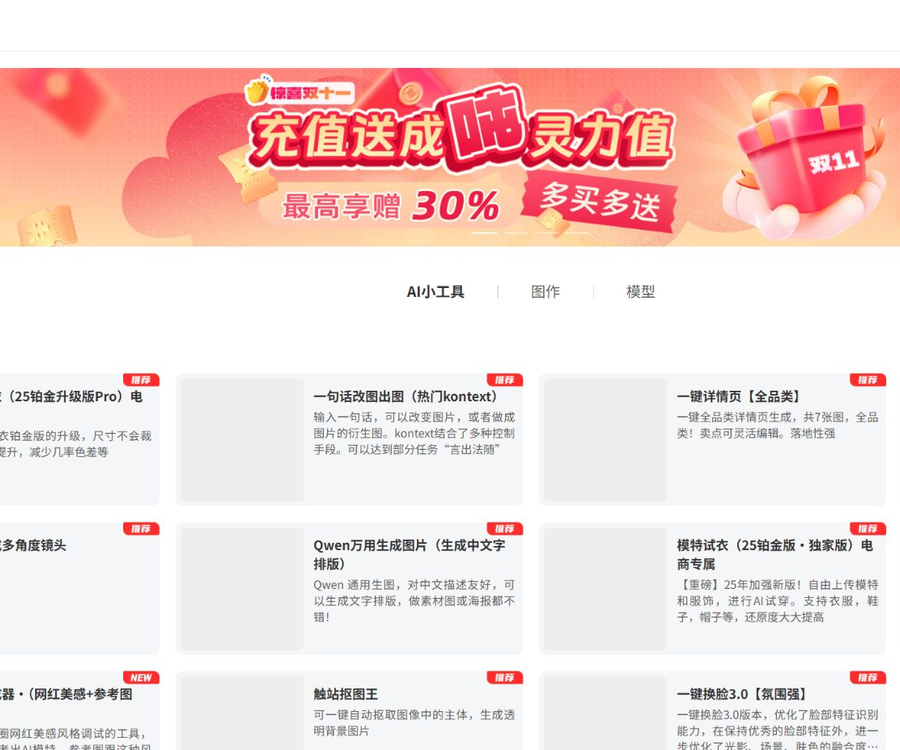
TouchStation AI is a platform that combines AI-powered drawing, image editing, e-commerce design, artistic photography, and a model community.
The product is operated by Guangzhou Chuzhan Technology Co., Ltd., which offers cloud computing resources for Stable Diffusion and ComfyUI.
Main functions
- Enter a prompt to generate an image.
- Use the reference image for style transfer and recreation.
- After local application, the specified area is regenerated.
- Expand the canvas and automatically add a background.
- Automatic object removal and subject erasure.
- High-definition zoom, noise removal, and restoration of old photographs.
- AI face and outfit swapping, try-on, and artistic photos.
- Generation of product images, model photos, and e-commerce scenarios.
- Browse and use the CHECKPOINT and LORA models.
- Rent a cloud-based AI drawing environment.
Text-to-image generation
Text-to-image generation creates new images based on prompts, models, size, and other parameters.
- First, explain the subject, scene, composition, and style.
- Add information on lighting, colors, and lenses.
- Select a model that matches the target style.
- Start testing with lower cost parameters.
- After generation, adjust the keywords and random seed gradually.
Image-to-image generation
Image-to-image generation uses a reference image to control the content, composition, or style, in order to produce a new visual result.
- Upload clear reference images that have the necessary usage rights.
- Adjust the redraw intensity to control the degree to which the original image is preserved.
- Enhance control through posture, line drawings, or depth references.
- Excessive intensity may result in the loss of features of people and products.
- If the intensity is too low, it may not be possible to make significant changes to the image.
Local redrawing and one-line image modification
Users can select the area that needs to be modified, or describe in natural language what changes are desired.
- Precisely mask the target area.
- Describe the objects that have been added, deleted, or replaced.
- Retain the background and subject that you do not wish to change.
- Check whether the edges, lighting, and perspective are harmonious.
- Keep the original version of important images before any modifications.
Image enlargement, image cropping, and subject removal
- Enlarging the image is used to extend the canvas and fill in the background.
- Automatic object extraction can create subjects with a transparent background.
- Custom masking allows for the extraction of objects based on their names.
- Subject erasure deletes the object and fills in the background.
- Complex hairs, transparent elements, and shadows require manual inspection.
High-definition zoom and restoration
The platform offers a variety of workflows for high-definition zooming, noise removal, redrawing, and restoring old photographs.
- The balanced version is suitable for minimizing changes to the image.
- The redrawn version will generate more details.
- The denoised version is suitable for color blocks and flat graphics.
- Restoring old photos can improve blurriness and defects.
- Facial details may be reimagined by AI.
AI try-on and model generation
E-commerce tools can convert flat lay images of clothing or mannequin photos into an image showing how the clothing will look on a model.
- Upload a clear front-facing image of the clothing.
- Avoid clothing from being covered or having severe wrinkles.
- Select the model type that matches the target audience.
- Check the color, pattern, material, and style.
- Physical product sales cannot rely solely on AI-generated visuals.
Product images and e-commerce scenarios
The product image tool can identify the main part of the product and create a background, props, and a display scene.
- Use high-resolution original images of the product with clear outlines.
- Retain the original trademark, specifications, and packaging text.
- Avoid AI-generated claims about product features and accessories.
- Verify the color difference and material quality in person.
- Comply with platform and industry rules before publishing ads.
Tools for portraits and artistic photos
TouchStation AI offers tools for face swapping, ID photo creation, artistic photos in traditional costumes, artistic photos of children, and body shape adjustment.
- Only upload photos of yourself or of people who have given explicit permission.
- Do not assume the identity of public figures or other people.
- Parental consent is required for children’s photos.
- ID photos should meet the actual needs and requirements of the organization.
- Changes in physical appearance and features should not be used for deception or discrimination.
Prompt inversion
Prompt inversion involves analyzing the reference image to generate a textual description that can be used for further creation.
- The generated result is merely an understanding of the image’s model.
- The original author’s complete prompt and parameters will not be restored.
- It is possible to extract information on the subject, style, camera angle, and colors.
- Do not copy protected works using reverse-engineered results.
- One’s own creative intent should be incorporated before secondary creation.
Model community
The model section includes CHECKPOINT and LORA, and shows various algorithm versions such as SD 1.5 and SDXL.
| Model type | Primary uses | Usage notes |
|---|---|---|
| CHECKPOINT | Decide on the overall generation capability and the basic style of art. | The corresponding algorithm version must be matched. |
| LORA | Enhance characters, clothing, objects, or a specific style | Trigger words and appropriate weights are required. |
| SD 1.5 model | Ecologically mature with abundant resources | It cannot be mixed arbitrarily with SDXL resources. |
| SDXL model | Higher resolution and complex visuals | It usually requires more computing power. |
TouchStation AI Usage Guide
- Register an account and access the AI tool center.
- Select the workflow based on image generation, image editing, or e-commerce tasks.
- Read the current instructions for the tool as well as the alerts regarding charges related to spiritual energy.
- Upload reference images for which you have legitimate rights to use.
- Select a model, template, or preset style.
- Set the image size, quantity, and other parameters.
- Enter clear, positive prompts.
- Set the reference intensity or local mask as needed.
- Submit the task and wait for it to be generated in the cloud.
- Check the details of characters, text, products, and background.
- When unsatisfied, adjust just one key parameter and try again.
- Check the copyright, privacy, and usage rights before downloading.
How is the spiritual energy value calculated?
TouchStation AI consumes ‘spirit energy’ based on the workflow; the costs associated with different models, tools, and parameters can vary.
| Cost items | Public status | Verification method |
|---|---|---|
| Spirit energy generated per occurrence | Displayed dynamically based on specific work processes | Click to view the fee deduction details before generating. |
| Spirit Energy Top-up Packages | On the public page without logging in, a fixed amount has not been confirmed. | Refer to the top-up and settlement pages. |
| Cloud computing power pricing | Displayed dynamically based on the instance and usage duration. | Check when creating a cloud PC. |
| Free trial | Some teaching or activity tools may be available | It is subject to the real-time account limit. |
As of August 30, 2026, the public pages do not display a unified top-up package consistently, and the old prices are no longer in use.
How to control production costs
- First, test it using the educational version or a low-cost workflow.
- Confirm the amount of spiritual energy consumed per use before submission.
- Generate one first and then increase the batch size.
- Save the satisfactory model, parameters, and random seed.
- For local issues, local redrawing is preferred.
- The rules for free gifts and top-ups are subject to those on the settlement page.
TouchStation AI Computing Power Cloud
The computing power cloud offers a cloud-based AI drawing environment in which tools such as ComfyUI and Stable Diffusion can be used.
- Select a cloud computer that meets the requirements regarding video memory.
- Deploy the drawing environment from available images.
- After creation, connect and use it following the guidelines.
- Save workflows, models, and generated results.
- Stop the instance in a timely manner when it is not in use to avoid further charging.
- Important documents should also be saved in a local backup.
Copyright and commercial use restrictions
The official website states clearly that the works created by TouchSite AI are intended solely for personal learning and communication, and cannot be used for commercial purposes.
Even if a tool’s name includes terms such as “e-commerce” or “commercial grade,” it cannot override the platform’s overall licensing rules.
- Explicit written permission from the platform must be obtained before commercial use.
- Models, templates, and uploaded materials may have separate licenses.
- Do not create or copy protected characters and trademarks.
- Obtain authorization before using someone else’s work for training or reference.
- Retain the source of the materials, the order details, and the authorization documents.
Face recognition, face swapping, and portrait rights
- Only process images of oneself or those for which consent has been given.
- It is forbidden to create content involving fraud, defamation, or pornographic face swapping.
- It is forbidden to publish advertisements or statements under someone else’s identity.
- When minors are involved, consent from the guardian is required.
- When releasing synthetic images externally, labeling is required as specified.
- Delete the uploaded portraits and results that are no longer needed.
Privacy and file uploading
Many workflows require the upload of photos of faces, products, documents, or other images, which may contain sensitive information.
As of the time of verification, no fully detailed and publicly available privacy policy page for Chuzhan AI was found.
- Do not upload ID numbers, addresses, or customer privacy information.
- For product images, remove any unnecessary order and inventory information first.
- Private photos should not be given to online generation tools.
- Keep the original local image and authorization records before uploading.
- Before using it, enterprises should confirm with the platform the retention and deletion periods.
Are AI-generated results reliable?
Image models may generate incorrect text, extra fingers, distorted products, or unrealistic details.
- Check the face, hands, and body structure.
- Check the packaging text, trademarks, and the quantity of products.
- Compare the product’s color, material, and actual size.
- Verify that the background perspective, shadows, and reflections are appropriate.
- Generated images cannot replace actual inspections or verification documents.
API and open-source status
As of the time of verification, no complete official product source code repository for TouchStation AI was found.
The presence of TouchStation AI integration in a third-party GitHub project does not mean that this project represents the official source code of TouchStation.
- Having a public workflow page does not mean that an API is available.
- The fact that resources can be downloaded from model communities does not mean that the platform is open source.
- The platform’s API documentation and the official pricing have not yet been made public.
- For enterprise connection requirements, please consult the operator directly.
Which users are it suitable for
- Beginners trying AI art generation.
- Designers who create illustrations, avatars, and creative materials.
- E-commerce staff responsible for handling product images and model photos.
- Ordinary users who create artistic photos and images for social media.
- Students learning the Stable Diffusion workflow.
- Creators who need a ComfyUI environment in the cloud.
Product advantages
- There are a large number of AI tools, with detailed categorization based on different use cases.
- It covers image creation, editing, correction, and e-commerce images as well.
- It offers a model community and various preset templates.
- The educational version of these tools lowers the barrier to getting started with Stable Diffusion.
- Compute clouds support more complex professional workflows.
- There are extensive Chinese operation instructions and localized scenarios.
Usage restrictions and precautions
- The workflow charges fees dynamically based on the spiritual energy level.
- The fixed public top-up packages have not been finalized yet.
- The generated result may contain structural and textual errors.
- Face-swapping and portrait tools require permission for the use of portraits.
- The official website explicitly states that the created works cannot be used for commercial purposes.
- The independent privacy policy and the retention period for documents have not yet been determined.
- It has not been confirmed that the complete product and platform APIs are open source.
Frequently Asked Questions
What can TouchStation AI do primarily?
It offers AI-powered image generation, image editing, restoration, face swapping, virtual try-on, product imaging, artistic photos, a model community, and cloud computing resources.
Can TouchStation AI be used for free?
Some teaching or activity tools may offer experiences, while other workflows will consume mana points based on real-time prompts.
How much does the AI spiritual energy of Chuzhan cost?
No unified fixed package has been confirmed on the public page; the fees charged and the amounts for top-ups in each workflow should be based on the account settlement page.
Can TouchStation AI generate images for e-commerce products?
Yes, the platform offers tools such as product background customization, model replacement, try-on features, and integration of products into various scenarios.
Can images generated by TouchStation AI be used for commercial purposes?
The official website states clearly that it is intended solely for personal learning and communication, and cannot be used for commercial purposes; explicit authorization must be obtained before any commercial use.
What should be kept in mind when using face swapping and artistic photos?
Permission for the use of portraits must be obtained; fraud or deception is not allowed, nor is the creation of illegal content. The privacy of those whose portraits are uploaded must also be protected.
Is TouchStation AI an open-source platform that provides APIs?
No official complete source code or public API documentation has been found; third-party adaptation projects do not indicate that TouchStation AI offers an official open-source version.
Tools similar to TouchStation AI



 Guigong Network Security Registration No. 45132202000164