






FluxImage.co
FluxImage.co – makes the creation of AI-generated images and illustrations more efficient and simpler.
Tags:AI image illustration generationWhat is FluxImage.co?
FluxImage.co is a third-party cloud-based AI image editing and generation platform; its homepage currently focuses on FLUX.1 Kontext. It is not the official website of Black Forest Labs, and it is necessary to determine separately who is responsible for providing the models and who operates the website.
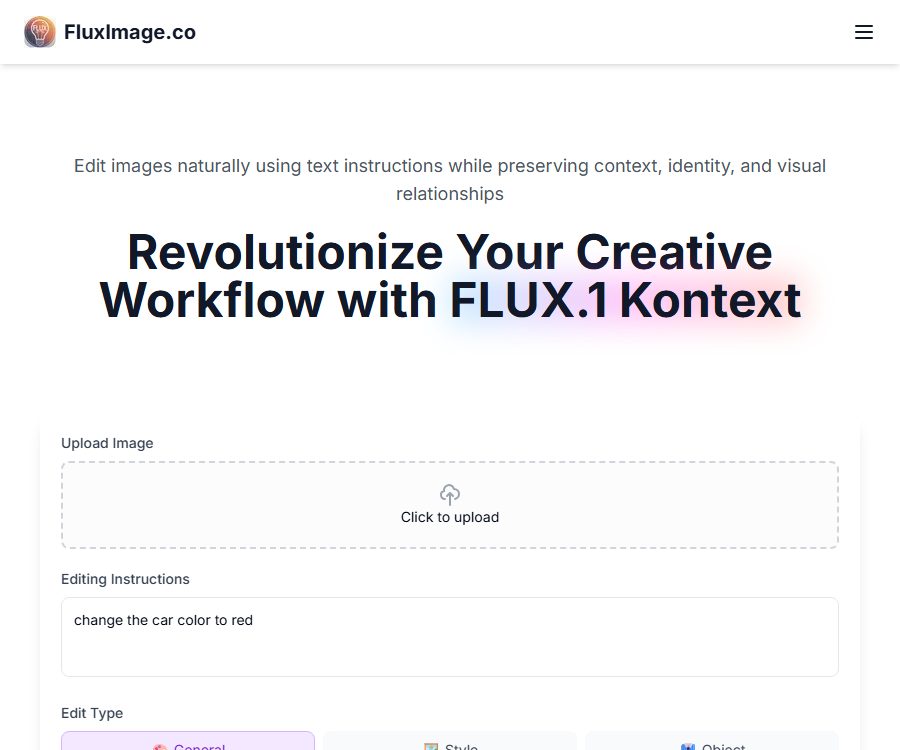
Users can upload images and use natural language to specify partial modifications, styles, objects, text, or backgrounds, in order to create new versions of the images. The site also offers an AI video creation tool; image editing and video generation follow different rules regarding inputs and requirements.
Main functions
Natural language image editing
The user uploads the original image and specifies the desired changes, such as altering the color of a car, replacing text on a sign, or adjusting the sky. The model tries to make only those specified changes while preserving the original composition and the relationships between various elements in the image.
Five types of editing modes
- General: Handles comprehensive image modifications.
- Style: Change the visual style, materials, and artistic presentation.
- Object: Add, delete, replace, or modify a specified object.
- Text: Adjust the text content and presentation in the image.
- Background: Change the environment, time, weather, or background elements.
Roles and identities are retained.
The interface offers the option to “retain identity and facial features,” which is suitable for creating sequences of images featuring the same character or for showing changes in that character’s appearance across different scenes. This option helps to reduce variations, but it cannot guarantee that the face, clothing, and other details will remain exactly the same.
Select image aspect ratio
Currently, five aspect ratios are available: 1:1, 4:3, 3:4, 16:9, and 9:16. These are suitable for profile pictures, regular horizontal and vertical images, video thumbnails, and content meant for use on vertical smartphone screens.
Model selection
The public editor shows FLUX.1 Pro and FLUX.1 Max; the page content also provides information on the Dev version. The available models, the amount of energy consumed for calculations, and account permissions may vary depending on the package chosen.
Advanced control
The advanced settings include guidance intensity, number of reasoning steps, and quality control, which are used to balance prompt compliance, speed, file size, and detail. Increasing the number of steps or the quality level may raise costs and waiting times; it is advisable to check the instructions on the page before submitting.
Multiple rounds of iteration
The platform focuses on sequential editing, allowing users to modify colors, backgrounds, objects, and styles step by step. By changing just one element at a time, it is easier to identify errors compared to making many requests all at once.
AI embraces video
The standalone video tool can accept text descriptions, reference images, or a combination of both, to create short videos of two people hugging each other. The page indicates that 10 points are spent on each creation, and the process takes approximately 3 to 5 minutes.
Input and output
| Tools | Enter | Output | Currently known settings |
|---|---|---|---|
| Kontext image editing | Image and text instructions | Edited image | Edit type, ratio, model, identity retention, advanced parameters |
| Style and Background Editing | Original image, style, or environment description | New version of the retained entity | Five ratios |
| Text editing | Images with text and replacement content | The newly generated layout | Spelling needs to be checked manually. |
| AI embraces video | Text, reference images, or both | Hugging animation video | 10 points, approximately 3 to 5 minutes |
The image upload control accepts image files, but the specific formats allowed, the maximum size of a single file, the limit on pixel count, and the output formats are not currently disclosed. For important projects, it is advisable to first use non-sensitive sample images to verify compression, color handling, and transparency features.
Image editing tutorial
- Open the image editing area and select the original image for which you have permission to use.
- Upload the image and wait for the thumbnail and editable version to appear.
- Choose from generic, style, object, text, or background type.
- Describe the object to be modified, its location, and the desired outcome using a clear instruction.
- Select a ratio of 1:1, 4:3, 3:4, 16:9, or 9:16.
- Select Pro or Max depending on the task, and decide whether to retain the character’s identity.
- Adjust the guidance, number of steps, and quality as needed, then submit for generation.
- Check the main body, face, text, edges, and areas where no modifications are required.
- Continue iterating with a single issue; once satisfied, download and save the original image.
Format for editing instructions
- Specify the object directly, for example, “Change the car on the left to a dark red color.”
- It indicates the parts that must be retained, such as the face of the person, their posture, and the camera angle.
- When replacing text, write the exact content within quotes and specify the font style and position.
- When modifying the background, it is necessary to specify the time, location, weather, lighting, and depth of field.
- Avoid vague expressions such as “become better,” and instead use observable visual requirements.
- Complex tasks are broken down into multiple rounds, with checks being performed at each stage to ensure that the structure of the original image is not compromised.
Price packages
| Package or version | Price | Billing cycle | Core benefits or quota | Suitable for users |
|---|---|---|---|---|
| Free demo | Free | Experience | The page states that no credit card is required to experience the core functions; the specific points system and models are not disclosed. | First test |
| Common annual payment | That’s equivalent to 8.96 dollars per month. | Settled on an annual basis | Infinity model: up to 50 videos, 83 Pro images, 166 Dev images, or 500 Schnell images; it can be set to private. | Use occasionally |
| Professional annual plan | That’s equivalent to 11.94 dollars per month. | Settled on an annual basis | Up to 130 videos, 216 Pro images, 433 Dev images, or 1300 Schnell images; it can be set to private. | High-frequency creators |
| Common monthly payment | The page configuration shows $9.99. | Monthly | The package includes 5,000 points; the final benefits are as specified on the settlement page. | Short-term use |
| Professional monthly plan | The page configuration shows $19.99. | Monthly | The package includes 13,000 points; the final benefits are subject to those stated on the settlement page. | High short-term usage |
The annual payment option is indicated as offering a 40% savings, but the average monthly price for annual payments as published by Common does not correspond to this 40% reduction when taking into account the configuration of the pages. Prices, total annual fees, discounts, and points may vary depending on the status of the pages, so it is necessary to refer to the actual pricing details on the settlement page.
The number of images and videos included in a package is determined by the cost limits associated with different models; it is not possible to have all of them at once. The rules regarding retries, failed tasks, high-definition output, and the impact of different parameters have not yet been fully disclosed.
Understanding of积分 and usage amounts
- The video tool clearly shows that 10 points are consumed per use.
- The Common plan is set at 5000 points, while the Professional plan is set at 13000 points.
- The cost per unit for Pro, Dev, and Schnell is different, which results in varying numbers of items that can be produced.
- The mention of “unlimited models” in the package does not mean unlimited usage; it is still subject to point limits and other restrictions.
- It has not yet been disclosed whether the points can be carried over, purchased separately, or refunded in case of failure.
Suitable for users and scenarios
- E-commerce team: Adjusting the colors of products, the background, and the display environment.
- Content creators: Produce covers, social media images, and vertical-format visuals.
- Story and character creators: Try to maintain the characters’ identities in different scenarios.
- Marketer: Replace objects, text, and lighting in the ad draft.
- Regular users: Create hug videos for memorials, entertainment, or social sharing.
Advantages
- The browser can run without the need for a local graphics card or model deployment.
- The options for editing type, ratio, and identity preservation are clearly grouped together.
- Local modifications to natural language are more suitable for iteration than complete redrawing.
- It covers both static image editing and the creation of simple reference video clips.
- The annual payment plan reveals the approximate generation limits for different models.
Restrictions and risks
- The operating company and the legal entity are not clearly displayed on this page.
- Multiple legal, assistance, API, and support resources are currently unavailable.
- Model editing cannot guarantee that the text, identity, and unspecified areas remain completely unchanged.
- The claims regarding speed and quality on the page lack consistent testing conditions.
- The annual discount and monthly pricing are not entirely consistent with the figures provided publicly.
- The “commercial license” for the package does not provide any explanatory terms outlining its specific scope.
- No native mobile apps, desktop applications, or browser extensions were detected.
Privacy and data security
The video page states that the uploaded photos are used solely for generating content and will not be used for any other purpose; they are deleted after processing. Since the unified privacy policy is currently not accessible, this statement cannot be applied automatically to Kontext images, prompts, outputs, account information, and payment data.
- Do not upload IDs, medical images, child photos, or customer confidential information.
- Obtain the person’s consent before using their real photos, especially for fabricated hug scenes.
- Before selecting the option to keep it private, confirm whether it applies to both the original image and the resulting image.
- Confirm with the platform the data retention period, backup cleanup procedures, and the purposes of model training.
- Enterprise projects must obtain instructions from third-party processors regarding cross-border data transfer.
Copyright and Commercial Use
Both paid packages include a commercial license, but the current terms of service page is not accessible; as a result, it is not possible to determine the ownership rights, prohibited uses, liability provisions, or restrictions related to third-party models. Purchasing a package does not automatically grant rights to use photos, people, or brands.
- Only upload images that you have created yourself or for which you have permission.
- Real-person synthesis should avoid deception, harassment, impersonation, and unauthorized intimate scenes.
- Trademarks, film and television characters, artistic works, and product designs may be protected separately.
- The non-commercial license for FLUX.1 Kontext Dev weights and the website subscription license are not the same file.
- Before commercial delivery, the platform is required to clarify the actual model and the licensing for the outputs.
- Comply with the applicable AI labeling and content platform rules at the time of publication.
API, SDK, and open-source status
| Project | Current status | Explanation |
|---|---|---|
| FluxImage.co web tool | Available now | Cloud-based image editing and video creation |
| Public API | Not confirmed yet | The FAQ claims support, but the API and documentation pages are currently unavailable. |
| SDK | Not yet made public | No installation packages or version details were found. |
| Product GitHub | Not confirmed yet | The footer link is a placeholder; the official repository has not been confirmed yet. |
| Website source code | Open source not confirmed | There is no public product license available. |
| FLUX model | Classified by version | The fact that weights for some models are made available does not mean that this website is open source. |
Developers who need programmed access should not plan their production systems based solely on the information provided under the \"Supported APIs\" section in the FAQ. They should at least obtain documentation regarding endpoints, authentication methods, request formats, pricing, rate limits, error codes, data policies, and service guarantees.
Cancellation, Refunds & Support
The package page states that upgrades or cancellations can be done at any time, but it does not explain where to initiate a cancellation, when such changes take effect, or what happens to the remaining points. Nor are there any details provided regarding the deadline for refunds, rules for partial refunds, or refunds in cases of failed transactions.
Before making the payment, it is necessary to save the settlement page, the renewal date, and the benefits associated with the plan; it is advisable to use payment methods that allow for tracking. If the support and legal pages are still not available, extra caution should be exercised when choosing a long-term annual payment plan.
Frequently Asked Questions
Is FluxImage.co the official website of FLUX?
It is not an official website that has been verified. It is a third-party cloud tool that makes use of or introduces the FLUX model developed by Black Forest Labs.
Is it possible to create images using only text?
The current home page is primarily used for uploading images and then editing them using text instructions. The capability to generate images solely from text may be provided by other models, but the available methods and rules are determined by the account page.
What image ratios are supported?
The editor displays 1:1, 4:3, 3:4, 16:9, and 9:16. The final pixel dimensions for different models have not yet been made public.
How many points are available for the free trial?
The page states that there are demos available without the need for a credit card, but it does not specify the points required, the number of times such demos can be used, or the applicable models. It is necessary to check the current balance in the account before attempting to use these demos.
Is the annual fee charged all at once when the membership is renewed annually?
The page states that settlement is done on an annual basis; therefore, the monthly average price corresponds to a one-time annual fee. The final total amount, taxes, and discounts are as indicated on the settlement page.
Can the limits for images and videos be used up simultaneously?
It shouldn’t be understood in that way. The numbers listed on the page represent the maximum value for the same points pool when converted based on different task costs; using them together will result in a combined consumption of points.
Is there an official API available?
Not confirmed yet. The FAQ contains information about the API, but the API and its documentation pages are currently inaccessible; the materials required for integration in production are missing.
Will the uploaded image be deleted immediately?
The video page describes it as an embrace, but the unified privacy policy is not accessible; therefore, it’s not possible to confirm that all image editing tasks are handled in the same way.
Can subscriptions be used for commercial purposes?
The package page indicates the commercial license, but the full terms of service are not available at the moment. Commercial users should obtain written information regarding the rights of use and the limitations on the models before making a payment.
Summary
FluxImage.co allows for quick modification of images’ colors, objects, text, style, and background using natural language; it also enables the use of simple reference images in videos. Various aspect ratios, options for preserving certain elements, and advanced parameters provide useful controls for iterative editing.
The platform’s current pricing details are clear, but there is a lack of transparency regarding the legal entities involved, data privacy policies, refund procedures, and API documentation. A low-risk trial can be used to test its performance, while for commercial or sensitive projects, it is necessary to have proper contracts and information related to data processing in place first.
Tools similar to FluxImage.co



 Guigong Network Security Registration No. 45132202000164