






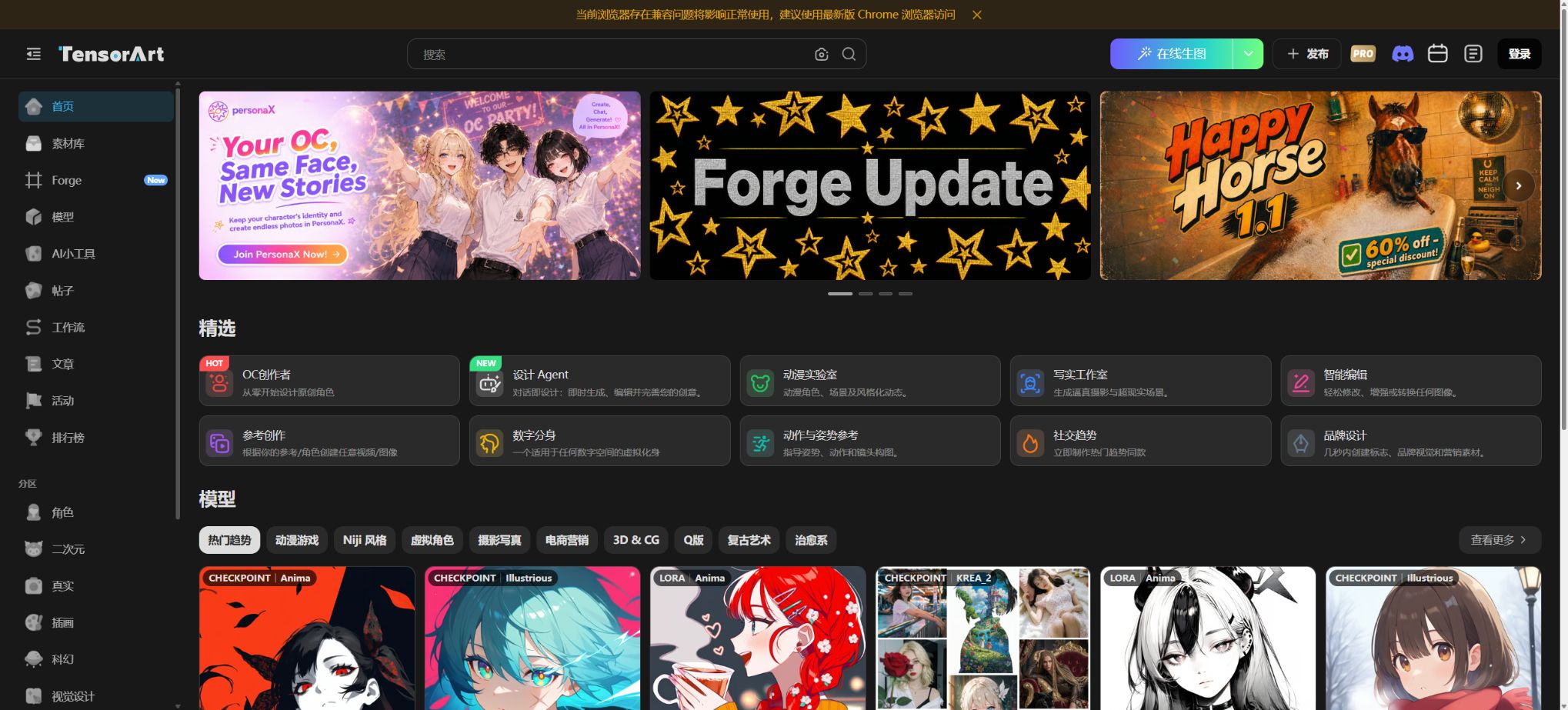
Tensor.Art
An AI creation platform that combines community models, online generation, and model training.
Tags:AI image illustration generationWhat is Tensor.Art?
Tensor.Art is a community and cloud-based creation platform focused on generative images and videos. Users can browse models such as Checkpoint and LoRA, reuse prompt phrases and parameters created by other users to generate content online, build ComfyFlow node workflows, release AI tools that are easy to use, train their own LoRA models, and share or sell those resources.
In its early days, the platform was known for the Stable Diffusion community and free cloud computing resources; later it expanded to include Flux, Illustrious, Pony, Qwen Image, video models, as well as proprietary commercial models.
In 2026, an independent Canvas will be introduced, bringing infinite canvases, professional design tools, as well as closed-source models such as Seedance, Kling, Nano Banana, Vidu, and PixVerse into the new Energy resource framework.
Model community
The model page brings together basic models, Checkpoints, LoRA, and other generation resources. Each item displays sample images, trigger words, recommended parameters, version information, licensing details, as well as options for downloading or running it online.
Users can use Remix to copy the models, prompts, samplers, steps, CFG values, and dimensions of public works, and then adjust them according to their own needs.
The quality of the community models and their licensing are determined by the respective uploaders. A high number of downloads or attractive examples do not indicate that a model is suitable for commercial use, nor do they guarantee that the training data is legal.
Before downloading or running it, you should check the project version, usage restrictions, commercial license, attribution requirements, and rules for merging models.
Online image generation Workspace
The traditional Workspace offers text-to-image and image-to-image functions; it allows users to choose from various models, VAEs, LoRAs, as well as positive and negative prompts, samplers, number of steps, CFG values, seeds, resolution, and batch size. Advanced features include High-Res Fix, ADetailer, ControlNet, IP-Adapter, as well as local processing and image upscaling.
Each task consumes TA Credits based on the model, resolution, number of steps, and additional features. The creator of the model can also impose extra fees or membership restrictions on its use; as a result, the cost for the same size may vary across different projects.
Check the real-time score displayed on the interface before submitting.
ControlNet and reference control
The platform supports various ControlNet or reference workflows such as Canny, Depth, LineArt, OpenPose, QR codes, Recolor, and Revision, which are used to control the posture of characters, edges, depth, line art, color schemes, and composition. The IP-Adapter allows reference images to influence the characters or their visual features.
The control model must be compatible with the base model and the preprocessor. Excessively high weights can result in a stiff appearance of the image or in it copying the reference, while excessively low weights lead to insufficient constraints.
When using someone else’s photos, paintings, or brand images, it is still necessary to obtain permission regarding both the portrait rights and copyright.
ComfyFlow node workflow
ComfyFlow is a ComfyUI-style node environment hosted by Tensor.Art. Users can start with a Text2Image template or a blank workflow, load models, encode prompts, perform sampling, use ControlNet, apply scaling, work with video, and utilize output nodes to create reusable workflows; they can also import local JSON files.
Node streams are suitable for complex batch processing and precise control, but not all custom ComfyUI nodes can be run directly in the cloud. Before importing, it is necessary to check for missing nodes, model paths, versions, and resource costs;
Workflows from strangers may also involve resource-intensive or unexpected processing.
AI Tool: Convert workflows into simple forms
Creators can select the input nodes that need to be made public within ComfyFlow, and use these to package complex processes into AI tools. Ordinary users only need to enter prompts, upload images, or select a few parameters in order to run the multi-node workflows behind them.
The AI Tool is suitable for fixed tasks such as creating product images, performing outfit changes, generating avatars, converting animations into realistic images, editing hands, enlarging images, and changing styles. The models, templates, and workflows for this tool are provided by community creators; the performance, costs, and commercial licensing terms need to be checked individually.
Online LoRA model training
Tensor.Art offers LoRA training without the need for a local graphics card. Users upload image datasets, set labels, select the base model, determine the number of epochs, the learning rate, and other parameters; the training is then carried out in the cloud, and previews of each iteration are available for review before deciding which version to release.
LoRA is suitable for learning characters, styles, clothing, products, or specific concepts. The quality of training depends on image clarity, angle coverage, labels, sample consistency, and parameters.
Too little data leads to underfitting, while excessive repetition or too many epochs can result in overfitting.
Permission must be obtained before uploading real-person photos and protected works.
The platform is also gradually supporting video LoRA training, such as the training process for Wan’s image-to-video model. Video data is more expensive, and it is prone to issues like jitter, overfitting, and motion drift; therefore, it is necessary to test multiple epochs and different prompts before releasing the content.
Canvas: An infinite canvas for creative painting
Launched officially in April 2026, Canvas is a new creative environment that stands apart from traditional Workspaces. It offers an infinite canvas, image and video models, professional design tools, as well as multi-step editing capabilities that allow users to place references, generate results, and work with different versions of their designs in the same space.
Canvas uses Energy instead of TA Credits. Seedance 2.0 is now exclusive to Canvas, and closed-source models such as the Nano Banana series and Wan 2.7 are also being migrated in accordance with the official plan.
Users should confirm whether Credits or Energy will be used before starting a task; the amounts of these two types of balance are not necessarily equal by default.
Canvas Agent
Canvas Agent is a creative agent that is still in the beta stage. After the user describes the desired outcome, it can understand those requirements and organize the necessary steps for creation and editing, thereby reducing the need to carry out tasks one by one.
It is suitable for rapid concept exploration, but the automatic selection of models, as well as the scope and cost of modifications, may differ from what is expected; for important projects, it is necessary to check the results and energy consumption step by step.
Image and video models
Traditional Tensor.Art focuses on models from the Stable Diffusion ecosystem and community, including SD 1.5, SDXL, Pony, Illustrious, Flux, SD 3.x, HunyuanDiT, Kolors, and others. Canvas, on the other hand, brings together Kling, Seedance, Nano Banana, Vidu, PixVerse, as well as other proprietary models.
Model availability, resolution, content restrictions, and migration status can change rapidly. A permanently fixed list should not be provided in the catalog.
Before actual use, check the current entries for Workspace, Canvas, and TensorHub.
Work release, Remixing, and community interaction
Users can publish the generated images as posts, along with the model and parameters, so that others can view them, like them, save them, and remix them. Making the parameters public facilitates learning and replication, but it also means that one’s own prompts, model combinations, and seeds may be copied.
Projects that should not be made public should make use of private settings, and care should be taken to prevent customer information from being exposed in the cover image, prompts, or metadata. Information such as the account name, profile picture, and biography may remain visible at all times, in accordance with the privacy policy.
Model download and Buffet
The model creator can decide whether to allow local downloading, and can set options for paid execution or paid downloading through Buffet. Purchasing or subscribing does not automatically extend the license for the model;
Users should still comply with the rules regarding commercial use, merging, redistribution, and attribution set by the author for specific versions.
Monetizing creations
Tensor.Art offers various ways for creators of models, ComfyFlow tools, AI tools, as well as those who create images and videos to generate income, including TenStar Fund, Pro Model, Pro AI Tool, paid access or downloads via Buffett, referrals from members, and platform-specific promotions. Income can be derived from the use of Pro services by users, successful referrals, or the performance of the created works.
Starting in July 2026, the platform announced that the incentive structure would be adjusted to three categories: TenStar Fund, Pro Model Incentives, and Pro Tools Incentives. The regular rewards offered by the TenStar Fund are focused on the new base models designated for that particular period. Qualifications, coefficients, withdrawal requirements, and the models supported can change over time; therefore, rewards from previous campaigns cannot be considered as fixed income.
Pro model and Pro AI Tool
The approved Pro models and tools are available for continuous use by Pro members, while regular users usually have only three chances to try them out. Creators can receive incentives by operating these tools as Pro members, and they get referral rewards when users purchase a membership through their projects.
Projects must be public, original, of consistent quality, and come with the appropriate commercial usage rights.
Once a project is added to Pro Segment, it usually cannot be reverted to its normal status – it can only be deleted; therefore, creators should first assess the implications of exclusivity, downloads, and community sharing. Platform reviews do not replace examinations of copyright or training data.
TA Credits
TA Credits are primarily used for generating open models, performing additional processing, training models, and using certain community tools in the traditional Tensor.Art platform. The cost of a task depends on the configuration settings;
Uploading images, zooming in, using ADetailer, and working with videos all increase consumption.
According to the terms for Pro members, 300 Credits are provided each day, and these credits are refreshed on a daily basis without being accumulated. The platform also distributes credits with varying expiration dates through tasks, activities, or when others use certain models or tools.
Permanent points, daily points, and campaign rewards should be checked separately in the account.
Energy
Energy is specifically designed for use in Canvas, as well as for its proprietary image, video, and design features; it is independent of TA Credits. During promotional events on Canvas, the platform allowed a limited amount of Credits to be converted into Energy, but this was part of the promotional mechanism only, and it should not be considered an option that is available at all times or with a fixed conversion ratio.
The price of Energy and its validity period for different closed-source models are determined by the Canvas interface. The Energy provided as a gift in promotions may have a validity period of 30 days, and any unused balance is not necessarily retained indefinitely.
Free to use
Tensor.Art enables registered users to access models, community AI tools, and certain training functions through daily points and assigned tasks. The free usage quota is affected by factors such as waiting times, concurrent usage, model pricing, peak usage periods, and platform promotions; it does not mean that all models and video generation services are available for free.
By 2025, the adjusted daily tasks will focus more on sharing, receiving likes, and having one’s works selected; a small amount of additional Credits will be awarded for this. The rules for these tasks can be changed easily, so users should not rely on regular sign-in rewards to plan their long-term creative work.
Pro membership price
The official announcement regarding Pro adjustments specifies that the current public rates are $9.9 per month, with 1000 Credits included as a bonus, and $19.9 per quarter, with 5000 Credits as a bonus; there is also a Daily Pass available for $1, which can be purchased only once by each user.
During the validity period of Pro, 300 Credits are provided daily, in addition to an increase in concurrent usage, queue capacity, and access to Pro content.
In the past, promotional offers such as a price of $59.9 per year and additional credit refunds were available, but these promotions have expired and cannot be considered as the current permanent prices. The details regarding annual payment options, taxes, regional pricing, automatic renewal, and Canvas Energy benefits are indicated on the member purchase page.
Automatic renewal and cancellation
The Pro monthly and quarterly plans offer subscription options. After cancellation, one usually has to wait until the current period ends before being able to subscribe again; it is not possible to cancel immediately and then purchase the plan repeatedly in order to obtain rewards.
Member benefits and points are not refundable, and in the event that an account is suspended due to violation of the terms, the data or balance cannot be restored.
TensorHub migration
TensorHub is a new model and creation platform linked to Tensor.Art; accounts and certain contents are synchronized between the two platforms. TensorHub uses Tokens instead of TA Credits, and these Tokens cannot be obtained through daily free points or tasks. The developers offered former users a one-time option for converting and transferring their balances.
The main Tensor.Art platform is gradually being switched to an SFW display format; some NSFW models are hidden from other users on this platform, but they are not removed immediately from the creators’ accounts, and can continue to be managed on TensorHub in accordance with its rules. There are restrictions regarding task synchronization, and the balances, content visibility, and incentives on the two platforms cannot be combined.
Work rights and model licensing
The terms of service for Tensor.Art state that the platform does not claim ownership over the models and AI-generated images uploaded; users can use the content they create. However, this does not constitute a unified commercial license for the underlying models, the training images, or third-party characters.
Each model may have its own separate license, and the content generated can involve issues related to portraits, trademarks, and copyrights. When using such models for products, advertisements, or client projects, it is necessary to keep track of the specific version of the model and its license details, as well as to understand all the restrictions associated with combining multiple LoRA models.
Age and content rules
Account users must be at least 18 years old. The platform prohibits any content that is illegal, infringes on rights, involves harassment, leads to the disclosure of personal information, or harms minors; it also requires that sensitive content be properly labeled.
The SFW policies on the Tensor.Art main site and the rules of TensorHub may still be adjusted in the future.
The fact that a model can be searched for or used within a community does not mean its use is legal. Using celebrity faces, unauthorized LoRA models based on real people, and content related to the sexualization of children poses serious risks; platforms may delete such content or suspend accounts associated with it.
Privacy and data processing
The privacy policy states that the platform collects account information, data related to creation and browsing activities, data used for model training, uploaded images, follow relationships, as well as metadata, all of which are used for providing services, personalizing experiences, improving functionality, conducting analyses, ensuring security, and carrying out research. The name, profile picture, and biography of public accounts may be visible to anyone, while the content created can be set to either public or private.
According to the official announcement, the materials used for image generation are permanently deleted from the servers once a task is completed, which means that they have to be reloaded for each new task; however, accounts, public content, training data, and other types of uploaded material may be retained in different ways.
Sensitive images and the training set should still be assessed against the relevant policies before being uploaded, and any items that are no longer needed should be deleted promptly.
Tensor.Art usage tutorial
Complete a basic task.
- Clarify the purpose of the image, its dimensions, style, and requirements regarding commercial licensing.
- Upload the original images for which you have permission to use, or provide clear instructions;
- Select the model community and generate low-cost candidates first;
- Use the online image generation Workspace to adjust the composition, subject, and details;
- Zoom in to examine faces, hands, text, edges, logos, and artifacts;
- Export after confirming the color, resolution, and licensing, while retaining the original image;
Create reusable professional workflows
- Create a list of brand colors, fonts, layout elements, and elements that are prohibited.
- The model community, the online image generation Workspace, and ControlNet were tested separately against the reference control;
- Use the same set of representative samples to compare quality, speed, and cost;
- Complex edges, text, and images of key products should be handed over for manual refinement.
- Standardize naming, dimensions, and review status;
- Batch processing and release are carried out after random inspections;
API and automation limitations
- The platform offers ComfyFlow for scripting workflows as well as AITool for packaging, but the terms of service prohibit accessing the generation services through any means other than the Tensor.Art website or its official app.
- Public self-service reasoning APIs are not a default feature for ordinary users; it is not possible to bypass restrictions related to Credits, Energy, waiting times, and concurrency levels by using packet capture or automated methods.
Support for platforms and open-source status
- Web browser version;
- Tensor.Art mobile app;
- Cloud Workspace and ComfyFlow;
- Canvas: an infinite drawing surface;
- The associated TensorHub platform.
Tensor.Art is built upon a large number of open-source models as well as the ComfyUI ecosystem; however, the platform’s own accounts, community features, cloud computing resources, Credits, Energy, training, and incentive systems are not fully open-source. As a result, it is not an open-source service that can be deployed on one’s own. It is necessary to check individually whether each specific model in the community is open-source.
Which users is it suitable for?
- Users who wish to run Stable Diffusion, Flux, and community LoRA online without a local graphics card;
- AI painting learners looking for models, prompts, and reproducible parameters;
- Creators who need a ComfyUI-style node workflow but do not want to maintain a local environment;
- The creator of models for training characters, styles, products, or videos using LoRA;
- Developers who package complex workflows into AI tools;
- Community authors who hope to earn revenue from the platform through models, tools, and works;
- Users who need closed-source image and video models as well as a Canvas with an infinite canvas.
Product advantages
- Model communities, online inference, training, and deployment constitute a complete ecosystem;
- Models, prompts, and parameters of publicly available works can be directly Remixed;
- ComfyFlow supports complex node workflows and the encapsulation of AI tools;
- It covers open models, closed-source models, as well as images and videos;
- It offers LoRA training, model hosting, downloading, as well as various ways to generate revenue;
- Free daily points lower the barrier to experiencing the open model;
- Canvas offers independent, infinite canvases along with creative Agents.
Restrictions and Precautions
- Credits, Energy, and TensorHubToken are distinct resources, and the model is being migrated across different entry points;
- Old tutorials and prices can easily become outdated; it is necessary to check the real-time charges before carrying out a task.
- The quality of community models, the training data, and commercial licenses are not consistent.
- The fact that the platform does not claim ownership does not mean that the models and the images generated can be used for commercial purposes without any restrictions.
- The 300 daily points available for Pro users do not accumulate, and the refunds from past promotions as well as the conversion of Credits into Energy cannot be considered as long-term benefits.
- Videos, training, and complex nodes can quickly deplete the balance.
- ComfyFlow is not fully compatible with local ComfyUI – the workflow may not function in the absence of certain nodes or models.
- Cloud platforms also do not guarantee continuous availability;
- The privacy policy covers the collection of data related to creation, training, and interaction;
- Before uploading real people’s data, customer information, and confidential data, authorization must be obtained and the cross-border processing must be assessed;
Frequently Asked Questions
Is Tensor.Art free?
The open-source models and some tools can be used with daily Credits and task rewards, but videos, training programs, paid community projects, and the closed-source Canvas model require more Credits or separate Energy.
How much does Tensor.Art Pro cost?
According to the official details, the price is $9.9 per month and $19.9 per quarter; there is also a one-time Daily Pass costing $1. The annual pricing and regional prices are specified on the membership purchase page.
How many points does Pro earn per day?
According to the membership terms, 300 Credits are refreshed daily, and any unused amount is not carried over to the following day; the package may also include a one-time bonus of Credits.
What is the difference between Credits and Energy?
Credits are primarily used for traditional Workspaces, open models, training, and community tools; Energy is dedicated to closed-source images, videos, and design features in Canvas.
Can one train their own LoRA?
Yes, it supports image LoRA, with video LoRA to be added gradually. It is necessary to have rights to the dataset before training, and the parameters must be adjusted according to the base model and the task at hand.
Can the images generated by Tensor.Art be used for commercial purposes?
The platform does not claim ownership of the generated images; however, whether they can be used for commercial purposes depends on the models used, LoRA elements, reference materials, and third-party rights, all of which must be checked individually.
Does Tensor.Art have a public API?
Ordinary users primarily use these services through web pages, apps, ComfyFlow, and AI tools. The terms of service prohibit accessing the generation services via unofficial channels; therefore, it is not possible to bypass these restrictions by using custom APIs.
Is Tensor.Art open source?
The platform is not open source. It hosts many open-source models and uses a workflow similar to ComfyUI, but the full community and cloud services are intended for commercial use.
Tools similar to Tensor.Art



 Guigong Network Security Registration No. 45132202000164