






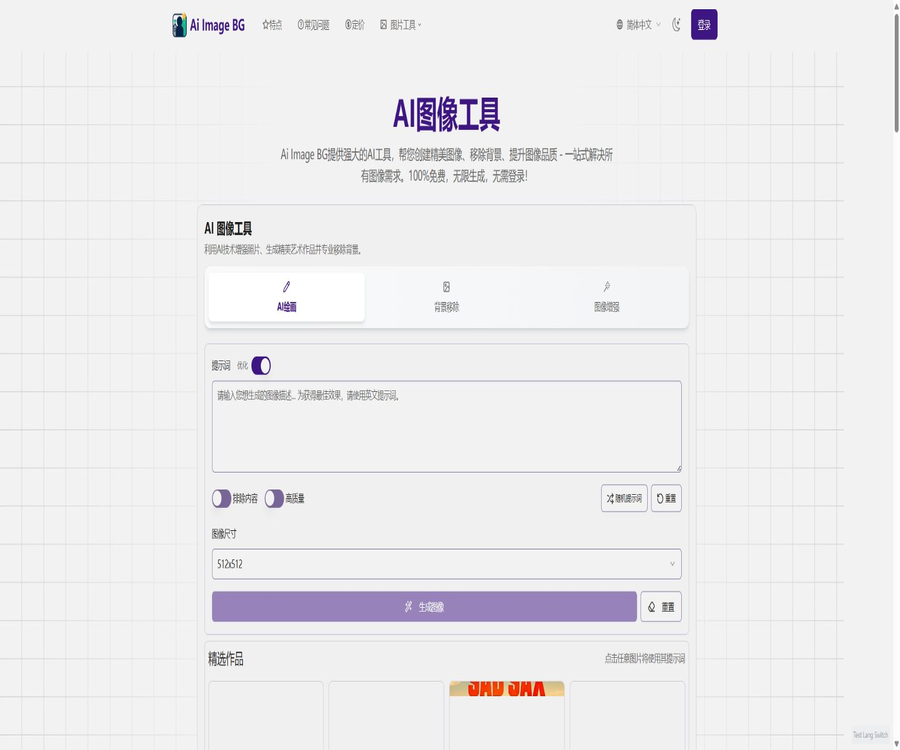
AI Image Bg
AI Image Bg – a smart tool dedicated to AI images
Tags:AI image background removalWhat is AI Image BG?
AI Image BG is an AI-powered tool for image generation and background processing that runs in a browser. Users can enter text to generate images, or they can upload existing photos to remove backgrounds, replace backgrounds, enhance them, or repair them.
It is suitable for e-commerce, social media, design, and general image processing tasks, and it has a low learning curve. Nevertheless, the automatically generated results may still suffer from issues such as missing edges, detail artifacts, and failures to meet the specified requirements.
Operating entity and product positioning
The website’s privacy policy and terms of service list the legal name of the operating entity as BackgroundRemove, but it does not disclose the full address of the company nor its registration number. Users who need to enter into business contracts or handle sensitive information should verify the details of this entity before proceeding with any transactions.
The product scope has expanded from being a simple background tool to include AI-driven drawing, image enhancement, restoration of old photos, and style generation. The current website offers free features, as well as personalized plans for individuals and corporate clients.
Main functions
- Generate images in realistic, anime, painting, sketch, or 3D style based on the textual instructions.
- Enter negative prompts to reduce elements that are not desired.
- Automatically identifies portraits, products, or other subjects and removes the background.
- Replace the background with transparent, solid-color, blurred, or AI-generated scenes.
- Improves clarity, details, contrast, and overall image quality.
- Fix blurry or old photos and add color to black-and-white photos.
- Use the Ghibli-style generator to create specific visual effects.
- Select the image size, quality, and common output formats.
- Premium members can use faster queues and advanced generation models.
- Ultimate members can enable private generation and high-definition output.
- Enterprise users can inquire about batch processing, APIs, and custom models.
Text to image
The AI drawing feature converts natural language descriptions into new images, offering options for style, size, quality, and negative prompts. The more specific the input, the easier it is to maintain consistency in terms of characters, environment, camera angle, and lighting.
Tutorial for using AI for drawing
- Select the AI image generation option and determine the purpose of the image.
- Describe the subject, action, environment, composition, lighting, and visual style.
- In the negative prompts, enter exclusion options such as spelling errors, extra fingers, and blurriness.
- Choose the image aspect ratio and quality that are suitable for the intended publishing channel.
- Generate a low-risk test image first, then gradually adjust the prompt.
- Check the details of the character structure, text, logo, and background.
- Save the available versions and record the prompt and generation settings.
Prompt writing format
- Subject: Identify the person, product, animal, or scene.
- Actions: Describe standing, running, displaying, or interacting in various ways.
- Environment: Indicates indoor, street, natural, or solid-color studio photography.
- Composition: Specify close-up, half-body, full shot, top-down view, or empty space.
- Lighting: Specify soft light, backlighting, sunset lighting, or studio lighting effects.
- Style: Choose realism, anime, watercolor, sketch, or 3D rendering.
- Restrictions: Exclude watermarks, garbled text, blur, and unwanted objects.
Automatically remove background
Background removal involves identifying the main subject of an image and creating a transparent or replaceable background. Photos of portraits, products with clear outlines, and those with a high contrast between the foreground and background tend to yield cleaner results.
Steps for background operations
- Prepare original images with a clear subject and no severe obstructions.
- Upload an image and select the background removal feature.
- Wait for the system to automatically detect the boundary between the subject and the background.
- Enlarge to examine hair, transparent objects, shadows, and tiny holes.
- Choose a transparent, solid-color, blurred, or new AI background.
- Choose PNG, WEBP, or JPG as the output format based on your usage.
- After downloading, check the edges on the actual page or in the design draft.
Suggestions for complex image processing
- High-resolution original images are used for the edges of hair and fur.
- Transparent glass and reflective products require the preservation of natural highlights and shadows.
- Do not place white products on a completely identical white background.
- For group photos, make sure that everyone is identified correctly first.
- After replacing the background in e-commerce images, check whether the color of the products has changed.
- When the automatic results are not satisfactory, use a professional editor to refine the edges further.
Background generation and replacement
Users can create new background environments for the subjects that have been isolated, which are suitable for product displays, profile pictures, and social media content. The perspective, lighting direction, and color temperature of the background should match those of the subject; otherwise, it will be easy to detect a noticeable synthetic feel.
- A solid-color background is suitable for ID photos, product main images, and unified catalogs.
- A blurred background is suitable for softening the environment and highlighting the subject.
- The scene background is suitable for advertisements, posters, and concept presentations.
- A transparent background is suitable for further use in design software or web pages.
- For the same batch of products, the lens height, shadows, and background color should be consistent.
Image enhancement, restoration, and coloring
Image enhancement is used to improve clarity, details, and overall appearance; photo restoration and colorization aim to fill in damaged areas or determine the appropriate colors. The details generated by AI may not correspond to the actual facts, so they cannot be used as direct evidence in historical contexts.
- Mild blurring and compression marks are usually easier to correct than severe defocus.
- After face enhancement, it should be checked whether the facial features have been altered to resemble those of another face.
- Text and document information cannot be reconstructed by relying on AI guesses.
- Colorizing black-and-white photos is a speculative process; the original image should be retained.
- Create a copy before making repairs to avoid overwriting unique files.
Ghibli-style generator
The website offers a dedicated tool for creating images in the Ghibli style; free users and paid users have different limits on the number of images they can create per month. The availability of certain style names does not imply that authorization to use the related studios, characters, or works is granted.
| Package | Monthly Ghibli-style quota | Explanation |
|---|---|---|
| Free version | Refer to the real-time page. | The basic version may have watermarks and is subject to a daily usage limit. |
| Premium | 100 pieces | Includes advanced models and faster generation. |
| Ultimate | 300 pieces | Includes private generation, high-definition, and advanced optimization. |
| Enterprise | Customization | Negotiate based on the number of teams, models, and the volume of requests. |
Supported formats and resolutions
The official website’s FAQs list the common file formats that can be used, such as JPG, PNG, WEBP, HEIC, and GIF, and state that resolution of up to 4K can be handled. The actual range of supported formats may vary depending on the specific tool, file size, and browser capabilities.
| Format | Suitable uses | Precautions |
|---|---|---|
| PNG | Transparent background, logo, and precise edges | Files are usually large, making them suitable for further design work. |
| WEBP | Web images and small files | Old software may not be fully compatible. |
| JPG | Photos, social media, and general sharing | Transparent backgrounds are not supported, and multiple compressions will result in loss of details. |
| HEIC | Import original phone photos | Conversion may be required when exporting or using across platforms. |
| GIF | Input of some animated images or pictures | Whether to retain animations in background processing depends on testing with the specific tool. |
Free version and paid version
The Chinese homepage of the website still states that the service is free, unlimited, and does not require login, but the price page clearly indicates that the free version has daily generation limits, a limited speed, and watermarks. Due to the inconsistencies in the information provided on the official site, it is necessary to rely on the actual benefits shown on the account dashboard and the billing page after registration.
| Ability | Free version | Premium | Ultimate |
|---|---|---|---|
| Number of generations | Limited per day | No limits on generation | No limits on generation |
| Generation speed | About 10 to 20 seconds | About 3 to 10 seconds, 5 times acceleration | Fastest queue |
| Ads and watermarks | There are ads and watermarks. | No ads, no watermarks | No ads, no watermarks |
| AI drawing models | Base model | Advanced models | Advanced models |
| Background removal | Base model | Advanced models | Advanced models |
| Image enhancement | Base model | Advanced models | Advanced models |
| Advanced optimization | Not included | Not included | Includes |
| Private generation | Not included | Not specified | Includes |
| High-definition generation | Restricted | Not specified | Includes |
| Priority access to new features | Not included | Not specified | Includes |
Member price
The following shows the monthly rate after selecting annual billing when checking the prices in August 2026. The annual plan indicates a 20% savings; whether the payment is made in one lump sum or in installments depends on the final settlement page.
| Package | Annual billing conversion | Suitable for users | Primary interests |
|---|---|---|---|
| Free version | $ | Individual users who occasionally edit images | Base speed, daily limit, ads, and watermarks |
| Premium | 10 dollars per month | Individual creators | Unlimited generation, 5x speed, ad-free watermark, and advanced models |
| Ultimate | $ | Professional creators | Fastest speed, private generation, high definition, and advanced optimization |
| Enterprise | Custom quote | Teams and high-traffic services | Full privacy, customized models, dedicated support, and APIs |
Monthly payment labels are available, but the corresponding monthly amount is not displayed consistently on the page; therefore, it is not appropriate to estimate the amount based on the annual rate. Before making a purchase, it is necessary to verify the taxes and fees, the currency used, the renewal period, as well as the total amount shown by the payment service provider.
Subscription, cancellation, and refunds
Refund policy: Paid plans may be automatically renewed according to the cycle indicated on the billing page; once cancellation is requested, they can still be used until the end of the current billing period. Users need to complete the cancellation process before the next renewal in order to avoid new charges.
- Refund requests can be submitted within 14 natural days after the transaction takes place.
- Orders paid through Paddle are processed according to Paddle’s refund process.
- When applying, it is necessary to provide the account email, order number, date, amount, and reason.
- Refunds are usually sent back to the original payment method, and the time it takes for them to arrive depends on the payment service provider.
- The common questions on the pricing page still state that sales are non-refundable, which is in conflict with the separate refund policy.
- In the event of a conflict, keep screenshots of the order, the settlement page, and the refund policy, and contact customer service first.
Commercial use and content rights
The price page and the FAQs state that users can use the generated and processed images for personal, academic, or commercial purposes; free users are required to indicate the source of AI Image BG. The terms of service also state that users retain ownership of both the original images and the processed versions.
- Only images with upload rights can be submitted for processing.
- For photos of people, permission for their portrait and privacy must be obtained.
- The generated results may be similar to existing works, and the platform’s license does not eliminate the risk of infringement.
- Trademarks, characters, artist styles, and brand materials need to be checked separately.
- Free users should confirm whether it is necessary to retain the platform’s watermark before using it for commercial purposes.
- Before running an ad, human staff check the text, the appearance of the product, and any misleading statements.
Enterprise Edition and API
The Enterprise version is designed for teams and companies; the pricing page outlines features such as full privacy protection, custom models, dedicated support, API access, and handling of high-volume requests. The official website does not disclose information regarding API endpoints, pricing per call, rate limits, or service level details.
Confirm before making a purchase for the company
- Statistically track monthly processing volume, peak concurrency, file size, and target latency.
- Prepare real test sets including portraits, transparent objects, and complex products.
- Confirm API authentication, rate limiting, retry on failure, and batch task handling.
- The written document should specify the storage location of the images, the time they are retained, and the mechanism for deleting them.
- Verify the training of generated content, manual access, and third-party processing rules.
- Define service availability, technical support, compensation, and exit procedures.
What use cases are suitable?
- E-commerce sellers create product images with a transparent background or a uniform background in bulk.
- Social media management involves creating covers, images, and background materials.
- The photographer quickly pre-processes the portrait and the simple background.
- Designers create concept sketches, poster drafts, and composite materials.
- Ordinary users use it to repair old photos or enhance blurry images.
- Content creators test anime, watercolor, sketch, and 3D styles.
- Companies use APIs to establish automated image processing workflows.
Tasks that are not suitable for completion directly
- It requires perfect refinement at the pixel level for hair, glass, and complex reflections.
- Restoration and coloring of old photographs that require the complete restoration of historical facts.
- Processing of client confidential information, photos of minors, or medical images without authorization.
- The final advertising product, which relies on accurate text, logos, and packaging markings.
- The content to be created must be for commercial projects that enjoy exclusive copyright.
- Tasks that must be processed offline and whose images cannot be uploaded to the cloud.
- A large-scale automated publishing process without manual review.
Product advantages
- Bring AI image generation, background removal, and image enhancement together on the same website.
- The operation process is simple; no knowledge of professional layers or masks is required.
- Supports transparent, solid-color, blurred, and generative backgrounds.
- It includes styles such as realism, anime, painting, sketching, and 3D.
- It supports a variety of common image formats as well as high resolutions.
- The free version allows you to test subject recognition and output quality first.
- The paid version offers faster speeds, advanced models, and watermark-free output.
- The enterprise plan includes API access, high usage quotas, and custom model options.
- The website offers a Chinese interface and is compatible with computer, tablet, and mobile browsers.
Usage restrictions and precautions
- There is a clear discrepancy between the free information on the home page and the benefits listed on the current price page.
- The free version is actually subject to limits on the number of uses per day, as well as advertisements and watermarks.
- The generation speed is affected by the complexity of the image, as well as by the queue and the network.
- Automatic image cropping can damage hair strands, semi-transparent edges, and shadows.
- AI enhancement may fabricate textures, faces, text, and historical details.
- The generated images may exhibit distorted structures, spelling errors, and style deviations.
- The monthly price is not displayed consistently on the page from which it is retrieved; it needs to be confirmed again before settlement.
- The statement on the pricing page regarding no refunds conflicts with the separate 14-day refund policy.
- The platform does not make the enterprise API technical documentation or fixed prices available to the public.
- The service is provided as it is, without any guarantee that the results will meet professional standards.
Privacy and image data
The privacy policy states that the platform collects account details, usage information, device data, cookies, uploaded images, and payment information. Images are processed on secure servers; unless the user chooses to save them, the original images are automatically deleted after processing.
- The policy states that images shall not be used to train AI models without explicit consent.
- The policy states that uploaded images will not be shared with third parties, except as required by law.
- Ultimate offers a private generation mode; the visibility level for the regular plan needs to be confirmed separately.
- Do not upload ID cards, contracts, medical records, or photos of unreleased products.
- Obtain permission before using someone else’s portrait, and remove metadata such as location information.
- Cloud transmission and storage cannot guarantee absolute security; a local copy should be kept.
- When purchasing enterprise APIs, deletion, backup, and sub-processor provisions should be included in the contract.
GitHub and the open-source status
As of the time of verification, no official GitHub repository maintained by AI Image BG or BackgroundRemove was found. The similar background removal projects that were discovered cannot be considered as the source code for this website.
There are no open-source specifications available for the website’s programs, models, and APIs; the tool directories should be marked as not being open source. Access to a company’s APIs does not entail obtaining the source code of the platform or the weights of its models.
Basic information
| field | Content |
|---|---|
| Tool name | AI Image BG |
| Operation name | BackgroundRemove |
| Tool type | AI image generation, background removal, background creation, and image enhancement |
| Main inputs | Text prompts and uploaded images |
| Common formats | JPG, PNG, WEBP, HEIC, and GIF, etc. |
| Highest resolution | The official website states that the free tool supports up to 4K resolution, with the actual capability depending on specific tests of its functions. |
| Supported platforms | Browsers for computers, tablets, and smartphones |
| Price pattern | Free version, Premium, Ultimate, and enterprise quotes |
| Is commercial use supported? | The terms permit it, provided that the authorization, signing, and legal requirements are met. |
| Whether API is provided | Enterprise solutions are available; limited public technical documentation. |
| Is it open source? | No |
Recommendation score
4.1 / 5. The AI Image BG feature set is comprehensive and easy to use; it offers a free trial period as well as various options for background processing. However, the information provided on the official website regarding benefits and refund policies is inconsistent, and the details related to corporate APIs are limited. It is advisable to verify the actual output and pricing rules before making a payment.
Frequently Asked Questions
Is AI Image BG completely free?
The Chinese homepage of the website still states that the service is free and unlimited, but the price page indicates that the free version has a limited number of uses per day, slower speeds, and includes watermarks. The actual benefits available depend on those shown after logging in.
Is transparent background supported?
Supported. After background removal, you can choose a transparent background and download the file in formats that support transparency, such as PNG.
Can the generated images be used for commercial purposes?
The official terms permit use for personal, academic, and commercial purposes, but free users may need to indicate the source. Users are still responsible for addressing issues related to copyright, trademarks, portraits, and content compliance.
How much is the paid version?
During the verification in August 2026, the annual pricing would be $10 per month for Premium and $20 per month for Ultimate; a quote is available for the enterprise version. The monthly payment amount and the total price after taxes are indicated on the settlement page.
Can I request a refund?
The separate refund policy allows requests to be made within 14 natural days after the transaction, yet the price page still states that no refunds will be given. After making a purchase, it is necessary to submit a request in accordance with the refund policy or through the Paddle order system as soon as possible, and keep relevant evidence.
Will the uploaded images be retained?
The privacy policy states that, unless the user chooses to save them, the original images are automatically deleted after processing. It is still not recommended to upload sensitive or confidential images.
Are APIs provided?
The enterprise plan covers API access and handling of high usage levels, but the official website does not provide complete technical and billing documentation; it is necessary to contact the platform for details.
Is AI Image BG open source?
It is not open source. As of the time of verification, no official GitHub repository containing the source code was found.
Tools similar to AI Image Bg



 Guigong Network Security Registration No. 45132202000164