






pixian
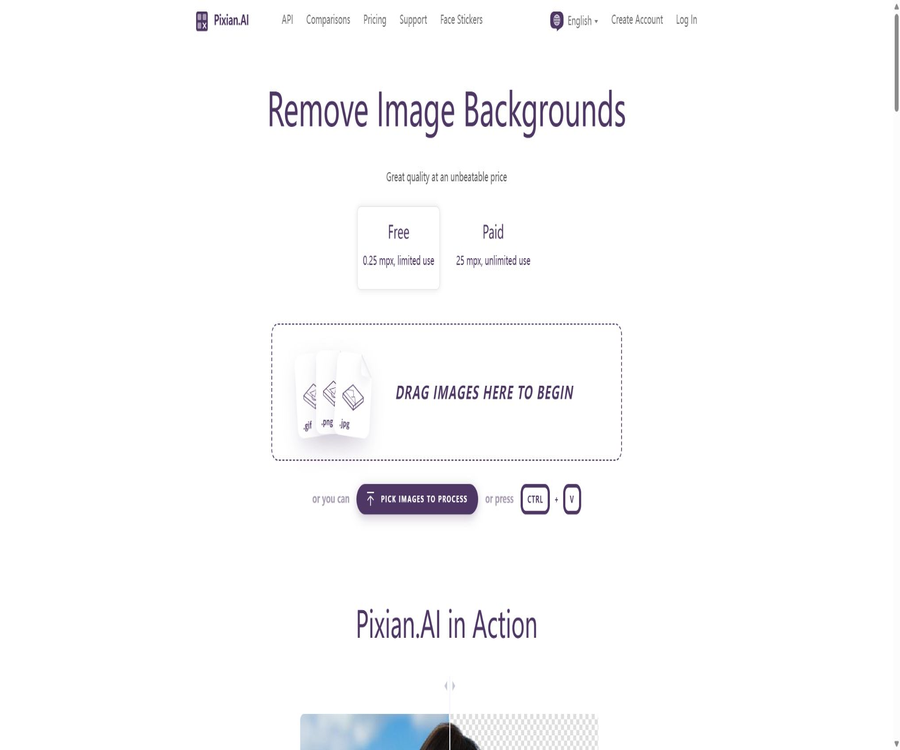
Pixian, an intelligent tool specialized in removing backgrounds from images.
Tags:AI image background removalWhat is Pixian.AI?
Pixian.AI is an online AI tool designed for automatically removing the background from images, operated by the Cedar Lake Ventures team. Once users upload an image to the website, the system identifies the subject in the image and generates a version with a transparent background.
It offers both web applications and development interfaces, and is designed to provide high-quality, low-cost basic services for automated image processing. Instead of combining image generation, template design, and complex photo editing in one solution, it focuses on the quality of image extraction, processing speed, and the ability to handle large numbers of images at once.
Main functions
- Automatically identifies the foreground in portraits, products, animals, artworks, logos, and scans.
- Retain hair, fur, and complex edges to reduce manual tracing work.
- It supports drag-and-drop, file selection, and pasting images from the clipboard.
- If the image is too large, you can first crop the area that needs to be processed.
- Transparent results can be exported as PNG, while those with a non-transparent background can be exported as JPEG or PNG.
- It supports setting an opaque background color for the results.
- It can process images generated by generative AI tools such as Stable Diffusion.
- Development interfaces are provided to facilitate bulk image extraction for websites, e-commerce platforms, and content systems.
- Provides account status, error messages, speed limits, and migration instructions.
- There are also lightweight additional features such as facial stickers.
Supported image types
| Image type | Applicable scenarios | Key points of inspection |
|---|---|---|
| Portraits | ID photos, profile pictures, studio shots, and lifestyle photos | Hair, ear ornaments, glasses, and translucent edges |
| Products | E-commerce main images, clothing, furniture, and small items | Holes, reflections, shadows, and white objects |
| Animals | Pets, plush toys, and wild animals | Areas where the edge of the hair is similar to the background |
| Artworks and Logos | Illustrations, icons, scanned images, and brand assets | Thin lines, negative space, and areas with similar colors |
| AI-generated images | Characters, illustrations, and composite visuals | Artifacts, transparent structures, and unnatural boundaries |
Input, output, and resolution limitations
| Project | Free web version | Paid web pages and APIs |
|---|---|---|
| Maximum pixels | 0.25 million pixels | 25 million pixels |
| Maximum file size | Up to 30MB | Up to 30MB |
| Input format | JPEG, PNG, BMP, GIF, WebP | JPEG, PNG, BMP, GIF, WebP |
| Transparent output | PNG | PNG |
| Opaque output | JPEG or PNG | JPEG or PNG |
| Processing priority | Low priority | High priority |
| Use the entrance | Only web pages | Websites and APIs |
GIF is an acceptable input format, but whether the animation will be retained in the result of image extraction depends on the export options selected. When working with animations, layers, or advanced color settings, it is recommended to test first using a sample.
What use cases are suitable?
- E-commerce sellers create product images with a transparent background or a solid-color background in bulk.
- The designer quickly separates the people and objects, then moves on to layout or compositing software.
- Photography users create profile pictures, ID photos, and simple portrait composite materials.
- Content operation involves identifying the main elements for use in covers, posters, and social media images.
- Developers add automatic image extraction to upload systems, product databases, or content platforms.
- Print and archive users extract logos, patterns, or illustrations from scanned documents.
- Generative AI is used to remove background elements such as characters and objects, thereby creating a library of transparent materials.
It is not very suitable for which tasks
- High-end commercial retouching that requires precision down to individual hairs and manual correction of each detail.
- Projects that require the preservation of original layers, paths, masks, and pre-press color information.
- Tasks that require creating a new background, redrawing objects, or carrying out a complete creative design.
- Ultra-high-resolution files with over 25 million pixels that cannot be scaled or cropped.
- Contains images that are highly sensitive or subject to strict data residency requirements.
- Enterprise environments that require local offline deployment, self-hosted models, or source code auditing.
Tutorial on extracting images from web pages
- Open the Pixian.AI website and prepare JPEG, PNG, BMP, GIF, or WebP images.
- Drag images onto the page, or you can select files or paste from the clipboard.
- When the image exceeds the size limit, it should first be cropped to the necessary area that includes the main subject.
- Wait for the system to automatically identify the foreground and generate a background-removed preview.
- Enlarge to examine hair, fur, holes, reflections, and translucent edges.
- Choose a transparent background or an opaque color depending on the use.
- Select an available format such as PNG or JPEG and download the result.
- Keep the original images for important materials; in case of edge issues, replace the image or make manual adjustments.
How to improve the quality of image masking
- Give priority to images with a clear subject, accurate focus, and sufficient resolution.
- Ensure that there is a certain difference between the subject and the background in terms of color or brightness.
- Do not over-compress fine hairs and transparent edges before uploading.
- First, remove the large areas of irrelevant background to leave the useful pixels for the subject.
- For product photos, try to minimize strong reflections and large areas of transparent material.
- Test with different types of real samples; do not rely solely on the official examples.
- Before launching in bulk, samples of different categories are inspected, and a manual process is prepared for images that fail the checks.
API Integration Tutorial
Pixian.AI offers a comprehensive interface for removing backgrounds from images, and it uses API IDs and keys for basic authentication. The official documentation provides examples in command line, Java, .NET, Node.js, PHP, Python, and Ruby.
- Register an account and create an API ID and key in the console.
- First, use test images to verify requests, authentication, and the handling of binary responses.
- Pass the image file or the supported image URL to the background removal interface.
- Set the output format, background color, maximum pixels, and other parameters as needed.
- After receiving a successful response, save the result as PNG or JPEG.
- Set up retries and alerts for status codes, timeouts, rate limits, and error JSON.
- Before going live, calculate the points consumed and the average processing time for different image sizes.
- Check the account status regularly to prevent production tasks from being interrupted due to insufficient points.
Migrate from other background services
The authorities provide specific guidelines for migrating from remove.bg; the basic process involves replacing the API addresses and API keys. In production systems, it is still necessary to verify each parameter name, authentication method, error codes, output format, as well as any differences in pixel-based pricing.
Price pattern
Pixian.AI offers a free web-based experience along with prepaid credit packages; there are no monthly fees or minimum spending requirements. Paid images are charged based on the number of pixels, with each image costing 0.05 to 1 credit.
| Plan | Price or quota | Resolution | Processing priority | Applicable entry point |
|---|---|---|---|---|
| Free | Limited use | Up to 0.25 million pixels | Low | Only web pages |
| PAYGO | Prepaid points are deducted based on the image pixels. | Up to 25 million pixels | High | Websites and APIs |
Price of the points package
The following are the dollar prices as of August 2026. The larger the package of points, the lower the cost per point; prices, currencies, and payment policies may change, so it is necessary to check the current pricing page before making a purchase.
| Integration | Reference price | Reference unit price for 25-megapixel images |
|---|---|---|
| 250 | 5 dollars | Approximately 0.0200 US dollars per sheet |
| 500 | 9.50 dollars | Approximately 0.0190 USD per sheet |
| 1,000 | 18.60 dollars | Approximately 0.0186 dollars per sheet |
| 2,500 | 45 dollars | Approximately 0.0180 US dollars per sheet |
| 5,000 | 85 dollars | Approximately 0.0170 USD per sheet |
| 10,000 | 166 dollars | Approximately 0.0166 USD per sheet |
| 25,000 | 400 dollars | Approximately 0.0160 US dollars per sheet |
| 50,000 | 750 dollars | Approximately 0.0150 USD per sheet |
| 100,000 | 1,460 dollars | Approximately 0.0146 dollars per sheet |
| 250,000 | 3,500 dollars | Approximately 0.0140 US dollars per sheet |
| 500,000 | 6,500 dollars | Approximately 0.0130 USD per sheet |
How are image points calculated?
Billing is based on the effective number of million pixels determined by the image’s width and height. The system counts at least 500 pixels for each of width and height; an image with 0.25 million pixels is worth 0.05 points, while an image with 25 million pixels is capped at 1 point, with values calculated proportionally in between.
| Image size | Points consumption | Reference cost at the minimum integration package |
|---|---|---|
| 0.25 million pixels | 0.050 | About 0.0010 dollars |
| 0.50 million pixels | 0.060 | About 0.0012 dollars |
| 1 million pixels | 0.079 | About 0.0016 dollars |
| 2 million pixels | 0.117 | Approximately 0.0023 dollars |
| 4 million pixels | 0.194 | About 0.0039 dollars |
| 8 million pixels | 0.347 | Approximately 0.0069 dollars |
| 12 million pixels | 0.501 | Approximately 0.0100 dollars |
| 16 million pixels | 0.655 | About 0.0131 dollars |
| 20 million pixels | 0.808 | Approximately 0.0162 dollars |
| 25 million pixels | 1.000 | Approximately 0.0200 dollars |
The amounts shown in the table are estimated based on a minimum package of 250 points or 5 dollars. Larger packages reduce the cost per unit, and removing unnecessary areas can also decrease pixel usage and the associated point consumption.
Points, payment, and refund rules
- The points themselves have no fixed expiration date, but the account must have purchase records from the past two years in order to use them.
- The subscription package takes effect immediately after purchase.
- The point packages are non-refundable.
- Points are associated with an individual account and cannot be shared.
- Major credit cards and PayPal are supported.
- The platform does not accept purchase orders nor issue invoices.
- The API can be accessed and tested for free; official use requires the purchase of credits.
- Currently, there are no special prices available for schools or non-profit organizations.
Data retention and privacy
According to the current official guidelines, approximately 10% of the uploaded images and all processing results are retained for 24 hours before being permanently deleted, so that users can download them again without incurring additional charges. API images are not stored permanently in non-volatile storage.
This retention policy may be adjusted, and therefore the service cannot be considered to be a zero-retention environment. Before handling documents, customer data, unreleased products, or other sensitive images, it is necessary to read the latest policy again and obtain internal approval.
- Images uploaded to a webpage are processed on the server, rather than being processed entirely locally.
- Do not write the account key on the frontend pages or in public code.
- Implement separate storage, rotation, and access control for generating keys.
- Only upload the minimum area of the image required to complete the task.
- Download the results promptly; there is no need to rely on 24-hour temporary storage as a backup.
- Enterprise users should evaluate data location, deletion proof, and contractual requirements.
Image rights and content responsibility
Pixian.AI states that it will not claim any rights over the results of the processing, nor will it share the images with third parties without explicit authorization. The terms of service grant only the limited rights necessary to provide the services and improve the product.
- Only upload images that you own or for which you have permission to use.
- When dealing with real-person portraits, it is necessary to verify matters related to privacy, portrait rights, and the scope of use.
- Do not use image editing results to forge identities, documents, or create misleading content.
- Check trademarks, copyrighted materials, and permissions for individuals before commercial release.
- Retain the original image, license files, and batch processing records.
Product advantages
- Focused on functionality: the background is automatically removed once the file is uploaded.
- The free web version can be tried out without the need for registration.
- It covers a wide range of elements such as portraits, objects, logos, scanned documents, and AI-generated images.
- The model has been specifically trained to handle complex edges such as those found in hair and fur.
- Payments support up to 25 million pixels and 30MB files.
- Pay-as-you-go; there is no monthly fee or minimum spending requirement.
- The large package options can further reduce the cost per item.
- The API documentation is complete, and examples in various programming languages are provided.
- Migration from the interfaces of common competitors is supported.
- API images are not saved permanently in non-volatile storage.
Usage restrictions and precautions
- The free resolution is only 0.25 million pixels, which is not suitable for use as images of actual products.
- The core feature of the product is image masking; it does not include a complete design and retouching workflow.
- Transparent, reflective, hazy, fibrous elements, as well as backgrounds that are similar in appearance, can still lead to misidentification.
- Official quality comparisons include subjective ratings, and they cannot replace testing with one’s own sample images.
- The cost of payment varies depending on the number of pixels, and it is necessary to conduct a budget estimation before batch processing.
- Images with over 25 million pixels must be cropped or resized.
- Web files will be uploaded to the server; sensitive images require careful handling.
- Integration packages are non-refundable and cannot be shared.
- To continue using the points, there must be purchase records from the past two years.
- No purchase orders, invoices, or educational discounts are provided.
- There is no official local deployment or offline version.
- Automated results still require manual sampling checks and a fallback process for failures.
GitHub and the open-source status
The real-time search did not yield any official repository containing the source code, as no such link is provided on the Pixian.AI website. The core image extraction models are trained using proprietary data, and the web services, model weights, and backend systems should be considered proprietary.
On GitHub, there are Python SDKs with the same name created by third-party developers, but their publishers are not Pixian.AI’s official team. Although these third-party versions can simplify the process of making calls, they do not entail any official support, service guarantees, or open-source status for the platform.
Basic information
| field | Content |
|---|---|
| Tool name | Pixian.AI |
| Operations team | Cedar Lake Ventures |
| Tool type | AI image background removal and object extraction APIs |
| Use the platform | Web pages and development interfaces |
| Free quota | The web page allows for limited use, with a maximum of 0.25 million pixels. |
| Payment limit | Up to 25 million pixels, 30MB |
| Price pattern | Prepaid points, billing per pixel |
| Whether API is provided | Yes |
| Is it open source? | No |
| Is installation required? | No |
Recommendation score
4.5 / 5. Pixian.AI offers a focused set of functions and transparent pricing, making it particularly suitable for e-commerce companies and developers who need to perform bulk automatic image extraction; however, the resolution provided in the free version is very low, and it lacks the capabilities for manual refinement and comprehensive design work. Additionally, there are risks associated with processing sensitive images on its servers.
Frequently Asked Questions
Is Pixian.AI free?
Web pages can be used for a limited time at no cost, with a maximum resolution of 0.25 million pixels; their processing priority is low. To handle tasks that require higher resolution or to use the API properly, it is necessary to purchase credits.
What size of images can Pixian.AI handle?
Paid web pages and APIs support up to 25 million pixels, with a maximum file size of 30 MB. Images that exceed these limits need to be cropped or resized first.
Which formats are supported?
The input formats supported are JPEG, PNG, BMP, GIF, and WebP. Results with a transparent background are saved in PNG format, while those with an opaque background can be saved in JPEG or PNG format.
How many points are required for one picture?
Calculated in pixels, each image is worth approximately 0.05 to 1 point; 0.25 million pixels equal 0.05 points, while 25 million pixels equal 1 point, with the cost calculated proportionally for values in between.
Do the points expire?
There is no fixed expiration date for the points, but in order to continue using them, the account must have made purchases within the last two years. This rule may be changed in the future.
Is it possible to connect multiple devices at once?
Yes. The official platform provides background removal APIs, authentication mechanisms, rate limiting, error handling, and multilingual examples, making it suitable for integrating with product databases or for upload processes.
Will the API images be saved?
According to the official statements, API images are not saved permanently in non-volatile storage. Web pages follow different retention rules, and for sensitive operations it is still necessary to check the latest policies.
Is Pixian.AI open source?
It is not open source. The Python wrapper with the same name on GitHub is a third-party project; it is not the official model or the source code of the platform.
Tools similar to Pixian



 Guigong Network Security Registration No. 45132202000164