






Cutout.Pro
A platform that offers intelligent image cropping, portrait processing, and video background removal.
Tags:AI image background removalWhat is Cutout.Pro?
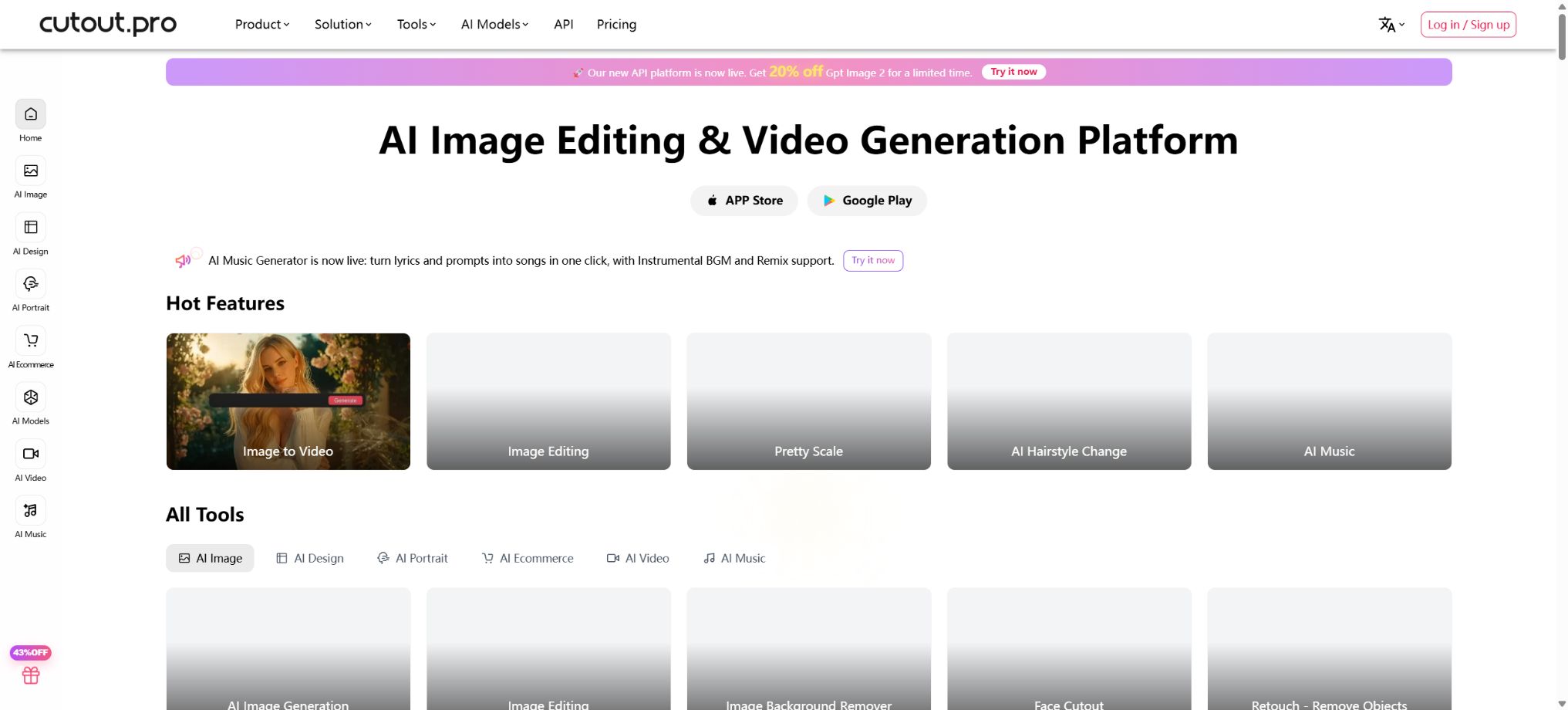
Cutout.Pro is an online AI visual processing platform developed by the LibAI team. Initially focused on automatic image cropping and video background removal, it has since expanded to include photo enhancement, restoration of old photographs, creation of ID photos, product photography, virtual models, image generation, video creation from images, as well as developer APIs. Users can process images and videos through a browser, desktop applications, or mobile devices.
It is suitable for individual one-click operations; it also offers batch processing, Shopify plugins, REST APIs, and real-time video SDKs for e-commerce businesses, printing services, photo studios, video production companies, and SaaS developers. Images and videos require different amounts of Credits or time limits, and it is necessary to distinguish between them before making a purchase.
Core functions
1. Removal of image background
After uploading images of people, products, animals, cars, logos, or other pictures, the system automatically identifies the main subject and removes the background. The resulting image can be in transparent PNG format, with a white background, a solid color background, or a custom background. Preview versions can be used for repeated testing free of charge, while high-resolution versions are available for download in exchange for Credits.
Hair, fur, glass, jewelry, transparent materials, and complex shadows may require manual trimming. The main image of the product should be checked for its edges, shading, color, and proportions, to ensure that it matches the actual product.
2. Face Cutout – Extracting the face from an image
Face Cutout is designed to identify faces and head contours, making it suitable for use in profile pictures, social media stickers, cartoon-style head images, as well as materials related to classes and teams. Unlike regular full-body image extraction tools, it focuses on preserving the face, hair, and headwear.
Group photos and images with faces covered may lead to incorrect recognition. Permission must be obtained for using real-person stickers, expressions, or advertisements; they must not be used for impersonation or harassment.
3. Video background removal
Video masking allows for the automatic separation of a person or subject from the background, even in the absence of a green screen; it enables the creation of outputs with a transparent background, a solid-color background, or a new scene. This feature is suitable for live broadcasts, courses, promotional videos, and social media videos. Both the desktop and web versions support common video formats, while complex or long videos consume video credits based on their length in seconds.
Fast movement, hair, semi-transparent objects, motion blur, and camera changes can cause edges to flicker. The final output should be checked segment by segment, rather than just by looking at the first frame preview.
4. Real-time video masking SDK
Cutout.Pro offers a real-time video AI SDK that can be used for video conferences, live broadcasts, virtual backgrounds, and XR applications. Companies can integrate person segmentation capabilities into their camera systems, without the need to upload individual recorded files.
The real-time performance is influenced by device performance, the network connection, resolution, and lighting conditions. When making purchases for business use, it is necessary to test factors such as end-side latency, concurrency, compatibility with mobile devices, as well as privacy and licensing aspects.
5. Object and defect removal
The Retouch tool removes pedestrians, clutter, text, stains, and other unwanted elements by applying edits, and it automatically fills in the background. It is suitable for travel photos, image cleanup, and design assets.
Removing watermarks does not grant rights to the work in question. Images of news events, evidence, real estate properties, and goods should not be altered by removing elements from them in order to change facts or influence opinions.
6. Photo Enhancer and Upscaler
Photo enhancement tools are used to fix photos with low resolution, poor focus, pixelation, noise, or damage, and to improve their resolution as well as the clarity of facial features. Photo Enhancer Pro offers more powerful processing for severely blurred photos and old photographs, while Anime Enhancer is designed for anime and illustrations.
AI will generate speculative details, particularly altering eyes, skin, text, and patterns. For archival, identity, medical, and legal purposes, the original documents should be retained with an indication that enhancements have been applied.
7. Coloring of black-and-white photos and restoration of old photographs
Photo Colorizer automatically estimates the colors of skin, clothing, and the background in black-and-white photos. The old photo tool also offers functions for enhancement, removal of scratches, and animation. It is suitable for family albums, commemorative videos, and drafts of historical content.
The colors of the models are not based on historical facts; uniforms, flags, vehicles, and artifacts should be corrected using reliable sources. Animated faces also need to take into account the wishes of the individuals involved and their families.
8. Production of identification photos
Passport Photo Maker automatically isolates the person in the image, replaces it with a suitable background, and adjusts the image to the standard sizes required for passports and other documents. The Pro version offers additional features such as the ability to replace clothing or suits, as well as batch processing and more comprehensive output options. The mobile app is designed mainly for creating photos for passports, visas, resumes, and other official documents.
Document issuing agencies have different rules regarding the proportions of the face, glasses, shadows, clothing, expressions, background, and file size. Using AI to change appearance or edit facial features may result in the document being rejected; it is necessary to check everything against the official requirements before submitting.
9. Virtual try-on and hairstyles
AI Hairstyle Change and Virtual Try-On allow users to preview different hairstyles, hair colors, and clothing styles using photos; they are suitable for personal experimentation, as well as for use in retail concepts and marketing materials. AI Headshot generates professional headshots with various background settings.
The preview does not guarantee the actual appearance of the haircut, hair color, or clothing once they are applied. The retail page should indicate that it is an AI-generated illustration; the results produced by such technology cannot replace accurate dimensions or real photos of the products.
10. E-commerce product images
AI Product Staging, E-commerce Product Image, Virtual Model, Product Posters, and Auto Design are used to create product backgrounds, scenes, models, and ad layouts. The platform also offers POD patterns and batch background processing, which is suitable for market platforms, independent websites, and social media ads.
The product itself, its logo, colors, accessories, and functions must all correspond to the actual product. When creating models and scenarios, it is necessary to avoid implying any usage effects that do not exist or fabricating customer reviews.
11. AI image generation and editing
The current platform aggregates models such as Flux Krea, Imagen, Nano Banana, Seedream, Qwen, and GPT Image, which can be used for text-to-image generation, editing of reference images, background diffusion, creating posters, tattoos, nail art, wall art, wallpapers, and design drafts. Different resolutions and qualities require different amounts of Credits.
The list of models and their prices will be updated. The characters, text, logos, and brand elements that are generated require manual review; for commercial use, it is also necessary to verify the licenses for third-party models and the input materials.
12. AI video generation and animation
The platform offers various generation models such as video from images, text-to-video, animation from old photos, product videos, special effect videos, conversion of sketches into videos, digital avatars, text-to-speech, and more. The current interfaces include platforms like Seedance, Sora, Veo, and Vidu.
Video models can result in inter-frame drift, incorrect lip movements, as well as changes in the voice and appearance of the characters. As a result, advertisements and public videos need to be examined frame by frame, with attention paid to the portraits, music, voices, and trademark rights.
13. AI video enhancement
Video Enhancer can improve low-resolution videos such as 240p, 360p, and 480p by performing tasks like scaling, noise removal, deinterlacing, motion interpolation, and stabilization. The current web tool supports MP4 and MOV formats; each file can be up to 500MB in size, up to 10 minutes long, and have a resolution of up to 2K at 30fps.
For larger tasks, please contact the technical team.
Enhancement cannot restore truly lost content, and motion interpolation may also create artifacts around hands and fast-moving objects. The original footage should be kept and viewed at its actual playback speed.
Free account
Free accounts offer preview access on a permanent basis and grant 5 image Credits; using an invitation code or inviting friends can increase this amount further. The free preview is suitable for testing the performance of edge algorithms and models, while downloading images in full resolution requires the use of Credits.
The free quota and promotional rewards may change. Before working with customer or commercial materials, it is necessary to test the actual images rather than relying solely on examples.
Price and version comparison
| Package or version | Prices, quotas, and core benefits |
|---|---|
| Image subscription price | As of August 2026, the current subscription tiers for image access are as follows: 80 Credits for $5 per month, 170 Credits for $9.90 per month, 300 Credits for $16.90 per month, 550 Credits for $29 per month, 1000 Credits for $49 per month, and 1450 Credits for $69 per month; custom options are also available. The page displays default recommended tiers based on any ongoing promotions, and it is necessary to confirm the number of Credits selected at the time of payment. Subscriptions can be upgraded, downgraded, or canceled without any long-term obligations. Unused Credits can be carried over from month to month, up to five times the amount allocated for that month, and they remain valid only as long as the subscription is active. |
| Video price | Videos have their own duration-based pricing: the current rates are 9 dollars per minute for 1 minute, 24 dollars for 3 minutes, 39 dollars for 5 minutes, 108 dollars for 15 minutes, 299 dollars for 45 minutes, 599 dollars for 120 minutes, 1299 dollars for 330 minutes, 4999 dollars for 1390 minutes, and 19999 dollars for 5800 minutes; custom options are also available. The pricing page states that the standard video service allows files up to 2GB in size, at 4K resolution and 30fps, but the limitations vary depending on the tool used – for example, the online enhancement tool allows files of up to 500MB in size, at 2K resolution and for a duration of 10 minutes. The final details are determined by the upload page and the order details. |
| API billing example | Background removal, face extraction, color correction, and object restoration each require 1 Credit per successful execution; previews with a resolution of up to 0.25MP can cost as little as one-quarter of a Credit. Enhancement, coloring, and cartoonization typically require 2 Credits. Charges are applied only in case of a successful execution, and developers still need to handle error codes and attempt retries. The costs for generative and video-related services differ even more. It is necessary to record the actual cost of each operation in a testing environment before going live, and to set budgets for cases of batch failures, retries, and high-resolution processing. |
Image subscription price
As of August 2026, the current subscription tiers for images are as follows: 80 Credits for $5 per month, 170 Credits for $9.90 per month, 300 Credits for $16.90 per month, 550 Credits for $29 per month, 1000 Credits for $49 per month, and 1450 Credits for $69 per month; custom options are also available. The page displays default recommended tiers based on any ongoing promotions, and it is necessary to confirm the number of Credits selected at the time of payment.
Subscriptions can be upgraded, downgraded, or canceled without any long-term obligations. Unused Credits can be carried over month by month, with a maximum amount equal to 5 times the monthly budget; they are retained only as long as the subscription remains active.
Image pay-as-you-go package
The Credits purchased on a pay-as-you-go basis are valid indefinitely. Currently, the prices are as follows: 30 Credits for 4.99 dollars, 300 Credits for 39 dollars, 900 Credits for 79 dollars, 3000 Credits for 199 dollars, and 30000 Credits for 1399 dollars; there are also custom options for larger quantities. The price per unit under this pay-as-you-go model is usually higher than that of a subscription plan, but it is suitable for those who do not have a fixed usage pattern.
Subscriptions and pay-as-you-go balances should be checked separately within the account. Team members or users who make frequent API calls should have their costs calculated based on the actual usage, rather than being estimated simply by using one point per chart.
Image Credits consumption
Background removal and object restoration cost 1 Credit per image; cartoon selfies, ID photos, photo enhancement, and colorization cost 2 Credits per image.
Cropping and background replacement for API ID photos cost 1 Credit; cropping plus replacement of the suit or clothing costs 2 Credits in total.
AI image generation and background diffusion are charged based on resolution: 3 Credits for resolutions up to 512×512, 6 Credits for resolutions between 512 and 1024, and 12 Credits for resolutions between 1024 and 1920×1080. High-quality image editing and 4K output require more credits; the actual cost is determined according to the details on the task page.
Image refund guarantee
The official website’s Credits offer a 14-day refund guarantee; if you are not satisfied, you can request a full refund, provided that the number of downloads does not exceed 50 times. Credits purchased through the Shopify app are not covered by this refund policy.
Eligibility for a refund depends on the purchase channel, time of purchase, and amount used. Before making a large purchase, it is advisable to use a free preview or a small amount of Credits to check the quality and clarity.
Video price
Videos have their own usage quota; the current pricing tiers are as follows: 1 minute for $9, 3 minutes for $24, 5 minutes for $39, 15 minutes for $108, 45 minutes for $299, 120 minutes for $599, 330 minutes for $1299, 1390 minutes for $4999, and 5800 minutes for $19999. Custom options are also available.
The price page indicates that for the standard video service the maximum file size is 2GB, with 4K resolution and 30fps; however, specific tools have different limits – for example, the online enhancer allows files of up to 500MB, in 2K resolution, and for a duration of 10 minutes. The final details are determined by the upload page and the order details.
API capabilities
Cutout.Pro offers REST APIs for tasks such as removing image backgrounds, isolating faces, performing color correction, creating ID photos, repairing objects, generating cartoon-style selfies, enhancing images, adding colors, creating AI art, diffusing backgrounds, editing images, generating videos from images, and removing backgrounds from videos. Developers can also check their balance by using API keys to make requests.
The standard image interface supports PNG, JPG, JPEG, BMP, and WebP formats. The typical maximum dimensions for images in the official documentation are 4096×4096, with a file size limit of 15MB; by default, up to 5 concurrent requests can be made per second. Different endpoints may have their own specific limits regarding format, file size, and concurrent requests.
API billing example
Background removal, face extraction, color correction, and object restoration each require 1 Credit per successful operation; previews with a resolution of up to 0.25MP can be generated for just one quarter of a Credit. Enhancement, coloring, and cartoonization usually cost 2 Credits each.
Charges are applied according to the documentation only when the call is successful; developers still need to handle error codes and attempt retries.
The cost differences between the generative and video endpoints are more significant. Before going live, it is necessary to record the actual costs associated with each operation in a testing environment, and set budgets for cases of batch failures, retries, and high-resolution processing.
GitHub and MCP
The official GitHub organization provides core examples of the Java SDK, as well as API call examples in PHP, C#, Objective-C, Python, and other languages. The Cutout MCP project is also available publicly, enabling agents that support MCP to call the corresponding services.
These repositories mainly contain interface encapsulations and examples; they do not include the Cutout.Pro training models, the source code for the web platform, or the cloud-based image extraction engine. Before using them, it is necessary to check the activity level of each repository as well as its license terms.
Desktop, mobile, and plugins
- Web version of the browser;
- Windows desktop applications;
- macOS desktop applications;
- iOS mobile app;
- Android mobile apps;
- Shopify e-commerce plugin;
- REST API, real-time video SDK, and MCP.
The functions and billing options vary depending on the platform. The desktop version is suitable for processing large quantities of files, while the mobile app focuses on tasks such as photo editing, enhancements, style adjustments, and quick edits. Additionally, purchases made through Shopify are subject to separate refund rules.
Privacy and data processing
According to the official privacy policy, images and videos uploaded are transmitted using SSL or TLS encryption, and are processed in a confidential manner. Cloud-based tools still have access to the original media; sensitive facial images, identification documents, unreleased products, and customer files should be used in accordance with authorization rules and organizational policies.
Once completed, the unnecessary content should be downloaded and deleted promptly; furthermore, corporate APIs need to take into account factors such as logging, retention periods, data location, and the requirements of subcontractors.
Commercial use and responsibilities
Paid tools can be used to create commercial designs and product materials, but users must have the rights to upload images, people, brands, and reference content. The licensing terms for the generated models and materials may vary; purchasing Credits does not imply ownership of all rights held by third parties.
Photo ID, face swapping, virtual try-ons, digital avatars, and video generation involve risks related to identity and portraits; they must not be used for fraud, impersonation, pornography, defamation, or misleading advertising.
Open-source status
The Cutout.Pro platform and its AI models are not open-source projects. What is made available publicly are API examples, SDK packages, and MCP integration code; it is not possible to deploy their core image-cutting and generation services on a private basis, nor can the entire product be considered open-source as a result of this.
Cutout.Pro usage tutorial
Complete a basic task.
- Clarify the purpose of the image, its dimensions, style, and requirements regarding commercial licensing.
- Upload the original image for which you have permission to use, or enter clear instructions to Cutout.Pro;
- Select the image to have its background removed and generate low-cost candidates first;
- Use Face Cutout for face extraction in order to adjust the composition, the main subject, and the details;
- Zoom in to examine faces, hands, text, edges, logos, and artifacts;
- Export after confirming the color, resolution, and licensing, while retaining the original image;
Create reusable professional workflows
- Create a list of brand colors, fonts, layout elements, and elements that are prohibited.
- Test image background removal, Face Cutout for extracting facial features, and video background removal separately;
- Use the same set of representative samples to compare quality, speed, and cost;
- Complex edges, text, and images of key products should be handed over for manual refinement.
- Standardize naming, dimensions, and review status;
- Batch processing and release are carried out after random inspections;
Which users is it suitable for?
- A tool for quickly removing the background from portraits, products, and design elements;
- Stores and users who create ID photos, profile pictures, resume photos, and professional photos;
- E-commerce teams that generate products, posters, and virtual models in bulk;
- Content creators who work on video backgrounds, enhancements, and product animations;
- Home and archive users who repair, colorize, and animate old photographs;
- Developers who integrate visual processing via APIs, SDKs, or MCP.
Product advantages
- Removing the background from images and videos is a core capability;
- It covers all scenarios such as ID photos, product images, portraits, and old photographs;
- Rich options available for Web, desktop, mobile, Shopify, and API access;
- Image subscriptions allow the monthly quota to be carried forward up to 5 times;
- Image Credits based on usage are valid permanently;
- The official sources provide API documentation, examples in multiple languages, a Java SDK, and MCP.
Restrictions and Precautions
- Images and videos have different pricing structures, with the cost of videos being significantly higher than that of processing individual images;
- Generative models also consume more Credits depending on resolution, quality, and duration.
- AI image masking may cause flickering or incorrect cuts in cases of hair, transparent materials, and moving videos; the edges must be checked before the final output is generated.
- Enhancements, colorization, outfit changes, and content generation create speculative details that cannot be used as evidence requiring factual accuracy or in identity-related scenarios.
- The refund guarantee covers 14 days, 50 downloads, and there are restrictions on the purchase channels;
- ShopifyCredits cannot be refunded in accordance with the website’s policies;
Frequently Asked Questions
Is Cutout.Pro free?
Free accounts allow for long-term previewing and provide 5 image credits; high-resolution downloads and most processing services are charged based on credits.
How much does it cost to subscribe to images?
Currently, 80 Credits cost $5 per month, 170 Credits cost $9.90, and the highest standard package of 1450 Credits costs $69; the unused balance can be carried over up to 5 times the monthly limit.
Do pay-as-you-go credits expire?
No, purchases on a pay-as-you-go basis are valid permanently. Currently, 30 Credits cost 4.99 dollars or more.
How are videos priced?
A separate quota is available for video duration; the current rates are $9 per minute, $24 per 3 minutes, and $39 per 5 minutes. The higher the capacity, the lower the price per second.
Is there an API?
Yes, it offers functions such as masking, enhancement, colorization, ID photo creation, and video processing; it also provides examples in multiple languages, a Java SDK, and MCP.
Is Cutout.Pro open source?
The core platform and models are not open source; the official GitHub site provides API examples, SDKs, and code for integrating with MCP.
Tools similar to Cutout.Pro



 Guigong Network Security Registration No. 45132202000164