






Avatarify AI
Avatarify AI makes AI video work more efficiently and simply.
Tags:AI video toolsWhat is Avatarify AI?
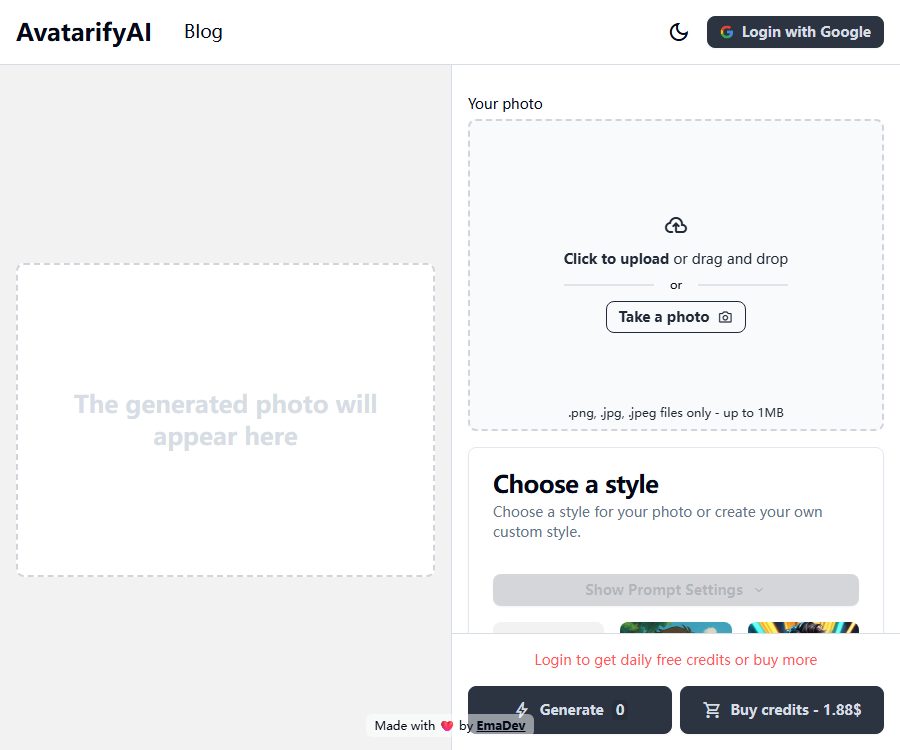
Avatarify AI is an online AI avatar generator independently developed by EmaDev. After uploading a photo, users can choose from pre-set artistic styles or create custom prompts to transform the photo into a personalized avatar.
It currently only generates static images; it is not the real-time avatar system that was used in video conferencing tools such as Zoom and Skype in earlier years. When searching for or using it, it is important to distinguish between these two products, which have similar names but differ in terms of functionality, developers, and licensing.
Main functions of Avatarify AI
Create a profile picture from a single photo
Users only need to upload one front-facing photo; there is no need to prepare multiple images for training. The system uses image generation models to retain certain facial features and re-create the style of the image.
15 preset style entries
The current interface offers a variety of common styles, which are suitable for quickly testing different visual approaches. The preset results are still affected by factors such as the lighting, angle, occlusion, and clarity of the original image.
- Ghibli and Anime
- Neon Punk and GTA
- Photographic and Analog Film
- Pixel Art and Comic Books
- Cinematic and Fantasy Art
- Cubism, Digital Art and Origami
- Enhance and 3D Model
Custom prompt
In addition to the preset options, users can enter their own descriptions to specify the clothing, background, composition, lighting, and artistic style. The more specific the description, the greater the control over the resulting output.
Negative prompt words
Negative prompts are used to specify elements that should not appear, such as blur, extra fingers, text, or complex backgrounds. They can only reduce the likelihood of such issues occurring, but they cannot guarantee the complete elimination of all defects in the output.
Take photos or upload files
The website allows direct use of the camera to take photos, as well as the ability to upload local files. Currently, only PNG, JPG, and JPEG formats are accepted, with a maximum file size of 1MB per file.
Free points daily
Users who log in with a Google account can earn free points each day, which can be used to experience the generation features. The interface for users who are not logged in does not provide a full amount of credits for generation.
Purchase points as needed
The platform uses a points-based purchase system rather than a fixed monthly subscription, which is suitable for users who need to create avatar images occasionally. The home page shows an option to purchase points for $1.88, but the number of points included in such a package is not indicated on any public page.
Retain the image generated
According to the official GitHub documentation, the resulting image is saved in the browser’s local storage. Users should still download the desired image as soon as it is generated, so that it can be retained.
Avatarify AI Usage Guide
- Prepare a photo of the person with clear details, even lighting, and proper authorization.
- Compress the image to under 1MB and save it in PNG, JPG, or JPEG format.
- Log in with your Google account to check your daily free points balance.
- Upload a photo or use the device’s camera to take a new one.
- Select a preset style to first generate a low-risk test version.
- When more detail is needed, open the prompt settings to describe the background, clothing, lighting, and composition.
- Unnecessary elements and common distortions are added to the negative prompts.
- Check the details of the face, eyes, teeth, hands, text, and background.
- Once satisfied, download the image and verify the authorization for the use of the portrait and style before using it publicly.
Ways to improve the quality of profile pictures
- Give priority to high-quality photos of individuals in a frontal pose with no obstructions.
- Avoid images that are too dark, overexposed, use strong filters, or have low resolution.
- Remove the complex background so that the model can focus more on the facial features of the people.
- Only a small number of prompts are changed at a time, which makes it easier to compare the resulting differences.
- A circular safe area is reserved for the social profile picture.
- Generate several versions of the important profile pictures, and then manually select and make adjustments.
Which users are it suitable for
- Individual users who create avatar images for social media, forums, and gaming accounts.
- Content creators who need anime, comics, or pixel avatars.
- Illustrators and design enthusiasts who test visual styles.
- Independent creators who wish to create a personal brand image at a low cost.
- Developers learning the integration of SvelteKit, Supabase, and AI image services.
Product advantages
- Just one photo is needed; no training with multiple images is required.
- There are a wide range of preset styles, ideal for quick comparison.
- It also provides control over positive and negative prompt words.
- Free points are available every day, allowing you to test the effectiveness first.
- Points can be purchased as needed; there is no mandatory monthly subscription.
- The official project code is publicly available, along with instructions for self-hosting setup.
Usage restrictions and precautions
- Currently, only static profile pictures are supported; real-time video face replacement is not available.
- The maximum size for uploaded files is 1MB; excessive compression may result in the loss of facial details.
- The generated results may change facial features, skin color, age, and identity characteristics.
- The predefined names of artistic styles do not imply that authorization to use the corresponding brands or works is granted.
- It is not allowed to upload others’ photos without permission or to use them for impersonation or deception.
- The daily free quota and the contents of the point packages may change depending on operational strategies.
- Third-party models, authentication, databases, and payment services are involved in the processing.
- Self-hosting still requires setting up external services such as Supabase, Stripe, and Replicate.
Price of Avatarify AI
The information below was verified on August 26, 2026. Avatarify AI does not provide a public list of monthly subscription plans; instead, it offers free points on a daily basis along with the option to purchase additional points as needed.
| Method | Public price | Explanation of quota limits | Precautions |
|---|---|---|---|
| Free points daily | Free | The official blog states that 1 image can be generated for free per day. | Google login is required; rules may change. |
| Buy points | The page shows $1.88. | The number of point packages is not displayed on the public page. | The information displayed on the Stripe payment page shall prevail. |
| Self-hosting | There is no unified price for software subscriptions. | You are responsible for the costs associated with the models, databases, domain names, and deployment. | The license reserves all rights; it does not equate to free commercial use. |
An official article from 2025 used the figure of around 0.10 dollar per unit as an example, but this is an estimate and should not be considered the fixed price at present. Before making a purchase, it is necessary to determine how many points correspond to 1.88 dollars, as well as the cost per generation and any taxes involved.
Technical architecture and self-hosting
The official repository shows that the frontend is built using SvelteKit, Svelte, and Tailwind CSS; Supabase is used for handling accounts and databases. Image generation is carried out via Replicate and Stable Diffusion, payment processing is handled by Stripe, and access analysis is done with Plausible.
Self-hosters need to configure the Supabase address and keys, Stripe prices and keys, Replicate tokens, as well as the website domain separately. The repository does not provide a ready-to-use solution that can operate entirely offline without relying on third-party services.
Data and Privacy
Users’ photos are sent to the hosting application and its image processing services; Google login is managed by Supabase Auth, while payments are handled by Stripe. Photos related to minors, customers, identification documents, or private life should not be uploaded directly.
The official website does not provide any verifiable details regarding the retention period for photos. Even if the resulting images are saved locally in the browser, the original images and the processing tasks may still pass through cloud servers; sensitive users should opt for self-hosting or avoid uploading such images.
Is Avatarify AI open source?
The official GitHub repository makes the code, dependencies, and steps for self-hosting available, but the license specified in the README states “Private – All rights reserved”. Therefore, it can be described as source code that is visible or can be self-hosted according to the instructions provided; it cannot be classified as open-source software under an OSI open license.
The official blog refers to the project as open source, which is in conflict with the actual license of the repository. When determining the rights to copy, modify, distribute, and use it for commercial purposes, the license of the repository and any written authorization from the developers should be taken as the guiding principle.
Differences from the old version of Avatarify
The older version of Avatarify was a real-time avatar creation tool for virtual cameras, and it typically required an NVIDIA GPU or remote computing power. The current Avatarify AI website, on the other hand, is a SaaS service for creating styled avatars from a single photo; the two versions cannot be used together, as their installation instructions, performance requirements, and licensing terms differ.
Frequently Asked Questions
Can Avatarify AI be used for free?
Yes. After logging in, you can receive free points daily; the official blog states that one free point can be generated each day, and the actual amount available is shown in your account.
What image formats does it support?
Currently, PNG, JPG, and JPEG are supported, with a maximum file size of 1 MB.
Can Avatarify AI generate videos?
No. The current official interface only generates static avatars; the old official blog mentions videos as a future development direction.
How much does it cost to buy points?
The current homepage shows a purchase option at $1.88, but it does not disclose the number of point packages available or the cost per package; the information should be taken from Stripe’s payment page.
Is it the old version of the video conferencing Avatarify?
No. The current product generates static avatars, and there is no verifiable functional relationship between it and the early virtual camera-based real-time avatar systems.
Is Avatarify AI open-source software?
Strictly speaking, it’s not the case. The code repository is accessible to the public, but the license states that all rights are reserved, and it isn’t possible to use it under standard open-source licensing terms.
Tools similar to Avatarify AI




 Guigong Network Security Registration No. 45132202000164