






It refers to a camera.
“Shuode Camera” is an intelligent shooting tool designed specifically for creators of voice-over videos. It offers innovative features such as AI script assistance, virtual backgrounds, the ability to reshoot freely, AR actors, accurate subtitles, and one-click video generation. It also includes functions for beautifying the appearance, extracting text from videos, detecting prohibited words, and more.
Tags:AI video toolsWhat is AI, then?
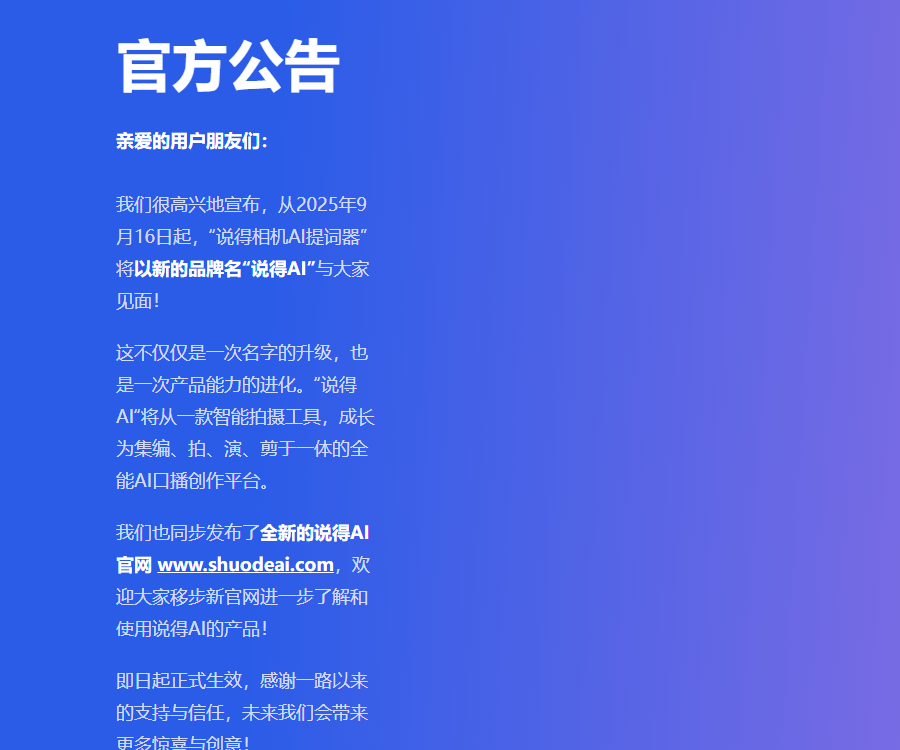
Shuode AI is an AI-based voice-over creation platform operated by Hangzhou Gaisight Technology Co., Ltd.; its original brand name was Shuode Camera.
On September 16, 2025, the authorities completed the brand upgrade by integrating scripts, filming, digital avatars, speech guidance, and editing into a single workflow.
Main functions
- Create multilingual digital pop-up videos.
- Record and customize your personal digital avatar.
- Make images of characters, animations, or pets speak.
- The AI script scrolls automatically based on the speaking speed.
- Display subtitles floating above the content in live broadcasts or other applications.
- Generate voice-over scripts and internet-style copy.
- Extract text from audio, video, images, and documents.
- Intelligently removes stuck and paused segments.
- Generate subtitles, covers, and virtual backgrounds.
- Detect prohibited words in spoken scripts.
- Use AI to remove elements from the image.
Multilingual digital humans
The digital avatar module allows for the use of existing characters or the creation of custom avatars, and it enables the generation of scripted audiovisual content that can be edited directly.
According to the official information, scripts can be translated into 27 languages including Chinese, English, French, German, and Japanese, and lip movements and actions are generated simultaneously.
| Ability | Required materials | Suitable scenarios |
|---|---|---|
| Ready-made digital humans | Script or audio | Knowledge podcasts and marketing videos |
| Exclusive digital avatar | Approximately 30 seconds of training video | The individual IP appears in videos on a continuous basis. |
| Digital humans for product promotion | Host, product images, and script | Product explanation and bulk deployment |
| Images speak. | Images of characters or figures | Creative content and character narration |
| Multilingual generation | Original script and target language | Overseas content distribution |
Preparation of digital human assets
- Use positive, clear, and stable footage.
- Ensure that there is no significant obstruction of the face and mouth.
- Record sound in a quiet environment.
- Maintain a natural speaking pace and normal expressions.
- Avoid using unauthorized character materials.
- For important projects, create short videos to test the effectiveness.
AI script reader
An AI script reader can adjust the pace of the dialogue according to the speaking speed; it can handle pauses, additional words, or skips in the speech and adjust the scrolling rhythm accordingly.
- Set the font size, line spacing, and cue area.
- Adjust the reading speed according to the distance from the lens.
- Break long texts into short sentences and natural pauses.
- Key words are marked with recognizable symbols.
- Conduct a trial reading before the official shooting.
- The gaze should be directed at the camera rather than focusing on reading each word.
Suspended captioning and live streaming
In suspension mode, the cue sheet can be displayed above other cameras or live streaming applications, and it also allows for switching between scripts while using the cue sheet.
| Scene | Usage method | Precautions |
|---|---|---|
| Live streaming for product sales | Suspension platform version and real-time script replacement | Reserve time for interaction and on-the-spot responses |
| Video conference | Provide cues above the meeting application | Avoid blocking the view of the participants. |
| Online interview | Display outline and key data | Do not read the answers word for word. |
| Camera shooting | Used in combination with a physical cue card | Calibrate lens and text position |
| Live teaching | Switch script by chapter | Synchronize the pace of demonstration and explanation. |
AI scripts and intelligent copywriting
Users can generate scripts based on keywords, or they can import the original text and rewrite it according to the target audience, tone, and platform requirements.
The template includes over 30 different types of text elements such as titles, introductions, and those suitable for platforms like REDnote; however, manual verification of the facts and compliance with advertising regulations is still required before posting.
- Provide accurate information about the product or topic.
- Set limits on video length and target audience.
- Choose between a knowledge-based, assessment-based, or product-promotion structure.
- It is required to first output the script outline.
- Add real-world examples and necessary data.
- Remove exaggerated claims and absolute phrases.
- Read the script aloud and adjust the pace of speech.
Copy extraction
Text extraction supports videos, audio, images, documents, links, and local files, making it suitable for converting existing materials into editable text.
- First, ensure that the materials have legitimate rights for use.
- Check the recognition results for proper nouns and numbers.
- Manually distinguish speakers in multi-person audio.
- Check the punctuation, sentence breaks, and chronological order.
- Do not copy copyrighted content directly.
- Secondary creations should retain their independent expression and value.
Intelligent Fast Cutting
Smart Quick Cut can identify stuck sections, pauses, and breath sounds, and adjust the video content accordingly by editing the text.
- Import the complete original audio file.
- Wait for the speech recognition to generate text.
- Check for misidentifications and proper nouns.
- Preview the pause segments that are suggested for deletion.
- Maintain the necessary rhythm of breathing and emotions.
- Add transition effects, subtitles, and background materials.
- Play it in its entirety before exporting the final video.
AI removal and image cleanup
AI can remove subtitles, watermarks, stickers, or text overlays from videos that can be processed; it is also possible to manually specify the areas that need to be cleaned.
Removing third-party watermarks may involve copyright and platform rules; only materials with proper authorization should be subjected to further editing.
Subtitles and internet-style covers
The platform can identify the key points of subtitles and highlight important words; it can also use AI for image generation and templates to create covers for video narrations.
| Task | Function of the tool | Manual inspection |
|---|---|---|
| Automatic subtitles | Convert speech to timeline text | Spelling errors, punctuation issues, and terminology |
| Highlight key points | Highlight key quotes and essential information. | Avoid excessive bouncing. |
| Template cover | Quickly apply a proven layout | Title and main body hierarchy |
| AI cover | Generate visual content | Characters, products, and copyrights |
| Popular version recreated | Refer to the existing visual structure. | Maintain originality and differentiation. |
Virtual backgrounds and intelligent shooting
The intelligent shooting feature integrates text narration, beauty enhancement, virtual backgrounds, and AR photo blending; it supports both green-screen and green-screen-free keying methods.
- Sufficient color difference should be maintained between the characters and the background.
- Avoid strong backlighting at the edges of the hair.
- The green screen surface must remain flat and evenly lit.
- Choose a background that matches the lens perspective.
- The beauty adjustment parameters are focused on naturalness and stability.
- Check for edge jitter in the characters before exporting.
An AI usage tutorial
- Select the mobile version or the dashboard entry on the official website.
- Register an account and complete the necessary authorizations.
- Decide between a live-action or digital human approach.
- Use AI scripts to generate a preliminary draft of the narration.
- Manually verify facts, products, and compliance information.
- Configure the AI’s speech delivery speed and line style.
- Shoot the original footage or generate a digital voiceover.
- Use Smart Quick Cut to remove invalid segments.
- Add subtitles, covers, and virtual backgrounds.
- Check the copyrights for portraits, voices, music, and materials.
- After a full preview, export it to the target platform.
Prices and membership packages
The App Store in China shows that the app can be downloaded for free, and it offers VIP, Super VIP, subscription plans with set durations, as well as lifetime access options.
| Package | Reference price | Billing method |
|---|---|---|
| VIP is automatically renewed on a weekly basis. | ¥19 | Weekly subscription |
| VIP Continuous Monthly Subscription | ¥45 | Monthly subscription |
| Super VIP Monthly Subscription Package | ¥58 | Monthly subscription |
| VIP Continuous Monthly Package | ¥98 | Quarterly subscription |
| Super VIP Continuous Monthly Subscription | ¥98 | Quarterly subscription |
| VIP is valid for one year. | ¥178 | Fixed for one year |
| VIP is automatically renewed on an annual basis. | ¥198 | Annual subscription |
| VIP is valid for life. | ¥308 or ¥348 | Different product items |
| Super VIP status is valid for life. | ¥598 | One-time purchase |
The same tier name may correspond to different promotions or benefits, and the availability may vary across web, Android, and Apple platforms; the information on the settlement page should be taken as the reference.
How to choose a membership
| User information | Suggestions | Key points for judgment |
|---|---|---|
| First experience | Use the free features first. | Test the prompting and export functionality |
| Short-term projects | Weekly or monthly plan | Confirm the project completion date |
| Stable weekly updates | Quarterly or annual plan | Compare VIP and Super VIP benefits |
| High-frequency production of digital humans | Super VIP or separate resource package | Verify the generated quota and queueing rules. |
| Long-term individual creation | Evaluate lifelong programs | Confirm the scope of rights and interests and the continuity of services |
Supported platforms
| Platform | Support status | Explanation |
|---|---|---|
| iPhone | Support | iOS 15.0 or higher is required. |
| Android | Support | It can be downloaded from the official website. |
| Web workspace | Support | Suitable for accounts and online creation |
| Native iPad version | Not confirmed yet | The notes on the Apple page are applicable only to iPhone. |
| Desktop client | Not confirmed yet | Refer to the official download page. |
Portraits, Voices, and Copyrights
Digital avatars, picture-based speech, and voice cloning involve aspects of personal identity; only the original person or those who have explicit authorization can use them.
- Save the authorization records for the presenters and voice actors.
- Specify the authorized platform, timeframe, and scope of business.
- It is prohibited to impersonate others and publish misleading content.
- Provide necessary labeling for digital human content.
- Product images and brand elements must be used legally.
- The licenses for music, fonts, and templates also need to be checked.
- Generation and release will cease once the authorization is revoked.
Privacy and data security
Functions such as recording, virtual backgrounds, beautification, and digital avatars may process the user’s audio/video content, device information, and account details.
- Confidential scripts are subject to masking before being uploaded.
- Do not save accounts and passwords in the script.
- Clear authorization for processing customer materials must be obtained.
- Check third-party login and device permissions.
- Regularly remove training materials that are no longer needed.
- An independent local backup of the important original files is kept.
API and open-source status
To date, no API documentation available for the public, no interface for requesting keys, no official SDK, and no verifiable GitHub repository have been found.
| Project | Open status | Explanation |
|---|---|---|
| AI platforms in general | Not open source | Commercial hosting services |
| Public API | Not yet made public | The developer console was not found. |
| Official SDK | Not yet made public | No installation documentation was found. |
| Official GitHub | Not confirmed yet | No verifiable repository found. |
| Corporate cooperation | Contact the authorities. | Subject to the separate agreement. |
Which users are it suitable for
- Voiceover creators who need natural cues.
- An e-commerce team that handles live streaming for product sales.
- Enterprise accounts that require batch voiceovers.
- Teachers and trainers who create course videos.
- A global team that supports multilingual distribution is desired.
- Individual IP managers who need digital avatars.
Product advantages
- It covers the entire process of writing, filming, acting, and editing.
- The teleprompter can scroll at the actual speaking pace.
- Digital humans support native generation in multiple languages.
- Scripting, subtitles, and cover design features are integrated.
- It supports both the real person and digital human approach.
- Provides mobile and web-based workstations.
Usage restrictions
- The quality of the digital human avatar is influenced by the quality of the training materials.
- AI scripts may contain errors and exaggerated statements.
- Automatic subtitles still misidentify proper nouns.
- Advanced features and generation quotas require payment.
- Packages and benefits may vary depending on the channel.
- Portraits and voices must have legitimate authorization.
- Public APIs and official open-source code have not been confirmed.
Frequently Asked Questions
What is the relationship between AI and a camera?
AI refers to the upgraded version of the camera AI captioning tool; the product range has now expanded to include digital avatars, scripts, as well as shooting and editing functions.
So, what can AI do mainly?
It covers AI scripts, voice-over recording, digital voice narration, text extraction, intelligent fast editing, subtitles, covers, and virtual backgrounds.
How much is an AI membership?
According to Apple’s channels in China, the weekly subscription cost is 19 yuan, the monthly VIP fee is 45 yuan, and the monthly fee for Super VIP is 58 yuan; there are also quarterly, annual, and lifetime subscription options available.
Can AI be used to create digital avatars?
Yes, according to the official information, it is sufficient to record a training video of around 30 seconds in order to create a personalized image and voice; prior to use, it is necessary to ensure that full authorization has been obtained.
How many digital human languages does AI support?
According to the official information, scripts can be used to generate digital voice-over videos in 27 languages, including Chinese, English, French, German, Japanese, and more.
Which platforms does AI support?
The official website provides access to interfaces for iPhone, Android, and the web dashboard; the iPhone app requires iOS 15.0 or a higher version.
Does it mean that AI provides APIs or open-source code?
To date, no public APIs, official SDKs, or verifiable GitHub repositories have been found; therefore, the AI platform itself should be considered a closed-source service.
Similar to tools that are used for taking photos.




 Guigong Network Security Registration No. 45132202000164