






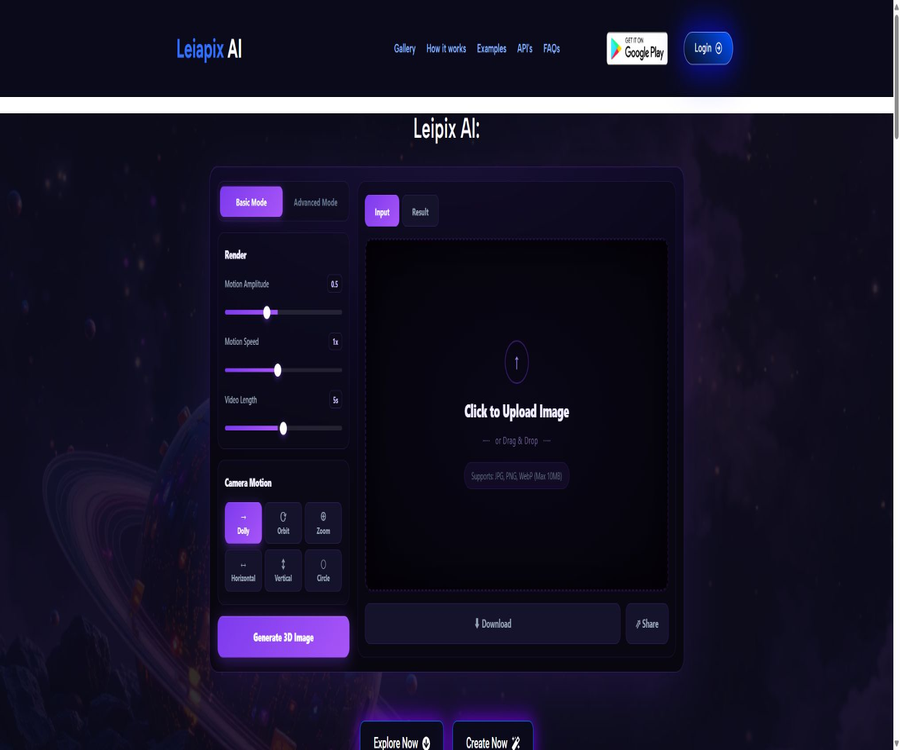
What is LeiaPix AI currently?
The sites listed in the database currently offer a function that converts images into 3D parallax animations using LeiaPix AI; however, the page directs users to another service named DepthFlow AI for creating such content and accessing its interfaces. This service is suitable for quickly turning photos, illustrations, or AI-generated images into short videos with depth effects and camera movements.
It is important to note that Leia Inc.’s original LeiaPix Converter was renamed Immersity AI in 2024; the current website does not indicate any connection between this product and either Leia Inc. or Immersity, so they should not be considered as belonging to the same company.
Main functions
- Automatic depth analysis: After a single 2D image is uploaded, the system identifies the relationship between the foreground, the main subject, and the background, and generates depth information necessary for parallax movement.
- Camera movement: Options include Dolly, Orbit, Zoom, Horizontal, Vertical, and Circle, which allow static images to appear as if they are moving forward, rotating, zooming in or out, or translating.
- Basic and advanced controls: The basic mode is used for quick creation, while the advanced mode allows adjustment of the amplitude of movement, the speed of movement, and the duration of the video, enabling better control over the rhythm and intensity of the movements.
- Sample preview: It is possible to use sample images to observe different camera movements without first uploading personal materials, which makes it suitable for determining whether the resulting effect meets the requirements.
- Video export: The page describes the output format as MP4, which can be used for short videos, portfolios, product presentations, or social media content; the specific resolution depends on the chosen option.
- Web and mobile versions: The primary access method at present is through a browser, while the associated DepthFlow AI has an Android application as well; the details regarding the developers of the mobile app and related data should be checked separately on the installation page.
Input, Setup, and Output
| Stage | Public specifications available | Usage suggestions |
|---|---|---|
| Enter | JPG, PNG, WebP; maximum size per file is 10MB. | Give priority to high-quality images with clear subject outlines and a distinct separation between the foreground and background. |
| Exercise | Camera modes such as push, orbit, zoom, horizontal, vertical, circular, etc. | For portraits, it’s better to start with smaller adjustments; for buildings and landscapes, more significant movements can be attempted. |
| Parameters | Range of motion, speed, video length | Preview first before increasing the scale, to avoid edge stretching and exposure of hidden areas. |
| Output | MP4 parallax animation | After downloading, open the video editing software to add subtitles, music, and brand elements. |
Usage steps
- First, use the examples provided by the site to test different lens modes, in order to confirm that what is generated is a video with parallax motion, rather than a complete 3D model that can be rotated.
- Before registering, check the page to see which service will receive the account and materials, and confirm the current billing entity, privacy policy, and plan name.
- Upload JPG, PNG, or WebP images; avoid using files that contain sensitive personal information, unauthorized persons, or restricted commercial materials.
- Select the lens movement and adjust its amplitude, speed, and duration; if tearing appears at the edges of the subject, reduce the amplitude or use an image with a clearer background and foreground.
- Generate and preview the results to check for any errors in depth perception regarding the characters’ limbs, hair, transparent objects, text, and complex backgrounds.
- Download the MP4 file according to the actual plan; before using it in customer projects or advertisements, keep the payment records and reconfirm the terms regarding commercial use and watermarks.
Suitable for users and scenarios
- Short-video creators: Transform covers, illustrations, or photographs into clips that offer a sense of movement and rotation.
- Photographers and designers: Create lightweight, dynamic versions for portfolios, proposals, and presentation pages.
- E-commerce and marketing professionals: Add motion to individual product images, but first check for any distortion in the edges of the products and in the text.
- Digital art creators: They add depth to concept art, character designs, and scene illustrations, and then proceed to the editing process to finalize the final product.
- Individual users: Create memorable photos with depth-of-field effects or content for sharing on social media; free versions come with watermarks and restrictions on non-commercial use.
Advantages and capabilities boundaries
Actual advantages
- The operation workflow is simple; there is no need to master modeling, masking, keyframing, or compositing software.
- The same image can yield versions with different rhythms through various lens paths and parameters.
- Observing the effects using examples first can reduce the need to upload personal materials directly.
Capacity boundaries
- The output is a parallax animation generated from a single image and depth estimation; it is not equivalent to a 3D model with complete geometric structure and materials.
- Areas obscured by the subject lack real image information; when moving significantly, stretching, voids, double images, or broken edges may occur.
- Text, fine hairs, glass, grids, images with multiple overlapping elements, and those with unclear foreground and background are more likely to result in incorrect depth perception.
- The page does not provide information regarding batch processing, queues, team collaboration, or stability guarantees; high-frequency production processes need to be tested on a small scale first.
Prices and commercial restrictions
| Package or version | Price | Billing cycle | Core benefits or quota | Suitable for users |
|---|---|---|---|---|
| Free plan | 0 dollars | Free quota | 1 result with a watermark, for personal use only | Functional trials and non-commercial experiences |
| Paid plans | Not yet made public | The settlement page shall prevail. | More points, high-resolution downloads without watermarks, priority handling, and commercial usage rights | Creators and teams that require a formal delivery |
The current public page does not list the amounts associated with each payment tier, the points required for purchases, the options for renewal, the validity period of the remaining credit, or the rules regarding refunds. Before making a purchase, it is necessary to refer to the actual settlement page and the account details, as well as to understand the settings related to automatic renewal, the timing at which cancellation takes effect, and the scope of the commercial license.
API, SDK, and open-source status
- The page provides an API entry point that leads to DepthFlow AI, but the public version does not disclose in full the endpoints, authentication methods, rate limits, costs, service guarantees, or data retention policies.
- As of now, there is no official SDK for this service, no verifiable official code repository, or any example projects available.
- No open-source license for this web product was found; therefore, it cannot be concluded that the product, the models, or the server code are open source.
- There is an open-source project named DepthFlow available on the internet; one should not assume, based solely on the name, that its license or code belongs to this online service.
Privacy, copyright, and account risks
- The site claims that uploaded images are deleted within 24 hours after processing and are not shared with third parties, but no separate privacy policy or information regarding the entity responsible for operations was found to support this claim.
- The registration form collects information such as username, name, email address, gender, and country; until the terms and data policy are clarified, it is advisable to avoid submitting unnecessary personal information.
- Users must ensure that they possess the copyright, portrait rights, and any necessary permissions for the images they upload; they must not upload confidential client information, identification documents, sensitive photos of minors, or material subject to confidentiality agreements.
- Free results are intended for personal use only and come with a watermark; the commercial rights mentioned on the paid pages are subject to the terms, invoices, and account benefits applicable at the time of purchase.
- The current site is a different entry point from Immersity of Leia Inc.; if you need the current products, mobile applications, or enterprise interfaces developed by the original LeiaPix team, you should choose Immersity and evaluate its solutions separately.
Summary
This page is useful for quickly understanding how a single image can be converted into a 3D parallax video; it also allows one to test camera movements using examples. Since information regarding the brand’s history, the entity in charge of its operation, privacy policies, and payment details is still insufficient, it is recommended to use this page as a starting point for testing with less sensitive content. Account creation, settlement procedures, and authorization processes should be completed before uploading actual assets or making payments.
Tools similar to My Blog




 Guigong Network Security Registration No. 45132202000164