






Pilio
Pilio, an intelligent tool focused on AI video processing
Tags:AI video toolsWhat is Pilio?
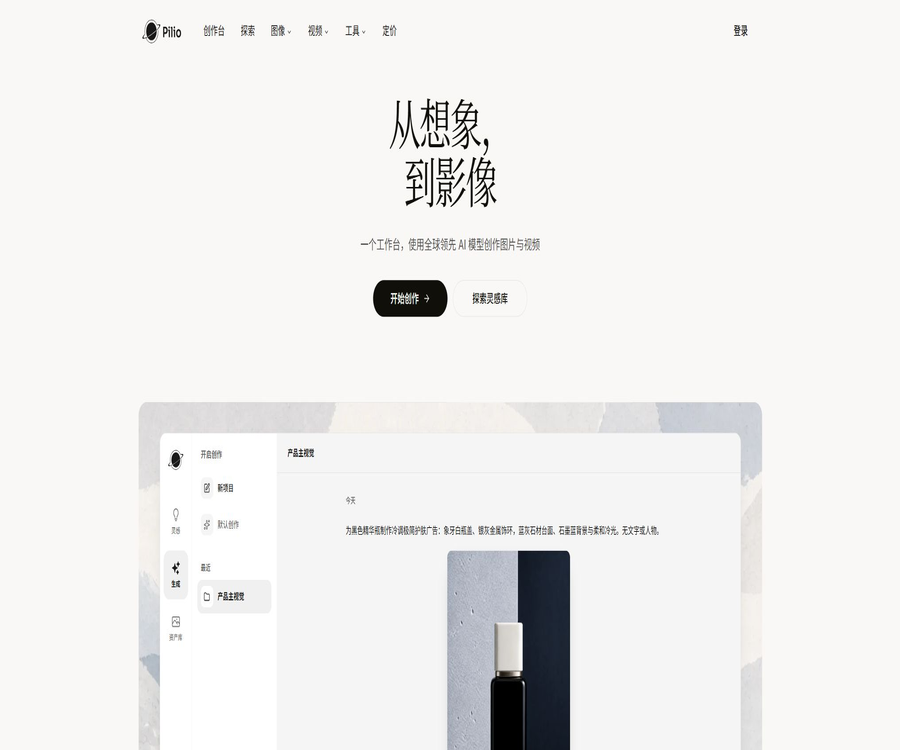
Pilio is an online AI visual workspace designed for creators and users who work in everyday office tasks. It brings together image generation, video creation, image cropping, quality improvement, watermark removal, and PDF cleanup in a single website, using a unified point system for billing.
Users do not need to subscribe to multiple model platforms separately; they can choose GPT Image 2, Nano Banana 2, or Seedance 2.0 depending on the task at hand. For all generation and processing tasks, it is necessary to check the estimated points before submission, as the actual consumption will vary depending on the model used, the resolution, the duration, and the number of outputs.
Pilio’s product positioning
Pilio is not a platform for displaying self-developed base models; rather, it is a creation platform that combines models with practical post-processing tools. It is more suitable for users who need to complete the entire process of \"generation, modification, cleanup, scaling, and export\" quickly.
| Dimension | Explanation |
|---|---|
| Core positioning | Integrated platform for AI image, AI video, and file processing |
| Usage method | It can be used online on the web, without the need to install any desktop software. |
| Billing method | Free welcome points, membership subscription points, and charges based on tasks completed |
| Main models | GPT Image 2, Nano Banana 2, Nano Banana Pro, Seedance 2.0 |
| Later-stage tools | Watermark removal, image cropping, image enlargement, video enhancement, and PDF cleanup |
| Development capability | API Key, asynchronous network interfaces, and Node.js SDK |
Main functions
- Generate product images, posters, characters, illustrations, and infographics using text prompts.
- Upload reference images to ensure consistency in characters, products, style, or layout.
- Use Seedance 2.0 to generate video from text, video from images, and multi-modal references.
- Remove logos, text, timestamps, or other obstructions from the image, and fill in the covered areas.
- It automatically removes the background and exports a transparent PNG, making it suitable for creating product images and avatars.
- Enlarge low-resolution images and restore compressed quality, blur, and facial details.
- Remove structured watermarks from PDFs; AI mode can be used for scanned documents and stubborn watermarks.
- Process static or dynamic watermarks in videos and export them uniformly as MP4 files.
- Improve the quality of blurry, compressed, or AI-generated videos frame by frame.
- Browse for inspiring examples, reuse prompts, or use the images from those examples as a reference for your own creations.
How to choose an AI image model
| Model | Key capabilities | More suitable tasks | Precautions |
|---|---|---|---|
| GPT Image 2 | Text rendering, command execution, and commercial visuals | Posters, infographics, product images, and layout design | The quantity and size of the output affect the integration. |
| Nano Banana 2 | Multiple image references, Thinking composition, and enhanced search capabilities | Role consistency, product portfolio, and complex editing | The highest resolution available is 4K, and there is a limit on the number of reference images. |
| Nano Banana Pro | More mature image generation and editing processes | General creation and existing workflows | The estimated consumption per image is higher than that of some lightweight models. |
The reference capabilities of Nano Banana 2
According to the official tool page, Nano Banana 2 supports output in 0.5K, 1K, 2K, and 4K resolutions, and allows the use of up to 14 reference images. The maximum number of references is 10 objects plus 4 characters, which makes it suitable for creations that require consistency across multiple elements.
It also offers enhancements for text and image search, as well as options to increase the depth of analysis. These search enhancements do not guarantee complete accuracy regarding facts and brand details; manual verification of text, trademarks, and product specifications is still required before any commercial release.
AI video generation feature
- It supports various types of input, including text, images, reference videos, and audio.
- You can choose between 480p, 720p, or 1080p resolution.
- The video duration can be set between 4 and 15 seconds.
- It supports the creation of native audio, reducing the number of steps required for post-production voiceover.
- Ideal for ad clips, short social media videos, product demonstrations, and storyboard previews.
The minimum configuration for Seedance 2.0 is 480p resolution and a duration of 4 seconds; approximately 97 points are required for verification. Higher resolutions, longer durations, or more output files will result in a greater consumption of points, with the estimated cost shown next to the submit button.
Image and file processing tools
| Tools | Input and output | Public restrictions or billing references |
|---|---|---|
| Image masking | Convert PNG, JPEG, WebP, HEIC to transparent PNG | The maximum size for a single file is 10 MB; the shorter side must not exceed 4320 pixels, while the longer side must not exceed 7680 pixels. |
| Zoom in on image | Upload an image and export a high-resolution result. | The maximum magnification depends on the original image; for high-definition scenes, it can reach 32 times. |
| Remove watermarks from images | Fix the logo, text, and overlapping areas. | The estimated usage for members is calculated at about 2 points per sheet. |
| Structured watermark removal for PDFs | Edit PDFs by file processing | The estimated usage for members is calculated at about 2 points per file. |
| PDF AI watermark removal | Process scanned documents or stubborn watermarks page by page | The estimated usage for members is calculated at about 1 point per page. |
| Remove watermarks from videos | Convert MP4, MOV, WebM, AVI, MPG, MPEG, MKV to MP4 | Points are deducted based on the video task. |
| Video enhancement | Repair frame by frame and export as MP4 | Resolution, duration, and model affect consumption. |
What use cases are suitable?
- E-commerce operations involve creating product main images, transparent background materials, advertising visuals, and scene pictures.
- Content creators produce covers, short video clips, social media images, and character visuals.
- Before the official shooting, the brand team quickly explored several different creative approaches.
- The designer uses reference images to develop the characters, apply style transfers, and create layout drafts.
- Office users use it to remove watermarks from PDF files, as well as to create illustrations for reports and materials for presentations.
- Photography users use it to restore blurry images, remove backgrounds, or enlarge old photos.
- Developers can integrate image and PDF processing workflows in bulk through APIs.
It is not very suitable for which tasks
- Professional design projects that require complete layers, vector paths, or precise pre-press parameters.
- The production of long videos requires frame-by-frame control of the camera, keyframes, and audio tracks.
- There is no legitimate reason to remove watermarks from other people’s works when one does not have the proper rights to do so.
- Tasks that involve highly sensitive personal information, medical data, financial information, or confidential business details.
- High-frequency batch production that requires fixed costs but whose number of units produced cannot be predicted.
- Enterprise environments that require local offline deployment, source code auditing, or self-hosting.
Pilio Image Generation Tutorial
- Register and verify your email address to receive the welcome points for your account.
- Enter the image generation tool and, depending on the task, select either GPT Image 2 or the Nano Banana series.
- Enter the subject, scene, lighting, style, composition, and text content.
- To maintain consistency in the appearance of people or products, upload reference images that you own legally.
- Select the frame size, resolution, number of outputs, and level of detail.
- Check the estimated points before submitting, then start generating.
- Inspect the details of the characters’ hands, text, trademarks, and products; adjust the prompt if they do not meet the standards.
- Download the result, and if necessary, proceed with image cropping, zooming, or watermark removal.
Pilio Video Generation Tutorial
- Open Seedance 2.0 and select the text-to-video or reference material mode.
- When uploading pictures, videos, or audio, first ensure that you have the rights to use and distribute them.
- Describe the main subject of the shot, actions, camera position, camera movement, environment, and rhythm.
- Choose a duration of 4 to 15 seconds and a resolution of 480p, 720p, or 1080p.
- Enable native audio as needed, and view the real-time score estimate.
- After generation, check the continuity of actions, lip movements, subtitles, and brand elements.
- Download the suitable segments, then use professional video editing software to assemble them into a complete film and adjust its color grading.
Tutorials on image cropping, zooming, and watermark removal
- Choose a tool that is suitable for the type of material; do not use image-processing tools on PDF files.
- Upload the file and verify that its format, size, and file size meet the page constraints.
- To carry out the watermark removal task, one must confirm that they are the rights holder or have obtained explicit permission.
- Choose between structured cleaning or AI repair mode based on the material.
- Check the point consumption and the expected output format before submitting.
- Preview edges, transparent areas, text texture, and repair marks.
- Download the result and keep the original file, so that it can be processed again if issues arise.
Comparison of member prices and packages
The following are the monthly prices in US dollars as of August 2026. Pilio also offers an annual payment option, which can result in savings of up to 44%; however, promotions, taxes, regional currency options, and settlement prices may vary.
| Package | Monthly reference price | Monthly subscription points | Estimated typical monthly usage |
|---|---|---|---|
| Free | $ | 10 points are granted as a one-time bonus for verifying the email address. | Used to experience low-power tasks |
| Lite | $ | 1,500 points | GPT Image 2: around 500 images; Seedance 2.0: around 15 four-second videos |
| Pro | $ | 3,000 points | GPT Image 2: around 1,000 images; Seedance 2.0: around 30 four-second videos |
| Ultra | 72 dollars per month | 12,000 points | GPT Image 2: around 4,000 images; Seedance 2.0: around 123 four-second videos |
The usage amount for the package is estimated based on default or minimum consumption levels; it is not a fixed output guarantee. For 1K images with Nano Banana 2, the estimates are around 136, 272, and 1,090 images respectively for the Lite, Pro, and Ultra versions, but the actual figure will depend on what is shown in the task panel.
Points and subscription rules
- New users who complete registration and verify their email address receive 10 welcome points as a one-time bonus.
- Subscription points are refreshed at the end of each billing period, and whether unused points carry over is determined by the rules displayed on the account page.
- The model, resolution, video length, and number of outputs all affect the amount of resource consumed per operation.
- Multiple options, the price difference for upgrades, and the procedure for handling existing subscriptions should be checked in the settlement details before making the payment.
- The monthly usage amount displayed on the page is only an estimate; it does not mean that the same amount can always be achieved each month.
- Taxes, exchange rates, and promotional discounts can result in a different final payment amount.
APIs and developer capabilities
Pilio offers permanent API keys, asynchronous network interfaces, OpenAPI documents, and a Node.js SDK. The development interfaces currently support tasks such as GPT Image 2, Nano Banana 2, image watermark removal, image cropping, image enlargement, and PDF watermark removal.
- Create an API Key in the account, and store it solely on the server side.
- Call the file interface to create a file record and obtain the upload address.
- Upload the binary file to a temporary address.
- Create a processing task and record the returned task ID.
- Poll the status and result interface to wait for the task to complete.
- Use the temporary download address to save the final file.
| API project | Rules |
|---|---|
| Billing | For reusing account points, the deduction is, by default, twice the amount of the basic points allocated on the website. |
| Single batch of documents | Up to 500 |
| Single file size | Up to 2GB |
| Validity period of the upload address | About 2 hours |
| Validity period of the download address | In about 24 hours, the results can be queried again to obtain the new address. |
| Concurrent task pool | The web pages and APIs share the same resource; up to 20 items can be in the pending or processing state. |
| Task mode | The first version offered only asynchronous APIs. |
Customers with high usage levels can contact the platform to inquire about the multiplication factor and prices. API keys should not be stored in browsers, mobile application packages, or public code repositories, as this could allow others to use up the account’s credits.
Privacy and file security
Pilio explains that some tools can be run locally in the browser; such files do not leave the device. Tasks that require server processing are uploaded via an encrypted connection and are automatically deleted in accordance with the service rules.
- Before uploading, confirm whether the processing is done locally or in the cloud.
- Do not upload passwords, identification documents, medical records, or confidential customer information.
- Download the results promptly, as the temporary download link will expire.
- After processing is complete, check the account history and remove the entry.
- Enterprise users should first verify the data retention policies, processing locations, and compliance requirements.
- The platform can enhance the security of transmission and storage, but it cannot guarantee absolute zero risk.
Copyright and compliance considerations
The user retains the right to upload files, but must ensure that they have the authority to handle and distribute such content. The watermark removal feature should not be construed as allowing the free removal of signatures, copyright notices, or platform identifiers from others’ works.
- Only work with material that you have created yourself, for which you have purchased a license, or that has been authorized by the rights holder.
- Do not generate illegal, fraudulent, infringing, malicious software, or harmful content.
- Obtain the necessary permissions when dealing with real-person portraits, and avoid misleading impersonation.
- Before commercial use, check for similarities in trademarks, characters, and materials in the model’s outputs.
- Retain the original file, authorization proof, and generation record.
- It is not allowed to bypass the platform’s restrictions, disrupt the services, or perform reverse engineering on protected components.
Refund policy
During verification, users who purchase a Pro or Ultra subscription on a monthly, annual basis, or as an annual card for the first time can request a refund to their original payment method within 3 days of making the purchase. This guarantee applies only to the first subscription order placed by each user.
- To subscribe for the first time, the request must be submitted within 3 days of purchase.
- No refunds are available once the 7-day pass is activated.
- No refunds are available for one-time historical points packages once purchased.
- Renewal orders, abnormal usage, and other exclusions are subject to the latest refund policy.
- Save the order number, account email, and payment receipt before applying.
Product advantages
- One account makes use of multiple image and video models simultaneously.
- Once generated, it can be directly used for the processes of image masking, zooming, and cleanup.
- An estimate of the points to be earned is displayed before submitting a task, making it relatively easy to determine the cost.
- It supports images, videos, and PDFs, offering a wider range of capabilities than single generators.
- Nano Banana 2 supports multiple image references, high resolution, and enhanced search capabilities.
- Seedance 2.0 takes into account multi-modal references, original audio, and multiple clarity levels.
- APIs, OpenAPI, and SDKs are provided to facilitate integration with batch workflows.
- Some lightweight tools can process files locally in the browser.
Usage restrictions and precautions
- Pilio aggregates third-party models; the capabilities, availability, and pricing of these models may vary.
- The free welcome points are very limited, making it difficult to properly test video tasks with high resource consumption.
- The number of items generated corresponding to the subscription points changes depending on the parameters.
- AI-generated images may still exhibit errors in text, hands, object structure, and consistency.
- Short videos are not equivalent to complete editing tools; longer videos still require post-production software.
- Removing watermarks and performing repairs do not guarantee that the original, hidden content will be restored.
- The server is used for handling file uploads and is not suitable for unapproved sensitive data.
- By default, the API offers a higher multiplier for points compared to web tasks; it is necessary to calculate the costs before performing batch calls.
- Websites and APIs share the same concurrency pool, which can lead to queues during peak times.
- The platform does not guarantee 100% continuous availability or complete accuracy of the results.
- Refunds are only available for eligible initial subscriptions; point packs and activated passes are not covered.
- The product does not support local offline deployment.
GitHub and the open-source status
The real-time search did not yield any repository containing the complete source code of the platform, with a direct link provided on Pilio’s official website. Pilio should be considered a closed-source online service that integrates models from various providers and delivers them through its own website and APIs.
The official developer page provides the Node.js SDK and OpenAPI documentation; this allows for the integration of such services, but it does not mean that the Pilio platform, model weights, or backend processing code are made available under an open-source license. Before using third-party repositories with the same name, it is necessary to verify the relationship between the publisher and the official website.
Basic information
| field | Content |
|---|---|
| Tool name | Pilio |
| Tool type | AI image generation, AI video generation, and file processing platform |
| Main models | GPT Image 2, Nano Banana 2, Nano Banana Pro, Seedance 2.0 |
| Supported languages | Multilingual interface including Simplified Chinese |
| Use the platform | Web page version |
| Free method | 10 points upon verifying the email, once only. |
| Payment methods | Lite, Pro, Ultra subscriptions and point-based billing |
| Whether API is provided | Yes |
| Is it open source? | No |
| Is installation required? | No |
Recommendation score
4.3 / 5. Pilio combines mainstream image and video models with common cleanup tools into a single workflow; it offers a fairly complete set of options for model selection and API functions. However, the cost associated with using its services varies depending on the parameters set, there are few free trial periods available, and extra care is required when dealing with sensitive files and watermarks.
Frequently Asked Questions
Can Pilio be used for free?
It can be tried out. New users who complete registration and verify their email address receive 10 welcome points as a one-time bonus; for higher levels of usage or long-term use, a subscription purchase is required.
How much is the monthly fee for Pilio?
As of August 2026, the reference monthly prices are $12 for Lite, $20 for Pro, and $72 for Ultra. Regional taxes, exchange rates, discounts, and annual payment savings are subject to the details on the settlement page.
How much content can be created each month after subscribing?
There is no fixed answer. The official website provides estimates based on default or minimum consumption parameters; the actual amount depends on factors such as the model used, the level of clarity, the length of the video, and the number of output frames.
Which image models does Pilio support?
During verification, the main models used are GPT Image 2, Nano Banana 2, and Nano Banana Pro. The list of models may change as supplies and products are updated.
Can Pilio generate videos?
Yes. Seedance 2.0 supports multiple reference inputs, video durations of 4 to 15 seconds, output resolutions from 480p to 1080p, and native audio.
Is it possible to remove the watermark from any image or video?
Technically, various types of materials can be supported, but only content that one owns, for which a license has been obtained, or for which explicit permission exists can be processed. Removing copyright markings from someone else’s work may constitute infringement.
Will the file be uploaded to the server?
It depends on the tool. Some functions operate locally in the browser, while AI generation and complex processing usually require a server; it is necessary to check the specific page instructions before uploading.
Does Pilio offer APIs?
It provides asynchronous APIs, API keys, OpenAPI files, and a Node.js SDK. By default, API tasks incur costs equal to twice the amount charged for web tasks, and they share the same concurrency pool as web tasks.
Is Pilio an open-source project?
No. The development documentation and SDKs are used to call services; they cannot be considered as open-source platform source code or model weights.
Tools similar to Pilio




 Guigong Network Security Registration No. 45132202000164