






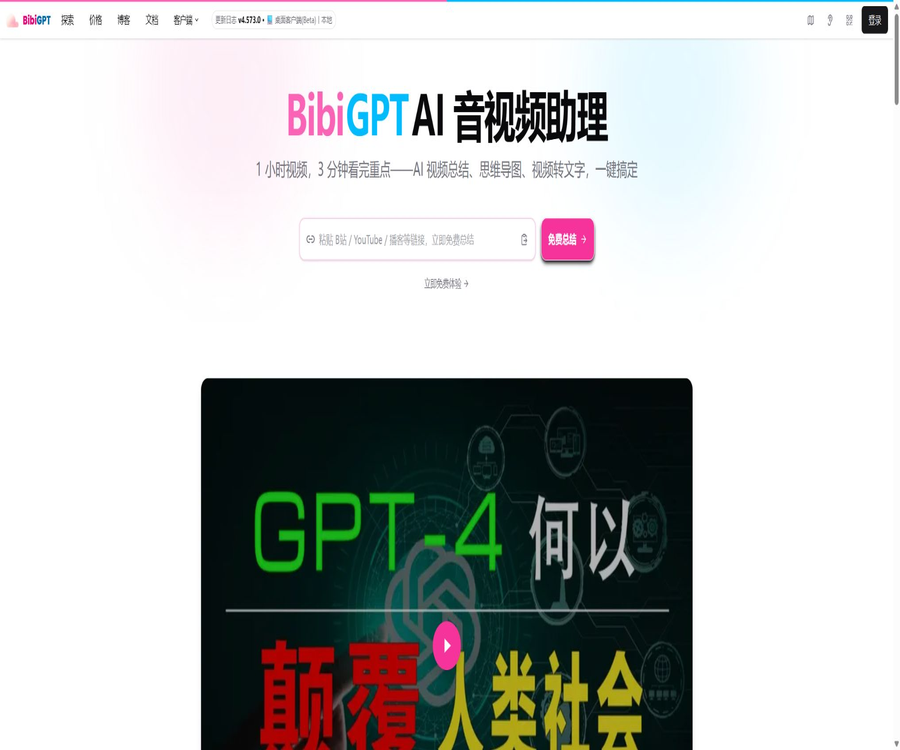
Bibigpt
Bibigpt, an intelligent tool focused on AI video.
Tags:AI video toolsWhat is BibiGPT?
BibiGPT is an AI-powered tool for learning and organizing audio and video content; its original name was BiliGPT. By pasting links to videos or podcasts, or by uploading local audio and video files, users can obtain subtitles, summaries, chapter outlines, mind maps, AI-driven Q&A responses, and materials for further creative work.
The product has evolved from its initial form, which was a summarizer for Bilibili and YouTube, to a cross-platform audio and video workstation. It is useful for quickly understanding long-form content and organizing knowledge, but summarization cannot replace watching the original material, checking the subtitles, or respecting the copyright of the content.
Core functions
1. One-click summary for audio and video
BibiGPT extracts subtitles from a platform or performs speech recognition on audio tracks, and then generates summaries, key points, and a chapter structure. Users can choose different models and prompts depending on whether they are using it for learning, meetings, podcasts, or content creation.
2. Subtitle extraction and transcription
For content that already has subtitles, the system can organize the timeline text; in the absence of subtitles, AI transcription can be used. The subtitle tool on Bilibili allows for exporting in SRT, TXT, and PDF formats, and it can also handle multi-part content separately.
3. Mind maps and chapter identification
The summary page allows the content to be organized into sections, outlines, and mind maps, while also preserving the time markers. Users can jump back to specific segments based on the knowledge points, thereby reducing the need to repeatedly scroll through the progress bar in long videos.
4. Conduct AI conversations centered on the content
Users can pose further questions based on the subtitles and summaries, asking the AI to explain concepts, compare viewpoints, or locate specific segments. The answers may still overlook context or contain errors; important conclusions should be verified by referring to the original content.
5. Visual analysis and PPT extraction
Visual summaries allow for the analysis of keyframes, charts, demonstration actions, and visual information, rather than relying solely on audio. The product also offers features such as OCR for hard subtitles, extraction of keyframes from PPTs, and screenshot analysis; some of these functions are still marked as beta.
6. Repurposing of content
The creation panel allows video content to be transformed into articles with text and images, material for official accounts, cover images, or social media posts. Pro is also designed for creators who work in areas such as visual analysis and AI-generated short videos; however, it is necessary to edit the content again and verify the rights to the materials before publishing them.
List of main functions
- Paste links to public videos, podcasts, or social media platforms to generate a summary.
- Upload local audio and video to carry out transcription, summarization, and Q&A.
- Generate chapters, key points, timestamps, and mind maps.
- Export subtitles, original text, summaries, notes, and highlighted content.
- Analyze video screenshots, PPTs, charts, code interfaces, and hard subtitles.
- Continue the dialogue, provide explanations, and carry out searches related to audio and video content.
- Synchronize the summary to note-taking tools such as Notion, Obsidian, and Cubox.
- Transform videos into articles, covers, images, or materials for short videos.
- Process links and files in batches, and manage content through favorites and subscriptions.
Which platforms and file types are supported?
| Type | Support range | Explanation |
|---|---|---|
| Domestic videos | Bilibili, Douyin, Kuaishou, REDnote, Xigua Video, Toutiao, Youku, and others | It may become temporarily unavailable when there are changes to the platform interfaces or page rules. |
| Overseas videos | YouTube, TikTok, Instagram, Lemon8, and others | Affected by region, copyright, and login status. |
| Podcasts and audio | Himalaya, Little Universe, Apple Podcasts, Spotify | For platforms that do not provide support, try to find other sources for the same program. |
| Learning content | Coursera, DeepLearning.AI, TED | Legal access is required to view paid or protected content. |
| Other content | X Video, Substack, and other identifiable online media platforms | Not all web players can read it directly. |
| Local videos | MP4, WebM, MPEG, MPG, AVI, MOV, MKV | The current maximum size for a single file is 2GB. |
| Local audio | MP3, WAV, M4A, AAC, FLAC, OGG | The quality of the transcription is influenced by the quality of the recording and the language used. |
Which users are it suitable for
- Students and lifelong learners who need to quickly organize courses, lectures, and tutorials.
- Researchers who need to archive podcasts, interviews, and industry videos as notes.
- Content creators who wish to extract topics, ideas, and materials from long videos.
- Workplace users who need to organize meeting recordings, training videos, and materials for internal sharing.
- People who use Notion, Obsidian, or Cubox to create personal knowledge bases.
- There is a need for operators and editors who can handle subtitles, timelines, and video-to-text conversion.
- Developers who wish to integrate audio and video transcription and summarization capabilities via APIs.
How to summarize online videos
- Copy the full link to the video or podcast that you have permission to access.
- Paste the link on the home page and verify that the system correctly identifies the platform and the content.
- Select the summary language, model, prompt, and the desired output format.
- Start processing and wait for subtitle extraction, transcription, and summarization to be completed.
- First, browse the chapters and summaries, then click on the timestamp to return to the original video for verification.
- Manual corrections are made to technical terms, numbers, names, and key conclusions.
- Export or synchronize qualified content to the note-taking system, while retaining the original source information.
How to handle local audio and video
- Ensure that the file format is supported and that each file is no larger than 2GB.
- When dealing with meetings or interviews, obtain the consent of the participants first and remove any irrelevant or sensitive information.
- Upload the file and select the language for recognition, the summary template, and the processing model.
- After the transcription is completed, check each segment for proper nouns, speakers, and the timeline.
- Generate chapters, summaries, mind maps, or continue with AI Q&A.
- When higher privacy is required, assess whether the local privacy mode on the desktop is suitable for the current task.
- Export the final notes and delete the unnecessary cloud files in accordance with the organization’s rules.
Export and integration with knowledge base
- Download highlighted notes, subtitles, summaries, and other generated content.
- Choose whether to include original subtitles and timestamps as needed.
- Synchronize the results to Notion or Obsidian to continue organizing them.
- After configuring the Cubox API, it is possible to save the outline, summary, and time position with just one click.
- Enable automatic sending to continuously archive newly completed summaries in the knowledge base.
- Before exporting, check that the formatting, images, links, and AI conversation content are complete.
Comparison of member prices and versions
BibiGPT offers a free trial version, as well as Plus, Pro, Partner membership options and pay-as-you-go plans. The prices listed in the table below are based on those specified in the official documentation and recent announcements; they do not include any time-limited promotions that have already ended. The prices in RMB may change depending on exchange rates.
| Plan | Regular price | Main limits and functions | Suitable for |
|---|---|---|---|
| Free trial | A free 120-minute session is offered upon registration. | Basic audio and video processing experience | First-time trial and low-frequency usage needs |
| Plus monthly plan | $ | During the membership period, there are no limits on the number of times or duration for accessing online content; 6,000 minutes per month for local files; synchronization of advanced models and notes. | Daily study and work |
| Plus annual plan | $ | Full Plus benefits, with a lower average annual cost | Long-term stable users |
| Pro monthly plan | $ | Includes Plus; unlimited local video usage; visual analysis, video-to-text conversion, AI vision, and short-video features | Professional content creators |
| Pro annual subscription | $ | Full Pro benefits with a lower average annual cost. | High-frequency multimodal creation |
| Member Partner | $ | Permanent Pro features, exclusive community, priority access, and a higher promotion rate | Identify long-term heavy users |
| Buy as needed | Real-time billing on the purchase page | Pay based on the actual amount processed | Occasional processing or short-term tasks |
The unlimited number of calls and duration mentioned by members do not include API calls; in addition, restrictions related to fair use, maximum size per file, and model resources may apply. It is advisable to review the current price, auto-renewal options, quota limits, promotional rules, and invoice details before making a payment.
How to choose between Plus and Pro
- It mainly deals with course content, podcasts, and summaries of work videos; Plus is given priority.
- The limit for local files per month is 6,000 minutes; the Plus plan is usually sufficient.
- If a large amount of local video, image analysis, and PPT extraction is required, Pro could be considered.
- If you need video to text conversion, AI-generated covers, social media images, or short videos, Pro is the better choice.
- When the frequency of use is uncertain, start with a free trial or purchase as needed; there is no need to commit to an annual payment.
- Member partners require significant long-term commitment; it is necessary to first verify the core workflows and ongoing needs.
Open API
BibiGPT offers an open API and includes compatibility with OpenAI’s audio transcription interface. Developers can integrate functions for audio and video transcription, link processing, or summarization into their own applications; the balance of the API credits and the membership limits need to be understood separately.
| Project | Current situation | Precautions |
|---|---|---|
| API documentation | Official API documentation and references are provided. | It should be developed in accordance with the latest interface definitions. |
| Authentication | Use the developer key. | Keys can only be stored on the server side. |
| OpenAI compatible | Provides a compatible transcription interface. | Compatibility does not mean that all parameters and behaviors are exactly the same. |
| Billing | Separate from member benefits | Prices, balances, and speed limits are subject to the developer console settings. |
| Input source | Links, online media, and files | Platform authorization, format, and size restrictions still apply. |
Open-source version and private deployment
The official GitHub repository provides BibiGPT v1, which is licensed under GPL-3.0. The README file specifies that this repository corresponds only to the early version of the software, and it supports Bilibili and YouTube primarily. The new platforms, multi-modal capabilities, client applications, and membership services available in the commercial version cannot be fully represented by v1.
- v1 primarily uses TypeScript, Next.js, Vercel Edge, and caching services.
- The repository provides local installation instructions as well as references for Docker deployment.
- After deployment, you need to configure the model API, caching, login settings, and platform access credentials on your own.
- GPL-3.0 imposes clear obligations regarding modification, distribution, and creation of derivative works; the license must be reviewed before using it for commercial purposes.
- Do not submit login cookies, platform tokens, or model keys to code repositories and images.
- The stability, costs, compliance, and data security of self-deployed systems are the responsibility of the person who carries out the deployment.
Privacy and data security
According to BibiGPT’s privacy policy, the uploaded meeting recordings, personal notes, and other audio/video materials are used solely for providing transcription, summaries, and related services; they are not intended for public disclosure or used to train public AI models. The service still needs to process account information, preferences, files, and usage data, and it may make use of third-party infrastructure or models.
- Obtain the necessary authorization before uploading recordings of meetings, interviews, and courses.
- Do not handle confidential meetings, customer data, or strictly regulated data unless a compliance assessment has been completed.
- The local privacy mode on the desktop version allows for recognition and summarization to take place on the device itself, but it is necessary to verify which specific models and functions are supported.
- Browser extensions handle website content and user activities; check the permissions before installing them.
- When synchronizing with Notion, Obsidian, or Cubox, check the third-party account and API permissions respectively.
- Remove promptly any files, transcripts, and export records that are no longer needed.
Product advantages
- It covers mainstream videos, podcasts, educational platforms both domestically and internationally, as well as local files.
- A complete learning process is established, ranging from subtitles and summaries to chapters, mind maps, and Q&A.
- It supports analysis of videos, PPTs, closed captions, and screenshots, going beyond mere audio summaries.
- Knowledge can be synchronized to tools such as Notion, Obsidian, and Cubox.
- It offers web versions, Apple clients, desktop applications, and browser extensions.
- The open API and the transcription interface compatible with OpenAI facilitate integration by developers.
- The v1 code is made public for learning, research, and self-deployment purposes.
Usage restrictions and precautions
- AI summaries may miss tone, counterexamples, context, and visual details, and cannot replace the original content.
- Automatic subtitles can be affected by noise, accents, multiple speakers speaking at the same time, and specialized terminology.
- Processing of platform links may fail due to copyright issues, regional restrictions, login problems, or anti-scraping rules.
- Unlimited access for members does not mean that the API is free, nor does it mean there are no limits on fair usage.
- Features such as visual analysis, OCR, PPT extraction, and short videos are still in the beta stage.
- When creating derivative works, it is necessary to respect the original author’s copyright rights as well as the platform’s rules; one cannot simply copy and publish the original content without modification.
- The current commercial version is not equivalent to GitHub v1; therefore, it cannot be concluded that the entire product is fully open source.
- Member and event prices may change; the information displayed on the purchase page is the final authority.
Refunds and purchasing notes
- The official documentation states that a refund can be requested within 7 days of purchase; requests made after that period are usually not accepted.
- Orders that are within the deadline can be used to submit an email request through the refund option in the order history.
- The promotional prices, the months during which group purchases come with free gifts, and the additional benefits offered are subject to separate rules that need to be checked.
- The price in RMB is converted from USD and may vary depending on exchange rates and payment methods.
- Before purchasing an annual or permanent plan, it is necessary to first test the accuracy and speed using a real-length video.
- When an invoice is required, prepare the account details, order information, and invoicing details in accordance with the official requirements.
Platform and open-source status
| Project | Current situation |
|---|---|
| Web page version | Supports links, local files, summaries, Q&A, creation, and export. |
| iPhone and iPad | An official app is provided; iOS or iPadOS 15.1 or higher is required. |
| Mac with Apple chip | The App Store version can run on macOS 12.0 and later. |
| Browser extensions | A Chrome extension is provided to handle the audio and video content on the current webpage. |
| Open API | Provides an official API as well as a transcription interface compatible with OpenAI. |
| GitHub | The official BibiGPT-v1 repository uses GPL-3.0 |
| Open-source scope | Only the v1 code is open source; the current full commercial service is not entirely open source. |
Basic information
| field | Content |
|---|---|
| Tool name | BibiGPT |
| Original name | BiliGPT |
| Development team | EvergreenAI |
| Tool type | AI tools for summarizing, transcribing audio and video, as well as for learning and content creation |
| Free quota | A 120-minute trial is offered upon registration. |
| Price pattern | Free trial, Plus, Pro, permanent plan, and on-demand purchase |
| Maximum size for a single file | 2GB |
| Whether API is provided | Yes |
| Is it open source? | v1 is open source; the current full commercial version is not entirely open source. |
Recommendation score
4.6 / 5. BibiGPT offers a complete processing pipeline for Chinese videos, podcasts, and learning materials; it has clear advantages in terms of platform coverage, visual understanding, and note integration. However, users still need to verify the summaries, subtitles, copyright information, and privacy aspects, as well as distinguish between membership services, APIs, and the v1 open-source code.
Frequently Asked Questions
Can BibiGPT be used for free?
Yes. The official documentation states that a 120-minute trial period is provided upon registration; after that, users can choose to purchase subscriptions of the Plus, Pro type, or other membership options as needed.
Which video websites is BibiGPT compatible with?
It supports various platforms such as Bilibili, YouTube, Douyin, Kuaishou, REDnote, TikTok, Instagram, etc., as well as podcasts, courses, and local files. The actual success rate is influenced by the rules of each platform and the permissions related to the content.
Can local files be uploaded?
Yes. The official platform supports a variety of common audio and video formats, with a maximum size of 2GB for a single file.
What is the difference between Plus and Pro?
Plus is designed for daily summarization and learning, with a monthly limit of 6,000 minutes for local files; Pro offers unlimited storage for videos, visual analysis, video-to-text conversion, and various other creator-related features.
Does BibiGPT provide an API?
Available. The official provider offers API documentation as well as a transcription interface compatible with OpenAI; however, the API credits are not included in the unlimited benefits available to regular members.
Is BibiGPT completely open source?
No. The public repositories on GitHub correspond to version v1 and are governed by the GPL-3.0 license; therefore, the complete commercial version of the platform, its clients, as well as any new features offered do not constitute fully open-source software.
Tools similar to Bibigpt




 Guigong Network Security Registration No. 45132202000164