






Meitu starts shooting
AI tools that assist voice-over creators with script writing, script delivery, and video production
Tags:AI video toolsWhat is Meitu’s shooting feature?
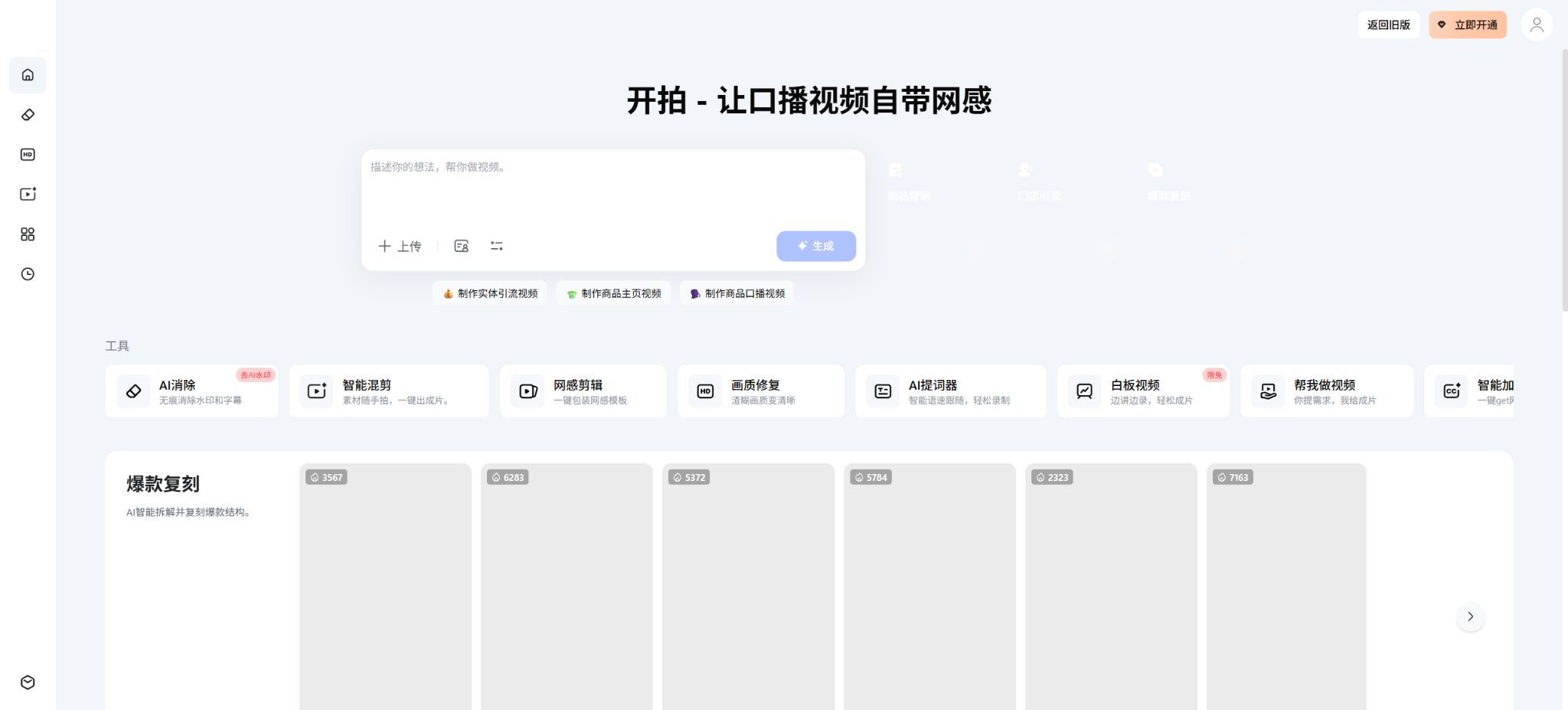
Kai Pai is an AI-powered video production tool launched by Meitu in 2023; its functions are centered around the concepts of “AI to help with writing, AI to help with filming, and AI to help with editing”. It integrates script creation, voice recording, beauty effects for videos, subtitle recognition, text editing, template application, video mixing, and image quality enhancement into a single workflow. It is designed primarily for content creators on social media, knowledge bloggers, retail businesses, e-commerce platforms, real estate agencies, insurance companies, and educational institutions.
Compared to traditional timeline editors, this tool places more emphasis on vertical video narration and automatic video editing. Users can first create or import the script, record while referring to it, and then use text-based editing techniques and trendy templates to quickly produce a finished video.
Complex color grading, multi-track synthesis, and film-grade post-production are still better suited to professional software.
AI script
AI scripts can generate spoken text, REDnote posts, and marketing materials based on topics, keywords, industry sectors, and content objectives. The app’s description section now makes use of the DeepSeek R1 inference model, and it offers templates for industries such as insurance and beauty.
AI-generated scripts may contain data errors, exaggerated claims about their effectiveness, and unrealistic promises. Content related to healthcare, finance, insurance, real estate, and advertising must be verified by professionals before it is published.
4K high-definition cameras and beauty features
Mobile cameras support recording in 4K resolution, and they offer filters, beauty effects, and picture adjustments – making them suitable for recording voiceovers directly with a smartphone. High resolution allows more details to be retained, but it also increases storage needs, generates more heat, and prolongs the processing time required later on.
Before starting the official recording, it is necessary to check the frame rate, audio quality, lighting, focus, available space, and aspect ratio. Excessive beauty effects can cause distortions in the appearance of the face; for product demonstrations and documents, beauty filters should not be used.
AI script reader
A teleprompter can display the script text on the recording interface, while the AI-paced mode adjusts the text scrolling in line with the speaking rhythm, thereby reducing the need for manual control. The product description also states that it supports English recognition, making it suitable for speaking in both Chinese and English.
Natural speaking should not involve reading word for word in a mechanical manner. It is recommended to break the text into segments based on its meaning, add pauses and emphasis, and adjust the speaking pace to be slightly slower than that of normal conversation.
Text quick cut
Text clipping first converts speech into text; users can delete sentences, pauses, and informal expressions just as they would in a document, and the system adjusts the video accordingly. It supports automatic subtitles, recognition of more than a dozen dialects, removal of unnecessary words, and bilingual subtitle formatting, all of which help to significantly reduce the time required for editing spoken content.
Dialects, multiple voices speaking at once, noise, names, and technical terms can reduce the accuracy of recognition. Before deleting text, it is necessary to listen to the context to avoid removing pauses, intonations, and essential visual elements by mistake.
Internet-themed templates and one-click packaging
Upon starting filming, it offers 50 to 60 different voiceover templates in various styles and industries; it can automatically add titles, subtitles, stickers, music, sound effects, and special effects, helping users without any editing experience to quickly adopt the common formatting style used on social media platforms.
Templates often lead to homogenization. Brand accounts should maintain consistent fonts, colors, opening sequences, subtitles, and music, while reducing the use of frequent visual effects that are not related to the content.
Intelligent subtitles addition
Smart subtitles can automatically detect speech and apply highlighting, special font effects, as well as trendy styling. Bilingual subtitles are suitable for use in courses, cross-border e-commerce, and content published on international platforms; however, automatic translation still requires manual review.
Subtitles require verification with regard to names, numbers, units, punctuation, sentence breaks, the number of characters per line, and the safety margin. In vertical videos for small screens, it is especially important to ensure that the subtitles are not obscured by platform buttons.
Intelligent video editing
Smart editing automatically selects and sorts multiple segments of content such as product videos, store footage, lifestyle Vlogs, or voiceover recordings, and combines them with music to create a finished video – making it ideal for quickly performing an initial edit on large amounts of material. The workspace currently offers options for editing content related to product promotion, store marketing, lifestyle Vlogs, and voiceovers.
Automatic video editing does not take into account the priority of factual elements nor the restrictions related to certain brands with regard to the footage that can be used. After generation, it is necessary to check the product version, the store environment, the permissions for using images of people, any repetitions in the footage, and the rhythm of the music.
Popular version recreated
To create a successful replica video, it is possible to analyze the structure, pacing, and way in which content is organized in the original video, and then use that information along with details about the product or store to produce a new video. This approach is useful for learning how to craft an engaging opening, determine the optimal order of selling points, and organize the shots effectively.
Replicating is not the same as copying. It is not allowed to use directly other people’s videos, text, characters, music, and trademarks, nor is it permissible to copy any false promotions from those original works.
Product and store marketing videos
The new version of the workspace offers guided tasks such as a product homepage, product narration, online traffic generation, and store promotion, helping merchants to quickly create marketing videos using their product highlights, relevant materials, and narration scripts.
The price of products, their inventory levels, their functions, the duration of any discounts, and the target audience for these products should be verified by the sellers. Additionally, advertisements for food, cosmetics, medical devices, and financial services must comply with the relevant advertising regulations.
AI elimination
AI can remove subtitles, watermarks, text, logos, people, and bystanders from images or videos that can be processed, and it supports batch processing. The algorithm determines the areas to be removed based on the surrounding image; the simpler the background, the more natural the result.
Removing watermarks is merely a feature for image processing; it does not lift the copyright restrictions on the original content. It can only be used on materials that one owns or for which permission has been obtained.
Dynamic backgrounds, occlusions, and large subtitles may cause blurring and flickering.
Image quality restoration and lossless scaling
Image quality restoration attempts to improve low-resolution, blurry, or compressed videos; it enlarges them without losing quality and preserves the key details. The old tool page on the official website indicates that some of those pages are no longer being maintained, so users should use the new version of the platform to carry out their tasks.
AI restoration infers new details and cannot restore the original evidence. The characters, product text, and the analyzed images should be saved alongside the original materials.
Video noise reduction
Video noise reduction is used to reduce background noise, wind sounds, and other distractions, thereby improving the clarity of spoken audio. It is suitable for use in mobile phone recordings as well as in stores and home environments, but it cannot replace a high-quality microphone placed close to the mouth.
Excessive noise reduction can damage consonants and create a subaquatic sound effect. Important content should remain on its original track; use headphones to check the results of the processing.
Copy extraction
Text extraction allows for the identification of spoken words from video links or media files, which makes it easier to analyze the structure of the content, create subtitles, or edit it again. Platform restrictions, login requirements, and anti-scraping measures may prevent certain links from being processed.
The extraction of text does not imply ownership of the rights to copy or publish it. It should be used for learning purposes by incorporating one’s own ideas and additions; any reproduction requires authorization.
Whiteboard video
The web-based workspace offers a whiteboard video feature; it allows selection of aspect ratios such as 16:9, 4:3, 3:4, 9:16, and 1:1. Users can draw on the canvas, write text, insert templates, and at the same time record video from the camera and microphone. A built-in script reader is available solely for the person recording the video to view.
Whiteboards are suitable for lectures, product demonstrations, and post-session reviews. Before recording, it is necessary to grant permission to the camera and microphone, and first check whether the browser supports canvas and video encoding.
Web tools and mobile devices
The shooting function is available through a web dashboard, as well as via iPhone, iPad, and Android apps. The mobile versions are better suited for speaking along while recording and for quick editing, while the web version is ideal for uploading materials, performing batch processing, recording on a whiteboard, and handling certain marketing tasks.
The functions, membership options, and consumption of beauty beans may vary across different platforms. The older web tools will be migrated to the new version; it is important to download important works in a timely manner, rather than relying only on recent tasks.
VIP, SVIP, and American soybeans
Filming can be carried out using free features, VIP or SVIP memberships, as well as beans. The price page on the official website explains that members can request invoices and cancel their subscriptions; it also addresses common questions such as upgrading from VIP to SVIP, device login, and the validity period of the monthly bonus beans.
Membership does not grant unlimited use for all AI tasks. Functions that require high costs to generate or process may still incur charges in US dollars, and the free US dollars provided each month may also expire at the end of the membership period; it is therefore necessary to check the estimated cost before submitting a task.
Member price
The price page on the official website displays prices dynamically, depending on the login status, package selected, any ongoing promotions, and the purchase channel. The statement often seen in third-party articles that the monthly fee starts at 18 yuan cannot be considered a fixed price for the year 2026; the App Store, websites, and Android platforms may also offer different SKU options.
Before making a purchase, it is necessary to confirm the VIP or SVIP level, whether the payment is monthly or annual, whether automatic renewal is available, the number of free credits offered, the quality of the exported content, the range of available templates, the number of devices allowed, and the invoice details. The final details will be those shown on the settlement page at the time of purchase.
Validity period of US soybeans
The common questions section on the official website clearly explains that the soybeans offered as a gift with membership subscriptions are provided on a monthly basis. These free soybeans are usually tied to the duration of the membership; the validity periods for purchases of soybeans and those granted as part of promotions may differ, so it cannot be assumed that they are valid indefinitely.
Frequent users should measure the consumption of each video based on the set goals, and address any remaining quota as well as unfinished tasks before their membership expires.
Invoices and cancellation of renewals
The official website indicates that electronic invoices can be requested through the Meitu payment service, and they will be sent after approval. The method for disabling automatic renewal varies depending on whether WeChat, Alipay, Apple, or another payment method is used; such actions need to be carried out within the corresponding subscription management interface.
Cancelling renewal usually only stops the deduction for the next billing cycle; it does not mean an immediate refund. The scope of refunds for virtual services is determined by the order details and applicable laws.
Is an API provided?
The Kaipai workspace does not provide any dedicated \"Kaipai API\" documentation or SDKs available for ordinary developers. Meitu offers an AI open platform, an official CLI, as well as a public skill library that cover image and video processing capabilities; however, these are products designed for independent developers and cannot be used in conjunction with Kaipai memberships or Meidou.
For bulk production by enterprises and related interface requirements, it is necessary to consult the Meitu Open Platform or the business team to verify the models, concurrency levels, storage requirements, prices, and output licensing terms.
Is it open source?
The Kai Pai app, the web-based workspace, as well as the editing algorithms and models are closed-source commercial products. Meitu’s official GitHub repository makes available the CLI tool, various agent capabilities, and other development projects, but it does not expose the full client software, server components, or the weights of the core models.
The catalog should be labeled as “Product is not open source”; it should not be marked as open source just because there is an open-source repository for the related software.
Copyright and Privacy
Users must possess the necessary rights to upload videos, images, music, fonts, character models, and product materials. Removing watermarks, extracting text, and reproducing popular content are especially not allowed for unauthorized use.
Customer portraits, store surveillance footage, unreleased products, and internal training materials should not be uploaded arbitrarily. Companies should review their current privacy policies, retention periods, deletion procedures, and the permissions of employee accounts.
Meitu shooting guide
Complete a basic task.
- Identify the audience, platform, format, duration, and the information that needs to be conveyed;
- Prepare scripts, shots, or reference materials that can be used during filming on Meitu;
- Select the AI script to create a low-cost preview;
- Use a 4K high-definition camera to adjust the visuals, rhythm, subtitles, and audio with beauty effects;
- Check each frame for characters, text, logos, lip movements, and factual accuracy;
- Export in the desired format after confirming the licensing for music, portraits, and materials;
Create reusable professional workflows
- Create scripts, shot lists, brand assets, and a list of elements that are prohibited from use;
- Save unified parameters for AI scripts, 4K high-definition cameras, as well as beauty enhancement functions and AI speech guides;
- First, use representative shots to test the model and the quota;
- Transfer the failed shots to manual editing or regenerate them;
- Uniformize subtitles, volume, colors, and end credits;
- Record the version and reviewer before publishing in batches;
Which users is it suitable for?
- Voicemail creators who need a smartphone for scripting and quick editing;
- Self-media platforms that create content for REDnote, Douyin, and Video Account;
- Businesses that need videos to promote products and attract customers to their stores;
- Professionals who create content related to courses, real estate, insurance, and knowledge;
- Those who prefer subtitle text over complex timeline editing.
Product advantages
- The processes of writing, filming, providing dialogue cues, adding subtitles, and editing are all complete;
- Meitu Camera boasts strong capabilities in beauty enhancement and image quality technologies;
- Text quick cuts, dialects, and bilingual subtitles are suitable for voiceovers;
- Web-based templates and intelligent editing tools reduce the barrier to getting started;
- Covers AI-based removal, noise reduction, restoration, and whiteboard video processing;
- Websites and mobile versions can be used in combination depending on the scenario.
Restrictions and Precautions
- It is more suitable for structured narration and marketing videos, but it is not a full-fledged professional video editing software.
- AI scripts, subtitles, edits, and reproductions of popular content must be reviewed manually, as automatic processing may also result in a lower quality of the output.
- VIP, SVIP, and US soybeans represent different types of benefits, and members may still experience individual usage of these benefits.
- The old tools page, historical prices, and rules regarding free beans cannot be considered as current commitments.
Frequently Asked Questions
Is it free to start shooting with Meitu?
Some recording, subtitle and editing functions can be used for free; however, advanced templates, better image quality, AI-related services, or higher usage limits require a membership or credits.
How much does it cost to become a member for filming?
The official website displays the prices for VIP and SVIP members based on different channels and ongoing promotions; the old prices provided by third parties are not reliable. The prices indicated on the website or in the settlement page after logging in should be taken as the authoritative ones.
Do I still need beauty beans after becoming a member?
It may be necessary. Members enjoy various functional benefits as well as free tokens each month, but high-cost AI tasks may still require additional tokens to be paid for.
Can subtitles be added automatically when shooting starts?
Yes, it supports voice recognition, dialects, bilingual subtitles, highlighting, and special font styles; however, names, numbers, and technical terms need to be manually checked.
Can watermarks be removed when shooting?
AI removal tools can handle watermarks, subtitles, and text, but they should only be used on material that is owned or for which authorization has been obtained; such technical removal does not change the ownership of the copyright.
Is there an API for starting filming?
No independent and publicly available API for starting processing has been found. Meitu AI Open Platform is another set of developer tools, with prices and benefits that are calculated separately.
Will it be open-source when production starts?
It is not open source. Meitu provides a public CLI and skill set, but the shooting client, cloud services, and core models are not made available openly.
Tools similar to Meitu’s shooting function




 Guigong Network Security Registration No. 45132202000164