






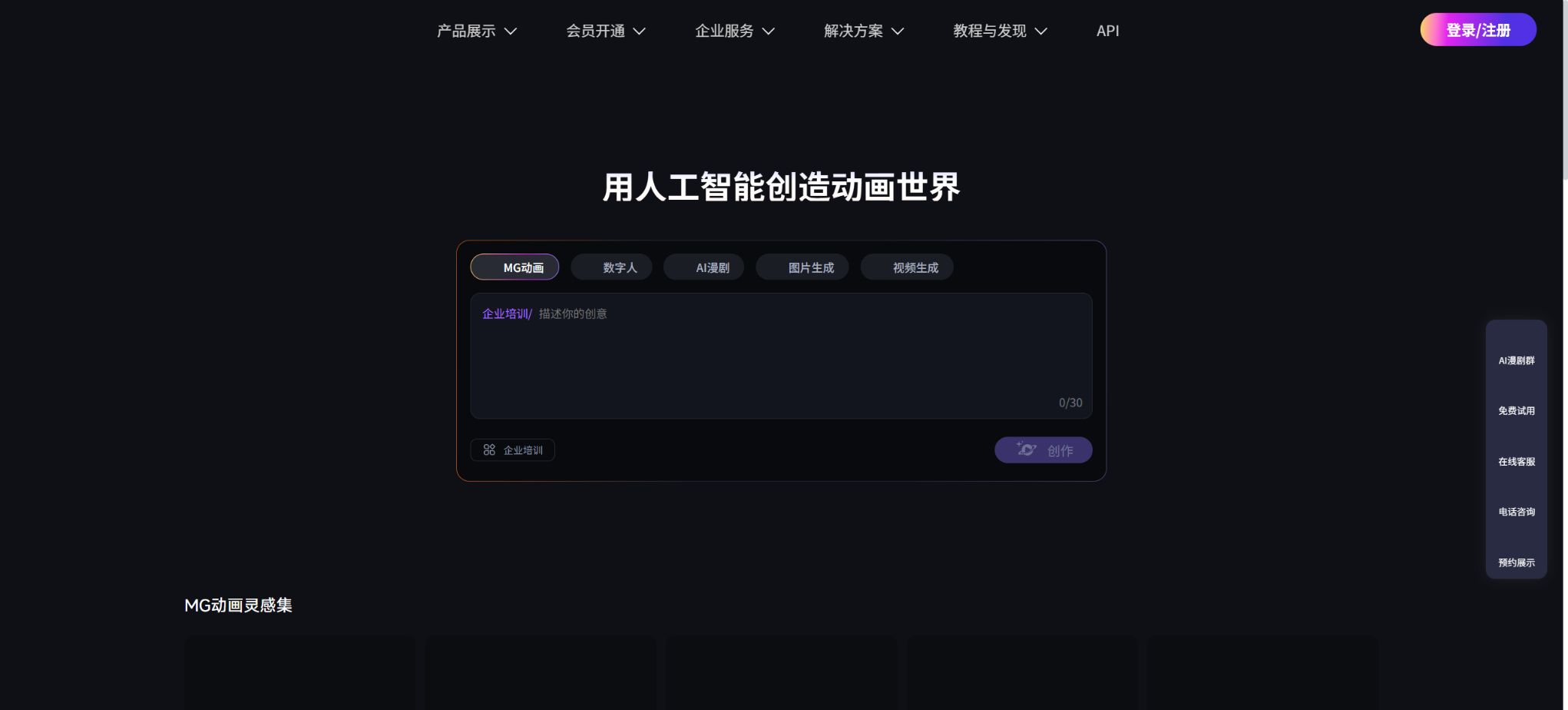
Let’s draw.
An online platform that supports the creation of animations, presentations, and videos featuring digital avatars
Tags:AI video toolsWhat is drawing?
Laihua is an online animation and digital avatar creation platform developed by Shenzhen Qianhai Hand-drawn Technology Culture Co., Ltd. It simplifies the process of creating MG animations by using a page-based editing approach similar to that of PPT; users can select templates, characters, scenes, text, voiceovers, and animation effects, arrange the content scene by scene, and then export it as an animated video.
The product matrix offered includes traditional visual animation editing, AI-powered one-click animation generation, AI-based manga creation, AI digital human videos, photo-based digital humans, voice cloning, video assembly from various elements, and visual AI agents. It is suitable for corporate promotions, educational micro-lectures, product explanations, content creation for social media, public education in government contexts, marketing presentations, and the management of content across multiple accounts; it is not merely a text-to-video model.
Core functions
1. Create animations in a way similar to making PPTs.
To create animations, a scene-based or page-based canvas is used; creators drag in characters, icons, illustrations, images, text, and audio elements onto the canvas, set parameters for entry/exit, movement, scaling, and camera effects, and control the order in which these elements appear using the timeline. It is not necessary to draw each frame manually, and it is possible to produce infographics, explanatory videos featuring characters, product introductions, and 2D MG animations.
Ready-made templates are available for use in scenarios such as education, business, marketing, science popularization, and holidays, and they allow for quick creation of videos by simply replacing the text and brand materials. While these templates increase efficiency, they do not guarantee that the resulting works will be inherently original.
Before public release, the script, shots, color schemes, and combination of elements should still be adjusted to avoid creating highly repetitive content.
2. AI for one-click animation creation
After the user enters a theme, idea, or script, the AI can generate drafts of the animation structure, visuals, and voiceovers, which can then be edited in the editor. The mobile version also allows for the import of images, PPTs, and documents, enabling existing materials to be converted into animations.
This capability is better suited for quickly producing a first draft; complex narratives, brand guidelines, and specialized knowledge still require manual adjustments.
AI-generated animations can be used in combination with manual editing: the system first breaks down the scenes and matches the relevant materials, after which the text, characters, pacing, subtitles, and voiceovers are adjusted page by page. The quality of the final output is influenced by the instructions provided, the suitability of the matched materials, the clarity of the footage, and the amount of content that can be generated.
3. AI comic dramas
In 2026, the Laihua App will introduce an AI-based comic series feature; users will be able to browse for inspiring works, enter descriptions of their ideas and upload reference materials, in order to create comic series videos with characters and plots. The current version also includes functions for reviewing text and uploaded images, aimed at ensuring that the content meets relevant standards before it is generated.
AI-generated comics are suitable for novel tweets, knowledge-based stories, and continuous content on social media; however, consistency of characters, continuity of shots, accuracy of dialogue, and copyright issues still need to be checked frame by frame. Reference images must not contain unauthorized characters, real-person portraits, or protected works that are copied from them.
4. AI Digital Voice Broadcasting
The digital avatar module allows users to select templates and avatars; after entering the text, it generates video clips with spoken narration. The official website offers more than 300 different digital avatars and over 460 different voice synthesis options. Users can also use the platform’s templates to further edit the background, subtitles, and visual elements. This tool is suitable for use in lesson explanations, product introductions, news broadcasts, and corporate services.
Digital voiceovers consume credits based on their duration. Once a member makes a purchase, the duration for which voiceovers can be used is typically granted in one go.
When it is insufficient, an upgrade or a separate purchase is required.
The realism of digital humans is related to factors such as voice quality, punctuation in the text, speaking speed, and the quality of the used materials; automated generation cannot serve as a substitute for human review.
5. Digital avatars of photos and voice cloning
Photo digital humans can transform the portraits uploaded by users into characters that are capable of speaking, while voice cloning uses authorized voices to create unique vocal tones. When combined, these technologies enable the creation of digital avatars whose voice delivery is more in line with an individual’s or a brand’s image.
The current app also offers controls for volume and speech speed, as well as the ability to filter official voice tones by gender and age.
Faces and voices are considered sensitive personal information; only material owned by the individual themselves or material for which explicit permission has been obtained from the rights holder can be uploaded. It is not allowed to clone the images of public figures, customers, employees, or relatives and friends for purposes such as impersonation, fraud, false endorsement, or unauthorized marketing.
6. AI-linked sequences
Linking in bulk enables the conversion of content from supported platforms into digital avatars as video clips – the system extracts information from the pages and creates scripts as well as draft visuals. The official website states that it is possible to create a custom digital avatar in about 3 minutes, and that links from various platforms can be converted into videos.
The specific platforms that can be parsed, the types of pages, and the time required will vary depending on the service.
Web page content may be outdated, incomplete in its extraction, or protected by copyright. Before generating content, it is necessary to verify the product parameters, prices, author, publication date, and licensing terms; interpreting a functional link as an indication that one has automatic rights to use the material from the original page for commercial purposes is incorrect.
7. Templates and legitimate asset libraries
The official website offers over 125,000 original templates and 18 million asset resources, including 3D backgrounds, animated characters, hand-drawn illustrations, icons, and scene elements. Different membership levels grant access to varying numbers of resources, different levels of quality, and different licensing rights; members at the Pro level and above also receive benefits related to commercial use certificates.
\"Genuine materials\" should still be understood in terms of the account version, the channel used for access, the entity that grants the license, and the date on which the material was released. Downloading such materials, reselling templates, distributing the original files, using trademarks, or providing them to third-party clients may fall outside the scope of a standard individual license.
8. Team collaboration and corporate services
The team solution enables multiple users to work together, facilitates the sharing of assets, offers customizable templates and role definitions, as well as training and customer support; it is ideal for standardizing a company’s brand assets and animation production processes. Companies can also opt for video customization, additional commercial licenses, or sub-licensing, with dedicated consultants providing tailored solutions.
The official website lists corporate customization as a separate pricing item; the cost is determined by factors such as the number of accounts, templates, roles, video length, the entity to which authorization is granted, as well as the scope of training and services. Before making a purchase, it is necessary to have the contract specify the deliverables, source files, the number of revisions allowed, ownership of copyright rights, and the terms for subsequent renewals.
9. Visualizing AI agents
It provides visual intelligent agents that enable real-time dialogue between AI digital avatars and users, and can be used in exhibition halls, educational settings, customer service, guidance, and brand interactions. It combines language model responses, digital avatar visuals, and audio playback; it is not the same product as pre-generated and exported videos.
Real-time agents may generate incorrect responses and process user inputs. When used by the public, features such as defined knowledge boundaries, handling of sensitive queries, manual escalation, log retention, and privacy disclosures should be in place; in high-risk areas such as healthcare, government services, and finance, manual review mechanisms must be established.
Members and Prices
| Package or version | Prices, quotas, and core benefits |
|---|---|
| Pro+ | The web version currently offers a free tier, as well as regular membership, Pro membership, Pro+ membership, and custom consultation services. The official website’s membership details state that the Pro version can be used for commercial purposes online, while the Pro+ version is suitable for full commercial use and allows for 5 sublicensing parties. |
| VIP | As of August 2026, some of the in-app purchases available on the AppStore in China include: an AI animation monthly subscription for 68 yuan, a LaiHua animation app monthly subscription for 128 yuan, a LaiHua individual VIP monthly subscription for 128 yuan, a digital avatar monthly VIP subscription for 188 yuan; the first month of a continuous monthly subscription costs 88 or 118 yuan, while the first quarter costs 158 or 168 yuan. 10 points are available for 10 yuan, and 18 LaiHua coins cost 18 yuan. |
| Free version | The options available for creating web content currently include a free version, regular membership, Pro membership, Pro+ membership, and custom consulting services. |
For web-based services, there are currently a free version, as well as regular member tiers, Pro member tier, Pro+ member tier, and custom consultation options. The regular member tier primarily offers AI-generated content.
Pro and Pro+ gradually offer higher export clarity, watermark-free content, template materials, longer duration for digital avatars, as well as team and commercial licensing benefits.
The results obtained by scraping the price list on the official website do not always show the actual amounts; therefore, it is not advisable to rely on the placeholder figures displayed on that page. Before making a purchase, one should log in to the member profile page to view the current monthly and annual prices.
As of August 2026, some of the in-app purchases available on the App Store in China include: an AI animation monthly subscription for 68 yuan, a Laihua animation app monthly subscription for 128 yuan, a Laihua monthly personal VIP subscription for 128 yuan, a digital avatar monthly VIP subscription for 188 yuan; the first month of a continuous monthly subscription costs 88 or 118 yuan, while the first quarter costs 158 or 168 yuan. 10 points are available for 10 yuan, and 18 Laihua coins cost 18 yuan. Different items may come with various promotions, renewal periods, and different benefits, so they cannot be simply exchanged with one another.
A distinction needs to be made regarding the authorization for web versions and apps. The membership guidelines on the official website state that the web-based Pro version can be used for commercial purposes online, while the Pro+ version is suitable for full commercial use and allows for five entities to receive sub-licenses.
The app version is not suitable for commercial use.
When client delivery, offline placement, advertising, television media, or multiple brand entities are involved, it is necessary to obtain the corresponding web version or corporate authorization first.
The current state of AI-generated PPTs
The home page of the official website’s dashboard still lists PPT-related functions as part of the platform’s overall capabilities, but the records for the iOS version show that the AI-powered PPT generation features were removed in November 2025. Therefore, it is not possible to guarantee that AI PPT functions will be available on all devices.
Availability is determined by the current Web dashboard, the region associated with the account, and the version of the client.
The animation editor still supports importing PPTs or documents to create animations.
Supported platforms
- Web:Main tools for animation, digital avatars, AI-generated content, and team collaboration;
- iPhone:The official app requires iOS 13.0 or a higher version;
- Mac with Apple chip:The iPhone version can be run; macOS 11.0 along with an M1 or newer chip is required, though there has been no separate testing for compatibility with Macs.
- Business services:Offers team solutions, customized content, agents, and commercial licensing options;
- Overseas version:Doratoon is a creative brand focused on the international market; its accounts and pricing should not be the same as those of the domestic version by default.
Company and open-source status
The official website belongs to Shenzhen Qianhai Hand-drawn Technology and Culture Co., Ltd., while the developer listed on the App Store is also Shenzhen Qianhai Hand-drawn Technology and Culture Co., Ltd. LaiHua is a commercial online platform and mobile application; the company does not make available the complete source code for its animation editing tools, digital avatar creation functions, or AI-based comic creation features, so it does not constitute an open-source tool.
Here is a tutorial on how to use it.
Complete a basic task.
- Identify the audience, platform, format, duration, and the information that needs to be conveyed;
- Prepare scripts, shots, or reference materials that can be used in the upcoming film;
- Choose to create animations in a manner similar to that used for PPTs, in order to generate low-cost previews;
- Use AI to generate animations in one click, allowing you to adjust the visuals, rhythm, subtitles, and audio;
- Check each frame for characters, text, logos, lip movements, and factual accuracy;
- Export in the desired format after confirming the licensing for music, portraits, and materials;
Create reusable professional workflows
- Create scripts, shot lists, brand assets, and a list of elements that are prohibited from use;
- Unified parameters are saved for creating animations in a manner similar to that used for PPTs, as well as for generating animations with AI and for AI-based manga.
- First, use representative shots to test the model and the quota;
- Transfer the failed shots to manual editing or regenerate them;
- Uniformize subtitles, volume, colors, and end credits;
- Record the version and reviewer before publishing in batches;
Which users is it suitable for?
- Individuals without any professional animation experience who wish to create MG animations quickly;
- Teachers and students who create micro-lectures, explanatory content, and material related to campus life;
- Teams that need corporate promotion materials, product introductions, and training videos;
- Creators who manage digital audio broadcasts, novel tweets, and AI-based comic series;
- Organizations that need templates, a team asset library, and commercial licensing;
- Enterprise clients who wish to deploy conversational digital avatar models.
Product advantages
- The page-based editor is intuitive, and its learning curve is lower than that of professional frame-by-frame animation software.
- The combination of AI-generated and editable animation templates allows for quick initial drafts as well as further modifications.
- Animations, digital avatars, linked videos, comic series, and intelligent agents have a wide range of applications;
- There are a wealth of resources available in the form of templates, characters, illustrations, and voiceovers;
- It offers team collaboration, corporate training, and tiered commercial licensing.
Restrictions and Precautions
- The free version and lower-tier memberships are usually subject to restrictions regarding watermarks, clarity, templates, the number of AI uses, and the duration for which digital avatars can be used.
- The shots and footage generated automatically by AI may not perfectly match the script, and significant manual editing effort is still required for longer videos.
- In-app purchases, web memberships, and enterprise solutions represent different channels, and the prices as well as the commercial usage rights associated with them cannot be mixed together.
- In particular, the app version cannot be used for commercial purposes; before it is deployed or delivered to customers, it is necessary to verify the authorization certificate first.
- AI animation and digital human content may involve copyright issues related to character portraits, voices, fonts, music, templates, trademarks, and reference images.
- Before publication, fact-checking, authorization for the use of the materials, and addition of AI identifiers must be completed; it is not allowed to use digital avatars to pretend to be real persons in order to provide false certificates or endorsements.
Frequently Asked Questions
Is it free to draw?
There is a free trial version, but there are restrictions on things such as export, watermarking, resolution, available assets, and the number of times AI generation can be used. To continue creating content, it is necessary to purchase an appropriate membership or credits.
Can it be used for drawing even if one cannot paint?
Yes. It relies mainly on templates, materials, and page-based animations, and it does not require drawing each frame by hand;
However, high-quality scripts, pacing of the shots, and visual consistency still require adjustments on the part of the creators.
Can drawing be used to create videos of digital humans?
Yes, it supports public digital avatars, photo-based digital avatars, voice cloning, text-to-speech narration, and the creation of videos from links; the duration of the resulting videos is determined based on the member’s privileges or through separate purchases.
Can drawing also be used to create PPTs?
The web homepage still mentions PPT content, but on the iOS version, AI-generated PPTs have been removed. The actual availability of these features should be checked in the current web interface; it is also necessary to distinguish between PPT import animations and AI-generated PPTs.
Can videos created with this tool be used for commercial purposes?
It depends on the purchase channel and membership status. The official website states that the web version of Pro allows for commercial use online, while Pro+ offers more extensive commercial capabilities as well as limited rights for sub-licensing; the app version, on the other hand, cannot be used for commercial purposes.
Come and work on open-source?
It is not open source. It is a commercial SaaS and mobile application that offers online creation tools and enterprise services, but the complete source code of the product is not made available.
Similar to the tools used for drawing




 Guigong Network Security Registration No. 45132202000164