






DataSquirrel.ai
DataSquirrel.ai – makes AI-driven design work more efficient and simpler.
Tags:AI design toolsWhat is DataSquirrel.ai?
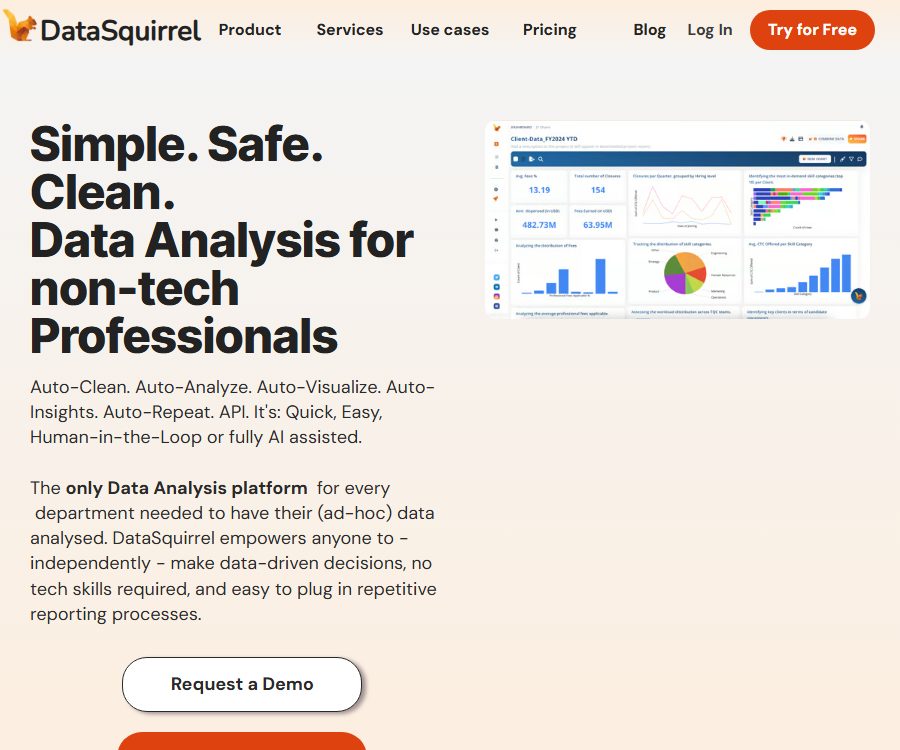
DataSquirrel.ai is a self-service data analysis and business intelligence platform developed by DataSquirrel Pte Ltd in Singapore; its goal is to enable business professionals who are not familiar with SQL, formulas, or pivot tables to carry out analyses on their own.
Users can upload or connect data; the platform automatically performs tasks such as cleaning, merging, calculation, visualization, and insight generation, and then presents the results in form of shareable and updatable dashboard reports.
Main functions
- Automatic cleaning: It identifies duplicate rows, differences in date and currency formats, inconsistencies in case sensitivity, hidden missing values, blank characters, and empty rows, and suggests or carries out cleaning actions.
- Download of cleaning results: Users can download the formatted CSV or Excel files to use in other systems.
- Go Auto automatic analysis: It selects key metrics and appropriate charts based on the field structure, enabling the rapid creation of data summaries and initial reports.
- Squirby natural language analysis: Describe in plain language the results you want to see, such as breaking down sales by month and demographic group; the system then creates the analysis based on this description.
- Custom charts: You can manually select columns and apply functions such as segmentation, filtering, sorting, date grouping, value range settings, heat maps, and theme adjustments.
- Automatic text classification: It categorizes fields with a high number of distinct values, such as industries, roles, and topics, in order to reduce the noise present in the charts caused by those numerous unique values.
- Data merging: It is possible to combine relevant data from multiple files into a single analysis without the need for VLOOKUP or copying and pasting.
- Reporting and collaboration: Charts can be downloaded in PNG format, while dashboards can be exported as PDF or PPT. They can also be shared via links, along with comments and annotations.
- Automatic updating: When the connected data changes, merging, cleaning, categorization, calculation, insight generation, and visualization can be carried out again, with reports distributed according to the scheduled schedule.
Input and output
| Stage | Enter | Output | Suitable for tasks |
|---|---|---|---|
| File import | CSV, Excel | Field overview and analyzable datasets | Temporary sales, operational, financial, and research data |
| Connected data | Google Sheets, REST API, or Make.com workflows | Dataset updated by frequency | Repeat reporting and business system synchronization |
| Automatic cleaning | Data with duplicates, incorrect formatting, null values, and case differences | Standardized data and downloadable cleaning files | Preparations before analysis and correction of data quality |
| Automatic analysis | Numeric, date, category, and text fields | KPIs, charts, trends, and automated insights | Quickly understand business performance and anomalies |
| Report collaboration | Select chart, apply filters, and add notes | Dashboard, PNG, PDF, PPT, share link, and comments | Management reporting and customer delivery |
Usage process
- Identify the business questions that need to be answered, retain the original documents, and remove sensitive fields that do not require analysis.
- Upload a CSV or Excel file, or connect to Google Sheets, REST API, or Make.com in the supported plans.
- Check the field types identified by the platform as well as the suggestions for data cleaning, to ensure that handling of duplicates, missing values, dates, currencies, and case sensitivity is appropriate.
- Run Go Auto to obtain the initial KPIs and charts, then use column selection or Squirby to conduct more detailed analysis.
- Adjust the chart by segmenting, filtering, grouping by date or value, sorting, and adjusting themes, and add key annotations.
- Combine the dashboard and export it as PNG, PDF, or PPT, or share an interactive link and invite comments.
- Configure data refresh and report distribution for repetitive tasks, and periodically check whether the new data still conforms to the cleaning rules.
Prices and packages
The following shows the information for the monthly payment option in dollars; both Lite and Pro plans are automatically renewed on a monthly basis. The page also offers an annual payment option which claims to save two months’ worth of cost, as well as a one-time purchase option with limited features; however, the exact price for that one-time purchase was not provided here.
| Package or version | Price | Billing cycle | Core benefits or quota | Suitable for users |
|---|---|---|---|---|
| Free | 0 dollars | Automatic refresh every month | Single file: 1MB, up to 500 rows and 10 columns; Google Sheet/API updates, automatic recalculation, automatic insights, and Squirby are all set to 0. | Verify import, basic cleaning, and manual charts |
| Lite | 15 dollars | Monthly automatic renewal | Single file: 5MB; 2 datasets per month, with a maximum of 5,000 rows and 100 columns; 20 updates to Google Sheets, 6 recalculations, 200 insights, and 20 Squirby operations. | Small-scale regular analyses and personal reports |
| Pro | 29 dollars | Monthly automatic renewal | Single file: 10MB; no limit on the number of datasets, rows, or columns. 100 updates to Google Sheets, 1500 API updates, 40 recalculations, 1000 insights, and 1000 Squirby operations. | High-frequency analysis, data connection, and automated reporting |
| Yearly | Displayed on the settlement page | Annual payment | The page states that this is equivalent to saving two months’ worth of cost; the actual amount varies depending on the currency and package chosen. | Long-term stable users |
| One Time | Not fully made public yet | One-time use | Limited functions; the specific amount of data and the export rights must be confirmed on the purchase page. | Temporary projects that do not require ongoing updates |
| Team and Integration | Contact sales | Custom quote | Team seats, connectivity, implementation, security, and support are confirmed based on requirements. | Departmental collaboration and systematic analysis processes |
Differences in limits and pages
- On the pricing page, the Free tier allows for the uploading or integration of up to 100 datasets, with a limit of 500 rows and 10 columns; the actual number of datasets that can be created and the available functions are subject to the indications provided in the account settings.
- The features page still marks Google Sheets and the API as upcoming, but the pricing page already shows the update quotas, and the integration page provides information on the API process; the updates on these different pages are not synchronized.
- The integration page mentions the old names Starter, Pro, and Pro Plus; the current available pricing options are Lite and Pro. Purchases and API activations should be carried out in accordance with the latest account plans.
- When connecting to Make.com or a custom system, professional implementation services may incur additional fees.
Cancellation and refund
The terms state that users can contact the service provider at any time to cancel their subscription, but the amounts already paid cannot be refunded. The date on which the cancellation takes effect, as well as the remaining period of the annual subscription and the rules for one-time purchases, should be confirmed prior to making the payment.
REST API and automation
DataSquirrel can receive new data sent periodically by business applications via API keys, and it automatically recombines, cleans, categorizes, calculates the data, generates insights, and updates charts.
- Obtain an API key from an account that has an API update quota, and set minimal permissions for the integration.
- Use Make.com or your own programs to select business applications, and map the required data to DataSquirrel.
- Complete the test run and verify that the fields, anonymization, data cleaning, and charts are consistent with those set initially.
- Configure updates at hourly, daily, or more frequent intervals, and send notifications to designated channels once the reports are completed.
- Monitor API update quotas, errors, and changes in data structures to prevent new columns or type changes from disrupting automatic reporting.
The public page does not provide the complete request structure, authentication details, rate limiting information, error codes, or SDKs. The Pro pricing page specifies 1500 API calls as part of the package; the availability of other packages or older plans needs to be checked within the account.
Data security and privacy
- The platform is hosted by Google Cloud; the original data files are deleted once they are no longer needed, with only the encrypted and masked data remaining.
- Sensitive fields are anonymized or masked by default, and users can choose different settings; before sharing a report, it is still necessary to ensure that email addresses, payment details, and personal identification information have not been exposed.
- According to the official statements, the raw data is not sent to large language models; only those data elements for which the user has given explicit consent can be used for functions such as automatic classification.
- Users can request the deletion of all data and receive a report on that deletion, but the public page does not specify the exact time it takes to delete the original files or the interval at which backups are removed.
- The privacy policy permits the disclosure of necessary information to service providers for services such as hosting and data storage; data is also collected through forms, files, comments, software usage, and cookies.
- The platform claims to comply with the principles of GDPR and PDPA, and it carries out periodic SAST, DAST, and penetration testing; however, no independent security certifications or public audit reports were confirmed in this case.
Platform, API, and open-source status
| Project | Current confirmation status | Explanation |
|---|---|---|
| Web version | Confirmed | The main entry point for uploading, cleaning, analyzing, visualizing, generating reports, and collaborating. |
| CSV and Excel | Confirmed | Supports drag-and-drop import and downloading of cleaned files |
| Google Sheets | Listed on the price page | Lite and Pro have update quotas, but the old feature pages still indicate that they are about to be released. |
| REST API and Make.com | Integration page confirmation | Pro offers a set amount of public updates; the complete technical documentation is not yet available publicly. |
| Official SDK and GitHub | Not yet made public | Without a confirmed license or sample repository, it is not possible to determine that the product is open source. |
| Native desktop, iOS, Android, browser extensions | Not yet made public | What is confirmed at present is a responsive web platform. |
Suitable for users and typical use cases
- Manager: Quickly convert scattered tables into KPIs, trend, and management reports.
- Sales and Marketing Team: Analyzes the sales funnel, performance of marketing campaigns, customer segmentation, and price changes.
- Finance and operations team: Standardize dates, currencies, and missing values, and prepare periodic cost or performance reports.
- Consultant: Merge different client documents to quickly create shareable charts and presentation reports.
- HR and researchers: anonymize personal fields, as well as analyst, questionnaire, and categorical data.
- Teams that need repeated reports: Automatically refresh and distribute reports using Google Sheets, APIs, or Make.com.
Capabilities boundaries and limitations
- Automatic cleaning may accidentally delete duplicate records, fill missing values incorrectly, or alter the valid format; it is therefore necessary to retain the original data and examine any differences.
- Automatic insights and charts merely reflect the relationships present in the input data; they cannot establish causality, nor can they replace statistical design or business judgment.
- The free version allows for 500 rows and 10 columns, with no automatic insights and no restrictions related to Squirby; this makes it more suitable for testing processes rather than conducting comprehensive analyses.
- Although Pro allows an unlimited number of rows and columns, there is still a limit of 10MB per file, as well as restrictions on the number of insights, conversations, API updates, and recalculations that can be performed.
- The functional status of multiple pages and the names of the packages are not fully synchronized; key integrations should first be tested on a small scale using the current account.
Frequently Asked Questions
Is there a free version of DataSquirrel.ai?
Yes. The free version allows a single file of up to 1MB in size, with 500 rows and 10 columns; however, the features such as Automatic Insights, Squirby, API updates, and scheduled recalculation are not available in this version.
Can it analyze Excel and CSV files?
Yes. The platform supports importing CSV and Excel files, and it is possible to download the cleaned CSV or Excel files.
Can DataSquirrel automatically update reports?
Updates can be made through Google Sheets, REST API, or Make.com; however, the number of updates is limited by the plan selected, and the status of the page must be checked in the account.
Are the raw data sent to ChatGPT?
According to the official statements, the original data is not uploaded to large language models; only the data for which the user has given consent can be used for functions such as automatic classification.
Will I get a refund if I cancel my subscription?
It is possible to contact them to cancel, but the terms state that any fees already paid are non-refundable. The specific rules regarding annual and one-time payment options need to be confirmed before making the purchase.
Is DataSquirrel open-source software?
No official GitHub account, SDK, or open-source license was identified this time; the existence of a REST API does not imply that the platform is open source.
Tools similar to DataSquirrel.ai



 Guigong Network Security Registration No. 45132202000164