






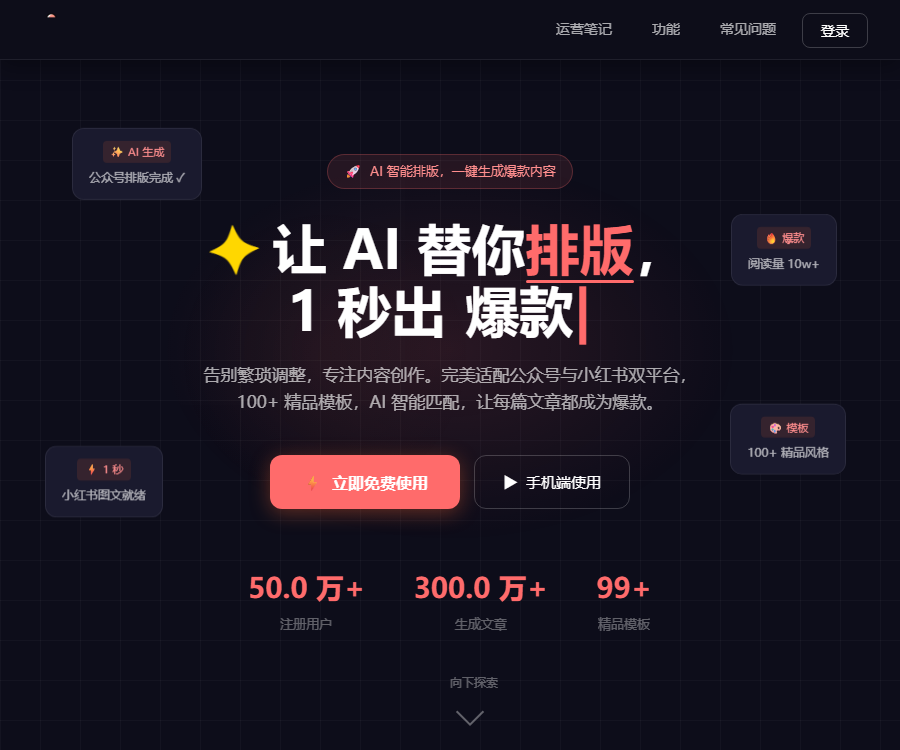
What is a formatting star?
Paifang Xiaoxing is an online AI formatting tool designed for WeChat Official Accounts, REDnote, and long-format images.
After importing an article, users can let AI identify the content type, recommend templates, select appropriate images, and generate a formatted image and text suitable for publication.
Main functions
- The text is automatically formatted after it is pasted.
- Let AI recommend a matching template.
- Over 100 premium styles are available.
- Suitable for official WeChat accounts and REDnote.
- Generate a high-resolution long image from the article.
- Select appropriate images based on the meaning of the text.
- Use AI to generate supplementary images.
- Fetch the article text through a link.
- Import Word, TXT, and Markdown.
- Fine-tune the font, color, and spacing.
- Copy the official account format or export HTML.
- It can be used on mobile devices through WeChat mini-programs.
AI one-click formatting
AI analyzes the type and structure of the content, and then decides on how to present the title, main text, citations, color scheme, and images.
| Processing stage | AI can create content. | Manual inspection |
|---|---|---|
| Structure recognition | Distinguish between titles, text, and lists | Verify content hierarchy |
| Template matching | Recommend suitable visual styles | Confirm that it fits the style of the account. |
| Text formatting | Adjust font size, spacing, and highlights | Check readability on mobile devices |
| Image matching | Select illustrations based on semantics. | Verify content and copyright |
| Platform compatibility | Switch the aspect ratio of long texts or images | Preview the effect on the target platform |
Supported methods for importing content
| Import method | Suitable scenarios | Precautions |
|---|---|---|
| Paste text directly | There are already draft articles. | Maintain clear paragraphs. |
| Article link | Import accessible web pages | The right to reproduce or adapt it is necessary. |
| Word document | Formatting of office documents | DOCX format is supported. |
| TXT file | Pure text content | The title hierarchy needs to be reconfirmed. |
| Markdown file | Technology and structured articles | Supports MD format |
| Manual entry | Short content and improvised creations | Check for spelling mistakes before generation. |
WeChat official account layout
The official account format takes care of fonts, paragraphs, spacing, color schemes, and images, generating a format that can be copied into the official account editor.
- Use clear primary and secondary headings.
- The text should use a font size suitable for reading on mobile devices.
- Leave sufficient spacing between paragraphs.
- Make sure the style does not cover too much of the text.
- Avoid using too many colors and fonts.
- After copying, preview it again in the official account backend.
- Check the display quality on both Apple and Android devices separately.
Rednote image and text layout
The REDnote format supports 9:16 vertical and 1:1 square shapes, making it suitable for creating page content, knowledge cards, and cover images.
| Layout | Suitable uses | Design focus |
|---|---|---|
| 9:16 Vertical format | Immersive reading on mobile phones | Do not have too much information on each page. |
| 1:1 square format | Cover and generic cards | The central information is clear. |
| Knowledge cards | Lists, steps, and summary | Highlight hierarchy and numbers |
| Plant recommendation notes | Product and experience sharing | Indicate the actual usage experience. |
| Long image | Complete tutorial and review | Control the total length of the image |
Template selection
The template library covers content categories such as knowledge popularization, emotional stories, product recommendations, and practical tips for the workplace.
- First, determine the account’s focus and target audience.
- Select a template that matches the emotion of the article.
- Check the contrast between the title and the main text.
- Ensure that the font is clear enough on mobile devices.
- Reduce decorative elements that are not related to the content.
- The same account maintains a relatively consistent style.
- Switch to a template and regenerate as needed.
Intelligent image matching and AI-generated images
The platform can analyze the semantics of articles and match them with images from a gallery; it also offers AI-generated images in a limited quantity per day.
| Image arrangement method | Features | Check before publishing |
|---|---|---|
| Licensed gallery images | Quickly match article topics | Confirm the specific permissions and scope of use. |
| AI-generated images | Create custom visuals based on content. | Check characters, text, and similarity. |
| Users upload images | Most in line with the actual content | Verify the portrait and copyright. |
| Replace image | Manually adjusting inappropriate materials | Maintain consistency in the overall style. |
AI image generation quota
The official website states that AI image generation is still in the beta phase; currently, each account can generate up to 4 images per day.
- Complete the article structure first before generating the image.
- Give priority to adding images to the cover and key paragraphs.
- Specify the subject, style, and proportion in the prompt.
- Prevent repeated consumption of the quota before generation.
- Whether the daily quota is reset depends on the page displayed.
- The beta testing rules may change depending on the product.
One-click rescheduling of links
After entering the article link, the system can extract the text and reformat it; it is suitable for handling content that you have published or for which you have received authorization.
- Verify that the webpage allows access and scraping.
- Confirm that authorization to reproduce, cite, or adapt is available.
- After importing, verify the completeness of the title and the text.
- Check to ensure that no images, tables, or citations are missing.
- Remove miscellaneous elements such as website navigation and ads.
- Reselect the template based on the target platform.
- Comply with the requirements for attribution and citation when publishing.
The ability to import them technically does not mean that users automatically gain the right to use the original text, images, or brand materials.
Convert article to long image
Long-image mode is suitable for Moments, communities, course materials, and knowledge posters; however, extremely long images may affect loading and readability.
- Long texts should be divided into multiple sections first.
- Keep one clear theme per screen.
- Control the text width and line spacing.
- Use lists or cards for key conclusions.
- Check the image clarity after exporting.
- Preview on phones of different sizes.
- Saving the editable draft makes it easy to make changes.
Fine-tuning and real-time preview
After the layout is created, it is possible to modify the font size, color, spacing, and images; it is also possible to switch to a different template and generate the layout again.
| Adjustable items | Frequently Asked Questions | Optimization suggestions |
|---|---|---|
| Font size | Difficulty reading on mobile devices | The preview on the target platform shall prevail. |
| Text color | Insufficient contrast | Ensure the text is clear. |
| Paragraph spacing | The content appears crowded. | Add an appropriate amount of negative space. |
| Illustration | Mismatch with semantics | Manually replace or regenerate |
| Template | It conflicts with the account’s style. | Choose a more moderate approach. |
Tutorial for using the formatting stars
- Open the web version or the WeChat mini-program.
- Register an account to use all features.
- Paste text, enter a link, or upload a document.
- Check whether the imported content is complete.
- Choose the official account, REDnote, or long-image mode.
- Manually select a template or use AI recommendations.
- Activate one-click formatting and intelligent image matching.
- Preview the title, text, lists, and images.
- Fine-tune the font, color, spacing, and elements.
- Check the facts of the content and its copyright status.
- Copy the official account format or export the image.
- Go to the target platform to complete the final preview.
Prices and free rules
Both the official website and the terms of service state that the core formatting features are available free of charge, with no limit on the number of times they can be used.
| Functions | Current price | Limit or description |
|---|---|---|
| AI intelligent typesetting | Free | There is no limit on the number of times at present. |
| Template library | Free | Over 100 templates |
| WeChat official account layout | Free | Supports format copying and HTML. |
| REDnote images and text | Free | Supports vertical and square formats. |
| Export long image | Free | The official website states that it is in high definition without watermarks. |
| AI image generation | Public beta is free | Up to 4 per day |
| Future value-added features | Not yet made public | Notifications will be sent in accordance with the rules prior to charging. |
The free policy and the amount available for beta testing may change; it is advisable to check the account page and the latest terms of service before using the service on a long-term basis.
Supported platforms
| Platform | Support status | Primary uses |
|---|---|---|
| Web page version | Support | Complete import, formatting, and export |
| WeChat Mini Program | Support | Mobile creation and content synchronization |
| WeChat official account | Output adaptation | Copy formatting or export HTML |
| REDnote | Output adaptation | Export high-resolution images |
| Independent mobile apps | No findings yet. | Currently, mini-programs are given priority. |
| Desktop client | No findings yet. | Use the web version on a computer. |
Content storage and privacy
The terms of service state that the platform offers cloud-based storage for historical records; as a result, the imported content is saved and processed on the server side.
- Do not upload unpublished commercial information.
- Customer manuscripts must first obtain approval for processing.
- Remove the ID numbers and contact information from the document.
- The account uses a separate and secure password.
- Regularly clean up unnecessary historical records.
- Make your own backups of important manuscripts and exported files.
- Complete data export before disabling.
Copyright and commercial use
The terms state that the user owns the original content they create as well as the formatted versions resulting from that content; the platform is granted only limited rights to process such content for the purpose of providing services.
- Make sure the article you enter is original or authorized.
- The content imported via links must comply with the rules regarding reproduction.
- Check the license scope before posting the image.
- Do not use other people’s trademarks to create confusion.
- AI-generated images require checking for the risk of similar existing works.
- When citing data and opinions, the necessary source must be indicated.
- A final review is carried out manually before the commercial release.
API and open-source status
To date, no official public API, SDK, GitHub repository, or open-source license for Paipang Xingxing has been found.
| Project | Open status | Explanation |
|---|---|---|
| Paipang Xiaoxing website | Not open source | Online hosted services |
| Public API | Not yet made public | Developer documentation not found. |
| Official SDK | Not yet made public | No access toolkit was found. |
| Official GitHub | Not confirmed yet | Other formatting elements are not official. |
| Batch enterprise onboarding | Consultation is required. | Refer to the official service instructions. |
Which users are it suitable for
| User | Typical requirements | Recommended usage |
|---|---|---|
| WeChat official account author | Quickly format long texts. | Preview in the background after copying |
| REDnote creator | Generate image and text cards as well as covers. | Control the information density per page |
| New media management | Managing content across multiple accounts | Establish unified template standards |
| Knowledge blogger | Convert the tutorial into a long image. | Split the content by chapter |
| Small team | Reduce design and formatting time | Retain the manual review process. |
| Design beginner | Quickly obtain available layouts | Start with a simple template. |
Product advantages
- The core formatting features are currently available for free, with no limit on the number of uses.
- It is compatible with both official WeChat accounts and REDnote.
- Supports the import of various types of text and documents.
- Over 100 template options are available.
- It enables intelligent image matching and the creation of AI-generated images.
- It can be used on both web pages and WeChat mini-programs.
- It supports format copying and export of high-definition long images.
Usage restrictions
- During the public beta phase of AI image generation, a maximum of 4 images can be created per day.
- Automatic typesetting still requires manual inspection.
- Importing a link does not equate to obtaining permission to repost it.
- The commercial licensing for the accompanying images needs to be checked carefully.
- Cloud-based history is not suitable for storing sensitive data.
- The free policy in the future may change.
- The platform has not confirmed the provision of APIs or open-source code.
Frequently Asked Questions
What can the layout star mainly do?
It can automatically format text, links, Word files, TXT files, or Markdown content into articles for public accounts, images for Xiaohongshu, or high-resolution shared images.
Is the layout tool Little Star free?
The core formatting features are currently available completely free of charge and without any limit on the number of uses; should additional paid features be introduced in the future, the platform will notify users in advance in accordance with its service rules.
How many AI images can Paizhao Xiaoxing generate per day?
AI image generation is currently in the beta testing phase; the official website states that each account can generate up to 4 images per day, and the specific rules for resetting this limit are indicated on the page.
Which document formats are supported by Typing Star?
It supports pasting text, article links, Word documents in DOCX format, TXT files, and Markdown documents in MD format.
How can the generated results be published on a public account?
It is possible to copy the formatting with just one click and paste it into the official account editor; HTML can also be exported, and a preview on a mobile device should be done again before publishing.
Can articles imported via a link be reposted directly?
Direct reproduction is not permitted by default; link extraction is merely a function for importing content, and users still need to have legitimate permission to use the original text, images, and other materials.
Does Layout Star provide APIs or open-source code?
To date, no official public API, SDK, or verifiable GitHub repository has been found; therefore, Xiaoxing’s layout service should be considered a closed-source online service.
A tool similar to one used for formatting small stars



 Guigong Network Security Registration No. 45132202000164