






ChatKit
ChatKit – makes AI-driven design work more efficient and simpler.
Tags:AI design toolsWhat is ChatKit?
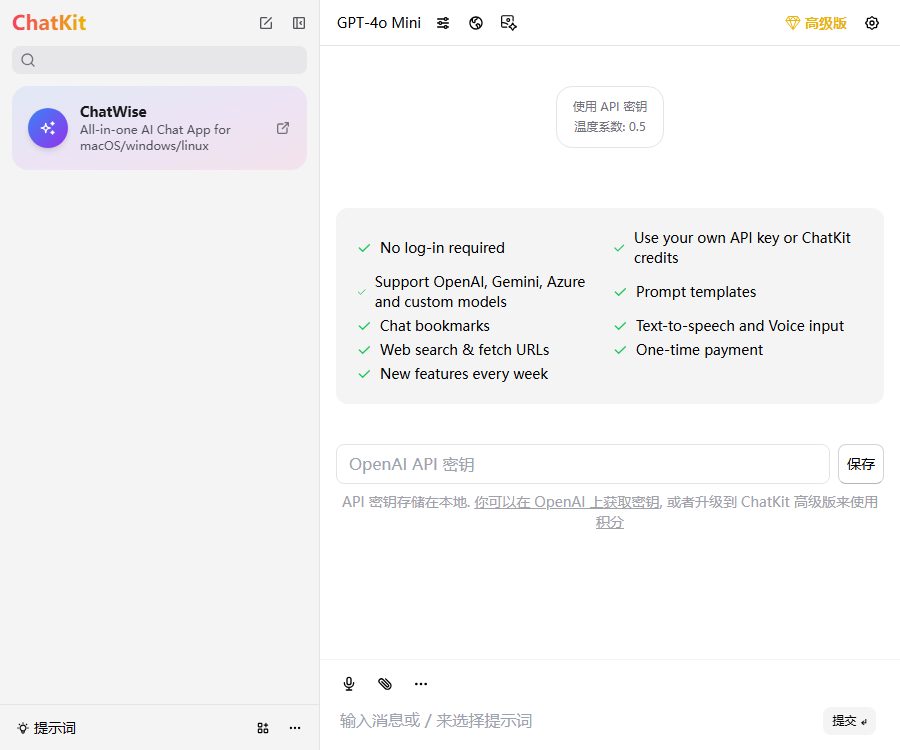
ChatKit is a standalone multi-model AI chat client that uses a unified interface to connect to OpenAI, Gemini, Azure, as well as custom models with compatible interfaces.
This section is about the chatkit.app product; it is not the ChatKit SDK of the same name provided by OpenAI for developers, nor is it the chatbot with the same name available in Shopify stores.
Main functions
Multi-model chatting and built-in keys
- Users can select OpenAI, Gemini, Azure, or a custom model from the model menu, then enter a question to obtain a text response.
- The free version relies primarily on the user’s own API Key; the costs associated with calling the models are charged by the respective interface providers and are not included in the free benefits of ChatKit.
- Premium users can also purchase ChatKit credits to access OpenAI services; their own API keys are given priority by default, but it is possible to switch to using credits for a specific session.
- The model name, context length, rate, and content restrictions depend on the upstream interface; ChatKit authorization does not expand the permissions of the upstream account.
Custom model and interface configuration
- Interfaces that are compatible with the OpenAI Chat Completions format can be added as custom models, making them suitable for integration with other cloud services or self-hosted models.
- The configuration options include the display name, the model values in the request, the API address, the API Key, additional request headers, the maximum context size, and the switch for stream output.
- It is possible to have the browser make direct requests, or a proxy can be used to overcome cross-domain restrictions; when using a custom interface, the user must determine for themselves the data policies and availability of the service provider.
- The selected custom model is also used to generate suggested questions and session titles; as a result, even low-cost models can lead to additional calls.
Networking, file, and code preview
- Online searching and web scraping allow recent page content to be included in the conversation, making them suitable for information retrieval, product comparison, and handling time-sensitive issues.
- The premium version allows multiple web addresses and files to be used simultaneously as context for summarization, extraction, comparison, and question-answering based on that information.
- The HTML, CSS, Tailwind CSS, and React code included in the responses can be previewed inline, which makes it easy to quickly examine front-end snippets.
- Web page content, files, and the generated code may all contain errors or unsafe instructions; important facts should be verified by referring to the original materials, and unknown code should not be deployed directly.
Prompt words, history, and voice
- Prompt templates are used to save instructions that are reused frequently; bookmarks allow you to mark important sessions, while full-text history search is a feature available to users with advanced privileges.
- Voice input can convert spoken content into prompts, while text-to-speech functionality allows for the reading out of responses; the premium version offers unlimited text-to-speech capabilities.
- The application supports syntax highlighting of code, making it convenient to read and copy program snippets generated by the model.
- The library of over 500 prompts indicated on the page is still in the process of being released, and should not be considered a feature that is already available.
Local history synchronized with the cloud
- By default, chat history is saved in the local browser, which is suitable for individual users who do not need to use it across different devices.
- Authorized users can log in to their email accounts and enable cloud synchronization, which allows for the synchronization of application settings, API keys, chat histories, and session settings; however, license keys are not synchronized.
- Cloud synchronization data transmission utilizes encrypted connections, and static data is also stored in an encrypted format; the servers and databases are located in data centers in the United States.
- You can contact the service provider to request the deletion of data stored in the cloud; whether the self-deletion feature available in the settings interface is already active depends on the specifics of your account.
Input and output
| Task | Enter | Output | Suitable scenarios |
|---|---|---|---|
| Normal conversation | Text prompts and conversation context | Text or code generated by the model | Writing, Q&A, and programming assistance |
| File Q&A | One or more files | Summary, extraction results, and answers | Reading materials and content comparison |
| Web research | Search for a question or web address | Answers based on the content of the webpage | Expiration information and page summary |
| Custom models | Compatible interfaces, keys, and model parameters | Specify whether the response should be in stream form or as a complete answer generated by the service. | Self-hosted models and other cloud interfaces |
| Voice interaction | Microphone input or existing answer | Text prompts or voice reading | No need for manual input; content can be listened to and read aloud. |
Usage tutorial
- Open the web application or install the official desktop version, and first use a task that does not contain sensitive information to check whether the interface and the network are functional.
- When using it for free, go to the settings to add your own API Key; if you use a custom model, you also need to enter the interface address, model parameters, maximum context size, and request headers.
- Select a model and create a new session, then enter the specific task, background, output format, and verification criteria.
- When external information is needed, enable online search or add web addresses and files as context, then check whether the model has correctly referenced the input content.
- High-frequency workflows can be saved as prompt templates; if they need to be used across different devices, it is necessary to purchase a license, log in to the email account, and enable cloud synchronization manually.
- Regularly check the usage of upstream APIs, delete files and cloud data that are no longer needed, and keep separate copies of critical results.
Price packages
The basic features of ChatKit can be used indefinitely for free, while the premium and team versions require a one-time payment. There are three different types of costs: software licensing, usage of the OpenAI API, and ChatKit credits.
| Package or version | Price | Billing cycle | Core benefits or quota | Suitable for users |
|---|---|---|---|---|
| Basic version | Free | Long term | Basic chatting functionality – an API Key must be provided by the user, and costs associated with model calls apply. | Light experience for those who already have interface accounts |
| Personal Premium Edition | It currently costs 36 dollars, while the price listed on the page is 49 dollars. | One-time use | Up to 5 devices can be activated to unlock advanced features; additional points can be purchased. | Individual long-term users |
| Team Edition | Starting at $250 | One-time use | It includes 50 devices and an unlimited number of license keys; an additional cost of $8 per device is applied. | Unified team authorization and key management |
| ChatKit points | Top up by purchase amount | Pay-as-you-go consumption | Used for calls to the OpenAI API; 5 points are equivalent to $5 worth of usage, and this is not included in the premium version. | Advanced users who do not want to configure an OpenAI Key on their own |
- The price of $36 for the individual premium version is part of the current promotion; it may return to its normal level or be adjusted, and the actual amount charged will prevail.
- Each activation of a personal license consumes one device slot; devices can be managed or reset on the license management page.
- Team administrators can create, update, and delete licenses, set OpenAI API Keys that are not visible to team members, and disable members’ ability to purchase credits.
- The team is currently unable to share ChatKit credits; each license holder must manage their own credits. New members who join via email are assigned one device by default.
Refunds and cancellations
- A refund for the ChatKit software license can be requested within 14 days of purchase, subject to the applicable refund policy.
- Once purchased, ChatKit credits are non-refundable; therefore, it is advisable to first test the model, region, and payment methods using a small amount.
- Assuming that the premium version includes free OpenAI services, or the presence of malicious activities, falls under the circumstances specified in the policy that preclude refunds.
- The service provider usually responds to refund requests within 24 hours, but this is not the deadline by which the refund will be processed.
Supported platforms
| Platform | Current status | Explanation |
|---|---|---|
| Web page | Already provided | No installation is required; it can be used in modern browsers. |
| Windows | Already provided | The official download page provides the x64 installer. |
| macOS | Already provided | Installation packages for Apple Silicon and Intel are available separately. |
| iOS and Android | Not confirmed yet | No official mobile application page for this product has been found. |
| Browser extensions | Not confirmed yet | No official extension store page for this product was found. |
The current download page for the desktop version shows version 0.3.59. ChatWise, which is recommended in the sidebar of the page, is another product; its Linux support cannot be considered part of ChatKit’s functional capabilities.
Privacy and data security
The privacy policy states that chat messages and API keys are forwarded to OpenAI via the ChatKit servers, but they are not stored on those servers; if proxying is disabled for custom interfaces, requests can be sent directly from the browser.
Uploaded files are retained for 30 days before being permanently deleted; purchasing and registration may involve the collection of email addresses, billing addresses, and payment-related information.
- Cloud synchronization uploads chat records, settings, and API keys; before enabling it, it is necessary to verify the team policies and the data processing rules for the upstream models.
- The service uses cookies and analysis data, and may also provide necessary information to the service providers responsible for tasks such as processing payments and hosting.
- The privacy policy provides clear information regarding OpenAI’s data handling processes, but it does not explain in detail how Gemini, Azure, and each custom interface handle data.
- When dealing with contracts, customer data, source code, or personal information, it is necessary to disable unnecessary proxies and synchronizations first, and use API keys with limited permissions that can be rotated.
Copyright, Commercial Use, and Limits of Liability
- Users retain the right to their own submitted content, and must ensure that they have the authority to upload and handle such material, without violating any copyrights, privacy rights, or other rights.
- The terms grant the service provider the permission to use, modify, display, and distribute user-submitted content within the scope of the services; this authorization should be assessed before handling any confidential materials.
- The ownership, exclusivity, and specific commercial licensing rights related to AI outputs have not been made public separately; commercial projects must also comply with the terms set by the provider of the model chosen.
- The service is provided as it is, without any guarantee regarding the accuracy of responses, their continuous availability, or the possibility of restoring data; users should keep their own copies of important information.
API, GitHub, and open-source status
- ChatKit can be connected to third-party model APIs, but as of now there are no public APIs or SDKs available that allow developers to integrate ChatKit’s capabilities into other products.
- The public ChatKit Docs repository is licensed under the MIT license; this license applies only to the documentation repository, and it cannot be used as evidence that the web service is open source.
- The ChatKit Desktop repository provides instructions and a way to download it, but it does not offer the source code of the application nor any licenses; therefore, this desktop application cannot be labeled as open-source software.
- OpenAI’s ChatKit, which shares the same name, comes with its own SDK and code repository; it is not connected to the account system, pricing, data, or licensing aspects of this product.
Suitable for users and typical use cases
- Individual users who possess multiple model API keys: they can switch between models using a single client, thereby reducing the need to open different consoles frequently.
- Research and content staff: Conduct a preliminary reading of the materials, prepare summaries, and organize their structure by making use of online resources, web pages, and document contexts.
- Developer: Integrate compatible interfaces or local models to generate code and preview the frontend segments in parallel.
- Small teams: Purchase device licenses in a unified manner; the administrator assigns the licenses and handles the centralized configuration of OpenAI Keys.
- Users who value working across devices: maintain their settings and chat history across multiple computers through paid cloud synchronization.
Advantages and limitations
| Aspect | Actual judgment |
|---|---|
| Model integration | Supports multiple cloud models and compatible interfaces, offering high flexibility. |
| Cost structure | The one-time software license is straightforward to understand, but the costs for model calls and points need to be calculated separately. |
| Work capacity | Features internet connectivity, file handling, voice support, historical search, and code preview. |
| Platform | Websites, Windows, and macOS have been confirmed; mobile devices and extensions have not yet been confirmed. |
| Data | Local history and optional cloud synchronization coexist, but the descriptions of data pathways across different providers are incomplete. |
| Open source | The document repository is open source, but the product itself does not come with an verifiable open source license. |
Summary
ChatKit is suitable for users who wish to manage model keys, custom interfaces, and chat history in a unified manner; it is particularly appropriate for those who do not want to pay for software subscriptions on a long-term basis but are willing to bear the costs associated with APIs themselves.
Before making a purchase, it is necessary to verify the availability of the model in the respective region, and calculate separately the costs related to personal authorizations, team devices, ChatKit credits, and upstream API fees.
Tools similar to ChatKit



 Guigong Network Security Registration No. 45132202000164