






Build Beautiful Landing Pages Instantly With AI
Create beautiful landing pages instantly with AI – making AI-driven design more efficient and simpler.
Tags:AI design toolsWhat is MakeLanding?
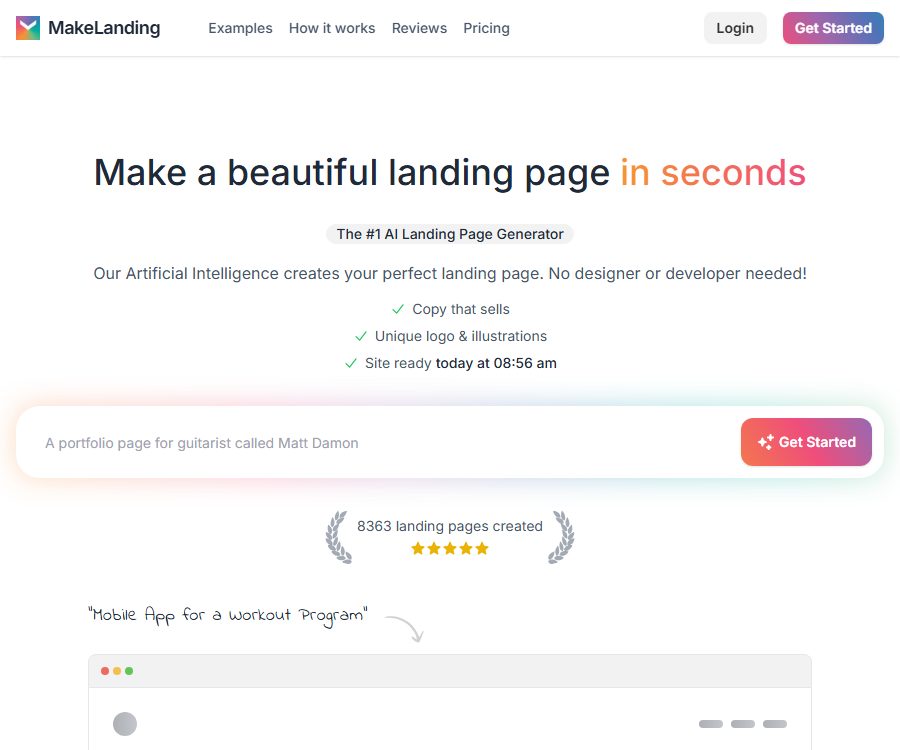
MakeLanding is an AI tool for creating and hosting landing pages, developed by independent developer Marc Lou; it can generate copy, logos, illustrations, and page layouts from a business description.
It primarily helps entrepreneurs, marketers, and freelancers to quickly create one-page websites; it is not a full-fledged e-commerce backend, content management system, or general coding platform.
Main functions
- Page generation description: Enter information about the business, products, services, or events, and the AI will automatically organize the homepage, key features, action buttons, and other elements of the target page.
- Marketing copy: Generates titles, descriptions, and conversion-oriented text based on the project description; supports over 50 languages including Chinese, English, Spanish, Hindi, and more.
- AI logos and illustrations: The page will come with logos, favicons, and illustrations, which can be selected from 6 artistic styles and 12 color schemes.
- Gallery images: In addition to creating illustrations, it is possible to select materials from around 5 million existing photos, or upload one’s own business-related images.
- Visual editor: Allows you to modify text, buttons, links, colors, fonts, and illustrations, as well as add or remove page sections.
- Responsive pages: The generated results are adapted for different screen sizes, and are presented in a format that facilitates fast loading as well as easy searching.
- Sharing and Hosting: Once editing is complete, the content can be shared directly using the platform’s sharing link, without the need for users to set up their own servers.
- Custom domain names: Pro and Premium allow you to connect an existing domain name to your publishing page.
- Simple analysis: Pro and Premium offer page access analytics to help monitor basic performance.
- API generation: Premium allows the creation of landing pages through public APIs, making it suitable for integrating this generation capability into other workflows.
Input and output
| Phase | Enter | Output | Adjustable content |
|---|---|---|---|
| First generation | Business name, products for sale, target audience, and project description | Complete single page, copy, logo, favicon, and illustrations | Regenerate or enter the editor |
| Visual configuration | Art style, color scheme, image library, or custom images | Visual elements that match the page’s theme | Images, colors, fonts, and illustrations |
| Content editing | Text, links, buttons, and blocks modified by the user | Updated responsive page | Add or remove blocks, replace content, and access action buttons |
| Publish | Platform link or custom domain configuration | Publicly accessible hosted landing page | Further editing can be done later. |
| API generation | Project description submitted by external systems | Programmatically generated landing pages | Interface details require confirmation via a Premium account. |
The generation of page descriptions usually takes less than a minute, but the actual speed, quality of the content, and number of retries are affected by the status of the task and the service.
Usage tutorial
- Prepare a clear project description that includes what is being offered, the target users, the main benefits, and the actions you expect visitors to take.
- Create an account and select a subscription; the platform does not currently offer a free preview of the generated results.
- Submit a description and wait for the AI to generate the page, copy, logo, favicon, and illustrations.
- Check facts, prices, promises, and brand names, and remove any unverified or inappropriate content.
- Replace images in the editor, adjust text, buttons, links, colors, and fonts, and add or remove page sections.
- Check the desktop and mobile displays separately, and test each action button, form entry point, and external link.
- Publish using the platform link; Pro or Premium users can connect a custom domain name following the account guidelines.
- After going live, access patterns are analyzed to create different versions for testing, focusing on the title, selling points, and action buttons.
Suitable for users and scenarios
- Entrepreneur: Create introduction pages for products that have not yet been developed, gather a list of potential customers, or assess market demand.
- SaaS team: Quickly create pages for feature descriptions, pricing information, and booking options for product demonstrations.
- Course and e-book authors: Highlight the value of courses, books, or digital products, and provide links to external payment platforms.
- Mobile app developers: Create promotional pages featuring an app store button, screenshots of the app’s functions, and download instructions.
- Podcasts, newsletters, and communities: information on the topics covered, the target audience, and how to subscribe.
- Freelancers and agents: They create initial page versions or proposal mockups for clients, and then make further adjustments based on their feedback.
- Event organizer: Publishes information about the event, including its date, location, and the link for registration.
- Affiliate marketers: Create introduction pages for specific offers and redirect to authorized external links.
Editing, hosting, and code
| Project | Current capabilities | Restrictions |
|---|---|---|
| Content editing | Text, buttons, links, images, colors, fonts, and sections | Limited support for complex layouts and custom components |
| Platform hosting | Publish using the MakeLanding page link. | Dependent on continuous subscription and platform availability |
| Custom domain name | Supported on Pro and Premium. | The user is responsible for purchasing domain names, managing DNS, and handling renewals. |
| Fundamental analysis | Supported on Pro and Premium. | The public page does not specify the events, funnels, or the level of data export available. |
| Code technology | HTML, Tailwind CSS, DaisyUI, and JavaScript | The description of the technology stack does not indicate whether source code can be downloaded at the moment. |
| Mobile apps | Responsive page adaptation | No native iOS or Android apps that can be released directly are generated. |
The public page does not indicate the availability of a function for downloading the HTML source code; if the project requires self-hosting, code delivery, or migration to another platform, this should be verified before making the payment.
Price packages
| Package or version | Price | Billing cycle | Core benefits or quota | Suitable for users |
|---|---|---|---|---|
| Starter | 9 dollars | Monthly | 10 pages per month, unlimited icons, illustrations and text, sharing link, editor | Individual projects and low-frequency testing |
| Pro | 19 dollars | Monthly | 50 pages per month, all Starter features, analytics, custom domain name, and customer support | Creators and marketing teams that are continuously active |
| Premium | 29 dollars | Monthly | 150 pages per month, all Pro features and API access | High-frequency generation and programmed workflows |
| Mockup single page | 29 dollars | One-time use | 1 icon, 1 to 3 illustrations, 1 copy of the text, and a sharing link | One-time customer proposal or concept page |
| Mockup with modifications | 39 dollars | One-time use | Commercial rights for infinite markers, illustrations and copywriting, editors, analysis tools, custom domain names, and page labels | One-page items that require repeated revisions |
All three subscriptions state that they can be canceled at any time, but the page does not provide information regarding proportional refunds, the date on which the subscription level will be reduced, the date when the credit limit is reset, or how unused credits are carried over.
The terms of service for 2023 still describe a one-time purchase with permanent access, which is significantly different from the current monthly subscription price; the information on the current billing page and the payment confirmation should be taken as the reference.
Free, cancellation, and refund
- The platform makes it clear that it does not offer free preview generation; users must pay first to see the complete result.
- If the result generated is not satisfactory, cash is generally not refunded; instead, the platform may issue additional points to allow the user to generate a new result.
- Subscriptions can be canceled at any time; the exact date on which the cancellation takes effect as well as the remaining period for which payment has been made can be checked in the account.
- After cancellation, the data on the pages will remain, but neither users nor visitors will be able to access them.
- The current policy does not provide specific details regarding how long data is retained, whether it is restored after re-subscription, or whether it can be deleted or exported manually.
Main advantages
- With a single input, you can obtain the copy, brand logo, illustrations, and page layout, making it suitable for quickly creating a draft that can be presented.
- It supports over 50 languages, which facilitates the creation of localized pages; however, native speakers are still needed to check the wording and ensure cultural appropriateness.
- The editor allows for the replacement of the generated content and for adding or removing sections, so it’s not necessary to accept the entire result produced on the first attempt.
- The custom domain names and analytics available in Pro meet the basic requirements for a formal release, while Premium offers additional API capabilities.
- Subscriptions are categorized by the number of pages; individuals can start with a lower monthly fee and then upgrade based on the frequency of content generation.
- The website’s FAQ section allows for the creation of pages and images for resale, providing commercial opportunities for freelancers and agents.
Capabilities boundaries and limitations
- MakeLanding is more suitable for marketing pages with a relatively simple structure, those that do not involve complete e-commerce ordering systems, member accounts, complex databases, or content management backends.
- AI may fabricate facts about products, discounts, customer reviews, or performance claims; each of these elements must be verified individually before they are published.
- Template-based generation helps to increase speed, but a brand framework, complex interactions, accessibility, and sophisticated responsive design still require professionals.
- A simple analysis cannot replace comprehensive event tracking, attribution, A/B testing, and privacy consent management.
- Once canceled, the page will become inaccessible; for long-term operations, it is advisable to consider options such as data export, alternative hosting, and domain name migration.
- No free preview is provided and refunds are generally not given; it is necessary to have a precise description ready before making the first purchase in order to avoid unnecessary creations.
- Although the API is included in the Premium package, the available interface documentation and information on usage costs are insufficient, making it impossible to estimate the effort required for integration.
API, SDK, GitHub, and open-source status
| Project | Current status | Explanation |
|---|---|---|
| Generate API | Premium is available. | Programmatic generation of landing pages as alternative web interfaces |
| Public API documentation | Not confirmed yet | No public references for endpoints, authentication, rate limiting, and examples have been found. |
| Official SDK | Not confirmed yet | No publicly maintained language client libraries were found. |
| Official GitHub product code | Not confirmed yet | No public source code repository corresponding to the current managed product was found. |
| Open-source product | No | MakeLanding is a commercial hosting service; the platform code is not provided under an open-source license. |
Privacy and data security
- Users can register using a Google account; the platform will pre-fill the public name and profile picture.
- The privacy policy states that personal information is collected only when it is necessary to provide the service, and the purpose of such collection is disclosed.
- The platform states that personal information is stored only for as long as it is necessary to provide the required services, and it employs commercially acceptable measures to prevent loss, theft, and unauthorized access.
- Except as required by law, the policy states that information that can identify an individual will not be made public or shared with third parties.
- Under the applicable data protection laws, MakeLanding may act as both the data controller and the processor.
- External action links, payments, photo galleries, domain names, and other third-party services are governed by their respective policies.
- The policy does not specify the encryption standards, sub-processors, data locations, the exact steps for deletion, details regarding cookies, or security certifications.
- It is not yet known to whom the underlying text and image models, as well as the prompts and uploaded images, are sent, nor whether they are used for training purposes.
Copyright and commercial usage notes
- The website’s FAQ states that users own the generated landing pages and AI images, and can resell them.
- The one-time mockup page specifies commercial rights only in the $39 version; there is a difference in wording compared to the more general statements in the general FAQ.
- Before official commercial use or delivery to customers, the package benefits purchased at the time should be retained, and the scope of licensing for logos, gallery images, and the content generated must be confirmed.
- AI-generated content may resemble that created by humans, and it may not meet the copyright requirements of certain regions; the notion of ownership does not equate to exclusive rights.
- Users should avoid creating or uploading infringing trademarks, portraits of people, protected works, and unauthorized images.
- The platform is not responsible for the way users use the generated content; publishers remain accountable for compliance with regulations on pages related to advertising, healthcare, finance, and so on.
Summary
MakeLanding is ideal for quickly creating hosted landing pages for products, courses, events, applications, and personal services; it uses AI to generate both the textual content and the visual elements simultaneously.
Before making a purchase, it is essential to assess factors such as the lack of free previews and no refund policy, the unavailability of the page after cancellation, the absence of API documentation, as well as the details regarding commercial usage rights and privacy disclosures.
Tools similar to Build Beautiful Landing Pages Instantly With AI



 Guigong Network Security Registration No. 45132202000164