






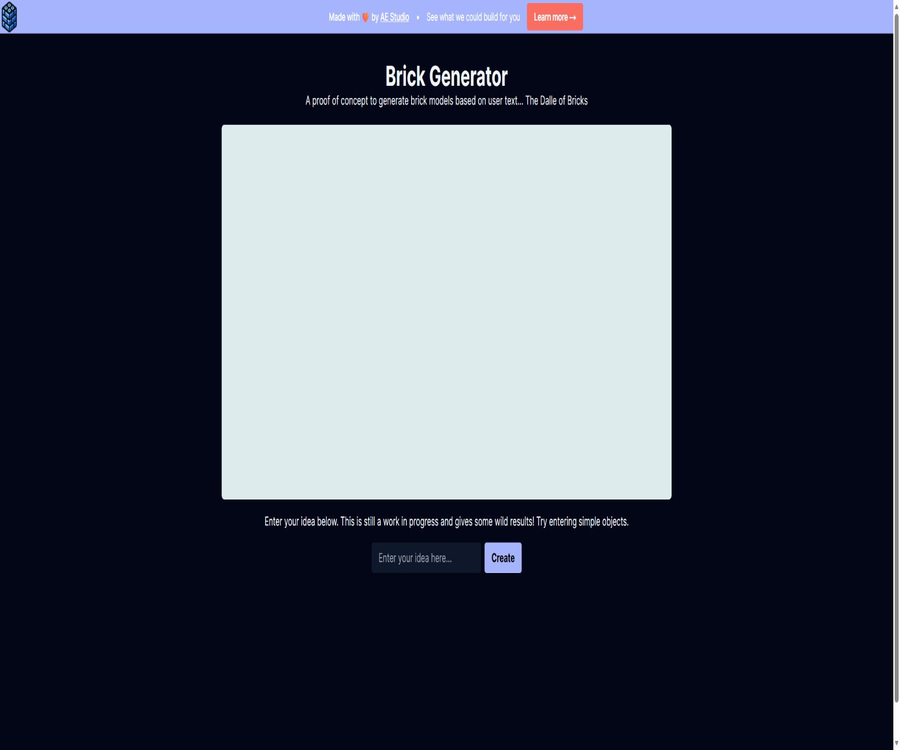
https://brickgenerator.com
https://brickgenerator.com – an intelligent tool focused on AI-driven design.
Tags:AI design toolsA one-sentence summary
Brick Generator is an experimental web tool that converts short textual descriptions into digital brick models; it allows users to view the resulting structure in the browser, read the LDraw code, and share the results.
Tool Introduction
Brick Generator was created by AE Studio; its official website describes it as a conceptual proof of concept that is still under development, labeling it an experimental generative creative tool in the field of building blocks. Its purpose is to demonstrate whether AI can combine building blocks based on natural language, rather than serving as a replacement for professional modeling, part management, or 3D modeling software.
The entire page is very concise; users can start generating content as soon as they enter an idea of no more than 50 characters. Once completion is achieved, the website parses the LDraw text into a visible 3D structure, displays the model code, and provides a function for creating sharing pages.
Core functions
Text generation block model
When the user enters the name of a simple object or a brief description, the system attempts to generate a structure represented using standard numerical building-block syntax. The official website recommends starting with simple objects, as handling complex scenarios, abstract concepts, and intricate mechanical structures is not currently a strength of this system.
Browser interaction preview
The resulting model will be displayed in the 3D rendering area of the web page, allowing users to view its overall shape from different angles. Interactive previews are useful for quickly determining whether a model meets the specified requirements; however, just because the appearance seems reasonable does not mean that the structure can be constructed stably using physical building blocks.
LDraw code demonstration
The page will display the LDraw code generated by AI; LDraw is an open digital format used to describe building block models and the positions of their components. Users with experience in related software can copy this code to further examine it, but the official website does not guarantee that all outputs can be used in third-party tools without any issues.
Result sharing
Users can submit the current model along with screenshots as the content to be shared; the system will then generate a separate, copyable page for sharing. Before making it public, it is necessary to ensure that there are no personal information, protected identities, or unauthorized brand elements in the prompt text, screenshots, or model.
No complex configuration is required.
The current homepage lacks options for selecting models, a parameter panel, an account workspace, or a subscription section; as a result, the barrier to getting started is very low. The simplified interface also means that users are unable to specify details such as the part library, color rules, dimensions, connection strength, and generation seeds.
| Functions | Current performance | Suitable uses | It cannot be inferred from this. |
|---|---|---|---|
| Text input | Short prompt of up to 50 characters | Simple objects and creative attempts | Supports long-form specification documents |
| AI-generated | Return the code for the block structure. | Concept exploration and demonstration | A model that can be built is generated each time. |
| 3D preview | Rendering of numerical structures within web pages | Observe the shape and angle. | Physical stability has been verified. |
| Code display | Display LDraw text | Learn the format and continue researching. | Includes complete assembly instructions |
| Share | Generate a separate results page | Show the experimental results to others | Private project space |
Usage method
- Open the main page of Brick Generator and wait for the 3D rendering area to load.
- Enter a simple, specific name or brief description of an object in the input field.
- Keep the prompt within 50 characters, giving priority to specifying the subject rather than complex scenarios.
- Click Create and wait for the system to generate the code and load the 3D model.
- Rotate or view the model to check whether the contours, colors, and combination of blocks are appropriate.
- View the generated LDraw code and copy it to a secure location as needed.
- If you need to display it publicly, use the sharing function to create a result page.
Methods for writing prompt texts
- First, write down the main subject, such as a car, a chair, a house, or an animal.
- Add a most crucial feature, such as color, shape, or purpose.
- Avoid requiring multiple subjects, backgrounds, actions, and complex mechanical structures at the same time.
- When it fails for the first time, reduce the adjectives rather than continuing to add more descriptions.
- Save different prompts and outputs to compare which descriptions are easier to understand.
- Treat the results as a draft, and then manually examine the structure and buildability.
Explanation of the output content
| Output | Content | What can be done | What needs to be reviewed? |
|---|---|---|---|
| 3D model | A block structure rendered by a web page | Rotational viewing and creative presentation | Part connection, collision, and stability |
| LDraw code | Text such as parts, colors, positions, and rotations | Learn or try to import compatible tools. | Syntax, part numbers, and dependent libraries |
| Model screenshot | The images captured during the sharing process | Display the generated appearance | Copyright, privacy, and image integrity |
| Share page | Entry for the results of managed models | Send to friends or collaborators | Whether to make it public and the retention period |
It’s not a step-by-step construction guide.
The current tool provides the complete model code as well as a preview; the official website does not offer a breakdown of the different layers, step numbers, a list of components to be purchased, or printable instructions. When actually constructing the model, it is still necessary to use specialized building-block design tools to verify and organize the steps.
It is not a general 3D model generator.
LDraw is primarily used to describe the combination of building blocks, and it differs from grid models that can be freely sculpted. It should not be promoted as a tool that can directly generate universal model files suitable for animation, games, manufacturing, or 3D printing.
Pricing and entry barriers
The official website does not currently display any packages, points, payment buttons, or account registration processes; the functions available on the home page can be tried out right away. Therefore, the price category can be marked as free or experimentally free. Since the project is still under development, there are no official commitments regarding whether restrictions will be imposed, fees will be charged, or the service will be discontinued in the future.
| Project | Current status | Explanation |
|---|---|---|
| Home page visits | Free access | It is possible to enter prompts without logging in. |
| Number of generations | The official website does not specify a fixed limit. | It may be affected by service capacity and implicit throttling. |
| Subscription plan | No findings were detected. | There is no monthly or annual pricing table. |
| Purchase with points | No findings were detected. | There is no option to top up funds on the page. |
| Business plan | No findings were detected. | It cannot be assumed that the resulting product comes with a commercial license. |
| Refund rules | Not applicable | There are no public paid transactions available at the moment. |
Which users are it suitable for
- AI enthusiasts who want to experience text-generation block structures.
- Designers and content creators who need creative sketches with a building-block theme.
- A beginner who is learning about the LDraw format and digital building block models.
- Teachers who wish to introduce students to the concept of generative AI.
- Product teams that need to create technical demonstrations or concept proofs quickly.
- Brick players who are willing to accept random outcomes and try again and again.
- Ordinary users who wish to share interesting digital building block models.
- Developers who study natural language and the methods for generating structured models.
It is not very suitable for which users
- Professional building block designers who can ensure the physical construction of the structures are needed.
- Users who request the automatic generation of step-by-step assembly instructions and a complete list of parts.
- Projects that require precise dimensions, stress analysis, or engineering verification.
- Users who wish to upload images and restore them as block models.
- Companies that need a team workspace, version control, and private projects.
- Development teams that need a stable interface for the automation of mass production.
- Brand customers who must obtain a clear commercial authorization and service agreement.
- Users who require a Chinese interface and complete Chinese help documentation.
Product advantages
- No registration is required; you can try text generation by simply opening the webpage.
- The input interface is simple, with almost no learning curve.
- After it is generated, an interactive 3D preview can be viewed directly.
- It also displays the LDraw code; the result is not just an image.
- It is possible to create sharing pages to easily display interesting results.
- Focusing on the niche area of building block models, it has a high level of conceptual clarity.
- Suitable as teaching examples for generative AI and structured output.
- The official website clearly indicates the experimental status of the product, without presenting it as a mature design platform.
Usage restrictions and precautions
- The product is still in the concept validation stage; failed generation and abnormal results are expected risks.
- Officials recommend entering simple objects, as the reliability of complex prompts is limited.
- The input field can hold up to 50 characters, making it unsuitable for detailed specification descriptions.
- There is no public parameter control, seeding, history tracking, or batch generation functionality.
- The resulting structure may have issues such as hanging parts, collisions, incorrect connections, or problems that prevent it from being assembled.
- Web previews cannot replace a real parts library or physical stability checks.
- There are no step-by-step setup instructions or an automatic parts procurement list.
- There are no public APIs, service level guarantees, or assurances of long-term availability.
- There are no clear guidelines regarding the commercial licensing of the generated content.
- Sharing results may create a public entry point, which is not suitable for sensitive designs.
- Pages and documents are primarily in English; the effectiveness of Chinese prompts is not guaranteed.
- Brick trademarks, characters, and third-party designs may still involve intellectual property rights.
Privacy and content security
The generation request sends the design text entered by the user to the server; when sharing, the model code, prompts, and renderings are also sent. The official website does not provide a clear privacy policy, information on the duration for which data is retained, or a mechanism for deleting it on its homepage, so sensitive information, personal data, or client-owned creative ideas should not be entered there.
| Data object | When it arises | Potential risks | Suggestions |
|---|---|---|---|
| Prompt | Click to generate | Revealing unpublished designs or personal information | Only enter public, non-sensitive concepts. |
| Model code | After being generated by AI | Contains creative structures and faulty components | Check and retain a local copy before importing. |
| Rendered screenshot | When creating a sharing page | The image is sent to the hosting service. | Check the visible content before sharing. |
| Share ID | After submitting and sharing it | Link forwarding leads to accidental exposure. | Only publicly available results are shared. |
| Access data | When using a web page | May be recorded by the analysis service | Avoid using it in conjunction with sensitive identities. |
Boundaries of intellectual property rights
Users should avoid requesting the creation of protected characters, brand identifiers, original designs belonging to others, or models intended for counterfeit goods. AI-generated content does not automatically eliminate the responsibilities associated with trademarks, copyrights, design rights, or the rules set by third-party platforms.
For children’s use
The building-block theme may attract minors, but the official website does not provide any special accounts for children, requirements for parental consent, or guidelines regarding content management. Parents and teachers should supervise usage and prevent children from entering information such as their names, school details, contact information, or photos.
Differences from professional building block design software
| Dimension | Brick Generator | Professional building block design software |
|---|---|---|
| Core goal | Show the possibilities of AI text generation building blocks | Precise design and management enable the creation of models. |
| Input method | Short text prompts | Manually select parts, position them, and connect them. |
| Control precision | Low, mainly determined by AI. | High; it can be adjusted individually. |
| Part management | The complete panel is not provided. | It usually includes a parts library, colors, and inventory levels. |
| Stability verification | No public commitments | Some software provides connection or collision checking. |
| Setup steps | Not provided | Instructions can be manually arranged or exported. |
| Collaboration and versions | No workspace provided. | It depends on the software. |
| Appropriate stage | Inspiration and concept exploration | Final design and production preparation |
GitHub, APIs, and open-source status
During verification, no official GitHub repository linked directly from the official website was found, nor were any public API documents, SDKs, or source code licenses available. The fact that the LDraw code is displayed on the website does not mean that the generation service itself is open source; the status of such software in the relevant directories should be marked as either not open source or not publicly available.
| Project | Verification results | Explanation |
|---|---|---|
| Official GitHub | No clear entry point was found. | It is not possible to replace it with a third-party repository with the same name. |
| Source code license | Not announced | The rights to redistribute and modify cannot be confirmed. |
| Public API | Not announced | Internal requests on the page do not constitute supported interfaces. |
| SDK | Not provided | There are no official development package instructions. |
| Output format | Display LDraw code | An open format does not mean that the product is open source. |
| Self-hosting | Not provided | There are no official deployment tutorials. |
Why aren’t the internal interfaces on a page considered public APIs?
The web page itself needs to send requests to the server in order to generate and share content, but these internal endpoints lack features such as version control, authentication, rate limiting, stability guarantees, or developer terms of service. Relying on these internal requests without proper consideration may result in them becoming ineffective after updates, or it might violate the expectations regarding the service’s functionality.
Basic information
| Project | Content |
|---|---|
| Tool name | Brick Generator |
| Development team | AE Studio |
| Tool type | AI text-to-number building block model |
| Product stage | Concept validation, still in development |
| Main inputs | A textual description of no more than 50 characters. |
| Main output | 3D preview of web pages and LDraw code |
| Sharing feature | Supports creating separate result pages. |
| Price pattern | It is currently available for free; no package plans have been announced yet. |
| Is registration required? | No registration is required for the current homepage. |
| Whether API is provided | No public API is available. |
| Is it open source? | Open-source license that is not publicly available |
| Interface language | English |
Frequently Asked Questions
What is Brick Generator?
It is an AI proof-of-concept that generates digital block structures based on short textual descriptions; the models as well as the LDraw code can be viewed on a web page.
Is Brick Generator free?
The current website does not offer any packages, points, or payment options; the homepage can be used directly. As it is still an experimental project, prices and quotas may change in the future.
Is registration required?
The current process for generating home pages does not require account creation. The results of sharing will include prompts, model code, and screenshots; therefore, it is still important to pay attention to the level of visibility.
Are Chinese prompts supported?
The page does not provide a list of languages nor any guarantees regarding the quality of the Chinese translation. To increase the chances of success, it is advisable to use short and clear English names for the elements in question.
Can it generate models that can be actually built?
No guarantee can be provided. The LDraw structure generated by AI may still have issues related to connections, collisions, unsupported elements, or stability problems; therefore, professional software and manual verification are required.
Will it generate setup instructions and a parts list?
The current official website does not offer step-by-step instructions or a complete list of components; it mainly provides a preview of the overall model along with the code text.
Can I download 3D files?
The focus of this page is on viewing and sharing, along with displaying the LDraw code that can be copied; it does not offer options for downloading generic 3D files. If a different format is needed, the conversion must be carried out using compatible tools.
Can it be used for commercial purposes?
The official website does not provide clear terms regarding the commercial licensing of the resulting products. Before planning to sell kits, materials, or derivative products, it is necessary to obtain information on the relevant rights and to check for any third-party intellectual property interests.
Is there an API?
There are no public and well-supported developer API documents. Internal page calls serve only the current page and should not be used as stable production interfaces.
Is Brick Generator open source?
No source code repository or open-source license explicitly associated with the official website was found. The LDraw format can be used publicly, but this does not mean that the application code used to generate the models is open source.
What to do if generation fails?
Shorten the prompt by keeping only one specific object and one key feature, then try again. Persistent failures may be caused by the limitations of the experimental model or the status of the service; no official support guarantees are provided for this page.
Summary
Brick Generator is ideal as a lightweight, entertaining generative AI experiment for seeing how short texts can be transformed into brick structures and LDraw code. It requires no registration, and its interactive preview and sharing features make it easy to use.
It should not be described as a mature building-block engineering platform, nor can it promise actual buildability, automatic instruction manuals, part procurement, or commercial licensing. Serious projects should use the results generated by it as rough sketches for inspiration, and then turn to professional software to handle the design of the structure, the selection of parts, copyright issues, and physical testing.
Tools similar to https://brickgenerator.com



 Guigong Network Security Registration No. 45132202000164