






Dynamiq
Dynamiq: an intelligent tool focused on AI-driven design.
Tags:AI design toolsA one-sentence summary
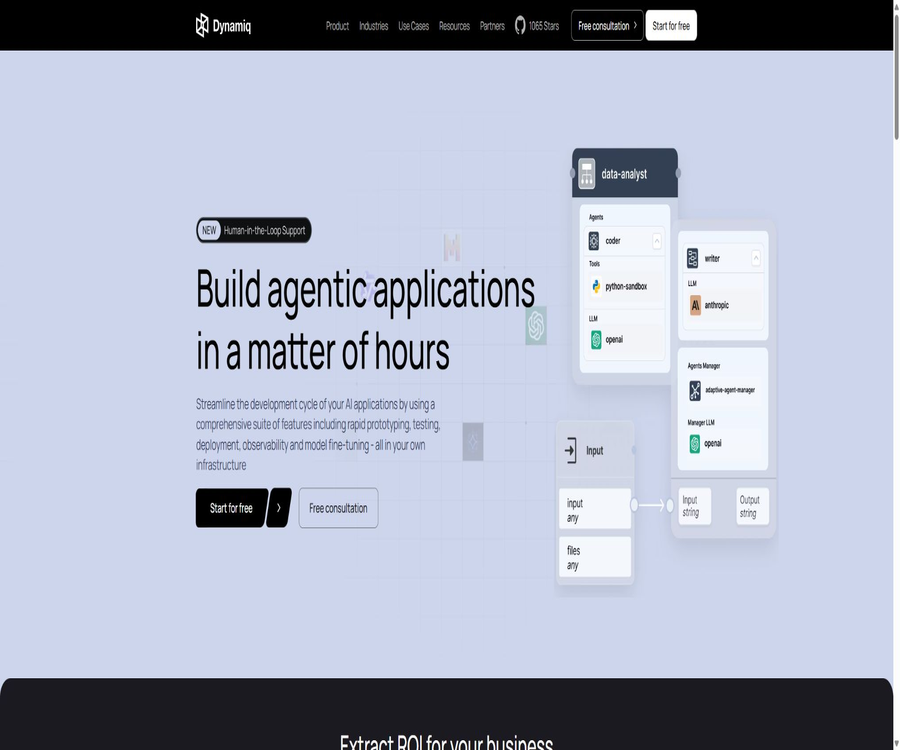
Dynamiq is a platform for developing and managing AI agents, designed for developers and enterprise teams. It allows users to create workflows, RAG applications, and multi-agent systems using visual interfaces or open-source Python frameworks, and to deploy these as callable applications.
Tool Introduction
Dynamiq was developed by Dynamiq Technologies; its offerings include prototype design, testing, deployment, monitoring, evaluation, a knowledge base, and model fine-tuning. It is suitable for technical teams that wish to take their generative AI experiments to a production environment.
Dynamiq consists of two distinct components: the business platform offers a visual builder, as well as capabilities for hosting and enterprise management; the dynamiq Python package, on the other hand, is an open-source orchestration framework licensed under Apache 2.0.
Product composition
| Composition | Positioning | Operation mode | Open-source status | Suitable for users |
|---|---|---|---|---|
| Dynamiq platform | Platform for the creation, deployment, and operation of agents | Cloud or enterprise self-hosted | Proprietary commercial software | Product teams, platform engineering, and enterprise customers |
| Python frameworks | Agents, RAG, and workflow orchestration libraries | Any environment that is compatible with Python | Apache 2.0 | Developers who need code control |
| REST API | Call the application and manage its operation, knowledge base, and evaluations. | Authentication via access key or personal token | The platform interface does not imply that the platform is open source. | Backend developers and system integration teams |
| AI Gateway | Centralized routing model for requesting and tracking usage amounts | Platform gateway or self-hosted address | It belongs to the platform’s capabilities. | Teams that require unified model governance |
Main functions
Visualization of agents and workflow construction
Users can connect input, Agent, tool, and output nodes on the canvas, and configure the data mapping between these nodes. Once a workflow is saved, it becomes a version, which facilitates testing, deployment, and rolling back.
- Combine agents, models, tools, knowledge bases, and business logic through a low-code canvas.
- It supports sequential, parallel, conditional branching, and multi-agent orchestration.
- You can start with an initial workflow generated from a blank canvas, a template, or prompt words.
- The test panel allows the canvas to run directly, and it enables viewing of node inputs, outputs, and errors.
- The versioning and release mechanism allows the workflow under testing to be fixed as a deployable version.
Agent nodes and tool calls
Agent nodes can be configured with roles, models, tools, memory, sandboxes, sub-agents, and structured outputs. The agent will plan and utilize these tools within a specified number of iterations until the task is completed or a stop condition is triggered.
The range of tools includes web searches, code sandboxes, database queries, external services, MCP servers, and other agents. Before being put into use, high-risk tools should have permissions, time limits, maximum number of iterations, and requirements for manual confirmation set in place.
Knowledge base and RAG
The Dynamiq knowledge base constitutes a complete ingestion process that includes file conversion, chunking, embedding, and vector storage. Users can use the default settings, or they can choose the method of chunking, the embedding provider, and the vector database to use.
- By default, the multi-file converter can process PDF, PPTX, DOCX, images, and text based on their file type.
- It is possible to adjust the chunking parameters, the embedding model, and the location of vector storage.
- After the knowledge base is created, search tests can be carried out, after which it can be connected to the Agent nodes.
- The Python framework supports storage solutions such as Pinecone, Qdrant, Weaviate, Chroma, Milvus, pgvector, and Elasticsearch.
- Before storing corporate data, it is necessary to determine the access permissions, retention period, and boundaries of third-party model data.
Deployment and application interfaces
The saved workflows can be deployed as apps, with each app having its own separate endpoint for calls. The platform supports synchronous responses, streaming output, two-way WebSocket communication, and asynchronous callbacks.
Deployment is tied to a specific version of the workflow, and the application interface provides access to functions such as history, tracking, sessions, integrations, triggers, and testing. In case of issues with a new version, it is possible to revert to a previous version based on the deployment history.
Observability and operational tracking
The platform keeps track of the execution tree of workflows, Agent loops, tool calls, model requests, delays, and token usage. Developers can identify issues related to prompts, models, connections, or data mapping by examining the failed nodes.
Evaluation and Quality Control
Dynamiq allows the creation of evaluation runs using datasets, workflow versions, and evaluation metrics. These metrics can be preset indicators, LLM review prompts, or custom Python code.
- The predefined metrics include fidelity, context accuracy, context recall, and factual correctness.
- The evaluation dataset can map to problems, context, standard answers, and workflow outputs.
- The same dataset allows comparison of multiple workflows or versions, helping to determine whether the changes are effective.
- The evaluation results are still affected by the review model and the quality of the dataset, and cannot replace manual verification.
Guardrails and structured output
The platform offers output validation, risk control, and constraints on the structure of the results; it can require models to adhere to formats such as JSON and YAML. Guardrails help reduce the likelihood of non-compliant outputs reaching the business system, but they cannot guarantee that the models will always be correct.
Model fine-tuning
The enterprise platform allows for the use of private data to fine-tune open-source large models, and these models can be deployed in dedicated infrastructure or corporate VPCs. The rules regarding training data, ownership of the models, costs associated with computing resources, and the scope of support are determined by the terms of the enterprise contract.
Team collaboration and governance
The platform manages resources by organization, project, and workflow, and provides shared connections, access control, as well as company-wide safeguards. Access keys can be restricted to a single project or applied at the organization level.
Python open-source frameworks
Dynamiq is an open-source Python orchestration framework that lies at the heart of the platform’s execution system; it can be installed from PyPI. Developers can combine models, Agents, tools, retrievers, embedders, and workflows within their code and run them in their own Python environment.
| Framework capabilities | Function | Typical uses |
|---|---|---|
| Workflows, Flows, and Nodes | Declare directed acyclic graphs and automatically execute nodes with no dependencies. | Data processing and multi-step AI pipelines |
| Agents | Plan, invoke tools, and repeat the process to complete tasks. | Research assistants, code assistants, and business agents |
| Graph Orchestrator | Build custom state machines and conditional routing | Complex multi-agent collaboration and human intervention |
| RAG component | Conversion, partitioning, embedding, writing, and retrieval | Corporate knowledge Q&A and document retrieval |
| Streaming and Callbacks | Output token streams and monitor the operation lifecycle | Chat interface and real-time monitoring |
| Memory | Save and retrieve session status | Multiple rounds of dialogue and long-term tasks |
| Checkpoints | Save a process snapshot and resume from where it was interrupted | Fault recovery, waiting for manual input, and time reversal |
| Engineering capabilities | Retry, cache, cancel, and evaluate | Stable operation in a production environment |
Supported models and data components
The official SDK documentation lists model providers such as OpenAI, Anthropic, Gemini, Bedrock, Mistral, Groq, Ollama, Azure AI, and Together AI, indicating that there are more providers available. The specific names of the models and the regions in which they are available are determined by each respective provider.
Session memory can make use of backends such as memory, SQLite, PostgreSQL, Qdrant, Pinecone, Weaviate, and DynamoDB. When integrating third-party models and databases, users are also responsible for managing the associated accounts, costs, and service terms.
Working principle
- Determine the tasks that the agent needs to complete, the input fields, the output structure, and the available tools.
- Create workflows in the visualization platform or Python code, and configure model connections and keys.
- To obtain private data, create a knowledge base and carry out file conversion, chunking, embedding, and indexing.
- Connect the Input, Agent, Tools, Knowledge Base, and Output nodes, and map the fields between them.
- Use sample inputs to test the workflow, and check each node, tool invocation, and execution tracking.
- By evaluating the dataset and the results of indicator comparisons, the prompt words as well as the retrieval and routing logic are adjusted.
- Save and publish the workflow version, then deploy it as an application with its own endpoint.
- Create access keys, invoke applications within the business system, and continuously monitor costs, latency, and errors.
Usage tutorial
Create the first agent on the visualization platform
- Register and access Organizations & Projects, then create a connection to the desired model provider.
- Open Workflows and create a new workflow; you can also close the template library and start from a blank canvas.
- Add Input nodes to define input fields such as user questions.
- Add Agent nodes and configure roles, models, tools, the number of iterations, and output requirements.
- Connect the Input to the Agent and map the input fields to the Agent tasks.
- Add an Output node to map the Agent’s results to the final output.
- Run the examples on the test panel, check the tracking, and fix any connection or field errors.
- Save the workflow and create a release version to prepare for subsequent deployment.
Create and connect a RAG knowledge base
- Go to the Knowledge Bases page of the project and create a knowledge base.
- Enter the name, and if necessary expand the advanced settings to select the file converter, chunker, and embedding provider.
- Choose either platform-hosted or enterprise-designated vector storage, and confirm the connection credentials.
- Upload PDF, PPTX, DOCX, image, or text files that have passed permission verification.
- Wait for the ingestion workflow to complete, then use representative questions to check the search results.
- Connect the knowledge base retrieval capability to the Agent, and define similarity levels, the number of results to be returned, and the manner in which references are presented.
- Test with cases that lack answers, contain conflicting information, and involve permission boundaries to prevent the misuse of the knowledge base.
Deploy and invoke the agent application
- Open the saved workflow and choose to create a new deployment or update an existing application.
- Enter the application name and description, select the runtime environment, and specify the correct workflow version.
- Wait for the deployment status to show as successful, and verify the input structure and application address on the integration page.
- Go to the organization settings to create an access key and restrict it to the corresponding project.
- The key is displayed in its full form only once, and it should be saved immediately in the server’s key management system.
- First, send a request from the application testing page, and then make the call from the backend using JSON input.
- Enable Agent streaming output for real-time text, and process the event stream on the client side.
- After going live, check tracking, tokens, costs, latency, and errors, and establish a key revocation process.
Install open-source Python frameworks
- Prepare a compatible Python environment and create a separate virtual environment for the project.
- Install dynamiq using the Python package manager, and install any optional dependencies for the desired model or storage.
- Place the model and database keys in environment variables; do not write them directly into the source code.
- Create a model node and configure connections, the model, prompts, and generation parameters.
- Add nodes to the workflow, and set dependencies and input mappings.
- Run it using small-scale test data and check the status, input, and output of RunnableResult.
- Add retry, caching, callbacks, checkpoints, and log masking before using it in production.
- If platform tracking or managed deployment is required, configure platform callbacks, CLI, or AI Gateway.
APIs, keys, and integration
Dynamiq’s REST API covers deployed applications, operations, sessions, knowledge bases, evaluations, metrics, datasets, tracking, and the AI Gateway. For self-hosted deployments, it is possible to use one’s own hostname, but the path structure and request format remain unchanged.
| Credential | Primary uses | Scope of permissions | Key safety points |
|---|---|---|---|
| Access Key | Invoke deployed applications, inference services, and AI Gateway | Organization-level or specific projects | The full key is displayed only once during creation, and an expiration date can be set. |
| Personal Access Token | Call the management API | Perform management operations on behalf of specific users. | They usually have higher permissions, and should not be used in the frontend or shared scripts. |
| Third-party provider key | Invoke external services such as models, search engines, and vector databases. | Determined by the corresponding connection. | Save in separate environments while restricting permissions and costs. |
- Application calls support synchronous results and server-side event streams.
- WebSocket is suitable for two-way interaction and tasks that require human feedback.
- The asynchronous mode allows the results to be sent to the callback address after a long-running task is completed.
- The application input must have the same field structure as that of the Workflow Input node.
- All external inputs should be validated for type, length, and content.
- Once a key is leaked, it must be revoked immediately; it is not sufficient to merely modify the client settings.
Deployment method
| Method | Infrastructure location | Main features | Suitable scenarios |
|---|---|---|---|
| Dynamiq Cloud Platform | Official hosting environment | After registration, it is possible to quickly build, test, and deploy. | Prototypes, trial versions, and regular team projects |
| Enterprise VPC | Customer cloud account | Deployment via Kubernetes and Helm, while maintaining control over networking and data. | Finance, healthcare, and regulated industries |
| Local or proprietary infrastructure | Enterprise control environment | Supports customizing security, access, and data processing measures. | Strict data residency and integration with the internal network |
| Open-source Python frameworks | Any runtime environment compatible with Python | The code runs autonomously; it is possible to choose whether to connect to a commercial platform or not. | Developer experiments, self-managed services, and integration into existing systems |
The setup of a corporate VPC involves cloud market subscriptions, Kubernetes clusters, databases, object storage, key management, and container deployment. It is not a simple desktop installation that can be completed with just one click; it requires DevOps or platform engineering skills.
Prices and packages
As of August 22, 2026, the official website offers a “Start for free” option, but it does not disclose the fixed prices of the regular cloud service packages nor the specific amount of free usage available. Enterprise VPC services come with annual contract prices on AWS Marketplace; for other enterprise services, it is necessary to contact sales.
| Plan | Price | Billing cycle | Core rights or scope | Suitable for users |
|---|---|---|---|---|
| Open-source Python frameworks | Free | No subscription required | Apache 2.0 license; you can run the workflow, Agent, and RAG code on your own. | Developers and self-managed projects |
| Dynamiq Cloud Platform | It can be started for free; no fixed price is listed on the public page. | Refer to the account or settlement page. | Visual construction, knowledge base, deployment, tracking, evaluation, and team features | Individual trials and product team |
| Enterprise VPC | 100,000 dollars | 12-month contract | Available for any number of users, includes deployed workflows, RAG knowledge bases, and monthly executions; offers dedicated support as well as VPC deployment. | Large enterprises and regulated industries |
| AI Agent Factory | Custom quote | By project | Design, develop, and deploy enterprise agents within the agreed time frame. | Enterprises that need to implement services |
Price considerations
- The public contract price for corporate VPCs is taken from the current AWS Marketplace product page; the final terms and requirements are as specified on the purchase page.
- In addition to corporate contracts, costs may also be incurred for cloud servers, databases, object storage, model inference, and vector databases.
- The fact that open-source frameworks are free does not mean that the connected models, search, sandbox, and database services are also free.
- The free starting option on the official website does not specify a particular amount; it should not be presented as a permanently free service.
- Enterprise packages, support levels, SSO, and compliance agreements can be customized based on the contract.
Which users are it suitable for
- AI application developers: Use Python or visual canvases to create Agents, RAG, and multi-step workflows.
- Product team: Quickly test the agent prototypes and deploy them as applications that can be called by the frontend or backend.
- Platform engineering team: Provides unified management of model connections, keys, tracking, evaluation, and application versions.
- Data and Machine Learning Team: Build knowledge bases, compare the performance of different models, and fine-tune open-source models.
- Regulated enterprises: Deployed within VPCs or proprietary infrastructure, along with access controls and compliance protocols.
- Open-source developers: Expand the node, tool, storage, and orchestration capabilities of the Apache 2.0 framework.
Typical use cases
- Create an internal Q&A assistant that connects to the company’s knowledge base, and use access controls to limit the scope of the available information.
- Create research agents that can search, invoke tools, and generate structured results.
- Have multiple agents handle retrieval, analysis, and writing separately, with the management agent responsible for combining the results.
- Combine customer service classification, information extraction, and ticket processing into an automated workflow.
- Use the evaluation dataset to compare prompts, models, retrieval parameters, and workflow versions.
- Deploy the tested workflow as an API to integrate it into websites, backend systems, or mobile applications.
- Run generative AI applications that deal with medical, financial, or internal confidential data within an enterprise VPC.
Product advantages
- It also provides a visualization platform and Python frameworks, allowing low-code and code teams to share the execution infrastructure.
- It covers building, knowledge bases, deployment, tracking, evaluation, and governance – there is no need to select separate tools for each stage.
- The open-source framework is licensed under Apache 2.0 and can be run and extended within one’s own Python environment.
- It supports multiple model providers and various vector databases, thereby reducing reliance on a single technology stack.
- Application deployment offers capabilities such as fixed versioning, tracking, streaming output, and asynchronous callbacks.
- The VPC and self-hosted options are suitable for enterprises that require data to remain on-site and need customized security controls.
- Access keys can be restricted by project and have a set expiration date, which facilitates the management of team permissions.
Usage restrictions and precautions
- The platform offers many capabilities, and there is a learning curve associated with working with organizations, projects, connections, workflows, applications, and credentials.
- The regular cloud packages and free quotas are not fully listed on the public page; it is necessary to check them within the account before using them.
- Open-source frameworks require knowledge of Python, model interfaces, as well as experience in storage and deployment; they are not ready-to-use chat tools intended for ordinary users.
- Enterprise VPC deployment involves Kubernetes, cloud networking, databases, and key management, and requires a professional operations team.
- Model outputs, tool results, and RAG retrieval can all be erroneous; manual review must be incorporated for high-risk processes.
- Third-party models, search functions, code sandboxes, and vector databases incur additional costs as well as additional steps in the data processing workflow.
- Agent loops and parallel tool calls can rapidly increase tokens, latency, and costs; therefore, budgets and termination conditions should be set.
- Structured output and Guardrails can only reduce risks; they cannot prove that the content is accurate or compliant.
- The platform’s terms of service prohibit reverse engineering of the proprietary platform, and it is not allowed to extend the framework license to commercial platforms.
Privacy, Security, and Compliance
According to the privacy policy, Dynamiq processes account, billing, communication, device, and usage information; it may also process the content, metadata, and permissions of Google Workspace documents when authorized by the user. Before connecting to corporate accounts, it is necessary to check the deployment method and the sub-processors being used.
- Personal data is processed on the basis of providing services, contracts, legal obligations, or legitimate interests, and is deleted or anonymized once it is no longer needed.
- Google Workspace data is used solely for functions such as searching, retrieving, summarizing, and answering questions as requested by users, within the limits of authorized usage.
- Official statements indicate that the original data from Google Workspace, as well as any derived data, embeddings, prompts, or outputs, are not used to train general-purpose foundational models.
- After disconnecting from Google Workspace, cached data will be deleted or anonymized in accordance with the retention rules, unless there are legal obligations or other exceptions.
- The service may make use of third-party sub-processors for hosting, analysis, and AI; before making a purchase, companies should review the current list as well as the data processing agreements.
- To handle health information subject to HIPAA regulations, it is necessary to sign a separate business partner agreement; it cannot be used directly based solely on the information provided on the official website.
- Self-hosting or VPCs can enhance data control, but model providers, external tools, and operational configurations can still serve as pathways for data to be exported.
Supported platforms
| Platform or method | Support status | Explanation |
|---|---|---|
| Web management platform | Support | Used for visualizing construction, knowledge bases, deployment, tracking, and management |
| Python | Support | The official open-source framework is released as a Python package. |
| REST API | Support | Used for application operation, management, knowledge base, evaluation, and gateway. |
| Python and TypeScript client calls | Support | The official deployment tutorial provides example calls. |
| Other backend languages | Support | Standard network requests can be sent to invoke the deployed application. |
| AWS VPC | Support | Deployment via AWS Marketplace, Kubernetes, and Helm |
| Self-hosting | Support | Use the company’s own addresses and infrastructure. |
| Development environments for Windows, macOS, and Linux | It depends on the Python environment. | Open-source frameworks can run in environments that are compatible with Python. |
| Native iOS or Android apps | No findings were detected. | Developers can integrate the deployed application into their own mobile products. |
| Browser extensions | No findings were detected. | The focus from the authorities is on web platforms, APIs, and SDKs. |
APIs, SDKs, and open-source status
Dynamiq offers REST APIs as well as an official Python framework. The APIs are used to invoke deployed applications and manage platform resources such as those related to operations and knowledge bases, while the Python framework can operate independently or be connected to the platform for purposes of tracking, gateway routing, and hosted deployment.
| Project | Is it open? | License or nature | Explanation |
|---|---|---|---|
| Dynamiq Business Platform | No | Proprietary SaaS and enterprise software | The terms of service specify that the platform’s intellectual property belongs to Dynamiq. |
| dynamiq Python framework | Yes | Apache 2.0 | It can be installed from PyPI, and the source code is available on the official GitHub repository. |
| REST API | Provide | Business platform interface | Allowing external calls does not mean making the platform’s source code available. |
| AI Gateway | Provide | Platform services | Used for model routing, centralized key management, and usage tracking. |
| Assistant interface components | Yes | Apache 2.0 | The authorities also provide React and JavaScript chat components designed for agent applications. |
Basic information
| field | Content |
|---|---|
| Tool name | Dynamiq |
| Development company | Dynamiq Technologies, Inc. |
| Tool type | AI agent platforms, workflow orchestration, RAG and LLMOps |
| Core competencies | Visualizing workflows, Agents, knowledge bases, deployment, tracking, evaluation, Guardrails, and fine-tuning |
| Price pattern | Open-source frameworks are free; cloud platforms can be used without cost; enterprise contracts and customized quotes are available. |
| Registration requirements | To use a cloud platform, registration is required; open-source frameworks can be installed independently. |
| Chinese support | It is possible to connect to models that support Chinese; the platform interface is primarily in English. |
| API | Yes |
| Official SDK | Yes, there are Python frameworks. |
| Open-source status of the product | Commercial platforms are not open source. |
| Open-source components | dynamiq Python framework and Assistant interface components |
| Open-source license | Apache 2.0 |
| Main platforms | Web, Python, REST API, AWS VPC, and self-hosted |
Recommendation score
Its rating is 4.3 out of 5 points. Dynamiq connects visualization tools, open-source orchestration frameworks, RAG, deployment processes, as well as tracking and evaluation functions into a cohesive system, making it suitable for AI development teams that want to move their prototypes from the prototype stage to production.
The main shortcomings are the incomplete information regarding public cloud pricing and free usage quotas, as well as the fact that understanding the platform concept and carrying out enterprise-level deployments requires certain skills and effort. Ordinary users who simply want to chat or create content need not opt for such development platforms.
Frequently Asked Questions
What is Dynamiq?
It is a platform used for building, deploying, and operating AI agents and LLM applications, and it also provides an open-source Python orchestration framework. It is not a single chatbot designed for ordinary users.
Is Dynamiq free?
Open-source Python frameworks can be used for free, and the official website’s cloud platform also offers a free starting point; however, the regular free quotas and fixed package prices are not clearly specified on those public pages. Models, databases, and cloud resources may incur additional costs.
Is Dynamiq open source?
A separate assessment is needed: the Dynamiq Python framework is distributed under the Apache 2.0 license and its source code is available publicly, whereas the Dynamiq commercial platform is proprietary software. Just because the framework is open source does not mean that the entire platform can be considered open source.
Is an API provided?
Available. The REST API covers deployed applications, operations, sessions, knowledge bases, evaluations, datasets, tracking, and AI Gateway; the same path structure is also applicable in self-hosted environments.
Is an official SDK provided?
It provides a Python framework that can be installed using a package manager. It enables workflows to run independently, and it also allows integration with commercial platforms to gain tracking, gateway, and hosted deployment capabilities.
Which large models are supported?
The official framework lists providers such as OpenAI, Anthropic, Gemini, Bedrock, Mistral, Groq, Ollama, Azure AI, and Together AI. The availability of specific models in a given region is determined by the respective services.
Is it possible to create an enterprise knowledge base?
Yes. The platform is capable of performing file conversion, chunking, embedding, vector storage and retrieval, as well as connecting knowledge bases to Agents; the custom framework also supports various vector databases.
Is private deployment supported?
It supports enterprise VPCs and self-hosted deployments; the official documentation provides instructions for installing Kubernetes in an AWS environment. To implement it in practice, cloud infrastructure, databases, storage solutions, and key management capabilities are required.
Can the generated results be used directly in high-risk operations?
It is not recommended to use them without first conducting a review. Agents, models, tools, and search results can all contain errors; therefore, in medical, financial, legal, and automated execution scenarios, evaluation processes, permission controls, and human approval are necessary.
Will user data be used for training?
The authorities have clearly stated that Google Workspace data will not be used to train or improve general-purpose foundational models, but this commitment applies only to such data. The handling of other types of data must be determined on a case-by-case basis, taking into account the privacy policies, the methods of deployment, the sub-processors involved, and the contracts with the enterprises.
What is the price of a corporate VPC?
As of August 22, 2026, the annual price for Enterprise VPC on AWS Marketplace is $100,000; costs related to cloud infrastructure and external models may be additional. The final price is subject to the details on the purchase page and the contract.
Is Dynamiq suitable for ordinary users?
It is primarily aimed at developers, product teams, and enterprise AI platform teams. For users who only need to conduct everyday conversations, write text, or generate images, using ready-made AI applications is a more straightforward option.
Summary
The value of Dynamiq lies in its ability to integrate agent development, RAG, deployment, tracking, and evaluation, while also allowing teams to choose between a visual platform and open-source Python code. For organizations that need production-grade agents and private deployments, it offers comprehensive engineering capabilities.
Before making a choice, it is essential to carefully consider the cloud-based packages, the costs associated with third-party models, the responsibilities related to deployment, and the data processing protocols. When using open-source frameworks, it is also necessary to implement systems for authentication, monitoring, budget control, evaluation, and maintenance.
Tools similar to Dynamiq



 Guigong Network Security Registration No. 45132202000164