






ChatWizardAI - Build a Custom ChatGPT for any Website
ChatWizardAI – Create a custom ChatGPT for any website; an intelligent tool focused on AI-driven design.
Tags:AI design toolsWhat is ChatWizardAI?
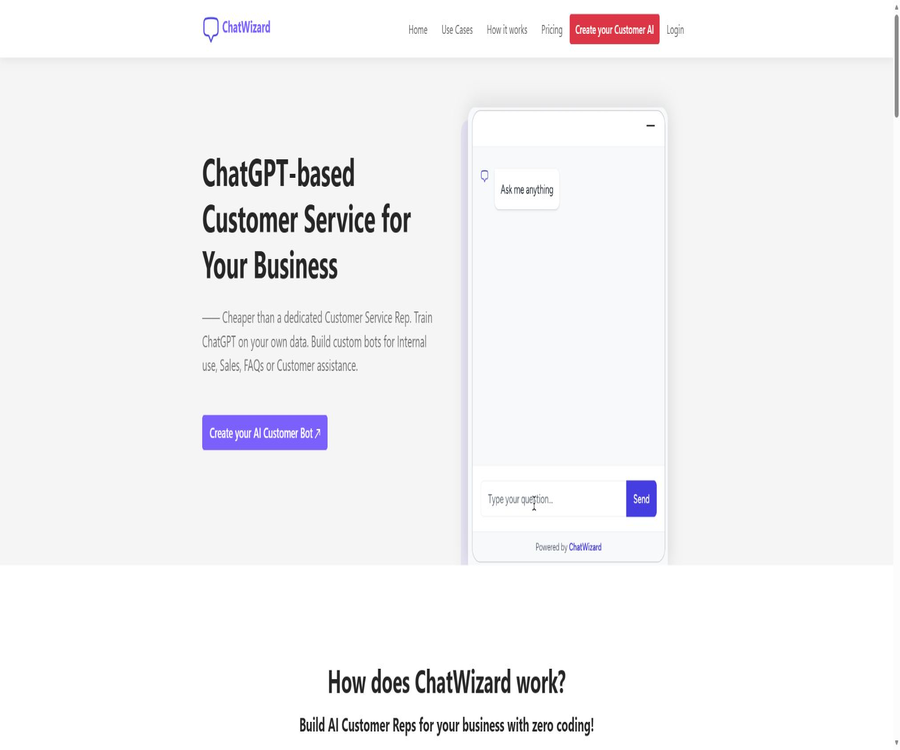
ChatWizardAI is a no-code platform for creating AI customer service bots for corporate websites. Users can import their website content and documents to train custom bots, adjust their appearance, set default responses to common questions, and add them to their web pages.
The product focuses on scenarios such as internal knowledge lookup, sales, FAQs, and customer support, and uses ChatGPT-style conversations as the mode of interaction. It is not the same product as other mobile chat applications or multi-model platforms with similar names.
A one-sentence summary
ChatWizardAI can transform corporate web pages and documents into 24/7 website chatbots, which can be deployed on an unlimited number of websites through simple code embedding.
Main functions
Website content training
Users can add the addresses of corporate websites, so that the platform can use those public pages as sources of information for its responses. Different packages set limits on the number of URLs that can be trained for each robot: 50, 200, 500, and 2,000 respectively.
Document training
The official website explicitly supports PDF, Word documents, and TXT text files. The number of documents that each robot can upload depends on the plan: the Free plan allows only 1 document, while the Business plan permits up to 50 documents.
| Training channels | Support status | Appropriate content | Precautions |
|---|---|---|---|
| Website URL | Support | Products, services, policies, and help pages | Limited by the number of URLs per robot |
| Support | Instructions, reports, and FAQs | The scanned document needs to have its text extracted first. | |
| Word document | Support | Internal materials and service instructions | Complex tables and formatting can affect the results. |
| TXT | Support | Plain-text knowledge and organized Q&A | Suitable for content that is concise and well-structured. |
| Other files | Not publicly confirmed | One should not make assumptions based on similar products. | The actual format of the above interface shall prevail. |
Customization of behavior and appearance
After the training is complete, it is possible to modify the robot’s appearance so that its colors and style better match the website’s brand. Users can also add Conversation Starters or frequently asked questions to help visitors get started on a conversation quickly.
Widget and Iframe embedding
ChatWizardAI offers two options for chatting elements: a widget in the corner of the webpage and an Iframe within the page, along with embed code that can be copied. According to the official documentation, it can be used on WordPress, Webflow, or any other website that allows the addition of code.
| Deployment method | Display effect | Suitable scenarios |
|---|---|---|
| Chat Widget | Fixed at the edges or corners of the website page | Website customer service entrance |
| Iframe | Embed in a specified area of the page | Independent Q&A page, help center, and member page |
| Share page | Open a standalone robot session | Demonstration, testing, or temporary sharing |
| Native mobile or desktop client | No findings were detected. | It is primarily used through browsers and website components. |
Over 30 languages
The official website claims that the robots can communicate with customers in more than 30 languages, and it provides examples in languages such as Chinese. The list of all available languages is not shown on the public page; the performance of the robot in Chinese and other specialized languages needs to be tested in practice.
Session history and chat export
All four public packages include the options to View Conversation History and Export Chats, which allow users to view and export conversations with visitors. The export format, retention period, filtering capabilities, and maximum number of items that can be exported are not specified.
Embedding is allowed on any website.
All packages include the option to \"Embed on Unlimited websites\", which means that the same robot component can be used on multiple websites. When deploying across multiple sites, it is still necessary to check the scope of knowledge covered, brand consistency, and the privacy policies specific to each site.
Infinity training characters
The current package list includes Unlimited Characters training as a common benefit, but the number of URLs and files remains limited. Unlimited characters do not mean that there are no limits on the amount of data, messages, or the frequency of data retrieval.
How does ChatWizardAI work?
- Register an account and specify the range of products, services, or internal knowledge for which the robot is responsible.
- Add the company website URL and upload the necessary PDF, Word, or TXT files.
- Wait for the platform to process the data, then use a real question to check whether the answer comes from the correct source.
- Adjust the colors, brand appearance, welcome message, and Conversation Starters.
- Copy the Widget or Iframe code and add it to the website’s test page.
- Check the layout on desktop and mobile devices, and then verify the session history and export functionality.
- After going live, keep updating the current information and remove any outdated or conflicting content.
Tutorial on creating an AI customer service system for websites
- First, list the frequently asked questions regarding operating hours, scope of services, prices, contact information, and refunds.
- Only the currently active pages are imported, to prevent old pages and duplicate content from consuming URL slots.
- Organize the missing information from the webpage into short documents, maintaining clear titles and structure.
- Add opening questions to the robot that can reflect the needs of real visitors.
- Test normal questions, vague questions, incorrect premises, and out-of-scope questions separately.
- When it is confirmed that a question cannot be answered, no fake prices, policies, or professional advice will be fabricated.
- Add the components to the website and conduct privacy and loading tests before its official release.
Web Component Installation Tutorial
- On the robot page, select the Chat Widget or Iframe embedding method.
- Copy the complete code generated by the platform; do not modify the robot identifier manually.
- Place the Widget code before the closing tag of the page where it is to be displayed.
- If an Iframe is used, set an appropriate height and width for the page area.
- Check the display and input experience on desktops, mobile devices, and various browsers.
- Test whether page navigation, caching, and content security policies prevent the loading of components.
Which users are it suitable for
- Small business website: Automatically answers questions regarding hours of operation, services, products, and contact information.
- Sales team: Provides basic pre-sales information while visitors are browsing the products.
- Customer Support Team: Convert FAQs and documentation into a 24/7 Q&A portal.
- Internal team: Create an internal document search robot using documents with a limited scope.
- Education and content websites: Allow readers to ask questions related to courses or articles.
- Agents and website developers: Install simple customer service components for multiple clients’ websites.
Typical use cases
- Frequently asked questions: Answers regarding business hours, location, payment methods, and service procedures.
- Product description: Explains the functions, specifications, and usage methods based on the website and documentation.
- Pre-sales consultation: Helps visitors understand the scope of services and guides them to contact sales.
- Document Q&A: Quickly find information in manuals, policies, or internal guidelines.
- Multilingual reception: Provides a basic means of communication for visitors who speak different languages.
- Website interaction: Lower the barrier for visitors to enter information voluntarily by using introductory questions.
Product advantages
- The creation process is simple – training can begin with just a website and three common types of documents.
- Widgets and Iframes offer two layout options: floating entries across the entire site and embedding within pages.
- All packages allow the inclusion of an unlimited number of websites.
- The number of characters that can be used for training is not limited; the main restrictions apply to the number of URLs and files.
- Offers more than 30 languages, suitable for basic multilingual Q&A.
- It includes session history and chat exports, facilitating manual review.
- With the Free plan, you can experience the entire setup process without having to purchase anything first.
Usage restrictions and precautions
- Free provides only 10 messages per month, which is sufficient only for very small-scale testing.
- The official website does not disclose the specific underlying models, model versions, or the vector retrieval and referencing mechanisms.
- No information was found regarding automatic retraining, Sitemap, scheduled synchronization, or the frequency of manual re-crawling.
- There is no information available regarding live agent handoffs, clue fields, team permissions, or advanced analysis features.
- No verifiable public APIs, SDKs, Webhooks, or third-party native integrations were found.
- The registration page requires acceptance of the terms and privacy policy, but the available text cannot be read properly at the moment.
- Session history and exports mean that the platform handles visitors’ chats, so sensitive information must be handled with care.
- AI responses may be incorrect; prices, contracts, as well as medical and legal matters must be reviewed manually.
- There are many ChatWizard products with different names; when installing or making payments, it is necessary to verify that the domain name matches the corresponding product.
- The growth figures shown on the official website are part of marketing rhetoric and should not be considered as a guarantee of actual results.
Prices and packages
The prices listed below were verified on August 21, 2026, and are expressed in US dollars. The official website offers four subscription tiers: Free, Starter, Growth, and Business; payments can be made on a monthly or annual basis. A 30-day refund guarantee and the option to cancel at any time are provided.
| Package | Monthly payment | Annual payment | Robot | Messages/month | Each robot’s training quota |
|---|---|---|---|---|---|
| Free | Free | Free | 1 | 10 items | 50 URLs, 1 PDF or Word or TXT file |
| Starter | 9 dollars | 89 dollars | 1 | 1,000 pieces | 200 URLs, 10 files |
| Growth | 29 dollars | 229 dollars | 3 | 5,000 items | 500 URLs, 30 files |
| Business | 99 dollars | 899 dollars | 15 | 15,000 items | 2,000 URLs, 50 files |
Common benefits of the package
| Ability | Free | Starter | Growth | Business |
|---|---|---|---|---|
| Branded robots | Support | Support | Support | Support |
| There are no restrictions on the characters used for training. | Support | Support | Support | Support |
| Embedding is allowed on any website. | Support | Support | Support | Support |
| Session history | Support | Support | Support | Support |
| Chat export | Support | Support | Support | Support |
| Cancel at any time | Support | Support | Support | Support |
| 30-day refund guarantee | Listed on the page | Listed on the page | Listed on the page | Listed on the page |
Switching to a different plan will immediately cancel the current subscription; the features for which payment has been made will remain available until the end of the billing cycle. Once the subscription expires, those features will no longer be accessible. The conditions and procedures for requesting a refund should be confirmed with the platform before making the payment.
Supported platforms
| Platform or method | Support status | Explanation |
|---|---|---|
| Web console | Support | Create, train, customize, and manage robots |
| Website Widget | Support | Suspension chat entry point |
| Iframe | Support | Embed at a specified location on the page |
| WordPress | Supports code embedding | It is necessary to be able to add custom code. |
| Webflow | Supports code embedding | Install by page or site template |
| Other website builders | Usually supported | The prerequisite is that HTML code is allowed to be added. |
| Native iOS and Android apps | No findings were detected. | Do not confuse it with the ChatWizard app of the same name. |
| Windows and macOS apps | No findings were detected. | It is primarily used through a browser. |
| Public API | No findings were detected. | There are no current developer documents. |
Privacy and data security
The registration page requires users to agree to the terms of service and the privacy policy, but at the time of verification no complete and publicly available version of these policies could be found. The entity responsible for operating the service, the location where data is stored, the third parties involved in processing the data, the retention period for that data, and the procedures for deleting it are not clearly stated on the main product page.
- Do not upload customer lists, contracts, identification documents, medical records, or payment information.
- Provide the company’s own privacy notice and contact information near the website components.
- Make it clear to visitors that the conversations are handled by AI, and avoid collecting unnecessary personal information.
- Limit the access rights to exported chat files as well as the duration for which they can be saved locally.
- Before making a purchase, confirm with the platform the model provider, the data location, as well as the encryption and deletion procedures.
- It cannot be assumed that data will not be used for training or retained simply because there is no public explanation.
- Regulated industries should avoid handling real sensitive data until they have obtained written safety and compliance materials.
API, SDK, and open-source status
The main ways to integrate ChatWizardAI are through website widgets and iframes; no developer API, official SDK, Webhook, or technical documentation has been identified. The code used for embedding on web pages is intended solely to load the chat component, and it does not represent any public business interface.
No verifiable official GitHub organization, complete source code for the product, or open-source license was found. ChatWizardAI should be classified as non-open source; other GitHub projects with the same name have no legitimate official connection to this commercial service.
Basic information
| field | Content |
|---|---|
| Tool name | ChatWizardAI |
| Operating entity | The official website does not provide this information clearly. |
| Tool type | Code-free website AI customer service and enterprise knowledge robots |
| Training channels | Website URL, PDF, Word, and TXT |
| Language support | Over 30 languages |
| Price pattern | Free, monthly, and annual subscriptions |
| Minimum payment amount | Starter costs $9 per month or $89 per year. |
| Free quota | 1 robot, 10 messages per month, 50 URLs, and 1 file |
| Main deployment | Website widgets, iframes, and sharing pages |
| Session history | Yes |
| Chat export | Yes |
| Public API | No findings were detected. |
| Official SDK | No findings were detected. |
| Official GitHub | No findings were detected. |
| Is it open source? | No |
Recommendation score
The recommendation score is 3.7 out of 5. ChatWizardAI offers a straightforward process for setup and integration; the Starter plan costs $9 per month, and the four available packages clearly specify the limits regarding robots, messages, URLs, and files.
The main shortcomings are the limited amount of free usage, as well as insufficient support in terms of models, automatic updates, APIs, team capabilities, and transparency regarding privacy and security measures. It is suitable for using non-sensitive data to test basic website Q&A functions, but it is not appropriate for handling high-risk tasks without additional verification.
Frequently Asked Questions
Is ChatWizardAI free?
There is a free plan that includes 1 robot, 10 messages per month, 50 URLs per robot, and 1 document. The quota is very limited and is intended mainly for testing the training and integration processes.
How much is the lowest priced subscription plan?
The Starter plan costs $9 per month or $89 per year; it includes 1,000 messages per month, 1 robot, 200 URLs, and 10 documents. The final price is as indicated on the settlement page.
Which files are supported?
The official website explicitly lists PDF, Word, and TXT files. No other formats are officially confirmed; it is necessary to check the list of supported formats on the interface before uploading.
Can it be added to WordPress?
Yes, it is possible to install Widgets or Iframes as long as the website allows the addition of custom code. Before going live, it is necessary to check the caching settings, mobile compatibility, and security policies.
Is Chinese supported?
The official website displays content in Chinese and claims to support more than 30 languages. However, specialized Chinese terms and complex issues still require testing using actual data.
How many websites are supported?
All four current packages specify that an unlimited number of websites can be integrated. The number of bots, as well as the amount of messages and training data, are still subject to the limits set for each tier.
Are APIs provided?
No verifiable public API, SDK, or Webhook documentation was found. The current methods for integration are website widgets, iframes, and share pages.
Is ChatWizardAI open source?
It is not open source; no official source code repository or open source license has been found. The embeddable code for web pages does not indicate that the platform’s source code is available publicly.
Can I view the chat history?
Yes, all packages include options for viewing session history and exporting chats. However, the specific retention period, export formats, and methods for deletion are not specified.
Can it be canceled at any time?
Yes, it is possible to cancel and continue using it until the end of the current billing cycle. The official website also mentions a 30-day refund guarantee, but the specific requirements and application process should be checked before making the purchase.
Is it the same as the app with the same name, ChatWizard?
It’s different. What is described here is ChatWizardAI, a tool designed for knowledge enhancement and component integration on corporate websites; other mobile applications with the same name or multi-model chat platforms should not be confused with it.
Summary
ChatWizardAI offers an easy-to-understand approach to setting up website customer service; there is no need for complex development, from training using web pages and documents to customizing the appearance and publishing widgets or iframes. Four different subscription plans are available to allow for gradual upgrades based on the number of robots and messages handled.
When making a choice, it is important to assess the quality of the model, the frequency of data updates, the ability to retain conversations, the privacy policy, and the approach taken in cases where questions cannot be answered. When dealing with customer personal information or professional advice, written documentation should be provided first, and manual review must be carried out.
Similar to ChatWizardAI – a tool for creating a custom ChatGPT for any website.



 Guigong Network Security Registration No. 45132202000164