






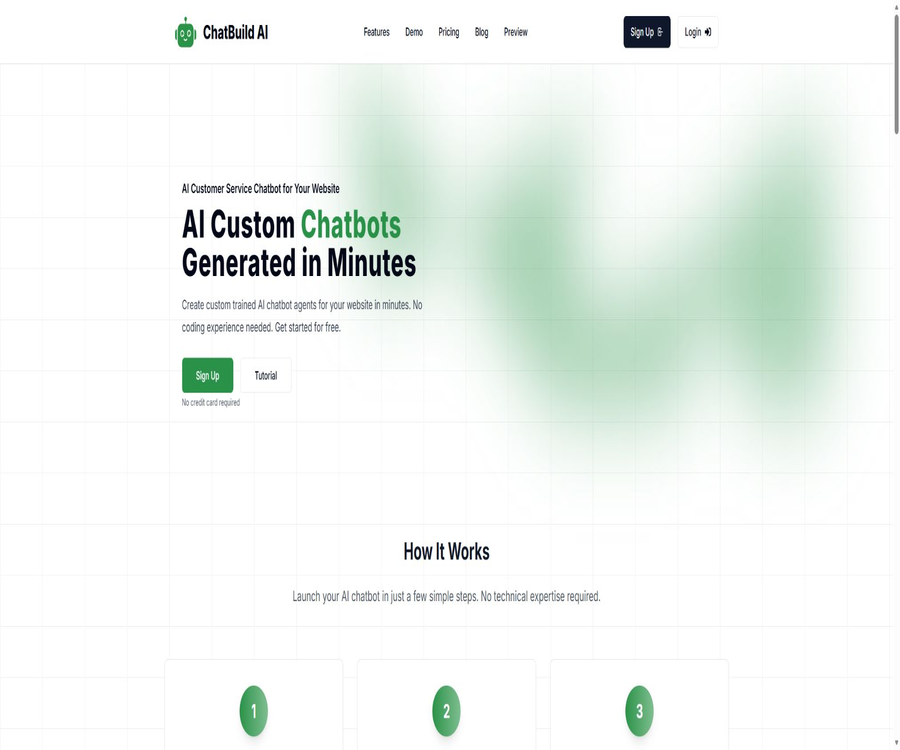
ChatBuild.io
ChatBuild.io, an intelligent tool focused on AI-driven design.
Tags:AI design toolsWhat is ChatBuild AI?
ChatBuild AI is a code-free AI chatbot platform designed for website customer service and converting visitors; it is also often referred to as ChatBuild.io. Users can train the bot using web pages, sitemaps, and files, after which they can copy an embedding code and insert it into WordPress, Shopify, or their own website.
The product offers both AI-powered automatic responses and real-time chat with live humans; when visitors need manual assistance, the website operator receives an email notification and can join the conversation. The backend also provides functions for viewing conversation history, exporting data, performing basic analyses, and collecting leads.
A one-sentence summary
ChatBuild AI enables businesses without any programming experience to create AI customer service solutions using their own websites and files; it allows for automated question-and-answer interactions, human intervention, collection of visitor information, and analysis of conversations through web components.
Main functions
Train robots using corporate data
Users can add web links, Sitemaps, PDFs, TXT files, CSV files, and other materials to enable the robot to answer questions based on the company’s content. The public version does not reveal the specific models, vector retrieval parameters, or citation mechanisms, so key responses still require manual testing.
| Training channels | Public support status | Appropriate content |
|---|---|---|
| Single web page link | Support | Product page, help articles, and policy pages |
| Sitemap | Support | Batch import of publicly available website pages |
| Support | Manuals, service instructions, and FAQs | |
| TXT | Support | Plain-text knowledge and organized instructions |
| CSV | Support | Structured Q&A, product or business entries |
| Image content | Not confirmed | The price page lists only the questions without providing clear answers. |
Code-free creation and preview
To create a form, it is necessary to enter the robot’s name, description, behavior instructions, and welcome message; a preview is available during the filling process. It is suitable for quickly establishing a branded entry point, but complex business rules still need to be refined through testing.
Website embedding
Once the configuration is complete, users can copy the code snippet to add the chat component to their website. It is stated that it can be used with WordPress, Shopify, and custom websites, but there is no separate plugin or app store page available.
AI automated customer service
Robots can handle common inquiries from website visitors around the clock, such as information on services, prices, questions prior to making reservations, and basic support. The quality of their responses depends on whether the training data is complete, up-to-date, and free of contradictions.
Real-time live chat and takeover
All paid packages include a Live Chat Feature; when visitors wish to contact a human representative, the operator can receive an email notification and respond in real time. Before putting it into use, it is necessary to test the entire process, including offline mode, waiting for prompts, the end of the manual intervention, and the resumption of AI operation.
Clue collection
The website can collect names and email addresses before visitors start chatting, so as to identify them and enable follow-up communication. Companies should explain the purpose of collecting this information on the interface, and avoid making unnecessary fields mandatory.
Chat history and export
From the backend, it is possible to view the full conversation history, search for visitors, and export sessions for backup, quality checking, or further analysis. The export format, retention period, and maximum number of sessions that can be exported are not specified on the public page.
Session analysis
ChatBuild AI allows users to review conversations and participation patterns based on chat records, helping teams understand visitors’ needs and improve the robots. The public version of the platform does not list specific metrics, reporting intervals, or advanced analysis options.
Custom brand
All versions – Pro, Premium, and Enterprise – include the option for custom branding, allowing the appearance of the robot to be adjusted to match the website. Whether it is possible to remove completely the platform’s identifiers, fonts, icons, and custom domain names should be confirmed through the account before making a purchase.
How does ChatBuild AI work?
- Register an account to receive 300 credits initially, and specify the range of products or services for which the robot is intended to be used.
- Fill in the name, description, action instructions, and welcome message to establish the basic style of the session.
- Add web pages, Sitemaps, or files to help the robot learn about the company’s knowledge.
- Use the preview and testing interfaces to raise actual questions and correct the materials and instructions.
- Configure lead collection, live chat, notifications, and brand display.
- Copy the embedded code to the test website and check the appearance on desktop and mobile devices.
- After going live, review the chat history and conduct analyses to continuously fill in any missing knowledge.
Tutorial on creating an AI customer service system for websites
- First, select a set of frequently asked questions, such as hours of operation, scope of services, prices, and the reservation process.
- Organize a knowledge document free of duplicate and outdated information, and add the necessary web pages.
- Specify in the instructions the tone of the response, items that must not be promised, and the approach to take when a question cannot be answered.
- Create a welcome message and suggested questions to let visitors know what the robot can handle.
- Test using correct questions, ambiguous questions, incorrect premises, and sensitive questions respectively.
- Embed components in the website’s testing environment to ensure they do not cover the navigation elements, forms, or buttons on mobile devices.
- Configure manual takeover personnel and response times to ensure that there is someone to handle requests from visitors when a human agent is not available.
Live chat and clue process
- Decide when to display the name and email fields to visitors, and specify the purpose of collecting such information.
- Set the robot to provide a human agent when it is unable to answer, when complaints arise, or at the user’s request.
- Configure the work email address for receiving notification emails, and specify who is authorized to view the sessions.
- Simulate a visitor’s request to a human agent to verify that notifications, waiting status, and operator responses are all functioning properly.
- After the takeover is complete, it is determined whether the session will be closed, continued to be handled by a human, or resumed with AI.
- Export and check sessions regularly, and delete personal information that is no longer needed.
Suggestions for preparing training materials
- Website pages should have clear titles and main text, with fewer navigations, footers, and repetitive marketing content.
- A PDF is best to contain selectable text, and scanned documents should first undergo text recognition followed by manual proofreading.
- CSV should use consistent column names, and unnecessary personal information such as email addresses and phone numbers should be removed.
- The same policy retains only the currently valid version, thereby preventing the robot from making random choices among conflicting versions.
- Set boundaries for manual handling of issues related to refunds, quotes, medical matters, legal affairs, or security.
- After the website content is updated, the robot should be checked again; there is no specified automatic update schedule for the public pages.
Which users are it suitable for
- Websites for small and medium-sized enterprises: automatically provide information on business hours, services offered, and common support questions.
- E-commerce sellers: Explain product details, shipping policies, and return procedures on sites such as Shopify.
- Local service providers: They collect information regarding scheduling intentions, location, and contact details, after which a staff member takes over to follow up.
- Professional service team: Answers basic inquiries and forwards complex requests to consultants.
- Real estate and hotel websites: handling property listings, check-ins, facilities, and pre-reservation inquiries.
- Content and education websites: enabling visitors to quickly find answers using available public information.
- Operations team without developers: Quickly deploy basic customer service using forms and embedded code.
Typical use cases
- Pre-sales Q&A: Explains product features, service processes, and the differences between various options.
- Visitor information collection: Collect name and email address before the conversation starts or when switching to a human agent.
- After-sales support: Addresses basic troubleshooting and usage issues based on the manual and FAQ answers.
- Human takeover: Switch to real-time chat when the AI is unable to handle it or when the visitor explicitly requests it.
- Demand research: Identify the questions that visitors frequently ask by analyzing the conversation history.
- Website content improvement: Transform robot failure issues into new help articles or knowledge entries.
Product advantages
- The creation process is carried out through a form, and users do not need to write code or call APIs.
- It also supports web pages, Sitemaps, and common files as training sources.
- The website embedding is simple and can be used on WordPress, Shopify, and custom sites.
- All paid packages include real-time chat with human agents, enabling collaboration between AI and humans.
- It provides chat history, export options, and basic analysis to help identify knowledge gaps.
- The initial 300 credits can be obtained without a credit card, making it suitable for testing the functionality of creation and answering questions first.
- The three-tier package reveals the number of messages, the number of pages retrieved, the number of files, and the size of each file.
Usage restrictions and precautions
- The 300 credits offered upon registration do not constitute a permanently free plan; the rules that apply once those credits are used up depend on the account settings.
- The authorities have not specified the conversion relationship between credits and messages, model tokens, or the number of generations.
- All three paid plans include only 1 Chatbot; multiple brands or sites may require multiple accounts.
- There are package limits on the number of files and website pages; the maximum size of a single file is 10MB.
- There is no information provided regarding model selection, citation display, the frequency of automatic retraining, or answer accuracy.
- No complete and publicly available privacy policy, terms of service, data retention policy, or list of sub-processors was found.
- The platform handles chat records, names, and email addresses; caution is required when dealing with personal information.
- There are no public APIs, SDKs, or Webhooks, so the capability for integrating complex systems is limited.
- Before installing components on third-party websites, it is necessary to first verify the loading speed, Cookies, and Content Security Policy.
- AI responses may be incorrect; prices, contracts, refunds, and high-risk recommendations require manual verification.
Prices and packages
The prices listed below were verified on August 21, 2026, and are expressed in US dollars. The official website shows the monthly pricing; it indicates that a 20% discount is available for annual payment, but the total cost of an annual subscription is not specified in the public text. The actual amount charged will be based on the details provided on the purchase page.
| Package | Monthly price | Monthly messages | Training quota | Support methods |
|---|---|---|---|---|
| Pro | $ | Up to 5,000 items | 100 web pages, 10 files; each file is 10MB in size; 1 Chatbot | Email support and a private Discord community |
| Premium | $ | Up to 20,000 items | 200 web pages, 10 files; each file is 10MB in size; 1 Chatbot | Priority support is provided for private Discord communities. |
| Enterprise | $ | Up to 100,000 entries | 500 web pages, 20 files; each file is 10MB in size; 1 Chatbot | Priority support via email and phone, plus a private Discord community |
Common functions and differences
| Ability | Pro | Premium | Enterprise |
|---|---|---|---|
| Live Chat | Support | Support | Support |
| Custom Branding | Support | Support | Support |
| Number of chatbots | 1 | 1 | 1 |
| Number of files | 10 | 10 | 20 |
| Single file size | 10MB | 10MB | 10MB |
| Number of website pages | 100 pages | 200 pages | 500 pages |
| Support level | Priority support | Priority support for emails and phone calls |
Users receive 300 credits upon registration, and no credit card is required; this amount is more suitable for a one-time use. The website does not disclose information regarding the consumption of credits, their validity period, or the rules for recharging them, so it is necessary to check these details in the account before using them.
Supported platforms and deployment methods
| Platform or method | Support status | Explanation |
|---|---|---|
| Web management backend | Support | Create, train, view sessions, and manage settings |
| Website chat component | Support | Deployment through embedded code |
| WordPress | Supports embedding | No separate official plugin documentation was found. |
| Shopify | Supports embedding | No separate app store page was found. |
| Custom website | Support | It is necessary to be able to add code snippets provided by the platform. |
| Native Windows and macOS applications | No findings were detected. | It is primarily used through a browser. |
| iOS and Android apps | No findings were detected. | No official app store client was found. |
| Messaging platform channels | No findings were detected. | There is no public integration with platforms such as Slack and WhatsApp. |
Data privacy and security
The public page of ChatBuild AI displays session history, visitors’ names and email addresses, as well as options for exporting and analyzing data; this indicates that the platform may process data related to customers and website visitors. As of the time of verification, no complete and publicly available privacy policy, information regarding data retention and deletion, encryption methods, or details about third parties involved in data processing could be found.
- Provide a clear privacy notice and explanation of the purpose of processing before collecting names or email addresses.
- Do not upload customer lists, contracts, medical records, or other sensitive documents.
- Limit the users who can view, export, and download chat records.
- Regularly delete unnecessary chat data and locally exported files.
- Before making a purchase, confirm with the platform the data storage location, retention period, model provider, and deletion process.
- Do not assume that the lack of a public policy means that data will not be stored or used to improve services.
APIs, SDKs, and GitHub
No public APIs, SDKs, Webhooks, or technical documentation for developers are available for ChatBuild AI. The current method of integration is through website embedding code, and it is not possible to infer the existence of interfaces for managing chats, synchronizing knowledge, or reading data.
No verifiable official GitHub organization, product source code, or open-source license was found. ChatBuild AI should be classified as non-open source; the generic chatbot projects on GitHub have no official connection to this commercial platform.
Basic information
| field | Content |
|---|---|
| Tool name | ChatBuild AI |
| Common names | ChatBuild.io |
| Operator | The company’s legal entity is not clearly stated on the official website. |
| Tool type | Code-free AI customer service for websites, knowledge base robots, and tools for chatting with human agents |
| Training channels | Websites, Sitemaps, PDF, TXT, and CSV, etc. |
| Price pattern | One-time experience credits, monthly or annual subscriptions |
| Experience quota | 300 credits are granted upon registration, no credit card required |
| Minimum payment amount | Pro costs $39.99 per month. |
| Main platforms | Web and website embedding components |
| Chinese support | No list of official languages was found; actual testing is required. |
| Live chat | All paid plans are supported. |
| Public API | No findings were detected. |
| Official SDK | No findings were detected. |
| Official GitHub | No findings were detected. |
| Is it open source? | No |
Recommendation score
The recommendation score is 3.8 out of 5. ChatBuild AI requires little effort to set up and integrate; it enables the integration of AI-generated responses from knowledge bases, live conversations, customer information collection, and chat history into the same customer service workflow on a website.
The main drawback is that all three package options include only one robot; in addition, there is a lack of development interfaces, models, capabilities for automatic retraining, and mechanisms for ensuring privacy and data security. It is appropriate to use 300 credits for preliminary testing on a small scale, but sensitive operations should not be carried out until the data and contracts have been verified.
Frequently Asked Questions
Is ChatBuild AI free?
Registration grants 300 credits free of charge and no credit card is required, but the official website does not list any permanently free subscription plans. Once the credit limit is exhausted, one must choose a paid plan or check the available top-up options in the account.
How much is the lowest package?
The monthly Pro plan costs 39.99 dollars; it includes up to 5,000 messages per month, 100 web pages, 10 files, and 1 Chatbot. A 20% discount is available when paying annually, and the final price will be indicated on the payment page.
Which training files are supported?
The available file types are clearly listed as PDF, TXT, and CSV on the public feature page; it is also indicated that other file types are supported. The maximum size for a single file is 10 MB, and the specific file extensions can be checked on the upload interface.
Is it possible to scrape the entire website?
Robots can be trained using sitemaps or web links. Pro, Premium, and Enterprise support up to 100, 200, and 500 web pages respectively.
Is it possible to have live customer service take over?
Yes, Live Chat is included in all paid plans. When visitors request to speak with a live agent, the operators can receive email notifications and respond in real time.
Can customer information be collected?
It is possible to collect visitors’ names and email addresses before starting a conversation. A privacy policy should be provided when using this feature, and only the information necessary for customer service or sales follow-up should be collected.
Is Chinese supported?
The official website does not provide a list of supported languages nor any criteria regarding the quality of Chinese language support. It is advisable to test the system’s ability to handle Chinese questions and answers, as well as its handling of technical terms and mixed Simplified and Traditional Chinese texts, before making a purchase.
Can it be added to WordPress and Shopify?
The official website indicates that the embedding code can be used on WordPress, Shopify, and custom websites. At present, no separate official plugin or app store page has been found.
Are APIs provided?
No public API, SDK, or Webhook documentation was found. The main method of deployment available is by copying the website’s embedding code.
Is ChatBuild AI open-source?
It is not open source; no official source code repository or open source license has been found. The ability to embed website components does not mean that the platform’s code is available publicly.
Are chat records saved?
The platform provides full chat history, search functions, export options, and analysis tools; as a result, conversations are saved and processed. The specific duration for which data is retained and the rules regarding its deletion are not made public, so it is necessary to confirm these details with the platform before using it.
Summary
ChatBuild AI offers small and medium-sized websites an easy-to-understand approach to setting up AI customer service; there is no need for complex development tasks, whether it’s data training, integration of components, or handling live conversations and reviewing sessions. The three pricing tiers also clearly specify the amount of messages that can be processed and the volume of data that can be used for training.
When selecting it, it is important to verify the Chinese-language responses, the ability for real-time takeover, the credit calculation system, and data governance – rather than merely looking at the demonstration interface. When client personal information or critical business rules are involved, it is necessary to ensure that privacy protections, contractual provisions, and deletion mechanisms are in place.
Tools similar to ChatBuild.io



 Guigong Network Security Registration No. 45132202000164