






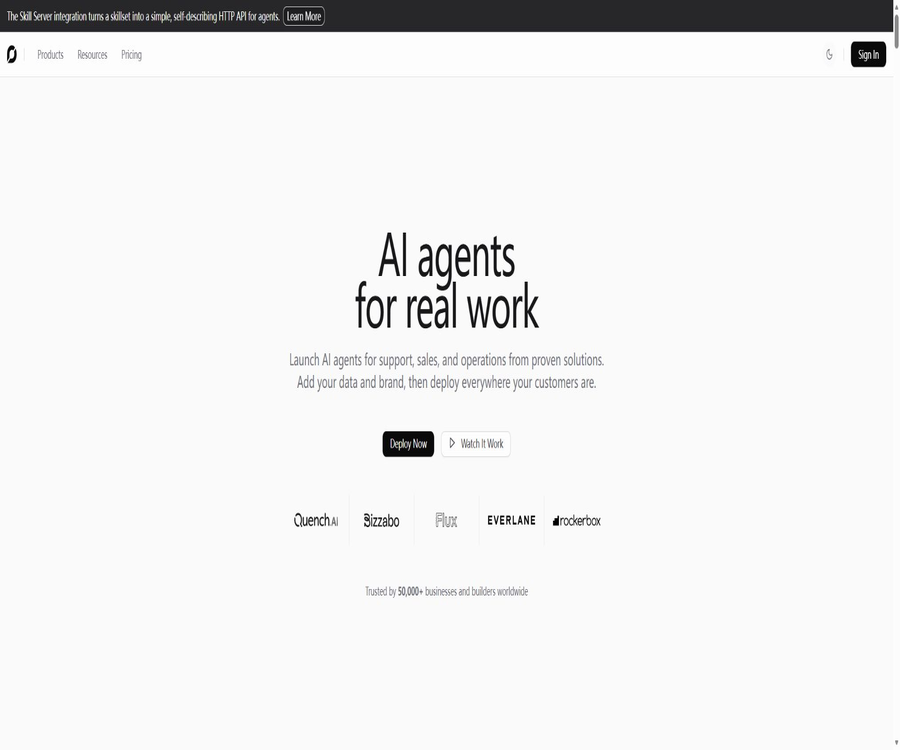
chatbotkit.com
chatbotkit.com – an intelligent tool dedicated to AI design.
Tags:AI design toolsWhat is ChatBotKit?
ChatBotKit is a modular intelligent agent platform designed for enterprises, development teams, and AI product founders; it is operated by the British company CBK.AI LTD. Users can combine knowledge bases, skills, external integrations, models, and deployment methods to create AI assistants for customer service, sales, internal operations, or within products.
The platform offers both visual Blueprint design as well as REST APIs, official SDKs, Terraform Providers, and integration with various messaging channels. Complex tasks related to model orchestration, retrieval, tool execution, and session management are handled by the ChatBotKit hosting service.
A one-sentence summary
Through reusable modules such as Dataset, Skillset, Integration, Model, and Blueprint, ChatBotKit enables teams to create AI agents that can retrieve corporate knowledge, invoke tools, and be deployed across various channels, either in a visual manner or via code.
Core components
| Composition modules | Main function | Reusable method |
|---|---|---|
| Bot and Agent | Define agent identity, behavior, and model. | Linking different knowledge, skills, and channels |
| Dataset | Save documents, records, and vector indexes | The same knowledge base can be used by multiple agents. |
| Skillset and Ability | Enables actions such as searching, sending messages, and calling interfaces. | Skill sets can be combined with different agents. |
| Integration | Connect websites, messaging platforms, data sources, and business applications | Once configured, it can be used for multiple deployments. |
| Blueprint | Combine behaviors, memories, models, and tools to create a design. | Clonable, modifiable, and redeployable |
| Space and Widget | Provides web session space and embedded components | Publish the same agent on different pages |
| Policy | Execution rules, privacy policies, and data retention rules | Configure governance boundaries for different robots. |
Main functions
Combinable Blueprint
Blueprint connects Dataset, Skillset, Integration, memory, and models to form an intelligent agent configuration. Teams can replace a specific model or data source without having to rewrite the entire business logic.
RAG knowledge base and semantic retrieval
The dataset utilizes vector embeddings and semantic search to provide relevant context for answers, and it allows for the creation of a knowledge base from documents, records, CSV, or JSON files. Users can also choose different models for processing, as well as set instructions to be followed when a search yields a result or not.
| Knowledge input | Handling method | Appropriate content |
|---|---|---|
| PDF, Word, and tables | Extract text, perform automatic segmentation, and create a vector index. | Manuals, policies, product information, and research documents |
| Text files and other common documents | Asynchronous processing of large files | FAQs, instructions, and internal knowledge |
| CSV and JSON | Import as searchable records | Structured catalogs, Q&A, and business data snapshots |
| Manual Record | Add text, channels, and metadata directly. | Knowledge entries that require precise maintenance |
| Website and Sitemap | Capture the page and synchronize it to the Dataset. | Help center, official website, and continuously updated content |
| Third-party data sources | Through Integration or automated synchronization | Notion, GitHub, and business application content |
Skillset and ability to act
A Skillset is composed of one or more Abilities, which enable an agent to send emails, search databases, create calendar events, call enterprise interfaces, or connect to third-party services. The official platform also supports custom functions and APIs, making it possible to transform conversations into concrete actions.
Multiple models and built-in model keys
All paid plans allow access to the various models provided by the platform, and it is also possible to use keys from one’s own model providers. The official list of such providers includes OpenAI, Anthropic, Mistral, and other models; in addition, self-hosted or custom model interfaces are supported as well.
Multi-channel deployment
The same agent can be presented as a website widget or a Space, and it can also be connected to Slack, Discord, WhatsApp, Telegram, Messenger, Instagram, Google Chat, and Microsoft Teams. Developers can also use APIs or SDKs to create completely customized user interfaces.
MCP and automation integration
ChatBotKit provides integration between the MCP Server and the Skill Server, and it supports various automation tools such as GitHub Actions, Zapier, and Trigger. Teams can incorporate these bots into their development processes, for business automation, or within tool environments that are compatible with MCP.
Analytics, Trace, and Governance
The platform offers session history, usage analysis, event logging, Trace functionality, content filtering, PII removal, policy management, and authentication capabilities. Pro and Scale also provide audit records and event monitoring at different levels.
White-labeling and partner capabilities
ChatBotKit enables companies to create branded AI experiences within their own products; the Pro version allows for the removal of the Widget platform’s branding, Scale supports custom domain names, while Enterprise offers more extensive options for custom branding and deployment customization.
How ChatBotKit works
- Create an account and define the agent’s tasks, users, channels, and the business actions it is allowed to perform.
- Create a Dataset, import files, web pages, or records, and test the results of semantic search.
- Create a Skillset to add the necessary predefined Abilities or custom functions to the agent.
- Configure the model, system background, memory, content rules, and privacy options.
- In Blueprints, knowledge and skills are combined with integration and modeling to create reusable designs.
- Connect to Widgets, Spaces, or messaging platforms to test multiple rounds of sessions in an isolated environment.
- After release, continuous monitoring and improvement are carried out through Usage, Event, Trace, and audit records.
Tutorial on Creating a Knowledge Base Agent
- Create a new Dataset and name it according to the product, department, or scope of permissions, in order to prevent unrelated data from being mixed together.
- First, add a small number of high-quality records or files to verify whether the text extraction and indexing are accurate.
- Configure matched instructions and unmatched instructions, and it is necessary to specify clearly when no basis can be found.
- Choose whether to enable Reranker, and then use the actual question to compare the search results.
- Create a Bot and connect it to a Dataset; set the role, response language, tone, and citation policy.
- Test for expired information, conflicting data, spelling errors, and prompt injection, and correct knowledge and instructions.
- Deploy the Bot to Widgets or target channels, and establish processes for data updates and regression testing.
Tutorials on Connecting via API and SDK
- Create API tokens with specific purposes within the account, and save them immediately in a secure key management system.
- The Allowed Route Pattern is used to restrict tokens so that they can only access the required resources and perform the necessary operations.
- Choose between REST API, Node, Python, Go, or Terraform tools based on the technology stack.
- Initialize the client on the server side, create a Bot, Dataset, or Conversation, and test the streaming return.
- Handles pagination, timeouts, error codes, idempotency, usage limits, and model failures.
- Use development, testing, and production tokens separately; it is prohibited to expose account-level tokens to the browser.
- After going live, audit the calls, rotate the tokens, and immediately delete the credentials of systems that are no longer in use.
Key points for using datasets with RAG
- Split large knowledge bases by permissions, products, and update time to avoid retrieving irrelevant content.
- After importing the file, check the extracted text; scanned documents and complex tables may require preprocessing.
- Channels and metadata are reserved for Records to facilitate updates, deletions, and result tracking.
- Test the Reranker in complex queries, while also keeping an eye on the additional latency and costs.
- A miss instruction is set, requiring the agent to acknowledge its lack of knowledge and to proceed to a manual process.
- When using APIs to synchronize data that changes frequently, mechanisms for removing duplicates, managing versions, and retrying on failures should be implemented.
Channels and Integration
| Category | Representative integration | Primary uses |
|---|---|---|
| Websites and apps | Widgets, Spaces, APIs, and custom interfaces | Website customer service, in-app assistant, and white-label products |
| Team collaboration | Slack, Discord, Google Chat, and Microsoft Teams | Internal Q&A, community management, and team automation |
| Social messages | WhatsApp, Telegram, Messenger and Instagram | Customer communication, notifications, and pre-sales consultation |
| Development process | GitHub, GitHub Actions, and MCP Server | Topic responses, code assistance, and continuous integration tasks |
| Communication | Email and Twilio | Workflows related to email handling, SMS, or phone calls |
| Knowledge and content | Sitemap, Notion, and Extract | Crawling websites, synchronizing knowledge, and extracting content |
| Automation | Zapier, Trigger, and Skill Server | Connect to third-party applications and carry out cross-system tasks |
| Business services | CRM, databases, calendars, and a large number of pre-set connections | Query or update business systems |
Prices and packages
The prices listed below were verified on August 21, 2026; the currency is the US dollar. The names Basic, Pro, Scale, and Enterprise correspond to those on the official website’s current pricing page. Some documentation still uses older names such as Team or Pro Plus, and such old documents cannot be used in place of the current subscription plans.
| Package | Price | Bots and monthly usage | Knowledge and component quotas | Suitable for users |
|---|---|---|---|---|
| Basic | $ | 5 bots, 1 million Credit Tokens, 1,000 sessions, 5,000 messages | 10 datasets, 10 skillsets, 10 integrations, 10 files, 200 scraping pages | Small and medium-sized projects and initial production applications |
| Pro | $ | 25 bots, 2 million Credit Tokens, 10,000 sessions, 50,000 messages | 100 Dataset, Skillset, and Integration sets each, 100 files, 1000 pages to be scraped | Teams that require brand control, monitoring, and greater capacity |
| Scale | $ | 100 bots, 10 million credit tokens, 50,000 sessions, 250,000 messages | 1,000 each for Dataset, Skillset, and Integration; 1,000 files; 50,000 pages captured | Multiple projects, large knowledge bases, and high-traffic services |
| Enterprise | Custom quote | Provide high volume or unlimited usage in accordance with the contract. | Unlimited scraping, deployment, branding, security, retention, and SLA can be negotiated. | Large organizations, private deployments, and complex compliance requirements |
Differences in package features
| Ability | Basic | Pro | Scale | Enterprise |
|---|---|---|---|---|
| All platform models | Support | Support | Support | Support |
| Built-in model key | Support | Support | Support | Support |
| Advanced website scraping | Basic crawling | 1000 pages, with a maximum time of 30 minutes per session | 50,000 pages, with a maximum time per session of 60 minutes | According to the contract, unlimited negotiation is possible. |
| Remove the Widget brand | Not included | Support | Support | Custom branding is supported. |
| Domain name | Foundation | Built-in domain name | Custom domain name | Customize |
| Audit and event logging | Basic session history | Basic auditing and logging – data is retained for 90 days. | Advanced auditing and logging, with data retention of 90 days | Configure according to the contract |
| Support | Basic Support | Priority Support | Premium Support | Dedicated account managers, support channels, and SLAs |
| Local or private deployment | Not included | Not included | Not included | Negotiable |
The official website states that an annual subscription is available, but it does not show the exact amount for an annual payment or the discount rate on the pricing page. Pro offers an option for a trial period; the specific duration of this trial, the payment methods, and any restrictions are determined according to the subscription process.
How is Credit Token billed?
ChatBotKit uses Credit Tokens to keep track of the computational resources consumed by different models; the calculation is done by multiplying the original model’s Token value by that model’s Token Ratio. Models with a lower ratio are suitable for frequent conversations, while those with a higher ratio are better suited for tasks that require complex reasoning or multi-modal processing.
| Charging factors | How to influence the amount used | Optimization methods |
|---|---|---|
| Input and output tokens | The longer the context and response, the more original tokens there are. | Compress history and limit irrelevant output |
| Model Token Ratio | Different models convert the original tokens into different credit tokens. | Select the model with the lowest acceptable scaling factor based on the task. |
| RAG context | The retrieved records will be included in the model context. | Optimize chunking, Top K, and rearranged results |
| Tool cycle | Multi-step execution by the Agent may result in multiple model calls. | Limit the number of iterations and record the failed paths. |
| Images and other modalities | It will be consumed in accordance with the calculation rules of the selected model. | Submit only the media required for the task. |
| Built-in model key | The costs associated with model providers are borne by the users, though the platform may still record Credit Tokens. | Monitor the bills on both the platform side and the provider side simultaneously |
The official billing documentation states that one-time Boosters can be purchased to add 1 million Credit Tokens, but the price of these Boosters is not displayed on the current public page. Whether they are available for purchase, which packages are applicable, and the settlement amount should be checked on the account’s billing page.
Which users are it suitable for
- AI Product Team: Develop custom chat interfaces, Copilot solutions, or branded intelligent agent products using APIs and SDKs.
- Customer service and sales teams: Publish corporate knowledge and business procedures on the website and messaging channels.
- Development and operations team: Uses GitHub Actions, MCP, and Terraform to manage AI resources and processes.
- Corporate knowledge team: Create reusable datasets to provide consistent knowledge for intelligent agents in various departments.
- Automation team: Combines Skillset, Ability, and third-party integrations to carry out cross-system tasks.
- Solution providers: Create isolated Bots, Datasets, domain names, and brand experiences for multiple clients.
- Large organizations: Negotiate private deployment, SLAs, reservations, and regional requirements through Enterprise.
Typical use cases
- Website AI customer service: Answers questions regarding products, policies, and technical issues, and delegates complex tasks to the business systems.
- Internal knowledge assistant: Allows employees to find answers in policies, projects, and technical documents.
- Community robots: Provide continuous Q&A and assistance via Slack, Discord, or Telegram.
- E-commerce and sales assistants: searching for products, scheduling meetings, gathering leads, and initiating subsequent processes.
- Develop collaborative agents: Perform auxiliary tasks within GitHub issues, pull requests, or continuous integration.
- Multi-agent processes: Enable bots from different specialties to divide tasks among themselves based on their capabilities and means of communication.
- RAG product backend: ChatBotKit is responsible for managing indexing, model orchestration, and sessions, while the frontend can be customized.
Product advantages
- Dataset, Skillset, and Integration can be reused across bots, reducing the need for repeated configuration.
- It supports both visual Blueprint and API programming, catering to both non-developers and engineering teams.
- Model providers can be replaced and support BYOK, facilitating a choice among capabilities, costs, and compliance requirements.
- The channels include websites, major collaboration platforms, and social messaging services.
- The official team provides development tools such as Node, Python, Go, Agent SDK, CLI, and Terraform Provider.
- Built-in RAG, Reranker, content moderation, PII processing, Policy, and observability.
- There is a clear path for expansion, ranging from the $25 Basic version to the customized Enterprise version.
- Enterprise allows for the hosting of private environments or local deployment on a negotiated basis, in addition to offering public cloud services.
Usage restrictions and precautions
- Platform resources are also limited by Credit Tokens, sessions, messages, bots, datasets, files, and the number of pages that can be scraped.
- The Credit Token is not the original model Token; different model Ratios can significantly affect the available amount.
- BYOK does not exempt the platform from carrying out measurements; users still have to deal with separate invoices issued by the model providers.
- Although the Python SDK has open-source code, its license is explicitly proprietary, with all rights reserved.
- The Node SDK documentation states that features marked as unstable may experience incompatible changes.
- The privacy feature is not enabled by default; it must be activated and tested for each individual Bot or Integration.
- PII detection may suffer from omissions or errors; sensitive industries still need to carry out processing on their own before and after integration.
- Third-party messaging, models, and business integrations incur additional costs, as well as new permissions and data processing requirements.
- When an agent performs external actions, it may cause changes to the business operations; therefore, authentication, confirmation, and auditing mechanisms should be in place.
- The public help documentation contains old package names; purchases should be based on the current pricing and settlement information.
- The platform’s server side is not an open-source project; self-hosting or local deployment requires negotiation with Enterprise.
Privacy, Security, and Data Governance
ChatBotKit offers functions such as content moderation, access control, policy management, as well as PII identification and anonymization. Privacy settings must be enabled explicitly in the configuration of each bot, integration, or API; it cannot be assumed that new bots will have their sensitive data masked by default.
Once enabled, the system will scan personal information such as names, addresses, phone numbers, and email addresses, and replace the original values with anonymous entities using hashing or tokenization; thereafter, the anonymized text is sent to the underlying model. The custom interface must handle entity mapping properly to prevent the re-exposure or incorrect pairing of information.
| Governance capacity | Public mechanism | Implementation precautions |
|---|---|---|
| PII anonymization | Identify personal information and replace it with entity tokens. | It must be activated proactively, and tests for missed detections and false positives need to be conducted. |
| Content moderation | Apply security rules to input or output. | It cannot replace industry audits and manual oversight. |
| Retention Policy | Continuously clean up old sessions and records based on age. | The available range and execution frequency are determined by the package and configuration. |
| Token permissions | The Allowed Route Pattern specifies the paths from which API calls are permitted. | Tokens without allowed routing configurations have relatively high default permissions. |
| Audit logs | Pro and Scale offer different levels of recording for 90 days. | Requirements for long-term retention need to be exported separately or negotiated. |
| Third-party API data | The privacy policy statement is not used to train general AI or machine learning models. | The data terms for the model and the integrated services still need to be reviewed separately. |
The privacy policy states that personal data is retained only for as long as it is reasonably necessary to achieve the purposes for which it was collected; however, complaints or potential lawsuits may extend this period of retention. The policy also notes that it is not possible to guarantee the deletion of all stored data, and companies should verify the procedures for deletion, backing up, and handling such data by third parties before proceeding with purchases or deployments.
API and official SDK
The ChatBotKit REST API enables the creation and management of Bots, Conversations, Datasets, Skillsets, Files, Memory, Blueprints, Tasks, Teams, Spaces, Policies, Integrations, and other resources. The SDK follows the same structure as the API resources, and it supports streaming conversations, pagination, and error handling.
| Development tools | Primary language or use | Current license and stability |
|---|---|---|
| REST API | Any server-side language | Business platform interface requires an account token. |
| Node SDK | JavaScript, TypeScript, React, Next.js, and CLI | The core SDK package is licensed under the ISC license; some features do not yet have a stable version designated. |
| Agent SDK | JavaScript and TypeScript Agent tools | It belongs to the Node SDK ecosystem and relies on the ChatBotKit server. |
| Python SDK | Asynchronous Python, typed resources, and Agent Helper | The code is available publicly, but the license is proprietary with all rights reserved. |
| Go SDK | Integration of Go applications | The public warehouse is in version v0, and the interfaces may still change. |
| Terraform Provider | Resources such as Infrastructure as Code management bots, etc. | Uses the MPL-2.0 license |
GitHub and the open-source status
ChatBotKit has an official GitHub organization that provides SDKs for Node, Python, and Go, as well as a Terraform Provider and numerous examples. The public repositories contain mainly client tools, the Provider, and demonstration code; the model orchestration capabilities, hosting platforms, and server-side products are not made fully open source.
The licenses for different repositories vary; even publicly available source code can be subject to proprietary licenses. The tool catalog should indicate that the product is not open source, and it should specify the ISC license for the Node SDK, the proprietary license for the Python SDK, and the MPL-2.0 license for the Terraform Provider under the section detailing the developers’ capabilities.
Supported platforms
| Platform or method | Support status | Explanation |
|---|---|---|
| Web console | Support | Visual creation, combination, deployment, and management of agents |
| Website Widgets and Spaces | Support | Embed in a website or provide an independent session space |
| Slack, Discord, Google Chat, Teams | Support | Team and community channels |
| WhatsApp, Telegram, Messenger, Instagram | Support | For social messaging, a third-party account is required. |
| Email and Twilio | Support | Automation of emails and communications |
| APIs and SDKs | Support | Covers development in REST, Node, Python, Go, and Agent technologies |
| Terraform | Support | Manage resources such as bots and datasets as part of the infrastructure. |
| MCP | Support | Provides MCP Server integration |
| Native desktop and mobile apps | No universal official client was found. | It is primarily used via the Web, SDKs, and various channels. |
| Local or private deployment | Enterprise can be negotiated. | It’s not the default capability of a regular subscription. |
Basic information
| field | Content |
|---|---|
| Tool name | ChatBotKit |
| Development company | CBK.AI LTD |
| Company registration address | United Kingdom |
| Tool type | Composable AI agent platform, RAG knowledge base, and multi-channel robot development platform |
| Core module | Bot, Dataset, Skillset, Integration, Blueprint, Space, and Policy |
| Price pattern | Monthly subscriptions, annual subscriptions, Enterprise customizations, and optional boosters |
| Minimum publicly listed price | Basic costs $25 per month. |
| Free or trial | Pro offers a trial version; the specific rules are stated on the subscription page. |
| Model | Multiple model options on the platform, as well as BYOK and the possibility to use custom or self-hosted models. |
| Public API | Yes |
| Official SDK | Node, Python, Go, Agent SDK, and other tools |
| Official GitHub | Yes |
| Is the product open source? | No; some client tools are available publicly, with varying licenses. |
| Local deployment | Enterprise can be negotiated. |
| Age requirement | The privacy policy requires users to be at least 18 years old. |
Recommendation score
It receives a rating of 4.6 out of 5 points. ChatBotKit features a modular architecture, RAG, Skillset, multi-channel integration, and comprehensive multilingual SDKs; it is suitable for teams that wish to combine and manage multiple AI agents on a single backend.
The main shortcomings are the need for careful calculation of resources and Credit Token costs, the presence of old package names in the documentation, inconsistencies regarding SDK licenses and stability, and the fact that privacy features are not enabled by default. Companies should verify costs, permissions, data retention, and fault handling under actual traffic conditions.
Frequently Asked Questions
Is ChatBotKit free?
The currently available official pricing starts at $25 per month for the Basic version; the Pro version offers a trial option. The documentation mentions Free or Trial options, but the specific amount of free usage is not indicated on the main pricing page, so it is necessary to refer to the actual registration page for details.
What is the data allowance included in the Basic plan?
Basic includes 5 bots, 1 million Credit Tokens per month, 1,000 sessions, 5,000 messages, as well as 10 Dataset, Skillset, and Integration sets each. It also includes 10 files and 200 website scraping pages.
What is a Credit Token?
The Credit Token is the unified billing unit of the platform; it equals the original Token of a model multiplied by that model’s Token Ratio. Using more expensive models, longer contexts, or multi-step tools will result in a faster consumption of this quota.
What types of files can be uploaded?
The dataset supports PDF, Word, tables, text, and other common document formats; it also allows the import of CSV, JSON, manually entered records, and website content. For complex scanned documents, tables, and media files, it is necessary to verify the extraction results first.
Does ChatBotKit support Chinese?
The platform supports multilingual models and multilingual conversations, but the quality of Chinese language processing depends on the selected model, the available knowledge base, and the configuration of prompts. It is necessary to test both Simplified and Traditional Chinese, as well as term lookup and cross-lingual search, before going live.
Can it be connected to Slack and WhatsApp?
Yes, it is also supported via Discord, Telegram, Messenger, Instagram, Google Chat, and Microsoft Teams. Third-party accounts, message costs, and platform reviews require separate handling.
Does ChatBotKit provide an API?
A complete REST API is provided to manage Bots, sessions, Datasets, Skillsets, Integrations, Policies, and other resources. API tokens can be used to restrict permissions via routing patterns.
What are the official SDKs?
The official offerings include Node, Python, Go, Agent SDK, CLI, and Terraform Provider. Each of these tools has a different level of maturity and comes with distinct licensing terms, so it is necessary to examine them individually when making a choice.
Is ChatBotKit open source?
The platform itself is not open source. The source code for some SDKs and Providers is available, but the Python SDK is licensed under a proprietary license; being readable does not mean it is open source.
Is privacy masking enabled by default?
No. The privacy feature must be activated manually in each Bot, Integration, or API process; once enabled, it is also necessary to test for any failures in detecting PII as well as any incorrect judgments.
Can it be privatized or deployed locally?
Enterprise allows for negotiated hosting of private deployments or local installations; this option is not included in the public packages. Costs, models, upgrades, maintenance, and data storage requirements require separate agreements.
Can I bring my own model API key?
Yes, paid plans support BYOK. Users are required to cover the costs associated with the model provider, and ChatBotKit may still record Credit Tokens in accordance with the platform’s rules.
Summary
ChatBotKit is suitable for teams that wish to use knowledge, tools, models, and channels as reusable building blocks to create intelligent agents. It covers visual assembly, development interfaces, RAG, multi-channel deployment, and production governance.
Before official adoption, a Bot should be used to verify the accuracy of searches, the permissions of the tool, the actual amount of Credit Tokens consumed, and the stability of the connection. Only after that can a decision be made as to whether to upgrade to Pro, Scale, or Enterprise, while also establishing clear responsibilities for privacy, auditing, and key management.
Tools similar to chatbotkit.com



 Guigong Network Security Registration No. 45132202000164