






Bahasa
Bahasa: an intelligent tool focused on AI-driven design.
Tags:AI design toolsWhat is AI language?
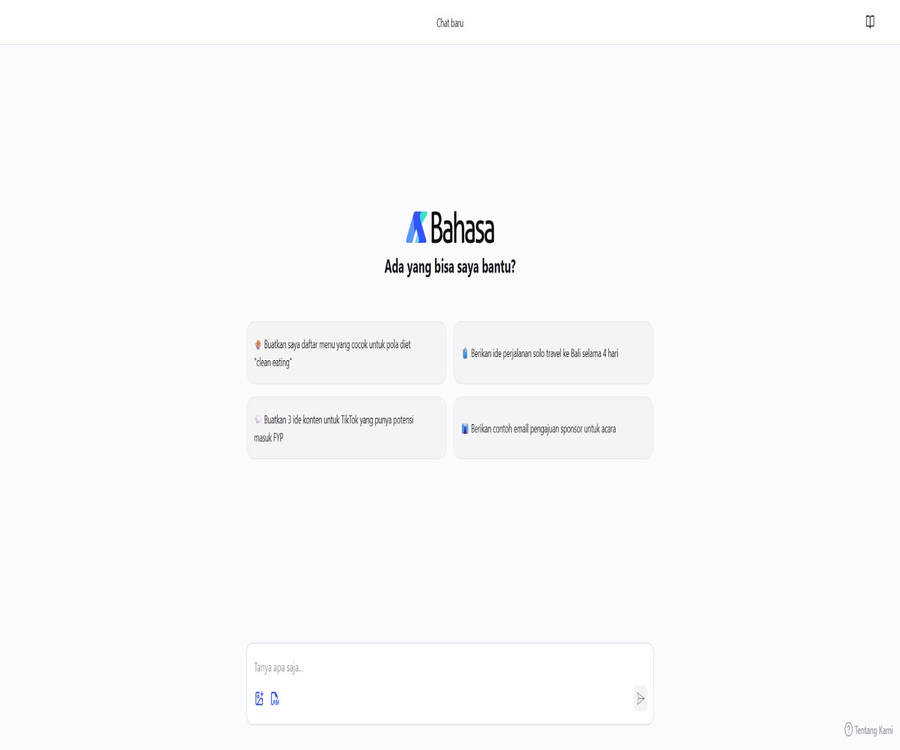
Bahasa AI is an Indonesian AI assistant developed by Bahasalab, intended for users who need to use the Indonesian language for work, study, and creative purposes. It places emphasis on Indonesian expression, analytical skills, and communication styles that are in line with local cultural norms.
The current web version supports text-based chatting; after logging in, users receive a higher daily quota, as well as features for image analysis and PDF analysis. They can enter up to 2,000 characters and view their chat history. Users can also create new conversations and share the content of those conversations.
Do not confuse it with a Malay language learning app of the same name.
There is another Malay language learning app in the app store named Bahasa AI, developed by Nexus Protocol Limited. The domain of the tool included in the database belongs to Bahasalab, an Indonesian language assistance website; the developers, functions, and access methods of these two apps are different from each other.
| Comparison items | Bahasa AI from Bahasalab | Malay language learning app with the same name |
|---|---|---|
| Primary language | Indonesian | The Malay language used in Malaysia |
| Product type | Universal AI chat and file analysis assistant | Applications for learning spoken language, vocabulary, and culture |
| Main platforms | Web page version | Android mobile apps |
| Developer | Bahasalab | Nexus Protocol Limited |
| The object of this entry | Yes | No |
Who is Bahasa AI suitable for?
- Indonesian native speakers: Use the more natural local language to conduct everyday questions and answers.
- Student: Understanding key concepts, organizing study plans, and summarizing PDF materials.
- Content creators: Generate ideas for social media, short videos, and articles.
- Working professionals: drafting emails, meeting materials, reports, and to-do lists.
- Small and medium-sized enterprises: Prepare Indonesian-language marketing copy and basic communication materials for customers.
- Researchers: Summarize, ask questions about, and extract information from Indonesian documents.
- Foreign learners: Useful for checking Indonesian expressions, but cannot replace a language teacher.
- Local market team: Adjusts the tone and cultural expressions for the Indonesian audience.
Main functions
- Indonesian chatting: Ask questions in natural language and engage in multiple rounds of conversation.
- Content creation: Generating titles, outlines, posts, emails, and copy for events.
- Knowledge explanation: Rewriting complex concepts into expressions that are easier to understand.
- Image analysis: Identifies the content and information contained in the images uploaded by logged-in users.
- PDF analysis: Generating summaries, answering questions, and extracting key points from documents.
- Long input: A single chat session while logged in allows up to 2,000 characters.
- Chat history: Save and revisit past conversations.
- Dialogue sharing: Share specific chat content with other people.
- New conversation management: Create separate chats for different topics.
Experience with and without logging in
| Functions | Not logged in | Login status |
|---|---|---|
| Basic chatting | The website allows direct access to the chat interface. | Support |
| Daily chat quota | The public page does not specify the exact quantity. | The official website states that more credit can be obtained. |
| Image analysis | Not confirmed on the public page | The official website lists it as a login experience. |
| PDF analysis | Not confirmed on the public page | The official website lists it as a login experience. |
| Single input length | The specific upper limit is not disclosed. | Up to 2,000 characters |
| Save chat history | Retention is not typically guaranteed. | It can be saved and accessed. |
| Share chats | The interface provides sharing capabilities. | It is more suitable for management after storage. |
How to get started using Bahasa AI
- Open the web chat interface of Bahasa AI.
- First, use a simple question that contains no sensitive information to test the style of responses.
- Log in if you need images, PDFs, more credits, or historical records.
- Create separate chats for different tasks to prevent context interference.
- Clearly specify the objectives, audience, background, format, and language style.
- Check the facts, figures, citations, and local cultural expressions in the responses.
- Only shared conversations that have been checked and do not contain any personal or corporate secrets.
How to write more effective questions
- First, define the roles, such as students, marketers, or project managers.
- Provide the background of the task and the problem that needs to be solved ultimately.
- Specify whether to use formal Indonesian, colloquial language, or a tone appropriate for a specific audience.
- Specify the requirements regarding output length, structure, tables, or lists.
- Provide the necessary materials, but remove personal identity and confidential data.
- For complex tasks, ask questions step by step; do not try to include all requirements in a single input.
- The model is required to mark uncertain information to facilitate subsequent verification.
Common prompt structures
| Components | Example direction | Function |
|---|---|---|
| Characters | As a content editor for the Indonesian market | Constrained response perspective |
| Task | Rewrite a product description | Clarify what needs to be completed. |
| Background | The target audience are young professionals in Jakarta. | Add local context |
| Tone | Natural, professional, without excessive marketing. | Control the expression style |
| Format | Output the title along with five key points | Make the results easy to work with directly. |
| Restrictions | Do not fabricate prices or customer examples. | Reduce high-risk content |
Creation of Indonesian-language content
- Social media posts, short video titles, and content scripts.
- Blog outline, draft article, and summary.
- Product descriptions, advertising directions, and campaign copy.
- Emails, invitation letters, and sponsorship requests.
- FAQs, draft customer service responses, and internal notices.
- Rewrites of Indonesian in different levels of formality.
- Assistive conversion between Indonesian and English content.
Image analysis
The login prompt clearly mentions the image analysis capabilities, which include describing images, reading visible text, organizing information from charts, and generating suggestions based on images. The accuracy of recognition is affected by factors such as clarity, font size, obstructions, and the complexity of the image.
- Extract text from posters, screenshots, or photos of documents.
- Describe product images and social media content.
- Explain simple charts, flowcharts, and screen shots.
- Check the image caption and generate Indonesian rewrite suggestions.
- Prepare a title or descriptive text based on the content of the image.
Steps for using image analysis
- Log in to your account and create a new chat.
- Upload images that are clear, in the correct orientation, and do not contain sensitive information.
- Indicate whether it is necessary to describe, extract text, compare, or check for errors.
- It is requested to explain the difference between the content that is directly visible in the image and what is inferred by the model.
- Manually verify important text, numbers, and chart readings.
- After use, delete the conversation or upload the content as needed.
PDF analysis
AI language can be used to analyze PDF documents; it is suitable for first obtaining a summary, and then asking questions about each chapter, concept, data point, and action item. The website does not disclose information regarding the file size, number of pages, OCR results for scanned documents, or a maximum limit on the number of documents.
- Generate a full-text summary and key points for each chapter.
- Extract names, dates, metrics, and tasks.
- Rewrite formal documents into plain Indonesian.
- Questions and answers will be held based on the content of the report.
- Compare different views or options in the document.
- Generate review questions and knowledge cards for learning materials.
PDF Q&A usage process
- After logging in, upload PDFs for which you have legitimate usage rights.
- First, ask about the document’s title, structure, and main topics to verify that the parsing was successful.
- Requests that summaries be generated for each chapter, with any unreadable content marked.
- Continue to ask for evidence and the relevant sections regarding the key conclusions.
- Check each item for numbers, dates, legal provisions, and references.
- Organize the final results into a list, table, or new Indonesian text.
- When dealing with confidential information, comply with the organization’s data handling rules.
Chat history and sharing
- Logged-in users can save and access past chat records.
- Different projects should have separate conversations to facilitate context control.
- Before sharing, check whether the conversation contains any uploaded file content.
- Remove names, email addresses, customer information, and internal prompts.
- The access scope and cancellation options for shared links should be visible on the interface.
- Important results should be saved separately in a document system approved by the organization.
Typical use cases
- Work writing: Drafting Indonesian emails, reports, explanations, and plans.
- Content management: Creating ideas for TikTok, Instagram, and blogs.
- Study guidance: Explaining concepts, summarizing textbooks, and creating review questions.
- Travel planning: Organizing itineraries and noting important points for destinations in Indonesia.
- Daily life: preparing menus, lists, suggestions for activities, and phrases for conversations.
- Document reading: Quickly understand PDF reports, papers, and internal documents.
- Visual understanding: Analyzing screenshots, posters, images, and simple charts.
- Localization: Rewrite generic content into more natural Indonesian expressions.
Product advantages
- Indonesian first: The product interface and communication style are tailored for local users.
- Cultural adaptation: Emphasis on expressions that are appropriate for the Indonesian context.
- Multimodal input: Supports analysis of text, images, and PDFs.
- Easy to use: Just open the webpage to access the chat interface.
- History management: After logging in, it is possible to save and access conversations.
- Content sharing: Allows you to send specific messages to other people.
- Developed by a local team: launched by the Indonesian tech company Bahasalab.
- Open model ecosystem: Bahasalab has made some Indonesian language model weights publicly available.
Usage restrictions
- Shorter input: The maximum length per entry listed in the login prompt is 2,000 characters.
- Lack of transparency in pricing: The current public page does not provide complete information on packages and pricing amounts.
- Limited help resources: The file size, image format, and context length are not specified in detail.
- The answer may be incorrect: Localization does not guarantee that the information is accurate.
- PDF parsing has limitations: scanned documents, complex tables, and low-quality content may not be recognized correctly.
- Insufficient privacy information: The public chat page does not clearly display all the details regarding data processing.
- Primarily aimed at the Indonesian language: Cross-lingual and global professional tasks require additional verification.
- The public API is not clear: it cannot be presented as advertised on the developer platform.
Pricing and free quota
The current official page for AI language chat states that logging in grants more daily chat credits, but it does not show the exact amount of free credits, the names of the paid plans, their prices, the payment cycle, or the rules regarding automatic renewal. Third-party websites have listed specific daily fees, but these figures cannot be verified on the official page, so they are not used as a basis for determining pricing in this entry.
| Project | Current official public information | Suggestions |
|---|---|---|
| Basic access | The web chat interface can be opened. | First, use non-sensitive questions for testing. |
| Login benefits | More daily chat credits | Check the real-time account limit after logging in. |
| Images and PDFs | Listed as login experience | Check whether there are any restrictions related to packages or the number of uses. |
| Paid price | Not publicly displayed | Refer to the settlement page before making a purchase. |
| Automatic renewal and refunds | Not publicly displayed | Read the purchase terms before making a payment. |
Data privacy considerations
Images and PDFs may contain names, contact information, contracts, grades, financial data, or other sensitive information. Since the public chat pages do not clearly specify where the files are stored, how they are used for training, the retention period for them, and who handles them on behalf of the system, users should apply the principle of using only the minimum amount of data necessary.
- Delete ID numbers, account details, addresses, and customer information before uploading.
- Do not submit unpublished contracts, trade secrets, or restricted research data.
- Only upload the pages or image areas required to complete the task.
- Clear personal information and file contents before sharing chats.
- Important organizations should obtain official guidelines on privacy, retention, and security before using them.
- Delete chats and files that are no longer needed in a timely manner.
How to verify AI responses
- Distinguish between creative suggestions, factual statements, and professional judgments.
- Verify key facts using government sources, universities, regulations, or original documents.
- Recalculate the numbers and check the dates, names, and units.
- Check the titles, tone, and regional expressions in formal Indonesian texts.
- Seek advice from qualified professionals for medical, legal, financial, and policy-related issues.
- Final editing and confirmation of responsibility are carried out manually before public release.
Bahasa-4B open model
Bahasalab has released Indonesian language models such as Bahasa-4B and Bahasa-4B-Chat on Hugging Face. According to the official documentation, Bahasa-4B was developed further based on the Qwen series, using a high-quality subset of Indonesian text amounting to around 10 billion tokens.
| Project | Make model information public |
|---|---|
| Model name | Bahasa-4B and Bahasa-4B-Chat |
| Parameter scale | About 4 billion |
| Infrastructure | Qwen series |
| Training direction | Indonesian comprehension and generation |
| Uses of the model | Q&A, sentiment analysis, summarization, and other natural language tasks |
| License | The model page indicates the Tongyi Qianwen license. |
| Usage method | Self-hosted frameworks such as Transformers, vLLM, and SGLang |
The difference between web-based products and open models
| Comparison items | AI Language Web Assistant | Bahasa-4B model weights |
|---|---|---|
| For users | Ordinary individuals and content users | Developers and researchers |
| Usage method | Browser chat | Download the model and deploy it on your own. |
| Key capabilities | Text, images, PDFs, history, and sharing | Indonesian text comprehension and generation |
| Operation and maintenance responsibilities | Operated by Bahasalab | The deployer is responsible for computing power, security, and updates. |
| Is it completely identical? | It is not possible to confirm that the website uses only this model. | It is just one of the publicly available models of Bahasalab. |
How can developers try out open models
- First, read the model card, license, training instructions, and known limitations.
- Verify that the video memory, RAM, storage, and inference framework meet the requirements.
- Use frameworks such as Transformers to load the tokenizer and model weights.
- Prepare test sets that cover formal language, spoken language, mixed language, and the target industry.
- Evaluate accuracy, bias, security, latency, and concurrency capabilities.
- Add content auditing, log masking, and access control before production use.
- Continuously keep track of model versions, and pay attention to license and weight updates.
Usage restrictions of the open model
- A model with 4 billion parameters cannot cover all areas of expertise and complex reasoning.
- The model card benchmarks do not represent the quality of each actual business scenario.
- The deployer is responsible for the GPU, performance, monitoring, and security aspects on their own.
- The license is not a permissive open-source license; the terms must be checked before using it for commercial purposes.
- Public weights may generate inaccurate, biased, or inappropriate content.
- The image and PDF capabilities of web-based products cannot be automatically attributed to text models.
API and integration status
The current Bahasa AI website does not provide an API console, information on call costs, rate limits, or official SDK documentation. Developers can host the public Bahasa-4B series models on their own, but this does not equate to having access to the official API of the Bahasa AI website product.
GitHub and the open-source status
No official GitHub repository for the Bahasa AI web product was found; therefore, the online service itself cannot be considered open source. Bahasalab has made some of the model weights available on Hugging Face, and the terms of use for these weights are determined by the licenses specified on each model’s page.
Company and product information
Bahasa AI was developed by Bahasalab; the relevant page lists Bahasalab Automation Pte. Ltd. in Singapore and PT Antares Global Teknologi in Indonesia. Bahasalab also operates or is associated with other AI products for speech transcription and conference use.
Basic information
| field | Content |
|---|---|
| Tool name | Bahasa AI |
| Development team | Bahasalab |
| Tool type | Indonesian AI chat and multimodal file assistant |
| Primary language | Indonesian |
| Key capabilities | Text chatting, image analysis, PDF analysis, history and sharing |
| Single input | The login prompt displays up to 2,000 characters. |
| Use the platform | Web page version |
| Price pattern | Basic access is available; the complete list of paid prices is not shown on the public pages. |
| Is login required? | The basic page is accessible; a full experience requires logging in. |
| Whether API is provided | No public API was found. |
| Is it open source? | The web-based product is not open-source; however, the model weights are available publicly. |
Recommendation score
The comprehensive recommendation score is 4.0 out of 5 points. Bahasa AI is suitable for users who need local Indonesian language support, image recognition, and PDF reading; however, the pricing, data usage limits, privacy policies, and developer documentation lack transparency, and important content must be verified manually.
Frequently Asked Questions
What is AI language mainly used for?
It is an Indonesian-language AI assistant that can handle text-based Q&A, content creation, as well as images and PDFs.
Is Bahasa AI free?
The website allows for basic chatting, but the official party has not yet disclosed the specific amount of free usage or the exact pricing for paid services.
Do I need to log in?
The basic page is accessible; features such as images, PDF files, additional capacity, a 2,000-character input field, and a history function are all designed to enhance the login experience.
Can images be analyzed?
Yes, the login page on the official website clearly mentions image analysis.
Can PDFs be analyzed?
Yes, but there are no public specifications regarding file size, number of pages, and limits on scanned documents.
How many characters can be entered at a time?
The login prompt indicates a maximum of 2,000 characters.
Are chat records saved?
After logging in, you can save and access the chat history.
Is there an official API?
No public Bahasa AI API console or official documentation was found.
Is the AI language open source?
The web-based product is not open-source, but Bahasalab has made some of the weights for its Indonesian language models available publicly.
Can Bahasa-4B be used for commercial purposes?
It is necessary to first check the Tongyi Qianwen license and applicable restrictions on the model page.
Is it the same as Malay language learning apps?
It’s different; the app with the same name was developed by another company. This entry is about Bahasalab, an Indonesian language web assistant.
Is the answer reliable?
No guarantee can be provided; for facts, policies, laws, medical, and digital information, it is still necessary to consult authoritative sources.
Tools similar to Bahasa



 Guigong Network Security Registration No. 45132202000164