






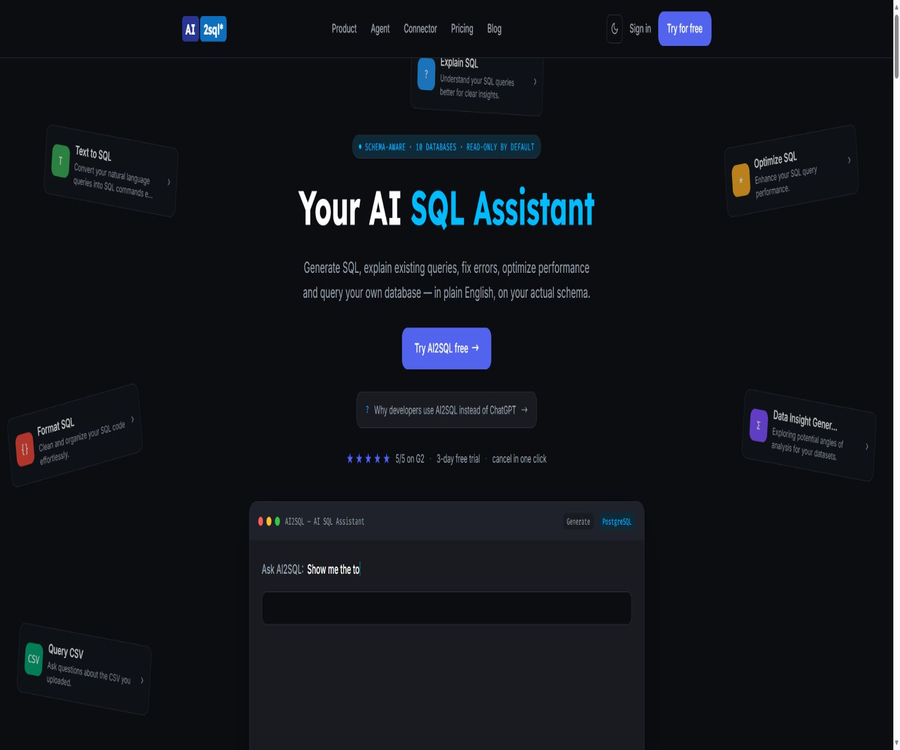
ai2sql
ai2sql, an intelligent tool focused on AI-driven design
Tags:AI design toolsWhat is AI2SQL?
AI2SQL is an AI database assistant that can convert natural language queries into statements in the syntax of the target database; it also provides functions for SQL interpretation, correction, formatting, optimization, and read-only execution. Once connected to a database, the system generates statements based on the actual tables, fields, and relationships.
A one-sentence summary
AI2SQL allows users to query their databases using everyday language, while mechanisms such as schema awareness, read-only protection, logging, and the MCP Gateway help reduce the risks associated with direct access to data by generic chat tools.
Core functions
- Convert natural language into SQL queries.
- Read the actual schema to generate table names and connection conditions.
- Explain the execution logic of existing queries.
- Fix grammar, field, and dialect errors.
- Optimize slow queries and explain the reasons for the changes.
- Uniformly format SQL code.
- Execute queries over a controlled read-only connection.
- Provide data capabilities for AI Agents through APIs and MCP.
Natural language generation of SQL
- Describe the business results you hope to achieve.
- Generate queries using the actual table and field names.
- Select the correct syntax based on the target database.
- Handles filtering, aggregation, sorting, and grouping.
- Generate multi-table joins and subqueries.
- Return the SQL query along with a textual explanation.
- Manual confirmation of the business meaning is still required before execution.
Schema awareness
After connecting to the database via AI2SQL, it reads the tables, columns, data types, and relationships in order to create a semantic context that is used to generate queries. Users do not need to copy the database structure into the chat window each time.
- Identify the actual tables and columns that exist.
- Use the field types of the selected database.
- Generate connection conditions based on the relationships.
- Reduce fictional fields and incorrect dialects.
- It supports mapping business terms to data objects.
- After a change to the schema, it is necessary to resynchronize it promptly.
SQL Explanation
- Explain, section by section, what task the query performs.
- Explain the SELECT fields and calculation expressions.
- It explains the logic of connection, filtering, and aggregation.
- Help take over inquiries left by others.
- It is suitable for learning SQL syntax and concepts.
- Explanations may overlook hidden business assumptions.
SQL repair
- Identify grammar errors.
- Correct the table and field names.
- Handle database dialect incompatibilities.
- Make the modifications based on the error message.
- Explain the reason for the failure of the original query.
- After the repair, the results should be verified in a testing environment.
SQL optimization
- Rewrite the inefficient connection and filtering logic.
- Potential missing indexes have been identified.
- Reduce unnecessary fields and redundant scans.
- Optimized query candidates are provided.
- Explain the approach to performance improvement.
- True performance must be evaluated in conjunction with the execution plan and the volume of data.
SQL formatting
- Standardize keyword casing.
- Adjust indentation and line breaks.
- Split complex conditions and joins.
- Improve the readability of code reviews.
- Suitable for organizing before submitting to the code repository.
- The team should still adhere to a unified format standard.
Query execution
The cloud connection mode allows queries to be executed over read-only connections, with the resulting data rows returned to help users verify whether the answers are reasonable. The execution capabilities must not bypass data permissions, audit mechanisms, and data masking policies.
- Select the target database connection.
- Run the verified read-only query.
- View the returned rows on the page.
- Save the query for reuse by the team.
- Records the execution identity and query logs.
- Large queries should have increased timeout and resource limits.
CSV queries and data insights
- After uploading the CSV, ask questions in natural language.
- Generate queries suitable for data analysis.
- Identify potential analytical perspectives.
- Used for temporary data exploration.
- Sensitive personal information should be removed before uploading.
- As a result, it is necessary to check the data types and missing values.
Supported databases
| Database | Main dialects or uses | Pay attention to the package details. |
|---|---|---|
| PostgreSQL | PostgreSQL SQL | Start and above |
| MySQL | MySQL SQL | Start and above |
| SQL Server | T-SQL | Start and above |
| Oracle | Oracle SQL and PL/SQL | Connection capacity depends on the package. |
| Snowflake | Snowflake SQL | Advanced plan |
| BigQuery | GoogleSQL | Advanced plan |
| Amazon Redshift | Redshift SQL | Advanced plan |
| MongoDB | Query and aggregation syntax | Advanced plan |
| SQLite | SQLite SQL | Supports generation |
| Firebird | Firebird SQL | Supports generation |
Cloud database connection
- Connect using a read-only database account.
- Read the Schema to establish a context.
- Generate and run queries in the cloud interface.
- Credentials are stored in an encrypted manner.
- Do not expose unnecessary ports to the public network.
- The production environment should be further restricted through network and IP rules.
AI2SQL Connector
Connector is a lightweight application that runs on the local machine or within an enterprise network; it is used to access local databases that AI2SQL cannot connect to directly from the cloud. It reads the schema and sends queries to AI2SQL, along with the names of tables and data types, but it does not transmit database passwords or the data rows contained in those tables.
- It supports Windows, macOS, and Linux.
- Connect to databases on the local machine or in a private network.
- There is no need to open inbound ports.
- There is no need to configure tunnels or modify the firewall.
- It supports MySQL, PostgreSQL, and SQL Server.
- Use the existing AI2SQL account and plan quota.
- Whether to execute the generated SQL is decided by the user in their own tool.
Connector data boundaries
| Data category | Send to AI2SQL? | Explanation |
|---|---|---|
| Database username and password | Do not send | To be used only by the local connector. |
| Data rows in the table | Do not send | Connector only reads Schema metadata. |
| Connection address | Do not send | Retained on this device |
| User questions | Send | Used to generate SQL |
| Select the table name and data type. | Send | Used for schema awareness |
| AI2SQL login token | Stored on the local machine | Protect using owner permissions |
Known limitations of Connector
The official page states clearly that the connection between the Connector and the database does not use TLS at present. This has little impact on databases located on the same machine; however, when connecting to other servers in the local network, the Schema metadata is transmitted in plain text across that network. In sensitive environments, it is necessary to wait for TLS support to be available or to adopt other security measures.
- The initial download of the file has not yet been completed; the signing by Apple and Microsoft is still pending.
- The system may display a security interception message.
- The LAN segment for database connections does not currently have TLS.
- To generate queries, it is still necessary to connect to the AI2SQL cloud interface.
- The current local connector supports only three types of databases.
- Companies should first conduct a review of the software’s origin and security.
MCP Gateway
The AI2SQL Gateway enables Cursor, Claude, ChatGPT development modes, as well as custom-built agents to query databases via governed MCP endpoints. It applies read-only rules, rate limiting, and auditing before queries reach the database.
- Create separate keys for different Agents.
- Limit the Schemas visible to each Agent.
- It allows for the description of schemas and the execution of queries.
- Intercept writes and dangerous DDL statements.
- Log the key, time, query, and result status.
- In the event of an anomaly, the key can be revoked quickly.
- It is still necessary to set read-only permissions on the database side as an additional layer of protection.
Read-only security control
- INSERT, UPDATE, and DELETE are denied by default.
- Intercept DDL operations such as DROP.
- Prevent multiple statements from being entered.
- Function to restrict reading of server files.
- Classification is completed before the statement reaches the database.
- Keep logs for each call.
- The database account itself should also be granted only SELECT rights.
REST API
- Applications are allowed to submit natural language questions.
- Generate SQL that conforms to the target Schema.
- Provides controlled query capabilities for AI Agents.
- Metering and recording are done on a call basis.
- The public page for Business or enterprise plans includes API capabilities.
- Production integration should verify the rate, timeouts, and error formats.
Desktop version
- Used to connect to on-premises or VPC databases.
- The current main site indicates that Pro includes desktop capabilities.
- It can be used on Windows and macOS.
- The Connector page also offers a Linux build.
- Database credentials are retained on the local machine.
- AI generation still relies on cloud services.
Which users are it suitable for
- Analysts who are aware of business issues but not familiar with SQL connections.
- Backend developers who need to explain and optimize queries.
- Data engineers who handle data from multiple database dialects simultaneously.
- Students and beginners who are learning SQL.
- Teams that need to allow AI Agents to access databases securely.
- Developers who use local or private network databases.
- Teams that wish to share query databases and permissions.
Typical use cases
- Calculate revenues for various regions based on sales data.
- Generate complex multi-table join queries.
- Explain long SQL in legacy systems.
- Fix dialect errors after database migration.
- Optimize slow report queries.
- Let the internal agent answer read-only business questions.
- Query the schema of the local development database.
- Save commonly used analyses as a team query database.
It’s not very suitable for which situations
- Applications that require automatic modification of production data.
- Organizations that require SQL to be generated entirely offline.
- Sensitive environments, such as table names and questions, cannot be sent to the cloud.
- A platform with complete BI dashboards and visualizations is needed.
- Processes that require AI to independently decide on financial or operational actions.
- Teams that lack a foundation for database permission governance.
- Developers who wish to obtain the complete source code of the platform in order to deploy it on their own.
Current price plan
As of August 2026, the homepage offers three dollar-based subscription plans: Start, Pro, and Team, along with a 7-day trial period. The separate pricing page still features the old Pro and Business options; therefore, it is necessary to refer to the payment page within the application before making a purchase.
| Package | Monthly payment | Annual equivalent | Main limit |
|---|---|---|---|
| Start | $ | 7 dollars per month | 100 SQL queries per month |
| Pro | $ | 14 dollars per month | No restrictions on SQL queries |
| Team | 39 dollars per month | $ | Governance for 5 users and teams |
| Enterprise | Contact sales | Customization | Local deployment, fine-tuning, and enterprise support |
Comparison of package features
| Functions | Start | Pro | Team | Enterprise |
|---|---|---|---|---|
| SQL generation and interpretation | Foundation | Advanced models | Advanced models | Customization |
| Monthly query | 100 times | No restrictions | No restrictions | In accordance with the contract |
| Database connector | Not included | Includes | Includes | Includes |
| Desktop capabilities | Not included | Includes | Includes | According to the plan |
| Shared query database | Not included | Individuals | Includes | Includes |
| Role permissions | Not included | Not included | Includes | Advanced |
| Number of users | 1 person | 1 person | 5 people | Customization |
| Local deployment | Not included | Not included | Not included | Available for provision |
Differences on the price page
During this verification, the dedicated pricing page on the official website still displayed the old pricing structure: Start at $9, Pro at $24, and Business at $39; whereas the home page showed prices of $19 for Pro and $39 for Team. Due to this discrepancy between the two sources of information, the main content of the page uses the updated prices from the home page, with a reminder to check the payment page.
Free trial
- Each current paid plan offers a 7-day trial period.
- The main site states that a bank card is required to start the trial period.
- No charge is incurred on the day of registration.
- It can be canceled in the account before the trial period ends.
- If it is not canceled, it may turn into a paid subscription.
- Some pages mention a quota of 100 free uses, but the actual amount depends on the account.
Subscriptions, automatic renewal, and refunds
- Subscriptions are charged in advance based on the selected cycle.
- Renewal is automatic at the end of each billing cycle.
- Users can cancel renewal on their account page.
- The price adjustment will take effect in the subsequent cycle.
- The fees paid after the subscription begins are non-refundable.
- No refund is provided for unused months.
- It is necessary to decide whether to continue using it before the trial period ends.
Natural Language Generation Tutorial
- Select the target database dialect.
- Connect to a test database or provide the Schema manually.
- Describe the desired result in clear language.
- Specify the date, filtering, grouping, and sorting criteria.
- Check the tables and fields used in the generated statements.
- First, run it in the development environment with a limit on the number of rows returned.
- After verifying the results, save them or continue making modifications.
Tutorials on optimizing slow queries
- Save the original query and the actual execution plan.
- Record the data volume, time taken, and resource consumption.
- Submit the query to Optimize SQL for analysis.
- Check the recommended connections, filters, and indexes.
- Run the candidate versions on the same test data.
- Compare the consistency of results and performance changes.
- Deploy to production only after code review.
Connector usage tutorial
- Download the Connector on the machine that has access to the database.
- Complete the scan of the file’s origin and security.
- Log in using an AI2SQL account.
- Create a read-only database user.
- Enter the connection details and load the Schema.
- Select only the tables required for the task.
- Generate SQL and review its execution in your own database tool.
MCP Agent Integration Tutorial
- Create a read-only database account dedicated to the Agent.
- Create a restricted Agent key in Gateway.
- Limit the number of databases, tables, and queries that can be accessed.
- Configure the MCP endpoint for compatible clients.
- Test reading the Schema and simple aggregate queries.
- It is verified that writes and dangerous statements will be blocked.
- Review the logs after going live and set up alerts for exceptions.
SQL validity risk
- Correct grammar does not mean that the business logic is correct.
- Incorrect connections can lead to duplicate counting.
- Errors can easily occur with NULL values, time zones, and currency handling.
- The aggregated dimensions may not align with the user’s intentions.
- Optimization suggestions may change the semantics of the results.
- Generating queries can place a load on large tables.
- Key reports must be verified by the data owner.
Safety and privacy
- Always use a read-only account on the database side.
- Restrict the schemas and tables visible to an account.
- Do not include confidential data in natural language questions.
- Mask the returned rows and impose a limit on their quantity.
- Monitor the query logs for each key.
- Regularly rotate database and Agent credentials.
- A pre-use assessment of the Connector for use across LANs shows no TLS risks.
- For production procurement, the current privacy and security documents must be verified.
Product advantages
- Generated based on the actual schema rather than generic examples.
- It supports ten databases and their respective dialects.
- It covers generation, explanation, repair, optimization, formatting, and execution.
- The Connector can access local and private network databases.
- Gateway provides a read-only MCP interface for AI Agents.
- Write operations are intercepted before reaching the database.
- Provides REST APIs and team query databases.
- The source code of Connector is made public, which facilitates the inspection of data boundaries.
Product restrictions
- There are differences in the plans between the homepage and the separate pricing page.
- The generated results may still contain errors in business logic.
- The ability to generate connectors relies on cloud APIs.
- The Connector database connection does not use TLS at the moment.
- The Connector file has not yet been signed by the system.
- A bank card is required for the free trial.
- The fees paid after subscribing will not be refunded.
- The full AI2SQL platform is not an open-source project.
- High-risk production queries still require manual intervention and database management.
GitHub and the open-source status
The AI2SQL Connector has an open GitHub repository, and the page clearly states that it is open-source; it can be used to check local schema readings as well as the boundaries of data in the cloud. The AI2SQL cloud generation platform, Gateway, and commercial applications themselves remain closed-source services.
Basic information
| Project | Content |
|---|---|
| Tool name | AI2SQL |
| Operating entity | Cross Regions Technology |
| Tool type | AI-driven SQL generation, optimization, and database Agent Gateway |
| Database | 10 types including PostgreSQL, MySQL, SQL Server, etc. |
| Trial | 7 days, a bank card is required. |
| Starting price | $ |
| API and MCP | Provide |
| Desktop and Connector | Windows, macOS; Connector also available for Linux. |
| Open-source status | The platform is not open-source, while the Connector is. |
Recommendation score
Recommendation score: 4.5 / 5. AI2SQL is suitable for teams that need to generate, understand, and optimize queries against real schemas, and that wish to provide AI agents with controlled read-only database access.
When using it, special attention should be paid to the correctness of SQL operations, minimizing database permissions, encryption restrictions for connections within the local network, and the prices displayed on the settlement page.
Frequently Asked Questions
Is AI2SQL free?
A 7-day trial is available; the homepage also mentions 100 free uses, but for long-term use a paid subscription is required.
What is the lowest price?
The current homepage shows a price of $9 per month for the Start plan, which is equivalent to $7 per month when billed annually.
Which databases are supported?
It supports PostgreSQL, MySQL, SQL Server, Oracle, Snowflake, BigQuery, Redshift, MongoDB, SQLite, and Firebird.
Will the database data be sent to the cloud?
The local connector sends only the issues, the selected table names, and data types; it does not send passwords, connection addresses, or data rows.
Can an AI Agent query a database?
Yes, controlled read-only queries can be provided through the MCP Gateway or REST API.
Will it execute the write statement?
By default, Gateway blocks writes and DDL operations, but the database account itself still needs to be set to read-only.
Can I get a refund?
The terms state that the fees paid after the subscription begins cannot be refunded.
Is AI2SQL completely open source?
No, the Connector is open-source, but the full cloud platform remains a closed-source service.
Can the generated SQL be used directly in production?
It is not recommended; it is necessary to verify the semantics, results, and performance in a testing environment before deployment.
Tools similar to ai2sql



 Guigong Network Security Registration No. 45132202000164