






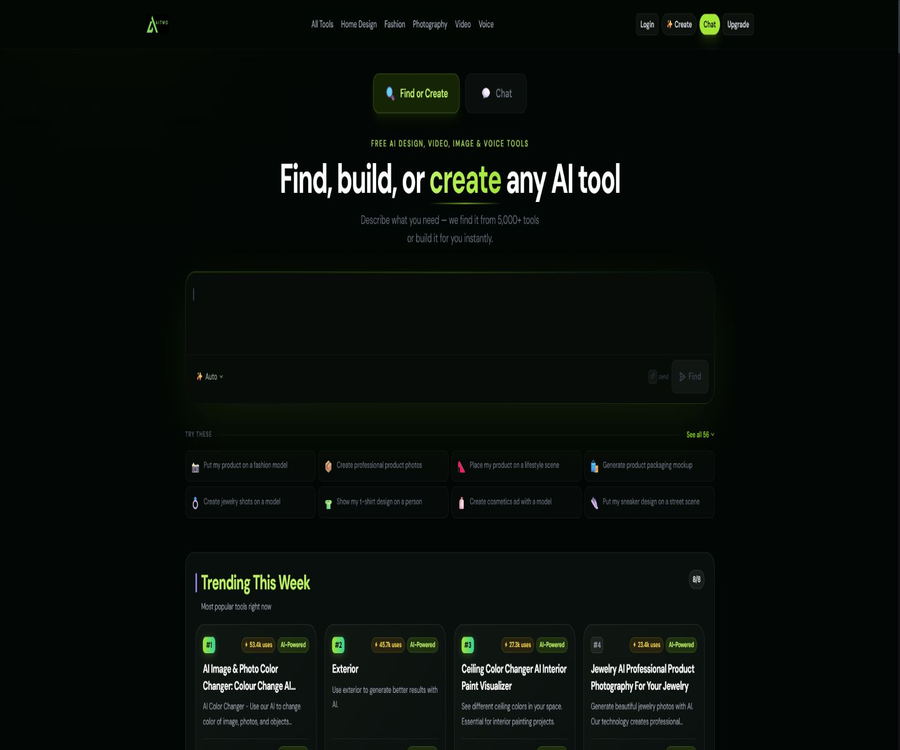
AI TWO
AI TWO: an intelligent tool focused on AI-driven design.
Tags:AI design toolsWhat is AI TWO?
Originally focused on AI-driven home design, AI TWO has now evolved into a comprehensive creation platform that covers images, videos, voice, design, analysis, and custom tools. Users can describe their goals, and the system will match appropriate existing tools or generate a new tool that can be reused and shared.
A one-sentence summary
AI TWO connects thousands of AI tools through a single account and unified points, making it suitable for quickly creating visual content, space redesign plans, product materials, short videos, and voiceovers.
Core functions
- Text-to-image generation and recreation based on reference images.
- Image editing, color adjustment, object removal, and generation of similar images.
- Text to video, image to video, and video to video.
- Visualization of interior and exterior facades, as well as architectural and landscape designs.
- Product photography, packaging renderings, and lifestyle scenes.
- Virtual models, clothing try-ons, and displays of jewelry and shoes.
- Text-to-speech and multi-language dubbing.
- Image and video recognition, evaluation, and content analysis.
- AI chat, assistants, and character creation.
- Create and publish custom AI tools using natural language.
Intelligent tool matching
Users can simply describe the task they want to carry out, and the platform will search the toolkit for a suitable tool for that task. Compared to navigating through various categories one by one, this approach is more suitable for users who have a clear idea of what they need but are not familiar with the specific names of the tools available.
Custom AI tools
- Describe the input, processing method, and output goal in natural language.
- Create a tool page without any programming experience.
- Save tools to handle similar tasks repeatedly.
- Set the tool to public and share it with other users.
- Adjust the purpose and prompts after cloning the community tool.
- Assess the popularity of a tool by observing its actual usage volume.
AI image generation
The image tool supports text-to-image generation, image editing, product modeling, character replacement, and creation of similar images. Users can choose the aspect ratio, style, quality, and model; different models require different amounts of points.
- Create realistic, cinematic, anime, or digital art images.
- Use role references to maintain consistency in character identities.
- Let the system enhance the prompt and add details to the image.
- Choose common ratios such as square, landscape, and portrait.
- Edit the subject, colors, and background in an existing image.
- Generate different visual versions for the same composition.
AI video generation
- Generate short videos based on the text description.
- Create a sense of camera movement in static images.
- Convert existing videos to a new style.
- Use action controls to guide the character’s movement.
- Choose landscape, portrait, or square aspect ratio.
- Estimate the integral based on the model, number of seconds, and resolution.
- Create short video content for social media and advertising.
UGC advertising videos
The UGC workflow allows for the creation of an introductory scene based on the product image, followed by the development of a script and a video. It offers options regarding the audience, video style, aspect ratio, and content format, making it suitable for product demonstrations, unboxing videos, reviews, and lifestyle advertisements.
Speech and text-to-speech
- Convert the script into natural speech.
- Choose from various voices and tones.
- Create video narration, course audio, and podcast drafts.
- Supports multiple languages and different accents.
- It is generated based on the number of characters or the points consumed by the corresponding tool.
- Check the pronunciation of names, numbers, and technical terms before downloading.
Interior design
- Upload room photos and select the design direction.
- Try different furniture, colors, and decoration styles.
- Generate inspiration for living rooms, bedrooms, kitchens, or office spaces.
- Compare the visual effects before and after the renovation.
- Create quick concept diagrams for client communication.
- Test the combinations before purchasing furniture and materials.
Fascade and architectural design
- Redesign the appearance of residences or buildings.
- Try different wall colors, materials, and architectural styles.
- Convert the sketch into a conceptual render that resembles reality as closely as possible.
- Generate variation schemes for doors, windows, roofs, and entrances.
- It is used for preliminary discussions rather than as construction drawings.
- It is reviewed by building professionals prior to the actual renovation.
Landscape and garden design
- Generate landscaping concepts based on courtyard photos.
- Try different plants, paths, and leisure areas.
- Modern, natural, or low-maintenance styles.
- Show the customers the possible directions for renovation.
- Re-screen plants in light of the local climate.
- Check the dimensions, drainage, and maintenance costs before construction.
Product photography
- Convert photos of ordinary products into studio-style visuals.
- Generate scenes with a white background, as well as lifestyle and holiday scenes.
- Materials for packaging, accessories, clothing, and cosmetics.
- Create multiple visual versions of ads quickly.
- Keep the main product intact and replace the environment.
- Check the logo, text, and product structure before publishing.
Fashion and virtual models
- Display the clothing on AI models.
- Create images of jewelry, shoes, and accessories.
- Try different groups of people, scenarios, and poses.
- Generate e-commerce lists and social media content.
- Perform virtual try-ons and style previews.
- Avoid using the generated results as a guarantee of the actual size.
Identification and analysis tools
- Identify plants, animals, tools, and common objects.
- Analyze clothing, rooms, and visual style.
- Extract contextual clues from images or videos.
- Use the recognition results for learning or preliminary screening.
- Important conclusions need to be cross-verified with authoritative sources.
- Medical care, safety, and authenticity verification cannot rely solely on AI.
Community Tool Library
The community page enables users to discover, create, clone, and share tools, and to browse them by popularity, recency, or usage volume. The descriptions of public tools as well as their output quality are determined by their creators; the platform does not provide any professional guarantee regarding their accuracy.
AI TWO Usage Guide
- Register an account to receive the available number of free generations.
- Describe in one sentence what you want to create or edit.
- Select the most suitable tool from the system’s recommendations.
- Upload clear images or videos that are authorized for use.
- Set the mode, scale, style, quality, and model.
- Check the estimated points consumption before generation.
- Check the results and regenerate only the necessary parts.
- After downloading, manually correct the text, facts, and brand details.
Home renovation tutorials
- Shoot the entire space in natural light to minimize obstruction and distortion.
- Select interior, exterior facade, or landscape tools.
- Indicate the structures, furniture, and materials that need to be retained.
- Choose a style and specify the color and functional requirements.
- Generating multiple versions and comparing their feasibility is possible.
- Note down the preferred materials, layout, and lighting features.
- Have designers or construction workers check the dimensions and safety.
E-commerce asset tutorial
- Prepare clear, unobstructed original images of the products.
- Choose product photography, virtual models, or UGC tools.
- Describe the brand positioning, target audience, and distribution channels.
- Generate different ratios suitable for listing pages and advertisements.
- Check the product structure, labels, colors, and logo.
- Manual photo editing and color calibration are performed on the qualified versions.
- Track the click and conversion performance of different materials.
Which users are it suitable for
- Creators who need to produce images and short videos quickly.
- E-commerce sellers who create marketing materials for products.
- Interior and landscape designers who create conceptual plans.
- Real estate professionals who showcase the potential of properties.
- A brand team that creates visuals for fashion and accessories.
- Creators of courses and videos that require multilingual dubbing.
- Users who want to create small AI tools using natural language.
Typical use cases
- Quickly compare various styles for home renovation.
- Convert the original product image into an advertisement scene image.
- Create visuals, scripts, and voiceovers for short videos.
- AI model images for creating clothing and jewelry.
- Generate social media avatars, covers, and post content.
- Identify the objects in the image and obtain a preliminary description of them.
- Create a custom tool that can be reused by a team.
It’s not very suitable for which situations
- Construction projects that require precise dimensions and construction documents.
- Videos that require long, continuous storytelling and precise physical effects.
- Free accounts that contain confidential, unreleased, or personally sensitive images.
- A production process that ensures completely reproducible results is required.
- Users who do not accept refunds after purchasing a subscription are not allowed.
- Development teams that need public APIs or local deployment.
- Scenarios that require professional opinions in law, medicine, or safety.
Rules for free use
The official website currently allows trials to be started without a credit card, and it provides a limited number of free generations per account. The specific number of generations varies depending on the tool, the activity, and the account status; the usage amount displayed next to the generation button should serve as a guide for that particular operation.
Points consumption
- Different tools and models consume different amounts of points.
- The image model currently shows examples at a frequency of about 1.5 to 8 points per time.
- Videos are usually priced based on the model and the number of seconds generated.
- Higher quality, longer duration, or more complex processes require more resources.
- The footage, scripts, and videos related to the UGC process may incur charges separately.
- Check the estimated consumption before regenerating.
- The scoring rules may change depending on the model cost.
Subscription price
As of August 2026, the homepage of the official website displays three weekly payment options along with time-limited discounts. Other pages may show different options depending on the region, billing cycle, or version of the offer; the details provided on the settlement page after logging in shall prevail.
| Package | Current weekly fee | Weekly points | Suitable for users |
|---|---|---|---|
| AITwo Basic | 6.99 dollars | 100 | Low-frequency creation and home inspiration |
| AITwo Plus | 9.99 dollars | 300 | Designers, real estate, and mid-frequency creation |
| AITwo Premium | 14.99 dollars | 500 | High-frequency vision and professional content creation |
Comparison of package features
| Functions | Basic | Plus | Premium |
|---|---|---|---|
| Tool library access | Support | Support | Support |
| Download without watermarks | The official website indicates support. | The official website indicates support. | The official website indicates support. |
| Commercial use | The official website indicates that it includes it. | The official website indicates that it includes it. | The official website indicates that it includes it. |
| Weekly points | 100 | 300 | 500 |
| Equipment | Multiple devices | Multiple devices | Multiple devices |
| Unsubscribe | Cancel at any time | Cancel at any time | Cancel at any time |
How to choose a package
- First, use the free trial sessions to test the stability of the target tool.
- Count the number of retries required to obtain a valid image.
- Video users have their weekly points calculated based on the number of seconds.
- For low-frequency users, compare Basic with the actual one-time cost first.
- E-commerce and design teams should reserve resources for generating multiple versions.
- Verify whether the points are reset at the end of each weekly cycle.
- Before making the payment, check the billing cycle, taxes, discounts, and the price of the renewal.
Cancellation and refund policy
- Users can request to cancel their subscription at any time.
- Once canceled, it can be used until the end of the current billing cycle.
- The subscription will not be renewed after the cycle ends.
- Subscription fees and processing fees are generally non-refundable.
- Access to the digital content is granted immediately upon purchase, which constitutes a waiver of the right to withdraw.
- The platform explains that refunds are not provided due to GPUs that have already been reserved and the resulting immediate costs.
- In the event of duplicate charges, save the relevant proof and contact support as soon as possible.
Commercial use and copyright
The FAQs on the official website state that the generated results can be used for both personal and commercial projects, including marketing efforts, customer presentations, product listings, and social media. However, commercial use does not mean that the platform eliminates the risks related to trademarks, portraits, licensing of materials, and similar issues.
- Only upload materials that you own or for which you have authorization.
- Check the people and brand logos in the generated image.
- Avoid creating misleading endorsements or fake product displays.
- Retain the input materials, generation records, and evidence of manual modifications.
- Different models may have additional terms of use.
- High-risk ads are subject to legal and platform policy reviews prior to publication.
Privacy and rules for the public display of images
The privacy policy specifies that images uploaded or created by free users are public, while the renderings of paid subscribers are private. This is a key difference that must be taken into consideration when choosing between a free and a paid account.
- Do not upload confidential client information or sensitive images of private residences to free accounts.
- The people, addresses, and file information in the image should be obscured first.
- The platform collects email addresses, unique identifiers, uploaded images, and usage data.
- The data used may include IP address, browser, page, and time spent.
- Service providers, regulatory authorities, or transaction recipients may obtain the necessary data.
- Personal information will be retained as required by the services and laws.
- Users may apply, in accordance with the applicable rules, to access, correct, delete, or restrict processing.
Cookies and third-party services
- Essential cookies are used for logging in and for the functionality of the website.
- Microsoft Clarity is used for analysis.
- The Facebook Pixel is used for marketing and advertising measurement.
- Crisp Chat is used for online chatting.
- Rejecting certain cookies may affect some functions.
- The uploaded content may be processed by the service provider that offers the model or infrastructure.
Content accuracy and security
- Visual renderings may alter the actual structure and proportions.
- Images generated for products may distort colors, materials, and labels.
- The video may contain errors in movement, text, and physics.
- The voice may mispronounce names, numbers, and technical terms.
- The identification results cannot replace professional assessment.
- It must be checked by someone familiar with the business before it is released.
- Construction, medical, and safety decisions require qualified professionals.
Product advantages
- One account covers images, videos, audio, and design.
- There are a large number of tools, with wide applicability.
- It allows for quick matching of the desired tool using natural language.
- It supports creating, cloning, and sharing custom tools.
- Tools for home, fashion, and product photography are relatively concentrated.
- Unified scoring makes it easier to experiment with different forms of creation.
- Free generation is provided for verifying the effectiveness.
- The official website clearly states that commercial use is allowed and that downloads are available without watermarks.
Product restrictions
- There are many tools, but their quality and maintenance status may vary.
- Prices may vary depending on the page, region, and promotion.
- A weekly subscription can be easily mistaken for a monthly fee.
- Videos and advanced models can quickly consume points.
- For free users, their images are publicly visible by default, which poses a higher risk of containing sensitive content.
- No refunds are available for subscription and processing fees.
- AI-generated designs cannot be used directly as a basis for construction.
- Complex images and videos require multiple attempts.
- No public developer API or official SDK was found.
- The platform is not an open-source project.
APIs and developer capabilities
During this verification, no API keys, SDKs, Webhooks, or documentation regarding pricing for developers were found. The platform’s reference to creating custom AI tools refers to its built-in no-code capabilities; it should not be interpreted as open APIs that can be integrated into third-party products.
GitHub and the open-source status
No official GitHub organization or source code repository for AI TWO that can be verified through official domain names or team introductions was found. The accounts with similar names such as Two-Ai identified in the search have no verifiable connection to this product, and therefore cannot serve as evidence of an official open-source version.
Basic information
| Project | Content |
|---|---|
| Tool name | AI TWO |
| Product positioning | Integrated AI creation and custom tool platform |
| Main types | Images, videos, audio, home, fashion, and analysis |
| Number of tools | The official website lists over 5,000 items. |
| Price pattern | Free generation and points-based subscription |
| Current public cycle | Weekly payment |
| Commercial use | The official website currently indicates that support is available. |
| Free image privacy | Public |
| Paid rendering privacy | Private |
| Open-source status | Not open source |
Recommendation score
Recommendation score: 4.2 / 5. AI TWO is suitable for users who wish to experiment with images, short videos, voice content, home design, and e-commerce materials on a single platform; its customizable tools and specialized studios are very useful.
Free image availability, weekly subscriptions, non-refundable nature, differences in point consumption, and the accuracy of the generated results are the key aspects to consider before using it.
Frequently Asked Questions
Is AI TWO free?
You can start for free and get a limited number of generations; more usage and advanced models require a subscription with points.
Can AI TWO only be used for designing rooms?
No, it also covers images, videos, audio, product photography, fashion, analytics, and custom tools.
Can videos be created?
Yes, it supports modes such as text to video, image to video, video to video, and motion control.
Is it suitable for commercial use?
The official website states that the generated results can be used in commercial projects, but users still need to address issues related to the use of materials, portraits, trademarks, and advertising compliance.
Are the pictures on free accounts private?
It is not private; the privacy policy states that images of free users are public, while the rendered results of paid subscribers are private.
How are points spent?
Consumption depends on the tool, model, quality, and video length; before starting the operation, check the estimated points displayed next to the generate button.
Can I cancel my subscription?
It can be canceled at any time; renewal will stop once the current period comes to an end.
Can I get a refund?
Generally, this is not possible; the official refund policy specifies that subscription fees and processing fees are not refundable.
Are APIs provided?
No public developer API or SDK documentation was found.
Is AI TWO open source?
It is not open source, and no verifiable official source code repository has been found.
Tools similar to AI TWO



 Guigong Network Security Registration No. 45132202000164