






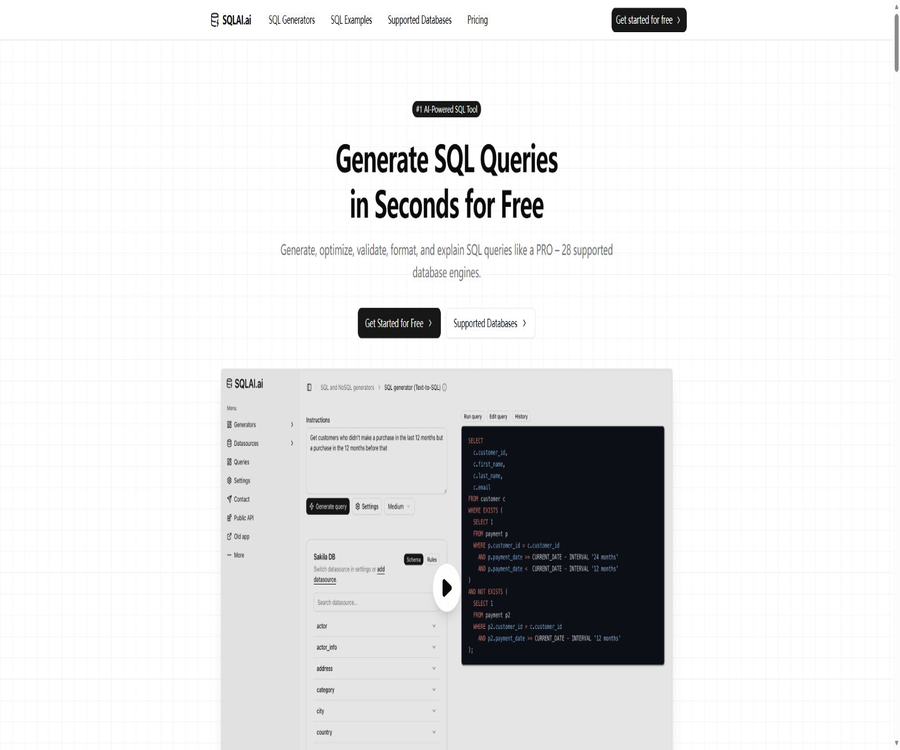
AI SQL BOT
AI SQL BOT – an intelligent tool designed with AI in mind.
Tags:AI design toolsWhat is SQLAI.ai?
SQLAI.ai is a set of AI-powered SQL and NoSQL tools designed for data analysts, developers, students, and teams. Users can generate queries using natural language, and they can also optimize, validate, explain, format, and convert existing SQL queries.
A one-sentence summary
SQLAI.ai improves the quality of query generation by taking into account database dialects, schema context, and rules; however, SQL statements in production environments still require manual review, access controls, and verification using real data.
Core functions
- Convert natural language requests into SQL or NoSQL queries.
- Optimize slow queries and explain the reasons for the changes.
- Check for grammar and potential errors and provide corrections.
- Explain step by step the execution logic of complex SQL queries.
- Format queries according to unified rules.
- Convert SQL between different database dialects.
- Import a Schema or connect to a database to obtain the context.
- Leverage public APIs to integrate generation capabilities into other applications.
Natural language to SQL
- Describe the required data in everyday language.
- Generate filtering, aggregation, sorting, and joining queries.
- It supports multilingual prompts and various database dialects.
- After adding a Schema, you can reference the actual table names and column names.
- The results can be adjusted through iterative suggestions.
- Complex business criteria still require confirmation by the data owner.
SQL optimizer
- Analyze the performance issues of existing queries.
- Provides suggestions related to indexing and query rewriting.
- Show the differences before and after optimization.
- Explain the potential impact of each modification.
- Each time the optimizer is used, 2 query credits are consumed.
- It is recommended to verify this in conjunction with the actual execution plan and the amount of data.
SQL validator
- A SQL syntax issue was detected.
- Check the query against the target database dialect.
- AI-assisted repair and guidance are provided.
- Help identify syntax differences across databases.
- Each time the validator is generated, 2 query credits are used.
- AI verification cannot replace the actual parsing done by the database engine.
SQL interpreter
- Explain the purpose of the query in natural language.
- Break down joining, filtering, and aggregation by clauses.
- Help beginners understand unfamiliar SQL.
- Assist the team in reviewing and drafting documents.
- Complex stored procedures can still be simplified or misunderstood.
- Sensitive constants and business information should be removed before explanation.
SQL formatting and conversion
- Uniform indentation, line breaking, and keyword styling.
- Improve code review and maintainability.
- Convert queries between different database engines.
- Preliminary rewriting to assist in database migration.
- Functions, dates, pagination, and type semantics may vary.
- After the conversion, tests must be run to verify that the results are consistent.
Schema context
- Import the database structure without necessarily connecting to real-time data.
- Help AI understand tables, columns, and relationships.
- Reduce the number of fictional table names and field names.
- The Schema object is automatically suggested in the prompt.
- It supports large Schema scenarios with over 900 tables.
- The schema itself can also reveal sensitive business structures.
Data source rules
- Save reusable commands for each data source.
- The identifier is required to use a specific referencing method.
- Limit the default number of rows returned.
- Constraints on the filtering conditions that must be used.
- Standardize the rules for generating SQL within the team.
- Incorrect rule configuration may be applied repeatedly to all queries.
Database connection
SQLAI.ai supports the import of schemas, and it also provides real-time connections to certain databases. The official website lists MySQL, PostgreSQL, SQL Server, Oracle, MariaDB, and MongoDB as databases that allow real-time connections; many other database engines rely on the schema approach instead.
- After connection, queries can be generated in the actual context.
- You can run the generated query and view the results.
- The official homepage emphasizes that read-only permissions should be used for connections.
- The production database should be connected to read-only replicas first.
- Permissions for creating, updating, deleting, or managing tables must not be granted.
- Before running it for the first time, check the query range and the number of rows returned.
Supported databases
The official database catalog lists 28 different engines, covering relational, analytical, NoSQL, graph databases, and query layers. It is necessary to check separately whether each engine supports real-time connections.
| Category | Quantity | Represents the database |
|---|---|---|
| Relational | 10 types | MySQL, PostgreSQL, SQL Server, Oracle, MariaDB, SQLite, DB2 |
| Analytical | 10 types | Snowflake, BigQuery, Redshift, Hive, ClickHouse, Presto, Trino |
| NoSQL | 3 types | MongoDB, Cassandra, DynamoDB |
| Graph database | 2 types | Neo4j, OrientDB |
| Query layer | 3 types | GraphQL, PartiQL, Salesforce SOQL/SOSL |
Real-time connection and Schema mode
| Method | Suitable situations | Main risks |
|---|---|---|
| Real-time read-only connection | It is necessary to run the query directly and view the results. | Credentials, permissions, query load, and data export |
| Import Schema | Just generate SQL with the correct dialect. | Structural information leakage and expired schema |
| Manually describe the structure | Test simple queries or learn. | Incomplete context leads to field hallucinations. |
Query editing and difference viewing
- Modify the AI results in the full query editor.
- View the differences between the original SQL and the rewritten SQL, item by item.
- Retain manual control rather than accepting the output directly.
- It automatically suggests tables and columns in line with the schema.
- Queries can be tested on the connected data source.
- Transactions, row count limits, and timeouts should still be used before execution.
SQLAI.ai Usage Guide
Generate queries in natural language
- Select the target database engine.
- Import a Schema or create a custom data source.
- Describe the business issue, time range, and output fields.
- Add aggregation criteria, sorting, and row count limits.
- Generate SQL and check the table names, connections, and filtering conditions.
- Run it first in the test database or read-only copy.
- Use it after comparing the results with known samples.
Optimize a slow query
- Copy the query and remove sensitive data.
- Select the correct database dialect.
- Submit the query and the necessary Schema to the optimizer.
- Read the reasons for the modifications and the difference view.
- Obtain the actual execution plan and baseline execution time.
- Compare the consistency of results on the same data.
- It will be put online after being reviewed by the database administrator.
Securely connect to the database
- Create a dedicated read-only database account.
- Limit the accessible databases, schemas, tables, and rows.
- Priority is given to connecting to the masked replica or analysis warehouse.
- Set IP restrictions, connection timeouts, and query timeouts.
- Add a data source in SQLAI.ai and test it.
- Check the audit logs and abnormal queries.
- Revoke the credentials and delete the data source when it is no longer in use.
Which users are it suitable for
- Students learning SQL syntax and query structures.
- Data analysts who need to quickly generate reports and perform queries.
- Developers who diagnose and optimize SQL queries.
- Migration teams that need to convert queries across databases.
- Product and operations personnel who wish to understand legacy SQL.
- Application teams that need to integrate SQL generation through APIs.
- Data teams that hope to have unified query standards.
Typical use cases
- Convert business issues into a preliminary draft of SQL queries for reports.
- Explain complex joins and subqueries.
- Check cross-engine syntax compatibility.
- Provides directions for rewriting slow queries.
- Format SQL according to team standards.
- Convert from dialects such as MySQL to other engines.
- Add natural language to SQL conversion functionality to the product.
When it is not suitable
- Allow AI to have write or management permissions for the production database.
- A formal proof is needed to show that the query is absolutely correct.
- Data cannot be sent to third-party services.
- It is intended to completely replace database administrators.
- Execute delete or update statements without any review.
- Deciding to produce indexes at high cost based solely on AI suggestions.
Packages and prices
SQLAI.ai currently offers four tiers: Hobby, Starter, Explorer, and Pro. Each of these tiers comes with a 7-day free trial that can be canceled at any time. The annual pricing shown on the official website is equivalent to two months of service for free; however, there is a difference between the annual fee displayed there and the monthly price – the amount indicated on the payment page should be taken as the accurate figure.
| Package | Monthly payment | Annual payment page | Check credit limit | Team |
|---|---|---|---|---|
| Hobby | $ | $ | 50 times per month | Not included |
| Starter | $ | $ | 200 times per month | Not included |
| Explorer | 10 dollars per month | 120 dollars per year | 1000 times/month | Not included |
| Pro | $ | $ | 3000 times/month | Includes |
How is the query limit calculated?
- Normal generation typically consumes 1 query quota.
- The SQL optimizer is used 2 times each time.
- The SQL validator consumes 2 units each time.
- Public API requests typically consume 3 quota units.
- API requests for large database schemas may consume 5 quota units.
- Repeated trial and error will quickly deplete the quota of the lower-tier plan.
- When making purchases, estimates should be based on the type of tool rather than just on the number of requests.
Free trial
- All four package options come with a 7-day trial period.
- The database page on the official website states that no credit card is required to start using it.
- The actual payment requirements shall be in accordance with the registration and settlement pages.
- The trial period is suitable for testing the dialect of the target database.
- It is necessary to verify simultaneously the schema, connection, and query quota usage.
- Check whether it will automatically switch to a paid version before the trial period ends.
How to choose a package
- For occasionally learning and creating simple queries, Hobby can be considered.
- For about 200 uses per month, the Starter plan can be considered.
- High-frequency personal analysis is suitable for Explorers.
- Consider Pro when a team and a larger budget are needed.
- For APIs and larger quotas, the Pro or XL plans need to be checked.
- Allocate a double amount when using the optimizer and validator frequently.
- Verify the target database and security processes before subscribing annually.
Cancellation and refund
- The official price page states that cancellation is possible at any time.
- Cancellation usually stops subsequent automatic renewals.
- To determine whether a refund is available for the paid cycle, it is necessary to check the current terms.
- Do not cite the refund policies of other SQL tools with the same name.
- Before purchasing an annual plan, it is necessary to confirm the rules regarding refunds and downgrades.
- Save records of payments, cancellations, and customer service interactions.
Public API
- SQLAI.ai offers public API access.
- It is possible to integrate AI-generated content and RAG capabilities into applications.
- A standard API request typically consumes 3 query credits.
- A large Schema request may consume 5 quota units.
- The key must be stored on the server side.
- It is necessary to configure throttling, logging, and budget alerting.
- Check the endpoints, models, and plan permissions before going live.
Database security
- Connect using only a dedicated read-only account.
- Apply the principle of least privilege at the table, column, and row levels.
- Give priority to connecting to masked data or read-only replicas.
- Direct write operations performed by AI-generated processes are prohibited.
- Set query timeout, result limit, and resource constraints.
- Regularly rotate passwords and delete unused connections.
- Audit logs are retained for queries and exports.
Sensitive data and privacy
- The schema name may reveal the business structure.
- The query text may contain customer or transaction information.
- Replace the real name, account, and password before submission.
- Do not include production credentials in the prompt.
- Companies should review their data retention and model training policies.
- Regulated data requires approval from the legal and security teams.
- Confirm the data location requirements before cross-border processing.
Risks of AI-generated SQL
- It is possible to reference non-existent tables or fields.
- Incorrect connection conditions can result in duplicate or missing data.
- Null values, time zones, and date boundaries may not be handled properly.
- The aggregated metrics may not align with the business definitions.
- Queries can trigger a full table scan and result in high cloud costs.
- The semantics of the transformed function may change.
- Just because something seems to run does not mean that the results are correct.
Production launch inspection
- Have someone familiar with data models review the SQL.
- Verify tables, columns, joins, and filtering conditions.
- Verify the results using a small sample.
- View the execution plan and the amount of data scanned.
- Set limits on the number of rows, cost, and execution time.
- Execute update or migration statements in the testing environment.
- Include the final SQL in version control and code review.
Product advantages
- It covers generation, optimization, verification, explanation, formatting, and conversion.
- It supports 28 types of databases as well as various data types.
- The Schema context can reduce field illusions.
- Some mainstream databases support real-time connections.
- It features rules, automatic suggestions, and the ability to handle large schemas.
- The difference view and editor maintain manual control.
- The prices and limits for the four-tier packages are relatively transparent.
- Provides team capabilities and public APIs.
Product restrictions
- SQL generated by AI does not guarantee correct business logic.
- Connecting to a database increases the risks related to credentials and data security.
- Most engines only support the Schema mode, rather than real-time connections.
- The optimizer and validator consume double the quota.
- API requests consume more query quotas.
- The number of monthly queries allowed under the basic package is limited.
- The annual fee and the conversion to a monthly price are to be confirmed at the time of settlement.
- Complex storage procedures and migrations still require expert handling.
- The platform itself is not an open-source project that can be deployed on one’s own.
GitHub and the open-source status
No official, complete source code repository that can be verified on the SQLAI.ai website was found. The repositories with similar names in the search results are likely to be those introduced by third parties, clones, or other projects, and cannot serve as evidence of an open-source version of this platform.
Basic information
| Project | Content |
|---|---|
| Tool name | SQLAI.ai |
| Tool type | AI SQL and NoSQL generation tools |
| Number of databases | The official catalog lists 28 types. |
| Core tools | Generate, optimize, verify, explain, format, and convert |
| Minimum payment amount | Hobby: $4 per month |
| Free trial | 7 days |
| Team features | Pro includes |
| Public API | Provide |
| Real-time connection | Some databases provide support. |
| Open-source status | Not open source |
Recommendation score
Recommendation score: 4.5 / 5. The SQLAI.ai toolset is comprehensive, covering a wide range of databases; it supports schemas, rules, connections, and APIs, making it suitable for learning and improving SQL productivity. For use in production environments, read-only permissions, manual review, and verification against real databases are still necessary.
Frequently Asked Questions
Is SQLAI.ai free?
A 7-day trial is available; for long-term use, you need to choose one of the Hobby, Starter, Explorer, or Pro packages.
How much is SQLAI.ai?
The monthly fees for Hobby, Starter, Explorer, and Pro are 4, 6, 10, and 20 dollars respectively.
How many types of databases are supported?
The official database catalog currently lists 28 types of relational, analytical, NoSQL, graph databases, and query layers.
Can it be connected to a real database?
Some of the mainstream databases support real-time connections, while other databases allow the import of schemas; in a production environment, only read permissions should be granted.
Can slow queries be optimized?
Yes, the optimizer will provide revisions and explanations, but it is necessary to test them in conjunction with the actual execution plan.
How is the query quota deducted?
Normal generation usually occurs once, while the optimizer and validator are used twice; public APIs are called three times in general, and large Schema API requests may require up to five calls.
Does it offer team features?
Available; the current standard price page lists the Teams feature under the Pro plan.
Are APIs provided?
Public APIs are provided, allowing the capabilities related to generation and RAG to be integrated into other applications.
Can SQL generated by AI be run directly?
It is not recommended to run it directly in the production database; instead, permissions should be reviewed and restricted first, and it should be tested in a testing environment.
Is SQLAI.ai open source?
It is not open source, and no complete source code repository for the product that can be verified on the official website was found.
Tools similar to AI SQL BOT



 Guigong Network Security Registration No. 45132202000164