






AI Shopify Landing Page Builder
AI Shopify Landing Page Builder – an intelligent tool focused on AI-driven design.
Tags:AI design toolsWhat is PagePilot?
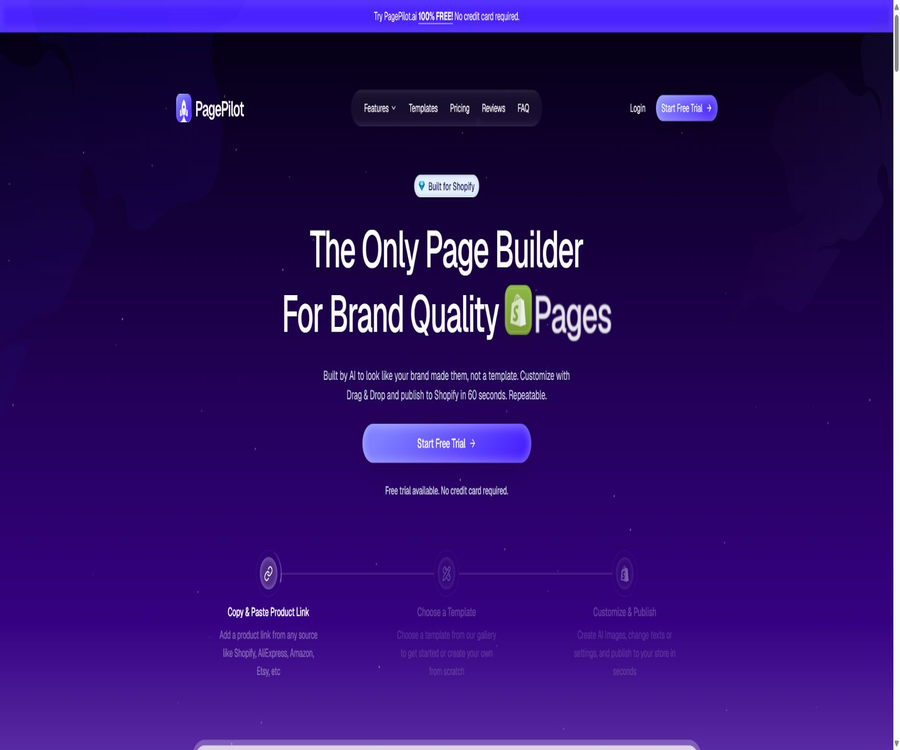
PagePilot is a platform based on AI, designed specifically for Shopify merchants to create product pages, landing pages, and store layouts. Once users paste the links to products from suppliers or other e-commerce sites, the system extracts the images, titles, specifications, and descriptions, and then generates customized copy, page structures, and visual elements.
It offers features such as drag-and-drop page editing, AI-generated product images, advertising materials, the ability to add items to a shopping cart, product research tools, multilingual support, and a free AI-powered store. PagePilot can reduce the time required to create pages, but it does not automatically address issues related to product licensing, advertising compliance, the supply chain, or actual conversion rates.
A one-sentence summary
PagePilot can quickly convert a product link into an editable Shopify product page, which can then be published on the connected store.
Core functions
- Generate product page from link: Extract information from the product link and create a page.
- AI sales copy: Generates titles, selling points, benefits, FAQs, and action buttons.
- Drag-and-drop editor: Adjust blocks, text, images, colors, and spacing.
- Product page template: Uses a DTC page structure tailored for different product categories.
- CRO block: Includes evaluation, comparison, warranty, FAQ, and a persistent purchase button.
- AI product images: Generate scene images, hand-hold images, and advertising visuals.
- Advertising materials: Quickly create static ads and copy from product pages.
- Cart drawer: Enable add-to-cart, countdown, and bundle sales.
- Multilingual: Generate product pages in over 30 languages.
- Brand consistency: Use the same font, colors, and visual style as the store.
- Product selection research: Analyze products based on demand, profit potential, competition, and trends.
- One-click publishing: Import pages and products into a Shopify store.
Supported product sources
| Source of the product | Extractable content | Use reminders |
|---|---|---|
| AliExpress | Images, titles, specifications, prices, and variants | Verify the supplier and material licensing. |
| Amazon | Public product information and visuals | Protected brand content must not be copied. |
| Shopify | Existing public product page information | Only migrate the pages for which access is granted. |
| Etsy | Images, stories, specifications, and personalized options | Respect the copyright of the original sellers. |
| TikTok Shop | Product information and media | Verify region and platform rules |
| Shein and eBay | Products or posted information | Check trademarks, images, and resale rights |
Generation of AI product pages
- Read the main information of the source product.
- Rewrite the copy based on the product perspective selected by the user.
- Select the target audience and highlight the key selling points or core benefits.
- Generate a full page of content in the specified language.
- Apply the currently selected page layout automatically.
- Generate a hero section, benefits section, reviews, FAQ, and purchase section.
- After completion, go to the editor to make manual modifications.
Drag-and-drop page editor
- Drag the blocks to change the order of the pages.
- Add, hide, copy, or delete parts of a page.
- Modify titles, paragraphs, buttons, and labels directly.
- Replace the image and adjust the font, color, borders, and spacing.
- Separate settings are provided for desktop and mobile displays.
- Start with a blank canvas, a template, or an AI page.
- Once the preview is correct, publish it to Shopify.
Templates, blocks, and conversion components
- Hero Section: Displays products and the main action buttons.
- Product image gallery: Supports thumbnails, sliding views, and variant images.
- Evaluation and testimony: Present authentic social proof that has been authorized.
- FAQ: Answers to questions regarding logistics, usage, warranty, and common concerns.
- Comparison table: Explains the actual differences between the product and alternative solutions.
- Combining items and adding extra purchases: increasing the average order value.
- Trust indicator: Only genuine payment and security information that is supported can be displayed.
- Countdown: Applies only to real-time limited-time events.
- sticky purchase button: Keeps the purchase option visible on mobile devices.
- Guarantee area: It must be in line with the actual refund and warranty policies.
AI product images
Users can choose from existing products or upload their own images, after which prompts can be used to create scenes, lifestyle images, and advertising pictures. The system offers AI-generated suggestions, and the resulting images can be downloaded and used on websites or as marketing materials.
- Design scenarios and characters based on the target audience.
- Create diagrams for handheld use, in use, or for indoor/outdoor display.
- Create visual variants for ads and social media.
- Maintaining consistency in the appearance, size, and color of products requires manual inspection.
- Additional review is required when it comes to rights related to characters, trademarks, and locations.
- It is not allowed to use generated images to fabricate the actual functions and effects of a product.
Advertising materials and copywriting
- Extract the ad title and key selling points from the product page.
- Generate static creatives suitable for Meta and Google ads.
- Create multiple angles for small-scale testing.
- Unify the brand expression across pages and ads.
- The policies, prohibited and restricted terms, and verification requirements of advertising platforms still need to be checked manually.
- Advertising revenues cannot be guaranteed based solely on AI predictions.
Product selection research
- Demand is measured using recent search and order signals.
- Compare the supply cost with the suggested selling price to assess the gross profit.
- Assess the level of competition by looking at the number of existing sellers.
- Check the interest curve over the past 90 days to determine the trend direction.
- Filter by categories such as home, beauty, pets, fitness, and seasons.
- A set of suggested candidate products is provided daily.
- Scores can only be used for screening; they cannot replace sample testing and market validation.
Free AI Shopify store
StorePilot is a free AI-powered tool provided by PagePilot for creating Shopify stores; it allows users to set up a basic store with over 30 potential products, based on specific market segments and brand preferences. Users still need to activate a Shopify account and handle matters related to domain names, payments, taxation, logistics, copyright of materials, and store policies on their own.
Tutorials on connecting to Shopify
- In the Stores section of PagePilot, select to connect to a Shopify Store.
- Copy the current store address from the Shopify admin panel.
- Paste the store address into PagePilot and initiate a connection.
- Verify that the page being redirected uses the correct Shopify account.
- Check the connection codes displayed on both sides.
- Check the permissions on the Shopify authorization page and confirm the installation.
- Return to PagePilot to confirm that the store is connected.
- First, use test products to verify publishing, the shopping cart, and theme display.
Tutorial for creating the first product page
- Confirm possession of the commercial rights to the products, images, and text.
- Copy the complete and publicly accessible product link.
- Click Generate in the console and paste the link.
- Choose the target audience, core benefits, or other product aspects.
- Select the page language and the layout suitable for the category.
- Generate the page and check the extracted specifications, prices, and variants.
- Use the drag-and-drop editor to modify text, images, sections, and brand styles.
- It will be released after completing the tests for legal aspects, mobile functionality, and ordering processes.
Published in Shopify tutorials
- Complete page preview and fact-checking in PagePilot.
- Select the target store that is already properly connected.
- Verify the product title, price, inventory, variants, and images.
- Perform the import or publish operation.
- Check the new products and page templates in the Shopify admin panel.
- Preview the actual store on both the desktop and mobile device.
- Test adding to the shopping cart, discounts, variants, and checkout.
- Recover ad traffic only after confirming everything is correct.
Quality inspection of product pages
- Are the title, specifications, materials, dimensions, and compatibility accurate?
- Does the image accurately represent the product received?
- Are there proofs supporting the selling points, and is there no exaggeration regarding medical benefits or outcomes?
- Verify whether the review comes from a genuine customer and has been granted permission for use.
- Whether the prices, discounts, inventory levels, and countdown timers are accurate.
- Are the shipping costs, delivery times, return policies, and warranty terms consistent with those in the backend?
- Check whether buttons, images, and text appear correctly on mobile devices.
- Check whether the page speed, analytics, and advertising pixels are functioning properly.
Which users are it suitable for
- Shopify store owners who need to quickly test their products.
- Entrepreneurs who are not familiar with Liquid, CSS, and page design.
- Teams that need to create product pages for markets in multiple languages.
- Businesses that wish to standardize their product pages, advertisement images, and brand style.
- E-commerce teams that need to create landing pages in bulk.
- E-commerce service providers that create Shopify product pages for customers.
Typical use cases
- Quickly convert AliExpress products into branded test pages.
- Migrate existing Shopify products to the new store and rewrite the pages.
- Create your own standalone website page for original products on Etsy.
- Create page versions from different audience perspectives for the same product.
- Create local language pages for multiple countries.
- Add AI scenario images and advertising materials to products with good performance.
- Use add-to-cart and shopping cart components to increase the average order value.
Scenarios where direct reliance is not appropriate
- There is no resale of products, nor copying of pages with images or brand licenses.
- Medical care, health services, finance, and high-risk performance products.
- Stores that require complex subscriptions, memberships, or customized business logic.
- High-end projects that require precise brand design at the pixel level.
- Consider the product selection score as a guarantee of sales volume or profit.
- Advertising campaigns that have not yet undergone sample verification, supplier verification, and performance validation.
Limits on the free trial period
All packages offer a free trial without the need for a credit card; during this free period, up to 3 product pages can be created and linked to a Shopify store. Free users are not able to publish or import these pages into Shopify, and using the paid publishing features will affect their eligibility for a refund.
Current package price
| Package | Monthly payment | Annual payment conversion | Product page | AI images | Shopify store |
|---|---|---|---|---|---|
| Lite | 39 dollars per month | 33 dollars per month | 10 per month | 50 per month | 1 |
| Starter | $ | $ | No restrictions | 200 per month | 3 |
| Scaler | $ | $ | No restrictions | No restrictions | 5 |
Comparison of package features
| Functions | Lite | Starter | Scaler |
|---|---|---|---|
| Page and Template Editor | Support | Support | Support |
| Publish to Shopify | Support | Support | Support |
| Professional DTC template | More than 8 types | More than 8 types | More than 8 types |
| CRO block | Over 35 types | Over 35 types | Over 35 types |
| Cart drawer and add-to-cart option | Support | Support | Support |
| AI text and image editing | Support | Support | Support |
| Over 30 languages | Support | Support | Support |
| Product page quota | 10 per month | No restrictions | No restrictions |
| AI image quota | 50 per month | 200 per month | No restrictions |
| Number of stores | 1 | 3 | 5 |
Monthly and annual payment
The annual payment option includes 2 months free; the website indicates that the monthly fees for Lite, Starter, and Scaler are 33, 49, and 83 dollars respectively. An annual plan entails a longer commitment, and it is appropriate to choose this option only after verifying page compatibility, usage levels, and business requirements.
How to choose a package
- Consider Lite for single stores with no more than 10 pages per month.
- Consider the Starter option when there are three or fewer stores and products are frequently tested.
- Consider using a Scaler when working with five stores or generating a large number of images.
- First, use 3 free pages to test the theme and publishing process.
- Include Shopify subscriptions, apps, advertising, and image licensing in the total cost.
- Before making an annual payment, confirm the actual average monthly usage of pages and images.
The page after canceling subscription
- Pages created in PagePilot will not be deleted as a result of cancellation.
- Products that have been imported into Shopify will remain there.
- The subscription remains valid until the end of the current billing cycle.
- Once it becomes invalid, it is no longer possible to edit the relevant pages in the Shopify customizer.
- Before cancellation, it is necessary to save backups of the text, images, and page settings.
- If the theme is changed, it may be necessary to resync or import the page.
Refund rules
- Refund requests must generally be submitted within 14 days after the most recent payment.
- The free trial allows you to create 3 product pages.
- A refund is possible only if no new page is created and no store is imported after payment.
- Once you use the paid page to create or import content, you usually lose the right to a refund.
- The annual refund will be deducted based on the monthly fee for the months that were used.
- The processing of refunds usually takes 1 to 2 business days; in special cases, it may take up to 5 business days.
- A small processing fee may apply for a full refund.
Copyright and Material Licensing
According to the PagePilot terms, the images of the landing pages provided or generated by the platform are intended solely for informational purposes; the platform does not claim ownership of these images nor is it responsible for any potential copyright issues. Users must obtain the necessary permissions and approvals from the owners of the images before using them for commercial or non-commercial purposes.
- The ability to read a product link does not mean that the material can be copied freely.
- The supplier’s permission to resell does not mean permission to use all the images.
- The copy, reviews, and page design of other merchants cannot be copied directly.
- Trademarks, characters, packaging, and patents may involve separate rights.
- AI rewriting cannot automatically eliminate the copyright risks associated with the original content.
- Before going live officially, it is necessary to keep records of the supplier’s authorization and the original materials used.
Evaluation and Social Proof
- Only reviews from real customers and verifiable sources are displayed.
- It is not allowed to copy reviews from other merchants’ pages and present them as if they were from customers of this store.
- Stars, the number of people, and sales volume cannot be fabricated by AI.
- Incentive evaluations must comply with local laws and the disclosure requirements of the platform.
- User-generated content and photos require permission to be published.
- Deleting important negative information can lead to misguidance.
Advertising and Consumer Protection
- There must be evidence for the efficacy, comparisons, and guarantees provided by AI.
- Statements related to healthcare, weight loss, and income require special scrutiny.
- The countdown, inventory levels, and discounts must be accurate.
- Return, logistics, and warranty policies should be clear and enforceable.
- AI-generated images must not distort the size, color, or functionality of the products.
- Advertising, tax, and consumer regulations vary from country to country.
- The merchant is responsible for the final page and the ads.
Privacy and Shopify permissions
PagePilot’s privacy policy states that it may collect email addresses, names, IP addresses, usage data, and logs, and it allows service providers to access the necessary information in order to carry out their tasks. This data may be transferred and processed in the United States; users can request to view, update, or delete their personal information.
- Check the store permissions for the application request before making the connection.
- Only employees who truly need to use PagePilot are authorized to do so.
- Do not enter customer orders and payment details in the prompt.
- Regularly check connected stores and disconnect unused accounts.
- The privacy policy was last updated in 2023; formal purchases require re-verification.
- Unsubscribing does not necessarily mean deleting the account and all its data.
- Deletion requests should be submitted through official support channels and a record of them should be kept.
AutoDS, DSers, and the supply chain
- PagePilot can be connected to tools such as AutoDS to manage the product workflow.
- DSers can import products from Shopify and map suppliers.
- Users still need to map prices, variants, inventory, and logistics one by one.
- It is recommended to order samples to verify the quality and packaging.
- Supplier ratings and product selection scores cannot replace due diligence.
- The merchant is responsible for delays in delivery, refunds, and after-sales service.
Product advantages
- The process of moving from a link to the full Shopify page is quick.
- The AI draft is combined with a drag-and-drop editor to preserve manual control.
- Applies to product pages, images, ads, product selections, and the shopping cart.
- Supports over 30 languages and multiple stores.
- The templates and CRO sections are designed for e-commerce conversion scenarios.
- The page for the three-tier package shows clear information regarding images and the store’s credit limit.
- Products that have been published remain on Shopify even after cancellation.
Product restrictions
- The free trial does not allow pages to be published on Shopify.
- Lite provides only 10 product pages and 50 AI images per month.
- Differences in theme styles can result in different appearances after publication.
- Products in PagePilot cannot be deleted; they can only be archived.
- AI may generate incorrect specifications, efficacy, and evaluations.
- The user is responsible for obtaining the permissions for the source images, text, and trademarks.
- Once created or imported via a one-time payment, refunds are generally not available.
- Product ratings and templates cannot guarantee profitability or conversions for ads.
- It relies on Shopify and various third-party supply chain tools.
APIs and open capabilities
PagePilot establishes connections primarily through a web console and Shopify app integrations, and it provides instructions for workflows such as AutoDS and DSers. No public API keys, SDKs, pricing information for Webhooks, or comprehensive technical documentation available for developers.
GitHub and the open-source status
No official GitHub organization or source code repository that can be verified in conjunction with the official website of the PagePilot e-commerce product was found. The browser proxies, reading extensions, and PDF-related projects with the same name that were discovered belong to other developers.
Therefore, PagePilot should be classified as a non-open-source SaaS service; it does not support the inference of private deployment capabilities based on projects with the same name.
Basic information
| Project | Content |
|---|---|
| Tool name | PagePilot |
| Tool type | AI Shopify product page and landing page generator |
| Primary users | Shopify merchants, cross-border e-commerce businesses, and outsourcing teams |
| Core input | Product link, product perspective, and target language |
| Free trial | 3 pages available; it allows connection to a store but does not enable posting. |
| Monthly price | 39, 59, or 99 dollars |
| Annual payment conversion | $ |
| Supported languages | Over 30 types |
| Public API | Not provided |
| Open-source status | Not open source |
Recommendation score
Recommendation score: 4.4 / 5. PagePilot offers comprehensive features such as import of product links, AI-generated drafts, drag-and-drop editing, and a process for publishing to Shopify; it is suitable for frequent testing of pages. However, care must be taken regarding material licensing, fake reviews, advertising statements, the supply chain, and the strict refund policies.
Frequently Asked Questions
Is PagePilot free?
A free trial is available without the need for a credit card; 3 pages can be created, but publishing to Shopify requires payment.
Which platform links does PagePilot support?
It supports sources such as AliExpress, Amazon, Shopify, Etsy, TikTok Shop, Shein, and eBay.
Is it necessary to know how to write code?
It’s not necessary; page sections, text, images, and styles can all be adjusted using the visual editor.
How much is PagePilot?
The monthly fees for Lite, Starter, and Scaler are 39, 59, and 99 dollars respectively.
Is Chinese supported?
It supports Simplified Chinese and over 30 other languages; however, manual proofreading of the local expressions is still required before publication.
Will the page disappear after it is canceled?
No, the pages that have already been created and the products that have been imported into Shopify will be retained, but it will no longer be possible to edit them using the customizer.
Can I get a refund?
A refund is possible only if the 14-day requirement is met and no new pages are created or imported after payment.
Can I use the supplier’s images directly?
It cannot be used by default; the terms require users to obtain the necessary permission from the image owner themselves.
Are APIs provided?
No public developer APIs or SDKs were found.
Is PagePilot open source?
It is not open source, and there is no verifiable official repository for the product’s source code.
Tools similar to the AI Shopify Landing Page Builder



 Guigong Network Security Registration No. 45132202000164