






Build Naidia
Build Naidia – an intelligent tool focused on AI-driven design.
Tags:AI design toolsWhat is NVIDIA Build?
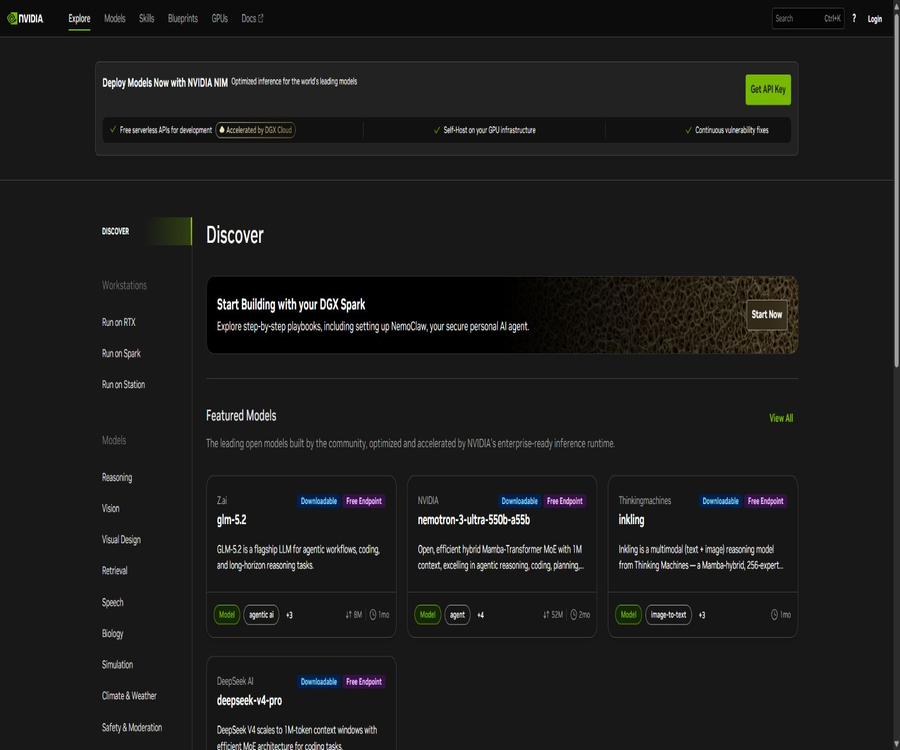
NVIDIA Build is a platform provided by NVIDIA for AI developers, offering tools for model discovery, online testing, and deployment. It brings together community-developed models, NVIDIA’s own models, NIM inference interfaces, Skills, Blueprints, and deployment resources in one single directory.
Users can first use the free development interfaces accelerated by DGX Cloud to create prototypes, and then choose a partner’s endpoint or deploy the downloadable NIM on their own GPU infrastructure. It is not a chat website for ordinary users, but rather a platform for development and deployment.
What is the relationship between NVIDIA Build and NIM?
NVIDIA Build is a portal for models and development resources, while NVIDIA NIM are microservices that offer inference capabilities through optimized standard interfaces. The model page typically displays the online prototype interface, model cards, API references, and available deployment options.
| Concept | Main function | Appropriate stage |
|---|---|---|
| NVIDIA Build | Discover models, obtain API keys, view examples, and select deployment methods | Exploration and prototype development |
| NVIDIA NIM | Provide model inference by optimizing containers or managed endpoints. | Development, testing, and production inference |
| NIM Blueprint | Reference workflows for composite models, retrieval, data, and application logic | Application prototype and solution verification |
| NVIDIA AI Enterprise | Provides enterprise software, support, security updates, and a licensing system. | Organizational-level production deployment |
Core functions
1. Model discovery and online trial
Developers can search for models by manufacturer, task, and tag, and test prompts and parameters on the model page. The directory also indicates whether the model offers free endpoints, whether it can be downloaded, and the integration methods supported.
2. Free NIM development interface
Some models offer free Serverless API endpoints for development; users can access them after logging in and generating an NVIDIA API Key. These free interfaces are intended for prototyping and evaluation, and it should not be assumed that they provide production-level SLAs, long-term stability, or unlimited usage quotas.
3. Compatibility with OpenAI-style clients
Many examples of text models use a client and message format in the OpenAI style; all that is required is to replace the base endpoint, the model name, and the NVIDIA key. Compatibility primarily helps reduce the cost of migration, but it does not mean that every parameter and response field will be identical.
4. The NIM container can be downloaded.
For models marked as Downloadable, enterprises and developers can run the NIM container on local data centers, private clouds, or public cloud GPUs, in accordance with the relevant licenses. Before deployment, it is necessary to check the GPU memory, drivers, container environment, model licensing, and NGC permissions.
5. Skills and Blueprints
The platform offers reusable skills, reference applications, and Blueprints for building RAG, agents, video analysis, digital avatars, and other generative AI workflows. Examples help in creating prototypes, but security, monitoring, and scalability considerations still need to be addressed in a production environment.
6. Model cards and API documentation
The model page typically provides information on context length, input and output, language, hardware requirements, licensing, as well as details regarding data and risks. Before developing something, it is necessary to read both the model card and the corresponding API Reference, rather than simply copying example code.
List of key capabilities
- Explore the language, visual, image, speech, and scientific models provided by NVIDIA and the community.
- Test prompts, parameters, and streaming output in the web Playground.
- Generate an API Key and call the free development endpoints.
- Access the model quickly using Python, the command line, or compatible clients.
- View the model card, task tags, licensing, and hardware requirements for each model.
- Download the eligible NIM containers and deploy them on your own GPU infrastructure.
- Select another cloud deployment path through the partner endpoint.
- Build RAG, agents, and industry applications using Blueprints and open-source examples.
- Obtain continuous vulnerability remediation, support, and deployment capabilities in a corporate environment.
Model and task type
- Text generation: chatting, reasoning, writing, coding, and tool invocation.
- Multimodal understanding: Analyzing image, text, document, or video content simultaneously.
- Embedding and reordering: Provides vector and sorting capabilities for search, RAG, and recommendation systems.
- Images and videos: Creating, editing, or understanding visual content.
- Voice: speech recognition, text-to-speech, and audio processing.
- Digital biology: Models related to protein, molecular, and drug discovery.
- Physical AI: robots, autonomous driving, simulation, and world models.
- Agent: Planning, tool usage, retrieval, and multi-step workflows.
Which users are it suitable for
- Application developers who need to compare multiple open-model APIs.
- Teams are being established to develop chat, RAG, coding, and agent products.
- Companies that wish to move from managed prototypes to their own GPU deployments.
- It is necessary to optimize the inference containers, as well as the AI platforms for concurrency and enterprise support.
- Professionals who study visual systems, digital biology, and physical AI models.
- Architects who wish to use Blueprint to quickly validate the architecture of AI solutions in their industry.
- Organizations that need to choose between on-premises, data centers, and multi-cloud for deployment.
How to call the API of the first model
- Create and verify a NVIDIA developer account.
- In the model directory, select the target model marked with Free Endpoint.
- Read the model card, API references, licensing, and input/output restrictions.
- Generate an API Key on the model page and save it immediately in a secure location.
- Copy the official Python or command-line examples and configure the key variables in your local environment.
- Initiate a small number of requests using non-sensitive test prompts, and record the responses as well as the amount of quota consumed.
- Add timeout, retry, rate limiting, logging, and error handling.
- Before going live, select a deployment path that provides the necessary capacity, support, and licensing.
How to migrate from the free endpoint to self-hosted NIM
- Confirm that the target model is marked as downloadable, and verify the NIM and model license.
- Check the supported GPUs, video memory, drivers, and container runtime environments according to the model specifications.
- Obtain the required NGC access permissions and container registry keys.
- Download the image in the isolated testing environment and configure the model cache.
- After starting NIM, use health checks and small-scale requests to verify the interfaces.
- Switch the application endpoint to the local service, and keep the model name and parameters unchanged.
- Conduct tests on throughput, latency, concurrency, video memory, and fault recovery.
- After going live, continuous updates are provided for containers, vulnerability fixes, monitoring, and capacity planning.
Free quota and price details
NVIDIA Build currently labels some NIMs as free development endpoints. According to NVIDIA’s official example repository, new accounts can receive up to 5000 free credits, with one credit being used per NIM request as an example; the actual amount of credits available, the models that can be used, and the way in which charges are applied are determined by the account dashboard.
| Usage method | Public price or quota | Scope of application |
|---|---|---|
| Build free endpoint | New accounts receive up to 5,000 free points, subject to the real-time account status. | Development, testing, prototyping, and model evaluation |
| The NIM development experience can be downloaded. | Provided according to the model and license. | Test self-hosted inference on compatible GPUs |
| NVIDIA AI Enterprise | Enterprises can request quotes or be billed through the cloud market. | Production licensing, support, security updates, and large-scale deployment |
| Cloud partner endpoint | Charged by the corresponding provider | Managed inference and scalable expansion |
| Self-hosted GPU deployment | Cover the costs related to hardware, cloud GPUs, electricity, and maintenance. | Data control, customization, and stable production workloads |
NVIDIA Build does not offer a single, unified pricing table based on tokens that applies to all models and production methods. The model itself, the provider, the GPU used, the throughput volume, the level of support, and any enterprise contracts all influence the total cost; therefore, free credits cannot be considered as a budget for long-term production.
Comparison of deployment methods
| Deployment method | Advantages | Main limitations |
|---|---|---|
| Free Serverless endpoints | No GPU required; the prototype can be completed in the fastest time. | The quota, rate, model lifecycle, and SLA are limited. |
| Partner-hosted endpoint | Scale up or down as needed to reduce infrastructure maintenance efforts. | Prices, regions, and data terms are determined by the provider. |
| Self-hosted NIM | Greater control over data and performance, with the possibility of deploying near the data source. | A GPU, operational support, monitoring, and license management are required. |
| Enterprise private environment | It can be integrated with organizational security, support, and governance requirements. | The costs associated with procurement, implementation, and capacity planning are high. |
API keys and security
- API Keys are stored only in environment variables or key management services.
- Do not store keys in the frontend of web pages, mobile applications, or public repositories.
- The development, testing, and production environments use different keys and access permissions.
- User authentication, quota limits, and abuse detection have been added to the external interfaces.
- Sensitive information such as prompt keywords, keys, and the full content of responses are masked in the logs.
- When the model’s input involves personal or corporate data, it is necessary to first confirm the data processing terms.
- As soon as a leak is detected, the key is revoked and abnormal calls are checked.
Model licensing and open-source status
NVIDIA Build includes both NVIDIA’s models and those from third-party communities, and the licenses applied to each model vary. The labels “Downloadable” or “Open Model” on the page do not necessarily mean unlimited open-source access; it is necessary to refer to the specific model and its license terms.
- Verify the model weights, code, data, and the licenses for the NIM container separately.
- Confirm whether commercial use, redistribution, modification, and creation of derivative models are permitted.
- The name of the third-party model and its license are determined by the original provider.
- The API trial terms and the self-hosted model license may be in different files.
- Regulated or high-risk scenarios require additional legal and security assessments.
- NVIDIA provides a large number of examples and tools, but the Build platform itself is not an entirely open-source project.
Official GitHub resources
- GenerativeAIExamples offers reference applications for RAG, NIM, and generative AI.
- The AI Workbench example demonstrates how to switch between the Build endpoint and downloading NIM.
- Metropolis NIM Workflows provides examples of visual and video analysis.
- The NeMo Agent Toolkit includes examples of agent workflows and NVIDIA Build keys.
- k8s-nim-operator is used for managing the NIM lifecycle in Kubernetes environments.
- Examples of digital biology demonstrate BioNeMo and related NIM workflows.
- Each warehouse license, maintenance status, and suitability for production must be checked separately.
Product advantages
- Bring model discovery, online testing, API documentation, and deployment paths together under one entry point.
- Free development endpoints lower the barriers to testing models and creating prototypes.
- NIM provides standardized inference microservices that are optimized for GPUs.
- It supports migrating from managed endpoints to local, cloud, or data center GPUs.
- Model types cover language, visual, speech, scientific, and physical AI.
- Blueprint and GitHub examples assist developers in building complete applications.
- Enterprise solutions offer security updates, support, and the capability for scalable deployment.
Usage restrictions and precautions
- The free endpoint is intended for development and testing purposes only, and should not be relied on for production use.
- The free quota, request limits, and available models can change; it is necessary to check the real-time status of the account.
- Models may be taken offline or a retirement date may be set, requiring migration and rollback plans for the applications.
- Self-hosted NIM requires compatibility with GPUs, sufficient video memory, and the capability to manage containers.
- The interface parameters, context, output, and security behaviors of different models vary.
- Open weights, downloadable containers, and open-source code are different concepts.
- The production costs of a company also include GPUs, storage, networking, monitoring, and technical support.
- Model outputs may be incorrect or unsafe; evaluation and manual review are necessary for critical operations.
Platform and open-source status
| Project | Current situation |
|---|---|
| Product format | Model directories, Playground, API, and deployment resource platforms |
| Develop interfaces | Some NIMs offer free Serverless endpoints. |
| Self-hosting | Some models provide downloadable NIM containers. |
| Enterprise services | Provided through NVIDIA AI Enterprise and its partners |
| GitHub | NVIDIA provides a large number of examples, tools, and workflow repositories. |
| Is it open source? | The platform is not fully open source; the specific models and repositories are governed by their respective licenses. |
Basic information
| field | Content |
|---|---|
| Tool name | NVIDIA Build |
| Original database name | Build Naidia should be corrected to NVIDIA Build. |
| Development company | NVIDIA |
| Tool type | AI model catalog, NIM API, and deployment platform |
| Core products | NVIDIA NIM, models, Skills, and Blueprints |
| Free method | Some models offer development endpoints and account points. |
| Production price | Enterprise quote requests, cloud market, or infrastructure costs |
| Whether API is provided | Yes |
| Is it open source? | The platform is not open source; some models and resources are available under an open source license. |
Recommendation score
4.7 / 5. NVIDIA Build offers developers a clear pathway from testing models to deploying them using NIM, and it is particularly suitable for teams that have NVIDIA GPUs or need enterprise-level AI solutions; however, the model licenses, the lifespan of the free endpoints, hardware requirements, and overall production costs all need to be examined carefully.
Frequently Asked Questions
Can NVIDIA Build be used for free?
Some NIM services offer free development endpoints; the official examples indicate that a new account can receive up to 5,000 points. The specific amount and request limits are determined by the information displayed on the account’s dashboard in real time.
Does NVIDIA Build require a local GPU?
Calling the free hosting endpoint does not require a local GPU. Only when NIM is downloaded and hosted locally are the GPU, video memory, and environmental requirements specific to that model necessary.
What is the difference between NIM and regular model APIs?
NIM packages the models and the optimization inference runtime as standard microservices, which can be hosted by NVIDIA or its partners, or deployed on one’s own GPU infrastructure.
Can free APIs be used in production?
Direct reliance on them is not recommended. Free endpoints are intended for development and evaluation purposes; for production systems, it is necessary to choose a deployment approach that provides guarantees regarding capacity, licensing, support, and availability.
Are all the models on NVIDIA Build open source?
No. The catalog contains models from different manufacturers, with various licenses and different levels of openness; it is necessary to read the information on each model card as well as the license details.
Is the NVIDIA Build platform open source?
The platform itself is not an entirely open-source project, but NVIDIA has made available on GitHub a large number of NIM examples, Blueprints, Agent tools, and operational components.
Tools similar to Build Naidia



 Guigong Network Security Registration No. 45132202000164