






Lovart
A one-stop AI design tool that handles everything from creative briefs to complete brand materials
Tags:AI design toolsWhat is Lovart?
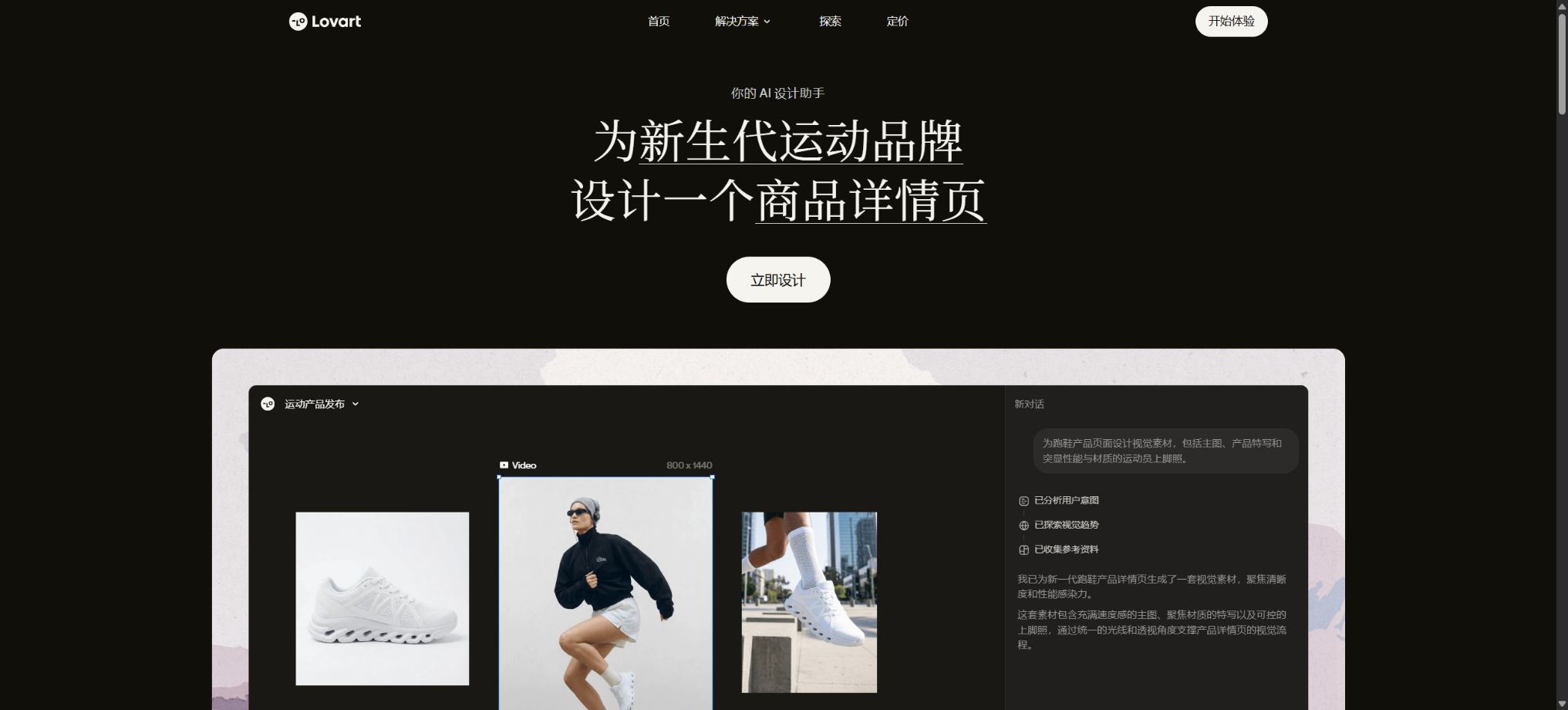
Lovart is an online visual creation platform that relies on AI Design Agents. Users can enter a request, upload reference images, or provide brand-related materials; the intelligent agents then understand the task and proceed to create posters, social media content, product images, brand visuals, presentations, and short videos.
It does not have just one input field for generating images from text; instead, it brings together tasks such as requirement analysis, idea collection, model selection, batch generation, canvas editing, and export of the final results in the same workspace.
Lovart is more suitable for brand and marketing tasks that require a complete set of visual elements. For example, when a request to launch a new product is submitted, the system can create a main poster, banners, images in formats suitable for social media, as well as product scenario images and video materials, all within the same visual style.
AI can speed up the creation of drafts and variations, but accuracy of the text, trademark compliance, details of characters, and the final print quality still require manual verification.
Lovart’s core functions
AI design agents and automatic model selection
Lovart breaks down natural language tasks, plans the necessary resources, and selects the most suitable capabilities among different generation models. The developers refer to this reasoning and scheduling approach as MCoT.
Users do not need to switch tools repeatedly for each step, but they can still adjust the models and parameters based on image quality, speed, video length, and cost in terms of points.
ChatCanvas infinite canvas
ChatCanvas combines chatting with a visual canvas. Users can view references, create drafts, compare versions, and continue editing in the same space, without having to download each image separately and then combine them.
The canvas is suitable for creating mood boards, brand proposals, marketing campaigns, and content sets in various sizes.
Brand kits and visual consistency
Users can provide a logo, colors, fonts, product images, and visual references to create a Brand Kit, ensuring that subsequent tasks adhere to a consistent style. This is particularly valuable for maintaining social media accounts, e-commerce brands, and marketing campaigns over time.
AI may still generate incorrect logos, spelling mistakes, or colors that do not comply with the standards; therefore, it is necessary to compare everything with the brand manual before making an official release.
AI Skills workflow
The platform offers access to skills related to brand design, marketing, e-commerce, social media, and video creation. These skills represent pre-defined task workflows, which help to reduce the time needed to describe requirements repeatedly.
When using it, first select the scenario that is closest to the target, and then add in the audience, channels, size, tone, and elements that must be retained.
Image and video generation
Lovart can utilize a variety of image and video models to create visual content, product images, advertising concepts, and dynamic content from text or reference images. These different models vary in terms of realism, text formatting, consistency of characters, video length, and the amount of resources required.
For complex tasks, it is best to first determine the composition using a low-cost setup, and then increase the resolution or create a video.
Touch Edit for local modifications
Touch Edit allows for making changes to specific areas within an image: for example, replacing products, adjusting the background, removing elements, or changing colors. The original version is usually retained, which makes it easy to compare and revert to it if necessary.
Local editing does not guarantee the same level of precision as professional photo editing; edges, lighting, hands, and text areas need to be examined closely.
Visual research and idea organization
Visual Insights is used to gather and organize publicly available visual references in order to help establish a style, composition, and understanding of the market context. These reference images can only be used for analysis and inspiration; it is not allowed to copy other people’s logos, characters, photographic works, or protected designs.
Export in multiple formats
Works can be exported in formats such as PNG, SVG, PSD, PPTX, MP4, etc., depending on the type of task. The actual available formats depend on the work and the package selected.
Exporting in PSD, SVG, or presentation format does not mean that all elements have fully editable native layers; it is necessary to open the file in Photoshop, Illustrator, or PowerPoint before delivery to check this.
Comparison of Lovart package versions
Lovart offers a range of options for both individual and team use. The official price listings are displayed dynamically depending on the region, the specific event, as well as whether payment is made on a monthly or annual basis. The public pages do not always show the exact current amount, so the prices listed in the table below are not based on information from older articles.
Before making a purchase, you should log in to your account to check the current currency, taxes and fees, points, and the final amount due.
| Plan | Price | Main equity direction | Suitable for users |
|---|---|---|---|
| Free | Free of charge; the quota is as specified on the account page. | Experience the basic design agent and limited generation quota. | First trial use, low-frequency creation |
| Basic | Refer to the real-time settlement page. | More quick points; parameters for certain tiers along with benefits for low-speed operation | Individual creators, daily social media design |
| Pro | Refer to the real-time settlement page. | Higher monthly limits, model parameters, and queue priorities | High-frequency marketing, e-commerce, and brand creation |
| Ultimate | Refer to the real-time settlement page. | Higher scores, priority queues, and advanced generation capabilities | Professional designers and power users |
| Team Plan | Charged by seat and settlement page | Team seats, centralized management, and shared or allocated points | Brands, agents, and multi-person teams |
Comparison between integration and generation modes
| Type | Validity period | Whether to carry forward | Instructions for use |
|---|---|---|---|
| Monthly subscription points | Current monthly billing period | Do not carry forward | It is reset on the next billing day, and unused points become invalid. |
| Annual subscription points | It is issued on a monthly basis and remains valid for one month. | Do not carry forward | The annual points are not awarded all at once; they are reset at the end of each monthly period. |
| Top up points | 366 days from the date of purchase | Not affected by the monthly subscription reset. | It can be used in supported models; unused points expire after a certain period. |
| Fast Generation | Depending on available points | Execute by score type | It generates content at a fast pace, and each task consumes points. |
| Unlimited Relax Generation | Set a duration of 30 days or 365 days, etc. | Independent of the subscription period | The specified model is generated through low-speed queuing, and is subject to constraints related to plans, fair usage, and one-time entitlement rules. |
The score for Agent tasks varies depending on the tools selected, the models used, and the complexity of the requirements; the quality of the output generated in Canvas is also influenced by factors such as image size, quality, style details, and advanced parameters.
Videos, high-resolution images, and complex multi-step tasks generally require more resources.
Before submitting, check the estimated points displayed on the page; it is not advisable to assume a fixed cost based on the option “Generate once”.
Lovart usage tutorial
Create reusable professional workflows
- Create a list of brand colors, fonts, layout elements, and elements that are prohibited.
- Test separately the AI design Agent and automatic model selection, ChatCanvas’s infinite canvas, as well as the brand kit and visual consistency;
- Use the same set of representative samples to compare quality, speed, and cost;
- Complex edges, text, and images of key products should be handed over for manual refinement.
- Standardize naming, dimensions, and review status;
- Batch processing and release are carried out after random inspections;
Precautions for infinite generation at low speed
- In low-speed mode, it enters the GPU idle queue, and the waiting time is usually longer than that in fast generation mode;
- Different packages correspond to different queueing priorities and available model parameters;
- The fixed deadline and automatic subscription renewal are not entirely synchronized, and renewal does not necessarily extend the original duration of the privileges.
- Under the account rules, this entitlement may be granted only once, and re-subscription after its expiration does not necessarily restore it;
- It is intended for personal use only; the use of scripts, frequent automation, sharing, or resale may lead to a suspension of verification.
- The number of devices that can be associated with a personal account is limited; for collaborative work among multiple people, a team plan should be used.
Lovart usage tutorial
- Define the deliverables:First, specify the brand, target audience, channels, size, quantity, style, and deadline; do not just enter “create a nice poster”.
- Prepare brand materials:Upload authorized logos, product images, colors, fonts, and reference images; sensitive brand assets should be managed using controlled accounts.
- Create task:Select the appropriate AI Skill or describe your entire set of requirements directly in ChatCanvas, so that the Agent can plan the necessary materials.
- Verify the plan and costs:Check the model to be used, the number of outputs, the resolution, and the estimated integration value; for complex video tasks, conduct tests on a small scale first.
- Comparative creative directions:Retain two to three distinctly different compositions, and then create variations based on the chosen direction, in order to avoid unnecessary repetitive creation.
- Local modification:Use Touch Edit to adjust products, backgrounds, colors, and details; it is recommended to use accurate assets for text and logos.
- Check consistency:Check each image individually to ensure consistency in the product’s appearance, the characters used, the brand colors, the font style, the text content, the proportions, and the different sizes.
- Export and recheck:Select the target format, and in professional software check for layer handling, font replacement, transparent backgrounds, video audio elements, as well as the platform’s safety zones.
How to write high-quality prompts
A feasible Lovart design specification should include the brand and products, target audience, communication channels, delivery checklist, visual direction, elements that must be included, elements that are prohibited, dimensions, and reference materials. For example, rather than simply stating “create a coffee advertisement,” it is better to outline the product’s features, the target audience, the dimensions for posters and social media posts, the primary colors, the copy text, the photography style, as well as any packaging details that need to be preserved.
Which users are it suitable for
- Market teams that need to quickly create a complete set of visual elements for the brand and related campaigns;
- E-commerce operations involving the bulk creation of product scene images, banners, and social media content;
- Designers and agencies that explore visual directions for clients and create proposals for them;
- Small businesses that lack professional design resources but can conduct manual reviews of the results;
- Content creators who wish to produce images, videos, and presentation materials on a single canvas.
Is Lovart open source?
The Lovart online design platform is not open-source software. The official team has made available example code for Agent Skills that can utilize the Lovart OpenAPI, with AK and SK used for authentication and task execution.
This only indicates that some of the access tools are made public; it does not mean that the platform’s models, canvas, and commercial services are open source.
Similar projects on the internet, such as Open Lovart, may also be maintained by third parties; they cannot be considered as the official desktop version or the source code for the platform.
Copyright, Privacy, and Commercial Use Notes
- Before uploading logos, product photos, portraits, fonts, music, and reference works, ensure that you have the necessary rights to use them.
- The fact that AI generation is successful or that a package includes options for commercial use does not automatically rule out risks related to trademarks, copyrights, portraits, and unfair competition.
- Brand launches, advertising campaigns, and product packaging should be reviewed by human staff or legal experts;
- When generating images, errors in text, fake identifiers, abnormal limb shapes, and deviations in the product’s structure may occur;
- When generating videos, there may also be issues such as flickering, inconsistent timing, and problems with audio licensing.
- When dealing with real people, medical, financial, news, or political topics, it is necessary to comply with the applicable AI labeling and industry regulations; synthetic content must not be used to mislead users.
Frequently Asked Questions
Is Lovart free?
A free trial version is available, but the benefits related to points, models, queues, and exports will be adjusted; the details shall be as indicated on the account page after logging in.
How much is Lovart?
Paid plans are available such as Basic, Pro, Ultimate, and Team; the prices may vary depending on whether payment is made on a monthly or annual basis, as well as due to differences in region, taxes, and any ongoing promotions. The current prices should be checked on the official pricing page, and it is not recommended to rely on old reviews for making decisions.
Is the Lovart score carried over to the next month?
Monthly subscription points are not carried over; annual subscription points are issued on a monthly basis, and any unused amount from one month is not accumulated to the next.
Recharge points purchased separately are valid for 366 days from the date of purchase.
Is generation at infinitely low speed truly completely unrestricted?
It refers to the entitlement to low-speed queueing within a specified package, model, and fixed period, subject to rules regarding fair use, devices, accounts, and one-time time limits; not all models or all speeds offer unlimited access forever.
Can Lovart be used for commercial purposes?
The terms of the selected package and model shall apply, and it is necessary to ensure that all input materials and output content do not infringe on third-party rights. Commercial use does not mean that the platform assumes responsibility for any infringement risks on behalf of the user.
Is Lovart an open-source tool?
The platform itself is not open source. The OpenAPI Agent Skill made available by the developers is merely an example of how to integrate it, and third-party open-source projects of a similar nature are not equivalent to the official source code of Lovart.
Tools similar to Lovart



 Guigong Network Security Registration No. 45132202000164