






Framer AI
Website creation tools that use AI to generate page structure, text content, and visual layouts
Tags:AI design toolsWhat is Framer AI?
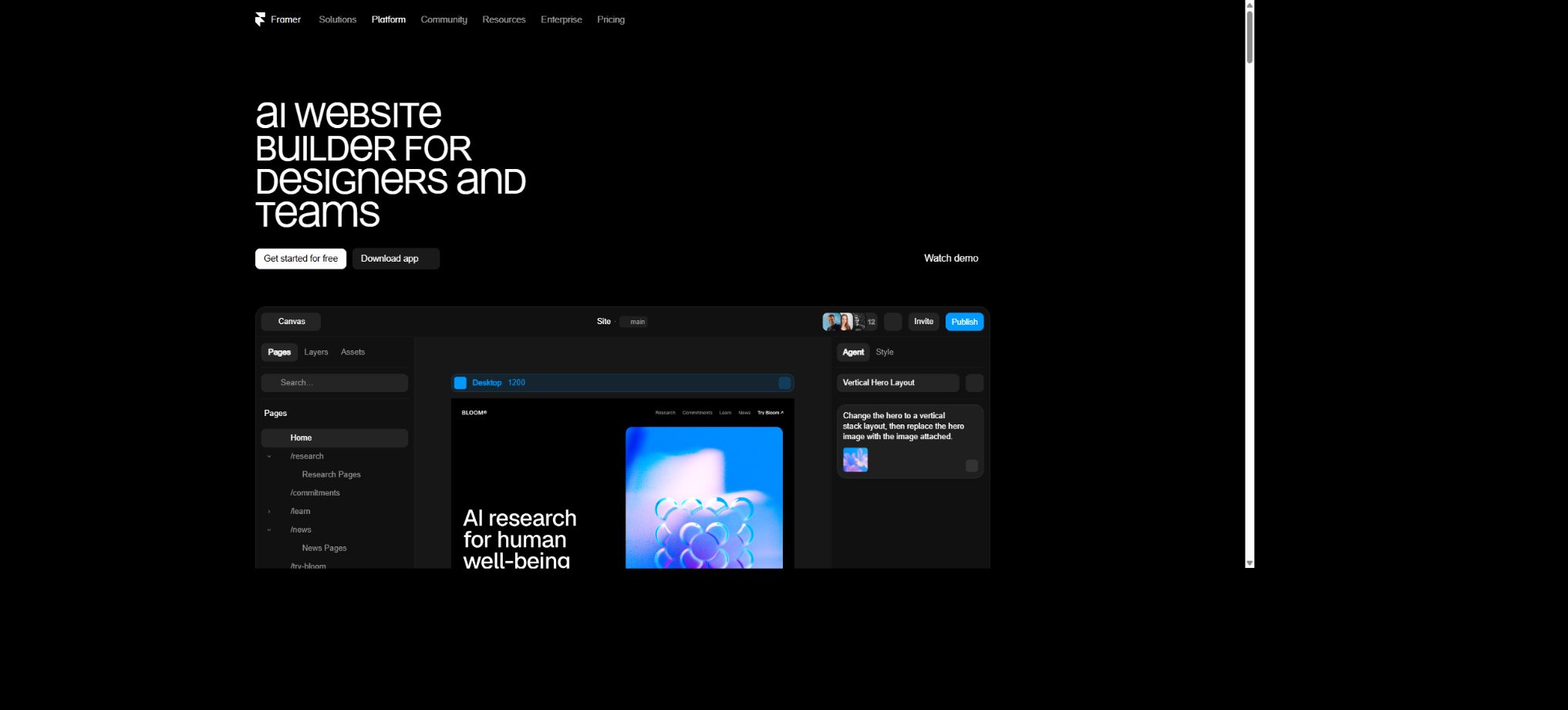
Framer AI is the artificial intelligence component of Framer’s platform for visual website design and hosting. Users can create websites, pages, and components using natural language; the AI can also modify existing layouts, generate text content, manage CMS content, create interactive code components, and assist with localization tasks.
Its feature is that AI works directly on the Framer Canvas and the project structure, producing results in the form of editable pages, layers, components, and content. Designers can continue to adjust the layout, breakpoints, spacing, colors, effects, and animations, rather than being limited to a static image as the only output.
Framer Agent website proxy
Currently, Framer AI is centered around the concept of Agents. Users describe the website, page, or updates they need, and the agents can carry out multiple steps of modification within a project – including creating the structure, filling in content, adjusting the visual elements, and managing the CMS.
It is suitable for starting from scratch, as well as for the ongoing maintenance of existing projects.
The scope of proxy execution is broad; it is therefore necessary to specify the target page, the content to be retained, the brand guidelines, and the acceptance criteria. For important sites, it is best to use branches or copied projects, and to review the changes before publishing them.
Generate a website from prompts
Users can enter information regarding the company, products, target audience, and style preferences; the AI will then generate an outline for a website that can be edited. Once it’s created, users can rearrange its structure, replace text and images in Canvas, and further refine it using Framer’s responsive layout features and components.
The initial creation focuses primarily on establishing a visual starting point; the domain name, the actual content, the destination of the forms, the privacy policies, and the analysis settings still require manual handling.
Page and block generation
Framer AI is capable of creating entire websites; it also allows for the addition of Landing Pages, pricing information, features, case studies, team details, FAQs, and contact pages as needed, or it can generate just a specific page element. New elements are designed to fit seamlessly into the design context of the project.
After creation, it is necessary to check the layer naming, component reuse, breakpoints, and SEO hierarchy. Multiple similar sections should be combined into shared components to avoid maintaining duplicate content.
Canvas visual editing
Framer offers a free drawing canvas similar to those found in design tools, along with web-oriented systems such as Stack, Grid, breakpoints, and component systems. The layouts generated by AI can be dragged around, rearranged, and fine-tuned, making them suitable for brand websites created by designers.
Free editing can lead to issues with fixed sizes and absolute positioning. Before publishing, it is necessary to check the layout on desktops, tablets, smartphones, and ultra-wide screens one by one, and to verify how the layout changes when the text volume increases.
Responsive layout and breakpoints
Users can set breakpoints for different widths, and control navigation, the number of columns, font settings, and display rules. AI can assist in creating an initial responsive structure, but touch interactions, landscape mode, and differences across browsers on actual devices still need to be tested.
Do not rely solely on previews to determine how things will look; menus, forms, Sticky elements, videos, and complex animations should be tested in a mobile browser.
Copywriting and visual creation
Framer Agent allows for the creation and modification of titles, text, CTA buttons, as well as visual elements for a page, enabling the iterative development of both design and content within the same process. It is ideal for quickly producing initial drafts of product websites and event pages.
AI may fabricate features, data, customer reviews, or compliance statements. Texts related to prices, performance, customer names, and legal declarations must be verified.
CMS creation and content filling
Agents can create CMS Collections, fields, and content for use in blogs, case studies, job listings, members, portfolios, and catalogs. Once CMS is connected to Canvas, design templates can be reused automatically for each piece of content.
It is necessary to first design a stable data model and Slug rules, before generating content in bulk. Frequent changes to fields can affect templates, filtering, and external data integration.
AI code components
Users can describe interactive or real-time functionalities, and Framer AI will generate React code components such as calculators, sliders, visualizations, dynamic buttons, and special input elements. These code components can accept attributes and be integrated into regular web pages.
Generating code requires checking dependencies, performance, accessibility, input validation, and external requests. Third-party keys cannot be included in browser components, and sensitive logic must be handled by a separate server.
Workshop AI
Workshop offers an AI-driven conversation and editing experience for code components, enabling the creation or iteration of components as needed. Using Workshop’s chat features consumes AI credits, with more credits required for complex components.
Workshops are useful for enhancing the built-in functions of Framer, but code generated through them and not yet tested should not be used in production environments with high traffic levels.
AI Translation and Localization
Framer Localization enables the creation of multiple language versions, as well as AI-powered translation of content in Canvas and CMS. Auto Translate allows for automatic synchronization of translations once the original text is updated; it is also possible to translate all content at once or to process only specific layers and pages.
The Localization add-on is responsible for managing language versions; AI translation also consumes AI credits. Brand terms, legal texts, prices, units, and SEO metadata still need to be reviewed by native speakers.
The tone of the AI Style brand
AI Style allows translation suggestions to be provided for a particular language, enabling the selection of a tone that is professional, concise, lively, or technical, so as to make multilingual content more in line with the brand’s identity. Currently, the official system uses different OpenAI models depending on the translation settings, and the underlying models may change as the product evolves.
Tone instructions cannot resolve issues related to facts and terminology; the team should make use of the glossary and the list of terms that are prohibited from being translated.
External AI Agents
Framer offers the capability to use external proxies for previewing, allowing tools such as Codex and Claude Code to connect to projects and carry out design or content-related tasks once authorized. Currently, users of the Basic and Pro plans can connect for free during the preview period; however, these rules may change in the future.
External agents can expand the scope of automation, but they also increase the risk of errors and unauthorized access. It is necessary to restrict permissions for projects, branches, and releases, while keeping records of all operations performed.
Collaboration and Roles
Framer enables collaboration among Workspace Owners, Editors, Content Editors, and Viewers. Viewers can view content and leave comments for free, while Editors can design, edit, and publish content; Content Editors are responsible for updating the CMS, handling localization, and modifying page content.
Roles should be assigned with the minimum level of permissions required. Content creators do not need full rights for design or publication, and external clients can first review the content by leaving comments.
Branches, previews, and Staging
Pro offers Branching with previews and a Staging Environment, which allow users to experiment with changes, share previews, and conduct tests without affecting the official website. These features are particularly useful when AI agents make extensive modifications.
Preview links may contain unpublished content, so care should still be taken regarding the scope of access when sharing them. It is necessary to check for any changes in pages, CMS, components, and SEO before merging.
SEO and AEO
Framer includes built-in SEO settings that allow for managing titles, descriptions, semantic structure, sitemaps, redirects, and performance. AI can assist in generating content, but the pages still need to be optimized based on actual search intentions and their intrinsic value.
A large number of similar AI-generated pages can result in low-quality or repetitive content. It is necessary to limit the scope of indexing, and to add original material, structured information, and internal links.
Animation and interaction
Framer excels at handling transitions, scrolling, hover effects, and component variations; it is suitable for websites with a strong visual identity, portfolios, and product launch pages. After the AI generates the visuals, designers can continue to fine-tune the interactive details in Canvas.
Too many animations can affect loading times, accessibility, and devices with limited performance. It is advisable to reduce the use of dynamic effects and to avoid interactions that hinder reading and conversion processes.
Hosting, performance, and domain names
The paid Site Plan option allows for the use of a custom domain name; the annual Basic and Pro plans include a free .com domain. Framer offers global hosting, HTTPS support, and a publishing process, with the Pro plan providing more delivery locations as well as additional advanced hosting features.
Domain name renewal, bandwidth expansion, and advanced hosting may incur additional costs. When performing the official migration, it is also necessary to set up DNS, redirection, and analysis codes.
Price and version comparison
| Package or version | Prices, quotas, and core benefits |
|---|---|
| Free free version | The free version costs $0; it allows users to publish content using a Framer domain name, includes 1GB of bandwidth and design tools, and provides 500 AI credits per month for using features such as Agent. The free version is suitable for learning and creating prototypes, but it does not permit the use of one’s own custom domain name, and its capabilities in terms of site scale and commercial use are limited. |
| Basic price | The Basic plan costs $10 per month on an annual basis; it includes a free custom domain name, 2 CMS Collections, 1,000 CMS items, 30 design pages, 50GB of monthly bandwidth, built-in SEO features, and 1,000 AI credits per month. This plan is suitable for portfolios and small marketing sites. Localization requires the purchase of additional languages, and extra editors as well as content editors come at an additional cost. |
| Pro price | The Pro plan costs $30 per month on an annual basis; it includes 10 CMS Collections, 2500 CMS items, 150 design pages, 100GB of monthly bandwidth, redirection capabilities, a staging area, branch previews, and 3000 AI credits per month. Additional pages, CMS Collections, CMS items, and bandwidth can be purchased as needed under this plan, making it suitable for websites with more complex content that require a team-based publishing process. |
| Enterprise price | Enterprise offers customized quotes based on specific requirements; it allows for the setting of limits, unlimited number of editors, enterprise-level security, availability guarantees, SCIM and SSO, as well as discounts on AI credits when purchased in bulk. When making a purchase, enterprises need to take into account aspects such as data processing, auditing, support response times, domain names, regions, and permissions for external agents. |
| Localization price | Basic and Pro plans allow for the addition of up to 20 translation locales, with a cost of $20 per locale. Language version management and the AI translation quota are separate charges; in addition, translating text requires Workspace AI credits. The cost of a multilingual website increases as the number of languages grows, so it is advisable to first determine which markets require separate releases, rather than purchasing licenses for all languages at once. |
Free free version
The free version costs $0; it allows use of a Framer domain name, includes 1GB of bandwidth and design pages, and provides 500 AI credits per month for accessing features such as Agent.
The free version is suitable for learning and creating prototypes, but it does not allow connection to one’s own official domain name; its scale and capabilities for commercial use are limited.
Basic price
The Basic plan costs $10 per month on an annual basis; it includes a free custom domain name, 2 CMS Collections, 1000 CMS items, 30 design pages, 50GB of monthly bandwidth, built-in SEO capabilities, and 1000 AI credits per month.
Basic is suitable for collections of works and small marketing sites. Localization requires the purchase of additional languages, and separate fees are charged for extra editors and content editors as well.
Pro price
The Pro plan costs $30 per month on an annual basis; it includes 10 CMS Collections, 2500 CMS items, 150 design pages, 100GB of monthly bandwidth, redirection capabilities, a staging area, branch previews, and 3000 AI credits per month.
Pro allows for the additional purchase of pages, CMS Collections, CMS items, and bandwidth, making it suitable for websites with more complex content that require a team-based publishing process.
Enterprise price
Enterprise offers quotes on demand, with customizable quotas, unlimited editors, enterprise-level security, availability guarantees, SCIM and SSO, as well as customized options such as bulk discounts for AI credits.
When making purchases, businesses should take into account aspects such as data processing, auditing, support response, domain names, regions, and the permissions of external agents.
Editing seat fee
The additional editors for the Basic and Pro plans cost 20 dollars per month, while the Content Editor costs 10 dollars per month; the Viewer version is available free of charge. The self-service option allows up to 10 users with editing rights, whereas the Enterprise version can be customized or offer unlimited such rights.
The price for the site plan does not represent the cost for a full team; when multiple people work together, the costs related to the site, editing licenses, and additional services need to be calculated together.
Localization price
Basic and Pro plans allow for the addition of up to 20 translation locales, with a cost of $20 per locale. Language version management and the AI translation quota are separate charges; additionally, translating text requires the use of Workspace AI credits.
The cost of a multilingual website increases as the number of languages grows; it is necessary to first determine which markets require separate releases, rather than purchasing everything in one go for all languages.
How do AI credits work?
Chat in Framer Agent, Workshop chats, and AI translation consume credits; lightweight editing tools such as automatic layer naming and Tracking ID suggestions do not consume any credits.
The amount used per request depends on complexity and workload.
Credits are shared across Workspaces, and the paid Site plan credits for each project can be added together. For example, two Basic projects will contribute a total of 2000 credits per month.
The quota is reset on the 1st of each calendar month, independent of the subscription renewal date.
Credit limit exhausted and additional purchase
When 80% is reached, the Workspace administrator receives a notification; once 100% is attained, the functions that require credits are suspended, although existing requests can still be completed.
Users can purchase monthly AI Credits add-ons; once these add-ons are activated, they can also buy one-time top-ups.
Canceling a monthly add-on package will immediately remove the corresponding quota, and one-time top-ups expire at the end of the month in which they were purchased and are not carried over. The specific quantities and prices are indicated on the settlement page.
A/B testing and Convert
Framer Convert is an additional product for A/B testing and funnel optimization, available on sites that meet the requirements such as Pro plans. It should not be considered as part of the unlimited features included in the standard Pro price.
The experiment requires that transformation events and sample size be defined in advance. AI can generate variants, but the conclusions must still be based on data and statistical significance.
Template, component, and plugin ecosystem
Framer offers a marketplace for templates, components, and plugins, allowing for the quick integration of navigation systems, CMS interfaces, graphic design tools, and workflow utilities. Developers can also create their own plugins and code components to extend the editor’s functionality.
The price, licensing, maintenance, and data access related to third-party resources are determined by the author. It is necessary to check the permissions and update history before installation.
GitHub and the open-source status
The Framer website builder, AI Agents, editor, and hosting platform are not open-source products. Framer and its associated teams have made some tools and open-source projects available on GitHub;
The renowned animation library Framer Motion has been renamed Motion and is licensed under the MIT license; however, it is not the same as the source code of Framer’s website building platform.
In the catalog, Framer AI should be labeled as a closed-source SaaS solution. Just because Motion or certain auxiliary repositories are open source, it does not mean that the entire Framer platform can be deployed in a private environment.
Framer AI Tutorial
Complete a basic task.
- Clarify the coding tasks to be carried out in Framer AI, the scope of the repository, and the acceptance criteria.
- Connect to or import the test project, and first back up the current branch;
- First, use the Framer Agent website to create a generation plan, and then verify the modified files.
- Make minor changes using the website generated from the prompt;
- Run tests, static checks, and builds; unverified code is not accepted directly.
- Manually check permissions, keys, dependencies, and handle exceptions before merging;
Create reusable professional workflows
- Select a low-risk, real-world project as a template;
- Fix the order of using website proxies for the Framer Agent, as well as the generation of websites, pages, and blocks from prompts;
- Record the environment, model, prompts, and failure conditions;
- Set up manual approval for write, deploy, and delete actions;
- Compare speed, cost, test pass rate, and the amount of rework;
- Expand to a team or production environment only after stability has been verified;
Which users is it suitable for?
- Designers who create brand websites, product pages, and event pages;
- Creators who need to quickly publish their portfolios and personal websites;
- A CMS team responsible for managing blogs, case studies, and catalogs;
- Market teams that require multilingual capabilities, branching structures, and collaborative content management;
- Developers who wish to enhance interactivity using React code components;
- A professional team that uses external AI agents to maintain websites.
Product advantages
- AI directly generates editable pages, blocks, CMS systems, and components;
- A free canvas is combined with a responsive web layout;
- Integration of visual elements, content, code, hosting, and deployment processes;
- Agents can modify existing projects rather than only creating one-time templates;
- Supports AI translation, branch preview, and team roles;
- The free version allows you to use 500 AI credits per month.
Restrictions and Precautions
- Framer is more suitable for content and presentation-oriented websites; it is not a general-purpose native app builder.
- Complex databases, account systems, and server-side applications usually require external services or code integration;
- The total cost may include Siteplan, editing seats, Localization, Convert, advanced hosting, and AI credits;
- Pages, copywriting, and code generated by AI all require manual review;
Frequently Asked Questions
Is Framer AI free?
There is a free version that includes 500 AI credits per month and allows publishing using a Framer domain name; custom domain names and higher quotas require the Basic or Pro version.
Can Framer AI create a complete website?
It is possible to create pages, blocks, text, and visuals using the prompts, and to continue editing them in Canvas; however, domain names, actual content, forms, compliance checks, and testing still require manual handling.
How much is Framer?
The annual Basic plan costs $10 per month, the Pro plan costs $30 per month; a quote is required for the Enterprise plan. Additionally, the Editor feature costs $20 per month, while the Content Editor feature costs $10 per month.
Do Framer AI credits roll over?
No. The quota for Workspace is reset on the 1st of each calendar month, and the top-up amount expires at the end of the month in which it was purchased.
Does Framer support AI translation?
It supports translation for Canvas and CMS, as well as Auto Translate and AI Style; however, a localization language package is required, and AI credits are consumed.
Is Framer AI open source?
The core platform is not open source. Although tools such as Motion are open source projects, this does not mean that the Framer editor, Agent, or hosting services can be deployed on one’s own.
Tools similar to Framer AI



 Guigong Network Security Registration No. 45132202000164