






MasterGo AI
AI interface generation and design assistant integrated into domestic collaborative design platforms
Tags:AI design toolsWhat is MasterGo AI?
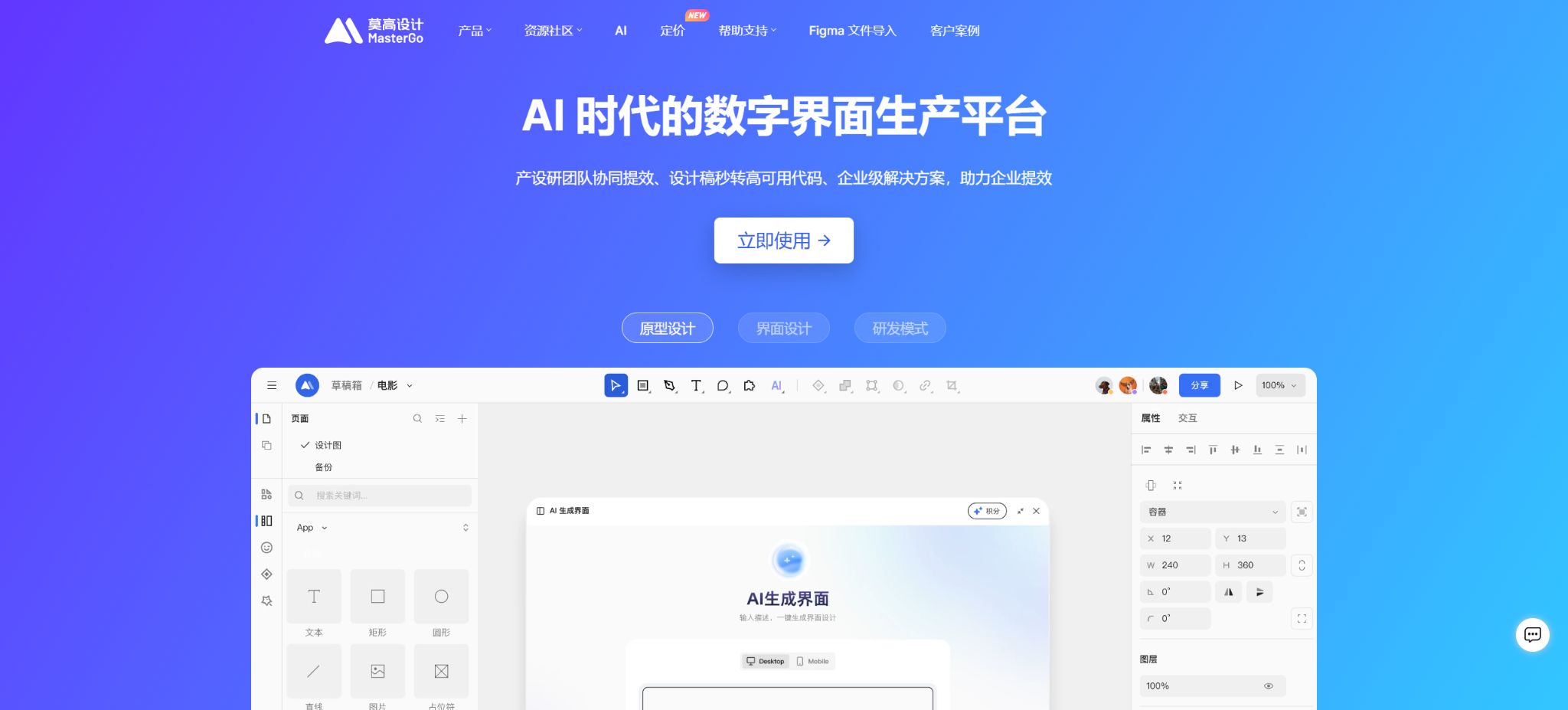
MasterGo AI is the set of AI capabilities built into MasterGo’s digital interface design and collaboration platform, designed for product managers, UI designers, development engineers, as well as operations and corporate design teams. It is not a standalone AI drawing tool; rather, it connects natural language, reference images, design systems, editable canvases, and front-end code to help teams quickly create web pages, mobile interfaces, and interactive prototypes from their requirements.
The current products mainly include AI Quick Build, the AI design assistant within the canvas, and MasterGo MCP. AI Quick Build is designed for creating UIs and code from scratch;
The AI design assistant allows for direct manipulation of existing design files, partial modifications, and verification of specifications; MCP, on the other hand, connects AI tools based on IDEs or command lines to MasterGo’s local canvas, enabling a two-way workflow between design and coding.
AI Quick Build
Dialog-based UI generation
Users describe the page type, target audience, functional modules, interaction logic, and visual style in natural language; AI Quick Build then generates web pages, mobile pages, or simple interactive prototypes, offering multiple options along with real-time previews. Users can also upload reference screenshots, examples, or design.md files so that the system can reuse the layout and design rules.
The generated results can be directly inserted into the MasterGo canvas, where they turn into editable vector layers and components; instead of merely a static screenshot being available for download. Designers can continue to adjust the structure, colors, text, component settings, and responsive layout before proceeding to review and delivery.
Generate front-end code synchronously
AI Quick Build is capable of generating front-end page code alongside the design; it supports component libraries such as Vue, React, Element Plus, and Ant Design, and provides responsive pages as well as exportable code snippets. This code is suitable for creating quick prototypes and serving as a starting point for development, but developers still need to check the routing, state management, APIs, accessibility features, performance, security, and project standards.
Quality-first mode
The quality-first approach emphasizes \"understand first, then create.\" The system first analyzes the objectives of the page, its core tasks, the hierarchy of information, and the business context, and then applies the design.md guidelines or project specifications.
It allows one to understand the layout, modules, and visual structure by referring to the sample screenshots, and it can be used as a reference for competing products, for updating older versions, and for recreating pages.
Quality is given top priority, but it is not guaranteed that the product will be ready for use right after it is created. Complex business logic, state management across different pages, abnormal workflows, and real-world data still require further development and refinement by the product team.
When uploading screenshots of competitors, attention should also be paid to copyright issues; protected and unique visual assets should not be copied directly.
AI design assistant
The AI design assistant is an AI Agent located within the MasterGo canvas, and it offers two modes: Agent mode and Chat mode. In Agent mode, it is possible to use the canvas’s editing interfaces to carry out actual operations.
The Chat mode functions more like a design consultant, allowing users to ask about design methods, MasterGo techniques, or to get help in optimizing prompts.
What can the Agent pattern be used for?
- Generate a complete design draft:Generate high-fidelity pages based on free rules, officially provided team libraries, or custom team libraries created by enterprises;
- Local modification:After selecting a layer, only the specified aspects can be adjusted, such as layout, style, text, or components;
- Image generation and processing:Generate JPG files and fill containers, or apply styling, image cropping, and image enlargement;
- Text processing:Translate and rewrite copy, modify text attributes in bulk;
- Layer management:Rename layers in bulk to organize design files;
- Data charts and icons:Generate chart and icon resources based on requirements;
- Design specifications:Extract visual guidelines from layer properties such as color, rounded corners, and effects;
- Standard check:Check whether the selected content meets the standards using the team component library;
- Canvas performance optimization:Clearing and correcting cached data can reduce memory usage, especially with large files that contain more than 100,000 layers.
The Agent settings allow the tool to run automatically, eliminating the need for manual confirmation at each step. When enterprises delete, replace, or synchronize canvas content in bulk, it is important to maintain manual verification and a version history to prevent the AI from making accidental changes to the production files.
Generated by design system
The complete design draft supports three approaches: free drawing for creating prototypes; pre-built team libraries that offer AI-friendly component sets such as Ant Design and Element UI.
A custom team library allows AI to use an organization’s own components and styles. A design system approach is more suitable for production projects, as it ensures that the outputs adhere to the brand’s guidelines, component standards, and engineering specifications.
Enterprise-specific team libraries need to be adapted to work well with AI; the clearer the naming of components, their attributes, variations, and usage instructions, the more stable the quality of the generated content will be. If AI cannot find the appropriate components, it may still combine them in arbitrary ways or create pages that do not comply with business rules, and such outputs require review by the person in charge of the design system.
MasterGo MCP and Vibe Design
MasterGo MCP connects IDEs or CLI tools that support the MCP protocol to the MasterGo client. There are currently two versions: Vibe MCP and Magic MCP; Vibe MCP is used to enable AI to read, create, modify, and synchronize canvases.
Magic MCP is primarily used to obtain DSL or D2C data.
Vibe MCP runs through a local client; it requires that the MasterGo client has a file open and its connection is active. The computer must have Node.js 18 or later as well as npm 8 or later installed. The client adaptation package is the official MasterGo npm package, which transfers IDE requests to the canvas via local ports, without the need for any personal tokens.
Magic MCP requires a personal token to connect to cloud services.
Common capabilities of Vibe MCP
- Create a complete page using free drawing, variables from the current file, or the team’s component library;
- Read the code of the currently selected layer or view its preview;
- Locally modify, replace, or delete existing nodes;
- Synchronize the entire local HTML content to the MasterGo canvas;
- Compare the local baseline with the canvas differences, and merge the design changes back into the code;
- Read, update, or delete design variables;
- Retrieve team library and component information to create new components.
When the root node is selected to retrieve the code, the tool saves the entire page code to the project’s MasterGo design directory; when a child node is selected, the corresponding code fragment is provided, and the local baseline is updated if conditions permit.
Synchronization and deletion are considered true write operations; it is necessary to first verify the target file and its version.
MasterGo AI Usage Guide
Complete a basic task.
- Define the code tasks to be carried out in MasterGo AI, the scope of the repositories, and the acceptance criteria.
- Connect to or import the test project, and first back up the current branch;
- First, use AI Quick Build to create a plan, and then verify the modified files.
- Use an AI design assistant to make minor adjustments;
- Run tests, static checks, and builds; unverified code is not accepted directly.
- Manually check permissions, keys, dependencies, and handle exceptions before merging;
Create reusable professional workflows
- Select a low-risk, real-world project as a template;
- Fix the order in which AI Quick Build, AI Design Assistant, MasterGo MCP, and Vibe Design are used;
- Record the environment, model, prompts, and failure conditions;
- Set up manual approval for write, deploy, and delete actions;
- Compare speed, cost, test pass rate, and the amount of rework;
- Expand to a team or production environment only after stability has been verified;
Applicable versions and permissions
- The MasterGo basic platform is available in four versions: Starter, Team, Enterprise, and Private Deployment.
- The basic version is free and suitable for small teams with just one designer;
- The team version supports an unlimited number of files, team libraries, as well as editing and development seats;
- The enterprise version adds cross-team management, corporate resources, data security, and customer service;
- The private deployment version can be installed within an enterprise or in a designated cloud environment;
- The AI Quick Setup subscription is available for different versions, and the points are managed by team or enterprise administrators;
- After the upgrade of the scoring system in June 2026, the team version – which includes individual teams and multi-member teams – will be available for online purchase; AI will be used only for the editing seats within a team.
- In the Enterprise version, AI can be used for both design seats and product seats.
- Currently, the AI design assistant within the canvas is available to SaaS enterprise versions on a whitelist basis, while private clients can deploy it using a hybrid cloud-on-premises approach.
- Enterprise members must hold a design or product role;
- Research and development accounts do not have canvas editing rights, so they cannot use the design assistant directly; moreover, the design assistant consumes company credits rather than individual credits.
How are points spent?
MasterGo AI calculates points based on the prompt, the model used, and the actual amount of tokens consumed for a task; it is no longer a fixed system where a certain number of points are awarded for each page generated. The factors that influence this consumption include:
- The stronger the capabilities of the selected model and the more complex its reasoning, the higher the score will be;
- The larger the team library, attachments, reference materials, and context, the greater the consumption.
- The longer the prompt, and the more complex the pages and files, the higher the processing cost.
- Modifying large files can consume more resources than creating simple pages;
- Quality-first agents typically require more reasoning than the simple speed mode.
AI Quick Setup deducts subscription points first, followed by event points, and then free points. No points are deducted in the event of a failed conversation or timeout.
When the user terminates the service voluntarily, the amount of AI usage that has already been completed will still be deducted; any unused portion is not taken into account.
Administrators can view the total amount, expiration date, source, and consumption records in AI score management.
Price and version comparison
| Package or version | Prices, quotas, and core benefits |
|---|---|
| Price of MasterGo AI | The new points system, which will be launched on June 16, 2026, divides packages into an Experience version, a Basic version, and a Professional version; the old individual and corporate point packages will no longer be in use. After a temporary discount of 20%, the cost per point will be 0.05 yuan. The package rates and prices listed in the current guidelines are as follows: Experience version – 125 yuan per month, including 2500 points; Basic version – 500 yuan per month for 10,000 points, or 6000 yuan per year for 120,000 points; Professional version – 27,500 yuan per year, including 550,000 points. In all cases, the cost per point remains 0.05 yuan. In earlier documents, these packages were referred to as “Expert Packages”; the new purchase page uses the terms Experience, Basic, and Professional instead. Any promotional discounts, free points, and requirements regarding ownership of a MasterGo team/corporate account are specified on the order page. Previously, purchasing a corporate account entailed receiving promotional points at the rate of 2500 points per account per year, with these points valid for the same duration as the account service. Under the new points system introduced in 2026, historical free points and points acquired through individual purchases will be transferred at a ratio of 1:1; old corporate points will also be taken into account. |
| Price of the basic MasterGo platform | The AI credit subscription is an additional fee beyond the basic version of MasterGo and the number of seats available. The starter version is free; the team version and enterprise version are purchased based on the number of seats required, while private deployments are priced according to specific plans. The prices for seats in the team version and enterprise version, as well as for design, products, and research & development services, can change depending on the contract terms and any promotions in effect. It is important not to mistake the price of AI credits for the total cost of the MasterGo software. Before making a purchase, it is necessary to consider the basic version, the number of seats needed, AI credits, whether a private or hybrid cloud deployment is required, as well as the contract terms and service support. For quotes regarding the enterprise version and private deployments, contact the account manager. |
Price of MasterGo AI
The new points system, which was introduced on June 16, 2026, divides packages into experience version, basic version, and professional version; the old individual points packages and corporate points packages have been discontinued. At a temporary discount of 20%, the cost per point is set at 0.05 yuan.
The package quotas and prices listed in the current guidelines for public use are as follows:
- Trial version:125 yuan per month, including 2500 points;
- Basic version:500 yuan per month, which includes 10,000 points, or 6,000 yuan per year, which includes 120,000 points;
- Professional Edition:27,500 yuan per year, including 550,000 points.
For all three tiers, the cost is 0.05 yuan per point, based on the prices mentioned above. In earlier documents, the package names were referred to as “Expert Package” and similar; on the new purchase page, they are called Basic, Standard, and Professional, reflecting the improved features offered.
The promotional discounts, bonus points, and whether a MasterGo team/enterprise account is required are subject to the details on the order page.
Previously, purchasing an enterprise edition subscription allowed one to earn event points at a rate of 2500 points per subscription per year, with these points valid for the entire duration of the subscription service. Under the new point system that will be in effect in 2026, the points granted historically will be transferred on a 1:1 basis to the points purchased individually.
The purchase points for existing enterprises are calculated by converting the original transaction price to a new price of 0.05 yuan, as determined by the account manager.
Validity period, upgrades, and refunds
Monthly or annual points are valid for the duration of the subscription, and they become invalid if not used up within that period. According to the current guidelines, a monthly plan cannot be downgraded during its validity period, but it is possible to choose a different plan after it expires.
The bonus points cannot be exchanged for cash, transferred, or resold.
You can request to cancel your subscription within 7 calendar days after the payment is completed. The platform will deduct the amount corresponding to the points that have been used and refund the remaining unused amount; services will cease on the day of cancellation.
Subscriptions are generally not accepted for cancellation after 7 days.
After canceling the subscription, the platform does not delete the data automatically, but files that are deleted by the user themselves may not be recoverable.
Price of the basic MasterGo platform
The AI Points subscription is an additional fee beyond the basic version of MasterGo and the number of seats available. The starter version is free; the team and enterprise versions are purchased based on the number of seats, while private deployments are priced according to specific plans.
The prices for the Team and Enterprise versions, as well as for design, product, and R&D services, vary depending on the contract terms and any ongoing promotions; the catalog should not list the price of AI credits as if it were the full price of the MasterGo software.
Before making a purchase, it is necessary to consider various factors: the basic version, the number of seats required, AI credits, whether deployment will be on a private basis or in a hybrid cloud environment, as well as contract terms and service support. For enterprise versions and private deployments, quotes can be obtained by contacting the account manager.
Is it open source?
The MasterGo platform, AI Quick Build, Design Assistant, D2C, and Canvas services are not open-source products – the official team does not make the complete source code or model weights available to the public. Vibe MCP and Magic MCP are distributed as npm packages, used to connect to the MasterGo services.
The ability to install client adaptation packages does not mean that the entire platform is open-source, nor does it imply that it can be run independently of the MasterGo client.
Component libraries such as Ant Design and Element may use open-source licenses, but designs generated by AI still need to comply with the licenses applicable to those components, icons, fonts, and other materials. Officially unrelated projects with the same name on GitHub cannot serve as a basis for the open-source nature of MasterGo.
Data security and private deployment
The Enterprise version offers features for managing members, visitors, seats, team resources, external access, and SSO. Administrators can restrict anonymous collaboration, control members who can use external email addresses, set deadlines for file sharing, and monitor usage through an activity dashboard.
The private deployment version supports local data storage and independent management, while the AI design assistant can operate in a hybrid cloud-on-premises mode.
When using external models or a hybrid cloud-on-premises approach, companies need to determine the boundaries for transferring reference diagrams, design documents, component libraries, and prompt texts. In the fields of finance, government services, healthcare, and for unreleased product designs, data classification and security assessments must be carried out prior to procurement.
Which users are it suitable for
- Product managers who can quickly create prototypes for web pages, mobile apps, and backends;
- Design teams that need to create high-fidelity UIs based on corporate component libraries;
- Developers who wish to obtain Vue or React code as part of the design process;
- Design system teams that require standardized inspections, bulk layer organization, and optimization of large files;
- Developers who wish to read from and write to the MasterGo canvas through MCP in an IDE;
- Large and medium-sized enterprises that require members, permissions, SSO, and private deployment.
Usage restrictions and precautions
- AI-generated pages may only meet visual requirements; aspects such as logging in, payment processing, permissions, error handling, empty states, responsive design, and accessibility still need to be addressed.
- The generated code must undergo tests for dependencies, security, typing, performance, and browser compatibility; it cannot be deployed in production without such reviews.
- The more prompts and reference materials there are, the more points are consumed, and it is not appropriate to include the entire large design library in the context without any selection.
- Teams can create a simplified, well-structured AI-friendly component library along with a design.md file to reduce costs and improve consistency;
- MCP can truly modify and delete canvas nodes; it is necessary to use version history, restrict file permissions, and check for differences before synchronization.
- Automated tools are suitable for controlled, repetitive tasks, but not appropriate for using without oversight on critical design documents;
Frequently Asked Questions
Can MasterGo AI be used for free?
The introductory version of MasterGo allows for basic design collaboration at no cost, but features such as AI-assisted rapid creation and design assistants require points or corresponding corporate privileges. The free version does not entail unlimited use of AI-generated functions.
Can an editable UI be generated directly?
Yes. The results generated by AI Quick Build can be inserted into the MasterGo canvas, converted into editable vector layers and components, allowing for further design, review, and delivery.
What types of code can be generated?
The official documentation lists Vue, React, Element Plus, and Ant Design, and it supports responsive pages as well as code snippets. The generated code still requires engineering review.
How much does MasterGo AI cost?
The current packages are as follows: the trial version costs 125 yuan per month and includes 2,500 points; the basic version costs 500 yuan per month or 6,000 yuan per year; the professional version costs 27,500 yuan per year. The pricing is calculated at 0.05 yuan per point, with the basic MasterGo subscription having a separate rate.
Can all users use the AI design assistant?
At present, it is available primarily for SaaS enterprise versions on the allowlist; a design or product license is required, along with the use of enterprise credits; research and development licenses do not allow access to the canvas design assistant.
Does MasterGo support MCP?
It supports Vibe MCP and Magic MCP. Vibe MCP is used to connect local clients for reading from and writing to the canvas, while Magic MCP is utilized for DSL or D2C data and requires a personal token.
Is MasterGo AI open source?
It is not open source. The MCP adaptation packages and open-source component libraries do not mean that the MasterGo platform, the design assistant, or the models have their source code made available publicly.
Tools similar to MasterGo AI



 Guigong Network Security Registration No. 45132202000164