






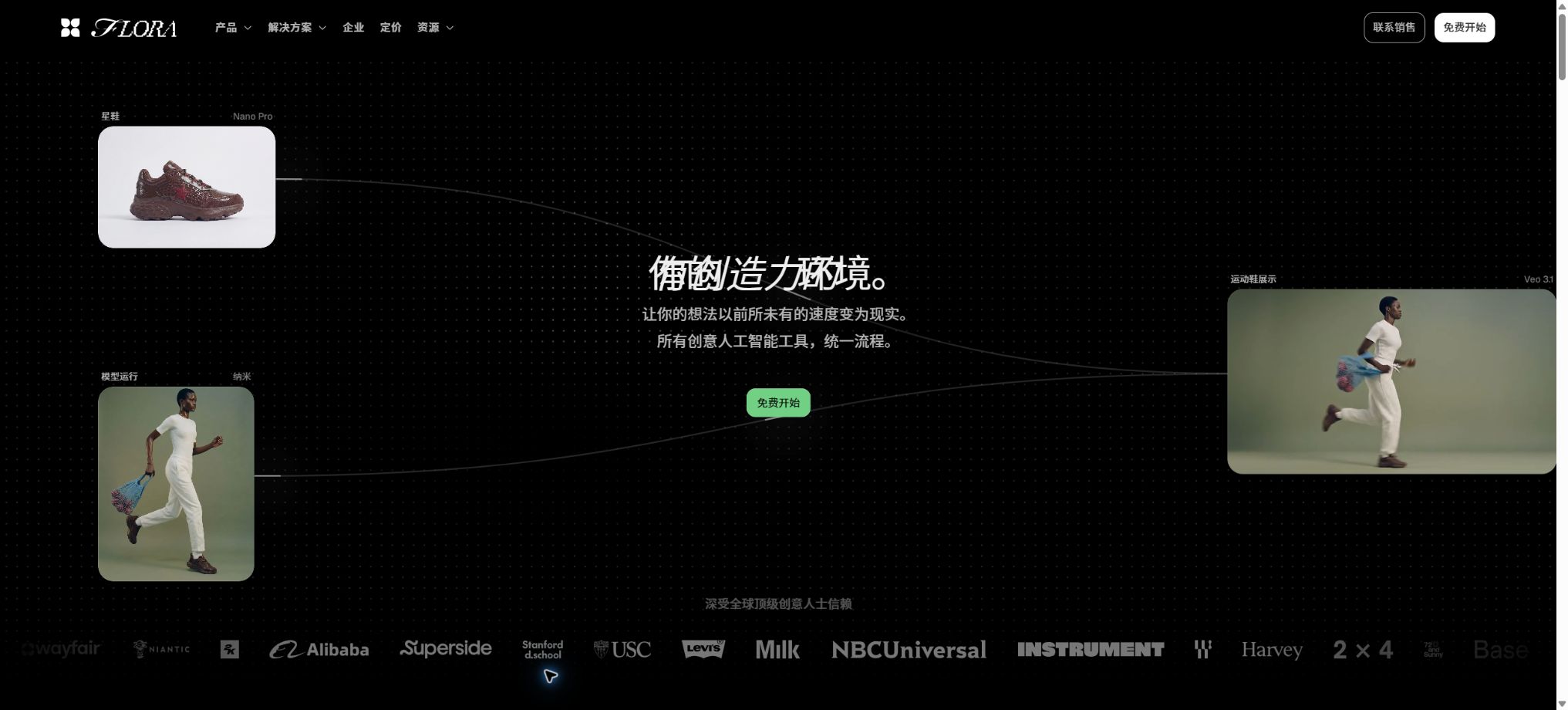
What is FLORA?
FLORA is an AI-driven workspace designed for designers, brands, and creative teams. It brings text, image, and video generation models together on a single infinite canvas, allowing users to connect nodes, compare directions, and save effective processes as reusable techniques.
Unlike generation tools that offer only a single prompt box, FLORA places more emphasis on the entire process from inspiration and iteration to mass production. The platform provides multiple levels of image editing, real-time collaboration, Fashion Studio, MCP, and public APIs, making it suitable for integrating AI-generated content into team creative workflows.
Main functions of FLORA
- Organize text, reference images, generated images, and videos on an infinite canvas;
- Connect different nodes, using the output from the previous step as the input for the next step;
- Unified access to over 60 types of text, image, video, and multimodal models;
- Compare models, prompts, seeds, image sizes, and reference materials side by side;
- Use a multi-layer image editor to further adjust the resulting output;
- Save the matured workflow as a Technique and run it again;
- Modify the parameters of nodes of the same type in bulk and generate multiple versions;
- Real-time collaboration is achieved through comments, cursors, shared assets, and elements;
- Use Fashion Studio to carry out clothing rendering, material replacement, and virtual try-ons;
- Integrate the creative workflow with external tools through APIs and MCP.
Infinity canvas and node workflow
Users can create nodes by double-clicking on the canvas, and then proceed by dragging from the connection points of these nodes. Text nodes can be connected to image nodes, which in turn can serve as the first or last frame of a video or as reference material, thus forming a visual creation pathway.
The canvas supports color labels, multiple selection, reordering of inputs, and batch parameter editing. Nodes that are being processed can be connected to downstream components first; the system will check whether the inputs are ready at the time of actual execution.
Model library and pay-per-use pricing
The current FLORA collection includes various models such as Nano Banana, Veo, Kling, Seedance, Runway, FLUX, Recraft, Marey, and others. Models are released and their versions change frequently; the specific list of available models should be based on the real-time list in the workspace.
Paid workspaces use a shared dollar budget, and the costs incurred are calculated based on the rates specified for each model. There are significant differences in prices depending on resolution, duration, quality, and model; therefore, the monthly subscription fee cannot be considered to grant unlimited usage.
Techniques and Action nodes
A technique is a creative workflow that can be run repeatedly; it allows use of platform and community templates, as well as the possibility of packaging one’s own node processes. It is suitable for repetitive tasks such as maintaining consistency in characters, extending a brand identity, creating mood boards, designing product images, and generating multiple variations.
The Action node allows for predefined processing of input data, while App Mode converts complex canvases into simpler parameter interfaces. The team can enable non-technical members to carry out fixed processes, with the creative leads in charge of maintaining the underlying nodes.
Fashion Studio
Fashion Studio transforms the common tasks in the fashion industry into specialized tools, including sketch to rendering, tile maps, Ghostform, color adjustment of garments, fabric replacement, Model Maker, fitting simulations, editing of photos, and 360-degree video of people. All these functions are available within this workspace, but their use incurs costs based on the model’s price, as part of the shared usage quota.
Common nodes and their uses
| Node or capability | Enter | Output and uses | Key points of use |
|---|---|---|---|
| Text | Prompt words, copy, or upstream text | Creative directions, structured prompts, and instructions | Specify format and variables |
| Image | Text, reference images, masks, or control charts | Concept diagrams, product images, and visual elements for characters and brands | Check authorization and consistency. |
| Video | Text, images, first and last frames, or reference videos | Dynamic concepts, ad previews, and footage materials | Control duration, format, and cost |
| Action | Result of one or more nodes | Edit, convert, analyze, or automated steps | First, validate using a small sample. |
| Technique | Parameterized input after encapsulation | Reusable creative applications and batch processes | Fix input specifications and version. |
| Document | Document files | Extract the text for processing by downstream models. | Wait for the parsing to be completed and verify the content. |
FLORA price
FLORA currently offers four public plans: Free, Starter, Pro, and Max, in addition to an Enterprise plan. The official website displays time-limited promotional offers upon verification, with these offers valid until August 31, 2026; prices and the amount of resources included may change in the future.
| Package | Current monthly price | Seats and items | Primary interests |
|---|---|---|---|
| Free | $ | 1 seat, 3 active projects | Text and image models, full canvas, Technique, FAUNA, annotation, and export |
| Starter | $ | Up to 8 seats, unlimited items | All models, team sharing usage, APIs, MCP, and real-time collaboration |
| Pro | $ | Up to 8 seats | All rights of Starter, shared assets, shared elements, member limits, and usage analysis |
| Max | $ | Up to 8 seats | Full Pro rights; up to 3 custom voices per organization |
| Enterprise | Contact sales | Customized according to organizational size | Enterprise procurement, security, identity, and support capabilities are determined in accordance with the contract. |
The official website offers an annual payment option, with a 20% discount indicated; the final price is as shown on the settlement page. The maximum number of generations available for free is around 17, and this figure is estimated based on the average cost per specific image model and a total cost of $2.50; it does not mean that all models can be used for 17 generations without charge.
Differences in package usage and features
| Project | Free | Starter | Pro | Max |
|---|---|---|---|---|
| Model scope | Text and images | Models for text, images, and videos all together | All models | All models |
| Number of projects | 3 active projects | Infinity | Infinity | Infinity |
| API and MCP | Not included | Includes | Includes | Includes |
| Shared assets and elements | Not included | Basic collaboration | Includes | Includes |
| Maximum usage per member | Not applicable | Basic shared pool | It can be set. | It can be set. |
| Custom sounds | Not included | Not included | Not included | Organize 3 per group |
Publish discount details
During verification, the official website indicates that Starter, Pro, and Max plans include additional monthly credits: 12 dollars per seat for Starter, 50 dollars per seat for Pro, and 100 dollars per seat for Max. It is specified that this discount is valid until August 31, 2026. After the end of this period, the applicable credits will be determined according to the real-time settlement page and the official details of the promotion.
FLORA Usage Guide
Create the first image workflow
- Register an account and create a blank project;
- Double-click on the canvas to add a Text node, and enter the subject, scene, and style.
- Drag a connection from the Text node to create an Image node;
- Select the model, format, quantity, and any necessary reference images;
- Run multiple versions and label the candidate directions with colors;
- Send the satisfactory results to the editing module or downstream video nodes.
Save the process as Technique
- First, complete and verify the entire node process on a regular canvas;
- Determine the text, images, and parameters that the user needs to enter;
- Provide a clear name, type, and example for each input;
- Encapsulate workflows in Technique Builder;
- Test failures, null values, and costs using different materials;
- Publish to individual or team spaces and track version changes.
Run Technique via API
- Verify that the workspace is on a paid plan that supports APIs;
- Create an API Key in the settings and save it in the server’s key management system;
- Query details of the Technique, as well as its input structure and cost per execution;
- Submit for asynchronous execution by entering the correct ID and type;
- Poll the status every 2 to 5 seconds or utilize the callback functionality as specified in the documentation;
- Download the output that needs to be stored for a long time and record the actual charges incurred.
Which users are it suitable for
- Brand design team: explores visual directions and creates brand assets in bulk;
- Advertising and marketing: Creating proposals, product images, dynamic concepts, and multiple size versions;
- Film, television, and animation: Completing character design, scene creation, storyboarding, and video previews;
- Fashion team: From clothing sketches to fitting sessions and promotional images;
- Photography and architecture: Conducting research on lighting, materials, composition, and settings;
- Creative technicians: Integrate Technique into production systems via APIs;
- Agency: Tracks costs based on projects and team members, and calculates them for the client.
The advantages of FLORA
- Text, image, and video models are gathered on the same visualization canvas;
- Nodes retain the generation path, facilitating the understanding and reuse of the creative process;
- Comparing multiple models side by side reduces the need to switch between websites and subscriptions frequently;
- Technique transforms mature processes into tools that can be used by teams;
- Offers multi-level editing, batch parameters, and real-time collaboration;
- API, MCP, and the official TypeScript SDK offer automation capabilities;
- Fashion Studio covers a fairly comprehensive visual workflow for clothing.
Usage restrictions and precautions
- The cost associated with model generation is deducted from the package price based on the actual operating costs.
- Videos and high-quality models consume more resources faster than regular images;
- Updates to external models may change effects, parameters, speed, and prices;
- Complex canvases require standardized naming, grouping, and version control;
- The text, characters, products, and brand details generated by AI may be incorrect;
- Free supports only 3 active projects, and its model range is limited;
- The output URL is not stored permanently; important assets should be downloaded promptly.
Copyright, Privacy, and Team Security
The brands, individuals, products, and reference materials uploaded by users must be covered by the necessary rights; the aggregation model does not automatically resolve any issues related to authorization. Before carrying out any commercial delivery, it is also necessary to check the terms of use associated with the selected underlying models, as well as the risk of similarity between the depicted individuals’ portraits and existing brands.
- Do not place unpublished client materials in public Techniques or Galleries;
- Set appropriate levels of access to projects and assets for team members;
- The API Key is stored only on the server, and it is replaced when there are changes in personnel.
- High-value content generation retains prompts, reference images, models, and approval records;
- Before making a purchase, enterprises should verify the Trust Center, DPA, SSO, and data retention policies.
API, MCP, and open-source details
FLORA offers a formal public API that allows for listing Techniques, querying inputs and costs, starting executions, polling for results, as well as managing workspaces, projects, and assets. This API is available only to users with paid subscriptions, and each key is associated with one workspace.
The official TypeScript SDK has been made available on GitHub under the Apache-2.0 license, and the NPM package can be used for server-side integration. The fact that the SDK is open source does not mean that the FLORA canvas, the hosting platform, or the third-party models integrated with it are also open source.
Frequently Asked Questions
Can FLORA be used for free?
Yes, the free plan costs $0 and includes 1 seat, 3 active projects, text and image models, as well as a full canvas. The amount that can be generated for free is determined based on the level of sharing and the cost of the selected models.
How much is FLORA Starter?
The current monthly rate on the official website is $18 per seat, and the discounts available as of August 31, 2026, are shown there. The annual payment option indicates a 20% discount; the final price will be indicated on the settlement page.
What AI models are included in FLORA?
The platform currently offers over 60 models for text, images, and video, including those provided by various leading suppliers. The available versions are updated continuously, so it is necessary to check them in real time via the model selector.
Does FLORA have an API?
Yes, versions Starter and above support the use of APIs and MCP. The official team also provides a TypeScript SDK; however, the use of APIs still incurs costs that are deducted from the usage quota of the workspace.
Is FLORA open source?
The core creative platform is not an open-source product. The official TypeScript SDK is licensed under the Apache-2.0 license, but the underlying services and third-party models are used in accordance with their respective licensing terms.
Tools similar to FLORA



 Guigong Network Security Registration No. 45132202000164