






DocumentPro
DocumentPro: an intelligent tool focused on AI-driven document processing.
Tags:AI document toolsA one-sentence summary
DocumentPro is an AI-based document extraction service designed for enterprises and software platforms; it enables the conversion of invoices, purchase orders, receipts, bank statements, tax forms, and other PDF or image files into structured fields and tables.
Tool Introduction
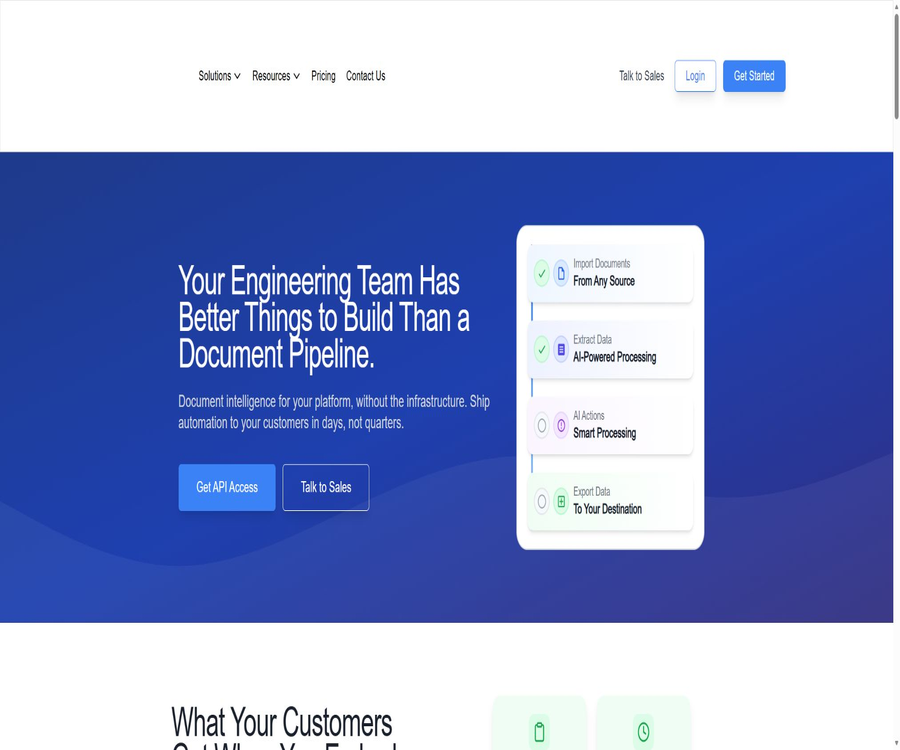
DocumentPro creates a complete workflow that includes document collection, classification, parsing, verification, manual approval, and data export. Users can configure everything without writing any code within the web application, or they can integrate it with existing products using APIs, Webhooks, SDKs, or MCP.
The platform emphasizes that there is no need to create fixed templates for each layout; the AI is capable of understanding documents in different languages and from various suppliers based on the field definitions. While the platform claims to support over 50 languages and various types of documents, the accuracy level should still be determined through testing using the company’s own samples.
Core workflow
| Phase | Available methods | Main results |
|---|---|---|
| Import | Connectors such as manual upload, email, API, Google Drive, etc. | The original files that enter the specified workflow |
| Classification | Classifier and confidence level | Identify the document type and route it to the parser. |
| Extract | Pre-set or custom fields, tables, and details | Structured JSON and field confidence |
| Processing | Search, match, edit, mark, and approve documents | Data that has passed the business rule verification |
| Export | Webhook, Excel, CSV, QuickBooks, or integration | Access to finance, ERP, and proprietary systems |
Main functions
Custom AI parser
Users can define the fields to be extracted, the data types, duplicate entries, and the table structure; the parser will return the results following a uniform pattern. The same fields can retain the same names across different formats, which reduces the workload required for subsequent data processing.
Pre-set document templates
- Invoice: Retrieves the supplier, invoice number, date, tax amount, total amount, payment terms, and line items.
- Purchase order: identifies the products, quantities, prices, delivery details, and customer information.
- Receipts and bank statements: provide information on the merchant, transactions, and payments.
- Bill of lading and quote: details regarding the goods, route, carrier, price, and terms.
- U.S. tax documents: Provides a library of pre-filled templates such as W-2, 1099, K-1, etc.
Scanned documents and multilingual processing
The same processing interface can accept digital PDFs, scanned documents, photos, and complex multi-page files, eliminating the need for a separate OCR step. However, low-quality images, handwritten text, and small font sizes still increase the likelihood of misidentification.
Automatic splitting of multiple documents
The semantic segmentation feature determines the boundaries between different documents within a merged PDF; for example, it splits invoices with varying numbers of pages into separate entries. It makes these decisions based on headings, numbers, amounts, and layout changes within the pages, rather than relying on any fixed rule regarding the number of pages.
Classifier API
The classifier can identify mixed documents as invoices, receipts, purchase orders, and other categories, and provide a confidence level for each label. Based on this information, developers can route the documents to different workflows; those with low confidence levels are then sent for manual verification.
Field-level confidence
The platform can provide a confidence score ranging from 0 to 1 for each individual field, which helps teams to review only those fields that are uncertain, rather than checking the entire text of each document. This feature may require an account activation; it is advisable to consult the authorities before it becomes available officially.
Multi-model selection and automatic fallback
The parser can switch between economical, balanced, and advanced vision models, and it will automatically fall back to other models when the upstream models fail. The choice of model affects accuracy, latency, and the amount of credits consumed per page.
Manual verification and business operations
Once extracted, the data can be edited, marked, and approved; it is also possible to query the database and perform matches for suppliers, products, or accounts. When it comes to payments and accounting, thresholds should be set and manual approval required.
Webhook and bulk export
After the processing is complete, the results can be pushed to the server via a Webhook, and one or more documents can be downloaded in XLSX or CSV format. A signed Webhook helps the recipient verify that the event indeed originates from DocumentPro.
MCP server
The authorities provide managed MCP servers that expose tools for extraction, classification, and template management to compatible AI agents. It uses the same key-based authentication as APIs, making it suitable for coding agents to read the actual field structures and create integrations.
Supported models
| Model hierarchy | Public examples | More suitable document | Cost and speed |
|---|---|---|---|
| Economic | GPT 4o Mini, GPT o4 Mini | Clear digital PDF, stable layout, and a large number of simple fields | With fewer credits, the speed is usually higher. |
| Balanced type | GPT 4o, Claude Sonnet 4.6 | A mixture of scanned documents and digital files, with complex tables. | Trade-off between quality and cost |
| Cutting-edge | Claude Sonnet 5, GPT 5.6 Terra | Handwriting, fax, small print, complex cross-page reasoning | More credits may result in a higher delay. |
| Automatic rollback | Alternative models such as Claude Haiku 4.5 | The main model has failed or is temporarily unavailable. | Improve process continuity |
Which users are it suitable for
- Finance and Accounts Payable team: Automatically enters invoices and matches them with suppliers, orders, and accounts.
- Supply Chain and Order Team: Converts purchase orders from emails into data in the ERP or order management system.
- Tax and accounting agencies: handle combined tax forms, bank statements, and batch scans of customer documents.
- SaaS development team: Integrates document upload, extraction, and manual review capabilities into its own products.
- Operations Automation Team: Uses connectors, Webhooks, and table exports to reduce redundant data entry.
Situations that are not very suitable
- Individuals who only need to read or summarize a single document, without the need for a consistent field structure or system integration.
- Organizations that require a completely offline solution, an open-source option, or the ability to deploy it on their own servers.
- It is not possible to establish a manual review mechanism, yet the results of the extraction are supposed to trigger immediate payment processes or legal actions.
- Scenarios where the file is protected by a password, the images are extremely blurry, or the key information cannot be identified.
- Projects that require a fixed total price, but for which the number of pages in the document and the resources consumed by the selected model are difficult to predict.
Usage tutorial
Create the first extraction workflow
- Register an account and select predefined types such as invoices or purchase orders, or create a custom parser.
- Define field names, types, whether they are required, and the structure of the row item table.
- Upload a set of representative digital PDFs, scans, and samples with abnormal formatting.
- Compare the extracted values with the original text, modify the field descriptions, and set the confidence review threshold.
- Configure editing, approval, database lookup matching, and export functions, then conduct a small-scale trial run.
- Calculate the accuracy of statistical fields, the rate of manual review, the data usage per page, and the latency, before expanding the scale further.
Access the product via API
- Create a parser in the account and obtain an API key, which is stored only on the server side.
- Send the files uploaded by users to the corresponding workflow, and record the document details as well as the tenant identifier.
- For low-volume interactions, the status can be checked via polling; for batch processing, asynchronous Webhooks are preferred.
- Verify the Webhook signature and implement idempotent handling for duplicate events.
- The review interface is displayed based on the confidence level of each field, preventing results with low confidence from proceeding automatically to critical processes.
- It will be officially made available after logging of sensitive data has been handled, usage-based billing has been implemented, retry mechanisms for failures have been in place, and deletion policies have been established.
Select the appropriate model.
- Select at least a dozen documents from real business scenarios and label the correct answers.
- First, use a balancing model to establish baselines for accuracy, latency, and cost.
- The economic model is tested on clear documents, while the state-of-the-art models are tested on low-quality and complex documents.
- The results are compared based on the error rate of key fields rather than overall character similarity.
- Route simple documents to the economical model, and only upgrade samples with low confidence to the advanced model.
Pricing and quotas
DocumentPro is billed on a credits basis; each page typically consumes one or more credits, depending on the model and the processing method used. In an official update in July 2026, it was announced that all accounts will receive 200 free credits per month automatically, without the need to link a bank card.
| Plan or project | Public information | Notes |
|---|---|---|
| Current free quota | 200 credits per month | Based on the official updates as of July 2026, it can be used for testing various models. |
| Old Standard page | 49 dollars per month, 1,000 credits | The old pricing page still shows that figure; it is necessary to verify it on the account settlement page before making a purchase. |
| Enterprise | Quotation for customized usage amounts | Data retention, business partner agreements, and custom integrations can be negotiated. |
| Professional implementation services | The old page showed a starting price of $1,500. | It represents additional setup and configuration services, and is not equivalent to the subscription fee. |
| Exceeding the free quota | Scale out based on usage | The actual unit price, tiering, and model multiplier are subject to the real-time settlement page. |
Why are the price details different?
The old pricing page on the official website still shows historical information such as 20 free credits and a Standard plan priced at $49, while the updated announcement states that the free credit allowance has been increased to 200 credits per month. This article relies on the more recent official announcements to describe the free credit quota, and does not consider the packages listed on the old page as permanent commitments.
API, SDK, and open-source status
| Project | Status | Explanation |
|---|---|---|
| REST API | Support | Upload files, start extraction, view results, and categorize. |
| Webhook | Support | Process results via asynchronous push, with signature verification provided. |
| SDK | The official website claims to offer it. | The specific language, installation packages, and maintenance status should be verified in the development documentation. |
| MCP | Support | The hosting server offers 11 tools for extraction, classification, and template creation. |
| Official open-source repository | No findings were detected. | It cannot be used as evidence to conclude that the platform or model is open source. |
| Open-source product | No | It belongs to cloud-based business document processing services. |
Input and output
| Category | Supported content | Precautions |
|---|---|---|
| Input file | PDF, scanned documents, images, and multi-page batch files | Encrypting files and blurring images may fail. |
| Input channels | Web upload, email, API, Google Drive, etc. | Connector availability is determined based on the package. |
| Extraction results | Fields, duplicate items, tables, categories, and confidence level | Key data requires manual verification. |
| Developer output | Structured JSON, Webhook events | The server should verify the signature and pattern. |
| Business output | XLSX, CSV, QuickBooks, and other integrations | Approval must be completed before exporting. |
Product advantages
- It covers the entire process from import to export, not just a single OCR or model invocation.
- Field patterns, confidence levels, and manual approval are more suitable for production-grade structured data.
- It supports multiple models and automatic fallback, allowing selection of the optimal approach based on quality, speed, and cost.
- API, Webhook, and MCP address both traditional system integration and AI agent development.
- Monthly free credits can be used for low-volume workflows and regression testing.
Usage restrictions and risks
- The official 98% accuracy rate is a general marketing figure; it does not mean that every individual field or company sample will achieve this level of accuracy.
- The model may miss items, mismatch rows, or produce seemingly reasonable error values; therefore, the payment and tax processes must be reviewed.
- Credits are consumed per page and per model; merging long documents, attempting retries in case of failures, and using advanced models all increase the costs.
- Features such as field-level confidence levels may require an application to be submitted in order to be enabled; they are not available for all accounts by default.
- There are differences between the old pricing page and the new announcements; the budget must be based on the current account prices.
- Third-party models, cloud storage, and business connectors expand the data processing chain, requiring individual evaluation of permissions for each one.
Safety and privacy
The official website states that data is encrypted both during transmission and when stored statically, and claims to follow the requirements of SOC 2 and HIPAA; however, it notes that the SOC 2 audit is still in progress. Purchasers should not consider a status of “under audit” as an indication that formal certification has been obtained.
Advanced solutions offer data retention protocols, partner agreements, and security controls. Before processing medical, tax, banking, or identity-related information, it is necessary to obtain the latest audit documents, data processing agreements, a list of sub-processors, as well as statements regarding data storage and deletion.
Purchase recommendations
| Demand | Suggestions | Reasons |
|---|---|---|
| Individual tests or low-volume monthly tasks | Use the free quota first. | 200 credits are available to verify the differences between real samples and the model. |
| Stabilize moderate-volume operations | Verify Standard real-time settlement | The old page shows $49 and 1,000 credits, but it is necessary to verify whether they are still valid. |
| Large volumes of data or regulated data | Contact Enterprise | Tiered pricing, retention agreements, and compliance documents are required. |
| Embed in SaaS products | API and Webhook | Facilitates asynchronous processing, as well as multi-tenant metering and review. |
| Only prepare brief summaries of what has been read. | Select the Universal Document Assistant. | The advantage of DocumentPro lies in its structured pipeline rather than chat functionality. |
Basic information
| Project | Content |
|---|---|
| Tool name | DocumentPro |
| Tool type | AI document extraction, intelligent document processing, and document parsing APIs |
| Price pattern | Monthly free credits, usage-based subscriptions, and enterprise customization |
| Free quota | The latest official update sets the amount at 200 credits per month. |
| Is registration required? | It is necessary. |
| Is Chinese supported? | Multilingual documents are supported; for complex Chinese texts, actual testing is required. |
| Whether API is provided | Yes |
| Is MCP provided? | Yes, managed servers. |
| Is it open source? | The product is not open-source; no official source code repository has been found. |
| Main platforms | Web applications, APIs, Webhooks, connectors, and MCP |
Frequently Asked Questions
Is DocumentPro free?
It can be used for free. According to the latest official updates, each account receives 200 credits for automatic renewal per month; any excess usage will require an upgrade based on the actual amount used.
Is one credit equal to one document?
Not necessarily. The platform calculates the amount based on the number of pages and the models selected; one page may require one or more credits, so longer documents and more advanced models will consume more credits more quickly.
Can tables and row items be extracted?
Yes. The parser supports fields, repeated items, and table structures, and is often used for invoice details, products in purchase orders, and bank transactions.
Is an API provided?
Available. Developers can upload files, initiate extraction, obtain structured results, and use classifiers; they can also use Webhooks to receive notifications of asynchronous completion events.
Can it handle PDFs with multiple invoices merged together?
Yes. Semantic segmentation determines the boundaries based on the content and layout, breaking down the merged file into individual records for separate extraction.
Is DocumentPro open source?
It is not open source. The API, SDK, and MCP provide access capabilities, but this does not mean that the cloud platform, the models, or the service code are made available in open source form.
Can the extracted results be used for automatic payment?
Direct payment without verification is not recommended. It is necessary to set confidence thresholds for key fields, match business data, verify webhook signatures, and retain human approval.
Summary
DocumentPro is suitable for enterprises that need stable, structured outputs, batch processing workflows, and system integration, rather than just handling one-off document queries. Its multiple models, field confidence levels, classification capabilities, semantic segmentation, and MCP features make it closer to a production-grade document infrastructure.
Before implementation, it is necessary to use real samples to assess the error rate in key fields, as well as the time required for review and the cost per page; moreover, it is important to confirm the current prices and the quality of the security materials used. Any data that could trigger financial, medical, or legal actions should require manual decision-making.
Tools similar to DocumentPro




 Guigong Network Security Registration No. 45132202000164