






LightPDF
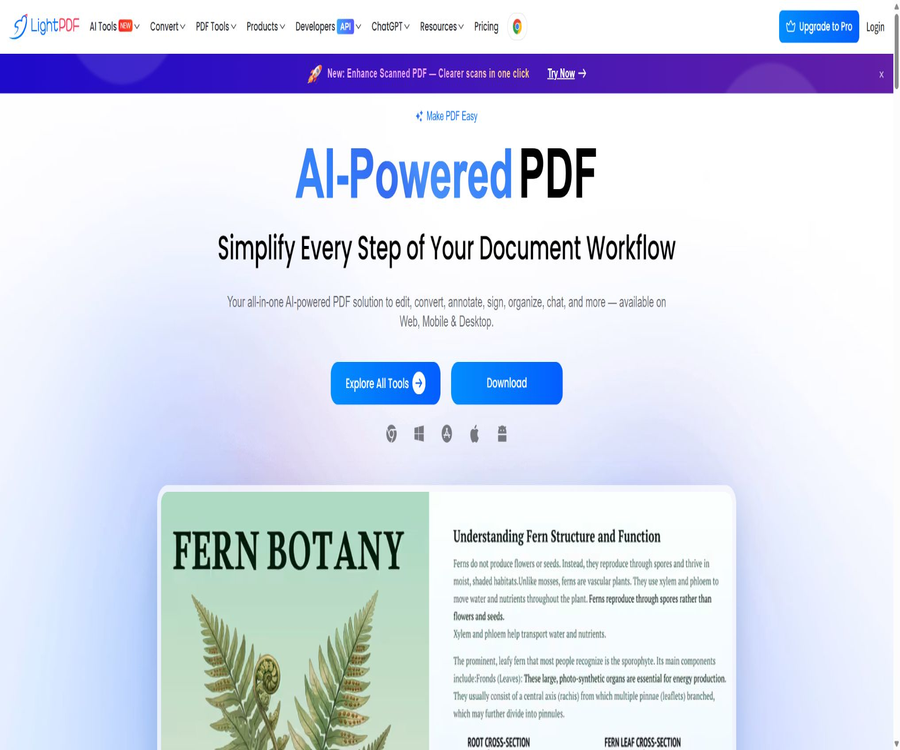
LightPDF, a smart tool focused on AI-driven document processing.
Tags:AI document toolsWhat is LightPDF?
LightPDF is an AI-powered PDF processing platform that works on web browsers, desktops, and mobile devices; it is provided by Wangxu Technology. It integrates traditional PDF editing, conversion, OCR, signing functions with AI-based capabilities such as question answering, summarization, translation, and automated workflow handling, all within a single product.
Users can process files directly in their browsers, or they can use clients for Windows, macOS, iOS, and Android. The free version is suitable for simple web-based tasks, while the Premium version provides cross-platform functionality as well as higher processing capacities.
Core functions
PDF AI Agent
PDF AI Agent allows users to describe tasks in natural language, after which the system selects the appropriate tools to carry out those tasks. It is suitable for handling various document operations such as merging, compressing, splitting, rotating, adding page numbers, converting formats, and encrypting documents.
ChatPDF and document analysis
After uploading PDF, Word, Excel, PPT, TXT, EPUB files or scanned documents, it is possible to ask questions, summarize content, and extract information. Answers can be presented in Markdown format or as tables, with relevant elements marked in scenarios that support such presentation.
PDF editing and annotation
The editor allows for editing text and images, adding links and shapes, adjusting the background and watermarks, as well as inserting, rotating, deleting, or extracting pages. Users can also highlight text, underline it, draw diagrams, and add notes.
Conversion and OCR
LightPDF can convert between PDF and formats such as Word, Excel, PPT, images, and text, and it supports batch processing. OCR enables the conversion of scanned PDFs or images into searchable and editable content.
AI-generated and translated
AI tools include PDF generation, PPT creation, mind mapping, document summarization, and PDF translation. Users can create new structured outputs from prompts, documents, text, or web content.
Signatures, forms, and secure processing
Desktop editing capabilities include electronic signing, form filling and creation, password protection, data masking, and page management. Whether specific functions require an internet connection as well as any differences between platforms depend on the actual interface of the current client software.
Cloud sharing and collaboration
Users can save files in the cloud, create sharing links, and invite others to view, edit, sign, or comment on them. It is necessary to set permissions before sharing and to check whether the document contains any information that should not be made public.
List of main functions
- Use natural language to arrange the processes of conversion, compression, merging, and page handling.
- Ask questions and get answers related to PDFs, scanned documents, and common office documents.
- Summarize long documents and extract key facts, numbers, and tables.
- Edit PDF text, images, links, background, and pages.
- Convert between PDF and formats such as Word, Excel, PPT, and images.
- OCR is used to identify scanned documents and generate searchable text.
- Translate the PDF while trying to preserve the original layout as much as possible.
- Generate PDFs, presentations, and mind maps from prompts.
- Add electronic signatures, annotations, forms, and password protection.
- Compress, split, merge, crop, rotate, and organize PDF pages.
- Works on Web, Windows, macOS, Android, and iOS.
- Viewing, commenting, and collaborating are carried out through cloud links.
What use cases are suitable?
- Students and teachers: summarizing papers, identifying lecture notes, translating materials, and creating mind maps.
- Administrative staff: Convert files, organize pages, add watermarks, and compress attachments in bulk.
- Researchers: Ask questions about multiple documents and extract structured information.
- Legal and financial staff: Search for specified fields in contracts, invoices, and reports.
- Freelancer: Edit clients’ PDFs, add signatures and annotations, and generate the final documents.
- Small teams: Share documents and handle common PDF tasks together.
- Mobile office users: Scan documents, use OCR for recognition, and continue editing on their phones.
- Content creators: Convert materials into PPTs, summaries, or mind maps.
What situations are not very suitable
- An environment that requires offline operation of all AI functions as well as cloud-based conversion functions.
- Organizations that prohibit uploading contracts, medical information, or customer confidential data to external cloud services.
- Publication tasks that require complex pre-press processing, professional typesetting, or precise control over font embedding.
- Organizations that require open-source solutions, reproducible builds, or fully private deployment.
- Users who make numerous AI calls on a daily basis and do not want to be affected by the rules regarding the expiration of credits.
- Teams that rely on stable, public APIs for large-scale production integration but have not entered into any corporate agreements.
LightPDF Usage Guide
Process PDFs online
- On the tool page, select Edit, Convert, Compress, OCR, or another desired function.
- Delete unnecessary personal information and hidden metadata before uploading the file.
- Set the format, page range, or output quality according to the prompts on the page.
- Run the task and preview to check whether the text, images, pagination, and tables are correct.
- After downloading, open the file locally again to verify that it is not damaged.
- Remove it from the account or file list when it is no longer needed as a cloud copy.
Use AI to analyze documents
- Upload a PDF or a supported office document and wait for the parsing to be completed.
- First, let the AI summarize the table of contents, topics, and the time range of the documents.
- Ask clear questions regarding specific chapters, figures, or conclusions.
- It is requested that the information be presented in a list or table, to reduce the difficulty of reading long paragraphs.
- Return to the original text to check whether the page numbers, context, and citations match.
- Copy the confirmed results to the report or continue generating a mind map.
Execute workflows using AI Agents
- Upload one or more PDF files that need to be processed.
- Describe the sequence of operations, the page range, and the output format in natural language.
- Before execution, check whether there are any irreversible actions such as deleting pages or overwriting content.
- Run the task and examine, one by one, the tools selected by the proxy as well as the results.
- Download the new file and compare it with the original file in terms of page count, clarity, and permissions.
- Keep the original; share or archive the results only after confirming they are correct.
Comparison between the free version and Premium
| Project | Free | Premium |
|---|---|---|
| Supported platforms | Only via web page | Web, Windows, macOS, Android, iOS |
| Batch processing | Not supported or limited | Support |
| Single-task file size | It is usually limited to 10MB. | There are no restrictions on page labeling. |
| PDF AI Agent | About 10 basic questions per day | 1,000 points per month, or permanent points |
| AI document analysis | About 1 file per day | According to the points and package rules |
| AI PDF generation | Limited number of files | Use based on points. |
| Conversion tool | About 3 files per day | Use according to the Premium rules. |
| Electronic signature | About 2 files per day | Higher or unlimited processing limits |
| Cloud files | Basic storage and sharing | Higher file limits and full functionality |
The free quota varies depending on the tool and region; the number of times per day shown in the table corresponds to the figures presented on the price comparison page during verification. The actual number of usable sessions is also influenced by factors such as file size, task type, account status, and applicable rules.
Individual Premium price
LightPDF displays different products based on region, event, and whether a trial version is being used. The following are the common dollar-based pricing options that can be found on the global page as well as in the official payment details during verification. The final price may change due to the end of promotions, taxes, or differences between distribution channels; the price indicated on the settlement page should be taken as the authoritative figure.
| Plan | Common public prices | Billing method | AI points | Refund period |
|---|---|---|---|---|
| Free | $ | Free for an extended period, with limited features | Based on the daily free quota | Not applicable |
| Monthly | Approximately $19.99 per month | Automatic monthly renewal | 1,000 points per month, valid for that month only | 3 days |
| Annual | The usual price is 49.99 dollars per year; on promotional pages it can drop to as low as 39.99 dollars per year. | Automatic annual renewal | 1,000 points per month, valid for that month only | 7 days |
| Perpetual | The regular price is 109.99 dollars per unit, while the discounted price during promotions might be 79.99 dollars. | One-time purchase | 40,000 points are issued at a time, and they remain valid for an extended period before use. | 30 days |
The annual subscription plan may offer a three-day free trial; after the trial period ends, charges will be deducted based on the amount specified on the page. The term “permanent” in the permanent version refers to access to the current product tools, and it does not mean unlimited access to AI credits, nor does it guarantee access to all future services or the absence of any changes to the online services.
AI scoring rules
With the monthly payment option, 1,000 points are awarded each month and are valid for one month starting from the date of purchase. The annual payment option also provides 1,000 points per month, with each batch of points being valid only for that specific month. Unused points are not carried over to the following month automatically.
The permanent version comes with 40,000 points granted at once; the information on the page states that these points remain valid for an extended period before use. Different AI models, as well as the number of pages in a file and the level of resource consumption, vary, so it is advisable to check the details in the price comparison table before making a purchase.
| Source of points | Method of distribution | Validity period | Suitable for |
|---|---|---|---|
| Free quota | Refresh daily or by function | It is usually not cumulative. | Occasionally process documents. |
| Monthly Premium | 1,000 points per month | One month | Short-term projects |
| Annual Premium | 1,000 points are automatically awarded each month. | One month per batch | Continuous use |
| Permanent version | 40,000 points are issued at a time | Remains valid for a long time before use | The frequency of use is not fixed. |
| Additional points package | One-time purchase | The rules on the purchase page shall prevail. | Temporarily increase AI usage |
Teams, enterprises, and educational programs
The team plan offers centralized billing, member management, and bulk discounts; companies can contact sales for customized quotes and demonstrations. Educational users need to submit identification or institutional documents in order to obtain a discount.
| Plan | Pricing method | Main features |
|---|---|---|
| Individuals | The page shows the monthly, annual, and one-time purchase prices. | Single-user cross-platform use |
| Team | Pricing is based on the number of people and the duration period. | Centralized billing, member management, bulk discounts |
| Companies | Contact sales | Customized scale, support, and business terms |
| Education | Get the discount after verification. | For students, teachers, or educational institutions |
Supported formats and platforms
| Category | Supported content |
|---|---|
| Document | PDF, DOC, DOCX, TXT, RTF, EPUB, OFD, CAJ, etc. |
| Table | XLS, XLSX, etc. |
| Presentation | PPT, PPTX, etc. |
| Image | JPG, PNG, TIFF, HEIC, WebP, SVG, etc. |
| Web page | HTML and some web page content |
| Desktop | Windows, macOS |
| Mobile version | iOS, Android |
| Browser | Web applications and Chrome, Edge extensions |
The format options are taken from the current descriptions on the official price page; they do not imply that all formats support two-way conversion, batch processing, and full fidelity. Complex tables, formulas, fonts, and scan quality can significantly affect the quality of the output.
Offline and online requirements
The web version must be connected to the internet, while Windows and macOS clients allow some standard PDF operations to be carried out offline. AI functions, cloud-based collaboration, and certain conversion tools still require a connection to a server.
- Download and activate the desktop client before using it offline.
- In a network-off environment, prioritize testing the editing, annotation, and page organization functions.
- AI Q&A, translation, and cloud conversion should be regarded as online services.
- Enterprise networks require an evaluation of proxies, domain name allowlists, and file transfer policies.
- Do not rely on temporary network conditions to carry out the final export of important tasks.
Privacy and file security
The official price page states that 256-bit SSL encryption is used for data transmission; temporary files are automatically deleted after processing is complete, and indicators of compliance with GDPR, ISO 27001, and ISO 27701 are displayed. The privacy policy also specifies that files that users save in the cloud on their own will remain in their account until they delete them or until the applicable retention rules come to an end.
The date of update for the privacy policy is indicated as June 27, 2022, which is earlier than the introduction of various AI functions at present. Organizations using such services should verify further the AI service providers, the purposes for which the data is processed, the specific time frames for deletion, as well as the rules regarding cross-border data transfer and data backup deletion.
- Remove ID numbers, bank card details, and unnecessary personal information before uploading.
- For confidential documents, offline tools or approved corporate solutions should be used preferentially.
- The shared link is set with minimum permissions and becomes invalid once the task is completed.
- Do not equate the automatic deletion of temporary files with the immediate removal of all backups.
- Export the files before deleting the account, and check the list of cloud documents again.
- When dealing with medical, legal, and financial information, conduct an organizational compliance assessment first.
Account and device restrictions
A Premium account can be used on Windows, macOS, Android, iOS, and the web, but according to the official FAQ, only one Windows device can be logged in at a time; logging in to another Windows device will cause the previous one to log out automatically.
Cross-platform benefits do not mean that unlimited concurrent use is possible on all devices, nor do they imply that the same pricing and refund policies apply across different app stores. Mobile subscriptions are usually also subject to the terms set by Apple’s or Google’s stores.
Product advantages
- Traditional PDF tools and AI capabilities for understanding, generating, and automating are combined in one platform.
- It covers five platforms: Web, Windows, macOS, iOS, and Android.
- It supports a variety of office document, image, and scanned file formats.
- AI Agents can reduce the need to switch between tools when dealing with multi-step page processes.
- It offers chat, summarization, translation, mind mapping, and PPT generation.
- Some common PDF tasks can be completed offline on the desktop version.
- Individuals, teams, enterprises, and educational programs cover various purchasing scenarios.
- Monthly, annual, and perpetual editions come with different cost structures.
Usage restrictions and precautions
- Prices vary for different products depending on region, event, channel, and trial status.
- Monthly and annual AI credits expire on a monthly basis, and any unused amount is not carried over.
- The permanent version comes with only 40,000 initial AI points, so AI usage is not unlimited.
- AI responses, translations, and information extraction may misinterpret the original text or overlook context.
- After converting complex PDFs, font replacement, misaligned tables, and changes in page breaks may occur.
- Web pages and AI features require file uploads, and they are not suitable for unapproved confidential materials.
- The privacy policy was updated some time ago, and it does not explain in detail all the new AI features.
- A Premium account cannot be logged in to multiple Windows devices at the same time.
- The free version has limitations on file size, number of operations per day, and batch processing.
- The watermark removal feature can only be used for content that is owned or for which authorization has been obtained.
GitHub and the open-source status
As of the time of verification, no official GitHub repository was found that had a direct link on the LightPDF website and could be confirmed to contain the complete source code of the product. The cracked versions, activation tools, and other lightweight PDF projects that appeared in the search results were not the official open-source version.
LightPDF should be considered as closed-source commercial software and a cloud service. Do not download so-called advanced unlocked versions from unofficial GitHub repositories; such files may violate licensing terms and pose risks of malware infection and credential leakage.
Basic information
| field | Content |
|---|---|
| Tool name | LightPDF |
| Development entity | Wangxu Technology Co., Ltd. |
| Tool type | AI PDF, document editing, and conversion platform |
| Core AI features | PDF AI Agent, ChatPDF, summarization, translation, generation, mind maps |
| Standard PDF functions | Editing, conversion, OCR, signing, annotations, compression, page organization |
| Supported platforms | Web, Windows, macOS, iOS, Android |
| Price pattern | Free version, monthly subscription, annual subscription, permanent version, for teams and enterprises |
| AI points | The subscription cost is 1,000 per month; the permanent version costs 40,000 once. |
| Is it possible to use offline? | Some functions are available on the desktop version, but not the AI and cloud-based functions. |
| Is it open source? | No |
Recommendation score
4.5 / 5. LightPDF is suitable for users who want to use a cross-platform tool for PDF editing, conversion, OCR, and AI analysis; it offers a wide range of functions and provides permanent solutions. However, it is necessary to pay close attention to the expiration of points, regional pricing, and the privacy of files stored in the cloud.
Frequently Asked Questions
Is LightPDF free?
Some tools available on the web can be used for free, but there are limits on file size, the number of operations that can be performed per day, batch processing capabilities, and the amount of AI resources that can be utilized. Full Premium features for desktop and mobile devices require payment.
How much is Premium?
During verification, the typical global prices are around $19.99 per month, $49.99 per year, and $109.99 for the permanent version; the promotional page may show prices of $39.99 per year or $79.99 for the permanent version. The final price depends on the pricing information displayed on the page specific to your region.
Does the permanent version include unlimited AI?
It is not included. The permanent version provides 40,000 AI points at the time of issuance; once these points are used up, they may need to be purchased separately, with the amount consumed determined by the specific functions used.
Are AI points accumulated?
For the monthly and annual plans, the 1,000 points issued each month are valid only for that particular month; any unused portion expires. The permanent version comes with 40,000 points at launch, which remain valid for an extended period before use.
Can it be used offline?
Windows and macOS clients allow some PDF operations to be performed offline, but AI features, cloud-based collaboration, and certain conversion functions require an internet connection. The web version always needs an internet connection.
Is uploading files safe?
Officials claim that data transmission is encrypted and that temporary files are automatically deleted, but files that are intentionally saved to the cloud remain in the account. Sensitive information should still be anonymized and subject to compliance assessments first.
Which file formats are supported?
It supports PDF, common Office documents, text, e-books, and various image formats. The input and output options for each tool vary; these should be checked on the respective tool’s page.
How to cancel subscription?
Automatic renewal can be canceled via a payment email or by contacting customer service; if the purchase was made through an app store, the process is handled through that store. Before canceling, it is necessary to check the current billing period, the date of renewal, and the conditions for refunds.
Is LightPDF open source?
No. No complete official source code repository that can be verified was found; the cracked versions available on GitHub, as well as projects with the same name, do not represent the official LightPDF version.
Tools similar to LightPDF




 Guigong Network Security Registration No. 45132202000164