






ChatPDF
A dedicated PDF reading assistant that supports citation positioning, multi-document dialogue, and summarization.
Tags:AI document toolsWhat is ChatPDF?
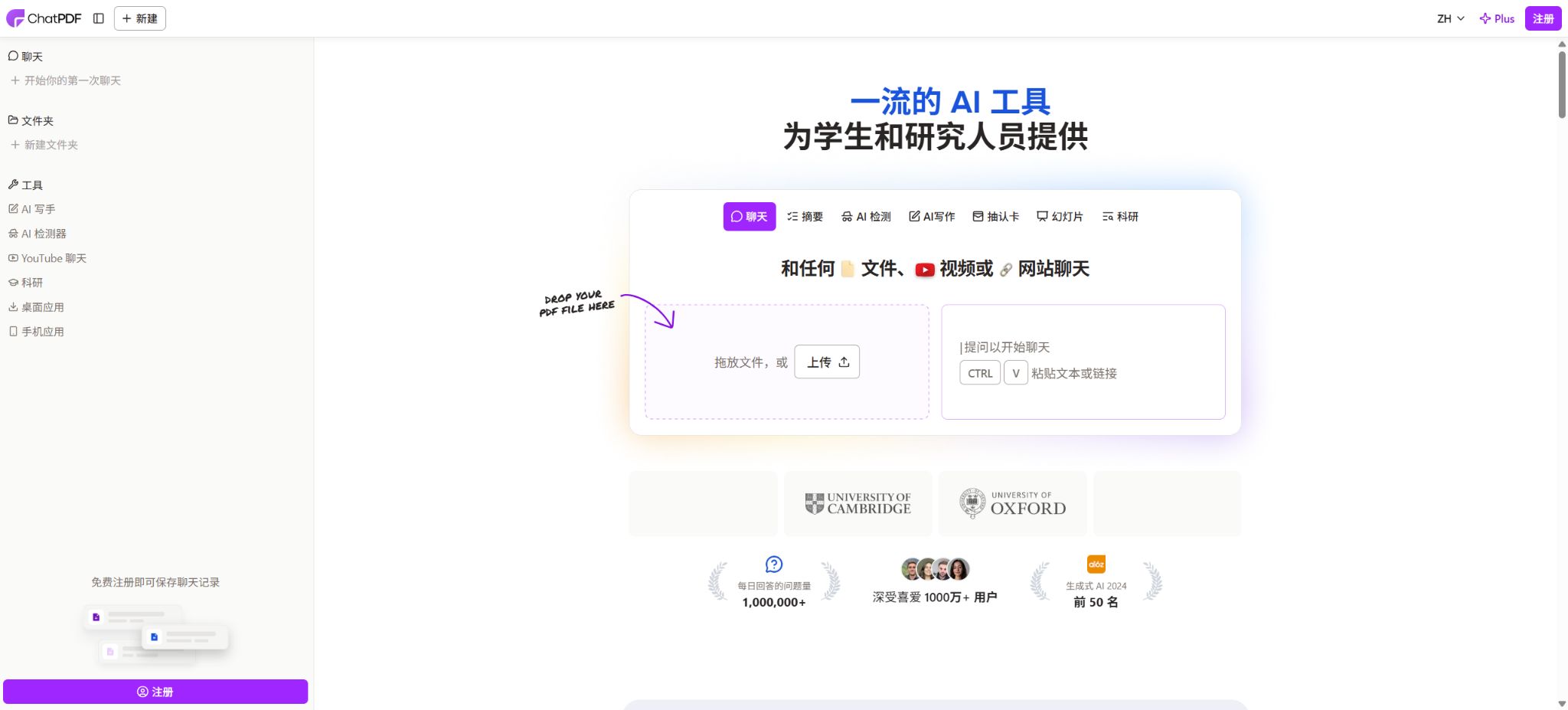
ChatPDF is an AI-based document analysis tool whose core functionality is to enable reading of documents in a manner similar to chatting. After users upload a file, they can ask questions about key points, concepts, data, conclusions, or the meaning of a particular chapter; the system then searches the document for relevant passages and generates summaries or answers accordingly.
It first gained attention through papers and PDF Q&A sessions; today it has evolved into a document learning platform that includes multi-file chatting, translation, AI flashcards, AI slides, research assistance, as well as mobile apps and developer APIs.
The main advantage of ChatPDF is not to replace the original text, but to save time spent searching through page by page in long papers, textbooks, contracts, financial reports, manuals, and training materials. The chat area is displayed alongside the document, and citations within the answers allow users to jump to the corresponding pages, making it easier to verify the context.
It is particularly suitable for the approach of first establishing a general understanding quickly, and then proceeding to a detailed reading of the original text.
Which files are supported
Although the product is still called ChatPDF, the official website now supports a variety of document formats, including PDF, Word documents, PowerPoint presentations, Markdown, and plain text. Users can also paste text or links to start processing them.
Scanned PDFs can be used for summaries, but the quality of text extraction depends on the clarity of the scan, the layout of the document, the complexity of any tables present, and the direction in which the text is written; blurry images, handwritten text, mathematical formulas, or multi-column layouts can still lead to errors in text extraction.
- PDF:Suitable for papers, e-books, reports, contracts, financial statements, policy documents, and instructions;
- Word:It supports DOC and DOCX formats, and can be used for analysis reports, lesson plans, meeting materials, and internal documents;
- PowerPoint:It supports PPT and PPTX files, allowing for the summarization of the presentation structure, comparison of page contents, or extraction of action items;
- Markdown and text:It supports MD and TXT formats, making it suitable for notes, technical documents, and plain-text materials;
- Scan document:It can process some scanned PDFs, but important numbers, names, tables, and formulas must be checked against the original page.
Core functions
- Document summary:After uploading a file, an overall summary, key points of each chapter, main arguments, conclusions, or a list of actions can be generated, and further questions can be posed. The summary generally maintains the structure of the original text, making it suitable for getting a quick understanding of the content before reading it in detail.
- Natural language Q&A:There is no need to search for specific keywords; you can ask questions in Chinese or another language such as “What are the author’s main conclusions?” “What sample was used in this study?” “What are the conditions under which a contract can be terminated?”
- Page number reference:The answers will include references to the page numbers of the relevant documents; by clicking on these references, one can go to the corresponding pages. These references are useful for verification, but they only indicate that the system considers such pages to be related to the answer – they do not guarantee that the answer is complete or accurate.
- Multi-file chat:After registration, you can create folders to store multiple papers, textbooks, or project materials in the same interface, allowing you to compare ideas across different files, find common conclusions, or identify differences.
- Cross-lingual reading:It is possible to upload documents in one language and then ask questions or request translations in another language. The official website claims that it can handle any language, but the quality of the translation still depends on technical terms, languages with limited resources available, and the formatting of the original text.
- Read side by side:The chat and the original document are displayed simultaneously, and references allow users to return to the original page; this makes it more suitable for research and review than having only the chat responses without any context.
- History and Sharing:Free registration allows you to save chat records and access them across different devices; documents remain private by default, but it is also possible to create shared links with controlled access, and such sharing permissions can be revoked.
How to use the multi-file dialog?
Multi-file chatting allows for the organization of materials within folders. Users can create folders for a particular course, research topic, client, or project, add relevant documents to those folders, and then pose questions collectively.
For example, researchers can compare the samples, methods, and conclusions of multiple papers; students can consult both textbooks and lecture notes at the same time.
Sales staff can compare different versions of contracts, reports, or competitor materials.
Cross-document question answering does not guarantee that the system will read each document equally. The question should clearly specify the criteria for comparison, the time range, and the documents to be referenced; it is best to request that the basis for each document be listed separately.
When the contents of the files are conflicting, the system should retain those differences rather than forcing a single unified outcome.
AI flashcards and learning tools
ChatPDF can create learning flashcards from uploaded documents or based on user input. Users can label the cards as easy, medium, or difficult, so that the practice exercises are tailored to their level of proficiency.
Flashcards can be exported in formats compatible with Anki, Quizlet, or Brainscape, and a CSV file can also be downloaded. The free version allows use within daily limits, while the Plus version enables unlimited creation; the specific fair use restrictions are indicated on the account page.
Flashcards are useful for reviewing terms, definitions, timelines, and basic concepts, but the answers generated automatically by these tools should not be considered as the standard answers. In fields such as medicine, law, engineering standards, and exam requirements, it is necessary to verify information against textbooks, course outlines, or official question banks.
AI slides
AI Slides can create presentations from PDF, Word, plain text files, or by directly entering the topic. Before generation, it is possible to adjust the outline, titles, number of pages, and content, after which the presentation can be exported as a PowerPoint file for further editing.
This feature is suitable for organizing research abstracts, course materials, or project details into a draft, but it cannot replace presentation design and fact-checking.
Slides generated automatically from documents may omit certain constraints, have insufficient citations, or contain overly condensed data. Before presenting them publicly, it is necessary to check the hierarchy of headings, the sources of charts, the units used for numbers, any copyrighted materials used, and the key points presented on each slide; furthermore, the narrative should be reorganized according to the audience.
Free version and ChatPDF Plus
ChatPDF offers a free trial that can be started without any registration required. According to the official website, the free version allows the analysis of 2 documents per day; once a account is registered, it becomes possible to save historical data and use features such as multi-document management.
The free quota is suitable for occasional reading of papers, reports, or textbooks; however, the daily limit on the number of items, file size, number of pages, number of queries, and usage of new tools may change depending on product policies.
ChatPDF Plus is designed for users who frequently work with documents; the official website highlights unlimited document analysis as well as various advanced features. On the official App Store in the United States, the monthly subscription fee for the Plus version on mobile devices is 14.99 dollars, while the annual subscription cost is 89.99 dollars.
The web version, in-app purchases on Apple devices, currency options in different countries, as well as taxes and promotions may vary; therefore, it is necessary to refer to the actual payment page when making a purchase, and the prices listed on third-party websites with similar names should not be considered as the official prices of ChatPDF.
| Package or version | Prices, quotas, and core benefits |
|---|---|
| Free | Starting from 0 yuan, 2 documents can be analyzed per day; features such as summaries, Q&A, and citations are available. You can start using it without registering, and registration allows you to save historical data. |
| Plus | It offers advanced features such as unlimited document analysis and higher usage limits; the price for iOS purchases in the United States is 14.99 dollars per month or 89.99 dollars per year. |
ChatPDF API
ChatPDF offers a formal backend API; developers can upload PDF files to the service or provide a publicly accessible PDF address, and once they obtain a source ID, they can use it to enable Q&A functions. This API is suitable for creating internal corporate document bots, learning applications, customer support knowledge bases, and processes for batch information extraction.
- Add PDF:Files can be uploaded locally, or PDFs can be added from a public address.
- Document restrictions:The official backend documentation states that a single PDF may have up to 2,000 pages or 32 MB in size;
- Continuous dialogue:The chat interface is stateless, so the application must include the relevant historical messages in each request;
- Context constraints:A maximum of 6 messages can be submitted at a time; when the total number of messages exceeds 2500 OpenAI tokens, the earlier messages will be ignored.
- Quote return:It is possible to request that the response include page numbers as references, so that the sources of the answers can be shown within the application;
- Stream output:It supports word-by-word streaming output, which is suitable for chat interfaces;
- Delete document:One or more added PDFs can be deleted by source ID.
API keys must be stored on the server side only; they cannot be included in web front-ends, mobile application install packages, or public code repositories. Since the interfaces are stateless, developers are responsible for handling session history, retries, access permissions, log data masking, cost monitoring, and file deletion.
The claim in WebPage Plus that there is “no limit on the number of documents” cannot be automatically interpreted as an unlimited number of API calls.
Privacy and data security
According to the ChatPDF official website, documents are encrypted using SSL during transmission, and they remain encrypted while stored; in addition, storage services are provided by providers that hold SOC 2 Type II certification. Documents are private by default, and users can delete files and chats at any time.
When sharing is enabled, it is possible to manage access and revoke permissions.
The flashcard and slide pages also state that the generated materials will not be shared externally, and users can delete them on their own.
These measures do not mean that all industries sensitive to such data can upload information directly. Before uploading unpublicized financial data, patient information, customer contracts, litigation documents, identification documents, and trade secrets, it is necessary to determine the organization’s policies, data processing agreements, storage locations, retention periods, and any third-party processors involved.
Once a sharing link is sent to someone else, there remains a risk that it may be forwarded or intercepted.
Supported platforms
ChatPDF can be used through desktop and mobile browsers, and it offers both a desktop application as well as an official mobile app. The official developer listed in the App Store for the United States is ChatPDF GmbH, and the app is compatible with iPhone, iPad, Mac devices equipped with Apple chips, and Apple Vision.
The system requirements are iOS or iPadOS 15.6 or later; Mac devices with Apple chips require macOS 12.5 or later.
There are numerous apps with the same name available in different stores; it is necessary to check the developer and the official website when installing them.
Open-source status and GitHub
The ChatPDF web service, mobile apps, document indexing system, and hosted API are not open-source products; the company does not provide a platform repository that allows for complete self-deployment. On GitHub, there are numerous RAG tutorials, cloned projects, and PDF chat examples named ChatPDF, which are usually maintained by third-party developers and have no connection to ChatPDF GmbH’s official services, accounts, or subscriptions.
If developers only need similar functionalities, they can build such systems using third-party open-source projects; however, they are responsible for handling the model, vector database, OCR, file parsing, permissions, logging, and the associated computing costs. Using the official ChatPDF API can reduce the workload related to infrastructure, but the data will be stored in a hosted service and will be subject to that service’s quotas and terms.
ChatPDF Usage Guide
Complete a basic task.
- Clarify the issue, time frame, location, source priority, and output format;
- In ChatPDF, upload materials for which you have permission to use, or enter search queries;
- First, a framework is established using a document summary, and then evidence is added through natural language questions and answers.
- It is necessary to distinguish between factual information from the source, the author’s opinions, and AI-generated conclusions.
- Check each item for dates, numbers, the original location, and any conflicting evidence;
- The conclusions are manually revised, the verification time is recorded, and then they are published;
Create reusable professional workflows
- Break down complex topics into four categories of questions: background, data, comparison, and conclusions;
- A fixed set of research steps is formed by combining document summaries, natural language question answering, and page number references;
- Give priority to using the official website, research papers, regulatory documents, and raw data;
- A second person is assigned to review conclusions that are considered high-risk;
- Save queries, evidence, versions, and unresolved issues;
- Re-run after the data changes and update the conclusions;
Which users are it suitable for
- Students and researchers who need to read papers, books, and lecture notes quickly in order to locate the original sources;
- Professionals who need to extract key points from contracts, financial reports, policies, manuals, or training materials;
- Consulting, operations, and legal teams that require numerous reports, papers, or assistance with version differences;
- Content creators and researchers who need to read, summarize, and translate international materials in different languages;
- Teachers and students who wish to create flashcards, review materials, and draft presentations from courses or documents;
- Developers who wish to add PDF Q&A capabilities to websites or internal systems through APIs.
Usage restrictions and precautions
- ChatPDF reduces the costs associated with verification, but it cannot eliminate AI hallucinations.
- The answer may result from misreading the table, ignoring footnotes, getting page numbers wrong, omitting negative words, or misrepresenting views cited by the author as one’s own conclusions.
- Academic citations should refer back to the original page of the paper to verify the author, year, sample, and limitations;
- Contractual, medical, legal, and financial decisions cannot rely solely on generating answers;
- The longer the document and the more complex its structure, the easier it is to overlook important information when searching across multiple files.
- When asking questions, it is possible to specify the file name, chapter, page number, and output format, and to request that uncertainties be listed.
- When dealing with numbers, it is best to specify both the original location in the table and the unit, so as to perform a manual recalculation;
- If the OCR conversion of a PDF is incorrect, it is necessary to use a specialized OCR tool to correct the text first.
- Do not upload copyrighted materials or confidential documents that you do not have the permission to handle.
- Before sharing a chat, check whether it contains the original text, personal information, and internal conclusions;
- Creating flashcards, translations, and slides can also alter the original meaning, so each element should be reviewed carefully before official release.
Frequently Asked Questions
Is ChatPDF free?
It can be used for free – the official website states that 2 documents can be analyzed per day, and no registration is required to get started. After registering, it is possible to save chat history and manage multiple documents.
Regular use allows for an upgrade to Plus.
Can ChatPDF only read PDF files?
No. Currently, Word, PowerPoint, Markdown, and plain text are supported; for some functions, it is also possible to paste content or links directly.
Can ChatPDF analyze multiple files at the same time?
Yes. By placing the files in the same folder, it is possible to ask questions across different documents, compare results, and identify connections within a single conversation.
Does ChatPDF include citations in its answers?
Yes. The response can include page number references that allow navigation to the original text, but these references still need to be verified manually; they cannot be considered as proof that the information is accurate.
How much does ChatPDF cost?
The free version allows for the analysis of 2 documents per day. The price of the Plus version on the website may vary depending on the region and any ongoing promotions.
The official iOS app for the United States shows a price of $14.99 per month or $89.99 per year; the actual price is as indicated on the payment page.
Does ChatPDF offer an API?
It provides backend APIs for uploading PDF files, adding files from public URLs, conducting Q&A sessions, returning results in a streaming manner, including page numbers in the responses, and deleting files. The maximum size for a single PDF is 2000 pages or 32MB.
Is ChatPDF open source?
The official version of this service is not open-source, nor does it provide a complete self-deployment repository. The projects with the same name on GitHub are mostly third-party tutorials or clones; they cannot be considered the official version.
Tools similar to ChatPDF




 Guigong Network Security Registration No. 45132202000164