






BoardMix AI
A visual workspace that integrates AI-generated content, whiteboards, and team collaboration.
Tags:AI mind mapWhat is BoardMix AI?
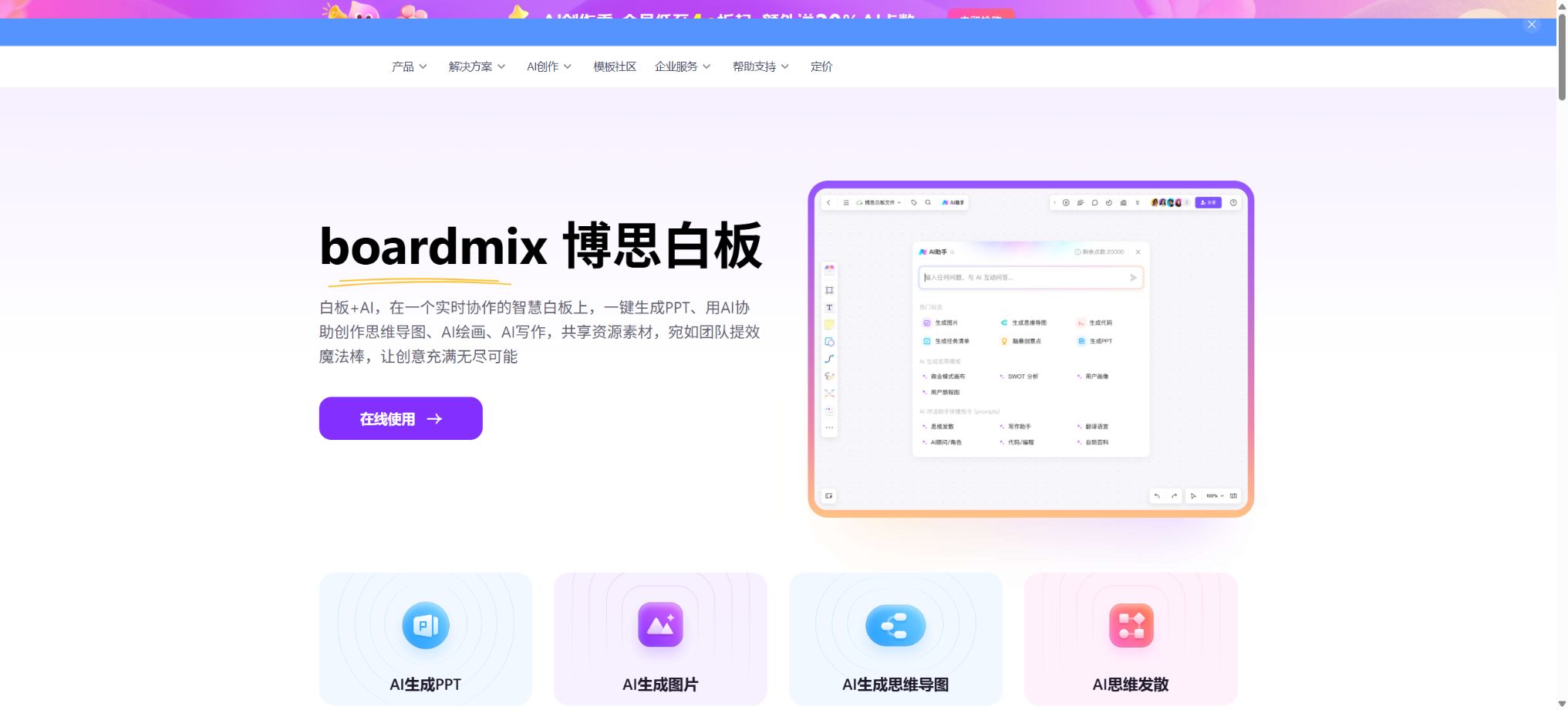
BoardMix AI is the AI-based creation tool built into the Boardmix whiteboard. It combines large-model generation, an infinite canvas, mind maps, flowcharts, presentations, document notes, project dashboards, and real-time collaboration for multiple users within a single visual workspace. Users can first create a structured draft using natural language, and then proceed to adjust the content, graphics, relationships, and layout on the canvas.
It is not a single website dedicated to AI mind maps. The current platform offers features such as collaborative whiteboards, mind maps, flowcharts, presentations, AI-powered drawing and design, AI-driven conversation and writing, document notes, and project management dashboards; it is suitable for brainstorming, product planning, business analysis, course design, conference workshops, and team collaboration.
Core AI features
1. AI-generated mind maps
After entering a topic or question, the AI generates a mind map with a central theme and multiple hierarchical branches, and places the result directly on the whiteboard. Users can select a particular node to create further sub-branches, and they can also modify the text, colors, borders, font style, layout, and the appearance of the branches.
Mind maps also support converting text into mind maps, as well as converting mind maps into tables; they are compatible with Markdown outlines and XMind-style mind map files. The AI generates an outline of the content, but facts, order, and classifications still need to be adjusted manually. In particular, the knowledge points generated automatically should not be used directly as answers to exams, research conclusions, or compliance recommendations.
2. AI-generated flowchart
After the user describes the business processes, approval steps, system logic, or operational guidelines, the AI can generate editable flowcharts. These flowcharts can be combined with swimlanes, UML diagrams, network topologies, connection lines, notes, tables, formulas, images, and documents to help analyze existing processes or design new solutions.
AI is prone to missing abnormal branches, rollback conditions, and permission boundaries. Before it is used in development, production, or auditing, business owners should verify the inputs, outputs, roles, conditions, and termination states at each stage.
3. AI-generated PPTs
After entering the theme and requirements of the presentation, BoardMix AI can generate an outline for the PPT, as well as the content for each page and its visual layout; these elements can then be further modified within the presentation editing environment. Users can also add various data charts such as line graphs, area graphs, bar graphs, pie charts, and doughnut charts.
Pages generated by AI are suitable for creating preliminary drafts quickly, but citations, data, image copyrights, brand guidelines, and the logic of the presentation need to be reviewed manually. After exporting, it is also necessary to check the fonts, animations, proportions, and media playback on the actual device used for presentation.
4. AI-generated documents and writing
AI can generate documents, task lists, content outlines, copywriting text, and code, and it also supports functions such as expansion, continuation, translation, summarization, and Q&A. Once text, tables, flowcharts, or documents on the canvas are selected, AI can be used to further process those elements.
The model may generate fictitious data or code details. A formal approach requires the AI to produce content with a clear structure, after which the user can add the actual sources, business constraints, and test results.
5. AI agents and character assistants
The Boshi AI agent can assume roles such as product manager, planner, and trainer; it facilitates multiple rounds of dialogue based on specific scenarios, and generates lists of questions, evaluation frameworks, industry analyses, and implementation suggestions. The results can be returned to the canvas for further modification and reuse by the team.
Role settings only change the way responses are given; they do not confer any actual professional qualifications on the model. Medical, legal, financial, and HR-related advice must be reviewed by qualified or authorized individuals.
6. AI-generated images and visual materials
The platform allows for the creation of images, posters, icons, and social media content from text, which can then be embedded in slideshows or presentations. Prompt optimization and style selection help users who are not designers to create concept diagrams quickly.
When generating images, errors in text, abnormal details, brand confusion, and copyright issues may occur. Before using them for commercial purposes, it is necessary to ensure that the portraits, trademarks, reference materials, and the resulting content comply with the relevant licensing terms and platform rules.
7. Strategic and analytical maps
BoardMix AI covers common frameworks such as fishbone diagrams, organizational structure charts, user journey maps, Gantt charts, business canvases, SWOT analysis, PEST analysis, 5Why method, balanced scorecards, value chains, customer profiles, Boston Matrix, Porter’s Five Forces, 4P marketing model, AARRR framework, and Ansoff Matrix.
A framework can aid in comprehensive thinking, but it cannot replace data-driven research. The market size estimated by AI, insights regarding competitors, user profiles, and various metrics must be verified through actual research.
Infinity canvas and professional drawing
Boardmix offers a borderless canvas on which text, notes, graphics, connection lines, hand-drawn elements, mind maps, flowcharts, tables, documents, images, videos, audio files, and attachments can all be placed simultaneously. Users do not need to switch back and forth between mind mapping, flowcharting, and document management software; they can display issues, evidence, solutions, and tasks in the same space.
The platform includes over 50 specialized graphic libraries that cover various use cases such as process diagrams, swimlane diagrams, UML diagrams, and network topology diagrams. For complex charts, attention must still be paid to legends, directions, colors, and intersections of lines; after AI-driven layout generation, manual adjustments are usually required before the chart can be used in formal presentations.
Real-time collaboration for multiple users
Team members can work on the same canvas simultaneously, see each other’s cursors, and use features such as comments, real-time feedback, note voting, and video conferences. According to the official statements, more than 1,000 people can be online at the same time, making this platform suitable for large-scale training sessions, remote workshops, and cross-departmental collaboration.
For large-scale collaboration, it is necessary to establish a moderator, define editing rights, assign roles within the team, and set voting rules in advance; otherwise, the large number of cursors and content will reduce readability. For sensitive projects, public links and the ability for visitors to make edits should be restricted, and members’ permissions should be checked regularly.
Import and Material Library
The platform supports the import of images, GIFs, videos, audio files, as well as documents in Word, Excel, PPT, and PDF formats. These files can be used as content on the canvas or as assets in a material library. The material library allows for renaming files, adding tags, previewing them, downloading them, and adding notes, which facilitates the organized management of team-related materials over time.
The fonts, animations, formulas, complex tables, and layout of the imported files may not be reproduced in their entirety. Before uploading files that contain customer information or internal data, it is necessary to check the requirements regarding cloud storage and corporate compliance.
Export and Share
Whiteboards, mind maps, flowcharts, and presentation content can be shared via links; images, PDFs, or other formats related to the presentations can also be exported based on the version’s features. The paid version offers high-definition and ultra-high-definition outputs as well as page-by-page export options, while the free version provides standard-definition versions with watermarks.
Before sharing externally, check whether there are any notes, comments, attachments, or hidden discussions remaining on the edges of the canvas. Once a file is exported and leaves the platform, it is no longer protected by online permissions; therefore, it should be encrypted or its distribution controlled separately.
Price and version comparison
| Package or version | Prices, quotas, and core benefits |
|---|---|
| Free version | The free individual version costs 0 yuan; each account can hold 3 editable files, with a maximum of 150 elements per file. The storage space available for individuals is 100 MB, and the exported files are in standard definition and come with watermarks. The free team version allows an unlimited number of members, but it still provides only 3 editable files and 150 elements per file, along with 200 MB of storage space for the team. The free version is suitable for experimentation and creating small sketches, but it is not appropriate for storing a large number of projects over the long term. Once the limits on files or elements are reached, it is necessary to delete some files, export them, or upgrade to a higher plan. |
| Individual member price | As of August 2026, the temporary prices listed on the official pricing page are as follows: the Whiteboard Membership costs 199 yuan per year, compared to the original price of 256 yuan; the Whiteboard AI Membership costs 288 yuan per year, with an original price of 376 yuan, and it includes 10,000 AI credits per month. The Lifetime Membership costs 599 yuan and is valid indefinitely, originally priced at 999 yuan, and it also includes 10,000 AI credits as a bonus. The Whiteboard Membership allows unlimited editing of files and elements, 50GB of personal storage, as well as the possibility to export content in high-definition, ultra-high-definition format, or in page-separated form. The Whiteboard AI Membership includes all the benefits of the Whiteboard Membership, in addition to AI agents, AI-generated PPTs, mind maps, flowcharts, and documents. The Lifetime Membership offers 200GB of storage space and permanent validity, but the AI credits provided as a bonus are not renewed on a monthly basis; it is therefore necessary to check the rules regarding these AI credits before making a purchase. |
| Team member price | The current limited-time price for Team Edition members is 240 yuan per person per year; the original price was 380 yuan, with a minimum purchase of 2 people. The page also indicates that an additional cost of 100 yuan per person per year applies for each extra member. The AI version of Team Edition costs 340 yuan per person per year, against an original price of 580 yuan; again, a minimum of 2 people are required for purchase, with an additional cost of 300 yuan per person per year for each extra member. Each member also receives 10,000 BoSi AI credits per month. The Team Paid Edition offers 200GB of storage space per seat, with no limits on the number of files that can be edited, shared, or used for collaboration; it also includes advanced creation features and more historical versions. The “starting price” and “price per additional seat” listed on the pricing page refer to different figures, and the final amount due should be based on the total cost of the order. |
Free version
The free individual version costs 0 yuan; each account can hold 3 editable files, with a maximum of 150 elements per file. The individual storage space is 100 MB, and the exported files are in standard definition with watermarks. The free team version allows an unlimited number of members, but it also provides only 3 editable files and 150 elements per file, while the team storage space is 200 MB.
The free version is suitable for experimentation and creating small sketches, but it is not appropriate for storing a large number of projects over the long term. Once the limits on files or elements are reached, it becomes necessary to delete items, export them, or upgrade to a higher plan.
Individual member price
As of August 2026, the limited-time prices displayed on the official pricing page are as follows: the Whiteboard membership costs 199 yuan per year, compared to the original price of 256 yuan; the Whiteboard AI membership costs 288 yuan per year, with an original price of 376 yuan, and it includes 10,000 AI credits per month.
The lifetime membership costs 599 yuan, originally priced at 999 yuan; in addition, 10,000 AI credits are provided as a bonus for a limited time.
The Whiteboard Premium membership offers unlimited editing of files and elements, 50GB of personal storage, as well as the possibility to export content in high-definition, ultra-high-definition format, and in paginated form. The Whiteboard AI Premium membership includes all the benefits of the Whiteboard Premium membership, plus additional features such as AI assistants, AI-generated PPTs, mind maps, flowcharts, and documents.
Lifetime members currently have 200GB of storage space and unlimited membership duration, but the AI credits provided are not renewed on a monthly basis; it is necessary to check the rules regarding these AI credits before making a purchase.
Team member price
The current limited-time price for Team Edition members is 240 yuan per person per year; the original price was 380 yuan. The purchase is available starting from 2 people, and the page indicates that an additional cost of 100 yuan per person per year will apply for each extra person.
The team version of the AI membership costs 340 yuan per person per year; the original price was 580 yuan. The subscription is available for a minimum of 2 people, with an additional cost of 300 yuan per person per year for each extra member. Each member also receives 10,000 points of Boshi AI credit per month.
The team subscription version provides 200GB of storage per seat, with the amount of storage increasing based on the number of seats; there are no limits on the number of files that can be edited, shared, or used for collaboration, and advanced creation tools as well as more historical versions are available. The prices shown on the pricing page differ between the initial purchase price and the price per additional seat, and the total amount due should be based on the overall cost of the order.
Rules for refunds and upgrades
BoardMix is a digital product; a free trial version is provided by the manufacturer, and no refund is available within seven days of purchase. The personal professional version can be upgraded at the original price before the discount, by covering the difference between that price and the amount actually paid, within 7 days of purchase.
After 7 days, the original order will be valued at only 50% of the actual amount paid.
Individual lifetime members cannot be upgraded to team lifetime members, and some joint members do not support upgrades between different package types.
The promotional prices, the months during which free access is provided, and the coupons can change. Before purchasing the lifetime or team versions, it is advisable to first test the import/export functions, performance, and AI capabilities using the free version.
Enterprise edition and privatization
The Enterprise version is intended for organizations that need unified management of members, permissions, security, deployment, and services; the price is subject to consultation with sales representatives. The official website also offers private deployment options, allowing for the customization of management functions and tailored deployment according to the organization’s requirements.
When making purchases for business use, it is necessary to take into account aspects such as single sign-on, retrieval of data when employees leave the company, visitor permissions, audit logs, backups, data location, model invocation, storage limits, as well as API integration and upgrading/maintenance. Privatization does not mean that AI models are completely offline; it is essential to specify in the contract the flow of each type of data.
Website and application integration
BoardMix offers enterprise solutions for integrating whiteboard functionality into websites or applications; it allows the inclusion of canvases, mind maps, flowcharts, templates, and drawing tools. No fixed price for the API is specified on the public pages – typically, a quote is provided based on the specific use case, number of calls, or scale of deployment.
Supported platforms
- Mainstream desktop browser web version;
- Use cases for Windows and macOS desktops;
- Entry for viewing and collaborating on mobile devices;
- Websites for enterprises, application integration, and private deployment.
BoardMix is based on cloud-based web collaboration; specific client, offline, and mobile editing capabilities are subject to the information provided on the download page and in the account settings.
Open-source status
BoardMix AI and Boshi Whiteboard are commercial online services, not open-source whiteboard projects. The availability of integration capabilities and documentation does not mean that the source code for features such as an infinite canvas, a collaboration engine, or AI-generated content is made available.
BoardMix AI Usage Guide
Complete a basic task.
- Specify the presentation topic, objectives, duration, and number of pages;
- Import reliable data into BoardMix AI and remove any irrelevant or sensitive information.
- Use the core AI features to create an outline first, rather than finalizing the document directly;
- Choose templates, icons, and visual hierarchies through an infinite canvas along with professional drawing tools;
- Check each page for numbers, citations, charts, font sizes, and layout;
- Perform a full-screen preview before exporting in the desired format;
Create reusable professional workflows
- Create brand templates, title hierarchies, and a library of common pages;
- Fixed core AI functions, an infinite canvas, professional drawing tools, and a workflow for real-time collaboration among multiple users;
- Specify one key point per page and control the text density;
- Assign the review of facts, visuals, and presentation logic to respective responsible persons;
- Test fonts, animations, and proportions on different devices;
- Save the source files, versions, and records of final approval;
Which users is it suitable for?
- Teams that hold brainstorming sessions, meetings, and workshops;
- Professional users who create mind maps, flowcharts, and product proposals;
- A product development team that analyzes requirements, the user journey, and the system architecture;
- Teachers and students who create courses, knowledge graphs, and presentations;
- Distributed organizations that require remote feedback, voting, and collaborative creation;
- Companies that wish to acquire whiteboard integration or privatization solutions.
Product advantages
- The results generated by AI can be directly turned into editable canvas objects;
- Capabilities in mind maps, flowcharts, PPTs, documents, and images are concentrated here;
- An infinite canvas allows the combination of various graphics, files, and media elements;
- It supports real-time editing, commenting, voting, and video communication for multiple users;
- There is a clear hierarchy among the individual, team, lifetime, and enterprise versions;
- Provides consulting services for enterprise integration and private deployment.
Restrictions and Precautions
- AI-generated content may contain fabricated facts, processes, and data; strategic analyses, project plans, and professional conclusions must be verified by the responsible persons.
- AI points are determined by the amount of functionality used, and membership does not grant unlimited generation of such points.
- The free version allows only 3 editable files, 150 primitives, and limited storage space; complex projects will reach these limits quite quickly.
- The permanent nature of a lifetime membership refers primarily to the duration of membership; it cannot be assumed that access to future AI capabilities will be unlimited forever.
- After purchasing digital products, a 7-day refund without reason is not available, and the rules for converting upgrades vary depending on the time of purchase.
- Testing with real files should be completed first before making a purchase;
Frequently Asked Questions
Is BoardMix AI free?
There is a free version that allows users to try out basic creation functions, but editing of files, working with single-file elements, as well as storage and export options are limited. For ongoing use of AI features, an AI membership and points are required.
What can BoardMix AI generate?
It can generate mind maps, flowcharts, PPTs, documents, images, task lists, as well as various strategic and data analysis frameworks.
Does it support multi-person collaboration?
It supports real-time editing, cursor tracking, comments, voting, and video conferencing. The team subscription version has no limits on the number of shares and collaborations.
How much does the Whiteboard AI membership cost?
The official current limited-time price is 288 yuan per year, with 10,000 AI points available each month; the prices for promotions and settlements may change.
Does a lifetime membership include unlimited AI access?
It shouldn’t be understood in that way. Currently, lifetime members are offered 10,000 points as a limited-time gift, and the page does not state that AI points can be refreshed indefinitely on a monthly basis.
Is BoardMix open source?
It is not open source; it is a commercial cloud-based collaboration whiteboard that offers enterprise integration and privatization solutions.
Tools similar to BoardMix AI


 Guigong Network Security Registration No. 45132202000164