






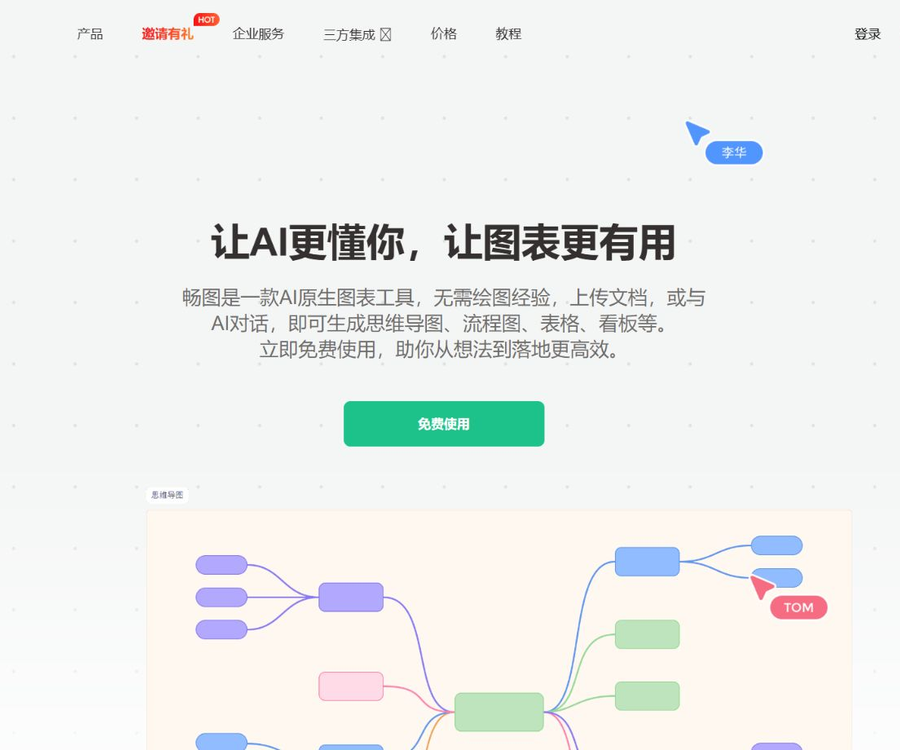
Changtu AI Charts
Thanks to its built-in AI capabilities, support for multi-modal input, and ability for continuous dialogue, Changtu has won the favor of users and received high praise; it is considered one of the leading intelligent drawing tools in China. Its strengths lie in the Chinese language handling, the quality of the generated images, the flexibility of editing, and the comprehensiveness of its functions...
Tags:AI mind mapWhat is Changtu AI?
Changtu is an AI-based charting and online whiteboard tool, part of the Moke product suite.
Users can create editable charts through conversations or by uploading files, and collaborate in real time with team members.
Core functions
| Ability | Main function | Suitable scenarios |
|---|---|---|
| Natural language generation | Convert text requirements into charts | Rapid optimization idea |
| Multimodal parsing | Read documents, images, tables, and web pages | Data visualization |
| Multiple rounds of dialogue | Continue to modify the chart based on the context. | Gradual improvement |
| Chart conversion | Switch between mind maps, flowcharts, and dashboards | Multiple ways of expression |
| Online editing | Manually adjust nodes, styles, and layout | Fine tuning |
| Collaboration among multiple people | Shared canvas, comments, and collaborative editing | Team discussion |
| Export in multiple formats | Export PDF, images, and PPT | Reporting and Sharing |
Which charts are supported?
- Mind map.
- Flowcharts and swimlane processes.
- Tables and cards.
- Kanban and timeline.
- Class diagrams and organizational structure diagrams.
- Professional charts such as bar charts, pie charts, and line charts.
The specific available types will change with product updates; always refer to the current editor interface before generation.
Generating charts from natural language
The user only needs to describe the objectives, nodes, and relationships, and the AI will generate a preliminary version of the structured diagram.
- Explain the problem that the chart is intended to address.
- Provide the main characters and the steps to be followed.
- Indicate the start, end, and decision conditions.
- Specify the required chart type.
- Check for logical closure after generation.
Multimodal file parsing
Changtu can parse text, PDFs, PPTs, Word documents, images, tables, and web content.
| Input type | Common uses | Key points of inspection |
|---|---|---|
| PDF and Word | Extract chapters and viewpoints | Title hierarchy and tables |
| PPT | Organize page logic | Notes and chart information |
| Image | Identifying text and visual structures | OCR errors and occlusions |
| Table | Organize, categorize, and compare relationships | Field and value specifications |
| Web page | Extract content from public pages | Statute of limitations and copyright |
| TXT | Quick processing of plain text | Encoding and paragraph structure |
Multiple rounds of dialogue editing
Changtu is capable of understanding sequential commands, allowing users to add or remove nodes or adjust the structure without having to redraw it.
- Request to add the missing steps.
- Merge duplicate nodes.
- Change the hierarchy and grouping method.
- Add role, time, or risk information.
- Review each modification result individually.
Intelligent chart conversion
The same content can be converted between mind maps, flowcharts, Kanban boards, cards, and tables.
- Mind maps are suitable for brainstorming and categorization.
- Flowcharts are suitable for representing steps and decisions.
- Kanban is suitable for task status management.
- Tables are suitable for comparing fields.
- After the conversion, it is necessary to recheck the relationships between the information.
Infinite canvas and manual editing
In addition to AI-generated content, Changtu also offers traditional whiteboards and drawing tools to facilitate manual adjustments of details.
- Add shapes, lines, and text.
- Use sticky notes to record ideas.
- Select the key points by using the brush.
- Switch themes and graphic styles.
- Organize the areas and layers within the large canvas.
Real-time collaboration for multiple users
Team members can work on the same canvas, make edits, leave comments, and communicate with each other, thereby reducing the need to send files back and forth.
- Invite the necessary members for each project.
- Set minimum permissions for external users.
- Use comment records to submit suggestions.
- Identify the person responsible for the final version.
- Revoke permissions upon leaving the job or when the project is completed.
Changtu AI Usage Guide
- Register and log in to your Changtu account.
- Confirm the AI points granted as a account bonus.
- Create a new blank canvas or AI task.
- Choose conversation, document, or web page input.
- Describe the goal, audience, and chart type.
- Upload authorized and anonymized data.
- Wait for the AI to generate a preliminary draft of the chart.
- Supplement and revise through multiple rounds of dialogue.
- Switch between chart types to compare the presentation effects.
- Manually adjust nodes, connections, and styles.
- Invite team members to comment and review.
- Export in the desired format and save the final version.
Package prices and free quotas
The official website states that 2,000 AI points are granted upon registration, which can be used to experience various AI functions.
| Plan | Public price | Public equity |
|---|---|---|
| New user experience | Free | 2000 AI points are given as a gift upon registration. |
| Future individual usage amount | Not yet made public | It is based on the points within the app and the purchase page. |
| Team collaboration | Not yet made public | It is subject to the actual rights and interests in the workspace. |
| Enterprise privatization | Consultation and quotation | Private network deployment, management, and customization services |
The price information was verified on August 30, 2026; the amount of points used, the validity period, and the costs are as specified on the settlement page or in the contract.
Export format
| Format | Suitable uses | Precautions |
|---|---|---|
| Fixed-format reading and archiving | Check pagination after exporting. | |
| PNG | Sharing high-definition images | Pay attention to resolution for large canvases. |
| JPG | Regular web pages and social sharing | The clarity of the text may decrease. |
| PPT | Demonstration and secondary formatting | Check the font and editability. |
Enterprise privatization
Changtu allows applications to be deployed on an enterprise’s own servers, in order to meet the needs related to data localization and customized management.
- The data is stored on enterprise servers.
- Manage member, project, and account permissions.
- Compatible with domestic servers and terminals.
- It supports data migration and scale-out.
- Customize functions according to business needs.
- It provides deployment, delivery, and operation services.
Key considerations for corporate procurement
- Team size and number of people collaborating simultaneously.
- Number of files such as historical XMind files that have been migrated.
- Server, chip, and database environments.
- AI models and external invocation locations.
- Permissions, logging, and backup requirements.
- Upgrade, operation and maintenance, and fault response times.
- Project acceptance and exit mechanisms.
Content accuracy check
AI may misinterpret the original text, overlook certain conditions, or create incorrect relationships; it must be reviewed manually before being used officially.
- Verify the node name and hierarchy.
- Check the decision logic and return path.
- Verify the numbers, dates, and responsible persons.
- Verify that the diagram does not omit any key steps.
- Have the business owner review the final version.
- Retain the original materials from before generation.
Documents and privacy security
The files uploaded may contain sensitive information such as contracts, organizational structures, business processes, or project plans.
- First, delete the account, keys, and personal information.
- For unreleased projects, only the necessary segments are uploaded.
- Restrict shared link and download permissions.
- Confirm the rules for saving and deleting cloud data.
- High-sensitivity services are given priority for privatization.
- Create your own backups of important documents.
Copyright and web page parsing
- Only upload documents and images for which you have permission to process.
- The content of the web pages remains protected by the rights of the original authors.
- Rewriting charts does not automatically remove copyright restrictions.
- Check the requirements for citations and acknowledgments at the time of public release.
- Generate graphics to avoid copying protected designs.
API and open-source status
As of the time of verification, no developer API or official SDK provided by Changtu for the public was found.
- Enterprise privatization does not equate to making public APIs available.
- No source code repository that can be confirmed as belonging to the official party was found.
- Independent intellectual property does not imply an open-source license.
- System integration requirements should be confirmed with the enterprise consultant.
Which users are it suitable for
- Students and researchers who organize knowledge structures.
- A product manager who oversees business processes.
- The person in charge of the team that creates the project dashboard.
- Professional users who convert documents into charts.
- Teams that carry out brainstorming sessions and discussion meetings.
- Companies that need an internal collaboration whiteboard.
Product advantages
- Natural language can directly generate various types of charts.
- Supports parsing of documents, images, and web pages.
- Multiple rounds of dialogue are available for continuous modifications.
- One-click conversion of chart types is supported.
- Take into account both AI-generated content and manual editing.
- It supports multi-person collaboration as well as enterprise privatization.
Usage restrictions and precautions
- The individual payment plans are not listed on the official website.
- The rules regarding AI point consumption can be found within the application.
- Parsing complex documents may result in the omission of content.
- The relationships may change after the chart is converted.
- Collaboration among multiple people requires strict management of permissions.
- Exporting a PPT may require reformatting.
- Key business charts must be reviewed manually.
Frequently Asked Questions
Can Changtu AI be used for free?
Yes, new users receive 2000 AI points upon registration; the rules regarding additional points and payments are specified on the in-app page.
What types of charts can Changtu generate?
It supports mind maps, flowcharts, tables, cards, Kanban boards, timelines, class diagrams, and a variety of other professional charts.
What types of files can be uploaded to Changtu?
It supports a variety of input formats, including PDF, PPT, Word, TXT, images, tables, and web pages.
Can the generated chart be modified?
Yes, users can continuously adjust the content and style through multiple rounds of dialogue, chart conversion, and manual editing.
Does Changtu support multi-person collaboration?
Supported: Team members can edit, comment, and communicate in real time on the same canvas.
What export formats does Changtu support?
The official website indicates that export in PDF, PNG, JPG, and PPT formats is supported; after exporting, it is necessary to check the layout and fonts.
Does Changtu provide APIs or open-source code?
As of the time of verification, no public API, official SDK, or source code repository attributable to the product provider was found.
Tools similar to Changtu AI charts


 Guigong Network Security Registration No. 45132202000164