






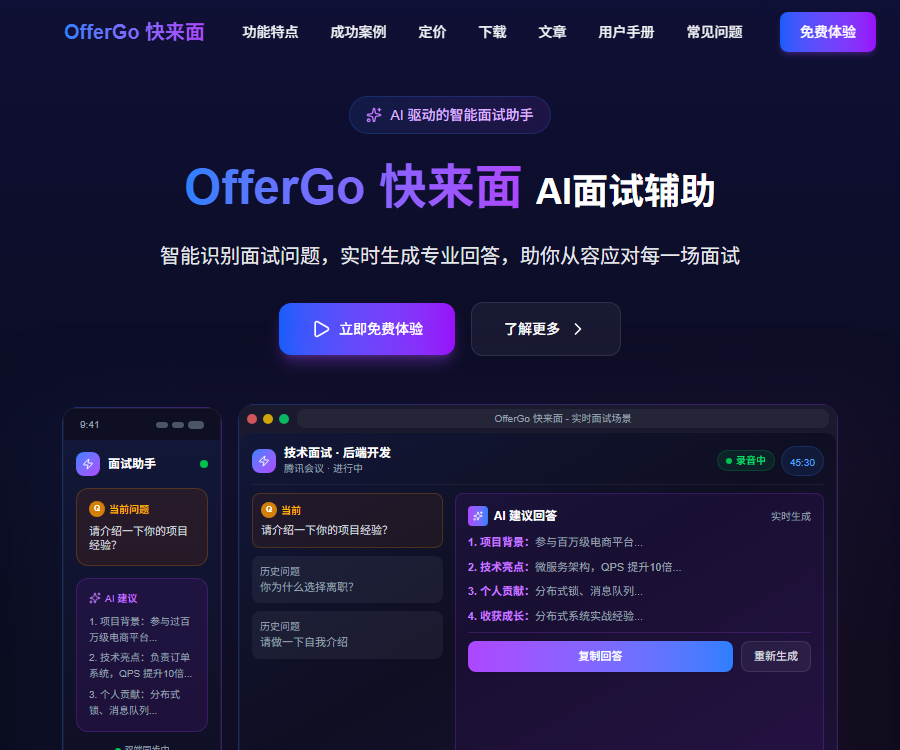
OfferGo AI mock interviews
Intelligently identifies interview questions and generates personalized response suggestions in real time.
Tags:AI audio toolsWhat is OfferGo’s “Come for an Interview” feature?
OfferGo Quick Interview is an AI-powered tool for preparing for interviews, developed by YuBi Technology; it offers functions such as simulated interviews, practice for answering questions, and post-interview analysis.
It also offers real-time speech recognition, answer suggestions, resume customization, and assistance with written tests; however, it must be used in accordance with the employer’s rules.
Main functions
- Generate mock interview questions based on the position and resume.
- Identify the voice in the interview and generate ideas for responses.
- Include your resume, project experience, and knowledge base in your responses.
- Simulate follow-up questions and train expression structures.
- View the prompts on your mobile device through a dual-screen connection.
- Provides assistance with written tests and feedback on interviews.
- It supports Windows as well as two types of macOS chip platforms.
Comparison of the three types of services
| Services | Primary use | Recommended usage |
|---|---|---|
| Simulated interview | Practice questions, answers, and follow-up questions | Practice repeatedly before the interview. |
| Interview assistance | Identify the problem and provide a framework for answers. | Use only when explicitly permitted. |
| Written test assistance | Handle a limited number of written test questions | Practice and understand problem-solving methods |
The most reliable approach is to use it as a training tool and for reviewing performance, rather than as a substitute to answer questions on one’s behalf.
AI simulated interview
Users can take into account the target position and their own experience to have the system generate common questions and simulate follow-up questions from interviewers.
- Reveal information gaps in the answers in advance.
- Practice structured ways of expression such as STAR.
- Compare the clarity of answers from different versions.
- Control the length, key points, and pace of the response.
- Record the weak questions and continue training.
Answers must be based on real experiences; AI enhancements should not result in fictional projects, skills, or job details.
Real-time voice and response suggestions
The interview assistance tool identifies the questions posed by the interviewer, and then generates potential response ideas based on the resume, the position in question, and relevant knowledge databases.
Real-time generation may involve delays, misidentifications, and a lack of context; therefore, users still need to make their own judgments and respond in their own words.
Content suitable for reference
- Intent of the question and structure of the answer.
- Key aspects of experiences that are easy to overlook.
- Technical concepts and example hints.
- Questions about the direction and a list of counter-questions.
Content that should not be given to AI
- Falsify work experience and project outcomes.
- Pretending to possess professional skills that one does not actually have.
- Avoid interview rules that explicitly prohibit the use of aids.
- Recording or processing someone else’s voice without permission.
Customization of resumes and knowledge bases
After uploading personal information, the tool can generate more targeted response suggestions based on real experiences.
- Remove the ID number, address, and unrelated contact information.
- Retain the projects, responsibilities, and outcomes required for the position.
- Provide verifiable data support for key outcomes.
- Create a database of job-related terms, company information, and specialized knowledge.
- Check whether the generated content is in line with one’s actual abilities.
Corporate secrets, customer data, internal codes, and information subject to confidentiality agreements should not be uploaded.
Dual-screen connection and hidden mode
The official website explains phone display, desktop control, and the window mode in which windows are not visible on the shared screen.
Technical “invisibility” does not equate to permission under the rules; explicit approval must be obtained before conducting actual interviews, tests, or assessments.
| Scene | Suggestions | Main risks |
|---|---|---|
| Individual simulation exercises | It can be used for hints and review. | Excessive reliance on hints |
| Approved tutoring | Explain in advance how AI will be involved. | The scope of recording and privacy is unclear. |
| Official recruitment interview | Comply with the employer’s written rules | Violations, breach of trust, or disqualification |
| Online written assessment | Use only when explicitly permitted. | Violation of exam and platform regulations |
Supported platforms and current version
As of August 31, 2026, the official website offers the v6.2.2 desktop client.
| Platform | Installation version | Size or requirements indicated on the official website |
|---|---|---|
| Windows | x64 | Windows 10 and later |
| macOS | Apple Silicon | About 196MB |
| macOS | Intel | About 203MB |
| Mobile phone | Dual-screen display terminal | Used to receive desktop content |
Before installation, it is necessary to check the system architecture, microphone permissions, sound input capabilities, and compatibility with conference software.
Supported meeting and interview platforms
The official website lists common platforms such as Niuke, Tencent Meeting, Lark, Zoom, and DingTalk.
The ability to recognize audio properly is still affected by system permissions, audio routing, headphone mode, and client updates.
Tutorial for simulated interviews
- Install a desktop client that is compatible with the system architecture.
- Use the new user trial to test the microphone and recognition performance first.
- Import the sanitized resume and information on the target position.
- Select a simulated interview and set the position, difficulty level, and types of questions.
- Answer independently first, then check the structural suggestions provided by AI.
- Verify facts, terms, numbers, and project details.
- Continue to ask follow-up questions through simulation to address the weak areas.
- Record your answers and check your speaking pace and logic.
- Compile a real, reusable database of cases.
- Confirm the rules for using the relevant tools with the other party before the formal interview.
Prices and packages
The prices listed below were verified as of August 31, 2026; the official website offers two purchasing options: pay-as-you-go and unlimited usage for a set period.
Pay-as-you-go
| Project | Limit | Price | Validity period |
|---|---|---|---|
| Interview assistance | 30 minutes | 17.90 yuan | Valid for a long time |
| Written test assistance | Question 30 | 19.90 yuan | Valid for a long time |
| Simulated interview | 30 minutes | 14.90 yuan | Valid for a long time |
Time-limited, unlimited package
| Deadline | Average monthly price on the official website | Estimate total price |
|---|---|---|
| 1 month | 99.90 yuan | 99.90 yuan |
| 3 months | 83.30 yuan | Approximately 249.90 yuan |
| 6 months | 69.90 yuan | Approximately 419.40 yuan |
| 12 months | 58.33 yuan | Approximately 699.96 yuan |
The total cost for multiple months is calculated based on the average monthly price listed on the official website, and it is provided solely for comparison purposes; any discounts, taxes, refunds, and the final amount shall be in accordance with the settlement page and the service agreement.
Free trial and purchase recommendations
The official website offers new users a 7-day trial with full functionality, which is ideal for testing the accuracy of recognition and device compatibility first.
- For occasional practice, it is advisable to opt for a pay-as-you-go plan.
- For the concentrated job hunting period, a 1-month package can be considered.
- Consider the multi-month package after long-term training.
- Before purchasing, verify whether there are any fair use restrictions regarding the lack of a volume limit.
- Do not determine refunds and expiration costs based solely on the average monthly price.
Privacy and recording considerations
The official website states that data is stored in an encrypted format and that interview content is not saved, but this does not mean that no data is retained at all.
- Obtain participants’ consent before recording.
- Check the recording and privacy rules in your area.
- Restrict microphone, file, and screen permissions.
- Remove any unnecessary sensitive information before uploading the resume.
- Confirm with customer service the mechanisms for deleting logs, caches, and accounts.
- Clear the local temporary files after the interview.
As of the verification date, no public privacy documents were found that provided sufficient information to fully verify the data deadlines and the details of cross-border processing.
Effects and usage limitations
- The satisfaction levels and pass rates displayed on the official website are statements made by the platform itself, and they do not reflect an individual’s actual results.
- Speech recognition can be affected by accent, noise, the network, and the device.
- The generated answers may contain factual, terminological, and logical errors.
- Over-reliance on real-time prompts can reduce the naturalness of communication.
- Recruiters may consider hidden assistance to be a violation of the rules.
- The outcome of the interview still depends on genuine abilities and suitability for the position.
API and open-source status
| Project | Current verification result |
|---|---|
| Public API | No official documentation has been found yet. |
| Official SDK | Not yet made public |
| Official GitHub | No verifiable official organizations or warehouses were found. |
| Product source code | It is not publicly available, so it cannot be considered an open-source product. |
Projects with the same name available on the internet cannot be considered as official OfferGo code; any requirements related to enterprise integration must be confirmed directly with the official team.
Frequently Asked Questions
Who is suitable for trying OfferGo’s interview service?
It is suitable for job seekers to conduct mock interviews, practice answering questions, and review their performance; when used in actual interviews, it is necessary to follow the rules set by the employer.
Does OfferGo offer a free trial?
The official website offers new users a 7-day trial period with full functionality; the specific requirements and benefits are outlined on the account page.
How much are the pay-as-you-go plans at OfferGo?
A 30-minute interview costs 17.90 yuan, a written test with 30 questions costs 19.90 yuan, and a simulated interview of 30 minutes costs 14.90 yuan.
Which computers is OfferGo compatible with?
Currently, Windows x64 and two types of macOS clients based on Apple Silicon and Intel are available.
Can the hidden mode be used in formal interviews?
It may only be used with the explicit permission of the employer; otherwise, it could constitute a violation, lead to a loss of credibility, or result in the revocation of qualifications.
Does OfferGo save interview recordings?
The official website states that interview content is not saved, but users should still obtain permission for recording and check the actual permissions and data policies.
Does OfferGo provide APIs or open-source code?
As of the verification date, no official public API, SDK, or verifiable open-source repository was found.
Tools similar to OfferGo AI for simulated interviews




 Guigong Network Security Registration No. 45132202000164