






calen
Calen – makes AI audio processing more efficient and simpler.
Tags:AI audio toolsWhat is calen?
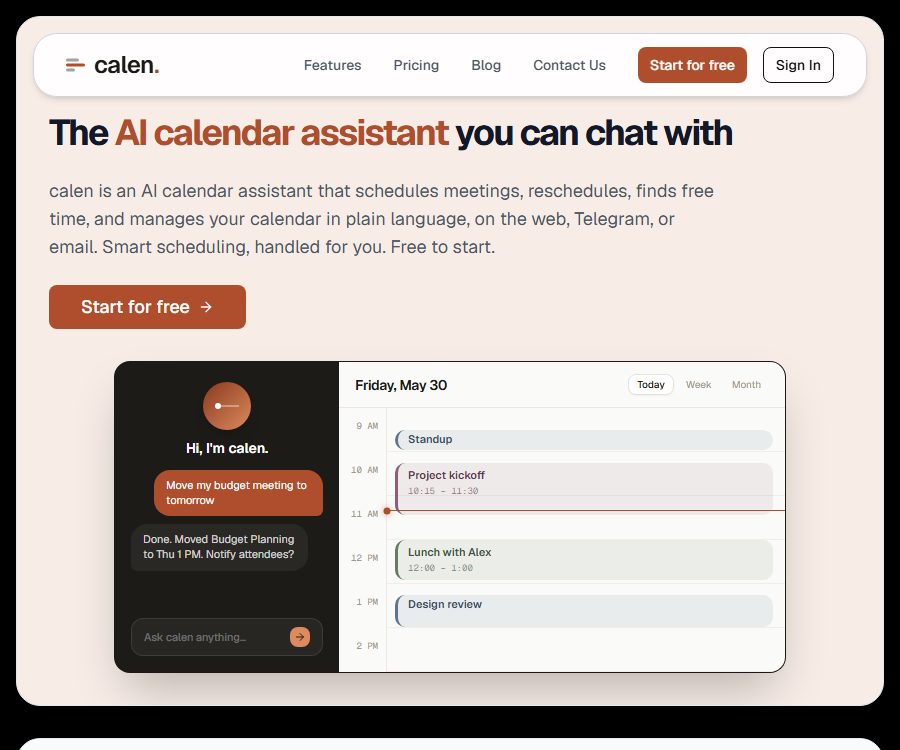
Calen is an AI calendar assistant that allows for the management of Google Calendar through chat. Users can describe their scheduling needs in natural language; the tool will check available times, handle any conflicts, create or move events, and confirm the results.
The available entry points at present include web pages, Telegram, and email threads; video conferences can be held using Google Meet and Zoom. The public page does not disclose the legal company responsible for its operation nor its registration address.
Main functions
Natural language calendar management
Users can enter commands such as “Schedule a meeting for tomorrow afternoon,” “Move the 3 p.m. meeting to next week,” or “Cancel the appointment for Friday afternoon.” Calen will read the connected calendars and carry out actions like creation, modification, deletion, or querying.
Email thread coordination
By adding Calen to the email copy, it is possible to share available time slots, gather participants’ preferences, resolve conflicts, and send calendar invitations. The number of email coordination tasks that can be carried out in the free version and the Pro version is determined by the email assistant credits.
Real-time synchronization and conflict detection
Google Calendar supports two-way real-time synchronization; the web interface, Telegram, and email all use the same calendar context. Changes to the calendar are updated via Webhooks, which reduces the risk of meetings being scheduled based on outdated information.
Video conference
Calen can create Google Meet or Zoom meetings when a user requests a video conference, and it adds the relevant information to calendar events. To connect to Zoom, only permissions for meeting creation and management are required; there is no need to access recorded content, chat messages, or call data.
Semantic search
The platform converts the titles and descriptions of events into semantic vectors, which are used to search through past and future schedules based on their meaning. The terms of service state that the responses are generated by Claude, and semantic searching makes use of OpenAI embeddings; however, the specific version of the model used is not disclosed.
Currently available features and roadmap options
The home page displays the names of multiple channels at the same time, but the price information indicates that some of these integrations are set to be released soon. The table below categorizes them according to their current status, so as to prevent the icons shown from being mistaken for functions that are already available.
| Function or platform | Current status | Explanation |
|---|---|---|
| Google Calendar | Available now | Two-way real-time synchronization is the feature of the main calendar platforms today. |
| Web Assistant | Available now | Chat queries and schedule management |
| Telegram | Available now | Manage the same calendar through messages |
| Email Assistant | Available now | After copying the email, coordinate the schedules of multiple people and send out invitations. |
| Zoom and Google Meet | Available now | Create a meeting link upon request. |
| Outlook and iCal | Roadmap | Calendars that are not yet listed as currently supported |
| Teams Team Edition | Coming soon | The price is displayed, but the purchase button still reads “Coming Soon”. |
| Slack, phone calls, and public APIs | Under development | The price FAQ states that it is still under development, and purchases cannot be made using its current functions for now. |
Usage process
- Create an account and connect your Google Calendar through authorization.
- Confirm the range of calendars that are allowed to be accessed; do not connect those calendars that are not needed.
- Send a low-risk test command via a web page or Telegram, such as asking about available time tomorrow.
- Test the creation, movement, and deletion of events, and verify that the time zone, participants, and notifications are correct.
- When email coordination is needed, add the assistant to the thread and avoid exposing any irrelevant or sensitive information.
- When video conferencing is needed, connect to Zoom or use Google Meet, and then test link creation and deletion.
- Regularly check the credits, synchronization status, and activity logs; important meetings still require manual confirmation.
Suitable for users and scenarios
- Founders and managers: Reduce meeting coordination, rescheduling, and invitation sending.
- Sales and recruitment staff: Determine the time with external contacts within the email thread.
- Remote workers: Quickly check or adjust schedules via Telegram.
- Users who hold frequent meetings: use natural language to search for past events and available time slots.
- Individual users: Experience Google Calendar automation using the free quota.
Price packages
The current pricing page offers options for Free, Pro, Teams (which is not yet available), and Enterprise. The annual payment page shows the average monthly cost after conversion; actual payments are made on an annual basis.
| Package or version | Price | Billing cycle | Core benefits or quota | Suitable for users |
|---|---|---|---|---|
| Free | $ | Permanently free | 50 AI requests per month, 10 email assistant credits, basic calendar management, natural language scheduling, and web access | Personal experience and light usage |
| Pro monthly plan | 12 dollars per month | On a monthly basis | 1,000 AI requests per month, 1,000 email assistant credits, executive assistant features, and priority email support | High-frequency individual and professional users |
| Pro annual subscription | Equivalent to 9 dollars per month | On an annual basis | Similar to Pro Monthly, the page states that it saves 25% compared to the monthly plan. | Identify individuals who will use it over the long term |
| Teams monthly plan | 18 dollars per user per month | Not yet available online | At least 3 seats, team calendar, centralized billing, and administrator controls | Waiting for the team version of the organization |
| Teams annual plan | Converted to 15 dollars per user per month | Not yet available; planned to be launched on an annual basis | Same as the monthly Teams plan | Team responsible for planning annual purchases |
| Enterprise | Contact sales | Custom quote | The plan includes a custom domain name, white labeling, SSO, a dedicated manager, a 99.9% SLA, and custom integrations. | Organizations that require corporate governance |
Requests and email credits
- A single session or calendar command is typically counted as one AI request.
- The Mail Assistant Credit is used to coordinate times and send invitations after using the CC Assistant.
- The specific methods of purchase available after the quota is exhausted are not fully detailed on the current pricing page.
- The free version does not require a credit card, and it is clearly indicated as permanently free.
Differences between the price page and the terms and conditions
As it is also a page for 2026, the current price page and the terms of service still feature different definitions for prices and credits. The main content shows the prices that can be paid, but users should still check their account details in the backend before making a payment.
| Project | Current Price Page | Terms of Service | Suggestions |
|---|---|---|---|
| Free quota | 50 AI requests and 10 email credits | 100 credits per month | The actual display on the account shall prevail. |
| Pro monthly price | $ | 10 dollars per month | The amount shown on the settlement page shall prevail. |
| Pro quota | 1000 AI requests and 1000 email credits | 10,000 credits per month | Confirm the conversion rules for the two types of quotas. |
| Consumption rules | Complexity conversion not listed | AI messages: 10 credits; event processing: 1 to 5 credits | Test the actual deduction within the account. |
Cancellation and refund
The terms of service state that subscriptions can be canceled at any time, and access remains valid until the end of the current billing cycle. A proportional refund is available for Pro subscriptions within 14 days, but the details regarding who is eligible for this refund, as well as the procedures for annual payments and taxes, are not specified in more detail.
- Upgrades or downgrades can be performed within the account; a downgrade will return it to the free version quota.
- Annual subscribers should confirm the refund calculation, renewal date, and effective date of cancellation before making the payment.
- The conditions for a refund are related to the current pricing structure; keep the settlement records before submitting a request.
Privacy and data security
- The platform handles names, email addresses, profile pictures, event titles, descriptions, dates and times, locations, attendees, and meeting links.
- AI messages and the relevant calendar context are sent to the AI service, which uses them to generate responses and carry out semantic searches.
- The event synchronization period covers the past 4 years to the next 4 years, with a maximum of 2,500 events per synchronization.
- After the account is closed, the data is deleted within 30 days, while backups and caches are removed within a maximum of 90 days.
- After Google access is revoked, calendar data is deleted within 30 days; Zoom tokens are deleted immediately upon disconnection.
- The data is stored on servers in the United States, and data transfers from the European Economic Area or the United Kingdom are protected by the standard contract terms of the service provider.
- Public measures include transmission with static encryption, RLS, OAuth 2.0, Webhook verification, and server-side key protection.
- Google Calendar data is not used for advertising nor sold; manual access is permitted only for security, compliance, or support purposes.
Copyright, commercial use, and scope of capabilities
- The products, functions, and original content belong to Calen or its licensors; the source code of the products as well as the open-source licenses are not made public.
- The terms of service require written consent for commercial use, which creates a conflict with the purpose of the professional packages; companies should verify the authorization before using them.
- AI may misinterpret dates, time zones, participants, or the scope of deletion; important actions should be confirmed first.
- The service relies on Google, Zoom, AI, and hosting services; disruptions or throttling by these third-party services can affect synchronization.
- Without confirmation from the official GitHub, SDK, or the currently available public APIs, it is not possible to assume the capabilities of these interfaces based on the roadmap.
Summary
Calen is suitable for both individual and professional users who wish to manage their Google Calendar through chats or emails. Its advantages include natural language handling, real-time synchronization, and the ability to coordinate emails among multiple people. Before choosing the paid version, it is important to check the number of credits available as well as the actual pricing structure, and to pay close attention to features such as roadmap functionality, business licensing, and the processing of sensitive calendar data.
Tools similar to Calen




 Guigong Network Security Registration No. 45132202000164